-
SBT安装与配置
目录
1.下载sbt
https://github.com/sbt/sbt/releases/download/v1.7.2/sbt-1.7.2.zip
2.安装SBT
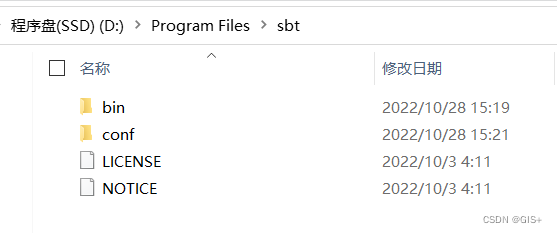
解压 sbt-1.7.2.zip 到 D:\Program Files\sbt
3.配置环境变量
设置系统环境变量SBT_HOME为sbt安装目录:SBT_HOME=D:\Program Files\sbt;
在path中添加:Path=%SBT_HOME%\bin
4.SBT参数配置
在conf目录下sbtconfig.txt文件末尾添加以下内容:
- -Dsbt.log.format=true
- -Dfile.encoding=UTF8
- -Dsbt.global.base=e:/sbt/.sbt
- -Dsbt.boot.directory=e:/sbt/.sbt/boot/
- -Dsbt.repository.config=e:/sbt/.sbt/repo.properties
- -Dsbt.ivy.home=e:/sbt/.ivy2
- -Dsbt.override.build.repos=true
- -Xmx512M
- -Xss2M
- -XX:+CMSClassUnloadingEnabled
5.设置阿里云镜像
将conf目录下的
repo.properties复制到上面的指定目录,我复制到E:/sbt/.sbt/目录下,内容为:- [repositories]
- local
- aliyun: http://maven.aliyun.com/nexus/content/groups/public/
- typesafe: http://repo.typesafe.com/typesafe/ivy-releases/, [organization]/[module]/(scala_[scalaVersion]/)(sbt_[sbtVersion]/)[revision]/[type]s/[artifact](-[classifier]).[ext], bootOnly
- sonatype-oss-releases
- maven-central
- sonatype-oss-snapshots
6.验证
打开cmd,输入sbt,如果出现类似下面的结果则表明安装成功:

注意,第一次运行的时候,sbt需要下载一些东西,下载消耗时间看网络情况状态。sbt版本不同的话,最后的结果也可能不一样,但是只要配置和网络正常,最后都会进入sbt的控制台。
-
相关阅读:
【测开求职】面试题:MySQL 吐血整理
SPOJ DQUERY D-query(主席树维护区间 求区间内不同数字的个数)
腾讯云原生安全“3+1”一体化方案发布,重构云上安全防御体系
最新接口有关抖音,获取抖音分享口令url API
CISSP监考官给我一张A4纸,内容朝下放在桌子上,说...
买美容仪看这篇,全网超火美容仪真实测评
Redis实现全局唯一ID
【MySQL】数据类型
常用正则表达式
3d稀疏卷积——spconv源码剖析(三)
- 原文地址:https://blog.csdn.net/yanggiser/article/details/127566265