-
超详细的文件上传和下载(Spring Boot)
超详细的文件上传和下载
前言Ⅰ:@RequestParam和@RequestPart的区别
@RequestPart
@RequestPart这个注解用在multipart/form-data表单提交请求的方法上。- 支持的请求方法的方式
MultipartFile,属于Spring的MultipartResolver类。这个请求是通过http协议传输的
@RequestParam
@RequestParam支持application/json,也同样支持multipart/form-data请求
代码演示
-
测试一:使用@RequestPart接收json数据
结论:
@RequestPart可以将jsonData的json数据转换为Person对象/** * 测试 RequestParam 和 RequestPart区别2 * @param person * @param file1 * @return * @throws IOException * @throws ServletException */ @RequestMapping(value = "/upload3",method = RequestMethod.POST) @ResponseBody public String readFile1(@RequestPart("person") Person person , @RequestPart("file1") MultipartFile file1) { StringBuilder sb = new StringBuilder(); sb.append(file1.getOriginalFilename()).append(";;;"); return person.toString() + ":::" + sb.toString(); }- 1
- 2
- 3
- 4
- 5
- 6
- 7
- 8
- 9
- 10
- 11
- 12
- 13
- 14
- 15
参数名 参数值 参数类型 file1 一个文件 file person {“name”:“cvzhanshi”,“age”:23} application/json 测试结果:能够用对象去接收json

-
测试二:使用@RequestParam接收json数据
结论:
@RequestParam对于jsonData的json数据只能用String字符串来接收/** * 测试 RequestParam 和 RequestPart区别2 * @param person * @param file1 * @return * @throws IOException * @throws ServletException */ @RequestMapping(value = "/upload3",method = RequestMethod.POST) @ResponseBody public String readFile1(@RequestParam("person") Person person , @RequestPart("file1") MultipartFile file1) { StringBuilder sb = new StringBuilder(); sb.append(file1.getOriginalFilename()).append(";;;"); return person.toString() + ":::" + sb.toString(); }- 1
- 2
- 3
- 4
- 5
- 6
- 7
- 8
- 9
- 10
- 11
- 12
- 13
- 14
- 15
测试结果:报错 2022-10-08 10:19:48.434 WARN 3440 — [nio-8888-exec-1] .w.s.m.s.DefaultHandlerExceptionResolver : Resolved [org.springframework.web.method.annotation.MethodArgumentConversionNotSupportedException: Failed to convert value of type ‘java.lang.String’ to required type ‘cn.cvzhanshi.test.entity.Person’; nested exception is java.lang.IllegalStateException: Cannot convert value of type ‘java.lang.String’ to required type ‘cn.cvzhanshi.test.entity.Person’: no matching editors or conversion strategy found]
报错说明:只能接收解析String类型的
区别(总结)
- 当请求为
multipart/form-data时,@RequestParam只能接收String类型的name-value值,@RequestPart可以接收复杂的请求域(像json、xml) @RequestParam依赖Converter or PropertyEditor进行数据解析,@RequestPart参考'Content-Type' header,依赖HttpMessageConverters进行数据解析- 当请求头中指定Content-Type:multipart/form-data时,传递的json参数,@RequestPart注解可以用对象来接收,@RequestParam只能用字符串接收
- @RequestParam适用于name-valueString类型的请求域,@RequestPart适用于复杂的请求域(像JSON,XML);他们最大的不同是,当请求方法的请求参数类型不再是String类型的时候
前言Ⅱ:getParameter() 和 getPart() 区别
代码测试
/** * 测试 RequestParam 和 RequestPart区别1 * @param request * @param name * @param file1 * @return * @throws IOException * @throws ServletException */ @RequestMapping(value = "/upload1",method = RequestMethod.POST) @ResponseBody public String readFile(HttpServletRequest request,@RequestParam("name") String name ,@RequestPart("file1") MultipartFile file1) throws IOException, ServletException { String ageParameter = request.getParameter("age"); Part agePart = request.getPart("age"); String file2Parameter = request.getParameter("file2"); Part file2Part = request.getPart("file2"); Enumeration<String> parameterNames = request.getParameterNames(); Collection<Part> parts = request.getParts(); return ""; }- 1
- 2
- 3
- 4
- 5
- 6
- 7
- 8
- 9
- 10
- 11
- 12
- 13
- 14
- 15
- 16
- 17
- 18
- 19
- 20
- 21
- 22
- 23
传递参数
key value type name cvzhanshi text age 18 text file1 新建文本文档.txt file file2 美女.jpg file DeBug分析:
-
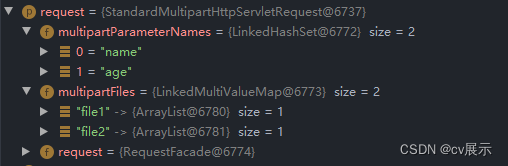
request:可以看到request有两个 Parameter 和 两个 Part 参数
-
Parameter和Part:request.getParameter获得的值以及request.getPart获得的值
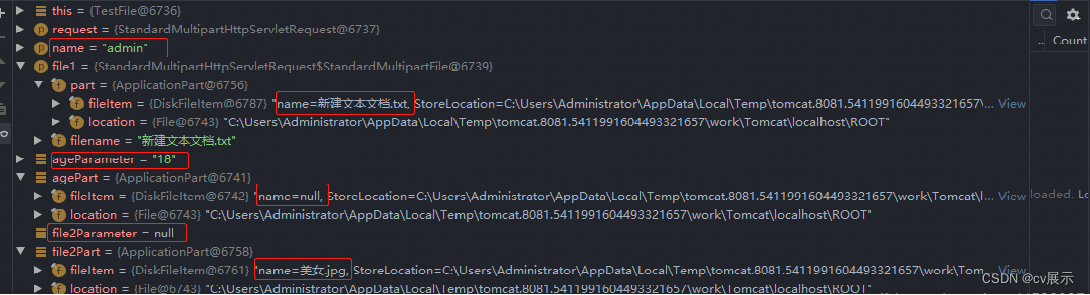
结果发现:使用 request.getParameter() 获取文件类型参数为空,使用 request.getPart() 获取非文件类型为空
-
ParameterNames和Parts:getParameterNames()和getParts()获取参数名
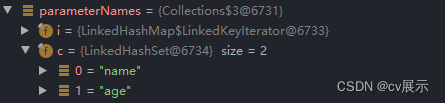
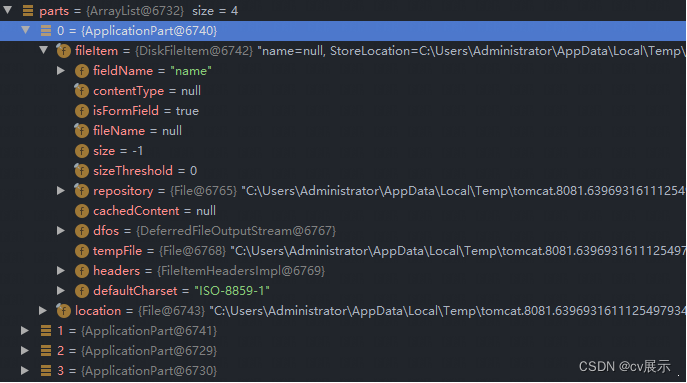
结果:使用 request.getParameterNames() 只能获取非文件类型的参数名, 使用 request.getParts() 可以获取全部参数名
结论
- Part 能获取所有的请求参数的参数名,而 Parameter 只能获取非文件类型的参数名
- Part 不能获得非文件类型参数的参数值,Part获得二进制的输入流
- Parameter 只能获得非文件类型参数值
- 使用 Part 获取文件很方便,可以获取文件大小文件类型
Ⅰ:文件上传
① form-data 类型上传
form-data 类型即常用的表单提交,可以通过两种方式接收前端传过来的文件
- 通过上述讲的Part 接收字节流,即@RequestPart注解以及request.getParts()
- 通过MultipartFile类来接收前端传过来的文件
说明:两种方法差不多
前端接口提交
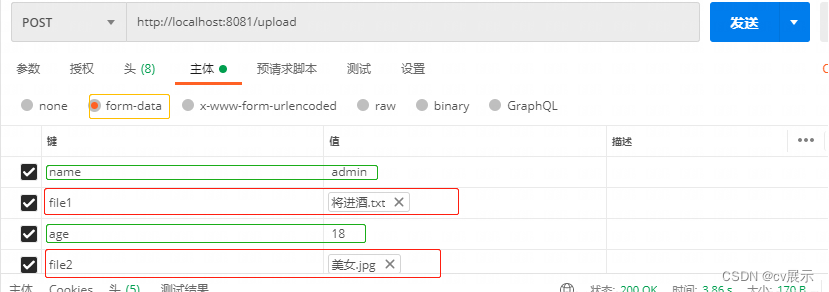
上传文件的后端代码(接口)
/** * form-data 类型(前端表单上传) * @param request * @param name * @param file3 * @param photo * @return * @throws IOException * @throws ServletException */ @RequestMapping(value = "/upload", method = RequestMethod.POST) @ResponseBody public String readFile(HttpServletRequest request, @RequestParam("name") String name, @RequestPart("file1") MultipartFile file3, @RequestPart("photo") MultipartFile photo ) throws IOException, ServletException { System.out.println(name); /* 第一种 : 使用 MultipartFile 封装好的 transferTo() 方法保存文件 photo.transferTo(new File(path + photo.getOriginalFilename())); */ /* 第二种 : 使用 MultipartFile 字节流保存文件 fileUtil(file3, String.valueOf(path)); */ /*第三种 :用 Part 接收文件字节流 Part file2 = request.getPart("file2"); file2.write(path + file2.getSubmittedFileName()); request.getParts() 获取的是全部参数(name,age,file1,file2),包括文件参数和非文件参数 */ for (Part part : request.getParts()) { // 获取文件类型 part.getContentType(); // 获取文件大小 part.getSize(); // 获取文件名 part.getSubmittedFileName(); // 获取参数名 (name,age,file1,file2) part.getName(); if(part.getContentType()!=null){ part.write(path + part.getSubmittedFileName()); }else{ // 可以获取文本参数值,文本参数 part.getContentType()为 null System.out.println(request.getParameter(part.getName())); } } return "success"; } /** * 字节流上传文件工具方法 * @param file * @param path * @return */ public String fileUtil(MultipartFile file, String path) { if (!file.isEmpty()) { try { // 转化成字节流 byte[] bytes = file.getBytes(); bufferedOutputStream = new BufferedOutputStream(new FileOutputStream( new File(path + file.getOriginalFilename()))); // 写出 bufferedOutputStream.write(bytes); // 关闭资源 bufferedOutputStream.close(); return file.getOriginalFilename() + " 上传成功"; } catch (Exception e) { return file.getOriginalFilename() + " failed to upload ---> " + e; } } else { return file.getOriginalFilename() + "You failed to upload file was empty."; } }- 1
- 2
- 3
- 4
- 5
- 6
- 7
- 8
- 9
- 10
- 11
- 12
- 13
- 14
- 15
- 16
- 17
- 18
- 19
- 20
- 21
- 22
- 23
- 24
- 25
- 26
- 27
- 28
- 29
- 30
- 31
- 32
- 33
- 34
- 35
- 36
- 37
- 38
- 39
- 40
- 41
- 42
- 43
- 44
- 45
- 46
- 47
- 48
- 49
- 50
- 51
- 52
- 53
- 54
- 55
- 56
- 57
- 58
- 59
- 60
- 61
- 62
- 63
- 64
- 65
- 66
- 67
- 68
- 69
- 70
- 71
- 72
- 73
- 74
- 75
- 76
- 77
- 78
- 79
- 80
- 81
测试

② binary 类型上传
binary 这一类型,指的就是一些二进制文件类型,如application/pdf,指定了特定二进制文件的MIME类型。就像对于text文件类型若没有特定的子类型
(subtype),就使用 text/plain。类似的,二进制文件没有特定或已知的 subtype,即使用 application/octet-stream,这是应用程序文件的默认值。
对于application/octet-stream,只能提交二进制,而且只能提交一个二进制,如果提交文件的话,只能提交一个文件,后台接收参数只能有一个,而且只能是流
(或者字节数组)
前端接口提交
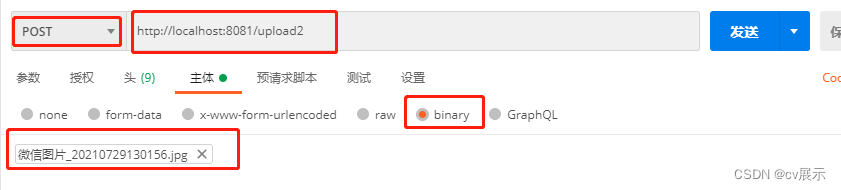
上传文件的后端代码(接口)
/** * binary 类型上传 * @param request * @return * @throws IOException */ @RequestMapping(value = "/upload2",method = RequestMethod.POST) public String upload2(HttpServletRequest request) throws IOException { ServletInputStream inputStream = null; FileOutputStream fileOutputStream = null; try { // 获取上传的文件流 inputStream = request.getInputStream(); // 定义输出流 上传到哪里 fileOutputStream = new FileOutputStream(new File(path + "a.pdf")); int len; byte[] bytes = new byte[1024]; while((len = inputStream.read(bytes))!=-1){ fileOutputStream.write(bytes,0,len); } } catch (IOException e) { e.printStackTrace(); return "上传失败"; } finally { // 关闭资源 if(fileOutputStream!=null){ fileOutputStream.close(); } if(inputStream!=null){ inputStream.close(); } } return "上传成功"; }- 1
- 2
- 3
- 4
- 5
- 6
- 7
- 8
- 9
- 10
- 11
- 12
- 13
- 14
- 15
- 16
- 17
- 18
- 19
- 20
- 21
- 22
- 23
- 24
- 25
- 26
- 27
- 28
- 29
- 30
- 31
- 32
- 33
- 34
- 35
测试
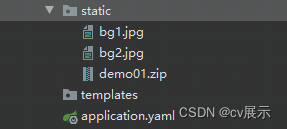
说明:part 使用起来比较方便,接受的就是字节流,读取文件类型,文件名,文件大小也比较方便
③ 配置说明
如果不自定义配置的话,他会默认上传大小1M\
SpringBoot项目的话通过配置文件配置
server: port: 8888 spring: servlet: multipart: max-file-size: 10MB # 最大上传大小 max-request-size: 100MB # 单文件最大上传大小- 1
- 2
- 3
- 4
- 5
- 6
- 7
Ⅱ:文件下载
① 补充说明
Content-Disposition
- 在常规的 HTTP 应答中,
Content-Disposition响应头指示回复的内容该以何种形式展示,是以内联的形式(即网页或者页面的一部分),还是以附件的形式下载并保存到本地 - 在 multipart/form-data 类型的应答消息体中,
Content-Disposition消息头可以被用在 multipart 消息体的子部分中,用来给出其对应字段的相关信息。各个子部分由在Content-Type中定义的分隔符分隔。用在消息体自身则无实际意义。
语法:
-
作为消息主体中的消息头:在 HTTP 场景中,第一个参数或者是
inline(默认值,表示回复中的消息体会以页面的一部分或者整个页面的形式展示),或者是attachment(意味着消息体应该被下载到本地;大多数浏览器会呈现一个“保存为”的对话框,将filename的值预填为下载后的文件名,假如它存在的话)。Content-Disposition: inline Content-Disposition: attachment Content-Disposition: attachment; filename="filename.jpg"- 1
- 2
- 3
-
作为 multipart body 中的消息头:在 HTTP 场景中。第一个参数总是固定不变的
form-data;附加的参数不区分大小写,并且拥有参数值,参数名与参数值用等号 ('=') 连接,参数值用双引号括起来。参数之间用分号 (';') 分隔。Content-Disposition: form-data Content-Disposition: form-data; name="fieldName" Content-Disposition: form-data; name="fieldName"; filename="filename.jpg"- 1
- 2
- 3
response.setContentType()的String参数及对应类型
文件扩展名 Content-Type(Mime-Type) 文件扩展名 Content-Type(Mime-Type) .*( 二进制流,不知道下载文件类型) application/octet-stream .tif image/tiff .001 application/x-001 .301 application/x-301 .323 text/h323 .906 application/x-906 .907 drawing/907 .a11 application/x-a11 .acp audio/x-mei-aac .ai application/postscript .aif audio/aiff .aifc audio/aiff .aiff audio/aiff .anv application/x-anv .asa text/asa .asf video/x-ms-asf .asp text/asp .asx video/x-ms-asf .au audio/basic .avi video/avi .awf application/vnd.adobe.workflow .biz text/xml .bmp application/x-bmp .bot application/x-bot .c4t application/x-c4t .c90 application/x-c90 .cal application/x-cals .cat application/vnd.ms-pki.seccat .cdf application/x-netcdf .cdr application/x-cdr .cel application/x-cel .cer application/x-x509-ca-cert .cg4 application/x-g4 .cgm application/x-cgm .cit application/x-cit .class java/* .cml text/xml .cmp application/x-cmp .cmx application/x-cmx .cot application/x-cot .crl application/pkix-crl .crt application/x-x509-ca-cert .csi application/x-csi .css text/css .cut application/x-cut .dbf application/x-dbf .dbm application/x-dbm .dbx application/x-dbx .dcd text/xml .dcx application/x-dcx .der application/x-x509-ca-cert .dgn application/x-dgn .dib application/x-dib .dll application/x-msdownload .doc application/msword .dot application/msword .drw application/x-drw .dtd text/xml .dwf Model/vnd.dwf .dwf application/x-dwf .dwg application/x-dwg .dxb application/x-dxb .dxf application/x-dxf .edn application/vnd.adobe.edn .emf application/x-emf .eml message/rfc822 .ent text/xml .epi application/x-epi .eps application/x-ps .eps application/postscript .etd application/x-ebx .exe application/x-msdownload .fax image/fax .fdf application/vnd.fdf .fif application/fractals .fo text/xml .frm application/x-frm .g4 application/x-g4 .gbr application/x-gbr . application/x- .gif image/gif .gl2 application/x-gl2 .gp4 application/x-gp4 .hgl application/x-hgl .hmr application/x-hmr .hpg application/x-hpgl .hpl application/x-hpl .hqx application/mac-binhex40 .hrf application/x-hrf .hta application/hta .htc text/x-component .htm text/html .html text/html .htt text/webviewhtml .htx text/html .icb application/x-icb .ico image/x-icon .ico application/x-ico .iff application/x-iff .ig4 application/x-g4 .igs application/x-igs .iii application/x-iphone .img application/x-img .ins application/x-internet-signup .isp application/x-internet-signup .IVF video/x-ivf .java java/* .jfif image/jpeg .jpe image/jpeg .jpe application/x-jpe .jpeg image/jpeg .jpg image/jpeg .jpg application/x-jpg .js application/x-javascript .jsp text/html .la1 audio/x-liquid-file .lar application/x-laplayer-reg .latex application/x-latex .lavs audio/x-liquid-secure .lbm application/x-lbm .lmsff audio/x-la-lms .ls application/x-javascript .ltr application/x-ltr .m1v video/x-mpeg .m2v video/x-mpeg .m3u audio/mpegurl .m4e video/mpeg4 .mac application/x-mac .man application/x-troff-man .math text/xml .mdb application/msaccess .mdb application/x-mdb .mfp application/x-shockwave-flash .mht message/rfc822 .mhtml message/rfc822 .mi application/x-mi .mid audio/mid .midi audio/mid .mil application/x-mil .mml text/xml .mnd audio/x-musicnet-download .mns audio/x-musicnet-stream .mocha application/x-javascript .movie video/x-sgi-movie .mp1 audio/mp1 .mp2 audio/mp2 .mp2v video/mpeg .mp3 audio/mp3 .mp4 video/mpeg4 .mpa video/x-mpg .mpd application/vnd.ms-project .mpe video/x-mpeg .mpeg video/mpg .mpg video/mpg .mpga audio/rn-mpeg .mpp application/vnd.ms-project .mps video/x-mpeg .mpt application/vnd.ms-project .mpv video/mpg .mpv2 video/mpeg .mpw application/vnd.ms-project .mpx application/vnd.ms-project .mtx text/xml .mxp application/x-mmxp .net image/pnetvue .nrf application/x-nrf .nws message/rfc822 .odc text/x-ms-odc .out application/x-out .p10 application/pkcs10 .p12 application/x-pkcs12 .p7b application/x-pkcs7-certificates .p7c application/pkcs7-mime .p7m application/pkcs7-mime .p7r application/x-pkcs7-certreqresp .p7s application/pkcs7-signature .pc5 application/x-pc5 .pci application/x-pci .pcl application/x-pcl .pcx application/x-pcx .pdf application/pdf .pdf application/pdf .pdx application/vnd.adobe.pdx .pfx application/x-pkcs12 .pgl application/x-pgl .pic application/x-pic .pko application/vnd.ms-pki.pko .pl application/x-perl .plg text/html .pls audio/scpls .plt application/x-plt .png image/png .png application/x-png .pot application/vnd.ms-powerpoint .ppa application/vnd.ms-powerpoint .ppm application/x-ppm .pps application/vnd.ms-powerpoint .ppt application/vnd.ms-powerpoint .ppt application/x-ppt .pr application/x-pr .prf application/pics-rules .prn application/x-prn .prt application/x-prt .ps application/x-ps .ps application/postscript .ptn application/x-ptn .pwz application/vnd.ms-powerpoint .r3t text/vnd.rn-realtext3d .ra audio/vnd.rn-realaudio .ram audio/x-pn-realaudio .ras application/x-ras .rat application/rat-file .rdf text/xml .rec application/vnd.rn-recording .red application/x-red .rgb application/x-rgb .rjs application/vnd.rn-realsystem-rjs .rjt application/vnd.rn-realsystem-rjt .rlc application/x-rlc .rle application/x-rle .rm application/vnd.rn-realmedia .rmf application/vnd.adobe.rmf .rmi audio/mid .rmj application/vnd.rn-realsystem-rmj .rmm audio/x-pn-realaudio .rmp application/vnd.rn-rn_music_package .rms application/vnd.rn-realmedia-secure .rmvb application/vnd.rn-realmedia-vbr .rmx application/vnd.rn-realsystem-rmx .rnx application/vnd.rn-realplayer .rp image/vnd.rn-realpix .rpm audio/x-pn-realaudio-plugin .rsml application/vnd.rn-rsml .rt text/vnd.rn-realtext .rtf application/msword .rtf application/x-rtf .rv video/vnd.rn-realvideo .sam application/x-sam .sat application/x-sat .sdp application/sdp .sdw application/x-sdw .sit application/x-stuffit .slb application/x-slb .sld application/x-sld .slk drawing/x-slk .smi application/smil .smil application/smil .smk application/x-smk .snd audio/basic .sol text/plain .sor text/plain .spc application/x-pkcs7-certificates .spl application/futuresplash .spp text/xml .ssm application/streamingmedia .sst application/vnd.ms-pki.certstore .stl application/vnd.ms-pki.stl .stm text/html .sty application/x-sty .svg text/xml .swf application/x-shockwave-flash .tdf application/x-tdf .tg4 application/x-tg4 .tga application/x-tga .tif image/tiff .tif application/x-tif .tiff image/tiff .tld text/xml .top drawing/x-top .torrent application/x-bittorrent .tsd text/xml .txt text/plain .uin application/x-icq .uls text/iuls .vcf text/x-vcard .vda application/x-vda .vdx application/vnd.visio .vml text/xml .vpg application/x-vpeg005 .vsd application/vnd.visio .vsd application/x-vsd .vss application/vnd.visio .vst application/vnd.visio .vst application/x-vst .vsw application/vnd.visio .vsx application/vnd.visio .vtx application/vnd.visio .vxml text/xml .wav audio/wav .wax audio/x-ms-wax .wb1 application/x-wb1 .wb2 application/x-wb2 .wb3 application/x-wb3 .wbmp image/vnd.wap.wbmp .wiz application/msword .wk3 application/x-wk3 .wk4 application/x-wk4 .wkq application/x-wkq .wks application/x-wks .wm video/x-ms-wm .wma audio/x-ms-wma .wmd application/x-ms-wmd .wmf application/x-wmf .wml text/vnd.wap.wml .wmv video/x-ms-wmv .wmx video/x-ms-wmx .wmz application/x-ms-wmz .wp6 application/x-wp6 .wpd application/x-wpd .wpg application/x-wpg .wpl application/vnd.ms-wpl .wq1 application/x-wq1 .wr1 application/x-wr1 .wri application/x-wri .wrk application/x-wrk .ws application/x-ws .ws2 application/x-ws .wsc text/scriptlet .wsdl text/xml .wvx video/x-ms-wvx .xdp application/vnd.adobe.xdp .xdr text/xml .xfd application/vnd.adobe.xfd .xfdf application/vnd.adobe.xfdf .xhtml text/html .xls application/vnd.ms-excel .xls application/x-xls .xlw application/x-xlw .xml text/xml .xpl audio/scpls .xq text/xml .xql text/xml .xquery text/xml .xsd text/xml .xsl text/xml .xslt text/xml .xwd application/x-xwd .x_b application/x-x_b .sis application/vnd.symbian.install .sisx application/vnd.symbian.install .x_t application/x-x_t .ipa application/vnd.iphone .apk application/vnd.android.package-archive .xap application/x-silverlight-app ② 下载本地资源
下载代码
/** * 下载本地资源 * @param fileName 下载的文件名 * @param response 响应头 * @param isOnLine 是否默认下载 true浏览器中打开 * @throws IOException */ @GetMapping("/download") public void download(String fileName, HttpServletResponse response, boolean isOnLine) throws IOException { // 路径可以指定当前项目相对路径 File file = new File(path + fileName); if (file.exists()) { // 把文件转化成流 FileInputStream fileInputStream = new FileInputStream(file); ServletOutputStream outputStream = response.getOutputStream(); // 是否立即下载 if(!isOnLine){ response.setContentType("application/octet-stream"); // 如果文件名为中文需要设置编码 response.setHeader("Content-Disposition", "attachment;fileName=" + URLEncoder.encode("背景.jpg", "utf8")); } byte[] bytes = new byte[1024]; int len; // 把文件流写入响应头 while ((len = fileInputStream.read(bytes)) != -1) { outputStream.write(bytes, 0, len); } } }- 1
- 2
- 3
- 4
- 5
- 6
- 7
- 8
- 9
- 10
- 11
- 12
- 13
- 14
- 15
- 16
- 17
- 18
- 19
- 20
- 21
- 22
- 23
- 24
- 25
- 26
- 27
- 28
- 29
测试链接:http://localhost:8888/download?fileName=背景.jpg
或者http://localhost:8888/download?isOnLine=true&fileName=背景.jpg
③ 下载网络资源
代码演示
说明:首先要获取到正确的url才能获取到想要的资源
/** * 下载网络资源 * @param response * @throws IOException */ @RequestMapping("/downLoadMusic") public void downloadNetworkFile(HttpServletResponse response) throws IOException { // 创建url对象 URL url = new URL("https://m701.music.126.net/20221009103058/70acd1fa2256e82ae0a90f833aec1072/jdyyaac/obj/w5rDlsOJwrLDjj7CmsOj/18195365565/53a1/ad15/9e1c/1b3457995065a152f56f61c38eda1914.m4a"); // 建立连接 URLConnection urlConnection = url.openConnection(); // 获取到输入流 InputStream inputStream = urlConnection.getInputStream(); // 获取到响应头的输出流 ServletOutputStream outputStream = response.getOutputStream(); // 设置响应头 response.setContentType("application/octet-stream"); response.setHeader("Content-Disposition","attachment;fileName=" + URLEncoder.encode("爱似水仙.m4a", "utf8")); int len; // 通过字节流下载下来 byte[] bytes = new byte[1024]; while ((len = inputStream.read(bytes)) != -1){ outputStream.write(bytes,0, len); } // 关闭资源 inputStream.close(); outputStream.close(); }- 1
- 2
- 3
- 4
- 5
- 6
- 7
- 8
- 9
- 10
- 11
- 12
- 13
- 14
- 15
- 16
- 17
- 18
- 19
- 20
- 21
- 22
- 23
- 24
- 25
- 26
- 27
- 28
测试链接:http://localhost:8888/downLoadMusic
-
相关阅读:
Nginx 报404问题,如何解决
面试知识点整理:Skia 架构的场景渲染
手写 git hooks 脚本(pre-commit、commit-msg)实现代码规范校验+Git提交日志校验
锐捷MSTP实验配置
Python:记录python安装 cv2报错及问题解决
算数平均法和加权平均法
计算机毕业设计之java+ssm基于web的实验室课程管理系统
【自动注入】@Autowired、@Resource的区别是什么
零碳家庭 “光”的力量
Truenas scale 配置 TrueChart zerotier
- 原文地址:https://blog.csdn.net/qq_45408390/article/details/127253216
- 最新文章
-
沪漂五周年了:我越来越迷茫了
Agentic Skill Routing 实战:别再把所有 Skill 塞进 AI Agent 上下文
MySQL-Seconds_behind_master的精度误差
[MAF预定义ChatClient中间件-03]CachingChatClient——利用缓存省钱省时间
AI的至暗历史:从万众期待到被政府撤资,AI的两次死亡徘徊
Agent OS :五种驯服不确定性的范式
PortSwigger SQL注入LAB11
数据库即时编译JIT
[Begin]AI Learn Data Day 0
深度学习进阶(二十七)现代 LLM 的核心架构设计其二:SwiGLU