-
【小程序原生】
开发工具
通过微信公众平台
https://mp.weixin.qq.com/获取appid
使用微信开发者工具https://developers.weixin.qq.com/miniprogram/dev/devtools/download.html开发小程序结构
文件 必需 作用 app.js 是 小程序逻辑 app.json 是 小程序公共配置 app.wxss 否 小程序公共样式表 js 是 页面逻辑 wxml 是 页面结构 json 否 页面配置 wxss 否 页面样式表 数据结构和基本语法
数据结构:
https://www.cnblogs.com/xi-li/p/11233249.html
基本语法:https://developers.weixin.qq.com/miniprogram/dev/framework/view/wxml/
单位:rpx
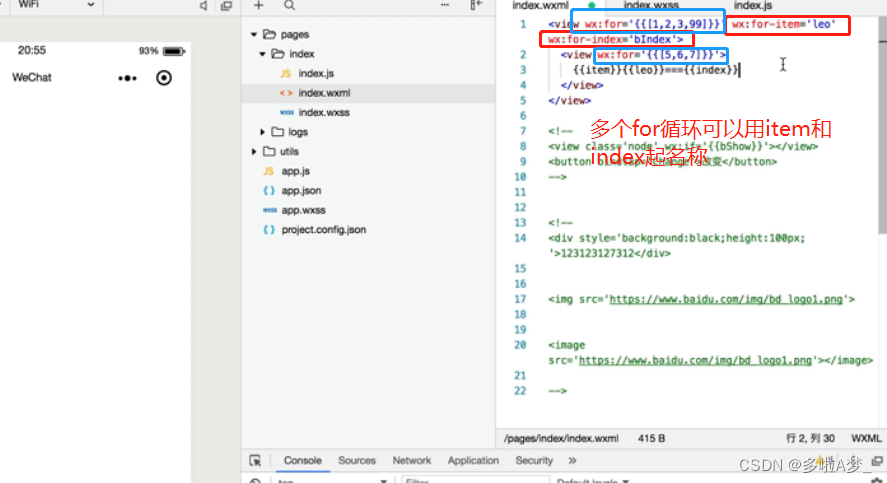
wx:key=“index”- 在组件上使用wx:for控制属性绑定一个数组,即可使用数组中各项的数据重复渲染该组件。wx:for和wx:for-items作用一样
- 默认数组的当前的下标变量名默认为index,数组当前项的变量名默认为item。
- 使用wx:for-item 可以指定数组当前元素的变量名。起别名,默认是 item。使用wx:for-index 可以指定数组当前下标的变量名
- wx:key 如果列表中项目的位置会动态改变或有新的项目添加到列表中,并且希望列表中的项目保持自己的特征和状态(如 中的输入内容, 的选中状态),需要使用 wx:key 来指定列表中项目的唯一的标识符。
事件系统:
https://developers.weixin.qq.com/miniprogram/dev/framework/view/wxml/event.html函数不能直接渲染出数据—data html—{{b()}}这么写展示不出来
模块化
引入:
require()
输出:
export const a = 12
export default{}
只允许一个js里面有一个,也支持es6的模块语法
导入:
import {a} from …
导出:
export const a =12
导入:
import {a} from …
import {a,c,d,f} from …
import json,{a,c,d} from …
json.a,json.b,json.c,josn.b
导出:
export const a = 12
export {a,c,d,f}
export default {a,b,c,d}生命周期
- onLaunch 初始 激活小程序
- onShow 进入小程序前台的时候会触发
- onHide 进入小程序后台的时候会触发
- onError 报错的时候会触发的生命周期
组件
- onLoad 生命周期函数—监听页面加载 一般来说 获取后台数据 从这个生命周期
- onReady 生命周期函数 ----监听页面初次渲染完成 组件都渲染完毕就完成了
- onShow 在ready之前load之后触发
- onHide
- onUnload 页面卸载----点击左上角那个返回的小箭头就触发了
- onPullDownRefresh 页面相关处理函数—监听用户下拉动作 例如下拉刷新
app.json 全局
window:
“enablePullDownRefresh”:true
局部 就是在pages —json
“enablePullDownRefrsh”:true 一般就是加载用 - onReachBtoom 如果有滚动条 滚动到最下面会触发的函数
- onShareAppMessage 微信小程序分享的时候触发的生命周期
数据传参
<view bindtap="tap1" id="值">view> <view bindtap="tap2" data-xxx="值">view> <input bindtap="tap3">input>- 1
- 2
- 3
tap1(ev){ console.log(ev.target.id) }, tap2(ev){//更推荐这个 console.log(ev.target.dataset.xxx) } tap3(ev){ console.log(ev.detail.value)//获取input的value值 }- 1
- 2
- 3
- 4
- 5
- 6
- 7
- 8
- 9
事件与冒泡
做拖拽的时候注意把下拉刷新禁止了不然拖拽的时候会触发
拖拽事件
- bindtouchstart
- bindtoutchmove
- bindtouchend
获取组件offsetleft
ev.target.offsetLeft
坐标点
ev.changedTouches[0].clientX
ev.changedTouches[0].clientY
事件冒泡
在小程序里面,事件有两套,一个就是咱们bind有事件冒泡机制,另外一套就是catch阻止事件冒泡机制的,他们两套拥有的事件是一样的
动画
https://developers.weixin.qq.com/miniprogram/dev/api/ui/animation/wx.createAnimation.html
transition.myview{ width:400rpx; height:400rpx; background:red; transition:1s all ease; } .changed{ width:500rpx; height:500rpx }- 1
- 2
- 3
- 4
- 5
- 6
- 7
- 8
- 9
- 10
go(){ this.setData({ needClass:'myview changed' }) }- 1
- 2
- 3
- 4
- 5
animation
myview{ width:400rpx; height:400rpx; background:red; transition:1s all ease; annimation:mymove 5s infinite alternate; } @keyframs mymove{ from{ width:400rpx; height:400rpx; background:red; } to{ width:600rpx; height:600rpx; background:blue; } }- 1
- 2
- 3
- 4
- 5
- 6
- 7
- 8
- 9
- 10
- 11
- 12
- 13
- 14
- 15
- 16
- 17
- 18
- 19
小程序自带的动画
<view bindtap="movego" class="myView2" animation="{{donghua}}">view>- 1
Page({ data:{ donghua:'' }, movego(){ this.setData({ donghua:wx.createAnimation({ duration:700, delay:100, timingFunction:'ease' }).rotate(90).backgroundColor('#ccc').step({ duration:1000, delay:3000 }).scale(3).rotate(0).width(200).step() }) } })- 1
- 2
- 3
- 4
- 5
- 6
- 7
- 8
- 9
- 10
- 11
- 12
- 13
- 14
- 15
- 16
- 17
-
相关阅读:
Jetpack Compose(6)——动画
预约洗车/美容/维修/家政/保养/上门洗车预约小程序源码及管理系统
jmeter的最佳并发
vue中props父给子传值,子组件可以改变父组件的值
英语——语法——从句——定语从句——笔记
Spring工具类--Assert的使用
【音视频|ALSA】SS528开发板编译Linux内核ALSA驱动、移植alsa-lib、采集与播放usb耳机声音
uvm数字IC验证覆盖率收集
2022谷粒商城学习笔记(六)JSR303数据校验和集中异常处理
matlab判断下列级数的收敛性
- 原文地址:https://blog.csdn.net/weixin_47416539/article/details/127389490
