-
c# 的一些简单用法
dll
C#是托管型代码,创建的对象会自动回收。C++是非托管型代码,创建的对象需要手动回收(有时不手动回收,可能出现内存溢出的问题)。
1、托管 也就是直接引用然后直接使用就行了
这个应该就是所谓的托管的调用方法,生成dll在这个例子里面也有

2、非托管的方法

然后再调用,把dll文件放到应用程序运行那里,也就是exe那里 比如debug文件夹下面。然后按照上面格式写一遍API,就可以使用了。运动控制卡官方视频文档,就是把.dll这么一个文件添加到exe对应目录中,然后就按照上述步骤使用了。

其中的DllImport是System.Runtime.InteropServices命名空间下的一个属性类,因此要使用DllImport,必须在HCNetSDK.cs类中在先导入这个类“using System.Runtime.InteropServices;”)get和set用法
详解
在面向对象编程里面,有的类的数据是私有的,是封装起来的,所以为了读取和写入对应的私有数据,c#采用了关键字get和set,其中get负责读取私有数据,set负责写入私有数据。这样就可以对读书或者写入的数据做一些处理,在进行读出或者写入。class Bank { private int money;//私有字段 public int Money //属性 { //GET访问器,可以理解成另类的方法,返回已经被赋了值的私有变量money get { return money; } //SET访问器,将我们打入的值赋给私有变量money,并且加了限制,不能存负的 set { if (value >= 0) { money = value; } else { money = 0; } } } } class Program { static void Main(string[] args) { //实例化一个Bank银行 Bank bank = new Bank(); //对Money属性做赋值操作,这时我们访问的是SET访问器 bank.Money = 15; //对Money属性做取值操作,这时我们访问的是GET访问器 int a = bank.Money; Console.WriteLine(a); } }- 1
- 2
- 3
- 4
- 5
- 6
- 7
- 8
- 9
- 10
- 11
- 12
- 13
- 14
- 15
- 16
- 17
- 18
- 19
- 20
- 21
- 22
- 23
- 24
- 25
- 26
- 27
- 28
- 29
- 30
- 31
- 32
- 33
- 34
- 35
- 36
- 37
- 38
- 39
- 40
- 41

/// <summary>格式的注释
详解
会在引用时出现提示,比如function1是//注释 就不会出现提示。2就会。3还会出现参数提示


public class Test { // This is Function 2 public static void Function1() { } ////// 能干嘛干嘛 /// 还能干嘛干嘛 /// public static void Function2() //感觉就这样用就挺好了,也不用用到下面参数这样 { } /// Returns zero. public static int Function3(int a, string b) { return 0; } static void Main() { Test.Function1(); Test.Function2(); Test.Function3(1, "ss"); } }- 1
- 2
- 3
- 4
- 5
- 6
- 7
- 8
- 9
- 10
- 11
- 12
- 13
- 14
- 15
- 16
- 17
- 18
- 19
- 20
- 21
- 22
- 23
- 24
- 25
- 26
- 27
- 28
- 29
- 30
- 31
- 32
- 33
- 34
- 35
try catch finaly用法
1、如果发生了异常,则转入catch的执行。NI这样的一个好处就是本来是异常退出的地方,变成了不退出 去执行catch中的语句了。像下面这段代码,本来是直接异常,然后退出的,现在变成了显示MessageBox.Show(“NI”);就好了,然后继续执行。
private void uiButton2_Click(object sender, EventArgs e) { try //这样捕捉到异常以后 就不是直接gg 而是执行catch中程序 { XmlSerializer xml = new XmlSerializer(typeof(List<stdudent>)); string path = Application.StartupPath; System.IO.Stream stream = new System.IO.FileStream(path + @"students.xml", System.IO.FileMode.OpenOrCreate); var t = (List<stdudent>)xml.Deserialize(stream); stream.Close();//关闭流 stream.Dispose();//释放流占用的资源 } catch { MessageBox.Show("NI"); } }- 1
- 2
- 3
- 4
- 5
- 6
- 7
- 8
- 9
- 10
- 11
- 12
- 13
- 14
- 15
- 16
- 17
void FormLoad() { try { } catch (Exception ex) { APIClass.SaveLog(@"灰阶卡相关测试ALLNGLoad错误:"+ex.Message); // MessageBox.Show("NGLoad" + ex.ToString()); } }- 1
- 2
- 3
- 4
- 5
- 6
- 7
- 8
- 9
- 10
- 11
- 12
2、finally可以没有,也可以只有一个。无论有没有发生异常,它总会在这个异常处理结构的最后运行。即使你在try块内用return返回了,在返回前,finally总是要执行,这以便让你有机会能够在异常处理最后做一些清理工作。如关闭数据库连接等等。
this
详细讲解
1、代表当前类的实例对象。我猜也就是当前类的全局变量class Program { static void Main(string[] args) { //Person实例化为对象p Person p = new Person(); p.Age = 18; Console.WriteLine(p.MyAge()); } } public class Person { //这个Age代表类的全局变量 public int Age; public string MyAge() { //这个Age代表方法的局部变量,将全局变量的Age+1赋值给局部变量 int Age = this.Age + 1;//this.Age指代类的全局变量为一开始赋值的18 这里又新定义了一个局部变量Age return $"今年{this.Age}岁,明年{Age}岁"; } }- 1
- 2
- 3
- 4
- 5
- 6
- 7
- 8
- 9
- 10
- 11
- 12
- 13
- 14
- 15
- 16
- 17
- 18
- 19
- 20
- 21
- 22

注:在静态成员中使用base和this都是不允许的。原因是,base和this访问的都是类的实例,也就是对象,而静态成员只能由类来访问,不能由对象来访问。this关键字只能在实例构造函数、实例方法或实例访问器中使用。2、 this()代表当前类的无参构造函数
namespace Demo { class Program { static void Main(string[] args) { Person p = new Person("李四"); p.Age = 18; Console.WriteLine(p.MyAge()); } } public class Person { //无参构造函数 public Person() { this.Name = "张三"; Console.WriteLine("进入Person类的无参构造函数"); } // this()代表无参构造函数Person() 这样就是继承上面的无参构造函数了 // 先执行Person(),后执行Person(string Name) public Person(string Name) : this() { this.Name = Name; Console.WriteLine("进入Person类的有参构造函数"); } public int Age { get; set; } public string Name { get; set; } public string MyAge() { int Age = this.Age + 1; return $"{this.Name}今年{this.Age}岁,明年{Age}岁";//this.Age就是一开始赋值的18 后面的age是局部变量age值为19 } } }- 1
- 2
- 3
- 4
- 5
- 6
- 7
- 8
- 9
- 10
- 11
- 12
- 13
- 14
- 15
- 16
- 17
- 18
- 19
- 20
- 21
- 22
- 23
- 24
- 25
- 26
- 27
- 28
- 29
- 30
- 31
- 32
- 33
- 34
- 35
- 36
- 37
- 38

@
详解
对字符串中的需要转义的不用转义:string path = @"D:\Microsoft VS Code\Code.exe"; //如果不加@那么编译的时候就会提示无法识别转义序列 //如果不加@ path 写法如下 string path_1="D:\\Microsoft VS Code\\Code.exe"";//就需要\进行转义- 1
- 2
- 3
- 4
- 5
using
Invoke
在辅助线程中修改UI线程( 主线程 )中对象的属性时,调用this.Invoke();invoke 会从当前线程的位置一直不停的往上进行查找,直到找到当前这个控件所在的线程,然后对他的值进行更新
代码详解
不过这样写串口不好用,他这个选中了com1 过段时间com1就消失了 要重新选

this.Invoke((EventHandler)delegate { pictureBox7.Image = bitmap;//直接这样就可以了 });- 1
- 2
- 3
- 4
InvokeRequired和Invoke
详解
下次用到 在好好研究下把public delegate void UpdateTextStatusCallback(string strLogStatus, IntPtr lpDeviceInfo); /** * lUserID [out] 用户ID,NET_DVR_Login_V40的返回值 dwResult [out] 登录状态:0- 异步登录失败,1- 异步登录成功 lpDeviceInfo [out] 设备信息,设备序列号、通道、能力等参数 pUser [out] 用户数据 */ public void cbLoginCallBack(int lUserID, int dwResult, IntPtr lpDeviceInfo, IntPtr pUser) { string strLoginCallBack = "登录设备,lUserID:" + lUserID + ",dwResult:" + dwResult; //异步登录失败 if (dwResult == 0) { uint iErrCode = CHCNetSDK.NET_DVR_GetLastError(); strLoginCallBack = strLoginCallBack + ",错误号:" + iErrCode; } //下面代码注释掉也会崩溃 if (InvokeRequired) { object[] paras = new object[2]; paras[0] = strLoginCallBack; paras[1] = lpDeviceInfo; uiLabel1.BeginInvoke(new UpdateTextStatusCallback(UpdateClientList), paras); } else { //创建该控件的主线程直接更新信息列表 UpdateClientList(strLoginCallBack, lpDeviceInfo); } }- 1
- 2
- 3
- 4
- 5
- 6
- 7
- 8
- 9
- 10
- 11
- 12
- 13
- 14
- 15
- 16
- 17
- 18
- 19
- 20
- 21
- 22
- 23
- 24
- 25
- 26
- 27
- 28
- 29
- 30
- 31
- 32
- 33
- 34
- 35
- 36
- 37
线程
C#线程的详解
线程都是执行完一遍就结束了,如果想一直执行下去 就要给他里面加上while一直循环执行MessageBox.Show()的用法
详细说明
如果什么都不加的话MessageBox.Show("初始密码错误");- 1

返回确认DialogResult dr=MessageBox.Show("确认删除吗?","信息提示",MessageBoxButtons.OKCancel,MessageBoxIcon.Question); if(dr==DialogResult.OK) { string sql = $"delete from t_book where id='{id}'"; Dao dao =new Dao(); if(dao.Execute(sql)>0) { MessageBox.Show("删除成功"); Table(); } else { MessageBox.Show("删除失败"); } dao.Close(); }- 1
- 2
- 3
- 4
- 5
- 6
- 7
- 8
- 9
- 10
- 11
- 12
- 13
- 14
- 15
- 16

DialogResult dr = MessageBox.Show("确认删除吗?", "信息提示", MessageBoxButtons.OKCancel, MessageBoxIcon.Question); //按下确定才会进入下面这里 if (dr == DialogResult.OK) { MessageBox.Show("1"); } //将提示框按掉(确定取消×掉都可以) 才会继续执行下去 MessageBox.Show("2");- 1
- 2
- 3
- 4
- 5
- 6
- 7
- 8
数据流的读取操作——文件流(FileStream)类
详解
1、所有文件类型的读取和写入- public FileStream(string path, FileMode mode, FileAccess access);
2、文本文件的读取和写入
- StreamReader类,可以直接读取文本文件的内容。
- StreamWriter类,允许直接将字符和字符串写入文件,因此一般用来对文本文件的写入。
3、二进制文件的读取和写入
C#中字符串与枚举值的相互转换
using System; namespace _01EnumerationConvert { //定义枚举 enum Animal { Cat = 1, Dog = 2 } class Program { static void Main(string[] args) { Console.WriteLine(Animal.Dog); //Dog Console.WriteLine((int)Animal.Dog);//这样才是数字 不然就是名字 dog //1.字符串转枚举 string value1 = "Dog"; Animal NIanimal = (Animal)Enum.Parse(typeof(Animal), value1); if (NIanimal == Animal.Dog) { Console.WriteLine("1、字符串转枚举"); Console.WriteLine(NIanimal);//Dog Console.WriteLine((int)NIanimal);//2 这样才是数字 Console.WriteLine("字符串转枚举类型成功"); } //2、数字转枚举 int i = 2; Animal ii=(Animal)i; Console.WriteLine("2、数字转枚举"); Console.WriteLine(ii);//Dog Console.WriteLine((int)ii);//2 //3.枚举转字符串 string str = Enum.GetName(typeof(Animal),Animal.Cat); //string value2 = Animal.Cat.ToString();这样也可以 不过效率低一点 if (str == "Cat") { Console.WriteLine("3、枚举转字符串"); Console.WriteLine(str);//cat Console.WriteLine("枚举转字符串类型成功"); } } } }- 1
- 2
- 3
- 4
- 5
- 6
- 7
- 8
- 9
- 10
- 11
- 12
- 13
- 14
- 15
- 16
- 17
- 18
- 19
- 20
- 21
- 22
- 23
- 24
- 25
- 26
- 27
- 28
- 29
- 30
- 31
- 32
- 33
- 34
- 35
- 36
- 37
- 38
- 39
- 40
- 41
- 42
- 43
- 44
- 45
- 46
- 47

parse
构造函数
详解
构造函数可分为:实例构造函数,静态构造函数,私有构造函数class Program { static void Main(string[] args) { Student stu1 = new Student();//无参构造函数调用 Student stu = new Student(1807,"王麻子","男",88.6); Console.WriteLine("学号:{0}-姓名{1}-性别:{2}-成绩{3}",stu.Id,stu.Name,stu.Sex,stu.Score); Console.ReadLine(); } } class Student { public int Id { get; set; } public string Name { get; set; } public string Sex { get; set; } public double Score { get; set; } //无参构造函数 public Student() { Console.WriteLine("无参构造函数被调用"); } //有参构造函数 public Student(int id,string name,string sex,double score) { this.Id=id; this.Name = name; this.Sex = sex; this.Score = score; } }- 1
- 2
- 3
- 4
- 5
- 6
- 7
- 8
- 9
- 10
- 11
- 12
- 13
- 14
- 15
- 16
- 17
- 18
- 19
- 20
- 21
- 22
- 23
- 24
- 25
- 26
- 27
- 28
- 29
- 30
不安全代码
当一个代码块使用 unsafe 修饰符标记时,C# 允许在函数中使用指针变量。不安全代码或非托管代码是指使用了指针变量的代码块。
添加链接描述


多线程
Thread t = new Thread(run); t.Start();- 1
- 2
public void run() { Thread.Sleep(1100); } // 执行线程的方法,方法不可以带参- 1
- 2
- 3
- 4
- 5
计时
方法1:精度高
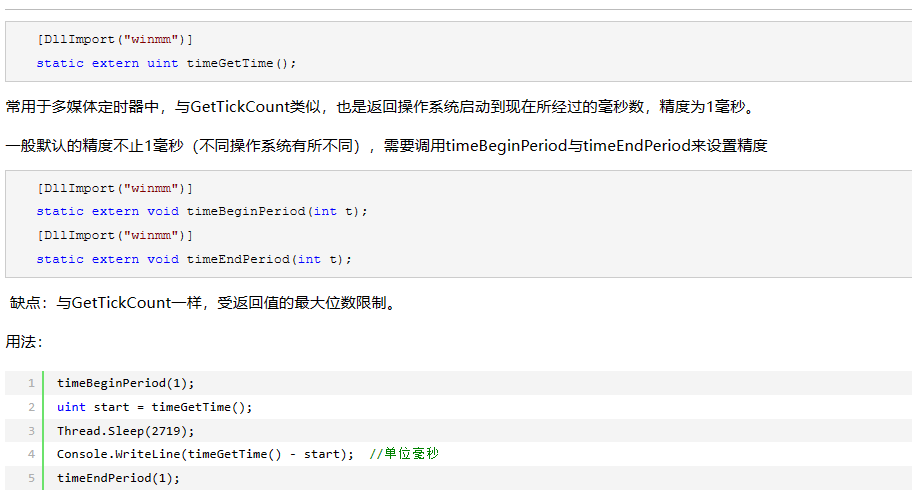
using System.Runtime.InteropServices;- 1
[DllImport("winmm")] static extern void timeBeginPeriod(int t); [DllImport("winmm")] static extern void timeEndPeriod(int t); [DllImport("winmm")] static extern uint timeGetTime();- 1
- 2
- 3
- 4
- 5
- 6
timeBeginPeriod(1); uint start = timeGetTime(); Thread.Sleep(2719); MessageBox.Show((timeGetTime() - start).ToString()); //单位毫秒 timeEndPeriod(1);- 1
- 2
- 3
- 4
- 5
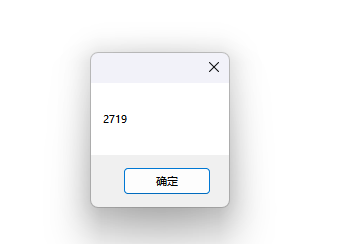
方法2:精度低点,代码少[System.Runtime.InteropServices.DllImport("kernel32")] static extern uint GetTickCount();- 1
- 2
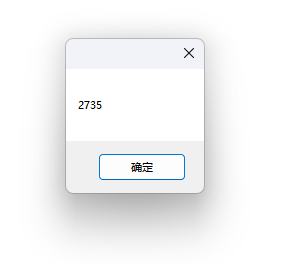
uint s1 = GetTickCount(); Thread.Sleep(2719); MessageBox.Show((GetTickCount() - s1).ToString()); //单位毫秒- 1
- 2
- 3
截取字符串的前几位数字
static void Main(string[] args) { string str = "a5 ff 01 005a *a5ff01 005a"; //Substring说明:如果传入的参数是两个长整参数,第一个参数指字符串的起始位置,也就是开始截取的位置 // 第二个是截取的长度。 //IndexOf:查找字串中指定字符或字串首次出现的位置,返首索引值 string num = str.Substring(0, str.IndexOf('*')); string num2=str.Substring(str.IndexOf('*') + 1,str.Length-str.IndexOf("*")-1); Console.WriteLine(num); Console.WriteLine(num2); }- 1
- 2
- 3
- 4
- 5
- 6
- 7
- 8
- 9
- 10
- 11
- 12
- 13
- 14

关于字符串的一些简单算法
-
相关阅读:
CSS之布局系列--顶部导航栏二级菜单居中展示
这些提高摸鱼效率的自动化测试技巧,提高打工人幸福感~
怎么统计 20 亿用户的登录状态 | bitmap
MATLAB数据类型最常用描述表
为什么要使用设计模式,以及使用设计模式的好处
卷积神经网络 图像处理,卷积神经网络识别图片
git pull 与 git pull --rebase
Android10 SystemUI系列 需求定制(一)状态栏控制中心默认tile定制属性适配
PHP使用php-screw-plus扩展进行加解密
手动安装pyhanlp【遇坑报错全程合集和解说】
- 原文地址:https://blog.csdn.net/chengcao123/article/details/127475961