项目依赖#
- SpringBoot 2.5.5
- SpringCloud 2020.0.4
- Alibaba Spring Cloud 2021.1
- Mybatis Plus 3.4.0
- Seata 1.4.1(需要与服务器部署的Seata版本保持一致)
- 。。。。
Seata介绍#
什么是Seata
#
- 一个开源分布式事务框架,由阿里中间件团队发起的开源项目Fescar,后更名为Seata
- 中文文档地址:http://seata.io/zh-cn/docs/user/quickstart.html
Seata三大组件
#
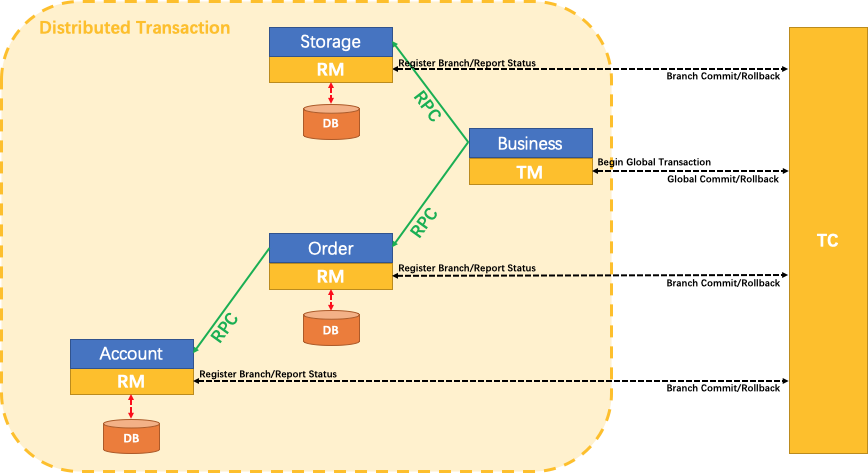
- TC:Transaction Coordinator事务协调器,管理全局的分支事务的状态,用于全局性事务的提交和回滚
- TM:Transaction Manager 事务管理器,用户开启、提交或者回滚【全局事务】
- RM:Resource Manager资源管理器,用于分支事务上的资源管理,向TC注册分支事务,上报分支事务的状态,接收TC的命令来提交或者回滚分支事务
- 传统XA协议实现2PC方案的RM是在数据库层,RM本质上就是数据库自身
- Seata的RM是以jar包的形式嵌入在应用程序里面
架构:TC为单独部署的Server服务端,TM和RM为嵌入到应用中的Client客户端
XID
- TM请求TC开启一个全局事务,TC会生成一个XID作为该全局事务的编号XID,XID会在微服务的调用链路中传播,保证将多个微服务对的子事务关联在一起
Seata部署安装#
下载Seata地址#
http://seata.io/zh-cn/blog/download.html

注:我这边下载的是1.4.1,seata部署版本需要与SpringBoot依赖的版本相对应!!!!!!
Seata部署#
前期准备#
准备好Nacos、mysql
注:nacos配置中心数据是持久化到mysql的!!!!
部署&修改配置#
修改存储模式DB
上传至服务器,目录为:/usr/local/software

# 1、创建目录
mkdir -p /usr/local/software

# 2、解压
unzip seata-server-1.4.1.zip

# 3、修改存储模式 DB
cd seata/conf/
vi file.conf
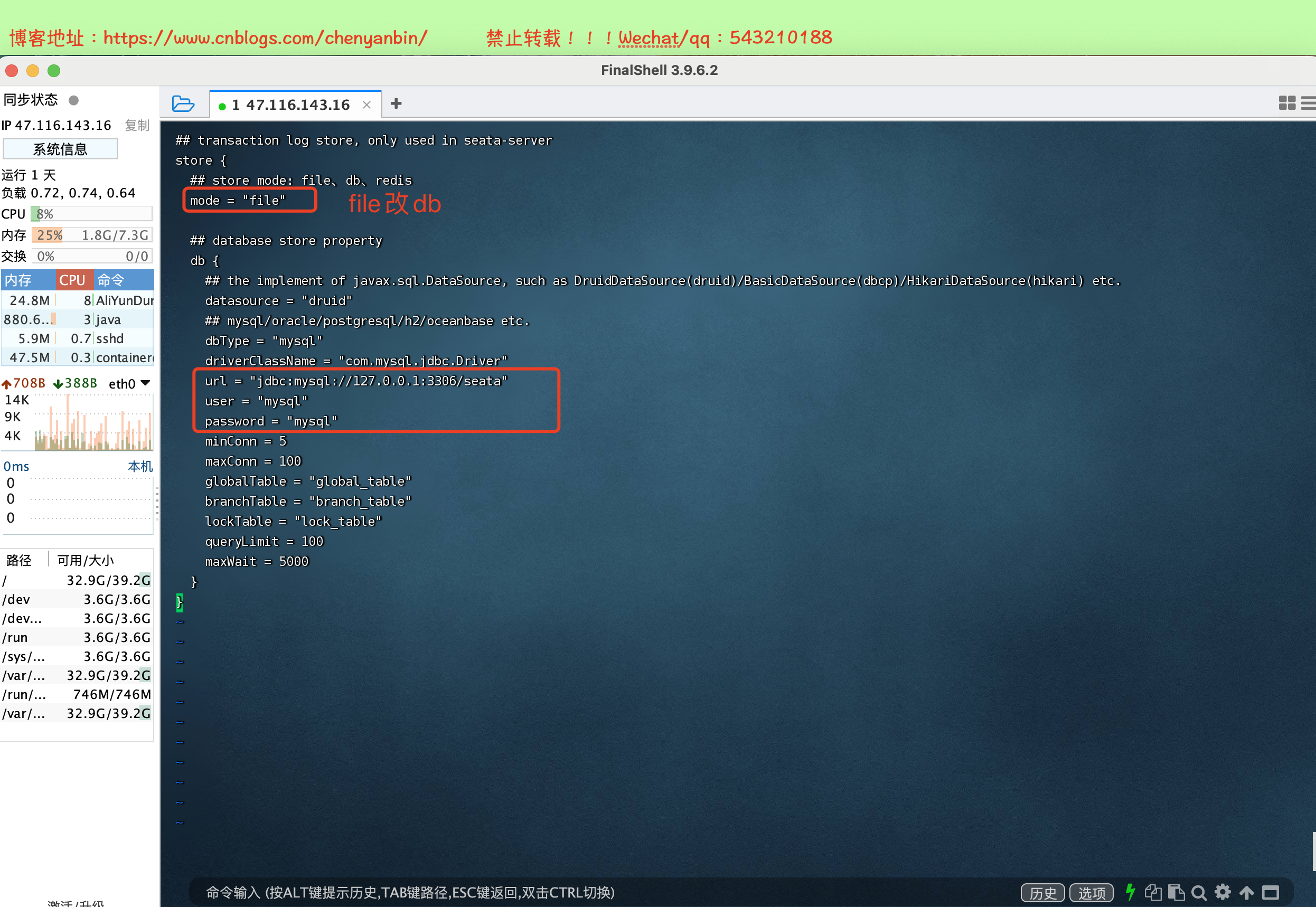
注:修改为自己的mysql!!!!
## transaction log store, only used in seata-server
store {
  ## store mode: file、db、redis
  mode = "file"

  ## database store property
  db {
    ## the implement of javax.sql.DataSource, such as DruidDataSource(druid)/BasicDataSource(dbcp)/HikariDataSource(hikari) etc.
    datasource = "druid"
    ## mysql/oracle/postgresql/h2/oceanbase etc.
    dbType = "mysql"
    driverClassName = "com.mysql.cj.jdbc.Driver"
    url = "jdbc:mysql://47.116.143.16:3306/seata?useUnicode=true&characterEncoding=utf-8&useSSL=false&serverTimezone=Asia/Shanghai"
    user = "root"
    password = "root"
    minConn = 5
    maxConn = 100
    globalTable = "global_table"
    branchTable = "branch_table"
    lockTable = "lock_table"
    queryLimit = 100
    maxWait = 5000
  }
}
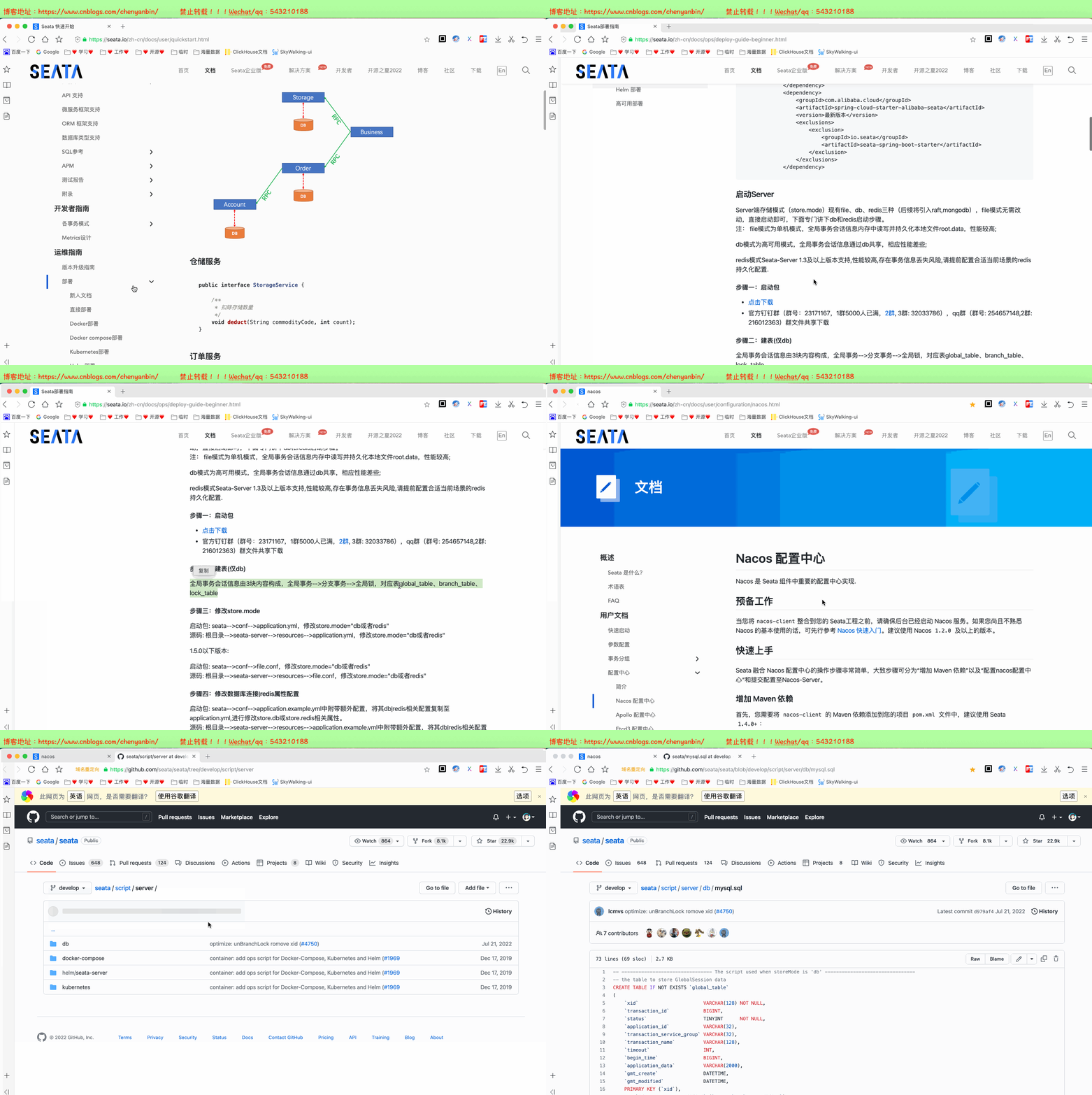
将seata需要的3张表导入数据库中,分别是:global_table、branch_table、lock_table
官网地址:http://seata.io/zh-cn/docs/user/quickstart.html
github地址:https://github.com/seata/seata/blob/develop/script/server/db/mysql.sql


-- -------------------------------- The script used when storeMode is 'db' --------------------------------
-- the table to store GlobalSession data
CREATE TABLE IF NOT EXISTS `global_table`
(
    `xid`                       VARCHAR(128) NOT NULL,
    `transaction_id`            BIGINT,
    `status`                    TINYINT      NOT NULL,
    `application_id`            VARCHAR(32),
    `transaction_service_group` VARCHAR(32),
    `transaction_name`          VARCHAR(128),
    `timeout`                   INT,
    `begin_time`                BIGINT,
    `application_data`          VARCHAR(2000),
    `gmt_create`                DATETIME,
    `gmt_modified`              DATETIME,
    PRIMARY KEY (`xid`),
    KEY `idx_status_gmt_modified` (`status` , `gmt_modified`),
    KEY `idx_transaction_id` (`transaction_id`)
) ENGINE = InnoDB
  DEFAULT CHARSET = utf8mb4;

-- the table to store BranchSession data
CREATE TABLE IF NOT EXISTS `branch_table`
(
    `branch_id`         BIGINT       NOT NULL,
    `xid`               VARCHAR(128) NOT NULL,
    `transaction_id`    BIGINT,
    `resource_group_id` VARCHAR(32),
    `resource_id`       VARCHAR(256),
    `branch_type`       VARCHAR(8),
    `status`            TINYINT,
    `client_id`         VARCHAR(64),
    `application_data`  VARCHAR(2000),
    `gmt_create`        DATETIME(6),
    `gmt_modified`      DATETIME(6),
    PRIMARY KEY (`branch_id`),
    KEY `idx_xid` (`xid`)
) ENGINE = InnoDB
  DEFAULT CHARSET = utf8mb4;

-- the table to store lock data
CREATE TABLE IF NOT EXISTS `lock_table`
(
    `row_key`        VARCHAR(128) NOT NULL,
    `xid`            VARCHAR(128),
    `transaction_id` BIGINT,
    `branch_id`      BIGINT       NOT NULL,
    `resource_id`    VARCHAR(256),
    `table_name`     VARCHAR(32),
    `pk`             VARCHAR(36),
    `status`         TINYINT      NOT NULL DEFAULT '0' COMMENT '0:locked ,1:rollbacking',
    `gmt_create`     DATETIME,
    `gmt_modified`   DATETIME,
    PRIMARY KEY (`row_key`),
    KEY `idx_status` (`status`),
    KEY `idx_branch_id` (`branch_id`),
    KEY `idx_xid` (`xid`)
) ENGINE = InnoDB
  DEFAULT CHARSET = utf8mb4;

CREATE TABLE IF NOT EXISTS `distributed_lock`
(
    `lock_key`       CHAR(20) NOT NULL,
    `lock_value`     VARCHAR(20) NOT NULL,
    `expire`         BIGINT,
    primary key (`lock_key`)
) ENGINE = InnoDB
  DEFAULT CHARSET = utf8mb4;

INSERT INTO `distributed_lock` (lock_key, lock_value, expire) VALUES ('AsyncCommitting', ' ', 0);
INSERT INTO `distributed_lock` (lock_key, lock_value, expire) VALUES ('RetryCommitting', ' ', 0);
INSERT INTO `distributed_lock` (lock_key, lock_value, expire) VALUES ('RetryRollbacking', ' ', 0);
INSERT INTO `distributed_lock` (lock_key, lock_value, expire) VALUES ('TxTimeoutCheck', ' ', 0);
修改Seata 配置中心&注册中心
修改Seata的配置
# 修改Seata配置
cd /usr/local/software/seata/conf
vi registry.conf
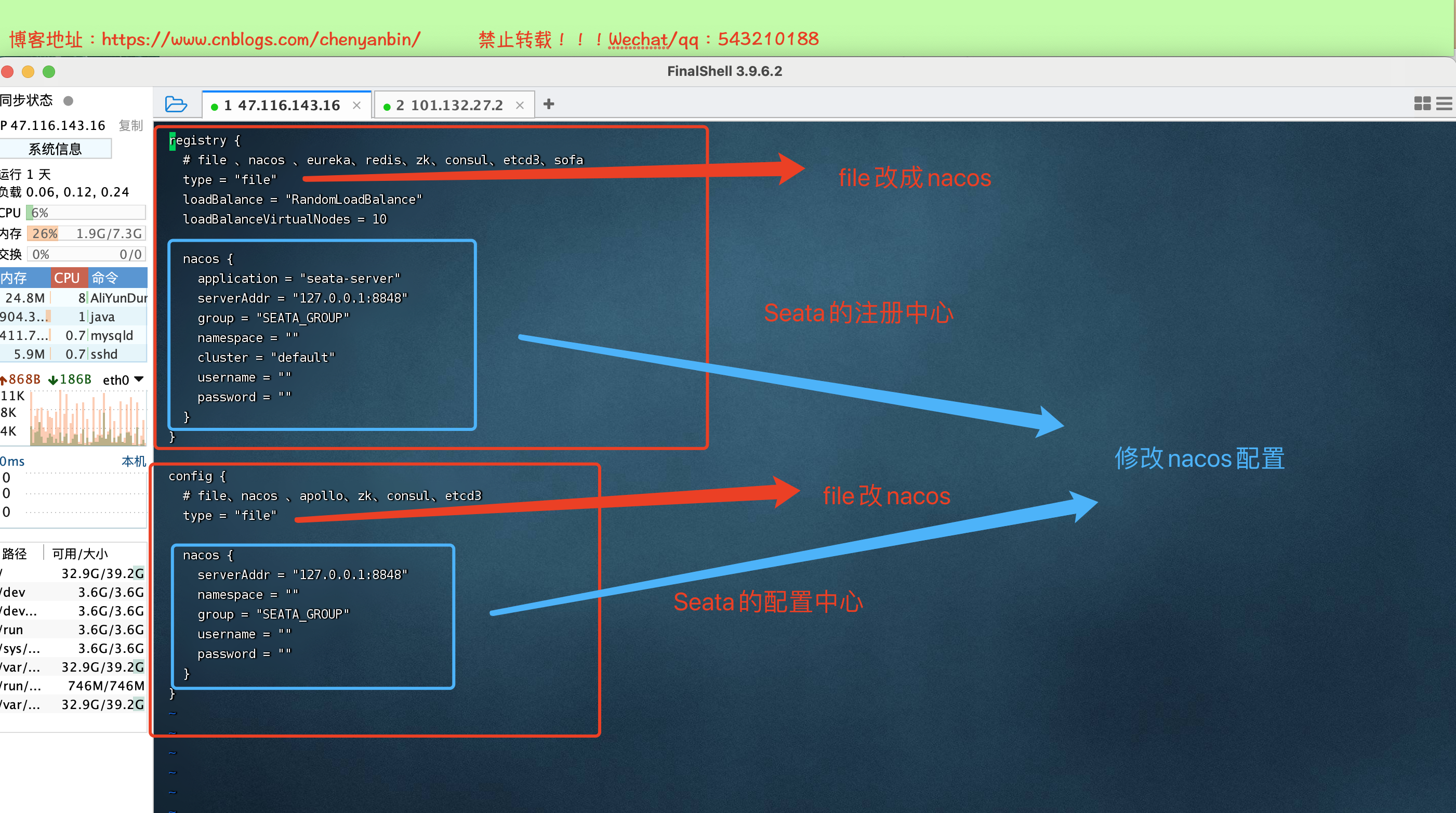
注:修改成自己的nacos信息
registry {
  # file 、nacos 、eureka、redis、zk、consul、etcd3、sofa
  type = "nacos"
  loadBalance = "RandomLoadBalance"
  loadBalanceVirtualNodes = 10

  nacos {
    application = "seata-server"
    serverAddr = "47.116.143.16:8848"
    group = "SEATA_GROUP"
    namespace = ""
    cluster = "default"
    username = "nacos"
    password = "nacos"
  }
}

config {
  # file、nacos 、apollo、zk、consul、etcd3
  type = "nacos"

  nacos {
    serverAddr = "47.116.143.16:8848"
    namespace = ""
    group = "SEATA_GROUP"
    username = "nacos"
    password = "nacos"
  }
}
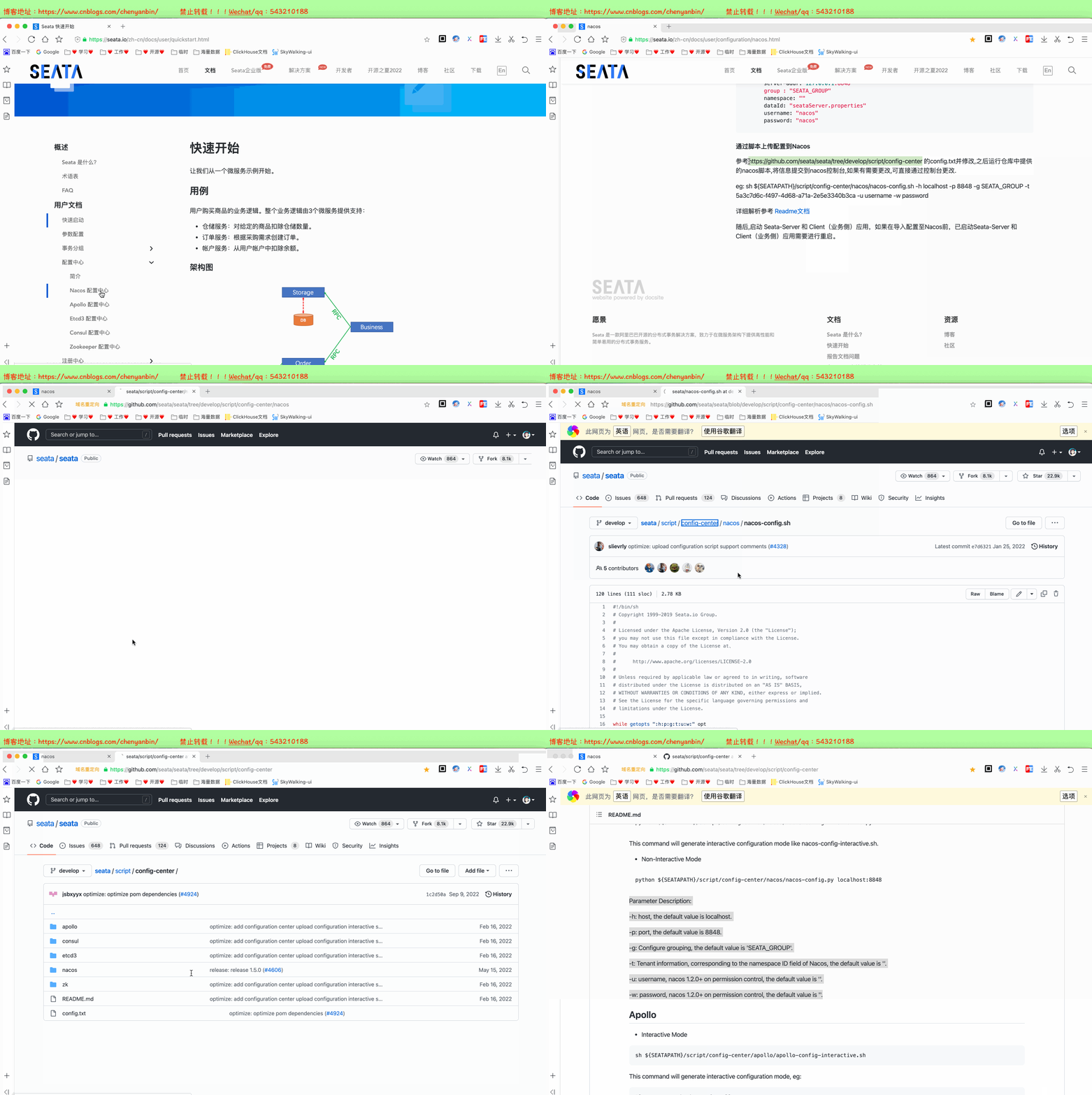
因为Seata的配置中心是nacos,需要把Seata的配置,通过脚本推送到nacos中
官网地址:https://seata.io/zh-cn/docs/user/configuration/nacos.html

脚本地址:https://github.com/seata/seata/blob/develop/script/config-center/nacos/nacos-config.sh
config.txt地址(可以暂时不修改配置参数,直接到nacos中修改配置):https://github.com/seata/seata/blob/develop/script/config-center/config.txt
将Seata配置参数推送到nacos配置中心
# 1、将github中的nacos-config.sh,传到服务器上,目录为:/usr/local/software/seata/conf
# 我这边使用的是,将脚本文件拷出,在服务创建文件夹,赋予权限
touch nacos-config.sh
chmod +x nacos-config.sh

# 2、将config.txt,放到服务器上,目录为:/usr/local/software/seata
执行脚本
sh nacos-config.sh -h 47.116.143.16 -p 8848 -g SEATA_GROUP -u nacos -w nacos


-h:nacos主机地址
-p:nacos端口号
-g:nacos分组
-t:nacos命名空间
-u:nacos账号
-w:nacos密码

推送成功,已将Seata配置参数推送到Nacos配置中心

在nacos配置中心里,修改Seata参数,具体修改参考官网如下
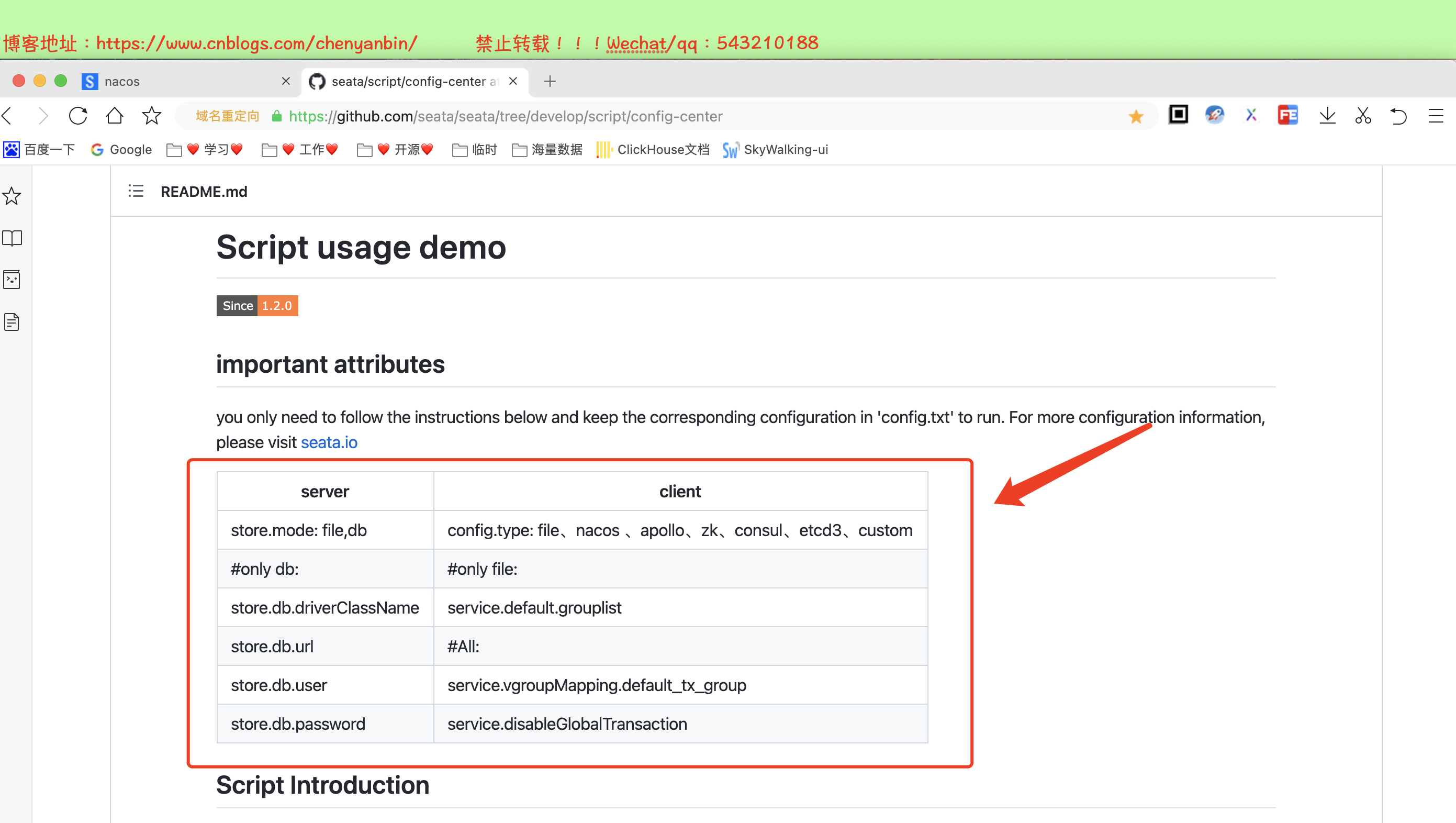
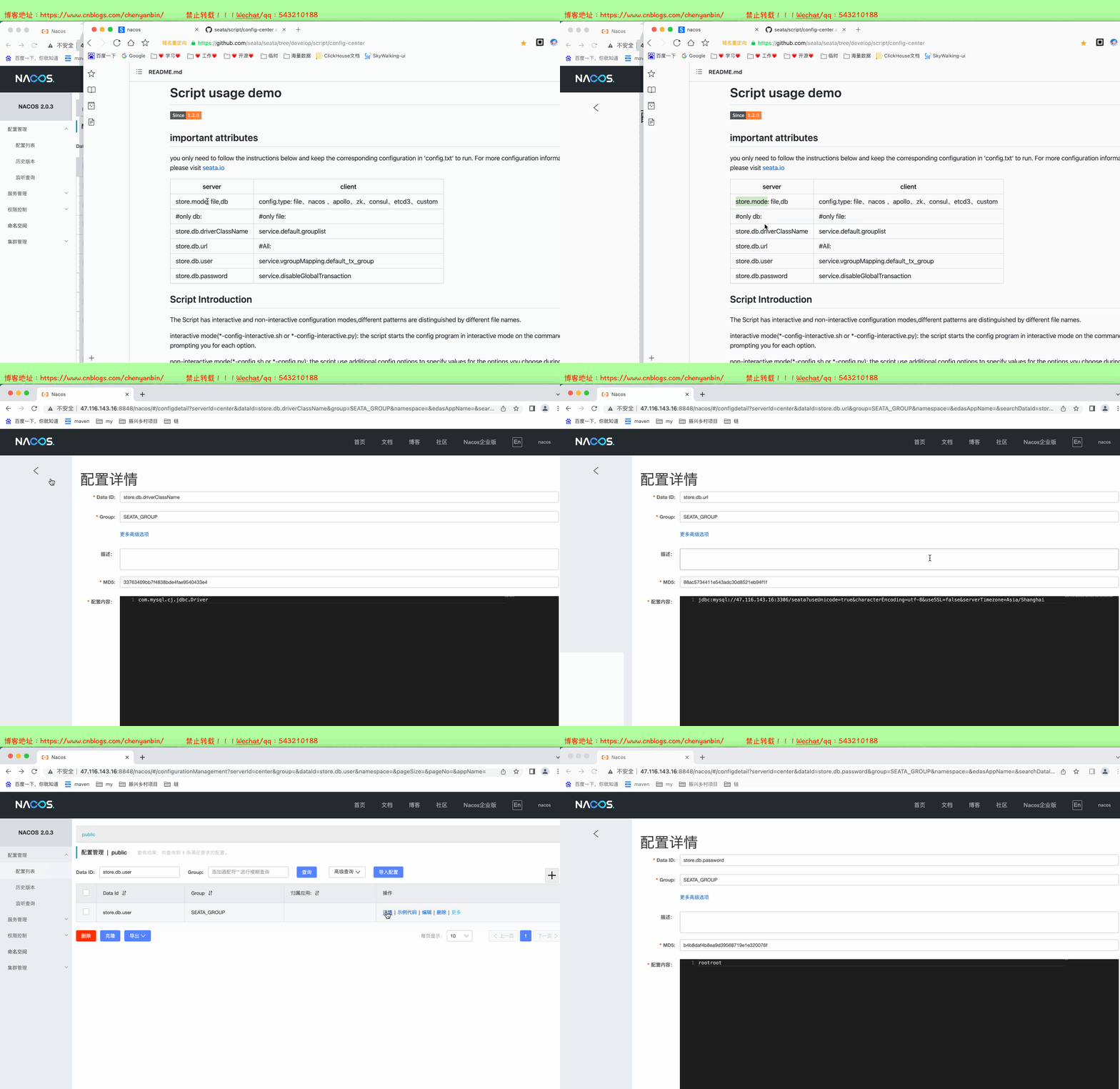
具体config.txt里的参数解释:https://seata.io/zh-cn/docs/user/configurations.html
新建2个配置需要与微服务中的配置对应上
service.vgroupMapping.${spring.alibaba.seata.tx-service-group}=default


如下
service.vgroupMapping.order_service_group=default
service.vgroupMapping.product_service_group=default

注意:分组为:SEATA_GROUP

启动Seata服务#
- ./seata-server.sh启动,默认端口8091(守护进程方式启动 nohup ./seata-server.sh &)
注意:如果seata部署在服务器,微服务在本地启动的话,2个服务不在一个局域网下,因此没法通信,启动Seata时,需要指定ip和端口号
sh seata-server.sh -p 8091 -h 47.116.143.16
Seata AT模式日期序列化问题解决方案#
后端服务引入kryo依赖#
      <dependency>
            <groupId>com.esotericsoftwaregroupId>
            <artifactId>kryoartifactId>
            <version>4.0.2version>
        dependency>
        <dependency>
            <groupId>de.javakaffeegroupId>
            <artifactId>kryo-serializersartifactId>
            <version>0.42version>
        dependency>
修改Seata在nacos配置中心配置#
将
client.undo.logSerialization=jackson

修改为
client.undo.logSerialization=kryo

微服务整合Seata#
前期准备#
在每个微服务所连的库,新建一张表
-- 注意此处0.3.0+ 增加唯一索引 ux_undo_log
CREATE TABLE `undo_log` (
  `id` bigint(20) NOT NULL AUTO_INCREMENT,
  `branch_id` bigint(20) NOT NULL,
  `xid` varchar(100) NOT NULL,
  `context` varchar(128) NOT NULL,
  `rollback_info` longblob NOT NULL,
  `log_status` int(11) NOT NULL,
  `log_created` datetime NOT NULL,
  `log_modified` datetime NOT NULL,
  `ext` varchar(100) DEFAULT NULL,
  PRIMARY KEY (`id`),
  UNIQUE KEY `ux_undo_log` (`xid`,`branch_id`)
) ENGINE=InnoDB AUTO_INCREMENT=1 DEFAULT CHARSET=utf8;
聚合工程搭建#
。。。。
项目结构#
- ybchen-common:公共模块
- ybchen-order-service:订单微服务
- ybchen-product-service:商品微服务
数据库分表为:order(订单微服务库)、product(商品微服务库)、seata(Seata全局事务涉及的表)、nacos(Nacos配置中心,mysql持久化)

Seata依赖#
        <dependency>
            <groupId>com.alibaba.cloudgroupId>
            <artifactId>spring-cloud-starter-alibaba-seataartifactId>
            <exclusions>
                <exclusion>
                    <groupId>io.seatagroupId>
                    <artifactId>seata-spring-boot-starterartifactId>
                exclusion>
            exclusions>
        dependency>
        <dependency>
            <groupId>io.seatagroupId>
            <artifactId>seata-spring-boot-starterartifactId>
            <version>1.4.1version>
        dependency>


        <dependency>
            <groupId>com.esotericsoftwaregroupId>
            <artifactId>kryoartifactId>
            <version>4.0.2version>
        dependency>
        <dependency>
            <groupId>de.javakaffeegroupId>
            <artifactId>kryo-serializersartifactId>
            <version>0.42version>
        dependency>
分布式事务演示#
关键代码片段
order-service
@Autowired OrderMapper orderMapper; @Autowired ProductStockControllerFeign productStockControllerFeign; @Override //开启分布式事务 Seta AT模式 @GlobalTransactional public ReturnTadd() { OrderDO orderDO = new OrderDO(); int outTradeNo = new Random().nextInt(1000); orderDO.setOutTradeNo("T" + outTradeNo); orderDO.setCreateTime(new Date()); int rows = orderMapper.insert(orderDO); if (rows > 0) { //扣减商品库存 ReturnT reduceReturn = productStockControllerFeign.reduce(); if (ReturnT.isSuccess(reduceReturn)) { log.info("购买成功"); //TODO 模拟异常方式二 // int num = 1 / 0; return ReturnT.buildSuccess("购买成功"); } // 解决全局拦截器问题,通过接口响应状态码,来判断是否主动抛异常!!!!!!! if (reduceReturn.getCode() != 0) { log.info("扣减商品库存失败,接口响应:{}", reduceReturn); throw new BizException(110, "扣减商品库存失败"); } log.info("扣减商品库存失败"); return ReturnT.buildError("扣减商品库存失败"); } log.info("购买失败"); return ReturnT.buildError("购买失败"); }
product-service
@Autowired ProductStockMapper productStockMapper; @Override public ReturnTreduceProductStock() { ProductStockDO stockDO = new ProductStockDO(); stockDO.setProductId(10086); stockDO.setBuyNum(1); stockDO.setCreateTime(new Date()); int rows = productStockMapper.insert(stockDO); //TODO 模拟异常方式一 // int num = 1 / 0; if (rows > 0) { log.info("扣减商品库存成功,rows=" + rows); return ReturnT.buildSuccess("扣减商品库存成功"); } else { log.info("扣减商品库存失败,rows=" + rows); return ReturnT.buildError("扣减失败"); } }
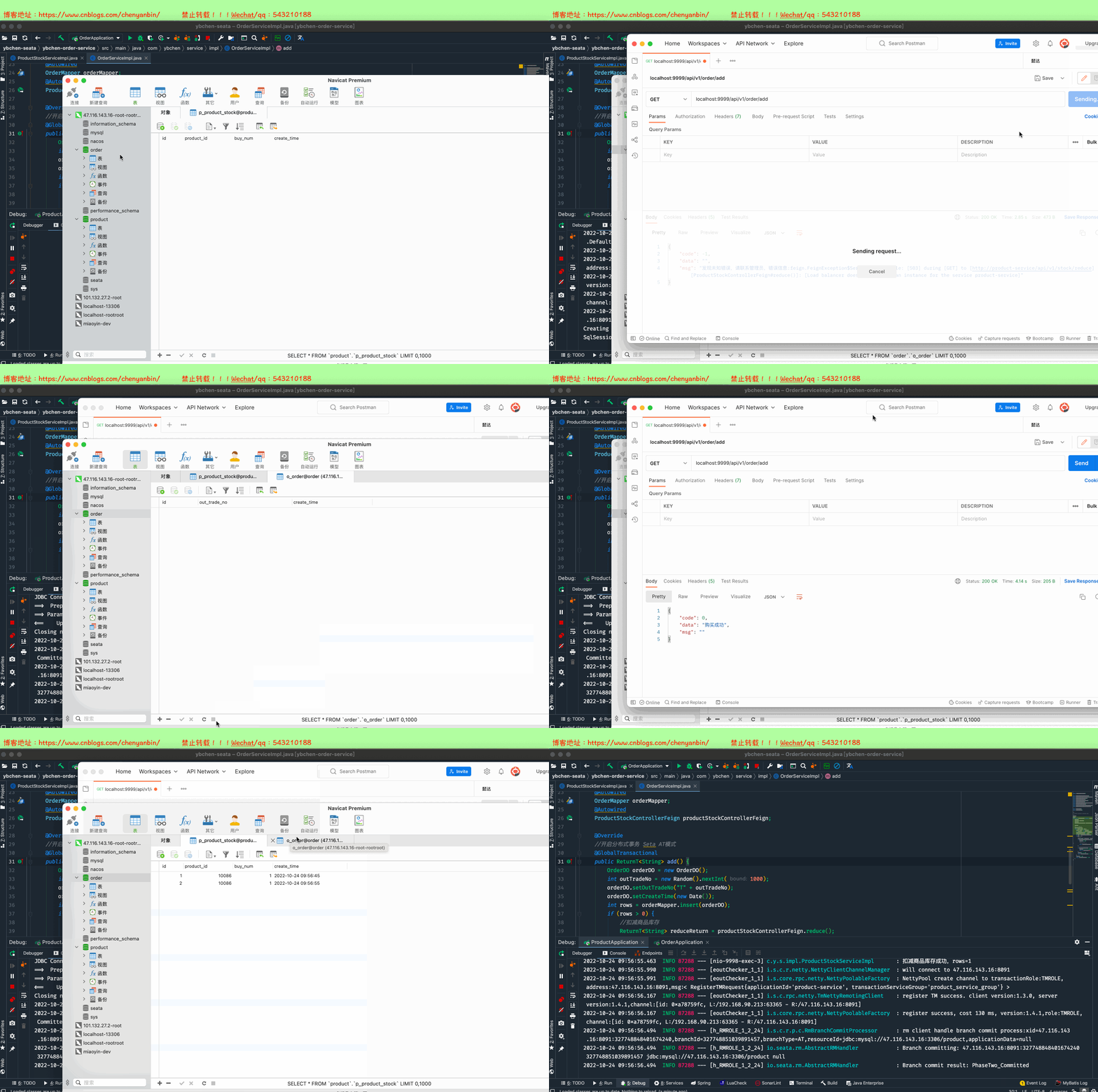
正常情况#
场景描述:product微服务和order微服务均正常,2个微服务的事务全部提交成功,2个库都插入数据成功
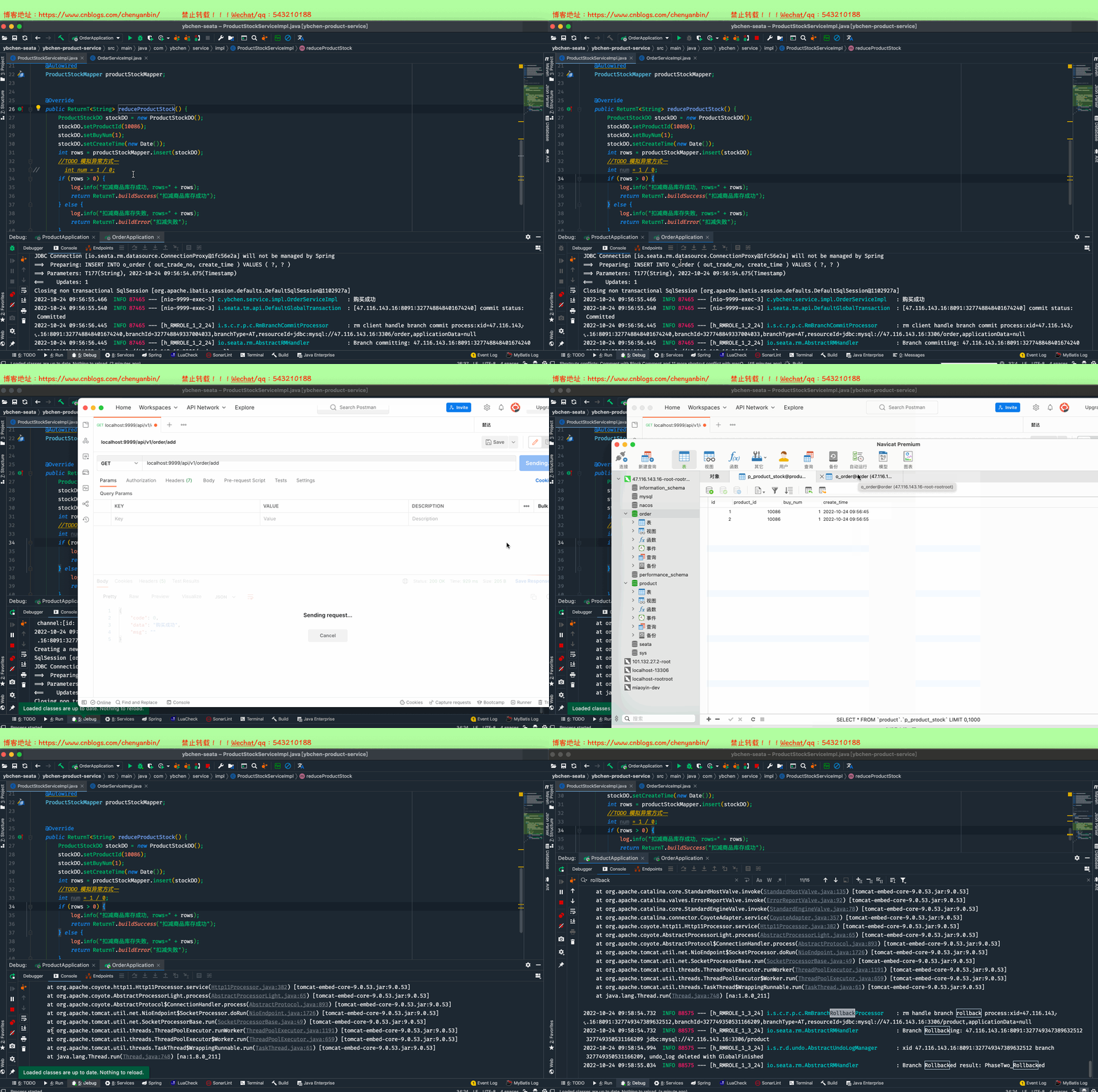
异常情况一(product微服务异常)#
场景描述:product微服务发生异常,order微服务正常情况,出现异常情况时,需要2个微服务的事务全部回滚,2个库插入的数据都回滚
异常情况二(order微服务异常)#
场景描述:order微服务发生异常,product微服务正常,出现异常情况时,需要2个微服务的事务全部回滚,2个库插入的数据都回滚

异常情况三(product微服务未启动)#
场景描述:order微服务正常启动,product微服务未启动,需要把order微服务插入的数据回滚

项目源码#
https://github.com/543210188/ybchen-seata

https://gitee.com/yenbin_chen/ybchen-seatay