-
SpringCloud学习笔记
一 从2.2.x和H版开始说起
1.1 微服务简介


1.2 SpringCloud 简介


1.3 SpringCloud技术栈


1.4 SpringBoot版本选择
1.4.1 git源码地址
git源码地址:https://github.com/spring-projects/spring-boot/releases/


为了稳定起见,建议用Spring boot2.x1.4.2 SpringBoot2.0新特性
git源码地址:https:github.com/spring-projects/spring-boot/wiki/Spring-Boot-2.0-Release-Notes

通过上面官网发现 Boot官方强烈建议你升级到2.X以上版本。1.4.3 官网看Boot版本
- springboot(截止2019.10.26)

- springboot(截止2020.2.15)

1.5 SpringCloud版本选择
1.5.1 git源码地址
git源码地址:https://github.com/spring-projects/spring-cloud/releases/
1.5.2 官网
官网:https://spring.io/projects/spring-cloud

1.5.3 官网看Cloud版本
1.5.3.1 Cloud命名规则
SpringCloud采用了英国伦敦地铁站的名称来命名,并由地铁站名称字母A-Z依次类推的形式来发布迭代版本。
SpringCloud是一个由许多子项目组成的综合项目,各个项目有不同的发布节奏。为了管理SpringCloud与各子项目的版本依赖关系,发布了一个清单,其中包括了某个SpringCloud版本对应的子项目版本。为了避免SpringCloud版本号与子项目版本混乱,SpringCloud版本采用了名称而并非版本号的命名,这些版本的名字采用了伦敦地铁站的名字,根据字母表的顺序来对应版本时间顺序。例如Angel是第一个版本,Brixton是第二个版本。当SpringCloud的发布内容积累到列节点或者一个重大Bug被解决后,会发布一个’service releases’版本,简称SRX版本,比如Greenwich.SR2就是SpringCloud发布的Greenwich版本的第2个SRX版本。

1.5.3.2 springcloud(截止2019.10.26)

1.5.3.3 springboot(截止2020.2.15)

1.6 Springcloud和Springboot之间的依赖关系
1.6.1 官方文档
官方文档:https://spring.io/projects/spring-cloud#overview

1.6.2 依赖

1.6.3 更详细的版本对应查看方法
查询网址:https://start.spring.io/actuator/info

1.7 项目环境
工具 版本 cloud Hoxton.SR1 boot 2.2.RELEASE cloud alibaba 2.1.0.RELEASE java Java8 Maven 3.5及以上 1.8 题外话
- boot版已经到3.0.0为最新,为什么选2.2.2?
只用boot,可以直接用最新版,但是同时用boot和cloud,需要照顾,由cloud决定boot版本。

- 2.x版本常用软件pom
org.springframework.boot spring-boot-dependencies 2.2.2.RELEASE pom import org.springframework.cloud spring-cloud-dependencies Hoxton.SR1 pom import com.alibaba.cloud spring-cloud-alibaba-dependencies 2.2.5.RELEASE pom import - 1
- 2
- 3
- 4
- 5
- 6
- 7
- 8
- 9
- 10
- 11
- 12
- 13
- 14
- 15
- 16
- 17
- 18
- 19
- 20
- 21
- 22
- 23
- 24
- 25
- 26
二 关于Cloud各种组件的停更/升级/替换
2.1 由停更引发的"升级惨案"
2.1.1 停更不停用
- 被动修复bugs。
- 不再接受合并请求。
- 不再发布新版本。
2.1.2 明细条目
- 之前

- now
1) 服务注册中心:Eureka(重度患者)、Zookeeper、Consul、Nacos(推荐)。
2)服务调用: Ribbon(轻度患者)、LoadBalancer。
3)服务调用:Feign,OpenFeign。
4)服务降级:Hystrix、resilience4j(国外使用多)、alibaba Sentinel(国内使用多)。
5)服务网关:Zuul、Zuul2(胎死腹中)、gateway。
6)服务配置:Config、Nacos、apollo。
7)服务主线:Bus、Nacos。
2.1.3 参考资料见官网
Spring Cloud:https://cloud.spring.io/spring-cloud-static/Hoxton.SR1/reference/htmlsingle/
Spring Cloud中文文档:https://www.bookstack.cn/read/spring-cloud-docs/docs-index.md
Spring Boot:https://docs.spring.io/spring-boot/docs/2.2.2.RELEASE/reference/htmlsingle/三 微服务架构编码构建

3.1 IDEA新建project工作空间
3.1.1 父工程步骤
-
New Project

-
聚合总父工程名字

-
Maven选版本

-
字符编码
文件–>设置–>文本编码

-
注解生效激活
文件–>设置–>构建,执行,部署–>Compiler–>Annotation processors

-
java编译版本选8
文件–>设置–>构建,执行,部署–>Compiler–>Java Compiler

-
File Type过滤
文件–>设置–>编辑器–>文件类型

3.1.2 父工程POM
4.0.0 com.tedu.java cloud2022 pom 1.0-SNAPSHOT Maven http://maven.apache.org/ 2001 UTF-8 1.8 1.8 4.12 1.2.12 1.18.16 8.0.26 1.2.11 2.1.4 org.springframework.boot spring-boot-dependencies 2.2.2.RELEASE pom import org.springframework.cloud spring-cloud-dependencies Hoxton.SR1 pom import com.alibaba.cloud spring-cloud-alibaba-dependencies 2.2.5.RELEASE pom import mysql mysql-connector-java ${mysql.version} com.alibaba druid ${druid.version} org.mybatis.spring.boot mybatis-spring-boot-starter ${mybatis.spring.boot.version} log4j log4j ${log4j.version} junit junit ${junit.version} org.projectlombok lombok ${lombok.version} true org.springframework.boot spring-boot-maven-plugin 2.6.7 true true - 1
- 2
- 3
- 4
- 5
- 6
- 7
- 8
- 9
- 10
- 11
- 12
- 13
- 14
- 15
- 16
- 17
- 18
- 19
- 20
- 21
- 22
- 23
- 24
- 25
- 26
- 27
- 28
- 29
- 30
- 31
- 32
- 33
- 34
- 35
- 36
- 37
- 38
- 39
- 40
- 41
- 42
- 43
- 44
- 45
- 46
- 47
- 48
- 49
- 50
- 51
- 52
- 53
- 54
- 55
- 56
- 57
- 58
- 59
- 60
- 61
- 62
- 63
- 64
- 65
- 66
- 67
- 68
- 69
- 70
- 71
- 72
- 73
- 74
- 75
- 76
- 77
- 78
- 79
- 80
- 81
- 82
- 83
- 84
- 85
- 86
- 87
- 88
- 89
- 90
- 91
- 92
- 93
- 94
- 95
- 96
- 97
- 98
- 99
- 100
- 101
- 102
- 103
3.1.3 Maven工程落地细节复习
- Maven中的DependencyManagement和Dependencies?
父项目中 不使用dependencyManagement,直接使用 dependencies,则子项目会继承引入父项目中的依赖。而父项目中使用dependencyManagement,则子项目不会引入依赖,需要显式的自行添加依赖。但可以不用添加版本号,直接继承父项目的版本号。
说明:dependencyManagement一般用在maven构建的聚合项目的父项目中,只是用来声明和锁定版本(通常用语有多个子项目,但是不是每个子项目都需要引入同一种依赖的场景),所以使用dependencyManagement元素提供了一种管理依赖版本号的方式,通常会在一个组织或者项目的最顶层父POM中看到dependencyManagement元素。 - maven中跳过单元测试?

3.1.4 父工程创建完成执行mvn:insall将父工程发布到仓库方便子工程继承

3.2 Rest微服务工程搭建
3.2.1 Cloud-provider-payment8001 微服务提供者Module模块
3.2.1.1 建module

创建完成后回到父工程查看pom文件变化?

3.2.1.2 改POM
cloud2022 com.tedu.java 1.0-SNAPSHOT 4.0.0 Cloud-provider-payment8001 org.springframework.boot spring-boot-starter-web org.springframework.boot spring-boot-starter-actuator org.mybatis.spring.boot mybatis-spring-boot-starter com.alibaba druid-spring-boot-starter 1.1.10 mysql mysql-connector-java org.springframework.boot spring-boot-starter-jdbc org.springframework.boot spring-boot-starter-test test org.projectlombok lombok org.springframework.boot spring-boot-devtools runtime true - 1
- 2
- 3
- 4
- 5
- 6
- 7
- 8
- 9
- 10
- 11
- 12
- 13
- 14
- 15
- 16
- 17
- 18
- 19
- 20
- 21
- 22
- 23
- 24
- 25
- 26
- 27
- 28
- 29
- 30
- 31
- 32
- 33
- 34
- 35
- 36
- 37
- 38
- 39
- 40
- 41
- 42
- 43
- 44
- 45
- 46
- 47
- 48
- 49
- 50
- 51
- 52
- 53
- 54
- 55
3.2.1.3 写YML
application.yml
server: port: 8001 spring: application: name: cloud-payment-service8001 datasource: type: com.alibaba.druid.pool.DruidDataSource #当前数据源操作类型 driver-class-name: com.mysql.cj.jdbc.Driver #mysql驱动包 url: jdbc:mysql://localhost:3306/db2022_cloud?useUnicode=true&characterEncoding=utf-8&useSSL=false username: root password: 123456 mybatis: mapper-locations: classpath:mapper/*.xml type-aliases-package: com.tedu.java.pojo #所在pojo别名类所在包- 1
- 2
- 3
- 4
- 5
- 6
- 7
- 8
- 9
- 10
- 11
- 12
- 13
- 14
3.2.1.4 主启动
package com.tedu.java; import org.springframework.boot.SpringApplication; import org.springframework.boot.autoconfigure.SpringBootApplication; /** * @author 47132 */ @SpringBootApplication public class PayMentMain8001 { public static void main(String[] args) { SpringApplication.run(PayMentMain8001.class,args); } }- 1
- 2
- 3
- 4
- 5
- 6
- 7
- 8
- 9
- 10
- 11
- 12
- 13
- 14
- 15
- 16
3.2.1.5 业务类
1) 建表SQL
在数据库中新增数据库db2022_cloud,在db2022_cloud新增表payment。CREATE TABLE `payment` ( `id` bigint(20) NOT NULL AUTO_INCREMENT COMMENT '主键', `serial` varchar(200) CHARACTER SET utf8 COLLATE utf8_general_ci DEFAULT NULL COMMENT '支付流水号', PRIMARY KEY (`id`) USING BTREE ) ENGINE = InnoDB CHARACTER SET = utf8 COLLATE = utf8_general_ci COMMENT = '支付表' ROW_FORMAT = Dynamic;- 1
- 2
- 3
- 4
- 5
2)pojo
主实体Payment:package com.tedu.java.pojo; import lombok.AllArgsConstructor; import lombok.Data; import lombok.NoArgsConstructor; import java.io.Serializable; /** * @author 47132 */ @Data @AllArgsConstructor @NoArgsConstructor public class Payment implements Serializable { private Long id; private String serial; }- 1
- 2
- 3
- 4
- 5
- 6
- 7
- 8
- 9
- 10
- 11
- 12
- 13
- 14
- 15
- 16
- 17
- 18
Json封装体CommonResult类
package com.tedu.java.utils; import lombok.AllArgsConstructor; import lombok.Data; import lombok.NoArgsConstructor; /** * @author 47132 */ @Data @AllArgsConstructor @NoArgsConstructor public class CommonResult{ //404 not_found private Integer code; private String message; private T data; public CommonResult(Integer code,String message){ this(code,message,null); } } - 1
- 2
- 3
- 4
- 5
- 6
- 7
- 8
- 9
- 10
- 11
- 12
- 13
- 14
- 15
- 16
- 17
- 18
- 19
- 20
- 21
3)dao
PaymentDao 接口package com.tedu.java.dao; import com.tedu.java.pojo.Payment; import org.apache.ibatis.annotations.Mapper; import org.apache.ibatis.annotations.Param; /** * @author 47132 */ @Mapper public interface PaymentDao { public int create(Payment payment); public Payment getPaymentById(@Param("id") Long id); }- 1
- 2
- 3
- 4
- 5
- 6
- 7
- 8
- 9
- 10
- 11
- 12
- 13
- 14
mybatis的映射文件PaymentMapper.xml:
路径:src\main\resources\mapper\PaymentMapper.xmlinsert into payment (serial) values (#{serial}); - 1
- 2
- 3
- 4
- 5
- 6
- 7
- 8
- 9
- 10
- 11
- 12
- 13
- 14
- 15
- 16
- 17
4)service
接口PaymentServicepackage com.tedu.java.service; import com.tedu.java.pojo.Payment; import org.apache.ibatis.annotations.Param; /** * @author 47132 */ public interface PaymentService { public int create(Payment payment); public Payment getPaymentById(@Param("id") Long id); }- 1
- 2
- 3
- 4
- 5
- 6
- 7
- 8
- 9
- 10
- 11
- 12
实现类 PaymentServiceImpl
package com.tedu.java.service.impl; import com.tedu.java.dao.PaymentDao; import com.tedu.java.pojo.Payment; import com.tedu.java.service.PaymentService; import org.springframework.beans.factory.annotation.Autowired; import org.springframework.stereotype.Service; @Service public class PaymentServiceImpl implements PaymentService { @Autowired private PaymentDao paymentDao; @Override public int create(Payment payment) { return paymentDao.create(payment); } @Override public Payment getPaymentById(Long id) { return paymentDao.getPaymentById(id); } }- 1
- 2
- 3
- 4
- 5
- 6
- 7
- 8
- 9
- 10
- 11
- 12
- 13
- 14
- 15
- 16
- 17
- 18
- 19
- 20
- 21
- 22
- 23
5)controller
PaymentControllerpackage com.tedu.java.controller; import com.tedu.java.pojo.Payment; import com.tedu.java.service.PaymentService; import com.tedu.java.utils.CommonResult; import lombok.extern.slf4j.Slf4j; import org.springframework.beans.factory.annotation.Autowired; import org.springframework.cloud.client.ServiceInstance; import org.springframework.web.bind.annotation.*; import java.util.List; import java.util.concurrent.TimeUnit; /** * @author 47132 */ @RestController @Slf4j public class PaymentController { @Autowired private PaymentService paymentService; @PostMapping(value = "/payment/create") public CommonResult create(@RequestBody Payment payment) { int result = paymentService.create(payment); log.info("*******插入结果:" + result); if (result > 0) { return new CommonResult(200, "插入结果成功,serverPort:", result); } else { return new CommonResult(444, "插入结果失败!!serverPort:"); } } @GetMapping(value = "/payment/get/{id}") public CommonResult getPaymentById(@PathVariable("id") Long id) { Payment paymentResult = paymentService.getPaymentById(id); log.info("*******插入结果为:" + paymentResult); if (paymentResult != null) { return new CommonResult(200, "查询结果成功,serverPort:"+serverPort, paymentResult); } else { return new CommonResult(444, "没有对应记录!!查询id为:"+id+",serverPort:"+serverPort); } } }- 1
- 2
- 3
- 4
- 5
- 6
- 7
- 8
- 9
- 10
- 11
- 12
- 13
- 14
- 15
- 16
- 17
- 18
- 19
- 20
- 21
- 22
- 23
- 24
- 25
- 26
- 27
- 28
- 29
- 30
- 31
- 32
- 33
- 34
- 35
- 36
- 37
- 38
- 39
- 40
- 41
- 42
- 43
- 44
3.2.1.6 测试
运行项目,先使用postman模拟post请求,添加数据,然后查询。

3.2.2 热部署Devtools
3.2.2.1 Adding devtools to your project(引入maven依赖)
org.springframework.boot spring-boot-devtools runtime true - 1
- 2
- 3
- 4
- 5
- 6
3.2.2.2 Adding plugin to your pom.xml(添加插件到pom)
org.springframework.boot spring-boot-maven-plugin true true - 1
- 2
- 3
- 4
- 5
- 6
- 7
- 8
- 9
- 10
- 11
- 12
3.2.2.3 Enabling automatic build(开启自动编译)

3.2.2.4 Update the value of(idea中快捷键:ctrl+shift+alt+/)


3.2.2.5 重启idea
3.2.3 cloud-consumer-order80 微服务消费者订单Module模块
3.2.3.1 新建cloud-consumer-order80

3.2.3.2 改POM
cloud2022 com.tedu.java 1.0-SNAPSHOT 4.0.0 cloud-consumer-order80 org.springframework.boot spring-boot-starter-web org.springframework.boot spring-boot-starter-actuator org.springframework.boot spring-boot-starter-test test org.springframework.boot spring-boot-devtools runtime true org.projectlombok lombok - 1
- 2
- 3
- 4
- 5
- 6
- 7
- 8
- 9
- 10
- 11
- 12
- 13
- 14
- 15
- 16
- 17
- 18
- 19
- 20
- 21
- 22
- 23
- 24
- 25
- 26
- 27
- 28
- 29
- 30
- 31
- 32
- 33
- 34
- 35
- 36
- 37
- 38
- 39
3.2.3.3 写YML
server: port: 80 spring: application: name: cloud-comsumer-order80- 1
- 2
- 3
- 4
- 5
3.2.3.4 主启动
package com.tedu.java; import org.springframework.boot.SpringApplication; import org.springframework.boot.autoconfigure.SpringBootApplication; /** * @author 47132 */ @SpringBootApplication public class OrderMain80 { public static void main(String[] args) { SpringApplication.run(OrderMain80.class,args); } }- 1
- 2
- 3
- 4
- 5
- 6
- 7
- 8
- 9
- 10
- 11
- 12
- 13
- 14
3.2.3.5 业务类
- pojo
主实体Payment:
package com.tedu.java.pojo; import lombok.AllArgsConstructor; import lombok.Data; import lombok.NoArgsConstructor; import java.io.Serializable; /** * @author 47132 */ @Data @AllArgsConstructor @NoArgsConstructor public class Payment implements Serializable { private Long id; private String serial; }- 1
- 2
- 3
- 4
- 5
- 6
- 7
- 8
- 9
- 10
- 11
- 12
- 13
- 14
- 15
- 16
- 17
- 18
Json封装体CommonResult类
package com.tedu.java.utils; import lombok.AllArgsConstructor; import lombok.Data; import lombok.NoArgsConstructor; /** * @author 47132 */ @Data @AllArgsConstructor @NoArgsConstructor public class CommonResult{ //404 not_found private Integer code; private String message; private T data; public CommonResult(Integer code,String message){ this(code,message,null); } } - 1
- 2
- 3
- 4
- 5
- 6
- 7
- 8
- 9
- 10
- 11
- 12
- 13
- 14
- 15
- 16
- 17
- 18
- 19
- 20
- 21
- 首说RestTemplate
RestTemplate提供了多种便捷访问远程Http服务的方法,是一种简单便捷的访问restful服务模板类,是Spring提供的用于访问Rest服务的客户端模板工具类。

- config配置类
ApplicationContextConfig 类
package com.tedu.java.config; import org.springframework.context.annotation.Bean; import org.springframework.context.annotation.Configuration; import org.springframework.web.client.RestTemplate; /** * @author 47132 */ @Configuration public class ApplicationContextConfig { @Bean public RestTemplate getRestTemplate(){ return new RestTemplate(); } }- 1
- 2
- 3
- 4
- 5
- 6
- 7
- 8
- 9
- 10
- 11
- 12
- 13
- 14
- 15
- 16
- 17
- 18
- controller
OrderController 类
package com.tedu.java.controller; import com.tedu.java.pojo.Payment; import com.tedu.java.utils.CommonResult; import lombok.extern.slf4j.Slf4j; import org.springframework.beans.factory.annotation.Autowired; import org.springframework.web.bind.annotation.GetMapping; import org.springframework.web.bind.annotation.PathVariable; import org.springframework.web.bind.annotation.RestController; import org.springframework.web.client.RestTemplate; /** * @author 47132 */ @RestController @Slf4j public class OrderController { public static final String PAYMENT_URL="HTTP://localhost:8001"; @Autowired private RestTemplate restTemplate; @GetMapping("/consumer/payment/create") public CommonResultcreate(Payment payment){ return restTemplate.postForObject(PAYMENT_URL+"/payment/create",payment, CommonResult.class); } @GetMapping("/consumer/payment/get/{id}") public CommonResult getPayment(@PathVariable("id") Long id){ return restTemplate.getForObject(PAYMENT_URL+"/payment/get/"+id,CommonResult.class); } } - 1
- 2
- 3
- 4
- 5
- 6
- 7
- 8
- 9
- 10
- 11
- 12
- 13
- 14
- 15
- 16
- 17
- 18
- 19
- 20
- 21
- 22
- 23
- 24
- 25
- 26
- 27
- 28
- 29
- 30
- 31
3.2.3.6 测试
先启动8001,再启动80,然后浏览器访问http://localhost/consumer/payment/get/1

3.2.4 工程重构
3.2.4.1 观察问题
 系统中有重复部分,重构。
3.2.4.2 新建cloud-api-common

3.2.4.3 改POM
cloud2022 com.tedu.java 1.0-SNAPSHOT 4.0.0 cloud-api-commons org.springframework.boot spring-boot-devtools runtime true org.projectlombok lombok true cn.hutool hutool-all 5.8.6 - 1
- 2
- 3
- 4
- 5
- 6
- 7
- 8
- 9
- 10
- 11
- 12
- 13
- 14
- 15
- 16
- 17
- 18
- 19
- 20
- 21
- 22
- 23
- 24
- 25
- 26
- 27
- 28
- 29
- 30
- 31
3.2.4.3 pojo
主实体Payment:
package com.tedu.java.pojo; import lombok.AllArgsConstructor; import lombok.Data; import lombok.NoArgsConstructor; import java.io.Serializable; /** * @author 47132 */ @Data @AllArgsConstructor @NoArgsConstructor public class Payment implements Serializable { private Long id; private String serial; }- 1
- 2
- 3
- 4
- 5
- 6
- 7
- 8
- 9
- 10
- 11
- 12
- 13
- 14
- 15
- 16
- 17
- 18
Json封装体CommonResult类
package com.tedu.java.utils; import lombok.AllArgsConstructor; import lombok.Data; import lombok.NoArgsConstructor; /** * @author 47132 */ @Data @AllArgsConstructor @NoArgsConstructor public class CommonResult{ //404 not_found private Integer code; private String message; private T data; public CommonResult(Integer code,String message){ this(code,message,null); } } - 1
- 2
- 3
- 4
- 5
- 6
- 7
- 8
- 9
- 10
- 11
- 12
- 13
- 14
- 15
- 16
- 17
- 18
- 19
- 20
- 21
3.2.4.4 maven命令clean install

3.2.4.5 订单80和支付8001分别改造
- 删除各自的原先的pojo和utils文件夹。
- 各自粘贴POM内容:
com.tedu.java cloud-api-commons 1.0-SNAPSHOT - 1
- 2
- 3
- 4
- 5
3.2.5 目前工程样图

四 Eureka服务注册与发现
4.1 Eureka基础知识
4.1.1 什么是服务治理
Spring Cloud封装了Netflix 公司开发的Eureka模块来实现服务治理。
在传统的rpc远程调用框架中,管理每个服务与服务之间依赖关系比较复杂,管理比较复杂,所以需要使用服务治理,管理服务与服务之间依赖关系,可以实现服务调用、负载均衡、容错等,实现服务发现与注册。4.1.2 什么是服务注册
Erueka采用了CS的设计架构,Eureka Server 作为服务注册功能的服务器,它是服务注册中心。而系统中的其他微服务,使用Eureka的客户端连接到Eureka的客户端连接到Eureka Server并维持心跳连接。这样系统的维护人员就可以通过Eureka Server 来监控系统中各个微服务是否正常运行。
在微服务注册与发现中,有一个注册中心。当服务器启动的时候,就会把当前自己服务器的信息,比如服务地址通讯地址等以别名的形式注册到注册中心上。另一方(消费者|服务者提供者),以该别名的方式去注册中心上获取到实际的服务通讯地址,然后再实现本地RPC调用RPC远程调用框架核心设计思想;在于注册中心,因为使用注册中心管理每一个服务与服务之间的一个依赖关系(服务治理概念)。在任何rpc远程框架中,都会有一个注册中心(存放服务地址相关信息(接口地址))。

4.1.3 Eureka两组件
- Eureka Server:提供服务注册功能。
各个微服务节点通过配置启动后,会在EurekaServer中进行注册,这样EurekaServer中的服务注册列表将会存储所有可用服务节点的信息,服务节点的信息可以再界面中直观看到。 - EurekaClient:通过注册中心进行访问。
是一个java客户端,用于简化Eureka Server的交互,客户端同时也具备一个内置的、使用轮循(round-robin)负载算法的负载均衡器。在应用启动后,将会向Eureka Server发送心跳(默认周期为30秒)。如果Eureka Server在多个心跳周期内没有接收到某个节点的心跳,EurekaServer将会从服务注册表中把这个服务节点移除(默认90秒)。
4.2 单机Eureka构建步骤
4.2.1 IDEA生成EurekaServer端服务注册中心
- 建Module(cloud-eureka-server7001)

- 改POM
cloud2022 com.tedu.java 1.0-SNAPSHOT 4.0.0 cloud-eureka-server7001 org.springframework.cloud spring-cloud-starter-netflix-eureka-server org.springframework.boot spring-boot-starter-web org.springframework.boot spring-boot-starter-actuator com.tedu.java cloud-api-commons 1.0-SNAPSHOT org.springframework.boot spring-boot-devtools runtime true org.projectlombok lombok - 1
- 2
- 3
- 4
- 5
- 6
- 7
- 8
- 9
- 10
- 11
- 12
- 13
- 14
- 15
- 16
- 17
- 18
- 19
- 20
- 21
- 22
- 23
- 24
- 25
- 26
- 27
- 28
- 29
- 30
- 31
- 32
- 33
- 34
- 35
- 36
- 37
- 38
- 39
- 40
- 41
- 42
- 写YML
server: port: 7001 spring: application: name: cloud-eureka-server7001 eureka: instance: hostname: eureka7001.com #eureka服务端的实例名称 client: #false表示自己断就是注册中心,职责就是维护服务实例,并不是区检索服务 fetch-registry: false #不注册自己 #fasle表示不向注册中心注册自己 register-with-eureka: false # 不检索自己 service-url: #设置与eureka Server交互的地址查询服务和注册服务都需要依赖这个地址 defaultZone: http://eureka7001.com:7001/eureka- 1
- 2
- 3
- 4
- 5
- 6
- 7
- 8
- 9
- 10
- 11
- 12
- 13
- 14
- 15
- 16
- 17
- 启动类EurekaMain7001
package com.tedu.java; import org.springframework.boot.SpringApplication; import org.springframework.boot.autoconfigure.SpringBootApplication; import org.springframework.cloud.netflix.eureka.server.EnableEurekaServer; /** * @author 47132 */ @SpringBootApplication @EnableEurekaServer public class EurekaMain7001 { public static void main(String[] args) { SpringApplication.run(EurekaMain7001.class,args); } }- 1
- 2
- 3
- 4
- 5
- 6
- 7
- 8
- 9
- 10
- 11
- 12
- 13
- 14
- 15
- 16
- 17
- 修改host文件

- 启动7001测试
http://eureka7001.com:7001

No application available没有服务被发现 因为没有注册服务进来当前不可能有服务被发现。
4.2.2 EurekaClient端cloud-provider-payment8001 将注册进EurekaServer成为服务提供者provider
- 改POM
org.springframework.cloud spring-cloud-starter-netflix-eureka-client - 1
- 2
- 3
- 4

- 写YML
eureka: client: #表示是否将自己注册进eurekaServer,默认为true register-with-eureka: true #是否从eurekaServer抓取已有的注册信息,默认为true。单节点无所谓,集群必须为true,才能配合ribbon使用负载均衡 fetch-registry: true service-url: #defaultZone: http://eureka7001.com:7001/eureka/,http://eureka7002.com:7002/eureka/ #集群版 defaultZone: http://eureka7001.com:7001/eureka- 1
- 2
- 3
- 4
- 5
- 6
- 7
- 8
- 9
- 主启动类
@SpringBootApplication @EnableEurekaClient public class PayMentMain8001 { public static void main(String[] args) { SpringApplication.run(PayMentMain8001.class,args); } }- 1
- 2
- 3
- 4
- 5
- 6
- 7
- 测试
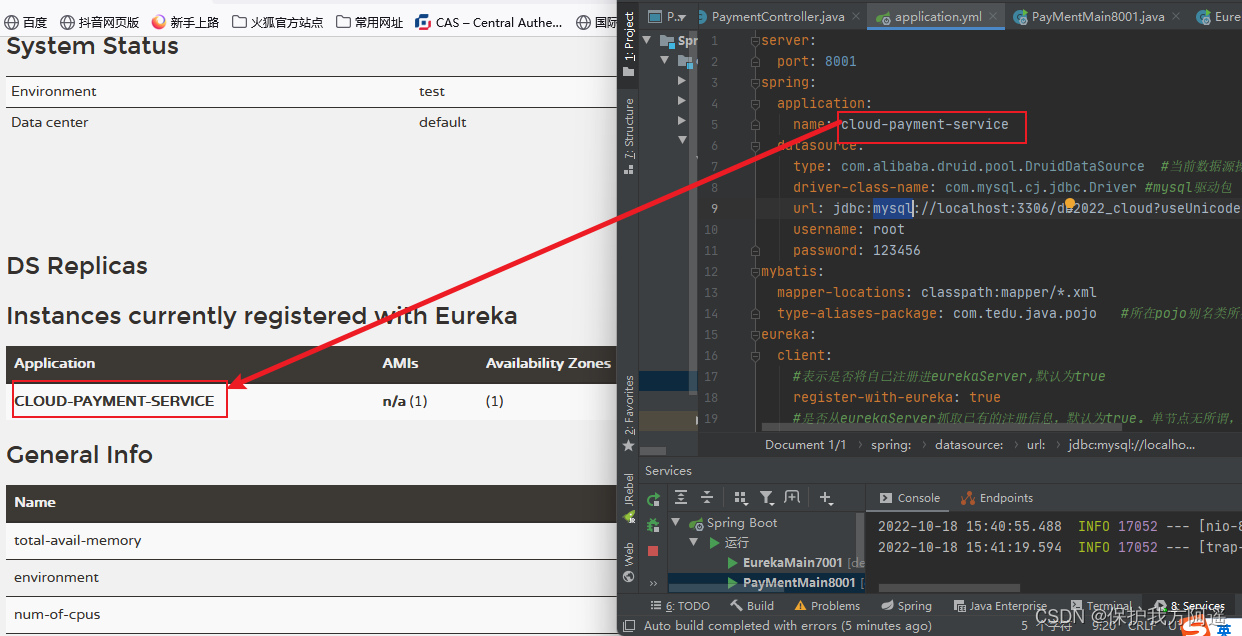
先启动EurekaServer,然后再浏览器输入:http://eureka7001.com:7001,然后再启动8001。
4.2.3 自我保护机制

4.3 集群Eureka构建步骤

4.3.1 Eureka集群原理说明

解决办法: 搭建Eureka注册中心集群,实现负载均衡+故障容错。4.3.2 Eureka集群环境构建步骤
4.3.2.1 参考cloud-eureka-server7001新建cloud-eureka-server7002
4.3.2.2 改POM
cloud2022 com.tedu.java 1.0-SNAPSHOT 4.0.0 cloud-eureka-server7002 org.springframework.cloud spring-cloud-starter-netflix-eureka-server org.springframework.boot spring-boot-starter-web org.springframework.boot spring-boot-starter-actuator com.tedu.java cloud-api-commons 1.0-SNAPSHOT org.springframework.boot spring-boot-devtools runtime true org.projectlombok lombok - 1
- 2
- 3
- 4
- 5
- 6
- 7
- 8
- 9
- 10
- 11
- 12
- 13
- 14
- 15
- 16
- 17
- 18
- 19
- 20
- 21
- 22
- 23
- 24
- 25
- 26
- 27
- 28
- 29
- 30
- 31
- 32
- 33
- 34
- 35
- 36
- 37
- 38
- 39
- 40
- 41
- 42
4.3.2.3 修改映射配置
找到C:\Windows\System32\drivers\etc路径下的hosts文件:
127.0.0.1 eureka7001.com 127.0.0.1 eureka7002.com- 1
- 2
刷新hosts文件:ipconfig /flushdns

4.3.2.4 写YMl
cloud-eureka-server7001:
server: port: 7001 spring: application: name: cloud-eureka-server7001 eureka: instance: hostname: eureka7001.com #eureka服务端的实例名称 client: #false表示自己断就是注册中心,职责就是维护服务实例,并不是区检索服务 fetch-registry: false #不注册自己 #fasle表示不向注册中心注册自己 register-with-eureka: false # 不检索自己 service-url: #设置与eureka Server交互的地址查询服务和注册服务都需要依赖这个地址 defaultZone: http://eureka7002.com:7002/eureka- 1
- 2
- 3
- 4
- 5
- 6
- 7
- 8
- 9
- 10
- 11
- 12
- 13
- 14
- 15
- 16
- 17
- 18
cloud-eureka-server7002:
server: port: 7002 spring: application: name: cloud-eureka-server7002 eureka: instance: hostname: eureka7002.com #eureka服务端的实例名称 client: #false表示自己断就是注册中心,职责就是维护服务实例,并不是区检索服务 fetch-registry: false #不注册自己 #fasle表示不向注册中心注册自己 register-with-eureka: false # 不检索自己 service-url: #设置与eureka Server交互的地址查询服务和注册服务都需要依赖这个地址 defaultZone: http://eureka7001.com:7001/eureka- 1
- 2
- 3
- 4
- 5
- 6
- 7
- 8
- 9
- 10
- 11
- 12
- 13
- 14
- 15
- 16
- 17
- 18
4.3.2.5 主启动
package com.tedu.java; import org.springframework.boot.SpringApplication; import org.springframework.boot.autoconfigure.SpringBootApplication; import org.springframework.cloud.netflix.eureka.server.EnableEurekaServer; /** * @author 47132 */ @SpringBootApplication @EnableEurekaServer public class EurekaMain7002 { public static void main(String[] args) { SpringApplication.run(EurekaMain7002.class,args); } }- 1
- 2
- 3
- 4
- 5
- 6
- 7
- 8
- 9
- 10
- 11
- 12
- 13
- 14
- 15
- 16
4.3.3 将支付服务8001微服务发布到上面2台Eureka集群配置中
将Cloud-provider-payment8001中的application.yml修改:
server: port: 8001 spring: application: name: cloud-payment-service8001 datasource: type: com.alibaba.druid.pool.DruidDataSource #当前数据源操作类型 driver-class-name: com.mysql.cj.jdbc.Driver #mysql驱动包 url: jdbc:mysql://localhost:3306/db2022_cloud?useUnicode=true&characterEncoding=utf-8&useSSL=false username: root password: 123456 mybatis: mapper-locations: classpath:mapper/*.xml type-aliases-package: com.tedu.java.pojo #所在pojo别名类所在包 eureka: client: #表示是否将自己注册进eurekaServer,默认为true register-with-eureka: true #是否从eurekaServer抓取已有的注册信息,默认为true。单节点无所谓,集群必须为true,才能配合ribbon使用负载均衡 fetch-registry: true service-url: defaultZone: http://eureka7001.com:7001/eureka/,http://eureka7002.com:7002/eureka/ #集群版 #defaultZone: http://eureka7001.com:7001/eureka- 1
- 2
- 3
- 4
- 5
- 6
- 7
- 8
- 9
- 10
- 11
- 12
- 13
- 14
- 15
- 16
- 17
- 18
- 19
- 20
- 21
- 22
- 23
4.3.4 将订单服务80微服务发布到上面2台Eureka集群配置中
将cloud-consumer-order80中的application.yml修改:
server: port: 80 spring: application: name: cloud-comsumer-order80 eureka: client: #表示是否将自己注册进eurekaServer,默认为true register-with-eureka: true #是否从eurekaServer抓取已有的注册信息,默认为true。单节点无所谓,集群必须为true,才能配合ribbon使用负载均衡 fetch-registry: true service-url: defaultZone: http://eureka7001.com:7001/eureka/,http://eureka7002.com:7002/eureka/ #集群版 #defaultZone: http://eureka7001.com:7001/eureka- 1
- 2
- 3
- 4
- 5
- 6
- 7
- 8
- 9
- 10
- 11
- 12
- 13
- 14
- 15
4.3.5 测试
先要启动EurekaServer,7001/7002服务,再要启动服务提供者provider8001,再要启动消费者80;在浏览器中输入http://localhost/consumer/payment/get/1,观察结果。

4.3.6 支付服务提供者8001集群环境搭建
4.3.6.1 参考cloud-provider-payment8001新建cloud-provider-payment8002
4.3.6.2 改POM
cloud2022 com.tedu.java 1.0-SNAPSHOT 4.0.0 cloud-provider-payment8002 org.springframework.cloud spring-cloud-starter-netflix-eureka-client org.springframework.boot spring-boot-starter-web org.springframework.boot spring-boot-starter-actuator org.mybatis.spring.boot mybatis-spring-boot-starter com.alibaba druid-spring-boot-starter 1.1.10 mysql mysql-connector-java org.springframework.boot spring-boot-starter-jdbc org.springframework.boot spring-boot-starter-test test org.projectlombok lombok org.springframework.boot spring-boot-devtools runtime true com.tedu.java cloud-api-commons 1.0-SNAPSHOT org.springframework.boot spring-boot-maven-plugin true true - 1
- 2
- 3
- 4
- 5
- 6
- 7
- 8
- 9
- 10
- 11
- 12
- 13
- 14
- 15
- 16
- 17
- 18
- 19
- 20
- 21
- 22
- 23
- 24
- 25
- 26
- 27
- 28
- 29
- 30
- 31
- 32
- 33
- 34
- 35
- 36
- 37
- 38
- 39
- 40
- 41
- 42
- 43
- 44
- 45
- 46
- 47
- 48
- 49
- 50
- 51
- 52
- 53
- 54
- 55
- 56
- 57
- 58
- 59
- 60
- 61
- 62
- 63
- 64
- 65
- 66
- 67
- 68
- 69
- 70
- 71
- 72
- 73
- 74
- 75
- 76
- 77
4.3.6.3 写YMl
server: port: 8002 spring: application: name: cloud-payment-service8002 datasource: type: com.alibaba.druid.pool.DruidDataSource #当前数据源操作类型 driver-class-name: com.mysql.cj.jdbc.Driver #mysql驱动包 url: jdbc:mysql://localhost:3306/db2022_cloud?useUnicode=true&characterEncoding=utf-8&useSSL=false username: root password: 123456 mybatis: mapper-locations: classpath:mapper/*.xml type-aliases-package: com.tedu.java.pojo #所在pojo别名类所在包 eureka: client: #表示是否将自己注册进eurekaServer,默认为true register-with-eureka: true #是否从eurekaServer抓取已有的注册信息,默认为true。单节点无所谓,集群必须为true,才能配合ribbon使用负载均衡 fetch-registry: true service-url: defaultZone: http://eureka7001.com:7001/eureka/,http://eureka7002.com:7002/eureka/ #集群版 #defaultZone: http://eureka7001.com:7001/eureka- 1
- 2
- 3
- 4
- 5
- 6
- 7
- 8
- 9
- 10
- 11
- 12
- 13
- 14
- 15
- 16
- 17
- 18
- 19
- 20
- 21
- 22
- 23
4.3.6.4 主启动
package com.tedu.java; import org.springframework.boot.SpringApplication; import org.springframework.boot.autoconfigure.SpringBootApplication; import org.springframework.cloud.netflix.eureka.EnableEurekaClient; /** * @author 47132 */ @SpringBootApplication @EnableEurekaClient public class PayMentMain8002 { public static void main(String[] args) { SpringApplication.run(PayMentMain8002.class,args); } }- 1
- 2
- 3
- 4
- 5
- 6
- 7
- 8
- 9
- 10
- 11
- 12
- 13
- 14
- 15
- 16
- 17
- 18
4.3.6.5 业务类
直接从8001粘
4.3.6.6 修改8001/8002的controller


4.3.6.7 修改80的controller
package com.tedu.java.controller; import com.tedu.java.pojo.Payment; import com.tedu.java.utils.CommonResult; import lombok.extern.slf4j.Slf4j; import org.springframework.beans.factory.annotation.Autowired; import org.springframework.web.bind.annotation.GetMapping; import org.springframework.web.bind.annotation.PathVariable; import org.springframework.web.bind.annotation.RestController; import org.springframework.web.client.RestTemplate; /** * @author 47132 */ @RestController @Slf4j public class OrderController { //public static final String PAYMENT_URL="HTTP://localhost:8001"; // 通过在eureka上注册过的微服务名称调用 public static final String PAYMENT_URL="http://CLOUD-PAYMENT-SERVICE"; @Autowired private RestTemplate restTemplate; @GetMapping("/consumer/payment/create") public CommonResultcreate(Payment payment){ return restTemplate.postForObject(PAYMENT_URL+"/payment/create",payment, CommonResult.class); } @GetMapping("/consumer/payment/get/{id}") public CommonResult getPayment(@PathVariable("id") Long id){ return restTemplate.getForObject(PAYMENT_URL+"/payment/get/"+id,CommonResult.class); } } - 1
- 2
- 3
- 4
- 5
- 6
- 7
- 8
- 9
- 10
- 11
- 12
- 13
- 14
- 15
- 16
- 17
- 18
- 19
- 20
- 21
- 22
- 23
- 24
- 25
- 26
- 27
- 28
- 29
- 30
- 31
- 32
- 33
4.3.6.8 使用@LoadBalanced注解赋予RestTemplate负载均衡的能力
修改80端口的ApplicationContextConfig :
package com.tedu.java.config; import org.springframework.cloud.client.loadbalancer.LoadBalanced; import org.springframework.context.annotation.Bean; import org.springframework.context.annotation.Configuration; import org.springframework.web.client.RestTemplate; /** * @author 47132 */ @Configuration public class ApplicationContextConfig { @Bean @LoadBalanced public RestTemplate getRestTemplate(){ return new RestTemplate(); } }- 1
- 2
- 3
- 4
- 5
- 6
- 7
- 8
- 9
- 10
- 11
- 12
- 13
- 14
- 15
- 16
- 17
- 18
4.3.6.9 测试
先要启动EurekaServer,7001/7002服务,再要启动服务提供者provider,8001/8002服务再启动consumer;80,在浏览器输入:http://localhost/consumer/payment/get/1

修改8001和8002的application.yml,改为CLOUD-PAYMENT-SERVICE

结果:负载均衡效果达到,8001/8002端口交替出现。
因为Ribbon和Eureka整合后Consumer可以直接调用服务而不用再关心地址和端口号,且该服务还有负载功能了。4.4 actuator微服务信息完善
4.4.1 主机名称:服务名称修改
- 当前问题

- 修改cloud-provoder-payment8001
yaml:
eureka: client: #表示是否将自己注册进eurekaServer,默认为true register-with-eureka: true #是否从eurekaServer抓取已有的注册信息,默认为true。单节点无所谓,集群必须为true,才能配合ribbon使用负载均衡 fetch-registry: true service-url: defaultZone: http://eureka7001.com:7001/eureka/,http://eureka7002.com:7002/eureka/ #集群版 #defaultZone: http://eureka7001.com:7001/eureka instance: instance-id: payment8001- 1
- 2
- 3
- 4
- 5
- 6
- 7
- 8
- 9
- 10
- 11

8002和80也是如此。

4.5 服务发现Discovery
对于注册eureka里面的微服务,可以通过服务发现来获得该服务的信息。
4.5.1 修改cloud-provider-payment8001的Controller:
@Autowired private DiscoveryClient discoveryClient; /** * 服务发现 */ @GetMapping("/payment/discovery") public Object discovery(){ Listservices = discoveryClient.getServices(); for(String element : services){ log.info("*********element:"+element); } //一个微服务小的全部实例 List instances = discoveryClient.getInstances("CLOUD-PAYMENT-SERVICE"); for (ServiceInstance instance:instances){ log.debug(instance.getServiceId()+"\t"+instance.getHost()+"\t"+instance.getPort()+"\t"+instance.getUri()); } return this.discoveryClient; } - 1
- 2
- 3
- 4
- 5
- 6
- 7
- 8
- 9
- 10
- 11
- 12
- 13
- 14
- 15
- 16
- 17
- 18


4.5.2 8001的启动类:@EnableDiscoveryClient
package com.tedu.java; import org.springframework.boot.SpringApplication; import org.springframework.boot.autoconfigure.SpringBootApplication; import org.springframework.cloud.client.discovery.EnableDiscoveryClient; import org.springframework.cloud.netflix.eureka.EnableEurekaClient; /** * @author 47132 */ @SpringBootApplication @EnableEurekaClient @EnableDiscoveryClient public class PayMentMain8001 { public static void main(String[] args) { SpringApplication.run(PayMentMain8001.class,args); } }- 1
- 2
- 3
- 4
- 5
- 6
- 7
- 8
- 9
- 10
- 11
- 12
- 13
- 14
- 15
- 16
- 17
- 18
- 19
- 20
4.5.3 测试
先要启动EurekaServer,再启动8001主启动类,需要稍等一会。在浏览器输入http://localhost:8001/payment/discovery

4.6 eureka自我保护
4.6.1 故障现象
概述:
保护模式主要用于一组客户端和Erueka Server之间存在网络分区场景下的保护。一旦进入保护模式,Eureka Server 将会尝试保护其服务注册表中的信息,不再删除服务注册表中的数据,也就是不会注销任何微服务。
如果在Eureka Server的首页看到以下这段提示,则说明Eureka进入了保护模式:EMERGENCY! EUREKA MAY BE INCORRECTLY CLAIMING INSTANCES ARE UP WHEN THEY'RE NOT. RENEWALS ARE LESSER THAN THRESHOLD AND HENCE THE INSTANCES ARE NOT BEING EXPIRED JUST TO BE SAFE.- 1
- 2
- 3
4.6.2 导致原因
- 为什么会产生Eureka自我保护机制?
为了防止EurekaClient可以正常运行,但是与EurekaServer网络不通情况下,EurekaServer不会立刻将EurekaClient服务剔除。 - 什么事自我保护模式?
默认情况下,如果EurekaServer在一定时间内没有接收到某个微服务实例的心跳,EurekaServer将会注销该实例(默认90秒)。但是当网络分区故障发生(延时、卡顿、拥挤)时,微服务与EurrekaServer之间无法正常通信,以上行为可能会变得非常危险----因为微服务本身其实时健康的,此时本不应该注销这个微服务。Eureka通过“自我保护机制”来解决这个问题----当EurekaServer节点在短时间内丢失过多客户端时(可能发生了网络分区故障),那么这个节点就会进入自我保护模式。

它的设计哲学就是宁可保留错误的服务注册信息,也不盲目注销任何一个可能健康的服务实例,
综上,自我保护模式是一种应对网络异常的安全保护措施。它的哲学架构是宁可同事保留所有微服务(健康的微服务和不健康的微服务都会保留)也不盲目的注销任何健康的微服务。使用自我保护模式,可以让Eureka集群更加的健壮、稳定。
一句话:某时刻 一个微服务不可用了,Eureka不会立刻清理,依旧会对该服务的信息进行保存,属于CAP里面的AP分支。
4.6.3 怎么禁止自我保护
4.6.3.1 注册中心eurekaServer端7001
出产默认,自我保护机制是开启的:eureka.server.enable-self-preservation=true,使用eureka.server.enable-self-preservation=false 可以禁用自我保护模式。

4.6.3.2 生产者客户端eurekaClient端8001
在默认情况下:
#Eureka客户端向服务端发送心跳的时间间隔,单位为秒(默认是30秒) eureka.instance.lease-renewal-interval-in-seconds=30 #Eureka服务端在收到最后一次心跳后等待时间上限 ,单位为秒(默认是90秒),超时剔除服务 eureka.instance.lease-expiration-duration-in-seconds=90- 1
- 2
- 3
- 4
配置:
eureka: client: #表示是否将自己注册进eurekaServer,默认为true register-with-eureka: true #是否从eurekaServer抓取已有的注册信息,默认为true。单节点无所谓,集群必须为true,才能配合ribbon使用负载均衡 fetch-registry: true service-url: defaultZone: http://eureka7001.com:7001/eureka/,http://eureka7002.com:7002/eureka/ #集群版 #defaultZone: http://eureka7001.com:7001/eureka instance: instance-id: payment8001 ##Eureka服务端在收到最后一次心跳后等待时间上限 ,单位为秒(默认是90秒),超时剔除服务 lease-expiration-duration-in-seconds: 2 ##Eureka客户端向服务端发送心跳的时间间隔,单位为秒(默认是30秒) lease-renewal-interval-in-seconds: 1- 1
- 2
- 3
- 4
- 5
- 6
- 7
- 8
- 9
- 10
- 11
- 12
- 13
- 14
- 15

4.6.3.3 测试
先启动EurekaServer,再启动8001,先关闭8001,看是否被删除。


五 Zookeeper服务注册与发现
Eureka停止更新了,你怎么办?
网址:https://github.com/Netflix/eureka/wiki
5.1 注册中心Zookeeper
Zookeeper是一个分布式协调工具,可以实现注册中心功能。
关闭Linux服务器防火墙后启动Zookeeper服务器。5.2 服务提供者
5.2.1 新建cloud-provider-payment8004
5.2.2 POM
cloud2022 com.tedu.java 1.0-SNAPSHOT 4.0.0 cloud-provider-payment8004 com.tedu.java cloud-api-commons 1.0-SNAPSHOT org.springframework.boot spring-boot-starter-web org.springframework.cloud spring-cloud-starter-zookeeper-discovery org.springframework.boot spring-boot-starter-actuator org.projectlombok lombok org.springframework.boot spring-boot-devtools runtime true - 1
- 2
- 3
- 4
- 5
- 6
- 7
- 8
- 9
- 10
- 11
- 12
- 13
- 14
- 15
- 16
- 17
- 18
- 19
- 20
- 21
- 22
- 23
- 24
- 25
- 26
- 27
- 28
- 29
- 30
- 31
- 32
- 33
- 34
- 35
- 36
- 37
- 38
- 39
- 40
- 41
- 42
5.2.3 YML
#8004表示注册到zookeeper服务器的支付服务提供者端口号 server: port: 8004 spring: application: name: cloud-provider-payment cloud: zookeeper: connect-string: 192.168.43.128:2181- 1
- 2
- 3
- 4
- 5
- 6
- 7
- 8
- 9
5.2.4 主启动类
package com.tedu.java; import org.springframework.boot.SpringApplication; import org.springframework.boot.autoconfigure.SpringBootApplication; import org.springframework.cloud.client.discovery.EnableDiscoveryClient; /** * @author 47132 */ @SpringBootApplication //该注解用于向使用consul或者zookeeper作为注册中心时注册服务 @EnableDiscoveryClient public class PaymentMain8004 { public static void main(String[] args) { SpringApplication.run(PaymentMain8004.class,args); } }- 1
- 2
- 3
- 4
- 5
- 6
- 7
- 8
- 9
- 10
- 11
- 12
- 13
- 14
- 15
- 16
- 17
- 18
5.2.5 Controller
package com.tedu.java.controller; import lombok.extern.slf4j.Slf4j; import org.springframework.beans.factory.annotation.Value; import org.springframework.web.bind.annotation.GetMapping; import org.springframework.web.bind.annotation.RestController; import java.util.UUID; @RestController @Slf4j public class PaymentController { @Value("${server.port}") private String serverPort; @GetMapping("/payment/zk") public String paymentZk(){ return "SpringCloud with Zookeeper:"+serverPort+"\t"+ UUID.randomUUID().toString(); } }- 1
- 2
- 3
- 4
- 5
- 6
- 7
- 8
- 9
- 10
- 11
- 12
- 13
- 14
- 15
- 16
- 17
- 18
- 19
- 20
- 21
5.2.6 启动8004注册进zookeeper
启动zk:
zkServer.sh start- 1
启动后问题:

解决zookeeper版本jar包冲突问题:

排除zk冲突后的新POM:cloud2022 com.tedu.java 1.0-SNAPSHOT 4.0.0 cloud-provider-payment8004 com.tedu.java cloud-api-commons 1.0-SNAPSHOT org.springframework.boot spring-boot-starter-web org.springframework.cloud spring-cloud-starter-zookeeper-discovery org.apache.zookeeper zookeeper org.apache.zookeeper zookeeper 3.7.1 org.springframework.boot spring-boot-starter-actuator org.projectlombok lombok org.springframework.boot spring-boot-devtools runtime true - 1
- 2
- 3
- 4
- 5
- 6
- 7
- 8
- 9
- 10
- 11
- 12
- 13
- 14
- 15
- 16
- 17
- 18
- 19
- 20
- 21
- 22
- 23
- 24
- 25
- 26
- 27
- 28
- 29
- 30
- 31
- 32
- 33
- 34
- 35
- 36
- 37
- 38
- 39
- 40
- 41
- 42
- 43
- 44
- 45
- 46
- 47
- 48
- 49
- 50
- 51
- 52
- 53
- 54
- 55
- 56
5.2.7 验证测试
http://localhost:8004/payment/zk

获得json串后用在线工具查看试试?


5.2.8 服务节点是临时节点还是持久节点
临时节点

5.3 服务消费者
5.3.1 新建cloud-consumerzk-order80
5.3.2 POM
cloud2022 com.tedu.java 1.0-SNAPSHOT 4.0.0 cloud-consumerzk-order80 org.springframework.boot spring-boot-starter-web org.springframework.boot spring-boot-starter-actuator org.springframework.cloud spring-cloud-starter-zookeeper-discovery org.apache.zookeeper zookeeper org.apache.zookeeper zookeeper 3.7.1 org.springframework.boot spring-boot-starter-test com.tedu.java cloud-api-commons 1.0-SNAPSHOT org.projectlombok lombok - 1
- 2
- 3
- 4
- 5
- 6
- 7
- 8
- 9
- 10
- 11
- 12
- 13
- 14
- 15
- 16
- 17
- 18
- 19
- 20
- 21
- 22
- 23
- 24
- 25
- 26
- 27
- 28
- 29
- 30
- 31
- 32
- 33
- 34
- 35
- 36
- 37
- 38
- 39
- 40
- 41
- 42
- 43
- 44
- 45
- 46
- 47
- 48
- 49
- 50
- 51
- 52
- 53
- 54
- 55
5.3.3 YML
#80表示注册到zookeeper服务器的支付服务提供者端口号 server: port: 80 spring: application: name: cloud-consumerzk-order cloud: zookeeper: connect-string: 192.168.43.128:2181- 1
- 2
- 3
- 4
- 5
- 6
- 7
- 8
- 9
- 10
5.3.4 主启动
package com.tedu.java; import org.springframework.boot.SpringApplication; import org.springframework.boot.autoconfigure.SpringBootApplication; import org.springframework.cloud.client.discovery.EnableDiscoveryClient; @SpringBootApplication @EnableDiscoveryClient public class OrderZkMain80 { public static void main(String[] args) { SpringApplication.run(OrderZkMain80.class,args); } }- 1
- 2
- 3
- 4
- 5
- 6
- 7
- 8
- 9
- 10
- 11
- 12
- 13
5.3.5 业务类
配置bean:ApplicationContextConfig
package com.tedu.java.config; import org.springframework.cloud.client.loadbalancer.LoadBalanced; import org.springframework.context.annotation.Bean; import org.springframework.context.annotation.Configuration; import org.springframework.web.client.RestTemplate; @Configuration public class ApplicationContextConfig { @Bean @LoadBalanced public RestTemplate getRestTemplate(){ return new RestTemplate(); } }- 1
- 2
- 3
- 4
- 5
- 6
- 7
- 8
- 9
- 10
- 11
- 12
- 13
- 14
- 15
- 16
controller:OrderZkController
package com.tedu.java.controller; import org.springframework.beans.factory.annotation.Autowired; import org.springframework.web.bind.annotation.GetMapping; import org.springframework.web.bind.annotation.RestController; import org.springframework.web.client.RestTemplate; @RestController public class OrderZkController { private static final String INVOKE_URL="http://cloud-provider-payment"; @Autowired private RestTemplate restTemplate; @GetMapping("/consumer/payment/zk") public String paymentInfo() { return restTemplate.getForObject(INVOKE_URL + "/payment/zk", String.class); } }- 1
- 2
- 3
- 4
- 5
- 6
- 7
- 8
- 9
- 10
- 11
- 12
- 13
- 14
- 15
- 16
- 17
- 18
- 19
5.3.5 验证测试
http://localhost/consumer/payment/zk

六 Consul服务注册与发现
6.1 Consul简介
6.1.1 官网地址
官网地址:https://www.consul.io/intro/index.html
HashiCorp Consul是一个服务网络解决方案,它使团队能够管理服务之间以及跨on-prem和多云环境和运行时的安全网络连接。Consul提供服务发现、服务网格、流量管理和对网络基础设施设备的自动更新。您可以单独使用这些功能,也可以在单个Consul部署中一起使用这些功能。

6.1.2 Consul功能

- 服务发现:提供HTTP/DNS两种发现方式。
- 健康检测:支持多种方式,HTTP、TCP、Docker、shell脚本定制化。
- KV存储:Key、Value的存储方式。
- 多数据中心:Consul支持多数据中心。
- 可视化界面。
6.1.3 下载地址
下载地址:https://www.consul.io/downloads.html
6.1.3 操作文档地址
文档地址:https://www.springcloud.cc/spring-cloud-consul.html
6.2 安装并运行Consul
6.2.1 官网说明
地址:https://learn.hashicorp.com/consul/getting-started/install.html
下载完成后只有一个consul.exe文件 硬盘路径下双击运行,查看版本信息:consul -version- 1

6.2.2 使用开发模式启动
consul agent -dev- 1

通过以下地址可以访问Consul的首页: http://localhost:8500;

6.3 服务提供者
6.3.1 新建Module支付服务provider8006:cloud-providerconsul-payment8006
6.3.2 POM
cloud2022 com.tedu.java 1.0-SNAPSHOT 4.0.0 cloud-providerconsul-payment8006 org.springframework.cloud spring-cloud-starter-consul-discovery org.springframework.boot spring-boot-starter-web org.springframework.boot spring-boot-starter-actuator org.springframework.boot spring-boot-starter-test com.tedu.java cloud-api-commons 1.0-SNAPSHOT org.projectlombok lombok org.springframework.boot spring-boot-devtools - 1
- 2
- 3
- 4
- 5
- 6
- 7
- 8
- 9
- 10
- 11
- 12
- 13
- 14
- 15
- 16
- 17
- 18
- 19
- 20
- 21
- 22
- 23
- 24
- 25
- 26
- 27
- 28
- 29
- 30
- 31
- 32
- 33
- 34
- 35
- 36
- 37
- 38
- 39
- 40
- 41
- 42
- 43
- 44
6.3.3 YML
###consul服务端口号 server: port: 8006 spring: application: name: consul-provider-payment ###consul注册中心地址 cloud: consul: host: localhost port: 8500 discovery: service-name: ${spring.application.name} hostname: 127.0.0.1- 1
- 2
- 3
- 4
- 5
- 6
- 7
- 8
- 9
- 10
- 11
- 12
- 13
- 14
6.3.4 启动类
package com.tedu.java; import org.springframework.boot.SpringApplication; import org.springframework.boot.autoconfigure.SpringBootApplication; import org.springframework.cloud.client.discovery.EnableDiscoveryClient; @SpringBootApplication @EnableDiscoveryClient public class PaymentMain8006 { public static void main(String[] args) { SpringApplication.run(PaymentMain8006.class,args); } }- 1
- 2
- 3
- 4
- 5
- 6
- 7
- 8
- 9
- 10
- 11
- 12
- 13
6.3.5 业务类Controller
package com.tedu.java.controller; import lombok.extern.slf4j.Slf4j; import org.springframework.beans.factory.annotation.Value; import org.springframework.web.bind.annotation.RequestMapping; import org.springframework.web.bind.annotation.RestController; import java.util.UUID; /** * @author 47132 */ @RestController @Slf4j public class PaymentController { @Value("${server.port}") private String serverPort; @RequestMapping(value = "payment/consul") public String paymentConsul() { return "SpringCloud with consul:" + serverPort + "\t" + UUID.randomUUID().toString(); } }- 1
- 2
- 3
- 4
- 5
- 6
- 7
- 8
- 9
- 10
- 11
- 12
- 13
- 14
- 15
- 16
- 17
- 18
- 19
- 20
- 21
- 22
- 23
6.3.6 验证测试
http://localhost:8006/payment/consul

6.4 服务消费者
6.4.1 新建Module消费服务order80
cloud-consumerconsul-order80
6.4.2 POM
cloud2022 com.tedu.java 1.0-SNAPSHOT 4.0.0 cloud-consumerconsul-order80 org.springframework.cloud spring-cloud-starter-consul-discovery org.springframework.boot spring-boot-starter-web org.springframework.boot spring-boot-starter-actuator org.springframework.boot spring-boot-starter-test com.tedu.java cloud-api-commons 1.0-SNAPSHOT org.projectlombok lombok org.springframework.boot spring-boot-devtools - 1
- 2
- 3
- 4
- 5
- 6
- 7
- 8
- 9
- 10
- 11
- 12
- 13
- 14
- 15
- 16
- 17
- 18
- 19
- 20
- 21
- 22
- 23
- 24
- 25
- 26
- 27
- 28
- 29
- 30
- 31
- 32
- 33
- 34
- 35
- 36
- 37
- 38
- 39
- 40
- 41
- 42
- 43
- 44
- 45
- 46
6.4.3 YML
###consul服务端口号 server: port: 80 spring: application: name: cloud-consumer-order ###consul注册中心地址 cloud: consul: host: localhost port: 8500 discovery: service-name: ${spring.application.name} hostname: 127.0.0.1- 1
- 2
- 3
- 4
- 5
- 6
- 7
- 8
- 9
- 10
- 11
- 12
- 13
- 14
- 15
6.4.4 主启动类
package com.tedu.java; import org.springframework.boot.SpringApplication; import org.springframework.boot.autoconfigure.SpringBootApplication; import org.springframework.cloud.client.discovery.EnableDiscoveryClient; @SpringBootApplication @EnableDiscoveryClient public class OrderConsulMain80 { public static void main(String[] args) { SpringApplication.run(OrderConsulMain80.class,args); } }- 1
- 2
- 3
- 4
- 5
- 6
- 7
- 8
- 9
- 10
- 11
- 12
- 13
6.4.5 配置bean
package com.tedu.java.config; import org.springframework.cloud.client.loadbalancer.LoadBalanced; import org.springframework.context.annotation.Bean; import org.springframework.context.annotation.Configuration; import org.springframework.web.client.RestTemplate; /** * @author 47132 */ @Configuration public class ApplicationContextConfig { @Bean @LoadBalanced public RestTemplate getRestTemple(){ return new RestTemplate(); } }- 1
- 2
- 3
- 4
- 5
- 6
- 7
- 8
- 9
- 10
- 11
- 12
- 13
- 14
- 15
- 16
- 17
- 18
6.4.6 Controller
package com.tedu.java.controller; import lombok.extern.slf4j.Slf4j; import org.springframework.beans.factory.annotation.Autowired; import org.springframework.web.bind.annotation.GetMapping; import org.springframework.web.bind.annotation.RestController; import org.springframework.web.client.RestTemplate; @RestController @Slf4j public class OrderConsulController { private static final String INVOKE_URL = "http://consul-provider-payment"; @Autowired private RestTemplate restTemplate; @GetMapping("/consumer/payment/consul") public String paymentInfo(){ String template = restTemplate.getForObject(INVOKE_URL + "/payment/consul", String.class); return template; } }- 1
- 2
- 3
- 4
- 5
- 6
- 7
- 8
- 9
- 10
- 11
- 12
- 13
- 14
- 15
- 16
- 17
- 18
- 19
- 20
- 21
6.4.7 验证测试
访问地址:http://localhost/consumer/payment/consul

6.5 三个注册中心异同点


6.5.1 CAP
- C: Consistency(强一致性)。
- A: Availability(可用性)。
- P: Parttition tolerance(分区容错性)。
- CAP理论关注粒度是否是数据,而不是整体系统设计的策略。
6.5.2 经典CAP图


- AP(eureka)

- CP(Zookeeper/Consul)
CP架构:
当网络分区出现后,为了保证一致性,就必须拒绝请求,否则无法保证一致性
结论:违背了可用性A的要求,只满足一致性和分区容错,即CP。
- springboot(截止2019.10.26)
-
相关阅读:
MySQL高级十一:其它索引详解
中国汉服行业发展深度调研与未来趋势预测报告
SQL中通过QUALIFY语法过滤窗口函数简化代码
ubuntu20.4部署java web环境
软件代码签名证书怎么申请
Vue生命周期
AquilaChat2-34B 主观评测接近GPT3.5水平,最新版本Base和Chat权重已开源!
经典算法系列之(二):七大查找——顺序查找
【JavaScript】DOM查询(子节点、父节点、兄弟节点)源码详解
OpenCV之直线曲线拟合
- 原文地址:https://blog.csdn.net/qq_43117059/article/details/127296606

- 最新文章
-
沪漂五周年了:我越来越迷茫了
Agentic Skill Routing 实战:别再把所有 Skill 塞进 AI Agent 上下文
MySQL-Seconds_behind_master的精度误差
[MAF预定义ChatClient中间件-03]CachingChatClient——利用缓存省钱省时间
AI的至暗历史:从万众期待到被政府撤资,AI的两次死亡徘徊
Agent OS :五种驯服不确定性的范式
PortSwigger SQL注入LAB11
数据库即时编译JIT
[Begin]AI Learn Data Day 0
深度学习进阶(二十七)现代 LLM 的核心架构设计其二:SwiGLU