-
深入浅出Spring Boot整合minio
为什么用 minio ,因为 oss 收费。
最新版依赖
<dependency> <groupId>io.miniogroupId> <artifactId>minioartifactId> <version>8.4.5version> dependency>- 1
- 2
- 3
- 4
- 5
- 6
如果只添加minio依赖启动项目大概率会碰到如下的报错信息
*************************** APPLICATION FAILED TO START *************************** Description: An attempt was made to call a method that does not exist. The attempt was made from the following location: io.minio.S3Base.- 1
- 2
- 3
- 4
- 5
- 6
- 7
- 8
- 9
- 10
- 11
- 12
- 13
- 14
- 15
- 16
- 17
- 18
- 19
- 20
- 21
- 22
- 23
- 24
- 25
- 26
- 27
- 28
- 29
- 30
从 io.minio.S3Base.(S3Base.java:104) 这一行点进去可以看到错误原因。
static { try { RequestBody.create(new byte[] {}, null); } catch (NoSuchMethodError ex) { throw new RuntimeException("Unsupported OkHttp library found. Must use okhttp >= 4.8.1", ex); } }- 1
- 2
- 3
- 4
- 5
- 6
- 7
pom minio 依赖点进去可以找到 okhttp的依赖

这里已经定义了 4.10.0版本,为什么到了外面不生效呢 ?我们找到 spring-boot-starter-parent 依赖搜索 okhttp

发现没有结果,于是进入到 spring-boot-dependencies 中搜索 okhttp

我们来约束一下版本<dependencyManagement> <dependencies> <dependency> <groupId>com.squareup.okhttp3groupId> <artifactId>okhttpartifactId> <version>4.10.0version> dependency> dependencies> dependencyManagement>- 1
- 2
- 3
- 4
- 5
- 6
- 7
- 8
- 9
可以看到版本已经成功使用 4.10.0

第二种方法<dependency> <groupId>io.miniogroupId> <artifactId>minioartifactId> <version>8.4.5version> <exclusions> <exclusion> <groupId>com.squareup.okhttp3groupId> <artifactId>okhttpartifactId> exclusion> exclusions> dependency> <dependency> <groupId>com.squareup.okhttp3groupId> <artifactId>okhttpartifactId> <version>4.10.0version> dependency>- 1
- 2
- 3
- 4
- 5
- 6
- 7
- 8
- 9
- 10
- 11
- 12
- 13
- 14
- 15
- 16
- 17
- 18
使用
在 yml 定义几个配置
minio: enable: true endpoint: 127.0.0.1:9000 accessKey: account secretKey: password bucketName: mkdir1- 1
- 2
- 3
- 4
- 5
- 6
定义一个config来读取yml配置
@Configuration public class MinIoClientConfig { private final static Logger logger = LoggerFactory.getLogger(MinIoClientConfig.class); @Value("${minio.endpoint}") private String endpoint; @Value("${minio.accessKey}") private String accessKey; @Value("${minio.secretKey}") private String secretKey; @Value("${minio.enable}") private boolean enable; @Value("${minio.bucketName}") private String bucketName; @Bean public MinioClient minioClient() { if (enable) { MinioClient client = MinioClient.builder() .endpoint(endpoint) .credentials(accessKey, secretKey) .build(); //尝试链接测试 try { List<Bucket> buckets = client.listBuckets(); List<String> bucketNames = buckets.stream().map(Bucket::name).collect(Collectors.toList()); boolean contains = bucketNames.contains(bucketName); if (!contains) { logger.error("minio Client Bucket not contains " + bucketName + ", Client build ERROR, Please Check your bucketName"); return null; } logger.info("minio client build SUCCESS"); return client; } catch (Exception e) { logger.error("minio client error {}", e.getMessage()); return null; } } return null; } // 老版本 // @Bean // public MinioClient minioClient() throws Exception { // if (enable) { // MinioClient client = new MinioClient(endpoint, accessKey, secretKey); // logger.info("minio client build success ... ... ... "); // return client; // } // return null; // } public String getEndpoint() { return endpoint; } public void setEndpoint(String endpoint) { this.endpoint = endpoint; } public String getAccessKey() { return accessKey; } public void setAccessKey(String accessKey) { this.accessKey = accessKey; } public String getSecretKey() { return secretKey; } public void setSecretKey(String secretKey) { this.secretKey = secretKey; } public boolean isEnable() { return enable; } public void setEnable(boolean enable) { this.enable = enable; } public String getBucketName() { return bucketName; } public void setBucketName(String bucketName) { this.bucketName = bucketName; } }- 1
- 2
- 3
- 4
- 5
- 6
- 7
- 8
- 9
- 10
- 11
- 12
- 13
- 14
- 15
- 16
- 17
- 18
- 19
- 20
- 21
- 22
- 23
- 24
- 25
- 26
- 27
- 28
- 29
- 30
- 31
- 32
- 33
- 34
- 35
- 36
- 37
- 38
- 39
- 40
- 41
- 42
- 43
- 44
- 45
- 46
- 47
- 48
- 49
- 50
- 51
- 52
- 53
- 54
- 55
- 56
- 57
- 58
- 59
- 60
- 61
- 62
- 63
- 64
- 65
- 66
- 67
- 68
- 69
- 70
- 71
- 72
- 73
- 74
- 75
- 76
- 77
- 78
- 79
- 80
- 81
- 82
- 83
- 84
- 85
- 86
- 87
- 88
- 89
- 90
- 91
- 92
- 93
- 94
- 95
- 96
- 97
- 98
- 99
- 100
- 101
创建bean的时候引入连接测试获取 listBuckets ,如果获取失败则提示如下效果。

定义上传文件工具类@Service public class MinioUtils { private final static Logger logger = LoggerFactory.getLogger(MinioUtils.class); @Autowired MinIoClientConfig clientConfig; @Autowired(required = false) MinioClient client; public String upload(MultipartFile file) throws Exception { if (client == null) { throw new RuntimeException("minio enable is false or connection failure "); } String saveFileName = preUpload(file, null); String bucketName = clientConfig.getBucketName(); //判断桶是否存在 BucketExistsArgs args = BucketExistsArgs.builder().bucket(bucketName).build(); boolean exists = client.bucketExists(args); if (!exists) { //创建存储桶 MakeBucketArgs makeBucketArgs = MakeBucketArgs.builder().bucket(bucketName).build(); client.makeBucket(makeBucketArgs); //配置权限 需要手动将桶设置为公共读 // SetBucketPolicyArgs policy = SetBucketPolicyArgs.builder().bucket(bucketName).config("null").build(); // client.setBucketPolicy(policy); } //上传文件 PutObjectArgs put = PutObjectArgs.builder() .stream(file.getInputStream(), file.getSize(), -1) .bucket(bucketName).object(saveFileName).build(); ObjectWriteResponse response = client.putObject(put); // GetObjectArgs get = GetObjectArgs.builder().bucket(bucketName).object(saveFileName).build(); GetObjectResponse getResponse = client.getObject(get); // GetPresignedObjectUrlArgs urlArg = GetPresignedObjectUrlArgs.builder() .bucket(bucketName).object(saveFileName).method(Method.GET).build(); return client.getPresignedObjectUrl(urlArg).split("\\?")[0]; } // 7.0 版本 // public String upload(MultipartFile file, String saveFileName) throws Exception { // if (client == null) { // throw new RuntimeException("minio enable is false "); // } // String bucketName = clientConfig.getBucketName(); // //判断桶是否存在 // boolean exists = client.bucketExists(bucketName); // if (!exists) { // throw new RuntimeException("minio bucket " + bucketName + " need create "); // } // //上传文件 // PutObjectOptions options = new PutObjectOptions(file.getSize(), -1); // client.putObject(bucketName, saveFileName, file.getInputStream(), options); // //获取返回url // String url = client.presignedPutObject(bucketName, saveFileName).split("\\?")[0]; // logger.info("upload success url is {}", url); // return url; // } /** * 处理路径和名字 * * @param file * @return */ public String preUpload(MultipartFile file, String mkdir) { String fileAllName = file.getOriginalFilename(); String prefix = LocalDateTime.now().toString().replaceAll(":", "-"); String suffix = fileAllName.substring(fileAllName.lastIndexOf(".")); if (mkdir == null) { return prefix + suffix; } return mkdir + "/" + prefix + suffix; } }- 1
- 2
- 3
- 4
- 5
- 6
- 7
- 8
- 9
- 10
- 11
- 12
- 13
- 14
- 15
- 16
- 17
- 18
- 19
- 20
- 21
- 22
- 23
- 24
- 25
- 26
- 27
- 28
- 29
- 30
- 31
- 32
- 33
- 34
- 35
- 36
- 37
- 38
- 39
- 40
- 41
- 42
- 43
- 44
- 45
- 46
- 47
- 48
- 49
- 50
- 51
- 52
- 53
- 54
- 55
- 56
- 57
- 58
- 59
- 60
- 61
- 62
- 63
- 64
- 65
- 66
- 67
- 68
- 69
- 70
- 71
- 72
- 73
- 74
- 75
- 76
- 77
- 78
- 79
- 80
根据业务扩展即可
定义一个测试controller
@RestController @RequestMapping("file") public class FileController { @Autowired MinioUtils service; @PostMapping(value = "upload", headers = "content-type=multipart/form-data") public String upload(@RequestPart("file") MultipartFile file) throws Exception { return service.upload(file); } }- 1
- 2
- 3
- 4
- 5
- 6
- 7
- 8
- 9
- 10
- 11
- 12
上传效果图如下
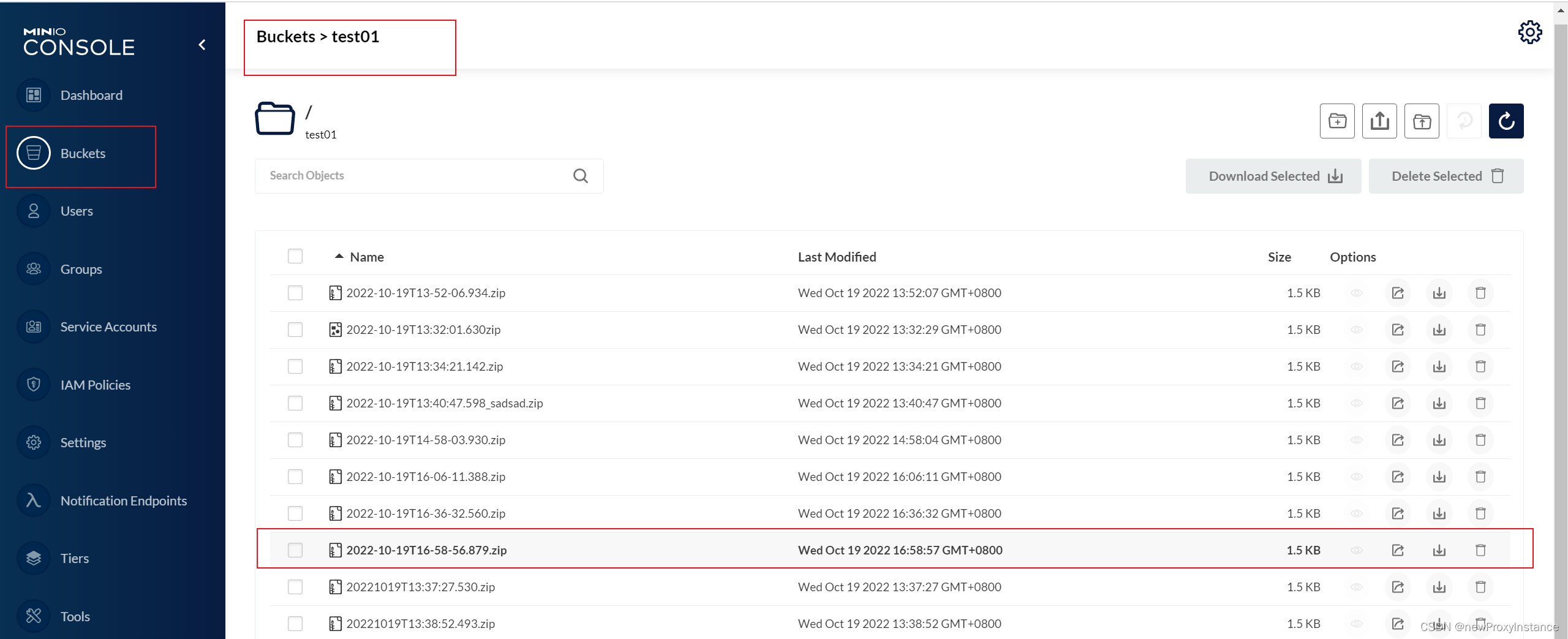
关于 Buckets 需要手动将权限改为 public

如果是 private 生成的 url 会带有默认的 7天时间,超过会过期。

如果是 private 权限,生成的 url 就不要做 split 截取,否则可能会无法访问

Docker部署
docker run -d -p 9000:9000 -p 9001:9001 --name minio1 \ -e "MINIO_ACCESS_KEY=zhanghao" \ -e "MINIO_SECRET_KEY=password" \ -v /mnt/data:/data \ -v /mnt/config:/root/.minio \ minio/minio server /data- 1
- 2
- 3
- 4
- 5
- 6
9000是API地址,9001是控制台地址。
-
相关阅读:
计数类DP
Trigger替换Demo
.NET Core WebApi第6讲:WebApi的前端怎么派人去拿数据?(区别MVC)
python基础及网络爬虫
【Android Studio】简单的QQ登录界面
2021了,真的不要再说 Node.js 是一门编程语言了
SAP Router 配置手册
C语言中的多线程编程如何实现?
【JavaSE】String类总结,StringBuilder、StringBuffer、String的区别讲解
【简单易操作】图漾TM460-E2深度网络相机在ROS-melodic环境下的配置过程
- 原文地址:https://blog.csdn.net/qq_37151886/article/details/127409538
