-
python版超市信息管理系统源代码,基于tkinter带界面
所用技术:SQLite3,tkinter,openpyxl,pandas
使用Java开发中的MVC思想,代码虽有冗余,但更容易维护
默认账号:admin,密码:123456- 使用
SQLite3创建商品信息管理系统所需数据表的数据库:commodity_info数据库 - 创建商品信息表,对项目中的商品信息进行存储
- 项目不需要添加管理员,管理员账号、密码的添加由管理人员代码添加
一、登录界面

二、主界面

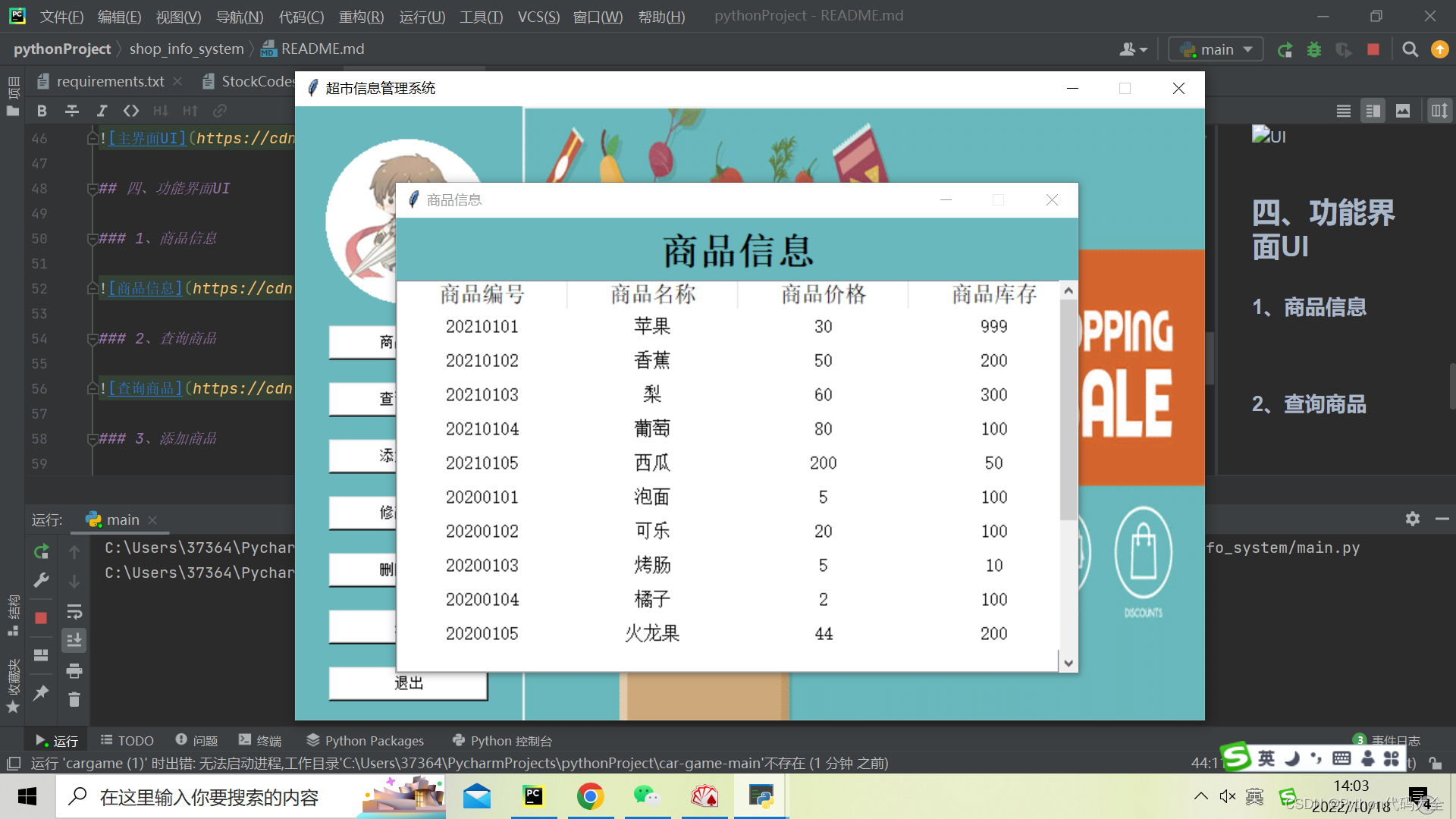
三、商品信息界面
四、添加商品页面(可批量导入)

源程序:
main.py
from tkinter import * from view.login_ui import Application as login if __name__ == '__main__': win = Tk() w = 800 h = 540 sw = win.winfo_screenwidth() # 得到屏幕宽度 sh = win.winfo_screenheight() # 得到屏幕高度 # 窗口宽高为100 x = (sw - w) / 2 y = (sh - h) / 2 win.geometry('%dx%d+%d+%d' % (w, h, x, y)) win.title('超市信息管理系统') win.resizable(width=False, height=False) # 加载login界面 login(master=win) win.mainloop()- 1
- 2
- 3
- 4
- 5
- 6
- 7
- 8
- 9
- 10
- 11
- 12
- 13
- 14
- 15
- 16
- 17
- 18
- 19
- 20
- 21
login_ui.py
#coding=utf-8 import tkinter from tkinter import * import tkinter.font as tkFont from tkinter import messagebox from controller import login_verify from view.index_ui import Application as index_ui class Application(Frame): def __init__(self, master=None): super().__init__(master) self.master = master self.pack() self.username = tkinter.StringVar() self.password = tkinter.StringVar() self.createWidget() def createWidget(self): # 背景图片 global photo_login photo_login = PhotoImage(file='./images/login.gif') self.label_bg = Label(self, image=photo_login) self.label_bg.pack() # 欢迎语区域 global photo_login_center photo_login_center = PhotoImage(file='./images/login_center.gif') label_login_center = Label(self, image=photo_login_center, width='600', height='340') label_login_center.place(x='100', y='100') welcome_font_1 = tkFont.Font(family='宋体', size=30, weight=tkFont.BOLD) label_welcome_1 = Label(self, text='Welcome', font=welcome_font_1, bg='#56cdff') label_welcome_1.place(x=175, y=170) welcome_font_2 = tkFont.Font(family='宋体', size=20, weight=tkFont.BOLD) label_welcome_2 = Label(self, text='欢迎登录超市信息', font=welcome_font_2, bg='#56cdff') label_welcome_2.place(x=140, y=260) label_welcome_3 = Label(self, text='管理系统', font=welcome_font_2, bg='#56cdff') label_welcome_3.place(x=195, y=320) # 数据输入区域 login_font = tkFont.Font(family='宋体', size=9) login_user = Label(self, text='请输入账号:', font=login_font, bg='#ffffff') login_user.place(x=430, y=160) Entry(self, highlightthickness=1, font=('宋体', 15), bg='#F3F3F4',textvariable=self.username).place(x=430, y=190,width=240,height=40) login_pass = Label(self, text='请输入密码:', font=login_font, bg='#ffffff') login_pass.place(x=430, y=240) Entry(self, highlightthickness=1,font=('宋体', 15), bg='#F3F3F4', show='*', textvariable=self.password).place(x=430, y=270, width=240, height=40) Button(self, text='立即登录', font=('宋体', 15, 'bold'), fg='#000000', bg="#56cdff", command=self.login).place(x=430, y=340, width=240, height=40) def login(self): errMessage = "" username = self.username.get() password = self.password.get() new_errMessage = login_verify.login_verify(username, password) errMessage = errMessage + new_errMessage if errMessage != "": messagebox.showinfo('提示', errMessage) self.password.set('') if new_errMessage == '登录成功': self.login_destroy() # 加载index界面 index_ui(self.master) # 销毁界面 def login_destroy(self): self.destroy()- 1
- 2
- 3
- 4
- 5
- 6
- 7
- 8
- 9
- 10
- 11
- 12
- 13
- 14
- 15
- 16
- 17
- 18
- 19
- 20
- 21
- 22
- 23
- 24
- 25
- 26
- 27
- 28
- 29
- 30
- 31
- 32
- 33
- 34
- 35
- 36
- 37
- 38
- 39
- 40
- 41
- 42
- 43
- 44
- 45
- 46
- 47
- 48
- 49
- 50
- 51
- 52
- 53
- 54
- 55
- 56
- 57
- 58
- 59
- 60
- 61
- 62
- 63
- 64
- 65
- 66
index_ui.py
from tkinter import * import tkinter.font as tkFont from view.about_ui import about_ui_begin from view.modify_ui import modify_ui_begin from view.inquire_ui import inquire_ui_begin from view.add_ui import add_ui_begin from view.info_ui import info_ui_begin from view.delete_ui import delete_ui_begin class Application(Frame): def __init__(self, master=None): super().__init__(master) self.master = master self.pack() self.createWidget() def createWidget(self): global photo_bg photo_bg = PhotoImage(file='./images/login.gif') # 使用时../改为./ label_bg = Label(self, image=photo_bg) label_bg.pack() self.frame_left = Frame(self, bg='#68B8BE',width=200, height=540).place(x=0, y=0) global photo_Avatar photo_Avatar = PhotoImage(file='./images/Avatar.gif') label_Avatar = Label(self.frame_left, bg='#68B8BE', image=photo_Avatar) label_Avatar.place(x=23, y=25) menu_font = tkFont.Font(family='宋体', size=10) Button(self.frame_left, text='商品信息', font=menu_font, fg='#000000', bg="#ffffff", command=self.index_info).place(x=30, y=193, width=140, height=30) Button(self.frame_left, text='查询商品', font=menu_font, fg='#000000', bg="#ffffff", command=self.index_inquire).place(x=30, y=243, width=140, height=30) Button(self.frame_left, text='添加商品', font=menu_font, fg='#000000', bg="#ffffff", command=self.index_add).place(x=30, y=293, width=140, height=30) Button(self.frame_left, text='修改商品', font=menu_font, fg='#000000', bg="#ffffff", command=self.index_modify).place(x=30, y=343, width=140, height=30) Button(self.frame_left, text='删除商品', font=menu_font, fg='#000000', bg="#ffffff", command=self.index_delete).place(x=30, y=393, width=140, height=30) Button(self.frame_left, text='关于', font=menu_font, fg='#000000', bg="#ffffff", command=self.index_about).place(x=30, y=443, width=140, height=30) Button(self.frame_left, text='退出', font=menu_font, fg='#000000', bg="#ffffff", command=self.index_quit).place(x=30, y=493, width=140, height=30) self.frame_right = Frame(self, width=600, height=540).place(x=200, y=0) global photo_index photo_index = PhotoImage(file='./images/info.gif') Label(self.frame_right, image=photo_index).place(x=200, y=0) # 商品信息 def index_info(self): info_ui_begin() # 查询商品 def index_inquire(self): inquire_ui_begin() # 添加商品 def index_add(self): add_ui_begin() # 修改商品 def index_modify(self): modify_ui_begin() # 删除商品 def index_delete(self): delete_ui_begin() # 关于 def index_about(self): about_ui_begin() # 退出-销毁界面 def index_quit(self): self.master.destroy()- 1
- 2
- 3
- 4
- 5
- 6
- 7
- 8
- 9
- 10
- 11
- 12
- 13
- 14
- 15
- 16
- 17
- 18
- 19
- 20
- 21
- 22
- 23
- 24
- 25
- 26
- 27
- 28
- 29
- 30
- 31
- 32
- 33
- 34
- 35
- 36
- 37
- 38
- 39
- 40
- 41
- 42
- 43
- 44
- 45
- 46
- 47
- 48
- 49
- 50
- 51
- 52
- 53
- 54
- 55
- 56
- 57
- 58
- 59
- 60
- 61
- 62
- 63
- 64
完整程序代码下载:python版超市信息管理系统源代码
- 使用
-
相关阅读:
2023数字科技生态大会-数字安全论坛 学习笔记
[答疑]角色和状态的区别
C语言--从键盘输入10个数字放在数组中,并输出
JavaScript基础
静态ip详解
正确使用 Unicode 和 MBCS 字符集
“可信区块链运行监测服务平台TBM发展研讨会”将于11月23日在北京召开
深度学习——使用块的网络VGG(笔记)
AIE多吡啶萘酰亚胺荧光树形分子/AIE喹啉腈(QM)染料衍生物QM-OH的研究制备
Harmony装饰器
- 原文地址:https://blog.csdn.net/weixin_42756970/article/details/127387342
