• Springboot集成阿里云短信


    1 前言

    ​ 线上系统开发中,短信功能是经常要用到的,比如注册、修改手机号、修改密码时短信验证码等。我们这里是一个基于Springboot的微服务(SpringCloud Alibaba)项目,选择阿里云的短信接口。

    2 准备工作

    2.1 了解流程

    ​ 登录阿里云短信控制台,了解短信相关知识。我们这里需要短信发送功能,进一步了解相关API。

    2.2 配置信息

    • 凭证:登录阿里云短信控制台,通过快速学习,我们知道,我们需要创建accessKey,accessKeySecret,即用户的访问凭证,具体如何创建,这里不赘述,自行查阅文档。
    • 域名endpoint:即我们通过那个地址访问阿里云的短信接口。

    2.3 短信签名和模板

    ​ 签名和模板是阿里云短信功能所必须的,下面讲解下签名和模板的添加。

    2.3.1 签名

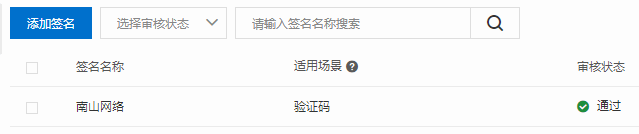
    • 添加签名:一个账户只能添加一个验证码类型的签名,我已经添加了一个,你们根据需要自行选择,图示:
    2.3.2 模板

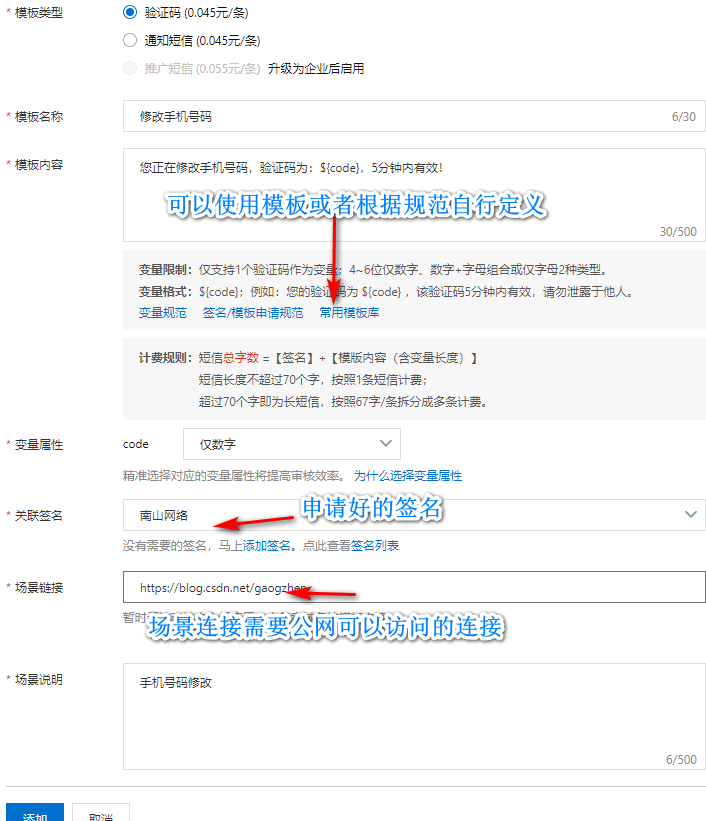
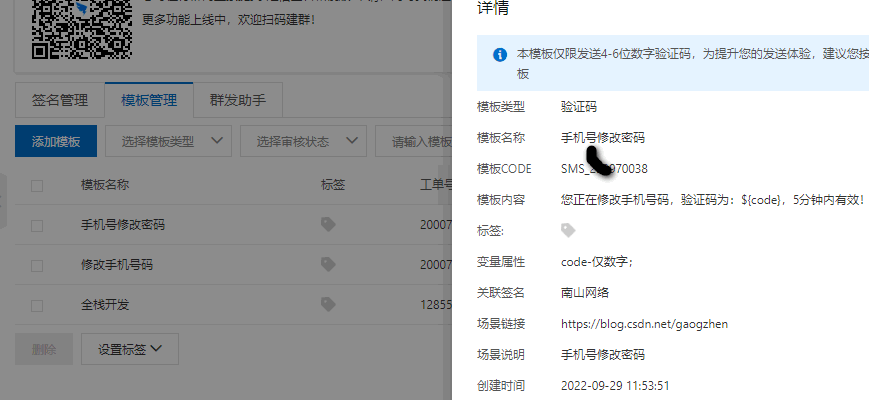
    • 添加模板:

    • 审核不通过原因:

      • 场景连接:这里场景连接一定要填写公网可访问连接,比如你上线的App、网站网址,或者你的博客等待的。
      • 模板内容:如需自定义,仔细阅读变量规范、模板申请规范;或者直接说使用模板库中预定义模块,适当修改文字,可满足大部分应用场景。
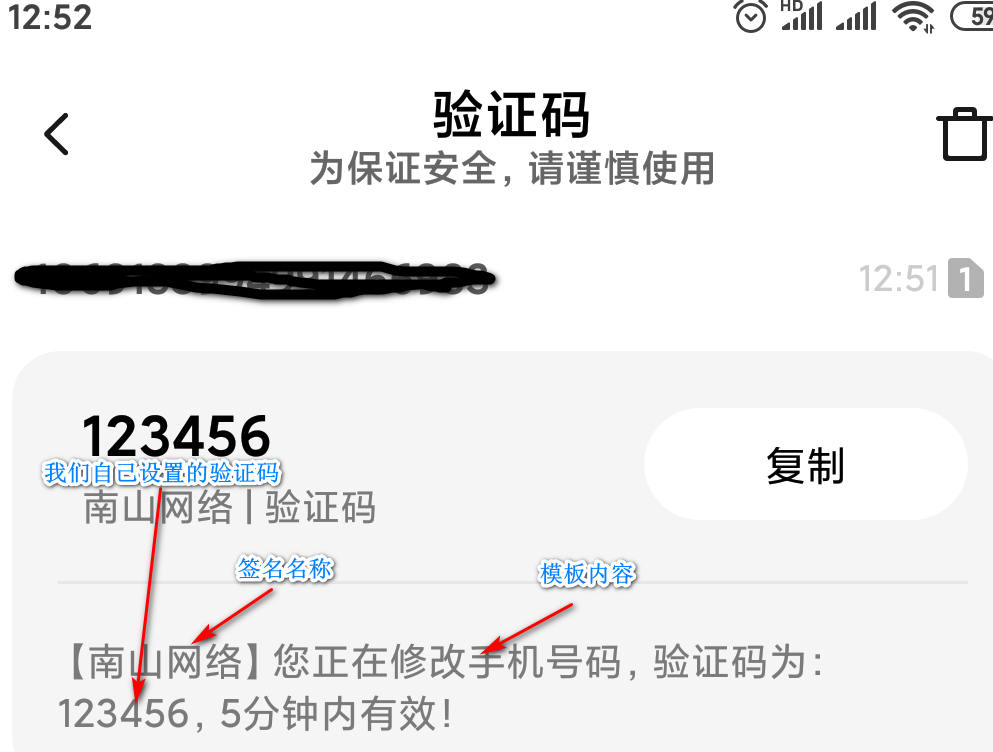
    • 效果图示:

    2.3.3 存入数据库

    • 与短信功能相关的签名、模板,这些信息保存在数据库的配置表中。
      • 签名:效果就是短信开头的【】中的信息,开发需要用到签名名称signName。
      • 模板:效果就是短信的内容,开发中需要用到模板名称templateCode,其他信息保存在数据库中。

    3 SDK

    ​ 虽然是做了前面的准备工作,但是具体怎么应用还是很模糊,查阅相关技术文档,很多都是旧版本的内容。这里我们还是通过阿里云的OpenAPI来学习最新的应用技术,这里我们以短信发送为例,图示:
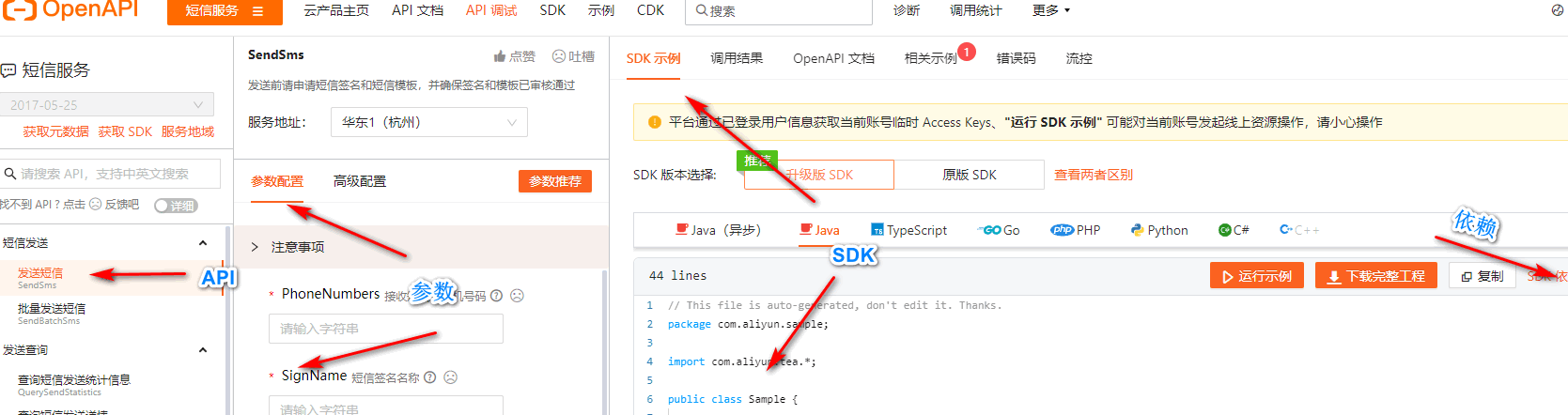
    api参数,示例,依赖一目了然,而且是最新版本的内容,下面我们开始集成到项目中。

    4 集成Springboot

    4.1 集成

    • pom.xml:复制上面依赖信息

      <dependency>
                  <groupId>com.aliyungroupId>
                  <artifactId>dysmsapi20170525artifactId>
                  <version>2.0.21version>
              dependency>
      
    • 分析:

      • 短信功能我们项目中多个模块需要用到,我们把短信发送功能封装到AliSms类中,AliSms配置为IOC容器中的bean,位置放置在公共模块中。
      • 需要用到的配置信息,比如accessKey,secretKey,endpoint,我们在nacos中配置,图示:2022-10-08_sendSms-nacos-config
    • 参考官网给出的SDK封装我们自己的AliSms类,源码:

      import com.aliyun.dysmsapi20170525.Client;
      import com.aliyun.dysmsapi20170525.models.SendSmsRequest;
      import com.aliyun.dysmsapi20170525.models.SendSmsResponse;
      import com.aliyun.teautil.models.RuntimeOptions;
      import cn.hutool.core.bean.BeanUtil;
      
      
      import java.util.Map;
      
      /**
       * @author Administrator
       * @version 1.0
       * @description ali sms
       * @date 2022-09-30 11:19
       * 阿里云短信类
       */
      public class AliSms {
      
          private final Client client;
          private final SendSmsRequest request;
      
          public AliSms(Client client, SendSmsRequest request) {
              this.client = client;
              this.request = request;
          }
      
          public  Map sendSms(String templateCode, String templateParam, String phoneNumbers) throws Exception {
      
              request.setTemplateCode(templateCode);
              request.setTemplateParam(templateParam);
              request.setPhoneNumbers(phoneNumbers);
      
              RuntimeOptions runtime = new RuntimeOptions();
              SendSmsResponse response = null;
              try {
                  response = client.sendSmsWithOptions(request, runtime);
              } catch (Exception e) {
                  e.printStackTrace();
                  throw new Exception("短信发送失败");
              }
              return BeanUtil.beanToMap(response);
          }
      }


      import com.aliyun.dysmsapi20170525.Client;
      import com.aliyun.teaopenapi.models.Config;
      import com.aliyun.dysmsapi20170525.models.SendSmsRequest;
      import org.springframework.beans.factory.annotation.Value;
      import org.springframework.context.annotation.Bean;
      import org.springframework.context.annotation.Configuration;
      
      /**
       * @author Administrator
       * @version 1.0
       * @description sms短信发送
       * @date 2022-10-04 12:50
       */
      @Configuration
      public class SmsAutoConfiguration {
      
          /**
           * 阿里云短信服务账户accessKey
           */
          @Value("${spring.cloud.alicloud.access-key}")
          private String accessKey;
      
          /**
           * 阿里云短信服务账户accessKey
           */
          @Value("${spring.cloud.alicloud.secret-key}")
          private String secretKey;
      
          /**
           * 阿里云短信服务endpoint
           */
          @Value("${spring.cloud.alicloud.sms.endpoint}")
          private String endpoint;
      
          /**
           * 阿里云短信服务签名
           */
          @Value("${spring.cloud.alicloud.sms.signName}")
          private String signName;
      
      
          @Bean
          public AliSms aliSms() {
              return new AliSms(createClient(), sendSmsRequest());
          }
      
          private SendSmsRequest sendSmsRequest() {
              SendSmsRequest request = new SendSmsRequest();
              request.setSignName(signName);
              return request;
          }
      
          private Client createClient(){
              Config config = new Config()
                      // 您的 AccessKey ID
                      .setAccessKeyId(accessKey)
                      // 您的 AccessKey Secret
                      .setAccessKeySecret(secretKey);
              // 访问的域名
              config.endpoint = endpoint;
              Client client = null;
              try {
                  client = new Client(config);
              } catch (Exception e) {
                  e.printStackTrace();
                  throw new RuntimeException("创建阿里客户端失败!");
              }
      
              return client;
          }
      
      }
      
    • pom.xml添加依赖,全部相关依赖:

              <dependency>
                  <groupId>com.aliyungroupId>
                  <artifactId>dysmsapi20170525artifactId>
                  <version>2.0.21version>
              dependency>
              <dependency>
                  <groupId>com.aliyungroupId>
                  <artifactId>tea-utilartifactId>
                  <version>0.2.14version>
              dependency>
      

    4.2 测试

    • 测试代码:前端代码及后端接口根据业务需求自己设计,这里只展示业务实现层的短信发送方法的简单测试实现:
    @Autowired
        private AliSms aliSms;
    
        @Override
        public void sendSms(Sms sms) {
            try {
                log.info("发送短信{}", JSON.toJSONString(sms, true));
                String templateParam = "{\"code\":\"" + "123456" + "\"}";
                Map info = aliSms.sendSms(sms.getTemplateCode(), templateParam, sms.getMobile());
                log.info("发送结果:{}", JSON.toJSONString(info, true));
            } catch (Exception e) {
                e.printStackTrace();
                throw new RuntimeException("发送短信失败");
            }
        }
    
    • 测试结果:

      • 控制台:

        {
            "basePath":"http://192.168.10.1:8090",
        	"description":"发送短信",
        	"ip":"192.168.10.1",
        	"method":"com.gaogzhen.controller.SmsController.sendSms",
        	"parameter":{
        		"sms":{
        			"countryCode":"+86",
        			"mobile":"自己填写的手机号",
        			"templateCode":"自己的模板CODE"
        		}
        	},
        	"result":{
        		"code":200
        	},
        	"spendTime":0,
        	"uri":"/sms/sendTo",
        	"url":"http://192.168.10.1:8090/sms/sendTo",
        	"username":"1014066909280374785"
        }
        
        
      • 手机截图:

    5 后记

    ​ 欢迎交流学习,下面为联系方式和仓库源代码地址

    ❓QQ:806797785

    ⭐源代码仓库地址:https://gitee.com/gaogzhen/coin-exchange

  • 相关阅读:
    目标检测YOLO实战应用案例100讲-基于YOLO的道路交通标志识别
    Freeswitch实现软电话功能
    漫画 | 一位坑人的编程大师
    MindSpore论文解读 | EPRNet:应用于实时街景分割的高效金字塔表征网络
    java毕业设计俄语等级考试管理系统.Mybatis+系统+数据库+调试部署
    温度敏感材料干燥过程中的温度和真空度精密控制解决方案
    C++:学习大纲目录:30天学会C++
    10款小而美的macOS应用
    Linux基础 - Samba 或 NFS 实现文件共享
    linux、windows 查看java等进程占用资源情况
  • 原文地址:https://www.cnblogs.com/gaogzhen/p/16768735.html