-
Unity_建造系统及保存加载

主要是尝试类似RTS的建造系统, 以及通过序列化/反序列化保存和加载游戏数据, 测试版本Unity2020.3
建造物体
移动
生成使用透明材质的的模型到场景, 通过射线检测获取鼠标位置并使模型位置跟随移动
- private Camera mCamera;//场景相机
- public GameObject PrefabModel;//预制体模型
- private GameObject createModel;//用于创建的场景模型
- void Start()
- {
- //获取场景相机
- GameObject gameObject=GameObject.Find("Main Camera");
- mCamera=gameObject.GetComponent
(); - createModel = Instantiate(PrefabModel);//生成模型到场景
- }
- void Update()
- {
- /*从摄像机向鼠标方向发射射线,获取鼠标位置*/
- Ray ray = mCamera.ScreenPointToRay(Input.mousePosition);
- RaycastHit hit;
- LayerMask mask = 1 << (LayerMask.NameToLayer("Floor"));//遮罩图层,使射线只检测Floor图层
- if (Physics.Raycast(ray, out hit,Mathf.Infinity,mask.value))
- {
- Debug.DrawLine(ray.origin, hit.point,Color.green);//在编辑器视图中绘制射线
- createModel.transform.position = hit.point;//使模型位置跟随鼠标坐标
- }
- }
预制体模型的一些处理
测试时发现默认情况下的预制体模型实例化到鼠标位置后会弹起来, 检查发现模型轴点位置是在碰撞体积内部的, 怀疑是产生了和地板模型的碰撞导致了,所以调整抬高了一点碰撞体积, 让模型轴点在碰撞体积以外, 再进行生成测试就正常了, 如果生成有问题可以参考:

旋转
用鼠标滚轮控制模型旋转角度
- void Update()
- {
- if (Input.GetAxis("Mouse ScrollWheel")!=0)//鼠标滚轮
- {
- //旋转模型角度
- newcreateModel.transform.Rotate(0,Input.GetAxis("Mouse ScrollWheel") *Time.deltaTime*20000,0,Space.World);//Space.World为使用全局坐标系
- }
- }
设置材质
固定模型到场景中后把模型材质从透明恢复为正常材质
- public Material AlbedoMat;//正常材质
- ...
- createModel.GetComponent
().sharedMaterial = AlbedoMat;//设置模型为正常材质
碰撞/重叠检测
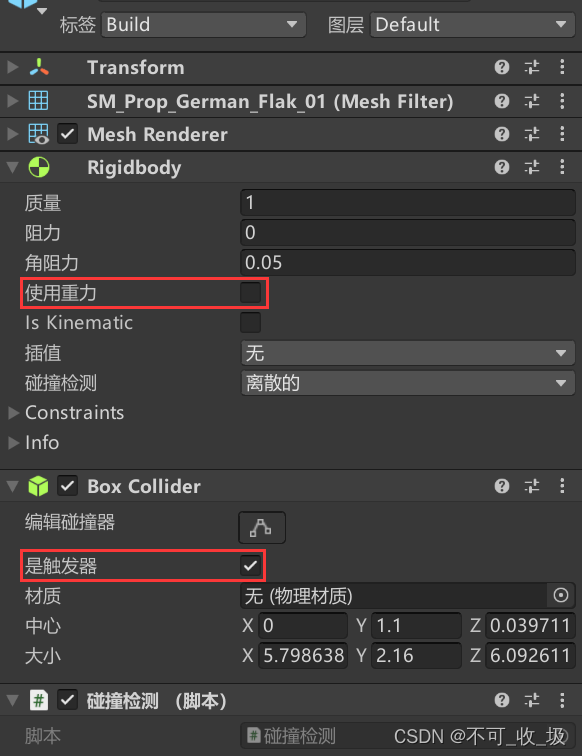
给预制体模型添加Collider碰撞体和Rigidbody刚体组件并使用触发器来检测是否与其他已经固定的模型有重叠导致穿模, 如果有重叠则不能固定到场景并把模型材质变红提示
[参考的]Unity碰撞和触发
- //触发开始时执行一次
- public void OnTriggerEnter(Collider collider){
- Debug.Log("与其他模型有重叠,不可建造");
- }
- //触发过程中一直重复执行
- public void OnTriggerStay(Collider collider){
- Debug.Log("与其他模型有重叠,不可建造");
- }
- //触发结束时执行一次
- public void OnTriggerExit(Collider collider){
- Debug.Log("无重叠,可以建造");
- }
数据保存/加载
查资料时都管这个叫序列化和反序列化, 听起来好高大上的样子, Unity自带了JsonUtility用于处理 json数据(JsonUtility文档)
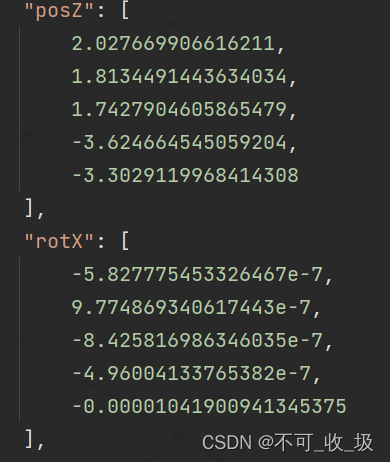
测试用到的主要是获取场景上所有已固定的建筑模型的类型、位置和角度并保存为json文件, 在重新加载场景后可以加载保存的数据并根据数据恢复保存时的状态
保存数据
- /*用于保存数据的类*/
- [Serializable]//应用可序列化属性
- public class BuildStateSave
- {
- public List<string> modelType = new List<string>();//模型类型
- public List<double> posX = new List<double>();//X位置
- public List<double> posY = new List<double>();//Y位置
- public List<double> posZ = new List<double>();//Z位置
- public List<double> rotX = new List<double>();//X方向
- public List<double> rotY = new List<double>();//Y方向
- public List<double> rotZ = new List<double>();//Z方向
- /*把数据转换为json字符串*/
- public string SaveToString()
- {
- return JsonUtility.ToJson(this,true);//[prettyPrint]为true时返回的字符串保持可读格式,为false时大小最小
- }
- }
- /*保存按钮*/
- public void SaveSence()
- {
- GameObject[] buildCubes =GameObject.FindGameObjectsWithTag("Build");//获取所有已建造对象
- BuildStateSave buildState = new BuildStateSave();
- for (int i = 0; i < buildCubes.Length; i++)
- {
- buildState.modelType.Add(buildCubes[i].name);
- buildState.posX.Add(buildCubes[i].transform.position.x);
- buildState.posY.Add(buildCubes[i].transform.position.y);
- buildState.posZ.Add(buildCubes[i].transform.position.z);
- buildState.rotX.Add(buildCubes[i].transform.rotation.eulerAngles.x);
- buildState.rotY.Add(buildCubes[i].transform.rotation.eulerAngles.y);
- buildState.rotZ.Add(buildCubes[i].transform.rotation.eulerAngles.z);
- }
- string filePath = Application.streamingAssetsPath + "/BuildSave.json";
- if (File.Exists(filePath))//判断文件是否存在
- {
- File.Delete(filePath);//删除这个文件
- }
- //找到当前路径
- FileInfo file = new FileInfo(filePath);
- //判断有没有文件,有则打开文件,没有则创建后打开
- StreamWriter sw = file.CreateText();
- //数据转换为字符串并写入文件
- sw.WriteLine(buildState.SaveToString());
- sw.Close();//关闭文件
- sw.Dispose();
- }
执行保存后路径下的json文件中可以看到保存的信息数据
加载数据
- /*用于加载数据的类*/
- [System.Serializable]//应用可序列化属性
- public class BuildStateLoad
- {
- public List<string> modelType = new List<string>();//模型类型
- public List<double> posX = new List<double>();//X位置
- public List<double> posY = new List<double>();//Y位置
- public List<double> posZ = new List<double>();//Z位置
- public List<double> rotX = new List<double>();//X方向
- public List<double> rotY = new List<double>();//Y方向
- public List<double> rotZ = new List<double>();//Z方向
- /*把json字符串转换为变量数据*/
- public BuildStateLoad CreateFromJSON(string jsonString)
- {
- return JsonUtility.FromJson
(jsonString); - }
- }
- /*加载按钮*/
- public void LoadSence()
- {
- /*从json文件读取数据*/
- FileStream fs = new FileStream(Application.streamingAssetsPath + "/BuildSave.json", FileMode.Open, FileAccess.Read, FileShare.None);
- StreamReader sr = new StreamReader(fs, System.Text.Encoding.Default);
- if (null == sr) return;
- string str = sr.ReadToEnd();
- sr.Close();
- /*字符串数据反序列化到变量中*/
- BuildStateLoad buildInfo = new BuildStateLoad();
- buildInfo=buildInfo.CreateFromJSON(str);
- for (int i = 0; i < buildInfo.modelType.Count; i++)
- {
- /*生成模型到场景*/
- switch (buildInfo.modelType[i])
- {
- case "Model1":
- createModel = Instantiate(PrefabModel1);
- break;
- case "Model2":
- createModel = Instantiate(PrefabModel2);
- break;
- }
- /*重命名*/
- createModel.name = buildInfo.modelType[i];
- /*位置*/
- createModel.transform.position = new Vector3((float)buildInfo.posX[i],(float)buildInfo.posY[i],(float)buildInfo.posZ[i]);
- /*旋转*/
- createModel.transform.rotation = Quaternion.Euler(new Vector3((float)buildInfo.rotX[i],(float)buildInfo.rotY[i],(float)buildInfo.rotZ[i]));
- /*固定到场景*/
- createModel.GetComponent
().isTrigger=false;//关闭触发器恢复碰撞 - createModel.GetComponent
().useGravity=true;//恢复刚体组件的重力 - }
- }
执行加载后获取保存的数据

完整代码
主要逻辑脚本, 挂载在一个场景空对象上
- using System;
- using System.Collections;
- using System.Collections.Generic;
- using System.IO;
- using UnityEngine;
- public class BuildTest : MonoBehaviour
- {
- private Camera mCamera;//场景相机
- public GameObject boxPrefabModel;//预制体模型
- public GameObject flak88PrefabModel;//预制体模型
- private GameObject newcreateModel;//用于创建的场景模型
- private GameObject loadcreateModel;//用于加载的场景模型
- public Material transparentMat;//透明材质
- public Material unInitMat;//阻挡材质
- public Material boxAlbedoMat;//Box正常材质
- public Material flak88AlbedoMat;//88炮正常材质
- private bool iSBuilding = false;//是否为建造模式
- public bool unInitPrefab = false;//是否重叠穿模
- private string selectBuildType;//记录当前选择建造的物体类型
- void Start()
- {
- /*获取相机*/
- GameObject gameObject=GameObject.Find("Main Camera");
- mCamera=gameObject.GetComponent
(); - }
- void Update()
- {
- if (iSBuilding)
- {
- /*从摄像机向鼠标方向发射射线,获取鼠标位置*/
- Ray ray = mCamera.ScreenPointToRay(Input.mousePosition);
- RaycastHit hit;
- LayerMask mask = 1 << (LayerMask.NameToLayer("Floor"));
- /*Raycast:
- [1]射线方向
- [2]碰撞到的对象信息
- [3]射线长度,Mathf.Infinity为无限远
- [4]遮罩图层,不检测其他图层的物体
- */
- if (Physics.Raycast(ray, out hit,Mathf.Infinity,mask.value))
- {
- Debug.DrawLine(ray.origin, hit.point,Color.green);//在编辑器视图中绘制射线
- /*模型位置跟随鼠标坐标*/
- newcreateModel.transform.position = hit.point;
- if (unInitPrefab)//若位置与已生成物体重叠,修改显示材质
- {
- /*设置模型材质为不可生成状态*/
- MeshRenderer[] Mat = newcreateModel.GetComponentsInChildren
();//获取当前对象及所有子对象上的材质组件并更换材质 - for (int i = 0; i < Mat.Length; i++)
- {
- Mat[i].sharedMaterial = unInitMat;
- }
- }
- else
- {
- /*设置模型材质为透明*/
- MeshRenderer[] Mat = newcreateModel.GetComponentsInChildren
();//获取当前对象及所有子对象上的材质组件并更换材质 - for (int i = 0; i < Mat.Length; i++)
- {
- Mat[i].sharedMaterial = transparentMat;
- }
- if (Input.GetMouseButtonDown(0))//点击鼠标左键
- {
- /*固定对象到场景中*/
- newcreateModel.GetComponent
().isTrigger=false;//关闭触发器恢复碰撞 - newcreateModel.GetComponent
().useGravity=true;//恢复刚体组件的重力 - //newcreateModel.layer = 20;//设置图层用于接收爆炸力影响
- switch (selectBuildType)
- {
- case "Box":
- newcreateModel.GetComponent
().sharedMaterial = boxAlbedoMat;//设置旧模型为正常材质 - newcreateModel = Instantiate(boxPrefabModel);//生成新模型到场景
- break;
- case "Flak88":
- /*设置旧模型为正常材质*/
- for (int i = 0; i < Mat.Length; i++)
- {
- Mat[i].sharedMaterial = flak88AlbedoMat;
- }
- newcreateModel = Instantiate(flak88PrefabModel);//生成新模型到场景
- break;
- }
- newcreateModel.name = selectBuildType;//重命名对象
- }
- }
- if (Input.GetAxis("Mouse ScrollWheel")!=0)//滑动鼠标滚轮
- {
- //旋转模型角度
- newcreateModel.transform.Rotate(0,Input.GetAxis("Mouse ScrollWheel") *Time.deltaTime*20000,0,Space.World);//加上Space.World为基于全局坐标系变换
- }
- }
- }
- //按下鼠标右键退出建造模式
- if (Input.GetMouseButtonDown(1))
- {
- iSBuilding = false;
- SetCursor(true);
- Destroy(newcreateModel);
- /*退出建造模式时如果是重叠状态会导致再次进入建造模式时也是重叠状态,这里在退出时强制取消重叠状态*/
- if (unInitPrefab)
- {
- unInitPrefab = false;
- }
- }
- }
- ///
- /// 设置鼠标状态
- ///
- /// true显示,false隐藏
- public void SetCursor(bool _cursorState)
- {
- //隐藏鼠标
- Cursor.visible = _cursorState;
- }
- /*进入Box建造模式按钮*/
- public void StartBoxBuild()
- {
- selectBuildType = "Box";
- iSBuilding = true;
- SetCursor(false);
- /*生成模型到场景*/
- newcreateModel = Instantiate(boxPrefabModel);
- /*设置模型材质为透明*/
- newcreateModel.GetComponent
().sharedMaterial = transparentMat; - /*重命名对象便于区分*/
- newcreateModel.name = selectBuildType;
- }
- /*进入Flak88建造模式按钮*/
- public void StartFlak88Build()
- {
- selectBuildType = "Flak88";
- iSBuilding = true;
- SetCursor(false);
- /*生成模型到场景*/
- newcreateModel = Instantiate(flak88PrefabModel);
- /*设置模型材质为透明*/
- MeshRenderer[] Mat = newcreateModel.GetComponentsInChildren
(); - for (int i = 0; i < Mat.Length; i++)
- {
- Mat[i].sharedMaterial = transparentMat;
- }
- /*重命名*/
- newcreateModel.name = selectBuildType;
- }
- /*保存按钮*/
- public void ClickSaveGame()
- {
- GameObject[] buildCubes =GameObject.FindGameObjectsWithTag("Build");//寻找对象
- BuildStateSave buildState = new BuildStateSave();
- for (int i = 0; i < buildCubes.Length; i++)
- {
- buildState.modelType.Add(buildCubes[i].name);
- buildState.posX.Add(buildCubes[i].transform.position.x);
- buildState.posY.Add(buildCubes[i].transform.position.y);
- buildState.posZ.Add(buildCubes[i].transform.position.z);
- buildState.rotX.Add(buildCubes[i].transform.rotation.eulerAngles.x);
- buildState.rotY.Add(buildCubes[i].transform.rotation.eulerAngles.y);
- buildState.rotZ.Add(buildCubes[i].transform.rotation.eulerAngles.z);
- }
- string filePath = Application.streamingAssetsPath + "/BuildSave.json";
- if (File.Exists(filePath))//判断文件是否存在
- {
- File.Delete(filePath);//删除这个文件
- }
- //找到当前路径
- FileInfo file = new FileInfo(filePath);
- //判断有没有文件,有则打开文件,没有则创建后打开
- StreamWriter sw = file.CreateText();
- //数据转换为字符串并写入文件
- sw.WriteLine(buildState.SaveToString());
- sw.Close();//关闭文件
- sw.Dispose();
- }
- /*重新加载场景按钮*/
- public void ReLoadGame()
- {
- Application.LoadLevel(Application.loadedLevel);//重置场景
- }
- /*加载按钮*/
- public void ClickLoadGame()
- {
- /*从json文件读取数据*/
- FileStream fs = new FileStream(Application.streamingAssetsPath + "/BuildSave.json", FileMode.Open, FileAccess.Read, FileShare.None);
- StreamReader sr = new StreamReader(fs, System.Text.Encoding.Default);
- if (null == sr) return;
- string str = sr.ReadToEnd();
- sr.Close();
- /*字符串数据反序列化到变量中*/
- BuildStateLoad buildInfo = new BuildStateLoad();
- buildInfo=buildInfo.CreateFromJSON(str);
- for (int i = 0; i < buildInfo.modelType.Count; i++)
- {
- /*生成模型到场景*/
- switch (buildInfo.modelType[i])
- {
- case "Box":
- loadcreateModel = Instantiate(boxPrefabModel);
- break;
- case "Flak88":
- loadcreateModel = Instantiate(flak88PrefabModel);
- break;
- }
- /*重命名*/
- loadcreateModel.name = buildInfo.modelType[i];
- /*位置*/
- loadcreateModel.transform.position = new Vector3((float)buildInfo.posX[i],(float)buildInfo.posY[i],(float)buildInfo.posZ[i]);
- /*旋转*/
- loadcreateModel.transform.rotation = Quaternion.Euler(new Vector3((float)buildInfo.rotX[i],(float)buildInfo.rotY[i],(float)buildInfo.rotZ[i]));
- /*固定到场景*/
- loadcreateModel.GetComponent
().isTrigger=false;//关闭触发器恢复碰撞 - loadcreateModel.GetComponent
().useGravity=true;//恢复刚体组件的重力 - }
- }
- /*用于保存数据的类*/
- [Serializable]//应用可序列化属性,不受支持的字段以及私有字段、静态字段和应用了NonSerialized属性的字段会被忽略
- public class BuildStateSave
- {
- /*
- 泛型集合List
- 大小可按需动态增加,不会强行对值类型进行装箱和拆箱,或对引用类型进行向下强制类型转换,性能提高
- */
- public List<string> modelType = new List<string>();//模型类型
- public List<double> posX = new List<double>();//X位置
- public List<double> posY = new List<double>();//Y位置
- public List<double> posZ = new List<double>();//Z位置
- public List<double> rotX = new List<double>();//X方向
- public List<double> rotY = new List<double>();//Y方向
- public List<double> rotZ = new List<double>();//Z方向
- /*把列表数据转换为json字符串*/
- public string SaveToString()
- {
- return JsonUtility.ToJson(this,true);//[prettyPrint]为true时保持可读格式,为false时最小大小
- }
- }
- /*用于加载数据的类*/
- [System.Serializable]//应用可序列化属性,不受支持的字段以及私有字段、静态字段和应用了NonSerialized属性的字段会被忽略
- public class BuildStateLoad
- {
- public List<string> modelType = new List<string>();//模型类型
- public List<double> posX = new List<double>();//X位置
- public List<double> posY = new List<double>();//Y位置
- public List<double> posZ = new List<double>();//Z位置
- public List<double> rotX = new List<double>();//X方向
- public List<double> rotY = new List<double>();//Y方向
- public List<double> rotZ = new List<double>();//Z方向
- /*把json字符串转换为变量数据*/
- public BuildStateLoad CreateFromJSON(string jsonString)
- {
- return JsonUtility.FromJson
(jsonString); - }
- }
- }
用于碰撞触发检测的脚本, 挂载在预制体模型上
- using System;
- using System.Collections;
- using System.Collections.Generic;
- using UnityEngine;
- public class 碰撞检测 : MonoBehaviour
- {
- private BuildTest testScript;
- private void Start()
- {
- /*获取脚本对象*/
- GameObject gameObject=GameObject.Find("脚本挂载");
- testScript = gameObject.GetComponent
(); - }
- //触发开始时执行一次
- public void OnTriggerEnter(Collider collider){
- testScript.unInitPrefab = true;
- }
- //触发过程中一直重复执行
- public void OnTriggerStay(Collider collider){
- testScript.unInitPrefab = true;
- }
- //触发结束时执行一次
- public void OnTriggerExit(Collider collider){
- testScript.unInitPrefab = false;
- }
- }
-
相关阅读:
Java NIO 通信基础
计算机毕业设计SSM钓鱼爱好者交流平台【附源码数据库】
基于Http Basic Authentication的接口
【JAVA】快速排序
【数据结构2】算法的基本概念
.NET Core WebAPI中使用Swagger(完整教程)
嵌入式C语言设计模式 --- 前言
S-2K2001 pmon调试
用pymysql封装项目通用的连接和查询
力扣(LeetCode)1333. 餐厅过滤器(C++)
- 原文地址:https://blog.csdn.net/qq_36917144/article/details/127111997
