-
springboot整合minio分布式存储
Minio基础概念
- S3
- Simple Storage Service,简单存储服务,这个概念是 Amazon 在 2006 年推出的,
- Object
- 存储到 Minio 的基本对象,如文件、字节流,Anything…
- Bucket
- 用来存储 Object 的逻辑空间。每个 Bucket 之间的数据是相互隔离的。
- Drive
- 部署 Minio 时设置的磁盘,Minio 中所有的对象数据都会存储在 Drive 里。
- Set
- 一组 Drive 的集合,分布式部署根据集群规模自动划分一个或多个 Set ,每个 Set 中的 Drive 分布在不同位置。
- 一个对象存储在一个 Set 上
- 一个集群划分为多个 Set
- 一个 Set 包含的 Drive 数量是固定的,默认由系统根据集群规模自动计算得出
- 一个 SET 中的 Drive 尽可能分布在不同的节点上
- Set /Drive 的关系
- Set /Drive 这两个概念是 MINIO 里面最重要的两个概念,一个对象最终是存储在 Set 上面的。
- Set 是另外一个概念,Set 是一组 Drive 的集合,图中,所有蓝色、橙色背景的 Drive(硬盘)的就组成了一个 Set。

- 一组 Drive 的集合,分布式部署根据集群规模自动划分一个或多个 Set ,每个 Set 中的 Drive 分布在不同位置。
- 纠删码(Erasure Code)
- 纠删码(Erasure Code)简称 EC,是一种数据保护方法,它将数据分割成片段,把冗余数据块扩展、编码,并将其存储在不同的位置,比如磁盘、存储节点或者其它地理位置。
- 纠删码保证了高可用,使用highwayhash来梳理数据损坏(Bit Rot Protection)
- 纠删码是一种恢复丢失和损坏数据的数学算法,目前,纠删码技术在分布式存储系统中的应用主要有三类,阵列纠删码(Array Code: RAID5、RAID6 等)、RS(Reed-Solomon)里德-所罗门类纠删码和LDPC(LowDensity Parity Check Code)低密度奇偶校验纠删码。
- Erasure Code 是一种编码技术,它可以将 n 份原始数据,增加 m 份校验数据,并能通过 n+m 份中的任意 n 份原始数据,还原为原始数据。
- 即如果有任意小于等于 m 份的校验数据失效,仍然能通过剩下的数据还原出来。
- Minio 采用 Reed-Solomon code 将对象拆分成 N/2 数据和 N/2 奇偶校验块。
- 在同一集群内,MinIO 自己会自动生成若干纠删组(Set),用于分布存放桶数据。一个纠删组中的一定数量的磁盘发生的故障(故障磁盘的数量小于等于校验盘的数量),通过纠删码校验算法可以恢复出正确的数据。
安装minio
systemctl status firewalld.service systemctl stop firewalld.service- 1
- 2
- 本文我们使用基于docker的形式安装minio
- 未安装docker可参考此文中的docker安装部分
- 安装的docker及docker-compose版本如下

- docker安装minio
- docker pull minio/minio 下载镜像

- docker pull minio/minio 下载镜像
- 在home目录下新建docker文件夹
- docker文件夹下新建minio目录和docker-compose.yml文件
- minio目录下新建目录config和data
- chmod 777 config
- chmod 777 data
- docker-compose.yml如下
- minio目录下新建目录config和data
- docker文件夹下新建minio目录和docker-compose.yml文件
version: '3' services: minio: image: minio/minio restart: always ports: - '9000:9000' - '9001:9001' networks: - front-ms privileged: true container_name: minio volumes: - $PWD/minio/data:/data - $PWD/minio/config:/root/.minio/ environment: - "MINIO_ROOT_USER=admin" - "MINIO_ROOT_PASSWORD=admin123456" command: server --console-address ':9001' /data networks: front-ms: driver: bridge- 1
- 2
- 3
- 4
- 5
- 6
- 7
- 8
- 9
- 10
- 11
- 12
- 13
- 14
- 15
- 16
- 17
- 18
- 19
- 20
- 21
- 22
- 23
- 在docker-compose.yml目录执行 docker-compose up -d 启动容器

- 访问 http://192.168.174.139:9000/
- 使用 admin admin123456登陆
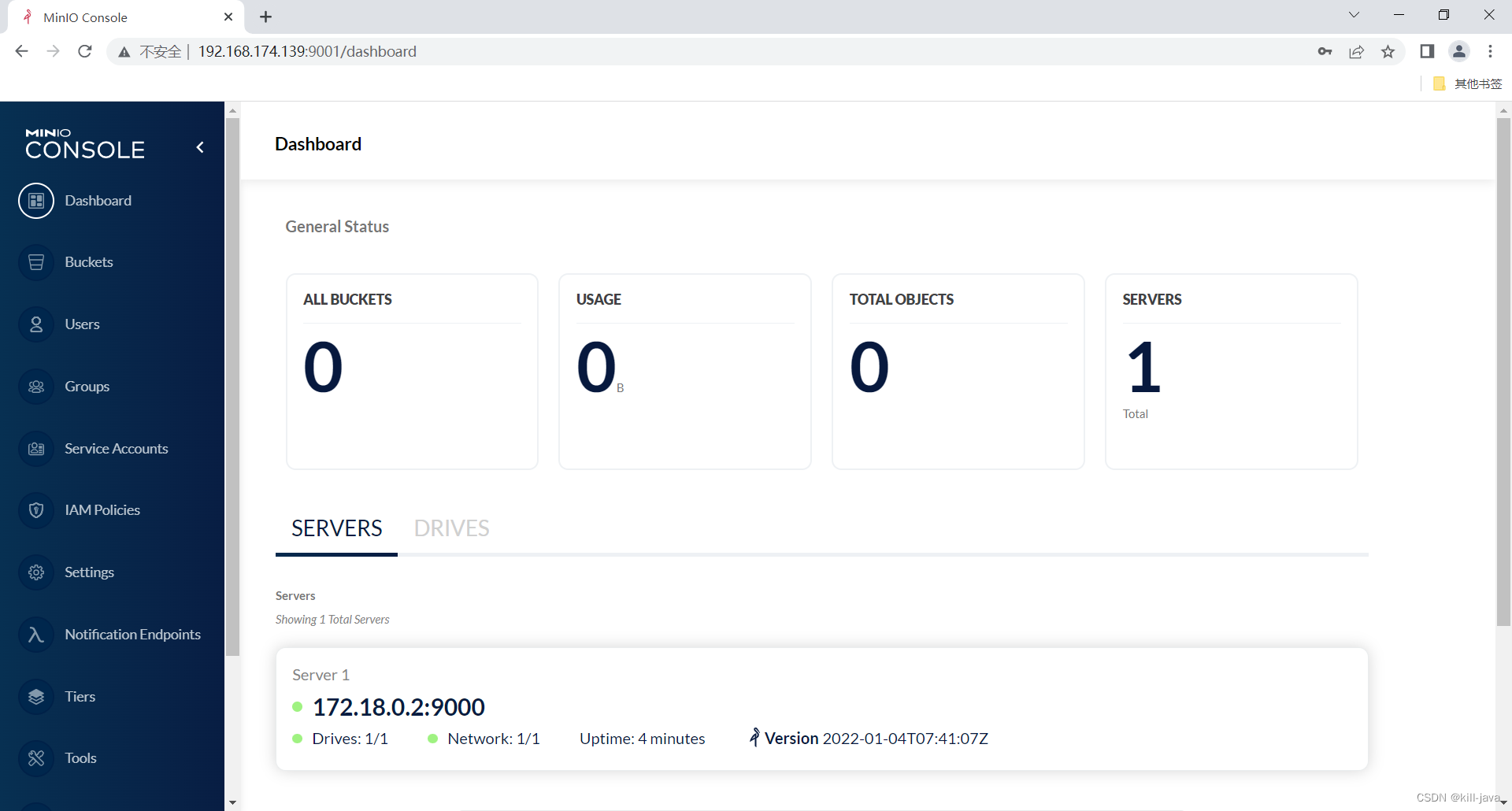
通过图形界面操作minio
- 创建一个桶

-
上传一个文件
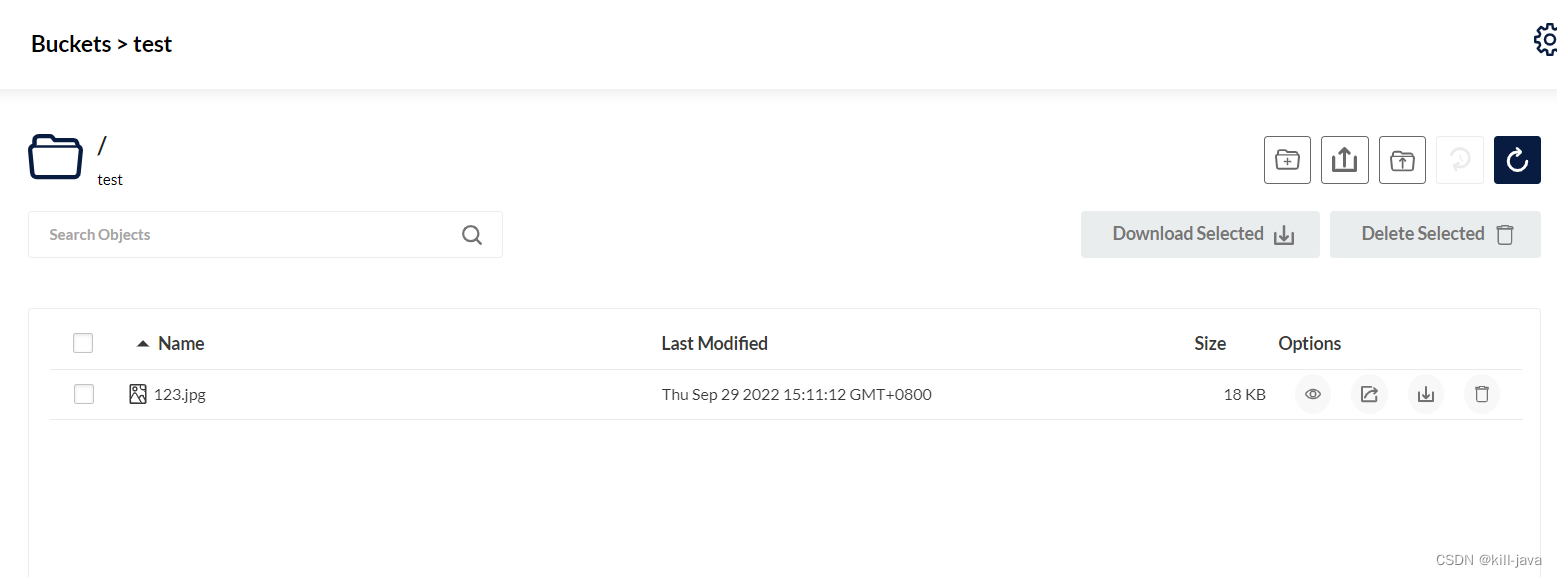
-
点击上传的文件
- 可以查看详情
- preview可以预览

-
在test桶中新建一个目录

-
新建好photo目录后上传一个文件

-
回到上级目录

-
在服务器查看文件
- 目录结构和从控制台看一致


- 目录结构和从控制台看一致

- 对test桶进行设置
- Manage

- Manage
- 设置访问权限

- 可以设置为public,也可以自定义

- public:所有人都可以访问该桶的资源,包括桶内的文件内容和文件目录
- private:所有人都无法直接访问该桶的资源,如果外部需要访问,只能通过外链(最长有效期7天)
使用含纠删码的方式启动minio
- 修改docker-compose文件
- 当挂载的data大于等于4个时,自动启动纠删码模式
- docker-compose up -d 重启镜像
version: '3' services: minio: image: minio/minio restart: always ports: - '9000:9000' - '9001:9001' networks: - front-ms privileged: true container_name: minio volumes: - $PWD/minio/data1:/data1 - $PWD/minio/data2:/data2 - $PWD/minio/data3:/data3 - $PWD/minio/data4:/data4 - $PWD/minio/config:/root/.minio/ environment: - "MINIO_ROOT_USER=admin" - "MINIO_ROOT_PASSWORD=admin123456" command: server --console-address ':9001' http://minio/data{1...4} networks: front-ms: driver: bridge- 1
- 2
- 3
- 4
- 5
- 6
- 7
- 8
- 9
- 10
- 11
- 12
- 13
- 14
- 15
- 16
- 17
- 18
- 19
- 20
- 21
- 22
- 23
- 24
- 25
- 26
- 使用纠删码模式上传完文件后
- 使用 tree minio/ 查看当前存放的目录结构

在单机上部署纠删码模式只能保证磁盘损坏的情况下,文件不丢失;并不能解决单点故障的问题,所以我们下面为了避免单点故障导致服务不可用,把minio服务改成分布式部署。
- 使用 tree minio/ 查看当前存放的目录结构
springboot整合minio
- pom.xml
<!--minio--> <dependency> <groupId>io.minio</groupId> <artifactId>minio</artifactId> <version>8.0.3</version> </dependency>- 1
- 2
- 3
- 4
- 5
- 6
- yml
#file spring.servlet.multipart.max-file-size=200MB spring.servlet.multipart.max-request-size=200MB #minio minio.endpoint = http://192.168.174.139:9000 minio.accessKey = admin minio.secretKey = admin123456 minio.bucketName = test- 1
- 2
- 3
- 4
- 5
- 6
- 7
- 8
- TestObjects
- 请求实体类
import lombok.Data; import java.util.List; /** * @author jigua * @version 1.0 * @className TestObjects * @description * @create 2022/9/28 16:19 */ @Data public class TestObjects { private String name; private List<String> list; }- 1
- 2
- 3
- 4
- 5
- 6
- 7
- 8
- 9
- 10
- 11
- 12
- 13
- 14
- 15
- 16
- 17
- 18
- 19
- ObjectItem
- 列表返回实体类
import lombok.Data; /** * @author jigua * @version 1.0 * @className ObjectItem * @description * @create 2022/9/28 15:30 */ @Data public class ObjectItem { private String objectName; private Long size; }- 1
- 2
- 3
- 4
- 5
- 6
- 7
- 8
- 9
- 10
- 11
- 12
- 13
- 14
- 15
- 16
- 17
- MinIoClientConfig
- 创建MinioClient的bean对象
import io.minio.MinioClient; import lombok.Data; import org.springframework.beans.factory.annotation.Value; import org.springframework.boot.context.properties.ConfigurationProperties; import org.springframework.context.annotation.Bean; import org.springframework.context.annotation.PropertySource; import org.springframework.stereotype.Component; /** * @author jigua * @version 1.0 * @className MinIoClientConfig * @description * @create 2022/9/28 15:27 */ @Component @Data public class MinIoClientConfig { @Value("${minio.endpoint}") private String endpoint; @Value("${minio.secretKey}") private String secretKey; @Value("${minio.accessKey}") private String accessKey; @Bean public MinioClient minioClient() { return MinioClient.builder().endpoint(endpoint).credentials(accessKey, secretKey).build(); } }- 1
- 2
- 3
- 4
- 5
- 6
- 7
- 8
- 9
- 10
- 11
- 12
- 13
- 14
- 15
- 16
- 17
- 18
- 19
- 20
- 21
- 22
- 23
- 24
- 25
- 26
- 27
- 28
- 29
- 30
- 31
- 32
- 33
- 34
- 35
- MinioUtils
- 操作工具类
import com.example.huibaozi.util.StringUtil; import io.minio.*; import io.minio.http.Method; import io.minio.messages.DeleteError; import io.minio.messages.DeleteObject; import io.minio.messages.Item; import org.apache.commons.io.IOUtils; import org.springframework.beans.factory.annotation.Autowired; import org.springframework.beans.factory.annotation.Value; import org.springframework.http.HttpHeaders; import org.springframework.http.HttpStatus; import org.springframework.http.MediaType; import org.springframework.http.ResponseEntity; import org.springframework.stereotype.Component; import org.springframework.web.multipart.MultipartFile; import java.io.ByteArrayOutputStream; import java.io.IOException; import java.io.InputStream; import java.io.UnsupportedEncodingException; import java.net.URLEncoder; import java.util.ArrayList; import java.util.Arrays; import java.util.List; import java.util.stream.Collectors; /** * @author jigua * @version 1.0 * @className MinioUtils * @description * @create 2022/9/28 15:30 */ @Component public class MinioUtils { @Autowired private MinioClient minioClient; @Value("${minio.bucketName}") private String bucketName; /** * description: 判断bucket是否存在,不存在则创建 * * @return: void */ public boolean existBucket(String name) { boolean exists; try { exists = minioClient.bucketExists(BucketExistsArgs.builder().bucket(name).build()); if (!exists) { minioClient.makeBucket(MakeBucketArgs.builder().bucket(name).build()); exists = true; } } catch (Exception e) { e.printStackTrace(); exists = false; } return exists; } /** * 创建存储bucket * * @param bucketName 存储bucket名称 * @return Boolean */ public Boolean makeBucket(String bucketName) { try { minioClient.makeBucket(MakeBucketArgs.builder() .bucket(bucketName) .build()); } catch (Exception e) { e.printStackTrace(); return false; } return true; } /** * 删除存储bucket * * @param bucketName 存储bucket名称 * @return Boolean */ public Boolean removeBucket(String bucketName) { try { minioClient.removeBucket(RemoveBucketArgs.builder() .bucket(bucketName) .build()); } catch (Exception e) { e.printStackTrace(); return false; } return true; } /** * description: 上传文件 * * @param file * @return: java.lang.String */ public String upload(MultipartFile file, String bucketNameStr) { String fileName = file.getOriginalFilename(); String[] split = fileName.split("\\."); if (split.length > 1) { fileName = split[0] + "_" + System.currentTimeMillis() + "." + split[1]; } else { fileName = fileName + System.currentTimeMillis(); } InputStream in = null; try { if (StringUtil.isEmpty(bucketNameStr)) { bucketNameStr = bucketName; } in = file.getInputStream(); minioClient.putObject(PutObjectArgs.builder() .bucket(bucketNameStr) .object(fileName) .stream(in, in.available(), -1) .contentType(file.getContentType()) .build() ); } catch (Exception e) { e.printStackTrace(); } finally { if (in != null) { try { in.close(); } catch (IOException e) { e.printStackTrace(); } } } return bucketNameStr + "/" + fileName; } /** * description: 下载文件 * * @param fileName * @return: org.springframework.http.ResponseEntity*/ public ResponseEntity<byte[]> download(String fileName) { ResponseEntity<byte[]> responseEntity = null; InputStream in = null; ByteArrayOutputStream out = null; try { in = minioClient.getObject(GetObjectArgs.builder().bucket(bucketName).object(fileName).build()); out = new ByteArrayOutputStream(); IOUtils.copy(in, out); //封装返回值 byte[] bytes = out.toByteArray(); HttpHeaders headers = new HttpHeaders(); try { headers.add("Content-Disposition", "attachment;filename=" + URLEncoder.encode(fileName, "UTF-8")); } catch (UnsupportedEncodingException e) { e.printStackTrace(); } headers.setContentLength(bytes.length); headers.setContentType(MediaType.APPLICATION_OCTET_STREAM); headers.setAccessControlExposeHeaders(Arrays.asList("*")); responseEntity = new ResponseEntity<byte[]>(bytes, headers, HttpStatus.OK); } catch (Exception e) { e.printStackTrace(); } finally { try { if (in != null) { try { in.close(); } catch (IOException e) { e.printStackTrace(); } } if (out != null) { out.close(); } } catch (IOException e) { e.printStackTrace(); } } return responseEntity; } /** * 查看文件对象 * * @param bucketName 存储bucket名称 * @return 存储bucket内文件对象信息 */ public List<ObjectItem> listObjects(String bucketName) { Iterable<Result<Item>> results = minioClient.listObjects( ListObjectsArgs.builder().bucket(bucketName).build()); List<ObjectItem> objectItems = new ArrayList<>(); try { for (Result<Item> result : results) { Item item = result.get(); ObjectItem objectItem = new ObjectItem(); objectItem.setObjectName(item.objectName()); objectItem.setSize(item.size()); objectItems.add(objectItem); } } catch (Exception e) { e.printStackTrace(); return null; } return objectItems; } /** * 批量删除文件对象 * * @param bucketName 存储bucket名称 * @param objects 对象名称集合 */ public Iterable<Result<DeleteError>> removeObjects(String bucketName, List<String> objects) { List<DeleteObject> dos = objects.stream().map(e -> new DeleteObject(e)).collect(Collectors.toList()); Iterable<Result<DeleteError>> results = minioClient.removeObjects(RemoveObjectsArgs.builder().bucket(bucketName).objects(dos).build()); return results; } /** * 根据文件名和桶获取文件路径 * * @param bucketName 存储bucket名称 */ public String getFileUrl(String bucketName, String objectFile) { try { if(StringUtil.isEmpty(bucketName)){ bucketName = this.bucketName; } return minioClient.getPresignedObjectUrl(GetPresignedObjectUrlArgs.builder() .method(Method.GET) .bucket(bucketName) .object(objectFile) .build() ); } catch (Exception e) { e.printStackTrace(); } return null; } }- 1
- 2
- 3
- 4
- 5
- 6
- 7
- 8
- 9
- 10
- 11
- 12
- 13
- 14
- 15
- 16
- 17
- 18
- 19
- 20
- 21
- 22
- 23
- 24
- 25
- 26
- 27
- 28
- 29
- 30
- 31
- 32
- 33
- 34
- 35
- 36
- 37
- 38
- 39
- 40
- 41
- 42
- 43
- 44
- 45
- 46
- 47
- 48
- 49
- 50
- 51
- 52
- 53
- 54
- 55
- 56
- 57
- 58
- 59
- 60
- 61
- 62
- 63
- 64
- 65
- 66
- 67
- 68
- 69
- 70
- 71
- 72
- 73
- 74
- 75
- 76
- 77
- 78
- 79
- 80
- 81
- 82
- 83
- 84
- 85
- 86
- 87
- 88
- 89
- 90
- 91
- 92
- 93
- 94
- 95
- 96
- 97
- 98
- 99
- 100
- 101
- 102
- 103
- 104
- 105
- 106
- 107
- 108
- 109
- 110
- 111
- 112
- 113
- 114
- 115
- 116
- 117
- 118
- 119
- 120
- 121
- 122
- 123
- 124
- 125
- 126
- 127
- 128
- 129
- 130
- 131
- 132
- 133
- 134
- 135
- 136
- 137
- 138
- 139
- 140
- 141
- 142
- 143
- 144
- 145
- 146
- 147
- 148
- 149
- 150
- 151
- 152
- 153
- 154
- 155
- 156
- 157
- 158
- 159
- 160
- 161
- 162
- 163
- 164
- 165
- 166
- 167
- 168
- 169
- 170
- 171
- 172
- 173
- 174
- 175
- 176
- 177
- 178
- 179
- 180
- 181
- 182
- 183
- 184
- 185
- 186
- 187
- 188
- 189
- 190
- 191
- 192
- 193
- 194
- 195
- 196
- 197
- 198
- 199
- 200
- 201
- 202
- 203
- 204
- 205
- 206
- 207
- 208
- 209
- 210
- 211
- 212
- 213
- 214
- 215
- 216
- 217
- 218
- 219
- 220
- 221
- 222
- 223
- 224
- 225
- 226
- 227
- 228
- 229
- 230
- 231
- 232
- 233
- 234
- 235
- 236
- 237
- 238
- 239
- 240
- 241
- 242
- 243
- 244
- 245
- 246
- 247
- 248
- 249
- MinioController
- 测试类
import com.alibaba.fastjson.JSONObject; import com.example.huibaozi.minio.MinioUtils; import com.example.huibaozi.minio.ObjectItem; import com.example.huibaozi.minio.TestObjects; import io.minio.Result; import io.minio.messages.DeleteError; import io.swagger.annotations.ApiImplicitParam; import io.swagger.annotations.ApiOperation; import org.springframework.beans.factory.annotation.Autowired; import org.springframework.beans.factory.annotation.Value; import org.springframework.boot.context.properties.ConfigurationProperties; import org.springframework.context.annotation.PropertySource; import org.springframework.http.ResponseEntity; import org.springframework.web.bind.annotation.*; import org.springframework.web.multipart.MultipartFile; import java.util.List; /** * @author jigua * @version 1.0 * @className MinioController * @description * @create 2022/9/28 15:33 */ @RestController @RequestMapping("/minio") public class MinioController { @Autowired private MinioUtils minioUtils; @Value("${minio.endpoint}") private String address; @Value("${minio.bucketName}") private String bucketName; @PostMapping("/upload") public Object upload(@RequestParam(value = "file") MultipartFile file, @RequestParam("bucketName") String bucketName) { return address + "/" + minioUtils.upload(file, bucketName); } @PostMapping("/getListByBucket") public List<ObjectItem> getListByBucket() { List<ObjectItem> list = minioUtils.listObjects(bucketName); return list; } @PostMapping("/existBucket") public boolean existBucket(@RequestBody JSONObject jsonObject) { return minioUtils.existBucket(jsonObject.getString("name")); } @PostMapping("/makeBucket") public boolean makeBucket(@RequestBody JSONObject jsonObject) { return minioUtils.makeBucket(jsonObject.getString("name")); } @PostMapping("/removeBucket") public boolean removeBucket(@RequestBody JSONObject jsonObject) { return minioUtils.removeBucket(jsonObject.getString("name")); } @PostMapping("/getFileUrl") public String getFileUrl(@RequestBody JSONObject jsonObject) { return minioUtils.getFileUrl(jsonObject.getString("bucketName"),jsonObject.getString("fileName")); } @PostMapping("/removeObjects") public Iterable<Result<DeleteError>> removeObjects(@RequestBody TestObjects testObjects) { return minioUtils.removeObjects(testObjects.getName(), testObjects.getList()); } @GetMapping("/loadFile") @ResponseBody public ResponseEntity<?> loadFile(@RequestParam("filePath") String filePath) { return minioUtils.download(filePath); } }- 1
- 2
- 3
- 4
- 5
- 6
- 7
- 8
- 9
- 10
- 11
- 12
- 13
- 14
- 15
- 16
- 17
- 18
- 19
- 20
- 21
- 22
- 23
- 24
- 25
- 26
- 27
- 28
- 29
- 30
- 31
- 32
- 33
- 34
- 35
- 36
- 37
- 38
- 39
- 40
- 41
- 42
- 43
- 44
- 45
- 46
- 47
- 48
- 49
- 50
- 51
- 52
- 53
- 54
- 55
- 56
- 57
- 58
- 59
- 60
- 61
- 62
- 63
- 64
- 65
- 66
- 67
- 68
- 69
- 70
- 71
- 72
- 73
- 74
- 75
- 76
- 77
- 78
- 79
- 80
- 81
测试图示
- 创建桶
- http://192.168.50.96:9999/api/minio/makeBucket
{ "name":"test" }- 1
- 2
- 3


- 不存在则创建桶
- 执行两次,第二次不会创建
- http://192.168.50.96:9999/api/minio/existBucket
{ "name":"testbucket" }- 1
- 2
- 3


- 移除桶
- http://192.168.50.96:9999/api/minio/removeBucket
{ "name":"testbucket" }- 1
- 2
- 3


- 上传文件
- 使用postman的form-data
- file
- bucketName(上传至指定桶,可不传)

- http://192.168.174.139:9000/test/test_1664357658095.jpg

- 无法访问,需要把桶设置为public

- 再次访问

- 查看桶列表
- http://192.168.50.96:9999/api/minio/getListByBucket
- 也可以通过参数查看指定桶(请自行实现)

- 根据文件名查找文件位置
- 使用返回值可在浏览器直接访问
- http://192.168.50.96:9999/api/minio/getFileUrl
{ "fileName":"test_1664357658095.jpg" }- 1
- 2
- 3

- 批量删除文件
- 先多上传几个文件
- http://192.168.50.96:9999/api/minio/removeObjects
{ "name":"test", "list":[ "test_1664357910876.jpg", "test_1664357911659.jpg" ] }- 1
- 2
- 3
- 4
- 5
- 6
- 7


- GET方式获取文件
- http://192.168.50.96:9999/api/minio/loadFile?filePath=test_1664357658095.jpg
- 选择send and download

- 可以发现在public权限下,是可以直接下载文件的

- 把桶设置回private后,发现下载的文件并不是图片


桶策略
- 如果把桶的权限配置为public,那这样所有人都可以访问了,显然是不安全的
- 如果桶为private权限则所有人都没办法访问
- 只能通过一个最长有效期7天的外链进行访问
- 例如头像类图片显然无法通过这样的形式获取
剩下的晚点写。。国庆要放假啦。。。
- S3
-
相关阅读:
JavaScript重新实现Git
查找内轮廓(孔洞)
java计算机毕业设计婚恋网站MyBatis+系统+LW文档+源码+调试部署
SOLR分组聚合的相关技巧
33.Mybatis-Plus
【C++】神奇字符串(力扣481)
【学习笔记】杜教筛
多旋翼无人机组合导航系统-多源信息融合算法(Matlab代码实现)
C++提高编程
一加手机线刷2024版,param预载失败/MSM刷机工具报错
- 原文地址:https://blog.csdn.net/zq6269/article/details/127084343

