-
Vue再次入门<一>互动教程
两年前入了个门,很久没摸,又忘了。这次再来,改变下只做笔记的方式,改为边学边动手敲。加油,maymay~
No one can stop u except yourself!
一,互动教程
1,声明式渲染


<script> export default { // 组件选项 // 此处声明一些响应式状态 data(){ return { msg:'hello view' } } } </script> <template> <h1>Make me dynamic! {{msg}}</h1> </template>- 1
- 2
- 3
- 4
- 5
- 6
- 7
- 8
- 9
- 10
- 11
- 12
- 13
- 14
- 15
2,Attribute 绑定
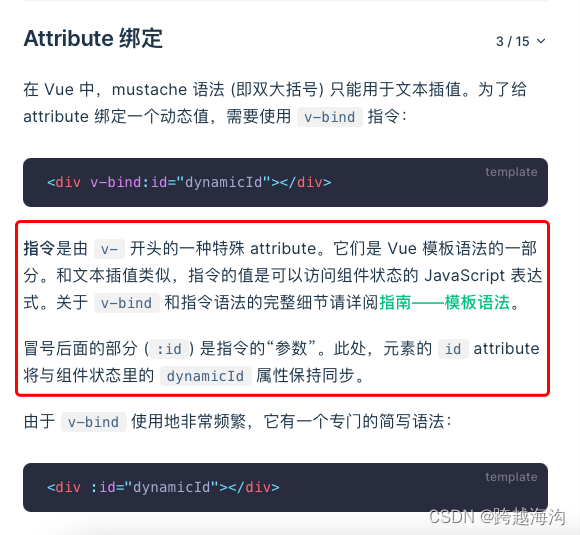


<script> export default { data() { return { titleClass: 'title' } } } </script> <template> <h1 :class="titleClass">Make me red</h1> <!-- 此处添加一个动态 class 绑定 --> </template> <style> .title { color: red; } </style>- 1
- 2
- 3
- 4
- 5
- 6
- 7
- 8
- 9
- 10
- 11
- 12
- 13
- 14
- 15
- 16
- 17
- 18
- 19
3,事件监听

<script> export default { data() { return { count: 0 } }, methods: { increment() { this.count++ } } } </script> <template> <button @click="increment">count is: {{ count }}</button> </template>- 1
- 2
- 3
- 4
- 5
- 6
- 7
- 8
- 9
- 10
- 11
- 12
- 13
- 14
- 15
- 16
- 17
- 18
4,表单绑定


<script> export default { data() { return { text: '' } } } </script> <template> <input v-model="text" placeholder="Type here"> <p>{{ text }}</p> </template>- 1
- 2
- 3
- 4
- 5
- 6
- 7
- 8
- 9
- 10
- 11
- 12
- 13
- 14
5,条件渲染

<script> export default { data() { return { awesome: true, show:true } }, methods: { toggle() { this.awesome = !this.awesome } } } </script> <template> <button @click="toggle">toggle</button> <h1 v-if="awesome">Vue is awesome!</h1> <h1 v-else>Oh no 😢</h1> </template>- 1
- 2
- 3
- 4
- 5
- 6
- 7
- 8
- 9
- 10
- 11
- 12
- 13
- 14
- 15
- 16
- 17
- 18
- 19
- 20
- 21
6,列表渲染


<script> // 给每个 todo 对象一个唯一的 id let id = 0 export default { data() { return { newTodo: '', todos: [ { id: id++, text: 'Learn HTML' }, { id: id++, text: 'Learn JavaScript' }, { id: id++, text: 'Learn Vue' } ] } }, methods: { addTodo() { this.todos.push({ id: id++, text: this.newTodo }) this.newTodo = '' }, removeTodo(todo) { this.todos = this.todos.filter((t) => t !== todo) } } } </script> <template> <form @submit.prevent="addTodo"> <input v-model="newTodo"> <button>Add Todo</button> </form> <ul> <li v-for="todo in todos" :key="todo.id"> {{ todo.text }} <button @click="removeTodo(todo)">X</button> </li> </ul> </template>- 1
- 2
- 3
- 4
- 5
- 6
- 7
- 8
- 9
- 10
- 11
- 12
- 13
- 14
- 15
- 16
- 17
- 18
- 19
- 20
- 21
- 22
- 23
- 24
- 25
- 26
- 27
- 28
- 29
- 30
- 31
- 32
- 33
- 34
- 35
- 36
- 37
- 38
- 39
7,计算属性


<script> let id = 0 export default { data() { return { newTodo: '', hideCompleted: false, todos: [ { id: id++, text: 'Learn HTML', done: true }, { id: id++, text: 'Learn JavaScript', done: true }, { id: id++, text: 'Learn Vue', done: false } ] } }, computed: { filteredTodos() { return this.hideCompleted ? this.todos.filter((t) => !t.done) : this.todos } }, methods: { addTodo() { this.todos.push({ id: id++, text: this.newTodo, done: false }) this.newTodo = '' }, removeTodo(todo) { this.todos = this.todos.filter((t) => t !== todo) } } } </script> <template> <form @submit.prevent="addTodo"> <input v-model="newTodo"> <button>Add Todo</button> </form> <ul> <li v-for="todo in filteredTodos" :key="todo.id"> <input type="checkbox" v-model="todo.done"> <span :class="{ done: todo.done }">{{ todo.text }}</span> <button @click="removeTodo(todo)">X</button> </li> </ul> <button @click="hideCompleted = !hideCompleted"> {{ hideCompleted ? 'Show all' : 'Hide completed' }} </button> </template> <style> .done { text-decoration: line-through; } </style>- 1
- 2
- 3
- 4
- 5
- 6
- 7
- 8
- 9
- 10
- 11
- 12
- 13
- 14
- 15
- 16
- 17
- 18
- 19
- 20
- 21
- 22
- 23
- 24
- 25
- 26
- 27
- 28
- 29
- 30
- 31
- 32
- 33
- 34
- 35
- 36
- 37
- 38
- 39
- 40
- 41
- 42
- 43
- 44
- 45
- 46
- 47
- 48
- 49
- 50
- 51
- 52
- 53
- 54
- 55
- 56
8,生命周期和模板引用


<script> export default { mounted() { this.$refs.p.textContent = 'mounted!' } } </script> <template> <p ref="p">hello</p> </template>- 1
- 2
- 3
- 4
- 5
- 6
- 7
- 8
- 9
- 10
- 11
9,侦听器

<script> export default { data() { return { todoId: 1, todoData: null } }, methods: { async fetchData() { this.todoData = null const res = await fetch( `https://jsonplaceholder.typicode.com/todos/${this.todoId}` ) this.todoData = await res.json() } }, mounted() { this.fetchData() }, watch: { todoId() { this.fetchData() } } } </script> <template> <p>Todo id: {{ todoId }}</p> <button @click="todoId++">Fetch next todo</button> <p v-if="!todoData">Loading...</p> <pre v-else>{{ todoData }}</pre> </template>- 1
- 2
- 3
- 4
- 5
- 6
- 7
- 8
- 9
- 10
- 11
- 12
- 13
- 14
- 15
- 16
- 17
- 18
- 19
- 20
- 21
- 22
- 23
- 24
- 25
- 26
- 27
- 28
- 29
- 30
- 31
- 32
- 33
- 34
10,组件

<script> import ChildComp from './ChildComp.vue' export default { components: { ChildComp } } </script> <template> <ChildComp /> </template>- 1
- 2
- 3
- 4
- 5
- 6
- 7
- 8
- 9
- 10
- 11
- 12
- 13
11,Props
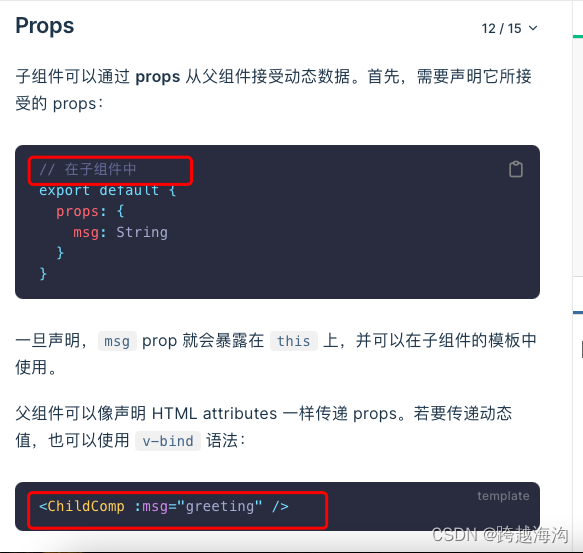
// parent <script> import ChildComp from './ChildComp.vue' export default { components: { ChildComp }, data() { return { greeting: 'Hello from parent' } } } </script> <template> <ChildComp :msg="greeting" /> </template> // child <script> export default { props: { msg: String } } </script> <template> <h2>{{ msg || 'No props passed yet' }}</h2> </template>- 1
- 2
- 3
- 4
- 5
- 6
- 7
- 8
- 9
- 10
- 11
- 12
- 13
- 14
- 15
- 16
- 17
- 18
- 19
- 20
- 21
- 22
- 23
- 24
- 25
- 26
- 27
- 28
- 29
- 30
- 31
- 32
12,Emits

<script> import ChildComp from './ChildComp.vue' export default { components: { ChildComp }, data() { return { childMsg: 'No child msg yet' } } } </script> <template> <ChildComp @response="(msg) => childMsg = msg" /> <p>{{ childMsg }}</p> </template>- 1
- 2
- 3
- 4
- 5
- 6
- 7
- 8
- 9
- 10
- 11
- 12
- 13
- 14
- 15
- 16
- 17
- 18
- 19
13,插槽

//parent <script> import ChildComp from './ChildComp.vue' export default { components: { ChildComp }, data() { return { msg: 'from parent' } } } </script> <template> <ChildComp>Message: {{ msg }}</ChildComp> </template> //child <template> <slot>Fallback content</slot> </template>- 1
- 2
- 3
- 4
- 5
- 6
- 7
- 8
- 9
- 10
- 11
- 12
- 13
- 14
- 15
- 16
- 17
- 18
- 19
- 20
- 21
- 22
- 23
- 24
二,简介+快速上手
1,特点:
(1)渐进式框架

(2)单文件组件

(3)选项式 API (Options API)


(4)组合式 API (Composition API)


2,快速上手
(1)创建一个 Vue 应用


(2)通过 CDN 使用 Vue

-
相关阅读:
项目实战:中央控制器实现(3)-优化Controller,处理普通的请求参数
MySQL——DBCP和C3P0连接池
【Python刷题篇】——Python入门 010 内置函数(一)
Golang | Leetcode Golang题解之第326题3的幂
MySQL VARCHAR(M)最多能存储多少数据
用Tinyproxy搭建自己的proxy server
egg-jwt的使用
AWS SAP-C02教程5--基础中间件
5月跳槽进字节跳动测试岗了,面试真简单...
高效解决触客难题的外呼系统,其实原理很简单!
- 原文地址:https://blog.csdn.net/qq_46068142/article/details/127113678
