-
SpringBoot+ThreadPoolTaskExecutor+mybatis-plus 多线程批量插入大数量级数据
SpringBoot+ThreadPoolTaskExecutor+mybatis-plus 批量插入大数量级数据
创作不易,可否给作者点个赞再走
一. 效率
参考:https://www.jianshu.com/p/255095b274fe
方法一、 saveBatch()首先mybatis-plus中默认提供了一个批量保存数据到数据库的方法saveBatch(),批处理实质上还是一条条的sql去执行,但是它做了预编译优化,只编译一次sql,但是还是一个for循环,一条执行一次,数据量多的时候,效率也不见得很好。


方法二、foreach拼sql
这个也挺简单,就是,写法网上百度一大把,不做赘述。

我这里是使用了mybatis-plus注入自定义的SQL,方法参考
https://www.yht7.com/news/194845
https://blog.csdn.net/qq_28025423/article/details/115680196
我使用的数据库是Oracle,所以sql有一点点不同
详细代码见:https://blog.csdn.net/qq_44364267/article/details/127111440insert into tablename(···) <foreach collection="list" item="item" index="index" open="" separator="union all" close=""> (SELECT ····FROM DUAL ) </foreach>在使用过程中发现由于插入表的字段太多了,拼接的插入值的时候总会卡上那么一下,再加上这玩意还有数量限制(一次性插入2000以上条会报错),所以这个时候会适得其反,效率下降。
结论:
1、BATCH模式当字段比较少的时候,效率比不过foreach一次性执行效率高。
2、foreach用在字段比较少的表插入时候,性能比BATCH模式好
我自己也实际的去测试了一下,插入一万条数据,对比图如下
这是使用saveBatch()方法,花了六秒

而foreach,花了三十多秒(截图忘了截了哈哈,但是有印象),好家伙这还是使用了多线程的情况下(多线程下文讲)。所以果断还是使用saveBatch(),但是考虑到这玩意其实也是循环一条条的跑,因此决定使用多线程。二. ThreadPoolTaskExecutor多线程插入数据
根据实际需求,需要插入W及10W以上的数据,而且因为插入的字段有点多,所以还是考虑使用saveBatch()方法,因此考虑使用ThreadPoolTaskExecutor多线程批量插入提高效率。
- 首先是spring容器注入线程池bean对象
import org.springframework.context.annotation.Bean; import org.springframework.context.annotation.ComponentScan; import org.springframework.context.annotation.Configuration; import org.springframework.scheduling.annotation.AsyncConfigurer; import org.springframework.scheduling.annotation.EnableAsync; import org.springframework.scheduling.concurrent.ThreadPoolTaskExecutor; import java.util.concurrent.Executor; @Configuration @EnableAsync @ComponentScan("com.example") public class AsyncConfig implements AsyncConfigurer { @Override @Bean("AsyncExecutor") public Executor getAsyncExecutor() { ThreadPoolTaskExecutor threadPool = new ThreadPoolTaskExecutor(); //返回可用处理器的Java虚拟机的数量,可以根据数量设定线程参数,我这里直接写死了 int i = Runtime.getRuntime().availableProcessors(); //设置核心线程数 threadPool.setCorePoolSize(10); //设置最大线程数 threadPool.setMaxPoolSize(100); //线程池所使用的缓冲队列 threadPool.setQueueCapacity(10); //等待任务在关机时完成--表明等待所有线程执行完 threadPool.setWaitForTasksToCompleteOnShutdown(true); // 等待时间 (默认为0,此时立即停止),并没等待xx秒后强制停止 threadPool.setAwaitTerminationSeconds(60); // 线程名称前缀 threadPool.setThreadNamePrefix("系统名-Async-"); // 初始化线程 threadPool.initialize(); return threadPool; } }- 第二步创建异步线程的业务类
接口
import java.util.List;
import java.util.concurrent.CountDownLatch;

/**
 * @author shidulin
 * @version 1.0
 * @date 2022/9/29 8:46
 */
public interface AsyncService {

    /** * 执行异步任务 * 可以根据需求,自己加参数拟定,我这里就做个测试演示 */
    void asyncBatchInsertCatalog( CountDownLatch countDownLatch, List<PurStoreProductsCatalog> catalogList);


}
实现类
/** * @author shidulin * @version 1.0 * @date 2022/9/29 8:45 */ @Service @Slf4j public class AsyncServiceImpl implements AsyncService{ @Override @Async("AsyncExecutor") public void asyncBatchInsertCatalog( CountDownLatch countDownLatch, List<PurStoreProductsCatalog> catalogList) { try{ log.warn("start Batch Insert"); //每个线程要做的操作 log.warn("end Batch Insert"); }finally { // 很关键, 无论上面程序是否异常必须执行countDown,否则await无法释放 countDownLatch.countDown(); } } }- 第三步测试调用
业务类内容太多了这里就只贴出具体方法
 @Override
    public String importProductsCatalog() {
   		//将json字符串转为JSONObject
         JSONObject catalog = JSON.parseObject(catalogstr);
        //catalogJSONArray大小是10
        JSONArray catalogJSONArray  = catalog.getJSONArray("catalog");
        List<PurStoreProductsCatalog> catalogList = (List<PurStoreProductsCatalog>) JSONArray.parseArray(catalogJSONArray.toJSONString(), PurStoreProductsCatalog.class);
        //造假数据10*1000条数据
        for(int i = 0 ; i < 1000 ; i ++) {
            catalogList.addAll(catalogList.size()-1,(List<PurStoreProductsCatalog>) JSONArray.parseArray(catalogJSONArray.toJSONString(), PurStoreProductsCatalog.class));
        }
        // 异步多线程  插入数据库
        int total = catalogList.size();
        //两千条数据开一条线程
        int batchSize = 2000;
        int number =total % batchSize == 0 ? total / batchSize :total / batchSize+1;
        countDownLatch = new CountDownLatch(number);
        long l1 = System.currentTimeMillis();
        for(int i = 0;i<number;i++){
            List<PurStoreProductsCatalog> batchList = new ArrayList<>();
            if(i== number-1){
                batchList = catalogList.subList(i*batchSize,total);
            }else{
                batchList = catalogList.subList(i*batchSize,(i+1)*batchSize);
            }
            //模拟阻塞队列,线程满的时候等待不抛出异常
            while(true){
                try{
                    asyncService.asyncBatchInsertCatalog(countDownLatch,batchList);
                    break;
                }catch(TaskRejectedException e){
                    try{
                        Thread.sleep(1000);
                    }catch(Exception e2){}
                }
            }

        }
        try {
            countDownLatch.await();
        } catch (InterruptedException e) {
            throw new RuntimeException(e);
        }
        long l2 = System.currentTimeMillis();
        log.info("主线程阻塞执行到此处花费了{}",l2-l1);
        return "获取库存成功";
    }
测试结果,一万条数据大约4s,没加线程的话7秒(虽然4s一万条数据还是有点慢,但是也没办法不想自己写sql哈哈,而且foreach在这里也不适用)

用foreach的话加上线程差不多38s了。
这是主表的,实际上主表一条数据对应附表3条数据左右,一开始我是一条线程插入主表的同时也把插入附表的操作也做了,用的都是savebatch()。结果让我大失所望,1W条主表数据+3W条附表数据整整花了27s左右
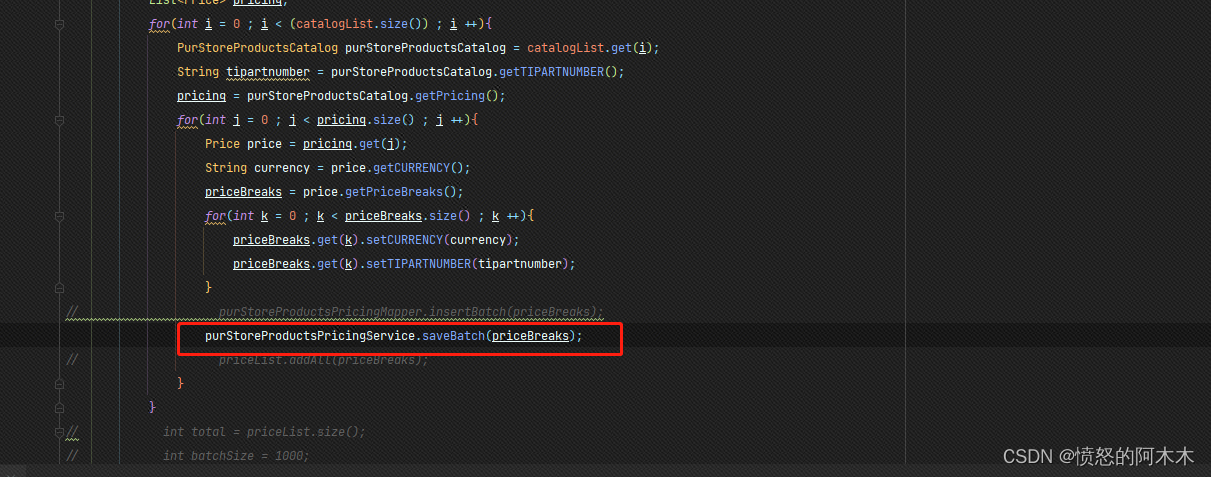

这个时候foreach就适用了,附表字段少只有4个,速度直接飙到4S。


这里跟前面只插入1W条主表数据差不多是因为优化了中间数据处理逻辑,但是没有做测试记录,大约1W条应该是1~2s左右三. 测试结果
- 1W条主表数据+3W条附表数据测试结果见上文,4s左右
- 10W条主表数据+30W条附表数据测试结果见上文,13s左右

- 100W条主表数据+300W条附表数据测试结果见上文,1分45s左右

这里在测试百万级数据时线程满了,因为我是2000条一个线程,100W / 2000 = 500,线程最大设置的时100个,这里我们并不能无限去扩大设置的线程数,spring boot的阻塞队列不好用,所以模拟了一下
 //模拟阻塞队列,线程满的时候等待不抛出异常
            while(true){
                try{
                    asyncService.asyncBatchInsertCatalog(countDownLatch,batchList);
                    break;
                }catch(TaskRejectedException e){
                    try{
                        Thread.sleep(1000);
                    }catch(Exception e2){}
                }
            }
四. 结论
需要根据实际需求去选择批量插入的方法,根据实际对比性能过后才能得出最优解
-
相关阅读:
Linux 下集成开发环境 – PyCharm介绍
uni-app 之 web-view 与h5 通讯
csp 202109-2 非零段划分
代码随想录第五十五天打卡
413 Request Entity Too Large
使用create-react-app脚手架创建react项目
UE5 GAS 学习笔记 10.3 LyraStarter案例解析(中)
最短路径算法总结
Clock时钟电路PCB设计布局布线要求
在不使用js在情况下只用css实现瀑布流效果
- 原文地址:https://blog.csdn.net/qq_44364267/article/details/127109182