-
混合开发架构|原生&Flutter通信
Native与Flutter通信展示
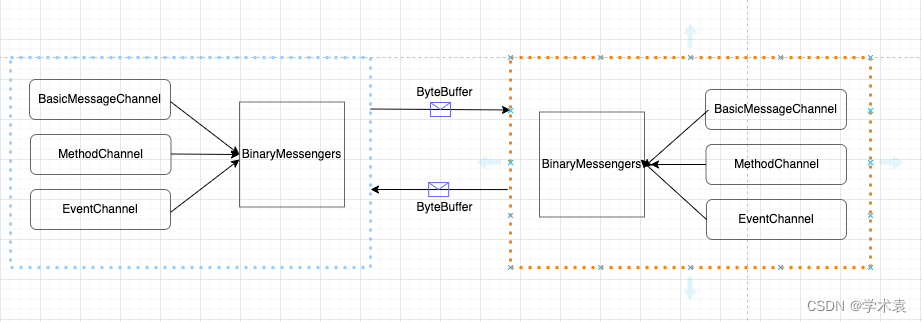
双端通信介绍说明
类型 说明 MethodChannel 用于传递方法调用 invokeMethod一次性通信:如Flutter调用埋点功能。这里且介绍MethodChannel,在Native与Flutter间如何通信~Flutter侧发送,Native侧接收处理。
Flutter侧发送,结合源码看,通过创建一个MethodChannel实例并指定渠道名称name。且两侧的name须一致相同。然后使用MethodChannel实例调用执行方法invokeMethod,该方法传入Native侧将被调用方法名称method及通信消息内容arguments。之后,便启动了由Flutter向Native侧传递调用。
Native侧接收处理,创建一个与Flutter侧渠道名称name相同的MethodChannel实例。使用MethodChannel实例调用执行方法setMethodCallHandler,用以匹配Flutter侧方法名称method接收处理Flutter侧发送来的信息。通信系统设计
Native侧
声明双端通信协议,以MethodChannel为例。
需求说明1· Native端发送信息到Flutter端,Flutter收到信息后回执。此时,Native端须再次处理Flutter端的回执信息。
需求说明2· Flutter端发送信息到Native端,Native收到信息后处理。MethodChannel无回执。
interface IFlutterBridge<P, Callback>声明
接口规范IFlutterBridge,泛型P表示发送(接收)信息类型,Callback表示以处理Flutter侧回执信息的回调方法。class FlutterBridgeCompl : IFlutterBridge<Any?, MethodChannel.Result>, MethodChannel.MethodCallHandlerFlutterBridgeCompl源码展示
实现协议规范接口,并实现接口MethodCallHandler,将接收Flutter侧发送来的消息处理能力内聚到FlutterBridgeCompl中。考虑到FlutterBridgeCompl实例将多次被调用到,设计使用单例模式获取实例。且针对多dart入口对应多Flutter引擎对应多MethodChannel,在FlutterBridgeCompl中将创建的多个MethodChannel实例并收集到List集合中,及invokeMethod和setMethodCallHandler调用处理。接收消息
Native端接收信息的监听配置-> methodChannel!!.setMethodCallHandler(instance)
单例模式,该方法为半生对象中的静态方法 - 创建单例、创建MethodChannel实例、配置监听接收Flutter侧发送的信息/** * 在JFlutterCacheManager.initFlutterEngine方法中调用 * @FlutterBridge 参数须与Flutter端一致 (Creates a [MethodChannel] with the specified [name]) * */ @JvmStatic fun init (flutterEngine:FlutterEngine) : FlutterBridgeCompl { methodChannel = MethodChannel(flutterEngine.dartExecutor, "FlutterBridge") if (instance == null) { FlutterBridgeCompl().also { instance = it } } // 接收消息配置:为每个MethodChannel做Flutter侧发送信息配置监听 methodChannel!!.setMethodCallHandler(instance) methodChannels.add(methodChannel!!) // 搜集缓存MethodChannel return instance!! } @JvmStatic fun getMethodChannels () : List<MethodChannel> { return methodChannels } }Native侧接收Flutter侧发送的消息并处理。override fun onMethodCall(call: MethodCall, result: MethodChannel.Result) { // 处理来之flutter端消息 when (call.method) { "onNativeBack" -> {Toast.makeText(ContextGlobal.get(), "onNativeBack", Toast.LENGTH_SHORT).show()} "goPointedNativePage" -> { this.goPointedNativePage(call.arguments) } "getNativeDeviceInfo" -> {Toast.makeText(ContextGlobal.get(), "getNativeDeviceInfo", Toast.LENGTH_SHORT).show()} "setBuriedPoint" -> {Toast.makeText(ContextGlobal.get(), "setBuriedPoint", Toast.LENGTH_SHORT).show()} else -> result.notImplemented() } }发送消息
Native端发送消息到Flutter端方法
MethodChannel集合遍历调用invokeMethod。从而实现多MethodChannel各自完成信息发送能力。/// example : 由native端向flutter端发送消息,flutter端可回复,之后native处理回复。 /// fire("方法名", "just send a message from native.参数哦", object : MethodChannel.Result { /// override fun success(result: Any?) {处理flutter端的回复信息} /// /// override fun error(errorCode: String, errorMessage: String?, errorDetails: Any?) {..} /// /// override fun notImplemented() {..} /// }) @RequiresApi(Build.VERSION_CODES.N) override fun fire(method: String, arguments: Any, callback: MethodChannel.Result?) { methodChannels.forEach { it.invokeMethod(method, arguments, callback) } }Flutter侧
声明双端通信协议,以MethodChannel为例。
需求说明1· Native端发送信息到Flutter端,Flutter收到信息后回执。此时,Native端须再次处理Flutter端的回执信息。
需求说明2· Flutter端发送信息到Native端,Native收到信息后处理。MethodChannel无回执。
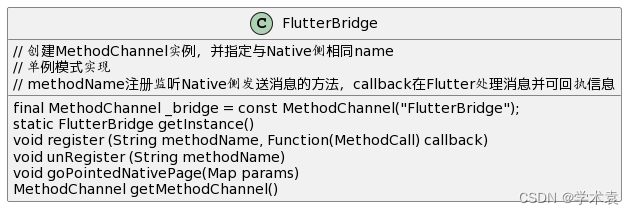
接收消息并回执
Flutter端配置接收Native端消息监听
单例实现,在创建``实例对象的同时,setMethodCallHandler配置监听来自Native端发送的消息。并通过_listeners字典匹配**已注册的**监听方法处理。FlutterBridge._() { _bridge.setMethodCallHandler((MethodCall call) async { String method = call.method; if (_listeners[method] != null) { // 如果该method已经注册了监听,则当native发来消息时,这里注册的监听就能收到。 // 并能在注册方法中进行处理 return _listeners[method](call); } return null; }); }比如,
Flutter侧这里通过注册Native端发送的onRefresh方法。同时在最后,回执信息给Native侧。
Native端通过执行fire("onRefresh", arguments: Any, callback: MethodChannel.Result?)FlutterBridge.getInstance().register("onRefresh", (MethodCall call) { print('_FinanceStatePageState = ${call.method}'); // 打印 接收native端发来的信息 // 向native端回信 return Future.value('flutter 端 已经接收到了信息'); });发送消息
Flutter侧发送信息到Native侧,通过调用方法invokeMethod启动。
如,通过点击定位图标,触发发送信息到Native侧。其真实的调用是_bridge.invokeMethod('goPointedNativePage', params);
而在Native侧则会在方法override fun onMethodCall中接收到并执行处理逻辑。/// 点击定位按钮,向native端发送消息 void onLocationTap() { FlutterBridge.getInstance().goPointedNativePage({"location":"北京"}); } -
相关阅读:
PHP redis set 集合
软件测试 - Linux的远程连接
⑮、企业快速开发平台Spring Cloud之HTML 速查列表
OnePose: 无CAD模型的one-shot物体姿态估计(CVPR 2022)
解封了 开始寻找牛人
低代码平台简介(10家国产化低代码平台详细介绍)
后端研发工程师面经——JVM
Python基础小知识问答系列-匿名函数
python pyqt5 计算下载文件的进度百分比
easyexcel操作之名称匹配
- 原文地址:https://blog.csdn.net/u012827205/article/details/127108095