-
vue3 + element plus实现侧边栏
一般前端项目少不了侧边栏。如图所示

这些鬼东西特别繁琐,所以我们喜欢找些现成、开源的所谓后台管理的前端框架,开箱即用。方便是方便,而且做得还挺好,问题是,有学习成本,要按照它的规则行事。一些功能是怎么实现的,不清楚,除非研究它的源代码。想改的话,更不容易。一切都靠猜、盲测,一则不好改,二则出了问题也不知道是哪里的毛病,反而欲速则不达。所以我们之前基于一个空白的vue项目开发,把需要的路由、ajax封装等摞上去。现在是实现侧边栏菜单。点击左侧菜单项,对应页面展示在右侧。下面是详细介绍,ui框架采用element plus。
1、如何编写侧边栏结构页面
html代码其实简单,左侧菜单用
以下是一个包含侧边栏的页面示例。支持二级菜单。三级或更多就不行了。
<template>
  <el-container>
    <el-aside width="255px">

      <el-menu
        router
        :default-active="to"
        active-text-color="#ffd04b"
        background-color="#001529"
        text-color="#999"
        class="el-menu-vertical-demo sliderHeight"
      >

        <el-sub-menu v-if="item.children" :index="item.route">
            <template #title>
              <el-icon><component :is="item.icon">component>el-icon>{{ item.text }}
            template>
            <el-menu-item
              v-for="item2 in item.children"
              :key="item2.name"
              :index="item2.route"
            >
              <template #title>
                <el-icon><component :is="item2.icon">component>el-icon
                >{{ item2.text }}
              template>
            el-menu-item>
          el-sub-menu>

          <el-menu-item v-else :index="item.route">
            <template #title>
              <el-icon><component :is="item.icon">component>el-icon>{{ item.text }}
            template>
          el-menu-item>
      el-menu>
    el-aside>
    <el-main>

      <router-view>router-view>
    el-main>
  el-container>
template>
2、默认选中菜单及加载对应页面
很自然地,打开包含侧边栏结构的页面,应该有一个菜单项默认被选中,同时加载对应的页面。
但是element plus只提供了选中指定菜单功能,加载页面需要自己完成。
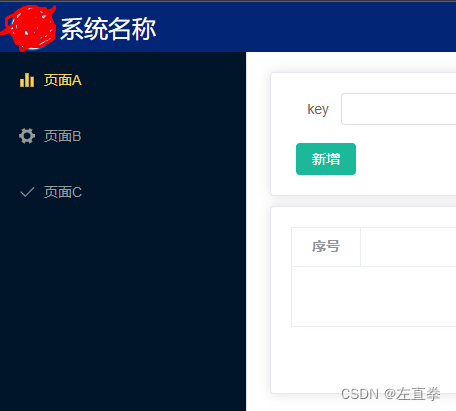
1)默认选中指定的菜单项
设置属性el-menu.default-active。属性值是el-sub-menu.index或el-menu-item.index<el-menu router :default-active="to" active-text-color="#ffd04b" background-color="#001529" text-color="#999" class="el-menu-vertical-demo sliderHeight" ><el-menu-item :index="item.route">2)加载对应页面
elment plus只能设置选中菜单项,加载相应页面需要自己动手。import { useRouter } from "vue-router"; const router = useRouter(); const gotoDefaultPage = (menus) => { if (menus && menus.length > 0) { const path = router.currentRoute.value.path; //如果当前路径是子菜单,则直接打开子菜单;否则打开第一个子菜单 //页面中,使用了菜单项的route作为index const to = path.split("/").length > 2 ? path : menus[0].route; router.replace(to); } }; onMounted(() => { const menus = getMenus(); gotoDefaultPage(menus); });3、刷新页面
好像刷新页面,选中啥的会丢失,页面一片空白?这个问题记得不是很清楚了,现在我没有这个问题。可能是获取到当前路由,按照路由重新打开。代码见2。
const path = router.currentRoute.value.path;
//如果当前路径是子菜单,则直接打开子菜单;否则打开第一个子菜单
//页面中,使用了菜单项的route作为index
const to = path.split("/").length > 2 ? path : menus[0].route;
router.replace(to);
4、icon

每个菜单项前面有个小图标。图标应该在菜单项/路由表二合一的数据中定义。取值从elment plus的icon中选取。
数据结构{ path: "p3-1", name: "p3-1", component: () => import("../views/module3/page1"), meta: { text: "页面A", icon: "Histogram", }, },页面
  <el-menu-item :index="item.route">
    <template #title>
      <el-icon>

      	<component :is="item.icon">component>
      el-icon>{{ item.text }}
    template>
  el-menu-item>
因为可以使用任意的element plus的icon,所以索性全局注册
src/main.js
import { createApp } from "vue";
import App from "./App.vue";
。。。
import ElementPlus from "element-plus";
import "element-plus/dist/index.css";
import * as ElIcons from "@element-plus/icons-vue";

const app = createApp(App);
app.use(ElementPlus).mount("#app");

for (const name in ElIcons) {
  app.component(name, ElIcons[name]);
}
5、新开窗口
在侧边栏结构页面中,如何打开一个新窗口呢?
其实,无论是在普通页面,还是这种侧边栏结构页面,点击一个链接或按钮,打开一个新窗口,代码都是一样的。但是!里面用到了路由。如果该路由没有注册,那么在本文所示的侧边栏结构页面中,打开新窗口会失败,页面仍然显示在右侧,没有新开窗口!这一度让我很困惑,以为
新开窗口的代码:
<template>
  <div @click="browseIt(1000)" class="show-detail">打开明细页div>
  <div>
    <router-link target="_blank" to="p2-1/detail/999"
      >第一种新窗口打开页面router-link
    >
  div>
template>
<script>
import { reactive } from "vue";
import { useRouter } from "vue-router"; //引入useRouter

export default {
  setup() {
    const router = useRouter();
    const browseIt = (id) => {
      const to = router.resolve({
        name: "p2-1-detail", //这里是跳转页面的name,要与路由设置保持一致
        params: { id: id },
      });
      window.open(to.href, "_blank");
    };

    return {
      browseIt,
    };
  },
};
script>
路由
  {
    path: "p2-1/detail/:id",
    name: "p2-1-detail",
    component: () => import("../views/module2/page-1-detail.vue"),
    meta: {
      text: "页面一明细",
      noList: true,
    },
  },
6、无限级菜单
前面的例子,菜单级别只能去到二级。如果要实现无限级,需要使用递归。页面组件递归。代码如下:
整体的侧边栏结构页面:
<template>
  <el-container>
    <el-aside width="255px">
      <el-menu
        router
        :default-active="to"
        active-text-color="#ffd04b"
        background-color="#001529"
        text-color="#999"
        class="el-menu-vertical-demo sliderHeight"
      >
        <template v-for="item in menus" :key="item.name">

          <middle-menu :item="item">middle-menu>
        template>
      el-menu>
    el-aside>
    <el-main>
      <router-view>router-view>
    el-main>
  el-container>
template>

<script>
import MiddleMenu from "./SidebarMenu.vue";
script>
自定义的菜单组件
<template> <el-sub-menu v-if="item.children" :index="item.route"> <template #title> <el-icon><component :is="item.icon">component>el-icon >{{ item.text }}template > <template v-for="innerItem in item.children" :key="innerItem.name"> <middle-menu :item="innerItem">middle-menu> template> el-sub-menu> <el-menu-item v-else :index="item.route"> <template #title> <el-icon><component :is="item.icon">component>el-icon>{{ item.text }} template> el-menu-item> template> <script> import { defineComponent } from "vue"; export default defineComponent({ name: "middle-menu", props: { item: { type: Object, required: true, }, }, }); script> -
相关阅读:
[附源码]计算机毕业设计springboot课程在线测评系统
浅谈Mysql读写分离的坑以及应对的方案 | 京东云技术团队
正则匹配删除指令
【每日一题】2258. 逃离火灾-2023.11.9
二种方法轻松提取音频中的钢琴声音
【代码随想录】算法训练营 第四天 第二章 链表 Part 2
生产者消费者模式(c++实现)
Apache Ftp Server 部署,它的帐号密码加密算法是什么呢?
基于springboot实现学生选课平台管理系统项目【项目源码】
A Cooperative Approach to Particle Swarm Optimization
- 原文地址:https://blog.csdn.net/leftfist/article/details/127016585