-
论文复现笔记
获取到数据集中的每一个ID
首先是测试集:testset.csv
这里测试集是这个样子的:

我需要根据每一个病毒的accsssion的ID去下载对应的基因文件,首先需要读取到每一个ID号import os import pandas as pd from Bio import Entrez, SeqIO from urllib.error import HTTPError #这个函数获取到所有的NCBI id列表 def GetAccssions(CSV_path): '''CSV_path:是csv文件的路径 ''' df = pd.read_csv(CSV_path) #数据集中的accession列的数据转为列表 accs = df.accession.to_list() #存放每一个ID的列表,每一个ID作为一个单独的列表元素 Accseesions = [] #accs是包含每一行的列表,不是每一个ID号的列表,进一步处理获取每个ID号的列表 for acc in accs: #acc可以是多个ID号的字符串,中间使用分号;隔开的字符串 acc_list = acc.split(';') #acc_list是每一行数据分割后的列表,再次遍历,去掉左右空格, for id in acc_list: id = id.strip() Accseesions.append(id) return Accseesions调用结果:

根据ID下载gb文件
拿到每一个ID后,需要下载gb文件
from posixpath import exists def downGb_fromID(Accessions,filePath): '''Accessions:是一个一个的id构成的列表, filePath:文件的下载路径 ''' if not os.path.exists(filePath): #执行到这里,目录基本不可能存在 os.makedirs(filePath) #如果exist_ok为False(默认值),则在目标目录已存在的情况下触发FileExistsError异常;如果exist_ok为True,则在目标目录已存在的情况下不会触发FileExistsError异常。 assert os.path.exists(filePath) os.chdir(filePath)#切换到下载目录的路径下 Entrez.tool = "ZoonosisPredictor pipeline - DownloadSequences.py" Entrez.email = "xxjxuejian@gmail.com" #拿到每一个NC的 ID号 for ID in Accessions: #保存的文件名格式 FileName = "{}.gb".format(ID) #如果文件不存在,刚开始肯定是不存在的,所以会下载 if not os.path.isfile(FileName): try: #这是在下载 QueryHandle = Entrez.efetch(db="nucleotide",id=ID,rettype="gb",retmode="text") except HTTPError as Error: if Error.code == 400: # Bad request raise ValueError("Accession number not found: {}".format(Accessions(ID))) else: raise #写入文件 with open(FileName, 'w') as WriteHandle: WriteHandle.write(QueryHandle.read()) else: print("{} exists, not updated".format(FileName))'运行到这里,就完成了所有accession的下载。
这里可以检查下路径下的所有的文件的数量,是不是和Accessions列表的长度一样,确保每一个都进行了下载。
返回每一个ID对应的碱基序列
由于我们需要的是基因的序列,AGCT这样的序列,下面需要根据每一个gb文件获取到序列信息。
这个函数是根据每一个
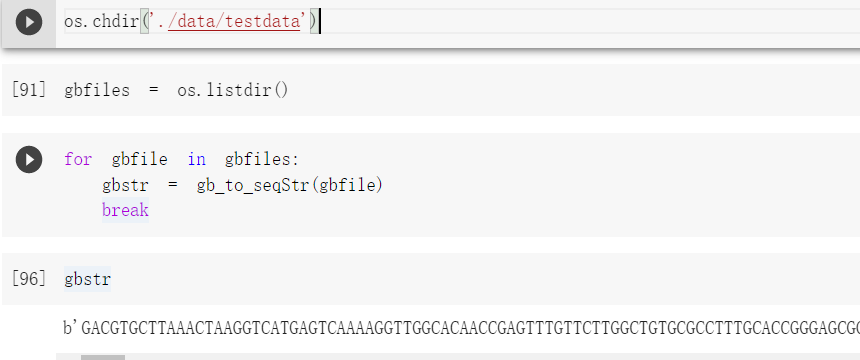
gb文件返回对应的序列,这个序列是经过编码后的序列,之后再解码就行。from genericpath import isfile def gb_to_seqStr(gbPath): '''gbPath:这个参数是每一个gb文件的路径 ''' #拿到路径直接操作 SeqRec = SeqIO.read(gbPath, format = "genbank") # seqStr = SeqRec.seq.encode('ascii')这个方法废弃了 seqStr = bytes(SeqRec.seq)#默认是UTF-8编码 #SeqRec.id, SeqRec.name , SeqRec.description return seqStr #或者考虑把id,name,seq,构造成一个字典一起返回出去'运行测试:
解码:

构建一个包含序列id,序列字符串等的字典
针对训练集的字典
data_train = pd.read_csv('/content/drive/MyDrive/zoonotic/trainset.csv')
data_test = pd.read_csv('/content/drive/MyDrive/zoonotic/testset.csv')

def trainset_to_dict(datas):
	'''datas参数是读取到的csv对象
	'''
  data_dict = {}
  for row in datas.iterrows():
    series = row[1]
    label = 1

    #首先看是属于哪个类别
    if series['observed_infection_class'] == 'No known human infections':
      label = 0

    accessions = series['accession'].split(';')
    for index,value in enumerate(accessions):
      value = value.strip()
      accessions[index] = value

    #如果大于1,说明有多个id,对每一个id都要构造一个字典
    if len(accessions) == 1:
      #长度就是1 的
      single = {
          'id':accessions[0],
          'species':series['species'],
          'family':series['family'],
          'label':label
      }
      data_dict[accessions[0]] = single
    else:
      #长度大于1的
      for index in range(len(accessions)):
        single = {
            'id':accessions[index],
            'species':series['species'],
            'family':series['family'],
            'label':label
        }
        data_dict[accessions[index]] = single
  return data_dict
针对测试集的字典
def testset_to_dict(datas): data_dict = {} for row in datas.iterrows(): series = row[1] accessions = series['accession'].split(';') #去掉空白符 for index,value in enumerate(accessions): value = value.strip() accessions[index] = value # print(accessions) # print(len(accessions)) #如果大于1,说明有多个id,对每一个id都要构造一个字典 if len(accessions) == 1: #长度就是1 的 single = { 'id':accessions[0], 'species':series['species'], 'family':series['family'], } data_dict[accessions[0]] = single else: #长度大于1的 for index in range(len(accessions)): single = { 'id':accessions[index], 'species':series['species'], 'family':series['family'], } data_dict[accessions[index]] = single return data_dict'运行这个字典是这样的:

字典持久化存储
使用pickle模块把这个字典持久化的存储下来
import pickle train_path = '/content/drive/MyDrive/zoonotic/Final_trainset.pkl' with open(train_path,'wb') as f: pickle.dump(train_dict,f)构造tensorflow的输入数据格式
要把碱基序列转为
one-hot矩阵,还要把标签也转为one-hot形式,还要注意数据的类型,设计好example序列转矩阵的函数
import numpy as np
import random
import tensorflow as tf
import inspect
from typing import Any, Callable, Dict, Optional, Text, Union, Iterable
import os
from tensorflow.core.example.feature_pb2 import BytesList
# import sonnet as snt
from tqdm import tqdm
from IPython.display import clear_output
import numpy as np
import pandas as pd
import time
import pickle

#DNA序列转为one-hot编码,可以直接拿来用
def one_hot_encode(sequence: str,
                   alphabet: str = 'ACGT',
                   neutral_alphabet: str = 'N',
                   neutral_value: Any = 0,
                   dtype=np.float32) -> np.ndarray:
  """One-hot encode sequence."""

  def to_uint8(string):
    return np.frombuffer(string.encode('ascii'), dtype=np.uint8)

  hash_table = np.zeros((np.iinfo(np.uint8).max, len(alphabet)), dtype=dtype)
  hash_table[to_uint8(alphabet)] = np.eye(len(alphabet), dtype=dtype)
  hash_table[to_uint8(neutral_alphabet)] = neutral_value
  hash_table = hash_table.astype(dtype)
  return hash_table[to_uint8(sequence)]
长度填充函数
MaxLength = 241087 def pad_to_maxLen(arr): ''' arr:需要填充的ndarray数组 ''' length = MaxLength-arr.shape[0] arr = np.pad(arr,((0,length),(0,0)),'constant',constant_values=(0)) return arr'运行写入tfr文件
#tfr文件的路径
path = '/content/drive/MyDrive/zoonotic/Trainset.tfr'

#train_dict需要提前读取到
with tf.io.TFRecordWriter(path) as writer:
  for k,v in train_dict.items():
    id = bytes(k,encoding='utf-8')
    seq = v['seq'].decode('utf-8')

    #label内的元素类型也转为float32类型
    label = v['label'].astype(np.float32)
    label = label.tobytes()#label也是一个矩阵,需要转为字节

    #字符序列转矩阵
    matrix = one_hot_encode(seq)
    #填充
    matrix = pad_to_maxLen(matrix)

    #转为字节类型
    matrix = matrix.tobytes()
    #写入tfr文件

    feature = {
      #序列使用的是tf.train.BytesList类型
        'id':tf.train.Feature(bytes_list=tf.train.BytesList(value=[id])),
        'sequence':tf.train.Feature(bytes_list=tf.train.BytesList(value=[matrix])),
        #'label':tf.train.Feature(int64_list=tf.train.Int64List(value=[label]))#标签单是一个数字的时候用这个
        'label':tf.train.Feature(bytes_list=tf.train.BytesList(value=[label])),
    }

    example = tf.train.Example(features=tf.train.Features(feature=feature))
    writer.write(example.SerializeToString())
读取tfr文件
#这个相当于是填充用的,占位
feature_description = {
    'id':tf.io.FixedLenFeature((),tf.string),
    "sequence": tf.io.FixedLenFeature((), tf.string),
    "label": tf.io.FixedLenFeature((), tf.string)
}

#将 TFRecord 文件中的每一个序列化的 tf.train.Example 解码
def parse_example(example_string):
  #解析之后得到的example
  example = tf.io.parse_single_example(example_string,feature_description)

  # id = tf.io.decode_raw(example['id'],tf.string)
  id = tf.cast(example['id'],tf.string)

  #example['sequence']还是字节流的形式,重新转为数字向量
  sequence = tf.io.decode_raw(example['sequence'], tf.float32)
  sequence = tf.reshape(sequence,(MaxLength,4))  #形状需要重塑,不然就是一个长向量

  # label = tf.cast(example['label'],tf.int64)  #标签对应的类型转换
  label = tf.io.decode_raw(example['label'], tf.float32)
  label = tf.reshape(label,(1,2))

  #把整个字典返回
  return {
      'id':id,
      'sequence':sequence,
      'label': label
  }
dataset = tf.data.TFRecordDataset(path) dataset = dataset.map(parse_example) it = iter(dataset) example = next(it) example
数据集的长度
由于需要设计模型的输入长度,还需要知道每一条序列的长度,也就是有多少个碱基。获取每一条序列的长度,然后比较获得最大的序列长度,根据这个长度设计模型的输入长度。
可以把每一条序列的长度都记录下来,然后使用可视化工具,或者画一个箱型图,查看数据的分布情况,设计一个合理的序列长度。
函数
gb_to_seqStr()可以返回病毒的序列字符串
返回的是所有序列的长度的列表def get_lengths(gbfiles): '''gbfiles:参数是每一个gb文件的路径 ''' #存储每一个序列长度的列表 lengths = [] for gb in gbfiles: gbStr = gb_to_seqStr(gb) length = len(gbStr) lengths.append(length) return lengths'运行关于箱型图的代码:
import matplotlib.pyplot as plt import numpy as np x = lengths sorted(x) a = np.quantile(x, 0.75) # 上四分之一数 b = np.quantile(x, 0.25) # 下四分之一数 print("平均数:", np.mean(x)) # 打印均值 print("中位数:", np.median(x)) # 打印中位数 print("上四分之一数:", a) # 打印上四分之一数 print("下四分之一数:", b) # 打印下四分之一数 up = a + 1.5 * (a - b) # 异常值判断标准 down = b - 1.5 * (a - b) # 异常值判断标准 x = np.sort(x) # 对原始数据排序 shangjie = x[x < up][-1] # 除了异常值外的最大值 xiajie = x[x > down][0] # 除了异常值外的最小值 print("上界:", shangjie) # 打印上界 print("up:", up) print("down:", down) print("下界:", xiajie) # 打印下界 plt.grid(True) # 显示网格 y = plt.boxplot(x, meanline=True, showmeans=True, flierprops={"marker": "o", "markerfacecolor": "red", "markersize": 15}) # 绘制箱形图,设置异常点大小、样式等 plt.show() # 显示图 -
相关阅读:
Echarts:简单词云图实现
音视频报警可视对讲15.6寸管理机
conda从4.12升级到最新版23.9 自动升级失败 手动升级方法
vue navbar tabbar导航条根据位置移动实现定位、颜色过渡动画效果
世界杯里的数学知识
给电热水器瘦个身,让它好看更好用,云米电热水器Air2 Mini体验
Linux查看文件大小的简单指令
PHP:矩阵旋转90°(附完整源码)
java项目-第137期jsp+servlet的周公算命预测系统-java毕业设计
CentOS 7.8 kubeadm安装 k8s 1.26
- 原文地址:https://blog.csdn.net/weixin_42576837/article/details/126910440