-
UNIAPP实战项目笔记2 创建项目和引入文件 导航开发和顶部开发
创建项目和引入文件

字体图标引入
放大镜,消息,垃圾桶,上箭头,下箭头,购物车方法: 去iconfont 网站
1.搜索
2.加入购物车
3.加入或新建项目
4.进入项目下载到本地
5.解压到static目录iconfont下
6.app.vue 中style 引入@import '@/static/iconfont/iconfont.css';
7. 用 class 的方式使用导航开发:
tabbar图标:
首页,分类,购物车,我的 => 选择 | 未选中 方法: 去iconfont 网站搜索 下载png 下载后到 static 目录下 tabbar下, 改名 index.png,indexSelected.png,my.png, mySelected.png,list.png,listSelected.png,shop.png,shopSelected.png- pages下 新建几个页面
index,
list,
my,
shopcart - pages.json下增加 在globalStyle后面
            "tabBar": {
                "color": "#636263",
                "selectedColor": "#636263",
                "backgroundColor": "#fff",
                "spacing": "5px",
                "list": [
                    {
                        "pagePath": "pages/index/index",
                        "iconPath": "static/tabbar/index.png",
                        "selectedIconPath": "static/tabbar/indexSelected.png",
                        "text": "首页"
                    },{
                        "pagePath": "pages/list/list",
                        "iconPath": "static/tabbar/list.png",
                        "selectedIconPath": "static/tabbar/listSelected.png",
                        "text": "分类"
                    },{
                        "pagePath": "pages/shopcart/shopcart",
                        "iconPath": "static/tabbar/shop.png",
                        "selectedIconPath": "static/tabbar/shopSelected.png",
                        "text": "购物车"
                    },{
                        "pagePath": "pages/my/my",
                        "iconPath": "static/tabbar/index.png",
                        "selectedIconPath": "static/tabbar/indexSelected.png",
                        "text": "我的"
                    }
                ]
            }
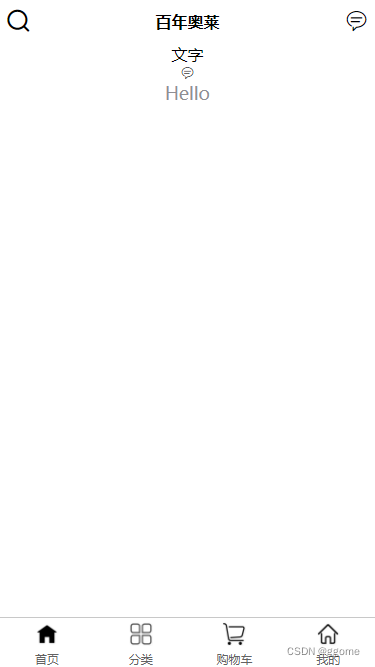
顶部开发
底色:白色
左侧:放大镜 中间文字 百年奥莱 右侧消息文字 : 改 pages.json的navigationBarTitle 为 百年奥莱 更改pages.json下的 index 页面:
{ "path": "pages/index/index", "style": { "navigationBarTitleText": "百年奥莱", "navigationBarBackgroundColor": "#fff", "app-plus": { "titleNView": { /* 使用字体图标时 unicode 字符表示必须 '\u' 开头,如 "\ue123"(注意不能写成"\e123")*/ "buttons": [ { "float": "left", "fontSrc": "./static/iconfont/iconfont.ttf", "text": "\ue616" },{ "float": "right", "fontSrc": "./static/iconfont/iconfont.ttf", "text": "\ue711" } ] } } } }- 使用字体图标时 unicode 字符表示必须 ‘\u’ 开头,如 “\ue123”(注意不能写成"\e123")
导航栏不支持小程序,小程序需要使用到自定义导航栏和条件编译来实现
-
导航栏设置为自定义 “navigationStyle”: “custom”,
页面加条件编译百年奥莱 -
index.vue
文字 {{title}} - list.vue
分类 - pages.json
{ "pages": [ //pages数组中第一项表示应用启动页,参考:https://uniapp.dcloud.io/collocation/pages { "path": "pages/index/index", "style": { "navigationBarTitleText": "百年奥莱", "navigationBarBackgroundColor": "#fff", // "navigationStyle": "custom", "app-plus": { "titleNView": { /* 使用字体图标时 unicode 字符表示必须 '\u' 开头,如 "\ue123"(注意不能写成"\e123")*/ "buttons": [ { "float": "left", "fontSrc": "./static/iconfont/iconfont.ttf", "text": "\ue616" },{ "float": "right", "fontSrc": "./static/iconfont/iconfont.ttf", "text": "\ue711" } ] } } } } ,{ "path" : "pages/my/my", "style" : { "navigationBarTitleText": "", "enablePullDownRefresh": false } } ,{ "path" : "pages/shopcart/shopcart", "style" : { "navigationBarTitleText": "", "enablePullDownRefresh": false } } ,{ "path" : "pages/list/list", "style" : { "navigationBarTitleText": "", "enablePullDownRefresh": false } } ], "globalStyle": { "navigationBarTextStyle": "black", "navigationBarTitleText": "uni-app", "navigationBarBackgroundColor": "#F8F8F8", "backgroundColor": "#F8F8F8" }, "tabBar": { "color": "#636263", "selectedColor": "#636263", "backgroundColor": "#fff", "spacing": "5px", "list": [ { "pagePath": "pages/index/index", "iconPath": "static/tabbar/index.png", "selectedIconPath": "static/tabbar/indexSelected.png", "text": "首页" },{ "pagePath": "pages/list/list", "iconPath": "static/tabbar/list.png", "selectedIconPath": "static/tabbar/listSelected.png", "text": "分类" },{ "pagePath": "pages/shopcart/shopcart", "iconPath": "static/tabbar/shop.png", "selectedIconPath": "static/tabbar/shopSelected.png", "text": "购物车" },{ "pagePath": "pages/my/my", "iconPath": "static/tabbar/index.png", "selectedIconPath": "static/tabbar/indexSelected.png", "text": "我的" } ] } } - pages下 新建几个页面
-
相关阅读:
ssm+vue+elementUI 少儿编程管理系统-#毕业设计
drf从无到有学习Django Rest Framework框架——目录结构最佳实践、REST_FRAMEWORK、数据库配置
java操作HBase
从零开发短视频电商 分布式锁-基于数据库实现
初学者使用R语言读取excel/csv/txt的注意事项
【C#每日一记】C#中常用的特性
1113: 递归调用的次数统计(函数专题)
【计算机网络】HTTPS的基础知识
【已解决】c++如何从0配置ffmpeg
树莓派4B开发之五安装yoloV5
- 原文地址:https://blog.csdn.net/gixome/article/details/127026349