-
WinForm中DataGridView分页的实现【DataTable.rows.add()报错:该行已经属于另一个表】
一、问题:DataGridView在显示数据的时候,如何快捷的修改列名(数据库字段变成有意义的列名)?
1、数据库中的表:

2、UI上的dataGridView要显示的列名

3、解决方法:
一、数据装载完毕后,修改dataGridView的列名【如何修改?自行搜索】——此法较笨
二、dataGridView数据绑定前,修改数据源(DataTable)的列名,如何修改,在Select sql的时候修改- 最初的sql 语句
SELECT id, username, nickname, password, sex, email, phone, remark FROM user;- 改进的sql语句,以及抓取的table
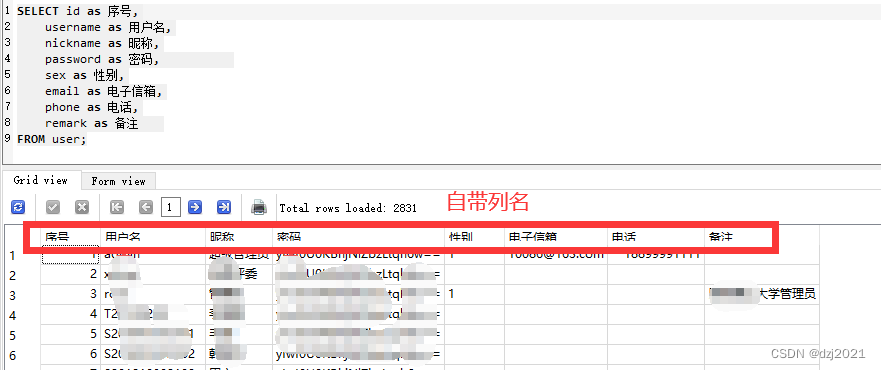
二、问题:sqlite在select时,如何获取行号?
1、想要的效果cnt作为行号,在分页的时候用来计算

其它数据库里面有一个函数row_number(),sqlite里面没有,所以只能曲线救国2、代码
select id, (select count(*) from user b where a.id >= b.id) as cnt from user a三、dataGridView如何分页
1、数据绑定
var table = DB.GetUserTable();                   //读表
var pageInfo = GetSpecifiedPage(1,30,ref table); //获取第一页的数据
bindingSource.DataSource = pageInfo.table;       //设置数据源
dataGridView1.DataSource = bindingSource;
数据流示意图

2、分页的思路
- 分页显示的流程

- 分页的实现
比如,table里面有91行数据,每页显示30行,那么总计可以分成4页——30 + 30 + 30 + 1
分页的情况:
页码 (第x页) 行号起始值 行号结束值 1 0 29 2 30 59 3 60 89 4 90 90 比如现在要显示第2页的数据,那么直接把第30到第59行的数据重新装到一个新表里,然后把这个新表设置成dataGridView的数据源就行。
用Linq,Skip属于前面页码的rows,然后Take30行即可- 代码实现
////// 给定一个DataTable,按每页指定行数分页后,取某一页的所有数据 /// 实现:用List 进行切片[Skip Take] /// /// 要取数据的页号(1...n) /// 每页包含多少行 /// 要处理的table ///新的DataTable public static (bool success,DataTable table,string info) GetSpecifiedPage(int pageIndex,int rowsNumInOnePage,ref DataTable table) { (bool success, DataTable table, string info) rtn ; //**总页数计算 float t = (float)table.Rows.Count / (float)rowsNumInOnePage; var totalPages = (int)(Math.Ceiling(t)); //**分页取数据 if(pageIndex < 1 || pageIndex > totalPages) //页码非法 { rtn = (false, new DataTable(), "给定的页码越界"); } else //页码合法,提取数据 { //切片处理进行分页 var skipRows = (pageIndex - 1) * rowsNumInOnePage; //跳过前面页面的DataRow var takeRows = rowsNumInOnePage; //取一整页的DataRow var rows = table.AsEnumerable().Skip(skipRows).Take(takeRows).ToList(); var rtnTable = new DataTable(); //rtnTable = table.Copy(); //DataTable.Copy() returns a DataTable with the structure and data of the DataTable. //rtnTable.Clear(); rtnTable = table.Clone(); //Unlike Copy(), DataTable.Clone() only returns the structure of the DataTable, not the rows or data of the DataTable. rows.ForEach(r => rtnTable.ImportRow(r)); rtn = (true,rtnTable,""); } return rtn; }- 把一个DataTable(表1)的rows添加(add)到另一个DataTable(表2)的时候,表2需要和表1有相同的表结构,不然会报错:该行已经属于另一个表
- 处理方案(1):把总表拷贝(copy)给临时表
官方说:Copy()的意思——把表的结构和表的数据都复制一份。DataTable.Copy() returns a DataTable with the structure and data of the DataTable.
那么Copy()后,你需要把临时表clear(),再重新装数据
var rtnTable = new DataTable(); rtnTable = table.Copy(); //DataTable.Copy() returns a DataTable with the structure and data of the DataTable. rtnTable.Clear(); rows.ForEach(r => rtnTable.ImportRow(r));- 处理方案(2):把总表*** 克隆***(clone)给临时表
官方说:Clone()的意思——只取表的结构不要表的数据。//Unlike Copy(), DataTable.Clone() only returns the structure of the DataTable, not the rows or data of the DataTable.
所以Clone()后,临时表不需要clear()
var rtnTable = new DataTable(); rtnTable = table.Clone(); //Unlike Copy(), DataTable.Clone() only returns the structure of the DataTable, not the rows or data of the DataTable. rows.ForEach(r => rtnTable.ImportRow(r)); -
相关阅读:
2023二建备考第二天Day02
Apache ECharts
单元测试多线程调用sleep,执行中断
windows下的volatility取证分析与讲解
Golang入门笔记(15)—— 数组
好玩的调度技术
解决Edge游览器龟速下载问题
微分中值定理之柯西中值定理
AST.NET Core 服务器端对接苹果推送通知 APNs
Java 实战介绍 Cookie 和 Session 的区别
- 原文地址:https://blog.csdn.net/dzj2021/article/details/126946348