-
HTTP请求:GET/POST请求
GET 用于:地址栏请求 通过url请求
POST 用于:表单请求
DELETE 用于删除
PUT 用于更新
获取GET请求:
GET的请求直接嵌入在路径中URL是完整的请求路径,包括了 ?后面的部分,因此你可以手动解析后面的内容作为GET请求的参数
node.js是UEL模块中的parse函数提供了这个功能。
util是node.js常用工具模块。util.inspect() 是一个将任意对象转化为字符串的方法。通常用于调试和错误输出
- var http = require("http")
- var url = require("url")
- var util = require("util")
- // http.createServer 创建一个服务器 require请求 response相应
- http.createServer(function (require, response) {
- // writeHead 输出相应头 //应头决定了对应的返回数据的格式以及编码格式
- response.writeHead(200, { "Content-Type": "text/plain" }); //输出相应头
- // util.inspect() 是node.js的常用工具模块,可以将任意对象转化成字符串的方法,通常用于调试和错误输出
- // url.parse()方法接受一个URL字符串,解析它,然后返回一个URL对象
- // response.end
- response.end(util.inspect(url.parse(require.url, true))); //请求
- }).listen(8888) //监听端口
- console.log("访问:http://127.0.0.1:8888");
获取POST请求:
- const http = require('http') //HTTP 核心模块是 Node.js 网络的关键模块。
- const querystring = require('querystring') //查询字符串
- var postHTML =
- '
Document ' + - '' +
- ' +
- '姓名:' +
- '
' + - '班级:' +
- '
' + - '' +
- '' +
- '';
- // 创建服务器 请求 响应
- http.createServer(function (require, response) {
- var body = ''
- // 通过require的data事件 监听函数,每当接收到请求体的数据就累加到body变量中
- require.on('data', function (turck) {
- // +=是默认将二进制转化成字符串格式
- body += turck
- })
- // 通过querystring解析请求体参数,将post请求 变成真正的post请求格式然后向客户端返回
- require.on("end", function () {
- // 解析参数
- body = querystring.parse(body);
- // 设置相应 头部即编码
- response.writeHead(200, { "Content-Type": "text/html;charset=utf-8" });
- if (body.name && body.class) {
- // 接受到post数据,输出提交的数据
- response.write(`姓名:${body.name}`)
- response.write("
") - response.write(`班级:${body.class}`)
- } else {
- // 未接收到post数据输出表单
- response.write(postHTML)
- }
- response.end();
- })
- }).listen(8888) //监听端口
- console.log("成功:http://127.0.0.1:8888");
通过req的data事件监听函数,每当接收到请求体的数据,就累加到body变量中
在end事件触发后,通过querystring.parse 将post解析为正真的POST请求格式,然后向客户端返回
Web模块
什么是Web服务器?
Web一般指网站服务器,是指驻留与因特网上某种类型计算机的程序。
Web服务器的基本功能就是提供Web信息浏览服务,他只需支持HTTP协议。HTML格式及URL与客户端的网络浏览器配合
Web应用架构
Client 客户端 一般指浏览器浏览器可以通过HTTP协议向服务器请求数据。
Server 服务器 一般值Web服务器,可以接收客户端请求,并向客户端发送响应数据。
Business 业务层 通过Web服务器处理应用程序,如与数据库交互,逻辑运算,调用外部程序等
Data 数据层 一般有数据库组成。
使用Node创建Web服务器
解析url 找到 pathname
substr(1) 截取字符串
1.创建服务器
2.获取url 解析url url.parse 找到 pathname
3.判断是否有!pathname || pathname==’/‘
4.读取文件 fs.异步调用
5.创建html文件
- // 引入模块
- var http = require('http')
- var url = require("url")
- var fs = require("fs")
- // 创建函数
- http.createServer(function (request, response) {
- // 获取到url通过 parse解析 url 并找到 pathname
- let pathname = url.parse(request.url).pathname
- if (!pathname || pathname == '/') {
- pathname = "/index.html"
- }
- fs.readFile(pathname.substr(1), function (err, data) {
- if (err) {
- response.writeHead(404, { "Content-Type": "text/html" })
- } else {
- response.writeHead(200, { "Content-Type": "text/html" })
- response.write(data.toString())
- }
- response.end()
- })
- }).listen(8888)
- console.log("请求成功:http://127.0.0.1:8888");
使用Node模拟客户端
host 主机名 port 端口号 path路径 data监视数据变化 end完成接收的
注意 :服务器要开启
- // 注意 :服务器要开启
- const http = require("http")
- // 用于请求的选型
- var options = {
- host: 'localhost', //主机名
- port: '8888', //端口号
- path: '/index.html' //地址 路径
- }
- // 处理响应的回调函数
- function callback(res) {
- var body = ''
- // 获取index里面的内容 把他复制给 data监视数据变化
- res.on('data', function (trunk) {
- body += trunk
- })
- //end完成接收的
- res.on("end", function () {
- console.log(body);
- })
- }
- // 请求
- var req = http.request(options, callback)
- req.end() //调用end
Express框架
安装 npm i express
第一个Express框架实例
路由
路由规则
- // 引入块
- const express = require('express')
- // 函数
- const app = express()
- // get请求 请求 相应 request请求 response相应 返回到页面的是用 response
- arr.get('/', function (request, response) {
- response.send("Hello get") //send() 假如发送字符串,那么将被解释为html文件;
- })
- arr.post('/post.html', function (request, response) {
- response.send("Hello post")
- })
- arr.delete('/delete.html', function (request, response) {
- response.send("Hello delete")
- })
- arr.put('/put.html', function (request, response) {
- response.send("Hello put")
- })
- arr.listen(8888)
- console.log("http://127.0.0.1:8888");
静态文件
- const express = require('express')
- const app = express()
- //静态
- //app.use([地址],中间件|路由|函数体)
- app.use(express.static("public"))
- app.get('/', function (req, res) {
- console.log("get");
- res.send("Hello world")
- }).listen(8888) //监听端口
- console.log("http://127.0.0.1:8888");
首先 接收请求 定义了por
接收到 对象 => 字符串(序列化)
字符串=> (反序列化)
- const express = require("express")
- const app = express()
- app.get('/home', function (req, res) {
- // 请求
- // __dirname 总是指向被执行js文件的绝对路径
- res.sendFile(__dirname + "/gethomeGet.html")
- })
- // 接收porcsee_get
- app.get('/porcsee_get', function (req, res) {
- // res.send("Hello world")
- // 请求 姓 和 名
- let obj = {
- firat_name: req.query.firat_name,
- last_name: req.query.last_name
- }
- // 接收姓名进行格式转化 'Content-Type': 'text/plain;charset=utf-8'
- res.writeHead(200, { 'Content-Type': 'Text/plain;charset=utf-8' })
- res.end(`姓名:${obj.firat_name}${obj.last_name}`)
- //end()执行完毕后就要输出的字符,如果指定了data的值,那就以为这在执行玩res.end()之后灰阶这执行一条res.write(data,encoding)
- })
- app.listen(8888) //监听端口
- console.log("http://127.0.0.1:8888");
POST()
通过浏览器来看到看到这个html 修改路由
路由和提交的路径匹配
body-parser是非常常用的一个express中间件,作用是对post请求的请求体进行解析
- const express = require('express')
- const app = express()
- //body-parser是非常常用的一个express中间件,作用是对post请求的请求体进行解析
- const bodyparser = require('body-parser')
- const parser = bodyparser.urlencoded({ extended: false })
- app.get('/demo', function (req, res) {
- // sendfile 函数在两个文件描写叙述符之间直接传递数据(全然在内核中操作,传送),从而避免了内核缓冲区数据和用户缓冲区数据之间的拷贝,操作效率非常高,被称之为零拷贝。
- // __dirname用于指向被执行的js文件的绝对路径
- res.sendFile(__dirname + "/gethomePost.html")
- })
- app.post('/porcsee_post', parser, function (req, res) {
- let obj = {
- firstName: req.body.firat_name,
- lastName: req.body.last_name
- }
- // writeHead 输出相应头 //应头决定了对应的返回数据的格式以及编码格式
- res.writeHead(200, { "Content-Type": "text/plain;charset=utf-8" })
- res.end(JSON.stringify(`${obj.firstName}${obj.lastName}`))
- }).listen(8888)
- console.log("http://127.0.0.1:8888");
要实现上传
检查又没有 安装multer
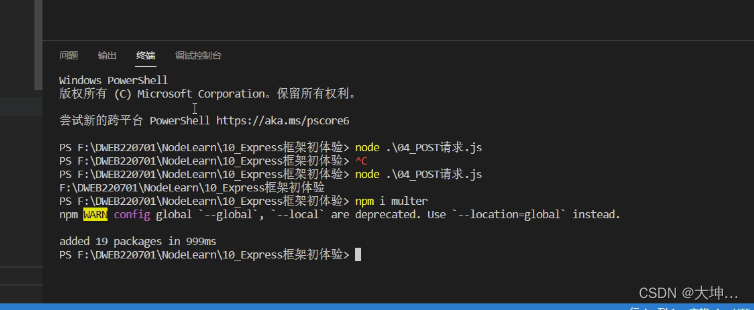
引入:const multer = requitre('multer')
上传文件
- // 引入模块 express multer
- const express = require('express')
- const app = express() //
- const multer = require('multer')
- const fs = require('fs') //读取本地文件
- //静态
- //app.use([地址],中间件|路由|)
- app.use(express.static('public'))
- // multer它重要用于上传文件。
- const upload = multer({ dest: 'public/uploads/' })
- // 接收uploads.html文件
- app.get('/uploads', function (req, res) {
- // 请求
- // sendfile 函数在两个文件描写叙述符之间直接传递数据(全然在内核中操作,传送),从而避免了内核缓冲区数据和用户缓冲区数据之间的拷贝,操作效率非常高,被称之为零拷贝。
- // __dirname用于指向被执行的js文件的绝对路径
- res.sendFile(__dirname + "/upload.html")
- })
- app.post('/file_upload', upload.single("image"), function (req, res) {
- // res.send("ok")
- // console.log(req.file);
- let oldName = req.file.destination + req.file.filename;
- let newName = req.file.destination + req.file.originalname;
- fs.rename(oldName, newName, function (err) {
- if (err) {
- res.send("上传失败");
- } else {
- res.send("上传成功");
- }
- })
- })
- app.listen(8888)
- console.log("http://127.0.0.1:8888");
-
相关阅读:
什么是人工智能,它是如何使用的?
9、MyBatis缓存
【RTOS训练营】I2C和UART知识和预习安排 + 晚课提问
题目:黄金树(蓝桥OJ 4494)
springboot环境下Shiro+Token+Redis安全认证方案
深入理解 python 虚拟机:花里胡哨的魔术方法
Flink处理函数 完整使用 (第七章)
月薪9K和年薪30W的职位,有什么区别?
Node.js | 深入讲解 express 应用程序生成器
数据结构-顺序表详解(含完整代码)
- 原文地址:https://blog.csdn.net/red_HTML/article/details/126866145