-
ART-PI移植touchGFX详细教程(基于正点原子7寸屏)
一、下载ART-PI支持包

二、新建工程
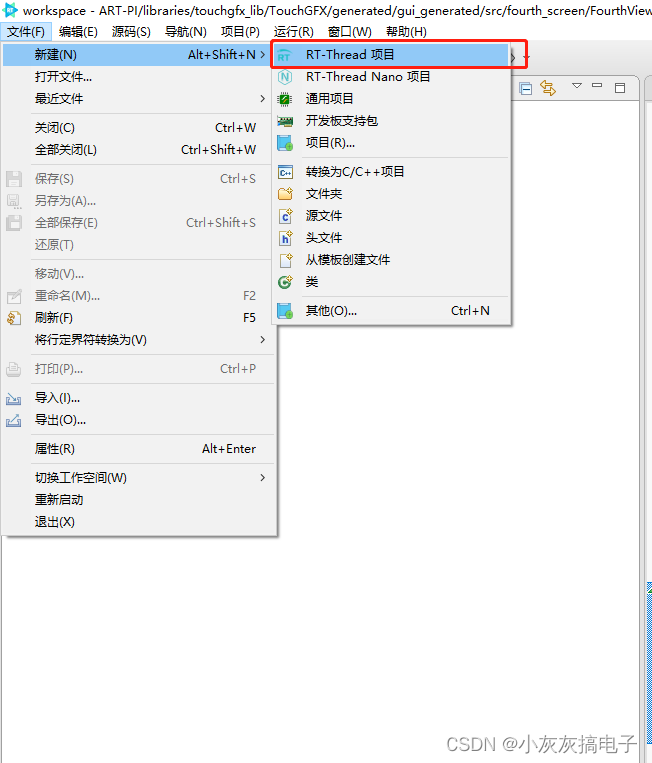
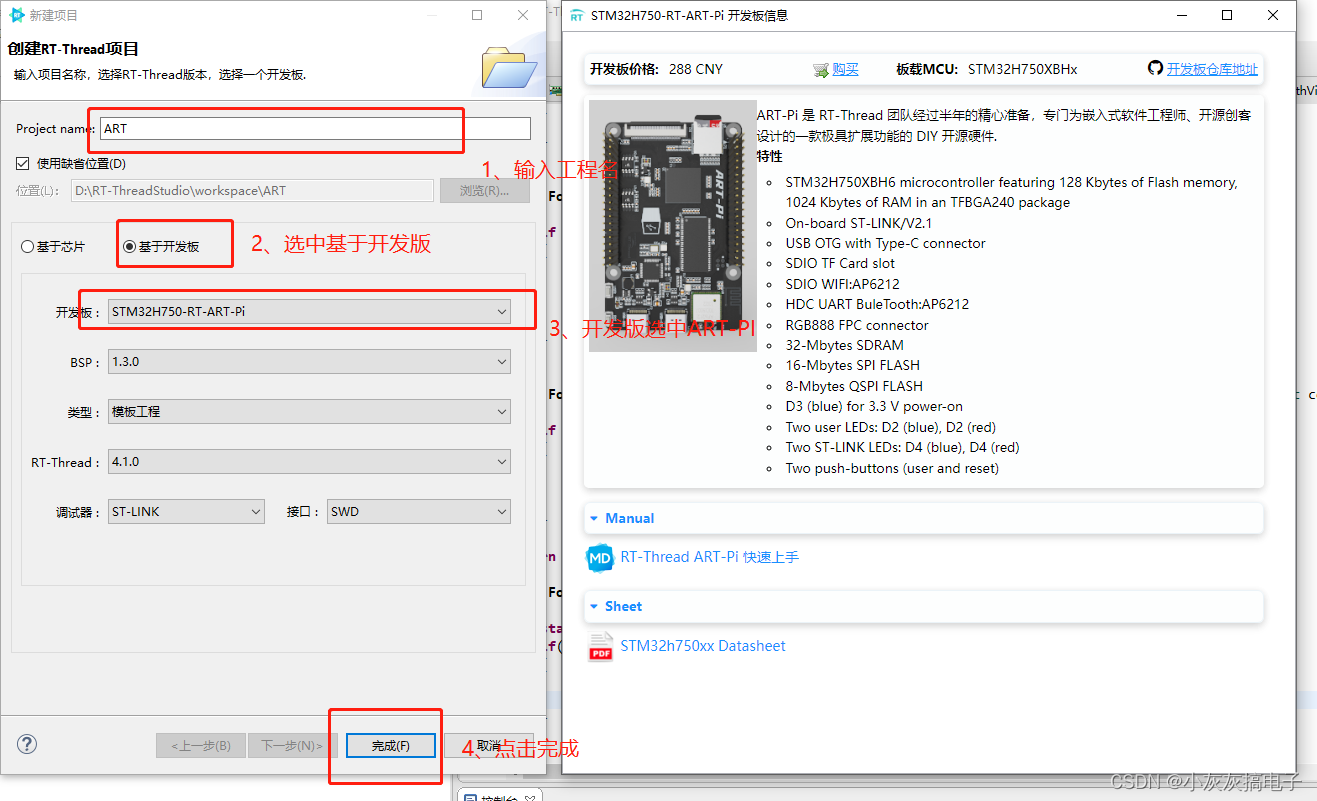
等待项目创建完成三、打开组件
1、C++

2、软件模拟IIC
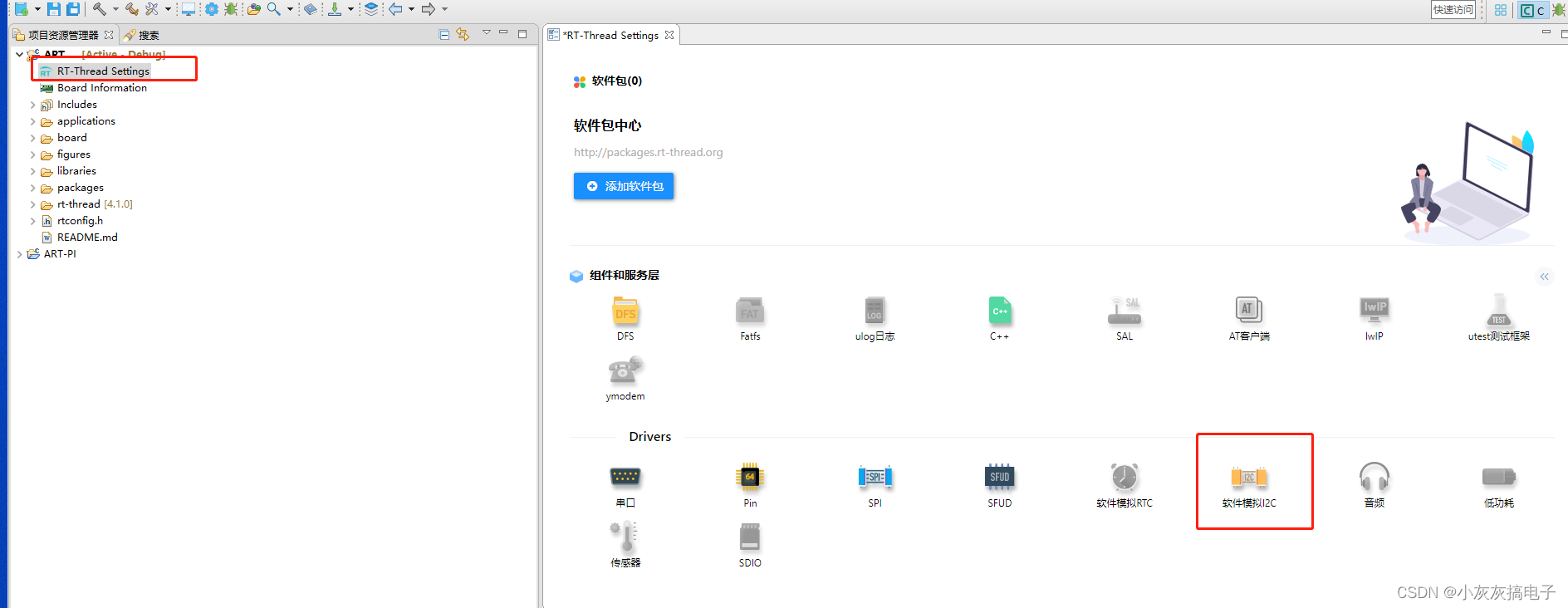
3、IIC配置
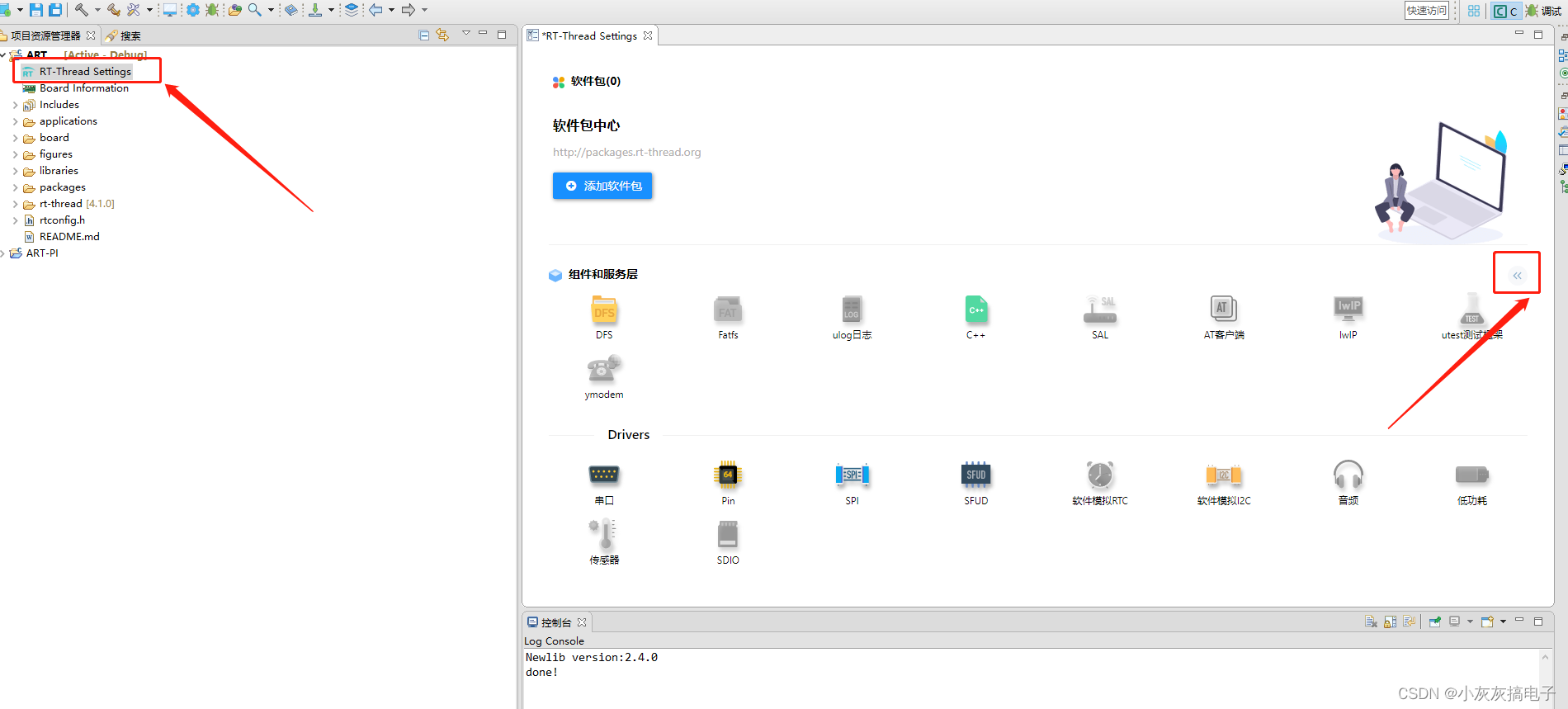

4、使能touchGFX

5、添加触摸芯片支持包


5、保存工程

四、配置工程

选择三项,然后点击应用并关闭五、配置touchGFX
1、打开touchGFX路径

2、用记事本打开这个文件

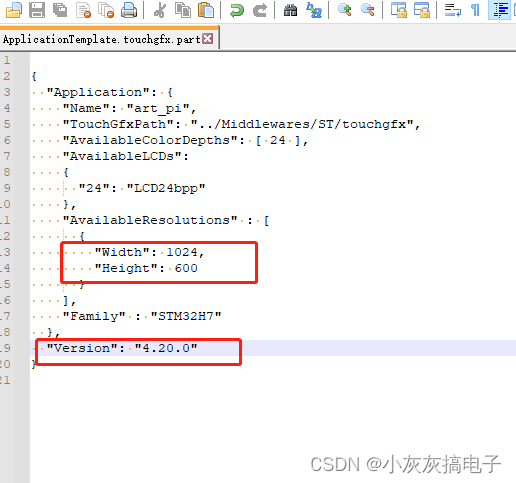
3、修改屏幕尺寸和touchGFX版本
六、配置lcd参数
1、修改lcd参数
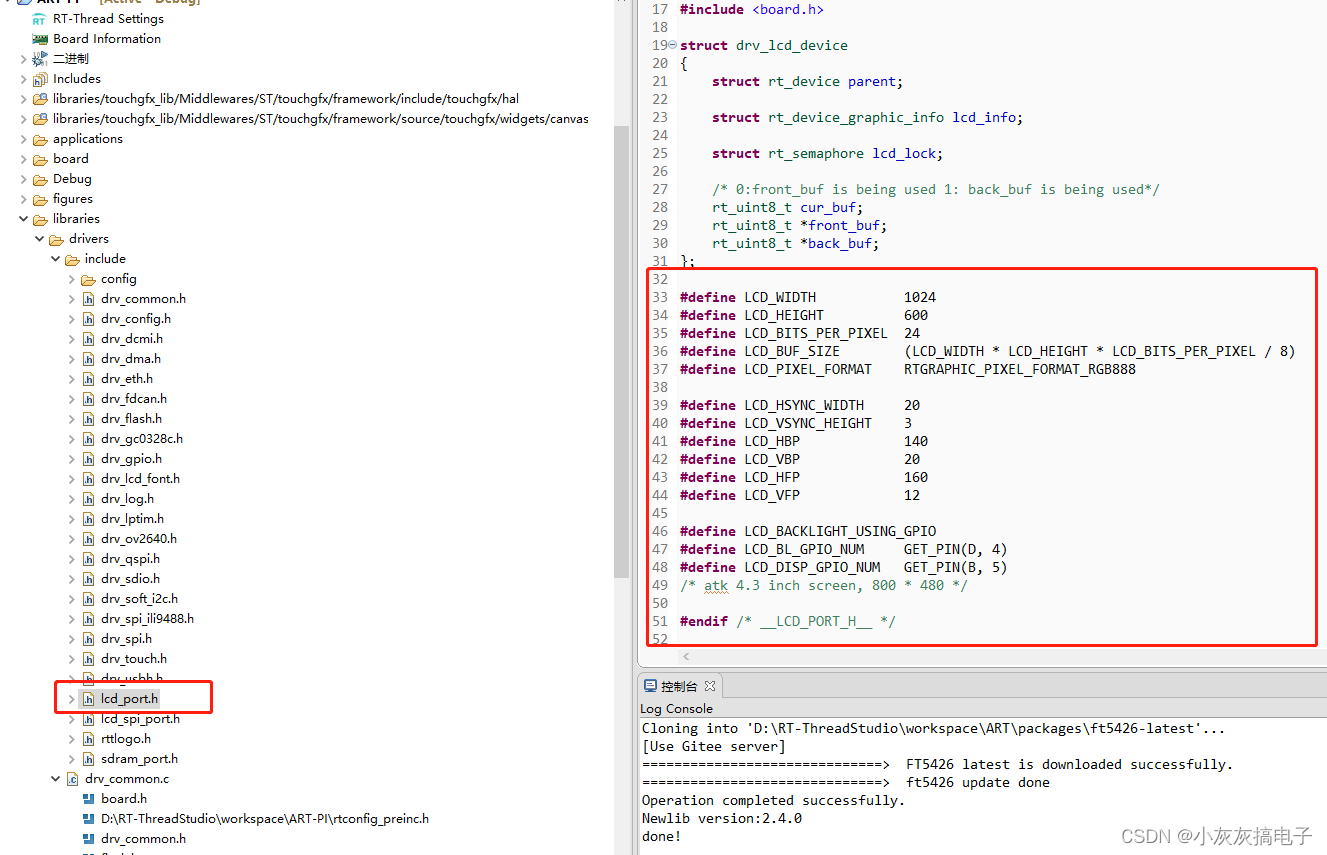
#define LCD_WIDTH 1024 #define LCD_HEIGHT 600 #define LCD_BITS_PER_PIXEL 24 #define LCD_BUF_SIZE (LCD_WIDTH * LCD_HEIGHT * LCD_BITS_PER_PIXEL / 8) #define LCD_PIXEL_FORMAT RTGRAPHIC_PIXEL_FORMAT_RGB888 #define LCD_HSYNC_WIDTH 20 #define LCD_VSYNC_HEIGHT 3 #define LCD_HBP 140 #define LCD_VBP 20 #define LCD_HFP 160 #define LCD_VFP 12- 1
- 2
- 3
- 4
- 5
- 6
- 7
- 8
- 9
- 10
- 11
- 12
2、打开CRC和DMA2D

七、使用touchGFX Designer编译工程
1、使用touchGFX designer打开工程

双击这个文件2、生成代码并运行仿真器

3、等待仿真器运行

八、编译工程,并修改错误
1、编译工程

2、错误修改
1、
../packages/ft5426-latest/src/ft5426.c:77:12: error: unknown type name 'uint16_t'将
uint16_t改为rt_uint16_t

2、
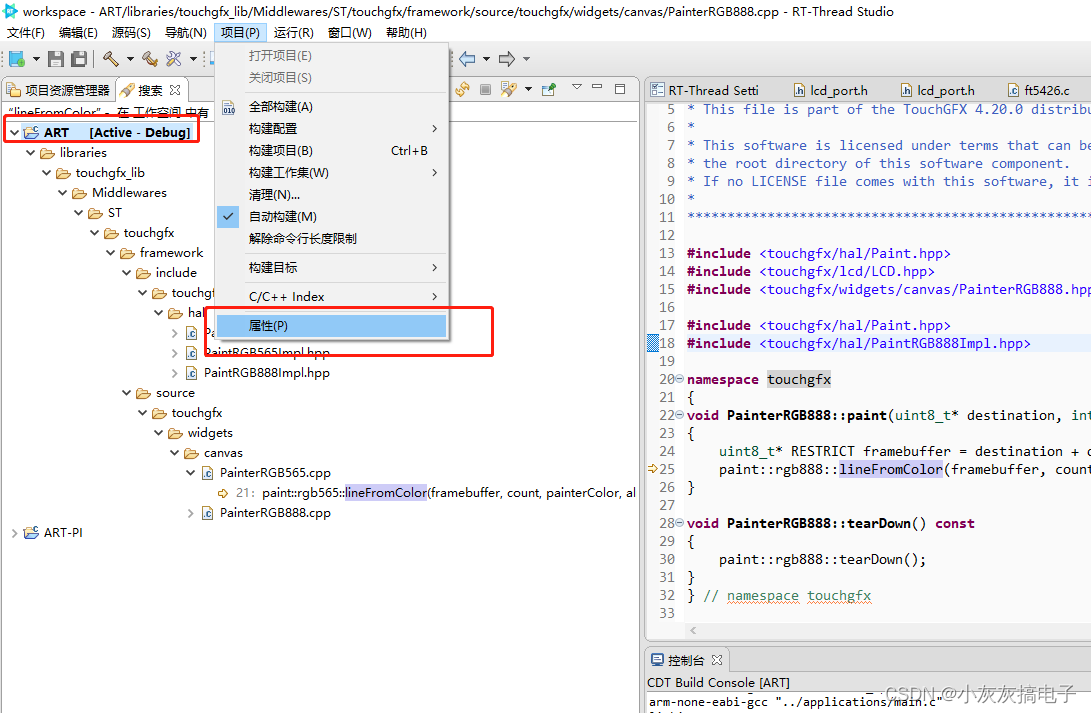
undefined reference totouchgfx::paint::rgb888::lineFromColor(unsigned char*, unsigned int, unsigned long, unsigned char)'`D:\RT-ThreadStudio\workspace\ART\libraries\touchgfx_lib\Middlewares\ST\touchgfx\lib\core\cortex_m7\gcc\libtouchgfx-float-abi-hard.a(PainterRGB888.o): In function `touchgfx::PainterRGB888::paint(unsigned char*, short, short, short, short, unsigned char) const': (.text._ZNK8touchgfx13PainterRGB8885paintEPhssssh+0x18): undefined reference to `touchgfx::paint::rgb888::lineFromColor(unsigned char*, unsigned int, unsigned long, unsigned char)' D:\RT-ThreadStudio\workspace\ART\libraries\touchgfx_lib\Middlewares\ST\touchgfx\lib\core\cortex_m7\gcc\libtouchgfx-float-abi-hard.a(PainterRGB888.o): In function `touchgfx::PainterRGB888::tearDown() const': (.text._ZNK8touchgfx13PainterRGB8888tearDownEv+0x0): undefined reference to `touchgfx::paint::rgb888::tearDown()'- 1
- 2
- 3
- 4
a、全局搜索`lineFromColor
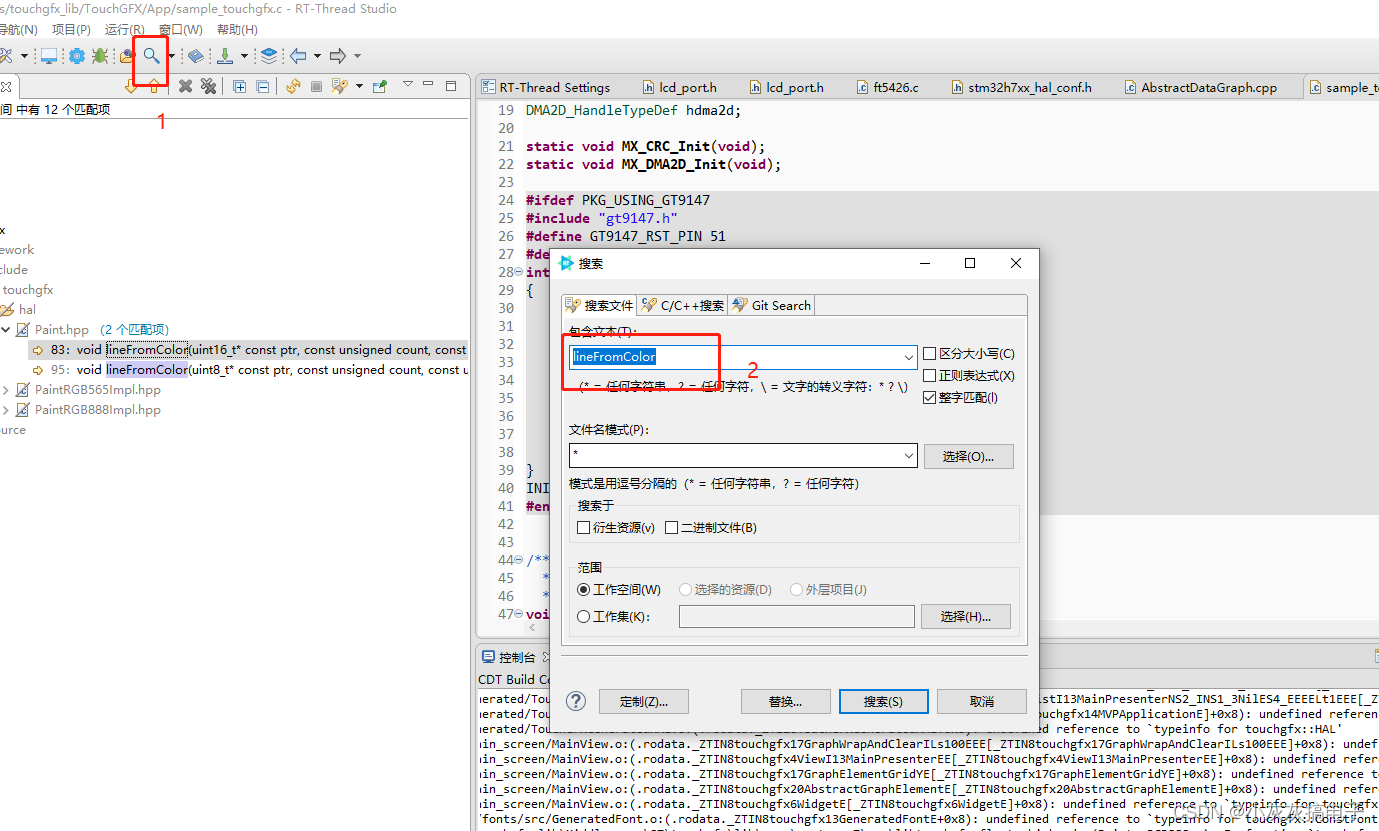
b、将hal文件夹和
PainterRGB888.cpp添加构建

c、在
PainterRGB888.hpp中添加头文件#include#include - 1
- 2

九、编译工程,并下载

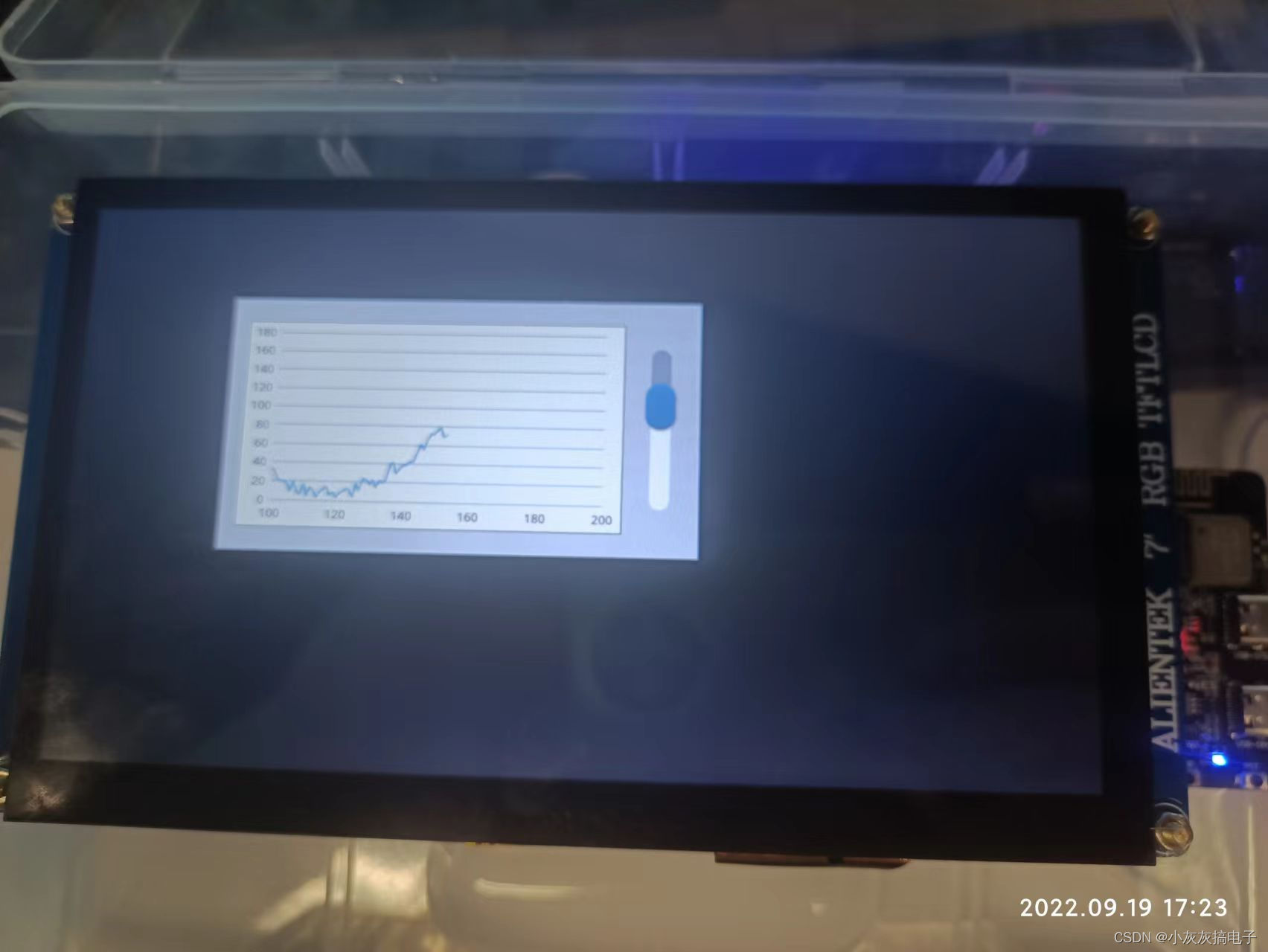
十、添加触摸
1、在sample_touchgfx.c里面添加初始化

#ifdef PKG_USING_FT5426 #include "ft5426.h" int rt_hw_ft5426_port(void) { struct rt_touch_config config; config.dev_name = "i2c1"; rt_hw_ft5426_init("ft5426", &config); return 0; } INIT_ENV_EXPORT(rt_hw_ft5426_port); #endif- 1
- 2
- 3
- 4
- 5
- 6
- 7
- 8
- 9
- 10
- 11
2、修改
STM32TouchController.cpp下面是整个文件
/** ****************************************************************************** * File Name : STM32TouchController.cpp ****************************************************************************** * @attention * *
* * This software component is licensed by ST under Ultimate Liberty license * SLA0044, the "License"; You may not use this file except in compliance with * the License. You may obtain a copy of the License at: * www.st.com/SLA0044 * ****************************************************************************** */ /* USER CODE BEGIN STM32TouchController */ #include© Copyright (c) 2020 STMicroelectronics. * All rights reserved. #include #ifdef PKG_USING_GT9147 #include "gt9147.h" static rt_device_t dev = RT_NULL; static struct rt_touch_data *read_data = NULL; static struct rt_touch_info info; int gt9147_init(void) { void *id; dev = rt_device_find("gt"); if (dev == RT_NULL) { rt_kprintf("can't find device gt\n"); return -1; } if (rt_device_open(dev, RT_DEVICE_FLAG_INT_RX) != RT_EOK) { rt_kprintf("open device failed!"); return -1; } read_data = (struct rt_touch_data *)rt_malloc(sizeof(struct rt_touch_data) * info.point_num); id = rt_malloc(sizeof(rt_uint8_t) * 8); rt_device_control(dev, RT_TOUCH_CTRL_GET_ID, id); rt_uint8_t * read_id = (rt_uint8_t *)id; rt_kprintf("id = %c %c %c %c \n", read_id[0], read_id[1], read_id[2], read_id[3]); rt_device_control(dev, RT_TOUCH_CTRL_GET_INFO, &info); rt_kprintf("range_x = %d \n", info.range_x); rt_kprintf("range_y = %d \n", info.range_y); rt_kprintf("point_num = %d \n", info.point_num); rt_free(id); return 0; } #endif #ifdef PKG_USING_FT5426 #ifdef __cplusplus extern "C"{ #endif #include "ft5426.h" #include "touch.h" #ifdef __cplusplus } #endif static rt_device_t dev = RT_NULL; static struct rt_touch_data *read_data = NULL; static struct rt_touch_info info; int ft5426_init(void) { void *id; // //same init include sample_touchgfx.c // struct rt_touch_config cfg; // cfg.dev_name = "i2c1"; // rt_hw_ft5426_init("ft5426", &cfg); dev = rt_device_find("ft5426"); if (dev == RT_NULL) { rt_kprintf("can't find device ft5426\n"); return -1; } if (rt_device_open(dev, RT_DEVICE_FLAG_RDONLY) != RT_EOK) { rt_kprintf("open device failed!"); return -1; } read_data = (struct rt_touch_data *)rt_malloc(sizeof(struct rt_touch_data) * info.point_num); id = rt_malloc(sizeof(rt_uint8_t) * 8); rt_device_control(dev, RT_TOUCH_CTRL_GET_ID, id); rt_uint8_t * read_id = (rt_uint8_t *)id; rt_kprintf("id = %c %c %c %c \n", read_id[0], read_id[1], read_id[2], read_id[3]); rt_device_control(dev, RT_TOUCH_CTRL_GET_INFO, &info); rt_kprintf("range_x = %d \n", info.range_x); rt_kprintf("range_y = %d \n", info.range_y); rt_kprintf("point_num = %d \n", info.point_num); rt_free(id); return 0; } #endif void STM32TouchController::init() { /** * Initialize touch controller and driver * */ #ifdef PKG_USING_GT9147 gt9147_init(); #endif #ifdef PKG_USING_FT5426 ft5426_init(); #endif } bool STM32TouchController::sampleTouch(int32_t& x, int32_t& y) { /** * By default sampleTouch returns false, * return true if a touch has been detected, otherwise false. * * Coordinates are passed to the caller by reference by x and y. * * This function is called by the TouchGFX framework. * By default sampleTouch is called every tick, this can be adjusted by HAL::setTouchSampleRate(int8_t); * */ #ifdef PKG_USING_GT9147 rt_device_read(dev, 0, read_data, info.point_num); if (read_data[0].event == RT_TOUCH_EVENT_DOWN || read_data[0].event == RT_TOUCH_EVENT_MOVE) { x = 800 - read_data[0].x_coordinate; y = 480 - read_data[0].y_coordinate; return true; } else #endif #ifdef PKG_USING_FT5426 rt_device_read(dev, 0, read_data, info.point_num); if (read_data[0].event == RT_TOUCH_EVENT_DOWN || read_data[0].event == RT_TOUCH_EVENT_MOVE) { y = read_data[0].x_coordinate; x = read_data[0].y_coordinate; //rt_kprintf("down x: %03d y: %03d\n", x, y); return true; } else #endif { return false; } } /* USER CODE END STM32TouchController */ /************************ (C) COPYRIGHT STMicroelectronics *****END OF FILE****/ - 1
- 2
- 3
- 4
- 5
- 6
- 7
- 8
- 9
- 10
- 11
- 12
- 13
- 14
- 15
- 16
- 17
- 18
- 19
- 20
- 21
- 22
- 23
- 24
- 25
- 26
- 27
- 28
- 29
- 30
- 31
- 32
- 33
- 34
- 35
- 36
- 37
- 38
- 39
- 40
- 41
- 42
- 43
- 44
- 45
- 46
- 47
- 48
- 49
- 50
- 51
- 52
- 53
- 54
- 55
- 56
- 57
- 58
- 59
- 60
- 61
- 62
- 63
- 64
- 65
- 66
- 67
- 68
- 69
- 70
- 71
- 72
- 73
- 74
- 75
- 76
- 77
- 78
- 79
- 80
- 81
- 82
- 83
- 84
- 85
- 86
- 87
- 88
- 89
- 90
- 91
- 92
- 93
- 94
- 95
- 96
- 97
- 98
- 99
- 100
- 101
- 102
- 103
- 104
- 105
- 106
- 107
- 108
- 109
- 110
- 111
- 112
- 113
- 114
- 115
- 116
- 117
- 118
- 119
- 120
- 121
- 122
- 123
- 124
- 125
- 126
- 127
- 128
- 129
- 130
- 131
- 132
- 133
- 134
- 135
- 136
- 137
- 138
- 139
- 140
- 141
- 142
- 143
- 144
- 145
- 146
- 147
- 148
- 149
- 150
- 151
- 152
- 153
- 154
- 155
- 156
- 157
- 158
- 159
- 160
- 161
- 162
- 163
- 164
- 165
- 166
- 167
- 168
- 169
- 170
- 171
- 172
- 173
- 174
- 175
- 176
-
相关阅读:
钢筋智能测径仪 光圆与带肋钢筋均可检测!
多线程程序是如何执行代码的?
java-php-net-python-基于的相册软件的设计与实现计算机毕业设计程序
vue父子组件传递参数详解
UE5: UpdateOverlap - 从源码深入探究UE的重叠触发
代码随想录算法训练营第六十天| 739. 每日温度 496.下一个更大元素 I
使用pfx文件的接口调用
数仓为什么要分层
提升软件测试效率,是一种自我习惯
C++项目:高并发内存池
- 原文地址:https://blog.csdn.net/qq_15181569/article/details/126936671