-
ModelScope--人像卡通化、人像美肤
ModelScope
什么是ModelScope呢?ModelScope是开源的模型即服务共享平台,为泛AI开发者提供灵活、易用、低成本的一站式模型服务产品,让模型应用更简单!在这里你可以免费体验训练模型,同时一行命令实现模型预测,快速验证模型效果,同时也可以定制自己的个性化的模型,在体验的同时还能提升自己模型研发能力,还有这很热闹的社区,成长之路不孤单。其他ModelScope介绍和用法欢迎来到ModelScope文档中心,里面有你想要的一切答案,地址:https://modelscope.cn/#/docs

这里你可以先大概看一下ModelScope的概览介绍以及ModelScope能够提供给我们的服务,鉴于其提供的服务,我们可以实现哪些业务。下面我将主要通过人像卡通化模型演示来展示ModelScope的强大功能。模型库
既然是要演示一下人像卡通化模型,那么首先就需要用到模型库,地址:https://modelscope.cn/#/models,在模型库里面找到人像卡通化的模型

这里的达摩卡通化模型其实就是我们通俗说的人像卡通化模型,图中也有一行红色小字标识【人像卡通化】,再体验完人像卡通化后后续会再演示一下【人像美肤模型】。达摩卡通化模型
下面我们就来演示达摩卡通化模型,在模型介绍页我们也可以看到已经实现的人像卡通化的展示效果动图以及模型描述、使用方式和范围,如何使用等说明。

模型介绍的右侧可以直接上传本地图片进行测验,这里有我测验的效果,还是不错的,另外我演示的是要通过Notebook在线打开模型文件进行测试。人像美肤模型
在演示完达摩卡通化模型后再演示一下【人像美肤模型】,为什么主要演示这两个模型呢,首先是个人比较感兴趣的也是这两个模型,当然也是因为这两个模型大家也比较喜欢,毕竟美肤和卡通化都是可以让照片美美哒的好方案,人像美肤模型模型介绍页

在线测试的测试结果对比原图来看,确实美白了呢,哈哈环境准备
你可以选择两种方式来进行开发,一种是通过本地环境开发,

一种是通过Notebook在线开发,这里我选择的是Notebook在线开发,为什么呢?因为你看本地需要安装Python环境,安装深度学习框架,安装ModelScope Library,属实太复杂了,还是直接在Notebook中运行,Notebook中提供官方镜像无需自主进行环境安装,更加方便快捷,推荐大家也可以试试。Notebook 开发
打开Notebook登录页面,如果没有账号需要注册一个

注册完账号登录之后可以看到

选择【方式一】,点击【启动】,启动过程需要一定时间,请耐心等待即可

一段时间后,
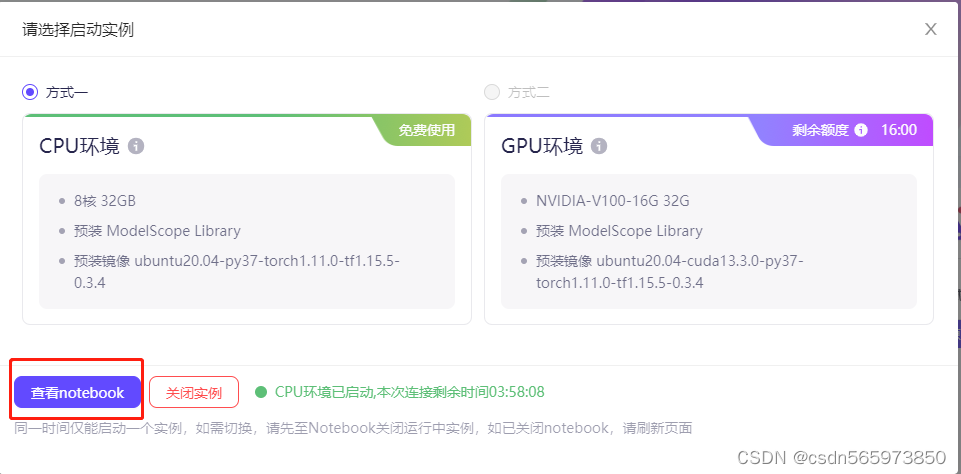
启动完成,点击【查看notebook】,可以看到如下在线开发页面

点击【Notebook】下Python3按钮,打开编辑页面

这时回到【达摩卡通化模型】,点击【快速使用】,复制【代码范例】

from modelscope.pipelines import pipeline p = pipeline('image-portrait-stylization', model='damo/cv_unet_person-image-cartoon_compound-models')- 1
- 2
到notebook在线开发工具中,点击执行按钮,可以看到日志输出

执行命令后,系统将进行模型的下载、推理等一系列操作日志,推理完毕后输入测试的内容即可得到输出结果。模型调试-人像卡通化
在上一步根据task示例化一个pipeline对象后,下面就可以输入数据进行调试,这里我首先在本地准备一张人像照片

然后在到【达摩卡通化模型】的【模型介绍】找到【如何使用】,【代码范例】,这里需要将输入图片的地址改成我自己的本地图片路径

调试代码如下import cv2 from modelscope.hub.snapshot_download import snapshot_download from modelscope.pipelines import pipeline model_dir = snapshot_download('damo/cv_unet_person-image-cartoon_compound-models', cache_dir='.') img_cartoon = pipeline('image-portrait-stylization', model=model_dir) result = img_cartoon('E:\\2345Downloads\\20220812131538.jpg') cv2.imwrite('result.png', result['output_img']) print('finished!')- 1
- 2
- 3
- 4
- 5
- 6
- 7
- 8
- 9
- 10
- 11
将调试代码输入notebook,点击执行

无法找到本地文件,猜测可能是由于开发环境是线上,无法正常访问本地文件,那就更换一个网络图片来再次测试,代码修改为import cv2 from modelscope.hub.snapshot_download import snapshot_download from modelscope.pipelines import pipeline model_dir = snapshot_download('damo/cv_unet_person-image-cartoon_compound-models', cache_dir='.') img_cartoon = pipeline('image-portrait-stylization', model=model_dir) result = img_cartoon('https://modelscope.oss-cn-beijing.aliyuncs.com/test/images/image_cartoon.png') cv2.imwrite('result.png', result['output_img']) print('finished!')- 1
- 2
- 3
- 4
- 5
- 6
- 7
- 8
- 9
- 10
- 11
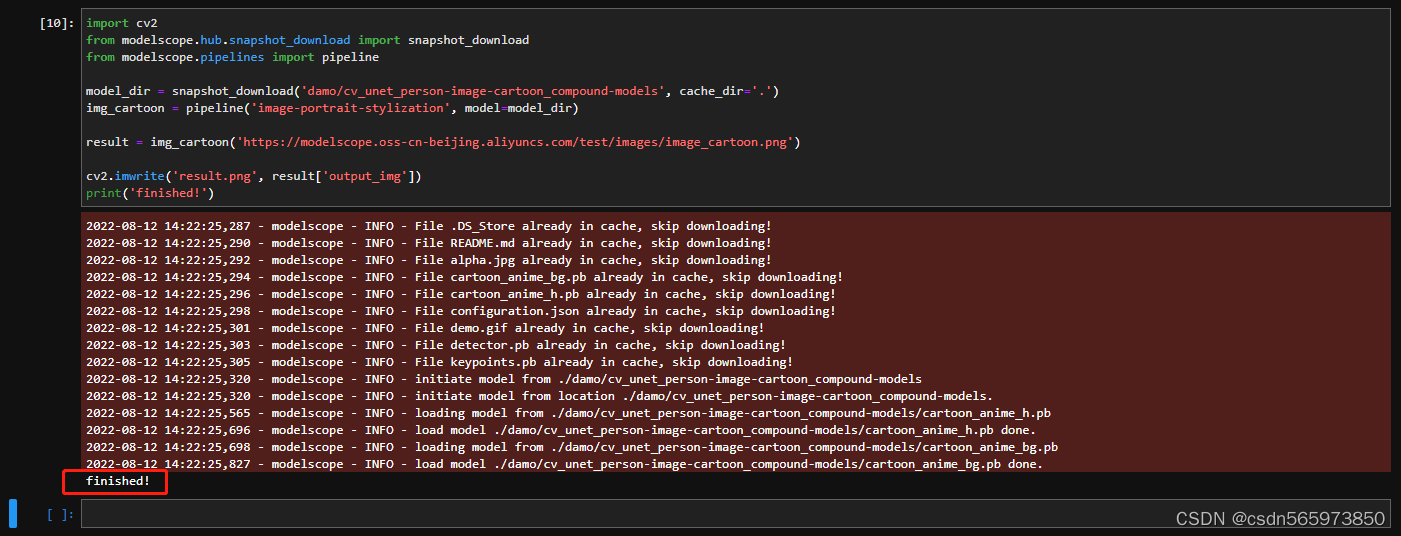
更改图片路径之后再次调试,执行可以看到日志无异常输出,程序执行完成打印【finished!】
点击结果图片可以看到

对比原图

整体基本没有差别,人像卡通化的效果很精确,细节上处理的也没有一点问题。
这里调试的执行日志也记录一下,方便后续使用2022-08-12 14:22:25,287 - modelscope - INFO - File .DS_Store already in cache, skip downloading! 2022-08-12 14:22:25,290 - modelscope - INFO - File README.md already in cache, skip downloading! 2022-08-12 14:22:25,292 - modelscope - INFO - File alpha.jpg already in cache, skip downloading! 2022-08-12 14:22:25,294 - modelscope - INFO - File cartoon_anime_bg.pb already in cache, skip downloading! 2022-08-12 14:22:25,296 - modelscope - INFO - File cartoon_anime_h.pb already in cache, skip downloading! 2022-08-12 14:22:25,298 - modelscope - INFO - File configuration.json already in cache, skip downloading! 2022-08-12 14:22:25,301 - modelscope - INFO - File demo.gif already in cache, skip downloading! 2022-08-12 14:22:25,303 - modelscope - INFO - File detector.pb already in cache, skip downloading! 2022-08-12 14:22:25,305 - modelscope - INFO - File keypoints.pb already in cache, skip downloading! 2022-08-12 14:22:25,320 - modelscope - INFO - initiate model from ./damo/cv_unet_person-image-cartoon_compound-models 2022-08-12 14:22:25,320 - modelscope - INFO - initiate model from location ./damo/cv_unet_person-image-cartoon_compound-models. 2022-08-12 14:22:25,565 - modelscope - INFO - loading model from ./damo/cv_unet_person-image-cartoon_compound-models/cartoon_anime_h.pb 2022-08-12 14:22:25,696 - modelscope - INFO - load model ./damo/cv_unet_person-image-cartoon_compound-models/cartoon_anime_h.pb done. 2022-08-12 14:22:25,698 - modelscope - INFO - loading model from ./damo/cv_unet_person-image-cartoon_compound-models/cartoon_anime_bg.pb 2022-08-12 14:22:25,827 - modelscope - INFO - load model ./damo/cv_unet_person-image-cartoon_compound-models/cartoon_anime_bg.pb done. finished!- 1
- 2
- 3
- 4
- 5
- 6
- 7
- 8
- 9
- 10
- 11
- 12
- 13
- 14
- 15
- 16
在完成了人像卡通化演示之后,后面我们再体验一下人像美肤。
本地图片不识别处理
这里对于本地图片无法识别的问题,考虑到会有挺多小伙伴想拿自己的图片测验一下人像卡通化,这里提供一下后台技术人员提供的方法,在notebook页面点击上传按钮

选择上传的文件,上传完成之后可以看到

选中文件右键【Copy Path】

将复制的路径放在对应调试代码的图片路径位置,点击运行即可。

模型调试-人像美肤
由于人像卡通化的notebook开发环境我们选择的是【方式一】CPU环境,但是人像美肤在CPU环境运行下会报错,报错信息如下
2022-08-12 15:13:31,245 - modelscope - INFO - File README.md already in cache, skip downloading! 2022-08-12 15:13:31,247 - modelscope - INFO - File configuration.json already in cache, skip downloading! 2022-08-12 15:13:31,252 - modelscope - INFO - File examples.jpg already in cache, skip downloading! 2022-08-12 15:13:31,254 - modelscope - INFO - File skin_retouching.png already in cache, skip downloading! 2022-08-12 15:13:31,256 - modelscope - INFO - File joint_20210926.pth already in cache, skip downloading! 2022-08-12 15:13:31,258 - modelscope - INFO - File pytorch_model.pt already in cache, skip downloading! 2022-08-12 15:13:31,260 - modelscope - INFO - File retinaface_resnet50_2020-07-20_old_torch.pth already in cache, skip downloading! 2022-08-12 15:13:31,263 - modelscope - INFO - File tf_graph.pb already in cache, skip downloading! 2022-08-12 15:13:31,279 - modelscope - INFO - initiate model from /mnt/workspace/.cache/modelscope/damo/cv_unet_skin-retouching 2022-08-12 15:13:31,279 - modelscope - INFO - initiate model from location /mnt/workspace/.cache/modelscope/damo/cv_unet_skin-retouching. --------------------------------------------------------------------------- AssertionError Traceback (most recent call last) /opt/conda/lib/python3.7/site-packages/modelscope/utils/registry.py in build_from_cfg(cfg, registry, group_key, default_args) 207 else: --> 208 return obj_cls(**args) 209 except Exception as e: /opt/conda/lib/python3.7/site-packages/modelscope/pipelines/cv/skin_retouching_pipeline.py in __init__(self, model, device) 54 ---> 55 self.generator = UNet(3, 3).to(device) 56 self.generator.load_state_dict( /opt/conda/lib/python3.7/site-packages/torch/nn/modules/module.py in to(self, *args, **kwargs) 906 --> 907 return self._apply(convert) 908 /opt/conda/lib/python3.7/site-packages/torch/nn/modules/module.py in _apply(self, fn) 577 for module in self.children(): --> 578 module._apply(fn) 579 /opt/conda/lib/python3.7/site-packages/torch/nn/modules/module.py in _apply(self, fn) 577 for module in self.children(): --> 578 module._apply(fn) 579 /opt/conda/lib/python3.7/site-packages/torch/nn/modules/module.py in _apply(self, fn) 577 for module in self.children(): --> 578 module._apply(fn) 579 /opt/conda/lib/python3.7/site-packages/torch/nn/modules/module.py in _apply(self, fn) 577 for module in self.children(): --> 578 module._apply(fn) 579 /opt/conda/lib/python3.7/site-packages/torch/nn/modules/module.py in _apply(self, fn) 600 with torch.no_grad(): --> 601 param_applied = fn(param) 602 should_use_set_data = compute_should_use_set_data(param, param_applied) /opt/conda/lib/python3.7/site-packages/torch/nn/modules/module.py in convert(t) 904 non_blocking, memory_format=convert_to_format) --> 905 return t.to(device, dtype if t.is_floating_point() or t.is_complex() else None, non_blocking) 906 /opt/conda/lib/python3.7/site-packages/torch/cuda/__init__.py in _lazy_init() 209 if not hasattr(torch._C, '_cuda_getDeviceCount'): --> 210 raise AssertionError("Torch not compiled with CUDA enabled") 211 if _cudart is None: AssertionError: Torch not compiled with CUDA enabled During handling of the above exception, another exception occurred: AssertionError Traceback (most recent call last) /tmp/ipykernel_1040/365630354.py in4 from modelscope.utils.constant import Tasks 5 ----> 6 skin_retouching = pipeline(Tasks.skin_retouching,model='damo/cv_unet_skin-retouching') 7 result = skin_retouching('https://modelscope.oss-cn-beijing.aliyuncs.com/test/images/image_cartoon.png') 8 cv2.imwrite('result2.png', result['output_img']) /opt/conda/lib/python3.7/site-packages/modelscope/pipelines/builder.py in pipeline(task, model, preprocessor, config_file, pipeline_name, framework, device, model_revision, **kwargs) 248 cfg.preprocessor = preprocessor 249 --> 250 return build_pipeline(cfg, task_name=task) 251 252 /opt/conda/lib/python3.7/site-packages/modelscope/pipelines/builder.py in build_pipeline(cfg, task_name, default_args) 161 """ 162 return build_from_cfg( --> 163 cfg, PIPELINES, group_key=task_name, default_args=default_args) 164 165 /opt/conda/lib/python3.7/site-packages/modelscope/utils/registry.py in build_from_cfg(cfg, registry, group_key, default_args) 209 except Exception as e: 210 # Normal TypeError does not print class name. --> 211 raise type(e)(f'{obj_cls.__name__}: {e}') AssertionError: SkinRetouchingPipeline: Torch not compiled with CUDA enabled import cv2 from modelscope.outputs import OutputKeys from modelscope.pipelines import pipeline from modelscope.utils.constant import Tasks skin_retouching = pipeline(Tasks.skin_retouching,model='damo/cv_unet_skin-retouching') result = skin_retouching('https://modelscope.oss-cn-beijing.aliyuncs.com/test/images/image_cartoon.png') cv2.imwrite('result2.png', result[OutputKeys.OUTPUT_IMG]) print('finished!') 2022-08-12 15:18:40,342 - modelscope - INFO - File README.md already in cache, skip downloading! 2022-08-12 15:18:40,345 - modelscope - INFO - File configuration.json already in cache, skip downloading! 2022-08-12 15:18:40,349 - modelscope - INFO - File examples.jpg already in cache, skip downloading! 2022-08-12 15:18:40,351 - modelscope - INFO - File skin_retouching.png already in cache, skip downloading! 2022-08-12 15:18:40,353 - modelscope - INFO - File joint_20210926.pth already in cache, skip downloading! 2022-08-12 15:18:40,356 - modelscope - INFO - File pytorch_model.pt already in cache, skip downloading! 2022-08-12 15:18:40,358 - modelscope - INFO - File retinaface_resnet50_2020-07-20_old_torch.pth already in cache, skip downloading! 2022-08-12 15:18:40,360 - modelscope - INFO - File tf_graph.pb already in cache, skip downloading! 2022-08-12 15:18:40,376 - modelscope - INFO - initiate model from /mnt/workspace/.cache/modelscope/damo/cv_unet_skin-retouching 2022-08-12 15:18:40,376 - modelscope - INFO - initiate model from location /mnt/workspace/.cache/modelscope/damo/cv_unet_skin-retouching. --------------------------------------------------------------------------- AssertionError Traceback (most recent call last) /opt/conda/lib/python3.7/site-packages/modelscope/utils/registry.py in build_from_cfg(cfg, registry, group_key, default_args) 207 else: --> 208 return obj_cls(**args) 209 except Exception as e: /opt/conda/lib/python3.7/site-packages/modelscope/pipelines/cv/skin_retouching_pipeline.py in __init__(self, model, device) 54 ---> 55 self.generator = UNet(3, 3).to(device) 56 self.generator.load_state_dict( /opt/conda/lib/python3.7/site-packages/torch/nn/modules/module.py in to(self, *args, **kwargs) 906 --> 907 return self._apply(convert) 908 /opt/conda/lib/python3.7/site-packages/torch/nn/modules/module.py in _apply(self, fn) 577 for module in self.children(): --> 578 module._apply(fn) 579 /opt/conda/lib/python3.7/site-packages/torch/nn/modules/module.py in _apply(self, fn) 577 for module in self.children(): --> 578 module._apply(fn) 579 /opt/conda/lib/python3.7/site-packages/torch/nn/modules/module.py in _apply(self, fn) 577 for module in self.children(): --> 578 module._apply(fn) 579 /opt/conda/lib/python3.7/site-packages/torch/nn/modules/module.py in _apply(self, fn) 577 for module in self.children(): --> 578 module._apply(fn) 579 /opt/conda/lib/python3.7/site-packages/torch/nn/modules/module.py in _apply(self, fn) 600 with torch.no_grad(): --> 601 param_applied = fn(param) 602 should_use_set_data = compute_should_use_set_data(param, param_applied) /opt/conda/lib/python3.7/site-packages/torch/nn/modules/module.py in convert(t) 904 non_blocking, memory_format=convert_to_format) --> 905 return t.to(device, dtype if t.is_floating_point() or t.is_complex() else None, non_blocking) 906 /opt/conda/lib/python3.7/site-packages/torch/cuda/__init__.py in _lazy_init() 209 if not hasattr(torch._C, '_cuda_getDeviceCount'): --> 210 raise AssertionError("Torch not compiled with CUDA enabled") 211 if _cudart is None: AssertionError: Torch not compiled with CUDA enabled During handling of the above exception, another exception occurred: AssertionError Traceback (most recent call last) /tmp/ipykernel_1040/2692908915.py in 4 from modelscope.utils.constant import Tasks 5 ----> 6 skin_retouching = pipeline(Tasks.skin_retouching,model='damo/cv_unet_skin-retouching') 7 result = skin_retouching('https://modelscope.oss-cn-beijing.aliyuncs.com/test/images/image_cartoon.png') 8 cv2.imwrite('result2.png', result[OutputKeys.OUTPUT_IMG]) /opt/conda/lib/python3.7/site-packages/modelscope/pipelines/builder.py in pipeline(task, model, preprocessor, config_file, pipeline_name, framework, device, model_revision, **kwargs) 248 cfg.preprocessor = preprocessor 249 --> 250 return build_pipeline(cfg, task_name=task) 251 252 /opt/conda/lib/python3.7/site-packages/modelscope/pipelines/builder.py in build_pipeline(cfg, task_name, default_args) 161 """ 162 return build_from_cfg( --> 163 cfg, PIPELINES, group_key=task_name, default_args=default_args) 164 165 /opt/conda/lib/python3.7/site-packages/modelscope/utils/registry.py in build_from_cfg(cfg, registry, group_key, default_args) 209 except Exception as e: 210 # Normal TypeError does not print class name. --> 211 raise type(e)(f'{obj_cls.__name__}: {e}') AssertionError: SkinRetouchingPipeline: Torch not compiled with CUDA enabled - 1
- 2
- 3
- 4
- 5
- 6
- 7
- 8
- 9
- 10
- 11
- 12
- 13
- 14
- 15
- 16
- 17
- 18
- 19
- 20
- 21
- 22
- 23
- 24
- 25
- 26
- 27
- 28
- 29
- 30
- 31
- 32
- 33
- 34
- 35
- 36
- 37
- 38
- 39
- 40
- 41
- 42
- 43
- 44
- 45
- 46
- 47
- 48
- 49
- 50
- 51
- 52
- 53
- 54
- 55
- 56
- 57
- 58
- 59
- 60
- 61
- 62
- 63
- 64
- 65
- 66
- 67
- 68
- 69
- 70
- 71
- 72
- 73
- 74
- 75
- 76
- 77
- 78
- 79
- 80
- 81
- 82
- 83
- 84
- 85
- 86
- 87
- 88
- 89
- 90
- 91
- 92
- 93
- 94
- 95
- 96
- 97
- 98
- 99
- 100
- 101
- 102
- 103
- 104
- 105
- 106
- 107
- 108
- 109
- 110
- 111
- 112
- 113
- 114
- 115
- 116
- 117
- 118
- 119
- 120
- 121
- 122
- 123
- 124
- 125
- 126
- 127
- 128
- 129
- 130
- 131
- 132
- 133
- 134
- 135
- 136
- 137
- 138
- 139
- 140
- 141
- 142
- 143
- 144
- 145
- 146
- 147
- 148
- 149
- 150
- 151
- 152
- 153
- 154
- 155
- 156
- 157
- 158
- 159
- 160
- 161
- 162
- 163
- 164
- 165
- 166
- 167
- 168
- 169
- 170
- 171
- 172
- 173
- 174
- 175
- 176
- 177
- 178
- 179
- 180
- 181
- 182
- 183
- 184
- 185
- 186
- 187
- 188
- 189
- 190
- 191
- 192
- 193
- 194
- 195
- 196
- 197
- 198
- 199
- 200
- 201
- 202
- 203
- 204
- 205
- 206
- 207
- 208
- 209
- 210
- 211
- 212
- 213
- 214
- 215
- 216
- 217
- 218
- 219
- 220
- 221
- 222
- 223
- 224
- 225
- 226
- 227
- 228
- 229
- 230
- 231
- 232
- 233
- 234
- 235
- 236
- 237
- 238
- 239
- 240
- 241
- 242
- 243
- 244
- 245
- 246
- 247
- 248
- 249
- 250
- 251
- 252
- 253
- 254
- 255
- 256
- 257
- 258
- 259
- 260
- 261
- 262
- 263
- 264
- 265
- 266
- 267
- 268
- 269
- 270
- 271
- 272
- 273
- 274
- 275
- 276
- 277
- 278
- 279
- 280
- 281
- 282
- 283
- 284
- 285
- 286
- 287
- 288
- 289
- 290
- 291
- 292
- 293
- 294
- 295
- 296
- 297
- 298
- 299
- 300
- 301
- 302
- 303
- 304
- 305
- 306
- 307
- 308
- 309
- 310
- 311
- 312
- 313
- 314
- 315
- 316
- 317
- 318
- 319
- 320
- 321
- 322
- 323
- 324
- 325
- 326
- 327
- 328
- 329
- 330
- 331
- 332
- 333
- 334
- 335
- 336
- 337
- 338
- 339
- 340
- 341
- 342
- 343
- 344
- 345
- 346
- 347
- 348
- 349
- 350
- 351
- 352
- 353
- 354
- 355
- 356
- 357
- 358
- 359
- 360
- 361
- 362
- 363
- 364
- 365
- 366
- 367
- 368
- 369
- 370
- 371
- 372
- 373
- 374
- 375
- 376
- 377
- 378
- 379
- 380
- 381
- 382
- 383
- 384
- 385
- 386
- 387
- 388
- 389
- 390
- 391
- 392
- 393
这个时候就必须要切换到【方式二】,也就是需要我们首先关闭【方式一】,选中【方式二】点击启动

启动完成之后可以看到成功页面如图

点击【查看notebook】,到notebook开发页面,输入【人像美肤模型】初始化对象代码from modelscope.pipelines import pipeline p = pipeline('skin-retouching', model='damo/cv_unet_skin-retouching')- 1
- 2
执行初始化之后,找到【模型介绍】的【代码范例】

复制并输入notebook开发环境,点击执行import cv2 from modelscope.outputs import OutputKeys from modelscope.pipelines import pipeline from modelscope.utils.constant import Tasks skin_retouching = pipeline(Tasks.skin_retouching,model='damo/cv_unet_skin-retouching') result = skin_retouching('https://modelscope.oss-cn-beijing.aliyuncs.com/test/images/image_cartoon.png') cv2.imwrite('result2.png', result[OutputKeys.OUTPUT_IMG]) print('finished!')- 1
- 2
- 3
- 4
- 5
- 6
- 7
- 8
- 9

执行完成之后看到无报错信息,最后打印【finished!】,则表示代码执行成功

点击左侧找到生成的图片文件,对比上面的原图可以看到皮肤美白了,哈哈

总结
ModelScope虽然之前没有用过,但是这次体验下来的整体感觉还是很不错的,虽然中间在体验人像美肤模型时多次尝试一直报错,询问了专业人士之后,切换到GPU模式下创建notebook开发环境成功达到实验效果,后面还有很多的体验模型,比如英文图像描述,达摩人像抠图等很多模型,ModelScope模型范围涉及图像、视觉等多模态,涉及语音、自然语言处理、计算机视觉等,可以说涉及到生活中的方方面面了,不管是个人体验、个人使用还是商业使用,同时通过开放的社区合作,构建深度学习相关的模型开源,并开源相关模型服务创新技术,推动模型应用生态的繁荣发展,真的是科技改变生活!
-
相关阅读:
A-Level经济例题解析及练习A monopoly’s revenue
力扣第501题 二叉树的众数 c++ (暴力 加 双指针优化)
二维数组笔试题及其解析
【C++】list容器模拟实现
Spring MVC的⼯作流程
认识springboot搭建
springboot社区人员管理系统的设计与实现毕业设计源码260839
常用 Git 命令
Linux进程的调度
@SpringBootApplication注解说明(InsCode AI 创作助手)
- 原文地址:https://blog.csdn.net/csdn565973850/article/details/126936510
