-
c# Word操作
介绍
Spire.XLS是E-iceblue开发的一套基于企业级的专业Office文档处理的组件之一,全称Spire.Office for .NET。旗下有Spire.Doc,Spire XLS,Spire.PDF,Spire.BarCode等多款专业组件,为各种Office文档在程序处理上提供了很大的方便,官方为各种功能提供了大量的在线api,简化了使用组件的难度。组件使用时不需要本地Office组件的支持。Spire.Office是一款企业级组件,它提供了收费版本和免费版本两种级别,一般来说,对于个人的应用,免费版本已足够用。
“XLS”是Excel文件的后缀之一,顾名思义,Spire.XLS当然就是针对Excel表格处理的组件

添加引用
1、专业版
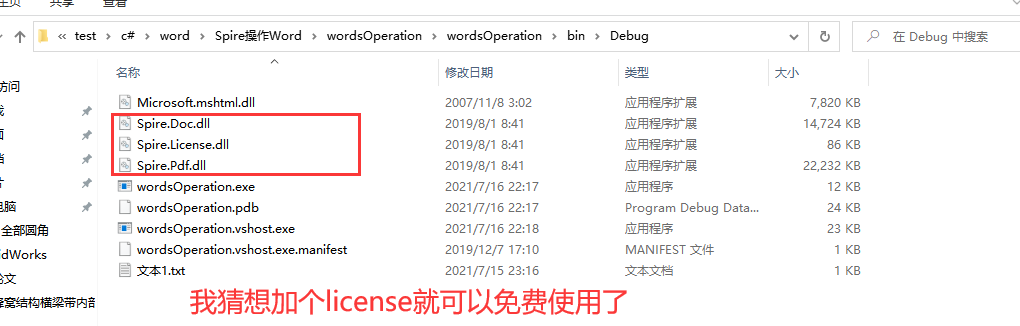


我像这样添加以后不知道为什么有问题2、免费版
只需要添加这么一个就可以了

页面

替换Word中的文字

using Spire.Doc; using System.IO;- 1
- 2
private void replaceuiButton3_Click(object sender, EventArgs e) { //textBox1.Text.Trim():从当前 System.String 对象移除所有前导空白字符和尾部空白字符。 //或者这样写也可以:string.IsNullOrEmpty(textBox2.Text) if (textBox1.Text.Trim() == "") { MessageBox.Show("请选择要读取的Word文档"); return; } FolderBrowserDialog dialog = new FolderBrowserDialog(); dialog.Description = "请选择保存路径"; if (dialog.ShowDialog() == DialogResult.OK) { ExportWord(textBox1.Text, dialog.SelectedPath); } }- 1
- 2
- 3
- 4
- 5
- 6
- 7
- 8
- 9
- 10
- 11
- 12
- 13
- 14
- 15
- 16
- 17
- 18
- 19
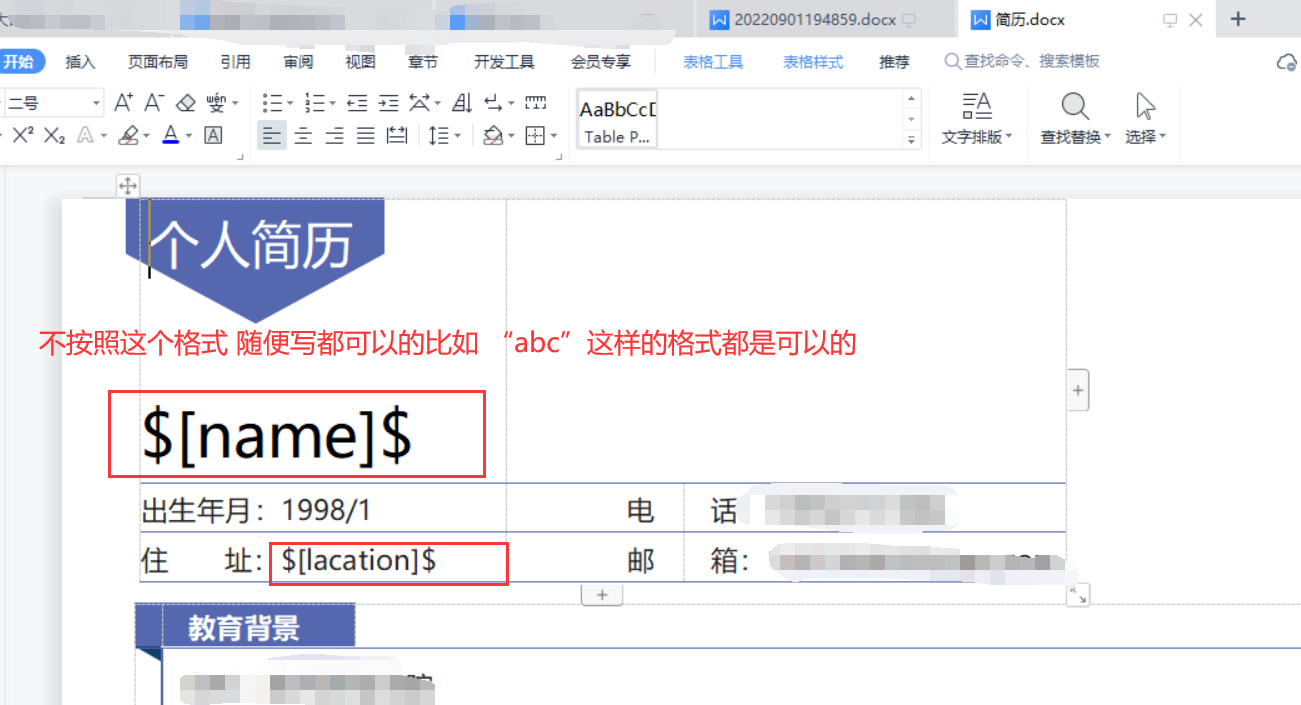
////// 导出模板 /// /// public void ExportWord(string path, string outPath) { //1、需引用命名空间using Spire.Doc; Document doc = new Document(); string templatePath = path; //模板路径 doc.LoadFromFile(templatePath); //加载模板路径 //将模板里面的所有$[lqwvje]$ 替换成 罗分明 doc.Replace("$[name]$", "周大大", true, true); //第一个参数:模板的占位符;第二个参数:替换的内容;第三个参数:是否区分大小写;第四个参数:是否全字匹配 doc.Replace("$[lacation]$", "北京", true, true); string savePath = outPath + "\\" + DateTime.Now.ToString("yyyyMMddHHmmss") + ".docx"; //导出路径 doc.SaveToFile(savePath, FileFormat.Docx); doc.Close(); } - 1
- 2
- 3
- 4
- 5
- 6
- 7
- 8
- 9
- 10
- 11
- 12
- 13
- 14
- 15
- 16
- 17
- 18
转成pdf

private void ToPDFuiButton4_Click(object sender, EventArgs e) { if (textBox1.Text.Trim() == "") { MessageBox.Show("请选择要转PDF的Word文档"); return; } Word2PDF(textBox1.Text); }- 1
- 2
- 3
- 4
- 5
- 6
- 7
- 8
- 9
- 10
- 11
////// word转pdf /// /// public void Word2PDF(string path) { try { Document document = new Document(); document.LoadFromFile(path); //Word转PDF 并保存到根目录下 document.SaveToFile(@"F:\StudyData_ele\test\c#\word\mywrite\WindowsFormsApp1\bin\Debug\测试用文档\toPDF.PDF", FileFormat.PDF); //打开PDF //System.Diagnostics.Process.Start("toPDF.PDF"); } catch(Exception ex) { MessageBox.Show("保存异常,文件可能正在使用"); } } - 1
- 2
- 3
- 4
- 5
- 6
- 7
- 8
- 9
- 10
- 11
- 12
- 13
- 14
- 15
- 16
- 17
- 18
- 19
- 20
- 21
- 22
- 23
- 24
- 25
- 26
两个PDF合并成一个
private -
相关阅读:
吃透这份高并发/调优/分布式等350道面试宝典,已涨30k
参数估计的均方误差(MSE),偏置(Bias)与方差(Variance)分解,无偏估计
比特位的计算
2023华为杯E题:出血性脑卒中临床智能诊疗建模(不断更新)
一篇文告诉你,当贝超短焦激光投影U1研发“内幕”
C语言常见面经详细总结
一次springboot和redis缓存的实践
掌握C#: 从基础到精通 - 中级实战练习集
SENet 学习
拓尔微电子超低功耗电源芯片解决方案
- 原文地址:https://blog.csdn.net/chengcao123/article/details/126935776
