-
lio-sam框架:后端里程计、回环、gps融合
前言
LIO-SAM的全称是:Tightly-coupled Lidar Inertial Odometry via Smoothing and Mapping
从全称上可以看出,该算法是一个紧耦合的雷达惯导里程计(Tightly-coupled Lidar Inertial Odometry),借助的手段就是利用GT-SAM库中的方法。
LIO-SAM 提出了一个利用GT-SAM的紧耦合激光雷达惯导里程计的框架。
实现了高精度、实时的移动机器人的轨迹估计和建图。其中建图优化节点整体如下图
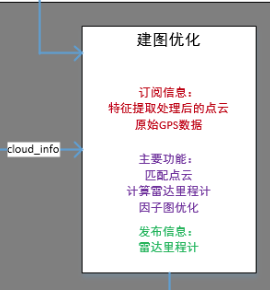
在之前的博客中,我们分部完成了- 帧间点云匹配
- 回环检测及位姿计算
本篇我们来看在lio-sam框架中,是如何将三者(雷达里程计、回环检测、gps)进行融合,来实现全局位姿优化的。
代码解析
void saveKeyFramesAndFactor() {- 1
- 2
保存关键帧 添加 factor
if (saveFrame() == false) return;- 1
- 2
通过旋转和平移增量,判断是否是关键帧
如果不是关键帧则不往因子图里加factor来看
saveFrame()函数bool saveFrame() { if (cloudKeyPoses3D->points.empty()) return true;- 1
- 2
- 3
- 4
如果没有关键帧,就直接认为是关键帧
Eigen::Affine3f transStart = pclPointToAffine3f(cloudKeyPoses6D->back());- 1
取出上一个关键帧的位姿
Eigen::Affine3f transFinal = pcl::getTransformation(transformTobeMapped[3], transformTobeMapped[4], transformTobeMapped[5], transformTobeMapped[0], transformTobeMapped[1], transformTobeMapped[2]);- 1
- 2
当前帧的位姿转成eigen形式
Eigen::Affine3f transBetween = transStart.inverse() * transFinal;- 1
计算两个位姿之间的 delta pose
float x, y, z, roll, pitch, yaw; pcl::getTranslationAndEulerAngles(transBetween, x, y, z, roll, pitch, yaw);- 1
- 2
转成 平移 + 旋转(欧拉角) 的形式
if (abs(roll) < surroundingkeyframeAddingAngleThreshold && abs(pitch) < surroundingkeyframeAddingAngleThreshold && abs(yaw) < surroundingkeyframeAddingAngleThreshold && sqrt(x*x + y*y + z*z) < surroundingkeyframeAddingDistThreshold) return false; return true;- 1
- 2
- 3
- 4
- 5
- 6
- 7
任何一个旋转大于给定阈值或者平移大于给定阈值就认为是关键帧
阈值的设置在 params.yaml 文件中

角度阈值 是 0.2 弧度
平移阈值 是 1 米添加激光雷达帧间里程计因子
回到 saveKeyFramesAndFactor 函数中
如果是关键帧的话就给isam增加因子addOdomFactor();- 1
增加odom 的因子
来看具体内容void addOdomFactor() {- 1
- 2
if (cloudKeyPoses3D->points.empty()) {- 1
- 2
如果是第一帧 关键帧
noiseModel::Diagonal::shared_ptr priorNoise = noiseModel::Diagonal::Variances((Vector(6) << 1e-2, 1e-2, M_PI*M_PI, 1e8, 1e8, 1e8).finished());- 1
置信度就设置差一点,尤其是不可观的平移和yaw角
gtSAMgraph.add(PriorFactor<Pose3>(0, trans2gtsamPose(transformTobeMapped), priorNoise));- 1
增加先验约束 , 对第 0 个节点增加约束
initialEstimate.insert(0, trans2gtsamPose(transformTobeMapped));- 1
加入节点信息 初始值
}else{- 1
如果不是第一帧,就增加帧间约束
noiseModel::Diagonal::shared_ptr odometryNoise = noiseModel::Diagonal::Variances((Vector(6) << 1e-6, 1e-6, 1e-6, 1e-4, 1e-4, 1e-4).finished());- 1
这时帧间约束置信度就设置高一些
gtsam::Pose3 poseFrom = pclPointTogtsamPose3(cloudKeyPoses6D->points.back());- 1
上一关键帧 位姿 转成 gtsam的 格式
gtsam::Pose3 poseTo = trans2gtsamPose(transformTobeMapped);- 1
当前关键帧 位姿 转成 gtsam的 格式
gtSAMgraph.add(BetweenFactor<Pose3>(cloudKeyPoses3D->size()-1, cloudKeyPoses3D->size(), poseFrom.between(poseTo), odometryNoise));- 1
这是 一个 帧间 约束 ,分别 输入两个 节点 的 id,帧间约束大小 以及 置信度
initialEstimate.insert(cloudKeyPoses3D->size(), poseTo);- 1
加入节点信息 先验位姿
添加GPS因子
回到 saveKeyFramesAndFactor 函数中
addGPSFactor();- 1
gps 的 因子
void addGPSFactor() { if (gpsQueue.empty()) return;- 1
- 2
- 3
- 4
如果没有gps信息就算了
if (cloudKeyPoses3D->points.empty()) return;- 1
- 2
如果有gps但是没有关键帧信息也算了
因为gps 是给关键帧提供约束的else { if (pointDistance(cloudKeyPoses3D->front(), cloudKeyPoses3D->back()) < 5.0) return; }- 1
- 2
- 3
- 4
- 5
第一个关键帧和最后一个关键帧相差很近,也就算了,要么刚起步,要么会触发回环
if (poseCovariance(3,3) < poseCovThreshold && poseCovariance(4,4) < poseCovThreshold) return;- 1
- 2
gtsam 反馈的 当前 x、y 的置信度,如果置信度比较高 也不需要 gps来进行 优化
while (!gpsQueue.empty()) {- 1
- 2
if (gpsQueue.front().header.stamp.toSec() < timeLaserInfoCur - 0.2) { gpsQueue.pop_front(); }- 1
- 2
- 3
- 4
把距离当前帧比较早的帧都抛弃
else if (gpsQueue.front().header.stamp.toSec() > timeLaserInfoCur + 0.2) { break; }` float noise_x = thisGPS.pose.covariance[0]; float noise_y = thisGPS.pose.covariance[7]; float noise_z = thisGPS.pose.covariance[14]; // 如果gps的置信度也不高,也没有必要使用了 if (noise_x > gpsCovThreshold || noise_y > gpsCovThreshold) continue;`- 1
- 2
- 3
- 4
- 5
- 6
- 7
- 8
- 9
比较晚就索性再等等lidar计算
{ // 寿命这个gps 时间上距离当前帧已经比较近了,那就把这个数据取出来 nav_msgs::Odometry thisGPS = gpsQueue.front(); gpsQueue.pop_front();- 1
- 2
- 3
- 4
说明这个gps 时间上距离当前帧已经比较近了,那就把这个数据取出来
float noise_x = thisGPS.pose.covariance[0]; float noise_y = thisGPS.pose.covariance[7]; float noise_z = thisGPS.pose.covariance[14]; if (noise_x > gpsCovThreshold || noise_y > gpsCovThreshold) continue;- 1
- 2
- 3
- 4
- 5
如果gps的置信度也不高,也没有必要使用了
float gps_x = thisGPS.pose.pose.position.x; float gps_y = thisGPS.pose.pose.position.y; float gps_z = thisGPS.pose.pose.position.z;- 1
- 2
- 3
取出gps 的 位置
if (!useGpsElevation) { gps_z = transformTobeMapped[5]; noise_z = 0.01; }- 1
- 2
- 3
- 4
- 5
通常gps 的z 没有 x y准,因此这里可以不使用z值 useGpsElevation 默认为0
直接拿里程计的z 并 设置 高置信度if (abs(gps_x) < 1e-6 && abs(gps_y) < 1e-6) continue;- 1
- 2
如果gps 的 x 或者 y 太小,说明还没有初始化好
PointType curGPSPoint; curGPSPoint.x = gps_x; curGPSPoint.y = gps_y; curGPSPoint.z = gps_z; if (pointDistance(curGPSPoint, lastGPSPoint) < 5.0) continue; else lastGPSPoint = curGPSPoint;- 1
- 2
- 3
- 4
- 5
- 6
- 7
- 8
加入gps观测不宜太频繁,相邻不能超过5m
gtsam::Vector Vector3(3); Vector3 << max(noise_x, 1.0f), max(noise_y, 1.0f), max(noise_z, 1.0f);- 1
- 2
gps 的 置信度,标准差设置成最小1m,也就是不会特别信任gps信息
noiseModel::Diagonal::shared_ptr gps_noise = noiseModel::Diagonal::Variances(Vector3);- 1
设置节点 置信度
gtsam::GPSFactor gps_factor(cloudKeyPoses3D->size(), gtsam::Point3(gps_x, gps_y, gps_z), gps_noise); gtSAMgraph.add(gps_factor);- 1
- 2
调用gtsam 中集成的gps 约束
aLoopIsClosed = true; break;- 1
- 2
加入gps 之后 等同于回环,需要触发较多的isam update
添加回环检测因子
回到 saveKeyFramesAndFactor 函数中
void addLoopFactor() {- 1
- 2
if (loopIndexQueue.empty()) return;- 1
- 2
有一个专门的回环检测线程会检测回环,检测到就会给这个队列塞入回环约束
for (int i = 0; i < (int)loopIndexQueue.size(); ++i)- 1
- 2
把队列里面所有的回环约束添加进行
int indexFrom = loopIndexQueue[i].first;//当前帧 int indexTo = loopIndexQueue[i].second;// 回环帧- 1
- 2
当前帧 回环帧 索引
gtsam::Pose3 poseBetween = loopPoseQueue[i];- 1
帧间约束
gtsam::noiseModel::Diagonal::shared_ptr noiseBetween = loopNoiseQueue[i];- 1
回环的置信度就是icp的得分
gtSAMgraph.add(BetweenFactor<Pose3>(indexFrom, indexTo, poseBetween, noiseBetween));- 1
加入约束
loopIndexQueue.clear(); loopPoseQueue.clear(); loopNoiseQueue.clear();- 1
- 2
- 3
清空回环相关队列
aLoopIsClosed = true; }- 1
- 2
标志位 至 true
isam 更新
回到 saveKeyFramesAndFactor 函数中
isam->update(gtSAMgraph, initialEstimate); isam->update();- 1
- 2
所有因子加完了,就调用isam 接口,更新图模型
if (aLoopIsClosed == true) { isam->update(); isam->update(); isam->update(); isam->update(); isam->update(); }- 1
- 2
- 3
- 4
- 5
- 6
- 7
- 8
如果加入了gps约束或者回环约束,isam需要进行更多次的优化
gtSAMgraph.resize(0); initialEstimate.clear();- 1
- 2
将约束和节点信息清空,他们已经呗加入到isam中去了,因此这里清空不会影响整个优化
isamCurrentEstimate = isam->calculateEstimate();- 1
通过接口获得所以变量的状态
latestEstimate = isamCurrentEstimate.at<Pose3>(isamCurrentEstimate.size()-1);- 1
取出优化后的最新关键帧位姿
thisPose3D.x = latestEstimate.translation().x(); thisPose3D.y = latestEstimate.translation().y(); thisPose3D.z = latestEstimate.translation().z(); thisPose3D.intensity = cloudKeyPoses3D->size(); cloudKeyPoses3D->push_back(thisPose3D);- 1
- 2
- 3
- 4
- 5
平移信息取出来保存进clouKeyPoses 3D这个结构中,其中索引作为 intensity
thisPose6D.x = thisPose3D.x; thisPose6D.y = thisPose3D.y; thisPose6D.z = thisPose3D.z; thisPose6D.intensity = thisPose3D.intensity ; thisPose6D.roll = latestEstimate.rotation().roll(); thisPose6D.pitch = latestEstimate.rotation().pitch(); thisPose6D.yaw = latestEstimate.rotation().yaw(); thisPose6D.time = timeLaserInfoCur; cloudKeyPoses6D->push_back(thisPose6D);- 1
- 2
- 3
- 4
- 5
- 6
- 7
- 8
- 9
6D姿态同样保留下来
poseCovariance = isam->marginalCovariance(isamCurrentEstimate.size()-1);- 1
保存当前位姿的置信度 用于是否使用gps的判断
transformTobeMapped[0] = latestEstimate.rotation().roll(); transformTobeMapped[1] = latestEstimate.rotation().pitch(); transformTobeMapped[2] = latestEstimate.rotation().yaw(); transformTobeMapped[3] = latestEstimate.translation().x(); transformTobeMapped[4] = latestEstimate.translation().y(); transformTobeMapped[5] = latestEstimate.translation().z();- 1
- 2
- 3
- 4
- 5
- 6
将优化后的位姿更新到transformTobeMapped数组中,作为当前最佳估计值
pcl::copyPointCloud(*laserCloudCornerLastDS, *thisCornerKeyFrame); pcl::copyPointCloud(*laserCloudSurfLastDS, *thisSurfKeyFrame);- 1
- 2
当前帧的点云的角点和面点 分别拷贝一下
cornerCloudKeyFrames.push_back(thisCornerKeyFrame); surfCloudKeyFrames.push_back(thisSurfKeyFrame);- 1
- 2
关键帧的点云保存下来
updatePath(thisPose6D);- 1
根据当前最新位姿更新rviz可视化
调整全局轨迹
下面来看调整全局轨迹
void correctPoses() {- 1
- 2
if (cloudKeyPoses3D->points.empty()) return;- 1
- 2
没有关键帧,自然也没有什么意义
if (aLoopIsClosed == true) {- 1
- 2
只有回环以及gps信息这些会触发全局调整信息才会触发
laserCloudMapContainer.clear();- 1
很多位姿会变化,因子之前的容器内转到世界坐标系下的很多点云就需要调整,因此这里索性清空
laserCloudMapContainer 这里存放关键帧的位姿和点云globalPath.poses.clear();- 1
清空path
int numPoses = isamCurrentEstimate.size(); for (int i = 0; i < numPoses; ++i) { // 更新所有关键帧的位姿 cloudKeyPoses3D->points[i].x = isamCurrentEstimate.at<Pose3>(i).translation().x(); cloudKeyPoses3D->points[i].y = isamCurrentEstimate.at<Pose3>(i).translation().y(); cloudKeyPoses3D->points[i].z = isamCurrentEstimate.at<Pose3>(i).translation().z(); cloudKeyPoses6D->points[i].x = cloudKeyPoses3D->points[i].x; cloudKeyPoses6D->points[i].y = cloudKeyPoses3D->points[i].y; cloudKeyPoses6D->points[i].z = cloudKeyPoses3D->points[i].z; cloudKeyPoses6D->points[i].roll = isamCurrentEstimate.at<Pose3>(i).rotation().roll(); cloudKeyPoses6D->points[i].pitch = isamCurrentEstimate.at<Pose3>(i).rotation().pitch(); cloudKeyPoses6D->points[i].yaw = isamCurrentEstimate.at<Pose3>(i).rotation().yaw(); // 同时更新path updatePath(cloudKeyPoses6D->points[i]); }- 1
- 2
- 3
- 4
- 5
- 6
- 7
- 8
- 9
- 10
- 11
- 12
- 13
- 14
- 15
- 16
- 17
然后更新所有的位姿
aLoopIsClosed = false; }- 1
- 2
标志位 至 0
总结

-
相关阅读:
腾讯联手警方重拳出击,平阳警方斩断特大外挂黑色产业链
Django笔记三十四之分页操作
界面控件DevExtreme中文使用指南——如何构建 & 应用模板
[python基础] 面向对象——封装,继承
数字化门店转型| 舞蹈室管理系统| 门店小程序开发教程
执行shell脚本时为什么要写成./test.sh,而不是test.sh?
项目风险管理必备内容总结
ELK 企业级日志分析系统
【隐私计算】SIRNN: A Math Library for Secure RNN Inference
策略模式在社会中的应用
- 原文地址:https://blog.csdn.net/qq_32761549/article/details/126827322