-
Redis非关系型数据库
Redis

前言
什么是Redis
Redis是一个基于内存的key-value结构数据库
Redis 是互联网技术领域使用最为广泛的存储中间件
它是「Remote Dictionary Service」的首字母缩写,也就是「远程字典服务」
- 基于内存存储,读写性能高

- 适合存储热点数据(访问频率高)(热点商品、资讯、新闻)

- 企业应用广泛

为什么需要Redis
系统性能最大的瓶颈之一
数据库, 如果能提升mysql查询性能, 系统性能就能得到极大提升

/** * 带缓存的查询方法 * 思考 1) 缓存的优点? * 减少数据库访问次数,提升性能, * 2) 缓存如果内容很多会带来什么影响? * 内存爆了 --- 缓存应该使用专业的技术 */ //定义变量,保存菜品数据到内存中 private Map<Long, DishDto> dishes = new HashMap<>(); /** * 根据id查询菜品信息和对应的口味信息 */ @GetMapping("/{id}") public R<DishDto> get(@PathVariable Long id) { //先从map中通过id查找,找到直接返回,不用查询数据库 DishDto dish = dishes.get(id); if (dish != null) { return R.success(dish); } DishDto dishDto = dishService.getByIdWithFlavor(id); //存储菜品信息到内存中 dishes.put(dishDto.getId(), dishDto); return R.success(dishDto); }- 1
- 2
- 3
- 4
- 5
- 6
- 7
- 8
- 9
- 10
- 11
- 12
- 13
- 14
- 15
- 16
- 17
- 18
- 19
- 20
- 21
- 22
- 23
- 24
- 25
- 26
- 27
- 28
使用Redis能做什么
- 数据缓存
- 消息队列
- 注册中心
- 发布订阅
Redis入门
Redis简介
Redis是一个开源的内存中的数据结构存储系统,它可以用作数据库、缓存和消息中间件
官网
Redis是用C语言开发的一个开源的高性能键值对(key-value)数据库,官方提供的数据是可以达到100000+的QPS(每秒内查询次数)
它存储的value类型比较丰富,也被称为结构化的NoSql数据库
关系型数据库(RDBMS)
- Mysql(免费)
- Oracle
- DB2
- SQLServer
非关系型数据库(NoSql)
NoSql(Not Only SQL),不仅仅是SQL,泛指非关系型数据库。 NoSql数据库并不是要取代关系型数据库,而是关系型数据库的补充- 1
- 2
- Redis
- Mongodb
- ElasticSearch
关系型数据库: 指的是能使用sql 进行管理查询的数据库 (内连接,外连接查询等) 非关系型数据库 指的是不能使用关联查询(不能使用sql),只能进行单表或者单条数据查询(每一种语法都不一样)- 1
- 2
- 3
- 4
Redis下载与安装
Redis下载
Redis安装包分为windows版和Linux版
-
Windows版下载地址
-
Linux版下载地址
下载后得到下面安装包

Redis安装
在Linux中安装Redis
在Linux系统安装Redis步骤:
-
将Redis安装包上传到Linux
-
解压安装包,命令:
tar -zxvf redis-4.0.0.tar.gz -C /usr/local- 1
-
安装Redis的依赖环境gcc,命令:
yum install -y gcc-c++- 1
-
进入/usr/local/redis-4.0.0,进行编译,命令:
cd /usr/local/redis-4.0.0 make- 1
- 2
-
进入redis的src目录进行安装,命令:
cd src make install ll- 1
- 2
- 3
- 4
注意
/usr/local/redis-4.0.0/src/redis-server:Redis服务启动脚本
/usr/local/redis-4.0.0/src/redis-cli:Redis客户端脚本
/usr/local/redis-4.0.0/redis.conf:Redis配置文件
在Windows中安装Redis
Redis的Windows版属于绿色软件,直接解压即可使用
解压结构

Redis服务启动与停止
Linux系统中启动和停止Redis
启动Redis服务器
执行Redis服务启动脚本文件"redis-server"
cd /usr/local/redis-4.0.0/src ./redis-server #Ctrl + C停止Redis服务- 1
- 2
- 3
- 4
通过启动日志可以看到,Redis默认端口号为"6379"
使用Redis客户端连接
复制远程连接,通过"redis-cli"可以连接到本地的Redis服务,默认情况下不需要认证即可连接成功

cd /usr/local/redis-4.0.0/src #cli->client客户端 ./redis-cli #测试是否连接成功 keys *- 1
- 2
- 3
- 4
- 5
- 6
退出客户端可以输入"exit"或者"quit"命令
Windows系统中启动和停止Redis
启动服务器,直接双击redis-server.exe即可启动Redis服务,redis服务默认端口号为6379
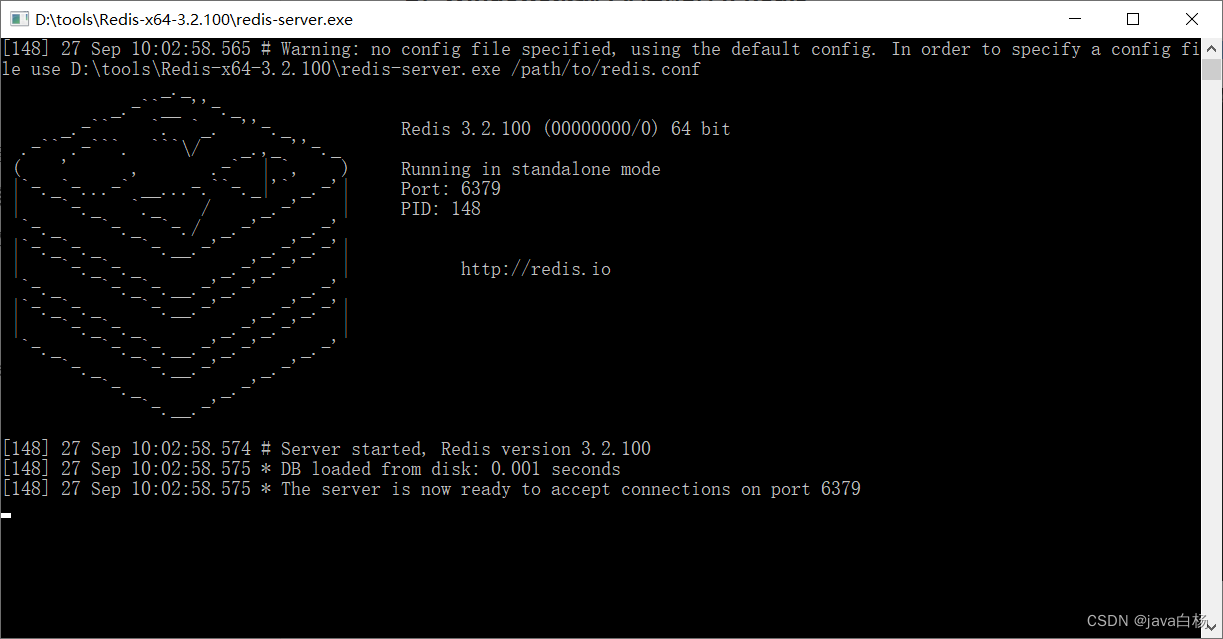
双击闪退处理方案
如果双击闪退需要使用命令行启动:redis-server.exe redis.windows.conf- 1
使用客户端连接服务器,双击"redis-cli.exe"即可,默认连接的是本地的Redis服务,而且不需要认证即可连接成功

退出客户端可以输入"exit"或者"quit"命令
Redis配置文件
启动Redis服务,默认情况下Redis启动后是在前台运行,而且客户端不需要密码就可以连接到Redis服务
如果希望Redis服务启动后是在后台运行,同时希望客户端认证通过后才能连接到Redis服务
此时就需要修改Redis的配置文件
- Linux系统中Redis配置文件:安装目录/redis.conf
- Windows系统中Redis配置文件:安装目录/redis.windows.conf
Redis配置文件中 #: 表示注释 1、daemonize(linux) 用来指定redis是否要用守护线程的方式启动,设置成yes时,代表开启守护进程模式。在该模式下,redis会在后台运行 2、requirepass 设置Redis的连接密码 3、bind 如果指定了bind,则说明只允许来自指定网卡的Redis请求。如果没有指定,就说明可以接受来自任意一个网卡的Redis请求- 1
- 2
- 3
- 4
- 5
- 6
- 7
- 8
- 9
- 10
- 11
通过修改Redis配置文件可以进行配置
设置Redis服务后台运行(Linux专属)
将配置文件中的"daemonize"配置项改为yes,默认值为no
daemonize
用来指定redis是否要用守护线程的方式启动,设置成yes时,代表开启守护进程模式。在该模式下,redis会在后台运行
#先关掉之前启动的Redis服务 cd /usr/local/redis-4.0.0/ vim redis.conf #命令模式下搜索:/dae:小写n向下查找,大写N向上查找 #修改:daemonize为yes #:wq 保存修改 #必须指定配置文件的位置 ./src/redis-server ./redis.conf- 1
- 2
- 3
- 4
- 5
- 6
- 7
- 8
- 9
- 10
注意
Windows版的Redis不支持后台运行
设置Redis服务密码
将配置文件中的 "# requirepass foobared"配置项取消注释,默认为注释状态
foobared为密码,可以根据情况自己指定。
vim redis.conf #搜索:/requirepass #====去掉前边的空格和# # requirepass 123456 requirepass 123456- 1
- 2
- 3
- 4
- 5
#1、关闭Redis服务 ps -ef|grep redis #root 14427 1 0 10:27 ? 00:00:01 ./src/redis-server 127.0.0.1:6379 kill -9 14427 #2、重新启动Redis服务 ./src/redis-server ./redis.conf #3、使用redis-cli携带密码去访问 ./src/redis-cli -h 127.0.0.1 -p 6379 -a 123456 #-h:指定连接的Redis服务的ip地址 #-p:指定连接的Redis服务的端口号 #-a:auth指定连接的Redis服务的密码 #连接成功后:auth root- 1
- 2
- 3
- 4
- 5
- 6
- 7
- 8
- 9
- 10
- 11
- 12
- 13
- 14
设置允许客户端远程连接Redis服务
Redis服务默认只能客本地连接,不允许客户端远程连接
vim redis.conf #删掉: #bind 127.0.0.1 #可以改成如下配置 bind 0.0.0.0- 1
- 2
- 3
- 4
- 5
- 6
- 7
#注意: #1.Redis配置文件中的配置项前面不能有空格,需要顶格写 #2.修改配置文件后需要重启Redis服务配置才能生效,并且启动Redis服务时需要显示的指定配置文件:- 1
- 2
- 3
Linux中启动Redis服务
#1、关闭Redis服务 ps -ef|grep redis #root 14427 1 0 10:27 ? 00:00:01 ./src/redis-server 127.0.0.1:6379 kill -9 14427 # 进入Redis安装目录 cd /usr/local/redis-4.0.0 # 启动Redis服务,指定使用的配置文件 ./src/redis-server ./redis.conf- 1
- 2
- 3
- 4
- 5
- 6
- 7
- 8
- 9
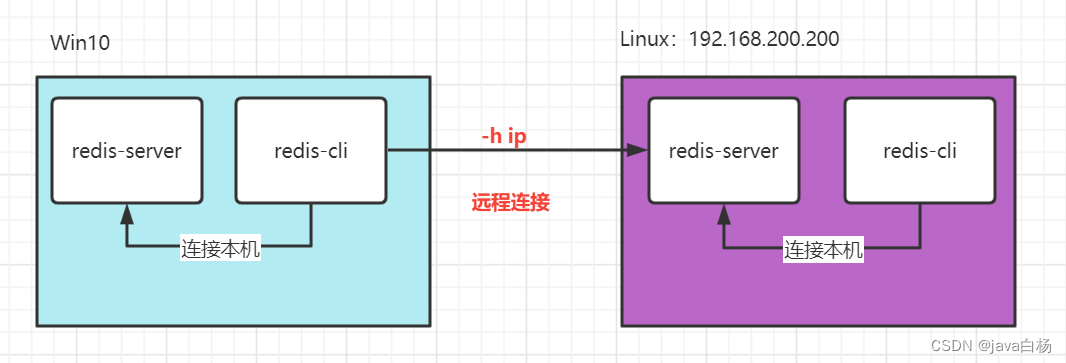
在Windows中远程连接Linux中启动的Redis服务
#检查Linux防火墙 systemctl status firewalld #关闭Linux防火墙 systemctl stop firewalld systemctl disable firewalld #如果不想关闭防火墙,记得开放6379端口- 1
- 2
- 3
- 4
- 5
- 6
- 7

#在Windows下远程连接 redis-cli.exe -h 192.168.xxx.xx -p 6379 -a 123456 #-h:指定连接的Redis服务的ip地址 #-p:指定连接的Redis服务的端口号 #-a:指定连接的Redis服务的密码- 1
- 2
- 3
- 4
- 5
Redis数据类型
介绍
Redis存储的是key-value结构的数据,其中key是字符串类型,value有5种常用的数据类型:
new HashMap<String, 常用的5种类型>(); 1、new HashMap<String, String>(); 2、new HashMap<String, new HashMap<>>(); 3、new HashMap<String, new ArrayList<>>(); 4、new HashMap<String, new HashSet<>>(); 5、new HashMap<String, new 有序set<>>();- 1
- 2
- 3
- 4
- 5
- 6
- 7
-
字符串 string
-
哈希 hash
-
列表 list
-
集合 set
-
有序集合 sorted set / zset
5种常用数据类型

Redis常用命令
更多命令可以参考Redis中文网
字符串string
Redis 中字符串类型常用命令
-
SET key value 设置指定key的值
-
GET key 获取指定key的值
-
SETEX key seconds value 设置指定key的值,并将 key 的过期时间设为 seconds 秒
#expire: 过期时间 #过期之后,再去get key就会返回nil(null) #查询剩余存活时间 ttl key- 1
- 2
- 3
- 4
- 5
-
SETNX key value 只有在 key 不存在时设置 key 的值
SETNX: set if not exist(如果不存在再设置)- 1

哈希hash
Redis hash 是一个string类型的 field 和 value 的映射表,hash特别适合用于存储对象
常用命令
-
HSET key field value 将哈希表 key 中的字段 field 的值设为 value
hash set: hset- 1
-
HGET key field 获取存储在哈希表中指定字段的值
-
HDEL key field 删除存储在哈希表中的指定字段
-
HKEYS key 获取哈希表中所有字段
-
HVALS key 获取哈希表中所有值
-
HGETALL key 获取在哈希表中指定 key 的所有字段和值

企业开发中常用格式
hset students 1001 "{name:zhangsan, age:24}" hset students 1002 "{name:wangwu, age:22}"- 1
- 2

列表list
Redis 列表是简单的字符串列表,按照插入顺序排序
常用命令
-
LPUSH key value1 [value2] 将一个或多个值插入到列表头部
lpush mylist a b c d a b #list push中可以保存相同的元素- 1
- 2
-
LRANGE key start stop 获取列表指定范围内的元素
lrange mylist 0 -1 #-1代表list中最后一个元素的位置- 1
- 2
-
RPOP key 移除并获取列表最后一个元素(先进先出)
-
LLEN key 获取列表长度
-
BRPOP key1 [key2 ] timeout 移出并获取列表的最后一个元素, 如果列表没有元素会阻塞列表直到等待超时或发现可弹出元素为止

集合set
Redis set 是string类型的无序集合。集合成员是唯一的,这就意味着集合中不能出现重复的数据
常用命令
-
SADD key member1 [member2] 向集合添加一个或多个成员
sadd myset a b c d a b- 1
-
SMEMBERS key 返回集合中的所有成员
SMEMBERS myset #a b c d #发现没有重复的元素- 1
- 2
- 3
-
SCARD key 获取集合的成员数
-
SINTER key1 [key2] 返回给定所有集合的交集
sadd myset2 c d e f #求myset和myset2的交集 #会输出c d sinter myset myset2- 1
- 2
- 3
- 4
- 5
-
SUNION key1 [key2] 返回所有给定集合的并集
#会输出:a b c d e f sunion myset myset2- 1
- 2
-
SDIFF key1 [key2] 返回给定所有集合的差集(key1中存在,key2中不存在的)
-
SREM key member1 [member2] 移除集合中一个或多个成员
#set remove: srem srem myset a b- 1
- 2
有序集合zset
Redis sorted set(zset) 有序集合是 string 类型元素的集合,且不允许重复的成员。每个元素都会关联一个double类型的分数(score)
redis正是通过分数来为集合中的成员进行从小到大排序。有序集合的成员是唯一的,但分数却可以重复

常用命令
-
ZADD key score1 member1 [score2 member2] 向有序集合添加一个或多个成员,或者更新已存在成员的 分数
zadd myzset 80 wangwu zadd myzset 100 zhangsan 60 lisi- 1
- 2
-
ZRANGE key start stop [WITHSCORES] 通过索引区间返回有序集合中指定区间内的成员
默认是升序:从小到大(根据score) zrange myzset 0 -1 #1) "lisi" #2) "wangwu" #3) "zhangsan" #如果想倒序:zrevrange key start stop [WITHSCORES] #revert:反转 zrevrange myzset 0 -1 #1) "zhangsan" #2) "wangwu" #3) "lisi"- 1
- 2
- 3
- 4
- 5
- 6
- 7
- 8
- 9
- 10
- 11
- 12
-
ZINCRBY key increment member 有序集合中对指定成员的分数加上增量 increment
#给wangwu增加30分 zincrby myzset 30 wangwu zrevrange myzset 0 -1- 1
- 2
- 3
- 4
-
ZREM key member [member …] 移除有序集合中的一个或多个成员
通用命令
Redis中的通用命令,主要是针对key进行操作的相关命令
-
KEYS pattern 查找所有符合给定模式( pattern)的 key 【生产环境禁用*】
-
EXISTS key 检查给定 key 是否存在
-
TYPE key 返回 key 所储存的值的类型
-
TTL key 返回给定 key 的剩余生存时间(TTL, time to live),以秒为单位
-1: 没有过期时间,永久有效 -2:已经过期或者不存在这个一个key 正数:代表还能在内存中存活的时间,单位:秒- 1
- 2
- 3
-
DEL key 该命令用于在 key 存在是删除 key
应用场景
-
排行榜 zset (有序set集合)
-
缓存验证码 String (setex 13212341234 180 66688)
-
缓存其他数据
String 类型可以,但是如果数量过多,会导致key 过多性能下降hash 类型可以减少key 的数量, (按照类型缓存)
jiadian goods01 xxx
goods02 xxx
tushu goods03 xxx
goods04 xxx
-
分布式锁 String (setnx: set if not exist)
-
黑名单 set
- 队列 使用list
Java中操作Redis
介绍
Redis 的 Java 客户端很多,官方推荐的有三种:
- Jedis(Java redis)
- Lettuce(连接池)
- Redisson(分布式锁)
- Spring Data Redis:Spring 对 Redis 客户端进行了整合,提供了 Spring Data Redis,在Spring Boot项目中还提供了对应的Starter,即 spring-boot-starter-data-redis
Jedis
Jedis 是 Redis 的 Java 版本的客户端实现
maven坐标
<dependency> <groupId>redis.clientsgroupId> <artifactId>jedisartifactId> <version>2.8.0version> dependency> <dependency> <groupId>junitgroupId> <artifactId>junitartifactId> <version>4.12version> dependency>- 1
- 2
- 3
- 4
- 5
- 6
- 7
- 8
- 9
- 10
- 11
使用 Jedis 操作 Redis 的步骤
- 获取连接
- 执行操作
- 关闭连接
实例
package com.itheima.test; import org.junit.Test; import redis.clients.jedis.Jedis; import java.util.Set; /** * 使用Jedis操作Redis */ public class JedisTest { @Test public void testRedis(){ //1 获取连接 Jedis jedis = new Jedis("localhost",6379); //Jedis jedis = new Jedis("192.168.xxx,xx",6379); //2 执行具体的操作 jedis.set("username","xiaoming"); String value = jedis.get("username"); System.out.println(value); //使用命令:get username //jedis.del("username"); jedis.hset("myhash","addr","bj"); String hValue = jedis.hget("myhash", "addr"); System.out.println(hValue); //使用命令: hget myhash addr Set<String> keys = jedis.keys("*"); for (String key : keys) { System.out.println(key); } System.out.println("Stream...."); keys.forEach(System.out::println); //3 关闭连接 jedis.close(); } }- 1
- 2
- 3
- 4
- 5
- 6
- 7
- 8
- 9
- 10
- 11
- 12
- 13
- 14
- 15
- 16
- 17
- 18
- 19
- 20
- 21
- 22
- 23
- 24
- 25
- 26
- 27
- 28
- 29
- 30
- 31
- 32
- 33
- 34
- 35
- 36
- 37
- 38
- 39
- 40
- 41
- 42
- 43
- 44
Spring Data Redis
介绍
Spring Data Redis 是 Spring 的一部分,提供了在 Spring 应用中通过简单的配置就可以访问 Redis 服务,对 Redis 底层开发包进行了高度封装。在 Spring 项目中,可以使用Spring Data Redis来简化 Redis 操作
网址

Spring Boot提供了对应的Starter
maven坐标
<dependency> <groupId>org.springframework.bootgroupId> <artifactId>spring-boot-starter-data-redisartifactId> dependency>- 1
- 2
- 3
- 4
Spring Data Redis中提供了一个高度封装的类
RedisTemplate,针对 Jedis 客户端中大量api进行了归类封装,将同一类型操作封装为operation接口
具体分类
- ValueOperations:字符串,简单K-V操作(redisTemplate.opsForXxx)
- SetOperations:set类型数据操作
- ZSetOperations:zset类型数据操作
- HashOperations:针对hash类型的数据操作
- ListOperations:针对list类型的数据操作
使用方式
环境搭建
创建maven项目springdataredis_demo,配置pom.xml文件
<parent> <groupId>org.springframework.bootgroupId> <artifactId>spring-boot-starter-parentartifactId> <version>2.4.5version> <relativePath/> parent> <dependencies> <dependency> <groupId>org.springframework.bootgroupId> <artifactId>spring-boot-starter-testartifactId> <scope>testscope> dependency> <dependency> <groupId>org.springframework.bootgroupId> <artifactId>spring-boot-starter-data-redisartifactId> dependency> dependencies> <build> <plugins> <plugin> <groupId>org.springframework.bootgroupId> <artifactId>spring-boot-maven-pluginartifactId> <version>2.4.5version> plugin> plugins> build>- 1
- 2
- 3
- 4
- 5
- 6
- 7
- 8
- 9
- 10
- 11
- 12
- 13
- 14
- 15
- 16
- 17
- 18
- 19
- 20
- 21
- 22
- 23
- 24
- 25
- 26
- 27
编写启动类
package com.itheima; import org.springframework.boot.SpringApplication; import org.springframework.boot.autoconfigure.SpringBootApplication; @SpringBootApplication public class App { public static void main(String[] args) { SpringApplication.run(App.class,args); } }- 1
- 2
- 3
- 4
- 5
- 6
- 7
- 8
- 9
- 10
- 11
- 12
- 13
配置application.yml
spring: #Redis相关配置 redis: host: 127.0.0.1 port: 6379 #password: 123456 database: 0 #操作的是0号数据库 jedis: pool: #Redis连接池配置 max-active: 8 #最大连接数 max-wait: 1ms #连接池最大阻塞等待时间 max-idle: 4 #连接池中的最大空闲连接 min-idle: 0 #连接池中的最小空闲连接- 1
- 2
- 3
- 4
- 5
- 6
- 7
- 8
- 9
- 10
- 11
- 12
- 13
注意
spring.redis.database:指定使用Redis的哪个数据库,默认有16个数据库,编号分别是从0到15
可以通过修改Redis配置文件来指定数据库的数量
提供测试类
package com.itheima.test; import org.junit.jupiter.api.Test; import org.springframework.beans.factory.annotation.Autowired; import org.springframework.boot.test.context.SpringBootTest; import org.springframework.data.redis.connection.DataType; import org.springframework.data.redis.core.*; @SpringBootTest public class SpringDataRedisTest { @Autowired private RedisTemplate redisTemplate; @Test public void testString(){ //存值 redisTemplate.opsForValue().set("city123","beijing"); //使用redis-cli,查看value:get city123 } }- 1
- 2
- 3
- 4
- 5
- 6
- 7
- 8
- 9
- 10
- 11
- 12
- 13
- 14
- 15
- 16
- 17
- 18
- 19
- 20
- 21
- 22
- 23
SpringBoot特性
- 约定优于配置
- 自动配置
自动配置原理解析

-
SpringBoot项目的启动类上都必须添加@SpringBootApplication,其中包含@EnableAutoConfiguration
-
@EnableAutoConfiguration 开启自动配置功能
-
@EnableAutoConfiguration中注解使用 @Import(AutoConfigurationImportSelector.class)来加载配置类AutoConfigurationImportSelector类定义如下:

- 配置文件位置:META-INF/spring.factories,该配置文件中定义了大量的配置类,当 SpringBoot 应用启动时,会自动加载这些配置类,初始化Bean

读取org.springframework.boot.autoconfigure.EnableAutoConfiguration对应的所有值
- 并不是所有的Bean都会被初始化,在配置类中使用Condition来加载满足条件的Bean

设置序列化方式
提供配置类
package com.itheima.config; import org.springframework.cache.annotation.CachingConfigurerSupport; import org.springframework.context.annotation.Bean; import org.springframework.context.annotation.Configuration; import org.springframework.data.redis.connection.RedisConnectionFactory; import org.springframework.data.redis.core.RedisTemplate; import org.springframework.data.redis.serializer.StringRedisSerializer; /** * Redis配置类 */ @Configuration public class RedisConfig { @Bean public RedisTemplate<Object, Object> redisTemplate(RedisConnectionFactory connectionFactory) { RedisTemplate<Object, Object> redisTemplate = new RedisTemplate<>(); //默认的Key序列化器为:JdkSerializationRedisSerializer redisTemplate.setKeySerializer(new StringRedisSerializer()); redisTemplate.setHashKeySerializer(new StringRedisSerializer()); redisTemplate.setConnectionFactory(connectionFactory); return redisTemplate; } }- 1
- 2
- 3
- 4
- 5
- 6
- 7
- 8
- 9
- 10
- 11
- 12
- 13
- 14
- 15
- 16
- 17
- 18
- 19
- 20
- 21
- 22
- 23
- 24
- 25
- 26
- 27
- 28
- 29
- 30
注意
当前配置类不是必须的,因为 Spring Boot 框架会自动装配 RedisTemplate 对象
但是默认的key序列化器为JdkSerializationRedisSerializer,导致存到Redis中后的数据和原始数据有差别
string类型
/** * 操作String类型数据 */ @Test public void testString(){ //存值: set city123 beijing redisTemplate.opsForValue().set("city123","beijing"); //也可以定义一个变量 //ValueOperations valueOperations = redisTemplate.opsForValue(); //存值 //valueOperations.set("city123", "beijing"); //取值: get city123 String value = (String) redisTemplate.opsForValue().get("city123"); System.out.println(value); //存值,同时设置过期时间: setex key1 10 value1 redisTemplate.opsForValue().set("key1","value1",10l, TimeUnit.SECONDS); //存值,如果存在则不执行任何操作: setnx city1234 nanjing Boolean aBoolean = redisTemplate.opsForValue().setIfAbsent("city1234", "nanjing"); System.out.println(aBoolean); //删除key redisTemplate.delete("city123"); }- 1
- 2
- 3
- 4
- 5
- 6
- 7
- 8
- 9
- 10
- 11
- 12
- 13
- 14
- 15
- 16
- 17
- 18
- 19
- 20
- 21
- 22
- 23
- 24
- 25
- 26
- 27
- 28
hash类型
/** * 操作Hash类型数据 */ @Test public void testHash(){ HashOperations hashOperations = redisTemplate.opsForHash(); //存值 hashOperations.put("002","name","xiaoming"); hashOperations.put("002","age","20"); hashOperations.put("002","address","bj"); //取值 String age = (String) hashOperations.get("002", "age"); System.out.println(age); //删除002中的age //hashOperations.delete("002", "age"); //获得hash结构中的所有字段 Set hashKeys = hashOperations.keys("002"); for (Object hashKey : hashKeys) { System.out.println(hashKey + ": " + hashOperations.get("002", hashKey) } //hashKeys.forEach(System.out::println); //获得hash结构中的所有值 List values = hashOperations.values("002"); for (Object value : values) { System.out.println(value); } }- 1
- 2
- 3
- 4
- 5
- 6
- 7
- 8
- 9
- 10
- 11
- 12
- 13
- 14
- 15
- 16
- 17
- 18
- 19
- 20
- 21
- 22
- 23
- 24
- 25
- 26
- 27
- 28
- 29
- 30
- 31
- 32
list类型
/** * 操作List类型的数据 */ @Test public void testList(){ ListOperations listOperations = redisTemplate.opsForList(); //存值 listOperations.leftPush("mylist","a"); listOperations.leftPushAll("mylist","b","c","d"); //取值 List<String> mylist = listOperations.range("mylist", 0, -1); for (String value : mylist) { System.out.println(value); } //获得列表长度 llen Long size = listOperations.size("mylist"); int lSize = size.intValue(); for (int i = 0; i < lSize; i++) { //出队列 String element = (String) listOperations.rightPop("mylist"); System.out.println(element); } }- 1
- 2
- 3
- 4
- 5
- 6
- 7
- 8
- 9
- 10
- 11
- 12
- 13
- 14
- 15
- 16
- 17
- 18
- 19
- 20
- 21
- 22
- 23
- 24
- 25
- 26
set类型
/** * 操作Set类型的数据 */ @Test public void testSet(){ SetOperations setOperations = redisTemplate.opsForSet(); //存值 setOperations.add("myset","a","b","c","a"); //取值 Set<String> myset = setOperations.members("myset"); for (String o : myset) { System.out.println(o); } //删除成员 setOperations.remove("myset","a","b"); //取值 myset = setOperations.members("myset"); for (String o : myset) { System.out.println(o); } }- 1
- 2
- 3
- 4
- 5
- 6
- 7
- 8
- 9
- 10
- 11
- 12
- 13
- 14
- 15
- 16
- 17
- 18
- 19
- 20
- 21
- 22
- 23
- 24
- 25
- 26
zset类型
/** * 操作ZSet类型的数据 */ @Test public void testZset(){ ZSetOperations zSetOperations = redisTemplate.opsForZSet(); //存值 zSetOperations.add("myZset","a",10.0); zSetOperations.add("myZset","b",11.0); zSetOperations.add("myZset","c",12.0); zSetOperations.add("myZset","a",13.0); //取值 Set<String> myZset = zSetOperations.range("myZset", 0, -1); for (String s : myZset) { System.out.println(s); } //修改分数 zSetOperations.incrementScore("myZset","b",20.0); //取值 myZset = zSetOperations.range("myZset", 0, -1); for (String s : myZset) { System.out.println(s); } //删除成员 zSetOperations.remove("myZset","a","b"); //取值 myZset = zSetOperations.range("myZset", 0, -1); for (String s : myZset) { System.out.println(s); } }- 1
- 2
- 3
- 4
- 5
- 6
- 7
- 8
- 9
- 10
- 11
- 12
- 13
- 14
- 15
- 16
- 17
- 18
- 19
- 20
- 21
- 22
- 23
- 24
- 25
- 26
- 27
- 28
- 29
- 30
- 31
- 32
- 33
- 34
- 35
- 36
- 37
通用操作
/** * 通用操作,针对不同的数据类型都可以操作 */ @Test public void testCommon(){ //获取Redis中所有的key Set<String> keys = redisTemplate.keys("*"); for (String key : keys) { System.out.println(key); } //判断某个key是否存在 Boolean itcast = redisTemplate.hasKey("itcast"); System.out.println(itcast); //删除指定key redisTemplate.delete("myZset"); //获取指定key对应的value的数据类型 DataType dataType = redisTemplate.type("myset"); System.out.println(dataType.name()); }- 1
- 2
- 3
- 4
- 5
- 6
- 7
- 8
- 9
- 10
- 11
- 12
- 13
- 14
- 15
- 16
- 17
- 18
- 19
- 20
- 21
- 22
- 23
-
相关阅读:
MySQL高阶语句----(二)
设计模式 23 访问者模式
TiDB Lightning 常见问题
Redis——》事务
22、7大参数自定义线程池(核心线程数,最大核心线程数。。。拒绝策略(4种))
项目任务发布互助申请系统(Java+Web+MySQL)
Servlet简单项目操作
(三)softmax分类--九五小庞
面试了20+前端大厂,整理出的面试题
RSA公钥密码算法和Diffie-Hellman密钥交换
- 原文地址:https://blog.csdn.net/weixin_48548208/article/details/126927943
