-
MySQL 日志及数据备份
目录
第一节:日志的类型与作用
一、日志的类型
1、redo重做日志
达到事务一致性(每次重启会重做)
作用:确保日志的持久性,防止在发生故障,脏页未写入磁盘。重启数据库会进行redo log执行重做,达到事务一致性
2、undo回滚日志
作用:保证数据的原子性,记录事务发生之前的一个版本,用于回滚,innodb事务可重复读和读取已提交隔离级别就是通过mvcc+undo实现
3、errorlog错误日志
作用:Mysql本身启动,停止,运行期间发生的错误信息
4、slow query log慢查询日志
作用①:记录执行时间过长的sql语句,时间阈值(10s)可以配置,只记录执行成功
作用②:在于提醒优化
5、bin log二进制日志
作用:用于主从复制,实现主从同步(记录的内容是:数据库中执行的sql语句)
6、relay log 中继日志
作用:用于数据库主从同步,将主库发来的bin log保存在本地,然后从库进行回放
7、general log普通日志
作用:记录数据库的操作明细,默认关闭,开启后会降低数据库性能
二、日志开启方法
1、对MySQL的配置文件my.cnf进行配置
- [root@zwb_mysql ~]# vim /etc/my.cnf
- [client]
- ..................................
- [mysql]
- port = 3306
- ..................................
- skip-grant-tables
- #default-storage-engine=MyISAM
- ### 开启各类型日志
- log-error=/usr/local/mysql/data/mysql_error.log
- general_log=ON
- general_log_file=/usr/local/mysql/data/mysql_general.log
- log-bin=mysql-bin
- slow_query_log=ONslow_query_log_file=/usr/local/mysql/data/mysql_slow_query.loglong_query_time=5
- ..................................
2、查看各日志是否开启
- mysql> show variables like 'general%'; ### 查看通用查询日志是否开启
- +------------------+-----------------------------------------+
- | Variable_name | Value |
- +------------------+-----------------------------------------+
- | general_log | ON |
- | general_log_file | /usr/local/mysql/data/mysql_general.log |
- +------------------+-----------------------------------------+
- 2 rows in set (0.00 sec)
- mysql> show variables like 'log_bin%'; ### 查看二进制日志是否开启
- +---------------------------------+---------------------------------------+
- | Variable_name | Value |
- +---------------------------------+---------------------------------------+
- | log_bin | ON |
- | log_bin_basename | /usr/local/mysql/data/mysql-bin |
- | log_bin_index | /usr/local/mysql/data/mysql-bin.index |
- | log_bin_trust_function_creators | OFF |
- | log_bin_use_v1_row_events | OFF |
- +---------------------------------+---------------------------------------+
- 5 rows in set (0.00 sec)
- mysql> show variables like '%slow%'; ### #查看慢查询日功能是否开启
- +---------------------------+--------------------------------------------+
- | Variable_name | Value |
- +---------------------------+--------------------------------------------+
- | log_slow_admin_statements | OFF |
- | log_slow_slave_statements | OFF |
- | slow_launch_time | 2 |
- | slow_query_log | ON |
- | slow_query_log_file | /usr/local/mysql/data/mysql_slow_query.log |
- +---------------------------+--------------------------------------------+
- 5 rows in set (0.00 sec)
- mysql> show variables like 'long_query_time'; ### 查看慢查询时间设置
- +-----------------+----------+
- | Variable_name | Value |
- +-----------------+----------+
- | long_query_time | 5.000000 |
- +-----------------+----------+
- 1 row in set (0.00 sec)
- mysql> set global slow_query_log=ON; ### 在数据库中设置开启慢查询的方法
- Query OK, 0 rows affected (0.00 sec)
第二节:数据备份与恢复
一、数据备份概念
1、数据备份的重要性
① 在生产环境中,数据的安全性至关重要
② 任何数据的丢失都可能产生严重的后果
2、造成数据丢失的原因
①程序错误
②人为操作错误
③运算错误
④磁盘故障
⑤灾难(如火灾、地震)和盗窃
3、数据库备份分类
3.1、从物理与逻辑的角度,备份可分为
① 物理备份:对数据库操作系统的物理文件(如数据文件、日志文件等)的备份
物理备份方法:
① 冷备份(脱机备份):是在关闭数据库的时候进行的(tar)
② 热备份(联机备份)∶数据库处于运行状态,依赖于数据库的日志文件(mysqlhotcopy、mysqlbackup)
③ 温备份:数据库锁定表格(不可写入但可读)的状态下进行备份操作(mysqldump)
② 逻辑备份:对数据库逻辑组件(如:表等数据库对象)的备份
3.2、从数据库的备份策略角度,备份可分为
① 完全备份:每次对数据库进行完整的备份
每次对数据进行完整备份,即对整个数据库、数据库结构和文件结构的备份,保存的是备份完成时刻的数据库,是差异备份与增量备份的基础完全备份的备份与恢复操作都非常简单方便,但是数据存在大量的重复并且会占用大量的磁盘空间,备份的时间也很长。
② 差异备份:备份自从上次完全备份之后被修改过的文件
备份那些自从上次完全备份之后被修改过的所有文件,备份的时间节点是从上次完整备份起,备份数据量会越来越大。恢复数据时只需要恢复上次的完全备份与最佳的一次差异备份

③ 增量备份:只有在上次完全备份或者增量备份后被修改的文件才会被备份
只有那些在上次完全备份或者增量备份后被修改的文件才会被备份以上次完整备份或上次增量备份的时间为时间点,仅备份期间内的数据变化,因而备份的数据量小,占用空间小,备份速度快。但恢复时,需要从上一次的完整备份开始到最后一次增量备份之间的所有增量依次恢复,如中间某次的备份数据损坏,将导致数据的丢失。

三种备份的方式比较:
备份方式 完全备份 差异备份 增量备份 完全备份时的状态 表1,表2 表1,表2 表1,表2 第一次添加内容 创建表3 创建表3 创建表3 备份内容 表1,2,3 表3 表3 第二次添加内容 创建表4 创建表4 创建表4 备份内容 表1,2,3,4 表3,4 表4 二、MySQL数据备份与恢复实验操作
MySQL完全备份与恢复
InnoDB存储引擎的数据库在磁盘上存储成三个文件: db.opt(表属性文件)、表名.frm (表结构文件)、表名.ibd(表数据文件)。
1、物理冷备份与恢复
物理冷备基本实验流程:
①创库建表
②先关闭数据库,之后打包备份
③恢复数据库
④恢复数据库,采用将备份数据mv成线上库文件夹的方式
①首先创建一个ceshi库,再创建一个表
- mysql> show databases; ### 显示MySQL服务器中的所有表
- +--------------------+
- | Database |
- +--------------------+
- | information_schema |
- | AAA |
- | CLASS |
- | class |
- | mysql |
- | performance_schema |
- | sys |
- | wanbei |
- | zwb |
- +--------------------+
- 9 rows in set (0.00 sec)
- mysql> use wanbei; ### 使用wanbei这张表
- Database changed
- mysql> create table if not exists info1 ( ### 创建表格式
- -> id int(4) not null auto_increment,
- -> name varchar(10) not null,
- -> age char(10) not null,
- -> hobby varchar(50),
- -> primary key (id));
- Query OK, 0 rows affected (0.00 sec)
- mysql> insert into info1 values(1,'user1',20,'running'); ## 写入记录
- Query OK, 1 row affected (0.01 sec)
- mysql> insert into info1 values(2,'user2',30,'singing');
- Query OK, 1 row affected (0.00 sec)
- mysql> select * from info1 ## 查询表内容
- -> ;
- +----+-------+-----+---------+
- | id | name | age | hobby |
- +----+-------+-----+---------+
- | 1 | user1 | 20 | running |
- | 2 | user2 | 30 | singing |
- +----+-------+-----+---------+
- 2 rows in set (0.00 sec)
② 退出mysql,安装xz工具
- [root@zwb_mysql data]# systemctl stop mysqld.service ## 停止mysql服务,准本完备
- [root@zwb_mysql data]# yum -y install xz
打包备份

④模拟故障
把/usr/local/mysql/data目录移走,模拟丢失故障。

⑤还原
把之前的备份文件解压至/usr/local/mysql/data下
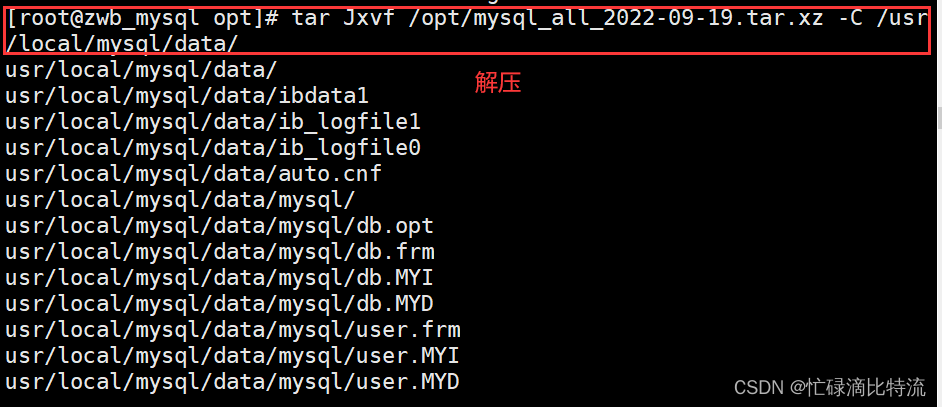
发现由于打包压缩导致路径不对,优化
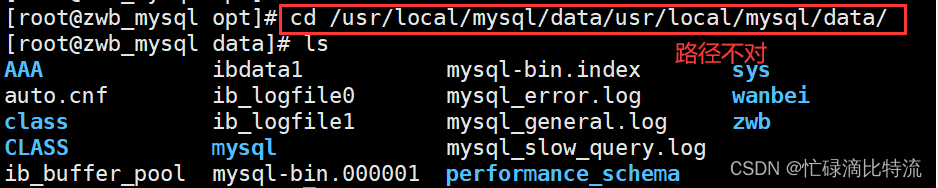
 ⑥更改data目录的属主和属组
验证:


2、mysqldump 备份与恢复(温备份)
2.1、mysqldump 备份(温备份)
① 完全备份一个或多个完整的库 (包括其中所有的表)
语法格式:
mysqldump -u root -p[密码] --databases 库名1 [库名2] ... > /备份路径/备份文件名.sql
- ### 把数据库中的wanbei库温备份到mnt下
- [root@zwb_mysql mysql]# mysqldump -u root -pabc123 --databases wanbei > /mnt/wanbei.sql ### 备份一个数据库及库中的表
- mysqldump: [Warning] Using a password on the command line interface can be insecure.
- [root@zwb_mysql mysql]# cd /mnt ### 查看备份结果,完成
- [root@zwb_mysql mnt]# ls
- wanbei.sql
- [root@zwb_mysql mnt]# cat wanbei.sql ### 查看内容
- -- MySQL dump 10.13 Distrib 5.7.20, for Linux (x86_64)
- --
- -- Host: localhost Database: wanbei
- -- ------------------------------------------------------
- -- Server version 5.7.20-log
- /*!40101 SET @OLD_CHARACTER_SET_CLIENT=@@CHARACTER_SET_CLIENT */;
- /*!40101 SET @OLD_CHARACTER_SET_RESULTS=@@CHARACTER_SET_RESULTS */;
- /*!40101 SET @OLD_COLLATION_CONNECTION=@@COLLATION_CONNECTION */;
- /*!40101 SET NAMES utf8 */;
- /*!40103 SET @OLD_TIME_ZONE=@@TIME_ZONE */;
- /*!40103 SET TIME_ZONE='+00:00' */;
- /*!40014 SET @OLD_UNIQUE_CHECKS=@@UNIQUE_CHECKS, UNIQUE_CHECKS=0 */;
- /*!40014 SET @OLD_FOREIGN_KEY_CHECKS=@@FOREIGN_KEY_CHECKS, FOREIGN_KEY_CHECKS=0 */;
- /*!40101 SET @OLD_SQL_MODE=@@SQL_MODE, SQL_MODE='NO_AUTO_VALUE_ON_ZERO' */;
- /*!40111 SET @OLD_SQL_NOTES=@@SQL_NOTES, SQL_NOTES=0 */;
- --
- -- Current Database: `wanbei`
- --
- CREATE DATABASE /*!32312 IF NOT EXISTS*/ `wanbei` /*!40100 DEFAULT CHARACTER SET utf8 */;
- USE `wanbei`;
- --
- -- Table structure for table `info1`
- --
- DROP TABLE IF EXISTS `info1`;
- /*!40101 SET @saved_cs_client = @@character_set_client */;
- /*!40101 SET character_set_client = utf8 */;
- CREATE TABLE `info1` (
- `id` int(4) NOT NULL AUTO_INCREMENT,
- `name` varchar(10) NOT NULL,
- `age` char(10) NOT NULL,
- `hobby` varchar(50) DEFAULT NULL,
- PRIMARY KEY (`id`)
- ) ENGINE=InnoDB AUTO_INCREMENT=3 DEFAULT CHARSET=utf8;
- /*!40101 SET character_set_client = @saved_cs_client */;
- --
- -- Dumping data for table `info1`
- --
- LOCK TABLES `info1` WRITE;
- /*!40000 ALTER TABLE `info1` DISABLE KEYS */;
- INSERT INTO `info1` VALUES (1,'user1','20','running'),(2,'user2','30','singing');
- /*!40000 ALTER TABLE `info1` ENABLE KEYS */;
- UNLOCK TABLES;
- /*!40103 SET TIME_ZONE=@OLD_TIME_ZONE */;
- /*!40101 SET SQL_MODE=@OLD_SQL_MODE */;
- /*!40014 SET FOREIGN_KEY_CHECKS=@OLD_FOREIGN_KEY_CHECKS */;
- /*!40014 SET UNIQUE_CHECKS=@OLD_UNIQUE_CHECKS */;
- /*!40101 SET CHARACTER_SET_CLIENT=@OLD_CHARACTER_SET_CLIENT */;
- /*!40101 SET CHARACTER_SET_RESULTS=@OLD_CHARACTER_SET_RESULTS */;
- /*!40101 SET COLLATION_CONNECTION=@OLD_COLLATION_CONNECTION */;
- /*!40111 SET SQL_NOTES=@OLD_SQL_NOTES */;
- -- Dump completed on 2022-09-19 1:45:57
② 完全备份 MySQL 服务器中所有的库
语法格式:
mysqldump -u root -p[密码] --all-databases > /备份路径/备份文件名.sql
- [root@zwb_mysql mnt]# mysqldump -uroot -pabc123 --all-databases > /opt/databases.sql ## 备份数据库中所有的表
- mysqldump: [Warning] Using a password on the command line interface can be insecure.
- [root@zwb_mysql mnt]# ls /opt
- databases.sql
③ 完全备份指定库中的部分表
语法格式1:(备份表的内容和结构)
mysqldump -u root -p[密码] 库名 [表名1] [表名2] ... > /备份路径/备份文件名.sql
- [root@zwb_mysql opt]# mysqldump -u root -pabc123 class ceshi member > /mi.sql
- ## 备份class库中的ceshi 和member两张表
- mysqldump: [Warning] Using a password on the command line interface can cure.
- [root@zwb_mysql opt]# ls /mnt
- ceshi.sql wanbei.sql
语法格式2:(只备份结构,不备份内容)
mysqldump -u root -p[密码] -d 库名 [表名1] [表名2] ... > /备份路径/备份文件名.sql
#使用“-d”选项,说明只保存数据库的表结构
#不使用“-d"选项,说明表数据也进行备份- [root@zwb_mysql opt]# mysqldump -u root -pabc123 -d class ceshi member > /mnt/jiegou.sql
- mysqldump: [Warning] Using a password on the command line interface can be insecure.
- ### 只要结构,没有内容
- [root@zwb_mysql opt]# cat /mnt/jiegou.sql
- -- MySQL dump 10.13 Distrib 5.7.20, for Linux (x86_64)
- --
- -- Host: localhost Database: class
- -- ------------------------------------------------------
- -- Server version 5.7.20-log
- /*!40101 SET @OLD_CHARACTER_SET_CLIENT=@@CHARACTER_SET_CLIENT */;
- /*!40101 SET @OLD_CHARACTER_SET_RESULTS=@@CHARACTER_SET_RESULTS */;
- /*!40101 SET @OLD_COLLATION_CONNECTION=@@COLLATION_CONNECTION */;
- /*!40101 SET NAMES utf8 */;
- /*!40103 SET @OLD_TIME_ZONE=@@TIME_ZONE */;
- /*!40103 SET TIME_ZONE='+00:00' */;
- /*!40014 SET @OLD_UNIQUE_CHECKS=@@UNIQUE_CHECKS, UNIQUE_CHECKS=0 */;
- /*!40014 SET @OLD_FOREIGN_KEY_CHECKS=@@FOREIGN_KEY_CHECKS, FOREIGN_KEY_CHECKS=0 */;
- /*!40101 SET @OLD_SQL_MODE=@@SQL_MODE, SQL_MODE='NO_AUTO_VALUE_ON_ZERO' */;
- /*!40111 SET @OLD_SQL_NOTES=@@SQL_NOTES, SQL_NOTES=0 */;
- --
- -- Table structure for table `ceshi`
- --
- DROP TABLE IF EXISTS `ceshi`;
- /*!40101 SET @saved_cs_client = @@character_set_client */;
- /*!40101 SET character_set_client = utf8 */;
- CREATE TABLE `ceshi` (
- `id` int(3) DEFAULT NULL,
- `name` varchar(30) DEFAULT NULL
- ) ENGINE=MyISAM DEFAULT CHARSET=utf8;
- /*!40101 SET character_set_client = @saved_cs_client */;
- --
- -- Table structure for table `member`
- --
- DROP TABLE IF EXISTS `member`;
- /*!40101 SET @saved_cs_client = @@character_set_client */;
- /*!40101 SET character_set_client = utf8 */;
- CREATE TABLE `member` (
- `id` int(10) DEFAULT NULL,
- `name` varchar(10) DEFAULT NULL,
- `cardid` varchar(18) DEFAULT NULL,
- `phone` varchar(11) DEFAULT NULL,
- `address` varchar(50) DEFAULT NULL,
- `remark` text
- ) ENGINE=MyISAM DEFAULT CHARSET=utf8;
- /*!40101 SET character_set_client = @saved_cs_client */;
- /*!40103 SET TIME_ZONE=@OLD_TIME_ZONE */;
- /*!40101 SET SQL_MODE=@OLD_SQL_MODE */;
- /*!40014 SET FOREIGN_KEY_CHECKS=@OLD_FOREIGN_KEY_CHECKS */;
- /*!40014 SET UNIQUE_CHECKS=@OLD_UNIQUE_CHECKS */;
- /*!40101 SET CHARACTER_SET_CLIENT=@OLD_CHARACTER_SET_CLIENT */;
- /*!40101 SET CHARACTER_SET_RESULTS=@OLD_CHARACTER_SET_RESULTS */;
- /*!40101 SET COLLATION_CONNECTION=@OLD_COLLATION_CONNECTION */;
- /*!40111 SET SQL_NOTES=@OLD_SQL_NOTES */;
- -- Dump completed on 2022-09-19 2:05:40
查看备份文件技巧:
查看备份文件
grep -v "^--" /opt/kgc_info1.sql | grep -v "^/" | grep -v "^$"2.2、mysqldump 恢复(温备份)
方法一:在数据库中使用source +备份文件路径就可以了
- mysql> drop database wanbei; ### 删除wanbei数据库
- Query OK, 1 row affected (0.00 sec)
- mysql> show databases; ### 无wanbei数据库
- +--------------------+
- | Database |
- +--------------------+
- | information_schema |
- | AAA |
- | CLASS |
- | class |
- | mysql |
- | performance_schema |
- | sys |
- | usr |
- | zwb |
- +--------------------+
- 9 rows in set (0.00 sec)
- mysql> source /mnt/wanbei.sql ### 采用source+备份文件绝对路径
- Query OK, 0 rows affected (0.00 sec)
- Query OK, 0 rows affected (0.00 sec)
- Query OK, 0 rows affected (0.00 sec)
- Query OK, 0 rows affected (0.00 sec)
- Query OK, 0 rows affected (0.00 sec)
- Query OK, 0 rows affected (0.00 sec)
- Query OK, 0 rows affected (0.00 sec)
- Query OK, 0 rows affected (0.00 sec)
- Query OK, 0 rows affected, 1 warning (0.00 sec)
- Query OK, 0 rows affected (0.00 sec)
- Query OK, 1 row affected (0.00 sec)
- Database changed
- Query OK, 0 rows affected (0.00 sec)
- Query OK, 0 rows affected (0.00 sec)
- Query OK, 0 rows affected (0.00 sec)
- Query OK, 0 rows affected (0.01 sec)
- Query OK, 0 rows affected (0.00 sec)
- Query OK, 0 rows affected (0.00 sec)
- Query OK, 0 rows affected (0.00 sec)
- Query OK, 2 rows affected (0.00 sec)
- Records: 2 Duplicates: 0 Warnings: 0
- Query OK, 0 rows affected (0.00 sec)
- Query OK, 0 rows affected (0.00 sec)
- Query OK, 0 rows affected (0.00 sec)
- Query OK, 0 rows affected, 1 warning (0.00 sec)
- Query OK, 0 rows affected (0.00 sec)
- Query OK, 0 rows affected (0.00 sec)
- Query OK, 0 rows affected (0.00 sec)
- Query OK, 0 rows affected (0.00 sec)
- Query OK, 0 rows affected (0.01 sec)
- Query OK, 0 rows affected (0.00 sec)
- mysql> show databases; ### 恢复成功
- +--------------------+
- | Database |
- +--------------------+
- | information_schema |
- | AAA |
- | CLASS |
- | class |
- | mysql |
- | performance_schema |
- | sys |
- | usr |
- | wanbei |
- | zwb |
- +--------------------+
- 10 rows in set (0.00 sec)
- mysql> use wanbei;
- Database changed
- mysql> select * from info1;
- +----+-------+-----+---------+
- | id | name | age | hobby |
- +----+-------+-----+---------+
- | 1 | user1 | 20 | running |
- | 2 | user2 | 30 | singing |
- +----+-------+-----+---------+
- 2 rows in set (0.00 sec)
方法二:重定向输入的方式恢复数据
删除了wanbei库中info1表
- mysql> use wanbei;
- Database changed
- mysql> drop table info1; ### 删除info1表
- Query OK, 0 rows affected (0.01 sec)
- mysql> show tables;
- Empty set (0.00 sec)
- mysql> quit ### 退出数据库
- Bye
- [root@zwb_mysql mysql]# mysql -uroot -pabc123 wanbei < /mnt/wanbei.sql ## 重定向输入
- mysql: [Warning] Using a password on the command line interface can be insecure.
- [root@zwb_mysql mysql]# mysql -uroot -pabc123
- mysql: [Warning] Using a password on the command line interface can be insecure.
- Welcome to the MySQL monitor. Commands end with ; or \g.
- Your MySQL connection id is 9
- Server version: 5.7.20-log Source distribution
- Copyright (c) 2000, 2017, Oracle and/or its affiliates. All rights reserved.
- Oracle is a registered trademark of Oracle Corporation and/or its
- affiliates. Other names may be trademarks of their respective
- owners.
- Type 'help;' or '\h' for help. Type '\c' to clear the current input statement.
- mysql> use wanbei;
- Reading table information for completion of table and column names
- You can turn off this feature to get a quicker startup with -A
- Database changed
- mysql> show tables; ##### 验证成功
- +------------------+
- | Tables_in_wanbei |
- +------------------+
- | info1 |
- +------------------+
- 1 row in set (0.00 sec)
- mysql> select * from info1;
- +----+-------+-----+---------+
- | id | name | age | hobby |
- +----+-------+-----+---------+
- | 1 | user1 | 20 | running |
- | 2 | user2 | 30 | singing |
- +----+-------+-----+---------+
- 2 rows in set (0.00 sec)
MySQL 增量备份与恢复实验
1、MySQL数据库增量恢复方式
①一般恢复
将所有备份的二进制日志内容全部恢复
mysqlbinlog [--no-defaults] 增量备份文件 | mysql -u 用户名 -p 密码
②基于位置恢复
数据库在某一时间点可能既有错误的操作也有正确的操作,可以基于精准的位置
跳过错误的操作,发生错误节点之前的一个节点,上一次正确操作的位置点停止。
1、基于位置的护肤格式--恢复数据到指定位置
2、mysqlbinlog-- stop-position='操作 id' 二进制日志 |mysql-u 用户名 -p 密码
1、从指定的位置开始恢复数据格式
2、mysqlbinlog--start-position='操作 id' 二进制日志 |mysql-u 用户名 -p 密码
③基于时间点恢复
跳过某个发生错误的时间点实现数据恢复,在错误时间点停止,在下一个正确时间点开始
1、从日志开头截止到某个时间点的恢复
mysqlbinlog[--no-defaults]--stop-datetime='年-月-日 小时:分钟:秒' 二进制日志 |mysql-u 用户名 -p 密码
2、从某个时间点到日志结尾的恢复
mysqlbinlog[--no-defaults]--start-datetime='年-月-日 小时:分钟:秒' 二进制日志 |mysql-u 用户名 -p 密码
3、从某个时间点到某个时间点的恢复
mysqlbinlog[--no-defaults]--start-datetime='年-月-日 小时:分钟:秒' --stop-datetime='年-月-日小时:分钟:秒' 二进制日志 |mysql-u 用户名 -p 密码
2、增量备份与还原实验
2.1、做完整备份
①先创建库和表
- mysql> show databases; ### 查看MySQL服务器当前所有的数据库
- +--------------------+
- | Database |
- +--------------------+
- | information_schema |
- | mysql |
- | performance_schema |
- | sys |
- +--------------------+
- 4 rows in set (0.00 sec)
- mysql> create database company; ### 创建数据库company
- Query OK, 1 row affected (0.00 sec)
- mysql> use company; ### 切换到数据库company
- Database changed
- mysql> create table info(id int(3),name varchar(40),address varchar(40));
- Query OK, 0 rows affected (0.01 sec) ### 创建表:info
- mysql> insert into info values(1,'zhangsan','nj'),(2,'lisi','bj');
- Query OK, 2 rows affected (0.00 sec)
- Records: 2 Duplicates: 0 Warnings: 0 ### 写入两行记录
- mysql> select * from info; ### 查看info表内容
- +------+----------+---------+
- | id | name | address |
- +------+----------+---------+
- | 1 | zhangsan | nj |
- | 2 | lisi | bj |
- +------+----------+---------+
- 2 rows in set (0.00 sec)
②做完全备份
- [root@zwb_mysql /]# mysqldump -uroot -p123123 company info > /opt/company_info.sql ### 把company库的info表备份到opt下
- mysqldump: [Warning] Using a password on the command line interface can be insecure.
- [root@zwb_mysql /]# ls /opt
- company_info.sql rh ### 备份的文件
③开启二进制日志文件

#二进制日志(binlog)有3种不同的记录格式: STATEMENT (基于SQL语句)、ROW(基于行)、MIXED(混合模式),默认格式是STATEMENT
① STATEMENT(基于SQL语句):
每一条涉及到被修改的sql 都会记录在binlog中
缺点:日志量过大,如sleep()函数,last_insert_id()>,以及user-defined fuctions(udf)、主从复制等架构记录日志时会出现问题② ROW(基于行)
只记录变动的记录,不记录sql的上下文环境
缺点:如果遇到update......set....where true 那么binlog的数据量会越来越大
create table info
insert into info values(1,'zhangsan');
insert into info values(2,'lisi');
delete id=zhangsan③ MIXED 推荐使用
一般的语句使用statement,函数使用ROW方式存储。重新启动MySQL
[root@zwb_mysql /]# systemctl restart mysqld.service查看生成的日志文件

2.2、在数据库中插入数据,做断点恢复的条件
在数据库中插入数据
- mysql> insert into info(name,address) values ('wangwu','nj');
- ERROR 2006 (HY000): MySQL server has gone away
- No connection. Trying to reconnect...
- Connection id: 3
- Current database: company #####这一步为我们想要进行的正确操作,插入一条数据
- Query OK, 1 row affected (0.01 sec)
- mysql> select * from info; ### 查看
- +------+----------+---------+
- | id | name | address |
- +------+----------+---------+
- | 1 | zhangsan | nj |
- | 2 | lisi | bj |
- | NULL | wangwu | nj |
- +------+----------+---------+
- 3 rows in set (0.00 sec)
- mysql> delete from info where id=1; ##这一步为误操作,不小心删除了需要的数据
- Query OK, 1 row affected (0.01 sec)
- mysql> select * from info;
- +------+--------+---------+
- | id | name | address |
- +------+--------+---------+
- | 2 | lisi | bj |
- | NULL | wangwu | nj |
- +------+--------+---------+
- 2 rows in set (0.00 sec)
- mysql> insert into info(name,address) values ('zhaoliu','nj');
- Query OK, 1 row affected (0.00 sec)
- ##在上一步的误操作之上,又做了一步正确的操作,添加了一条数据
- mysql> select * from info;
- +------+---------+---------+
- | id | name | address |
- +------+---------+---------+
- | 2 | lisi | bj |
- | NULL | wangwu | nj |
- | NULL | zhaoliu | nj |
- +------+---------+---------+
- 3 rows in set (0.00 sec)
2.3、在上面的前提下,做一个增量备份

2.4、对二进制日志文件进行解码
不进行解码状态下的二进制文件

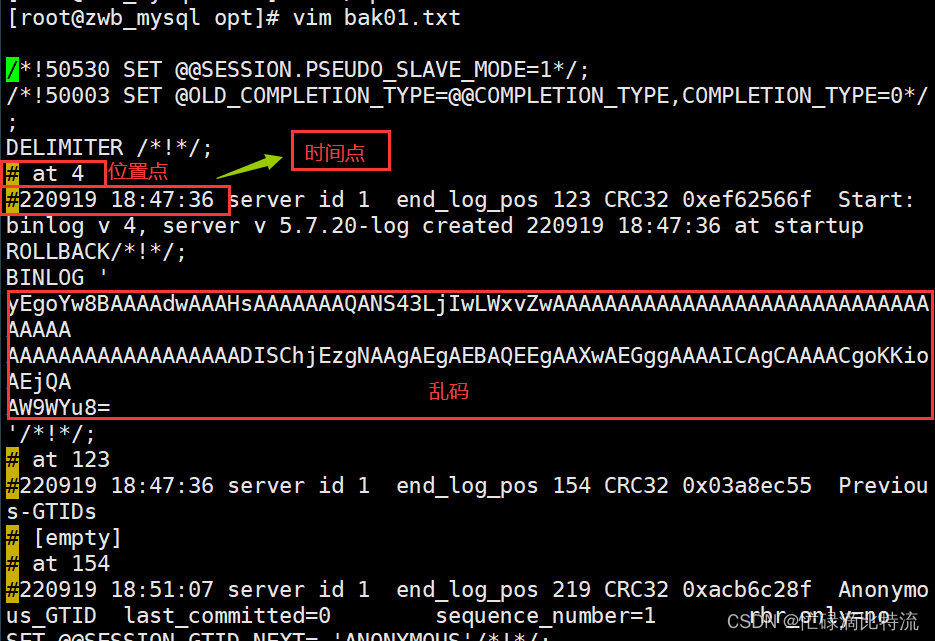
解码二进制日志

2.5、进行断点恢复
断点恢复思路:需要找到我们正确操作的两个时间点,一个是错误操作之前的时间点或者位置点,还有一个是错误操作之后的时间点或者位置点,然后对这两个点进行断点恢复。
先将表删除,进行完整备份的恢复
①先删除info表,进行完整备份的恢复
- mysql> drop table info; ### 删除info表
- Query OK, 0 rows affected (0.00 sec)
- mysql> show tables; ### 库内无表
- Empty set (0.00 sec)
- mysql> source /opt/company_info.sql ### 用source恢复完整备份
- Query OK, 0 rows affected (0.00 sec)
- Query OK, 0 rows affected (0.00 sec)
- Query OK, 0 rows affected (0.00 sec)
- Query OK, 0 rows affected (0.00 sec)
- Query OK, 0 rows affected (0.00 sec)
- Query OK, 0 rows affected (0.00 sec)
- Query OK, 0 rows affected (0.00 sec)
- Query OK, 0 rows affected (0.00 sec)
- Query OK, 0 rows affected, 1 warning (0.00 sec)
- Query OK, 0 rows affected (0.00 sec)
- Query OK, 0 rows affected (0.00 sec)
- Query OK, 0 rows affected (0.00 sec)
- Query OK, 0 rows affected (0.00 sec)
- Query OK, 0 rows affected (0.01 sec)
- Query OK, 0 rows affected (0.00 sec)
- Query OK, 0 rows affected (0.00 sec)
- Query OK, 0 rows affected (0.00 sec)
- Query OK, 2 rows affected (0.00 sec)
- Records: 2 Duplicates: 0 Warnings: 0
- Query OK, 0 rows affected (0.00 sec)
- Query OK, 0 rows affected (0.00 sec)
- Query OK, 0 rows affected (0.00 sec)
- Query OK, 0 rows affected, 1 warning (0.00 sec)
- Query OK, 0 rows affected (0.00 sec)
- Query OK, 0 rows affected (0.00 sec)
- Query OK, 0 rows affected (0.00 sec)
- Query OK, 0 rows affected (0.00 sec)
- Query OK, 0 rows affected (0.00 sec)
- Query OK, 0 rows affected (0.00 sec)
- mysql> show tables; ### 查看表,info已经恢复
- +-------------------+
- | Tables_in_company |
- +-------------------+
- | info |
- +-------------------+
- 1 row in set (0.00 sec)
- mysql> select * from info; ### 查看info表内容
- +------+----------+---------+
- | id | name | address |
- +------+----------+---------+
- | 1 | zhangsan | nj |
- | 2 | lisi | bj |
- +------+----------+---------+
- 2 rows in set (0.00 sec)
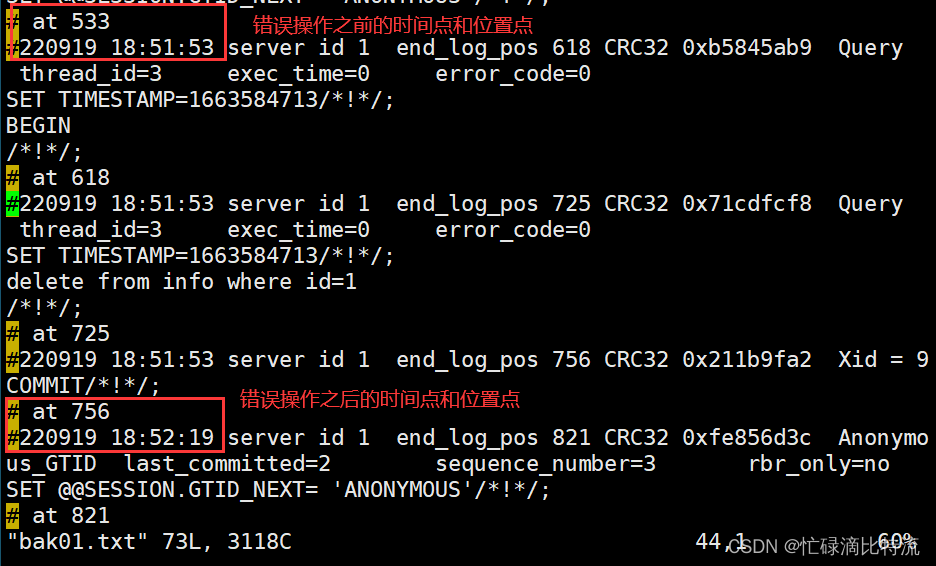
②根据位置点进行恢复
- [root@zwb_mysql opt]# mysqlbinlog --no-defaults --stop-position='533' /usr/local/mysql/data/mysqld-bin.000001 | mysql -uroot -p123123
- mysql: [Warning] Using a password on the command line interface can be insecure.
- [root@zwb_mysql opt]# mysqlbinlog --no-defaults --stop-position='533' /usr/local/mysql/data/mysqld-bin.000001 | mysql -uroot -p123123
- mysql: [Warning] Using a password on the command line interface can be insecure.
- [root@zwb_mysql opt]# mysql -uroot -p123123 -e "use company;select * from info"
- mysql: [Warning] Using a password on the command line interface can be insecure.
- +------+----------+---------+
- | id | name | address |
- +------+----------+---------+
- | 1 | zhangsan | nj |
- | 2 | lisi | bj |
- | NULL | wangwu | nj | ### 此时出现了wangwu
- +------+----------+---------+
跳过错误的一步
- [root@zwb_mysql opt]# mysqlbinlog --no-defaults --start-position='756' /usr/local/mysql/data/mysqld-bin.000001 | mysql -uroot -p123123
- mysql: [Warning] Using a password on the command line interface can be insecure.
- [root@zwb_mysql opt]# mysql -uroot -p123123 -e "use company;select * from info"
- mysql: [Warning] Using a password on the command line interface can be insecure.
- +------+----------+---------+
- | id | name | address |
- +------+----------+---------+
- | 1 | zhangsan | nj |
- | 2 | lisi | bj |
- | NULL | wangwu | nj |
- | NULL | zhaoliu | nj |
- +------+----------+---------+ ### 此时跳过错误位置点
2.6、基于时间点恢复
实验环境:
- mysql> insert into info(name,address) values ('wangwu','nj');
- ERROR 2006 (HY000): MySQL server has gone away
- No connection. Trying to reconnect...
- Connection id: 3
- Current database: company #####这一步为我们想要进行的正确操作,插入一条数据
- Query OK, 1 row affected (0.01 sec)
- mysql> select * from info; ### 查看
- +------+----------+---------+
- | id | name | address |
- +------+----------+---------+
- | 1 | zhangsan | nj |
- | 2 | lisi | bj |
- | NULL | wangwu | nj |
- +------+----------+---------+
- 3 rows in set (0.00 sec)
- mysql> delete from info where id=1; ##这一步为误操作,不小心删除了需要的数据
- Query OK, 1 row affected (0.01 sec)
- mysql> select * from info;
- +------+--------+---------+
- | id | name | address |
- +------+--------+---------+
- | 2 | lisi | bj |
- | NULL | wangwu | nj |
- +------+--------+---------+
- 2 rows in set (0.00 sec)
- mysql> insert into info(name,address) values ('zhaoliu','nj');
- Query OK, 1 row affected (0.00 sec)
- ##在上一步的误操作之上,又做了一步正确的操作,添加了一条数据
- mysql> select * from info;
- +------+---------+---------+
- | id | name | address |
- +------+---------+---------+
- | 2 | lisi | bj |
- | NULL | wangwu | nj |
- | NULL | zhaoliu | nj |
- +------+---------+---------+
- 3 rows in set (0.00 sec)
查看二进制日志标记处出现错误的前后时间 ,标明时间点
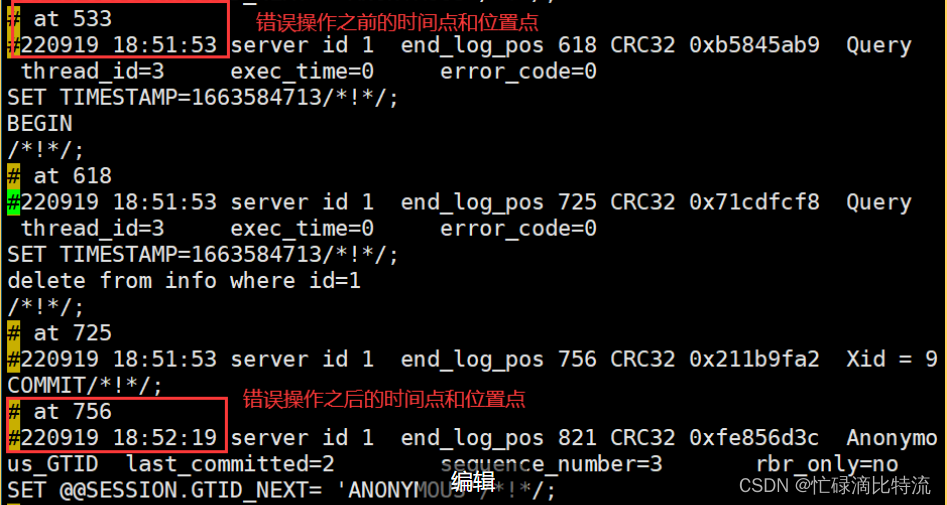
基于时间点做错误前的恢复
- [root@zwb_mysql data]# mysqlbinlog --no-defaults --stop-datetime='2022-09-19 18:51:53' /usr/local/mysql/data/mysqld-bin.000001 | mysql -uroot -p123123
- mysql: [Warning] Using a password on the command line interface can be insecure.
- [root@zwb_mysql data]# mysql -uroot -p123123 -e "use company;select * from info"
- mysql: [Warning] Using a password on the command line interface can be insecure.
- +------+----------+---------+
- | id | name | address |
- +------+----------+---------+
- | 1 | zhangsan | nj |
- | 2 | lisi | bj |
- | NULL | wangwu | nj |
- +------+----------+---------+
跳过错误时间点后恢复
- [root@zwb_mysql data]# mysqlbinlog --no-defaults --start-datetime='2022-09-19 18:52:19' /usr/local/mysql/data/mysqld-bin.000001 | mysql -uroot -p123123
- mysql: [Warning] Using a password on the command line interface can be insecure.
- ERROR: Incorrect date and time argument: 2022-09-19 18:52:19
- [root@zwb_mysql data]# mysqlbinlog --no-defaults --start-datetime='2022-09-19 18:52:19' /usr/local/mysql/data/mysqld-bin.000001 | mysql -uroot -p123123
- mysql: [Warning] Using a password on the command line interface can be insecure.
- [root@zwb_mysql data]# mysql -uroot -p123123 -e "use company;select * from info"
- mysql: [Warning] Using a password on the command line interface can be insecure.
- +------+----------+---------+
- | id | name | address |
- +------+----------+---------+
- | 1 | zhangsan | nj |
- | 2 | lisi | bj |
- | NULL | wangwu | nj |
- | NULL | zhaoliu | nj |
- +------+----------+---------+
-
相关阅读:
web前端黑马下载:探索学习资源的海洋
【公路施工组织及概预算】第六章 —— 公路工程定额(1,定额概述及分类)
gitlab将本地文件项目上传至gitlab服务
LeetCode 42. 接雨水 - PHP
从GitHub火到了CSDN,共计1658页的《Java岗面试核心MCA版》,拿走不谢
【算法】通信线路(二分,堆优化版dijkstra)
算法-具有所有最深节点的最小子树(Kotlin)
如何使用pid
Jenkins p和声明语法结构
C++ 类、对象、模板相关选择题、填空题
- 原文地址:https://blog.csdn.net/m0_62948770/article/details/126921297
