-
【Vue十三】-- Vuex详细介绍
五、 Vuex
1-1
1-1-1 基本概念+ 求和案例
- 专门在Vue中实现集中式状态(数据)管理的一个vue插件,对vue应用中多个组件的共享状态进行集中式的管理(读/写)
- 一种组件间通信的方式
- 适用于任意组件间通信
- 什么时候使用vuex
- 多个组件依赖同一状态
- 来自不同组件的行为需要变更同一状态
-
npm i vuexVue.use(Vuex)store- vc ==> store
1-1-2 Vuex工作原理图
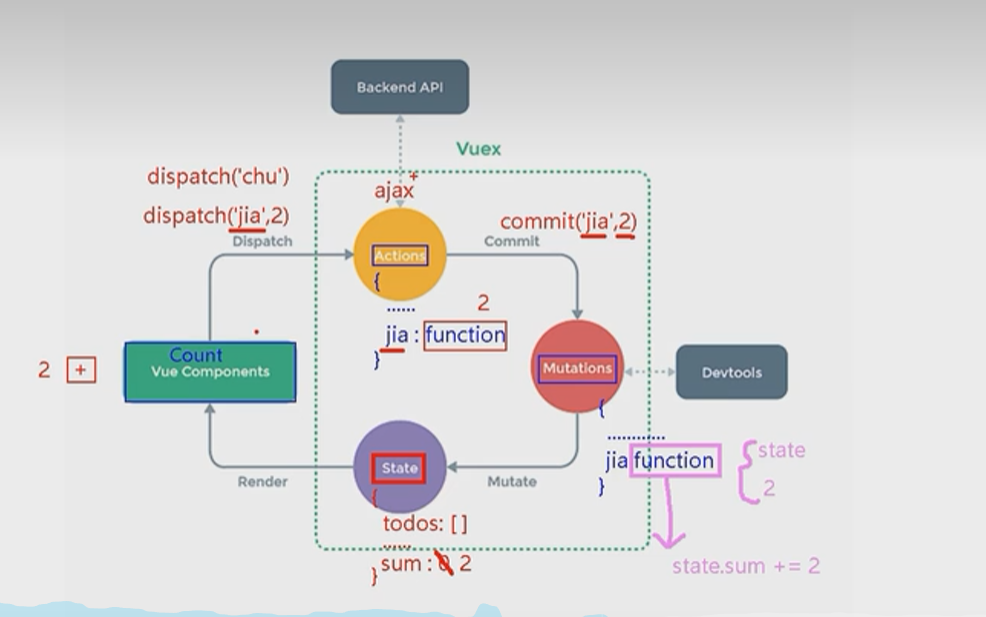
-
- vue2—vuex3
- vue3–vuex4


1-1-3 搭建vuex
-
创建文件:
src/store/index.js//引入Vue核心库 import Vue from 'vue' //引入Vuex import Vuex from 'vuex' //应用Vuex插件 Vue.use(Vuex) //准备actions对象——响应组件中用户的动作 const actions = {} //准备mutations对象——修改state中的数据 const mutations = {} //准备state对象——保存具体的数据 const state = {} //创建并暴露store export default new Vuex.Store({ actions, mutations, state })- 1
- 2
- 3
- 4
- 5
- 6
- 7
- 8
- 9
- 10
- 11
- 12
- 13
- 14
- 15
- 16
- 17
- 18
- 19
- 20
-
在
main.js中创建vm时传入store配置项...... //引入store import store from './store' ...... //创建vm new Vue({ el:'#app', render: h => h(App), store })- 1
- 2
- 3
- 4
- 5
- 6
- 7
- 8
- 9
- 10
- 11
1-1-4 vuex开发者工具
- 组件中读取vuex中的数据:
$store.state.sum - 组件中修改vuex中的数据:
$store.dispatch('action中的方法名',数据)或$store.commit('mutations中的方法名',数据) - Timeline
1-2
1-2-0 Vuex的属性:
-
state
- state是存储的单一状态,是存储的基本数据。
-
Getters
- getters是store的计算属性,对state的加工,是派生出来的数据。就像computed计算属性一样,getter返回的值会根据它的依赖被缓存起来,且只有当它的依赖值发生改变才会被重新计算。
-
Mutations
- mutations提交更改数据,使用store.commit方法更改state存储的状态。(mutations同步函数)
-
Actions
- actions像一个装饰器,提交mutation,而不是直接变更状态。(actions可以包含任何异步操作)
-
Module
- Module是store分割的模块,每个模块拥有自己的state、getters、mutations、actions。
const moduleA = { state: { ... }, mutations: { ... }, actions: { ... }, getters: { ... } } const moduleB = { state: { ... }, mutations: { ... }, actions: { ... } } const store = new Vuex.Store({ modules: { a: moduleA, b: moduleB } }) store.state.a // -> moduleA 的状态 store.state.b // -> moduleB 的状态- 1
- 2
- 3
- 4
- 5
- 6
- 7
- 8
- 9
- 10
- 11
- 12
- 13
- 14
- 15
- 16
- 17
- 18
- 19
- 20
- 21
- 22
- 辅助函数
-
Vuex提供了mapState、MapGetters、MapActions、mapMutations等辅助函数给开发在vm中处理store。
-
Vuex的使用方法:

-
import Vuex from 'vuex'; Vue.use(Vuex); // 1. vue的插件机制,安装vuex let store = new Vuex.Store({ // 2.实例化store,调用install方法 state, getters, modules, mutations, actions, plugins }); new Vue({ // 3.注入store, 挂载vue实例 store, render: h=>h(app) }).$mount('#app');- 1
- 2
- 3
- 4
- 5
- 6
- 7
- 8
- 9
- 10
- 11
- 12
- 13
- 14
1-2-1 getters配置项
-
概念:当state中的数据需要经过加工后再使用时,可以使用getters加工。
-
在
store.js中追加getters配置...... const getters = { bigSum(state){ return state.sum * 10 } } //创建并暴露store export default new Vuex.Store({ ...... getters })- 1
- 2
- 3
- 4
- 5
- 6
- 7
- 8
- 9
- 10
- 11
- 12
- 13
-
组件中读取数据:
$store.getters.bigSum
1-2-2 四个map方法的使用
1-2-2-1 mapState
-
mapState方法:用于帮助我们映射
state中的数据为计算属性import {mapState} from 'vuex' computed: { //借助mapState生成计算属性:sum、school、subject(对象写法) ...mapState({sum:'sum',school:'school',subject:'subject'}), //借助mapState生成计算属性:sum、school、subject(数组写法) ...mapState(['sum','school','subject']), // school() { // return this.$store.state.sum // } },- 1
- 2
- 3
- 4
- 5
- 6
- 7
- 8
- 9
- 10
- 11
- 12
-
mapGetters方法:用于帮助我们映射
getters中的数据为计算属性computed: { //借助mapGetters生成计算属性:bigSum(对象写法) ...mapGetters({bigSum:'bigSum'}), //借助mapGetters生成计算属性:bigSum(数组写法) ...mapGetters(['bigSum']) },- 1
- 2
- 3
- 4
- 5
- 6
- 7
1-2-2-2 mapGetters
1-2-2-3 mapActions
-
mapActions方法:用于帮助我们生成与
actions对话的方法,即:包含$store.dispatch(xxx)的函数methods:{ //靠mapActions生成:incrementOdd、incrementWait(对象形式) ...mapActions({incrementOdd:'jiaOdd',incrementWait:'jiaWait'}) //靠mapActions生成:incrementOdd、incrementWait(数组形式) ...mapActions(['jiaOdd','jiaWait']) }- 1
- 2
- 3
- 4
- 5
- 6
- 7
1-2-2-4 mapMutations
-
mapMutations方法:用于帮助我们生成与
mutations对话的方法,即:包含$store.commit(xxx)的函数methods:{ //靠mapActions生成:increment、decrement(对象形式) ...mapMutations({increment:'JIA',decrement:'JIAN'}), //靠mapMutations生成:JIA、JIAN(对象形式) ...mapMutations(['JIA','JIAN']), }- 1
- 2
- 3
- 4
- 5
- 6
- 7
备注:mapActions与mapMutations使用时,若需要传递参数需要:在模板中绑定事件时传递好参数,否则参数是事件对象。
1-2-3 多组件共享数据
1-2-4 模块化+命名空间
-
目的:让代码更好维护,让多种数据分类更加明确。
-
修改
store.jsconst countAbout = { namespaced:true,//开启命名空间 state:{x:1}, mutations: { ... }, actions: { ... }, getters: { bigSum(state){ return state.sum * 10 } } } const personAbout = { namespaced:true,//开启命名空间 state:{ ... }, mutations: { ... }, actions: { ... } } const store = new Vuex.Store({ modules: { countAbout, personAbout } })- 1
- 2
- 3
- 4
- 5
- 6
- 7
- 8
- 9
- 10
- 11
- 12
- 13
- 14
- 15
- 16
- 17
- 18
- 19
- 20
- 21
- 22
- 23
- 24
- 25
-
开启命名空间后,组件中读取state数据:
//方式一:自己直接读取 this.$store.state.personAbout.list //方式二:借助mapState读取: ...mapState('countAbout',['sum','school','subject']),- 1
- 2
- 3
- 4
-
开启命名空间后,组件中读取getters数据:
//方式一:自己直接读取 this.$store.getters['personAbout/firstPersonName'] //方式二:借助mapGetters读取: ...mapGetters('countAbout',['bigSum'])- 1
- 2
- 3
- 4
-
开启命名空间后,组件中调用dispatch
//方式一:自己直接dispatch this.$store.dispatch('personAbout/addPersonWang',person) //方式二:借助mapActions: ...mapActions('countAbout',{incrementOdd:'jiaOdd',incrementWait:'jiaWait'})- 1
- 2
- 3
- 4
-
开启命名空间后,组件中调用commit
//方式一:自己直接commit this.$store.commit('personAbout/ADD_PERSON',person) //方式二:借助mapMutations: ...mapMutations('countAbout',{increment:'JIA',decrement:'JIAN'}),- 1
- 2
- 3
- 4
- 专门在Vue中实现集中式状态(数据)管理的一个vue插件,对vue应用中多个组件的共享状态进行集中式的管理(读/写)
-
相关阅读:
数据结构与算法(四)--队列
Spark部署模式与作业提交
ctrl+k,ctrl+l无法切换到时限文件
PIXHAWK飞控使用RTK
多线程的基本使用
Java学习笔记4.3.1 数学计算 - Math类
【Gensim概念】03/3 NLP玩转 word2vec
头歌-信息安全技术-【实训10】HTML信息隐藏、动态分析技术
LeetCode每日一题(2365. Task Scheduler II)
个人论坛系统的测试用例
- 原文地址:https://blog.csdn.net/hannah2233/article/details/126923459
