-
设计模式复习(Java)
设计模式
再次复习了设计模式,原文来着上一篇文章:https://blog.csdn.net/hhhmonkey/article/details/124652879?spm=1001.2014.3001.5501,可找到对应pdf文件,将其转换为Java进行编写,如下:
![[外链图片转存失败,源站可能有防盗链机制,建议将图片保存下来直接上传(img-Fod5j8c1-1663506844528)(.\pics\image-20220918190843367.png)]](https://1000bd.com/contentImg/2023/11/07/223253355.png)
代码请见 GitHub:(网不行,下次网给力了就添加上来哈哈哈)创建型模式
工厂方法
工厂方法是一种创建型设计模式,其在父类中提供一个创建对象的方法,允许子类决定实例化对象的类型。
public class Main { //工厂方法是一种创建型设计模式, // 其在父类中提供一个创建对象的 // 方法,允许子类决定实例化对象 // 的类型。 public static void main(String[] args) { // 程序根据当前配置或环境设定选择创建者的类型。 // 当前客户端代码会与具体创建者的实例进行交互,但是必须通过其基本接口 // 进行。只要客户端通过基本接口与创建者进行交互,你就可将任何创建者子 // 类传递给客户端。 String configs = "Windows"; Dialog dialog = null; if("Windows".equals(configs)){ dialog = new WindowsDialog(); } else if("Web".equals(configs)){ dialog = new WebDialog(); }else{ System.out.println("类型错误"); } dialog.render(dialog); } } // 创建者类声明的工厂方法必须返回一个产品类的对象。创建者的子类通常会提供 // 该方法的实现。 public abstract class Dialog { abstract Button createButton(); // 请注意,创建者的主要职责并非是创建产品。其中通常会包含一些核心业务 // 逻辑,这些逻辑依赖于由工厂方法返回的产品对象。子类可通过重写工厂方 // 法并使其返回不同类型的产品来间接修改业务逻辑。 void render(Dialog closeDialog){ // 调用工厂方法创建一个产品对象。 Button okButton = createButton(); // 现在使用产品。 okButton.onClick(closeDialog); okButton.render(); } } public class WebDialog extends Dialog { @Override Button createButton() { return new HTMLButton(); } } public class WindowsDialog extends Dialog { // 具体创建者将重写工厂方法以改变其所返回的产品类型。 @Override Button createButton() { return new WindowsButton(); } }- 1
- 2
- 3
- 4
- 5
- 6
- 7
- 8
- 9
- 10
- 11
- 12
- 13
- 14
- 15
- 16
- 17
- 18
- 19
- 20
- 21
- 22
- 23
- 24
- 25
- 26
- 27
- 28
- 29
- 30
- 31
- 32
- 33
- 34
- 35
- 36
- 37
- 38
- 39
- 40
- 41
- 42
- 43
- 44
- 45
- 46
- 47
- 48
- 49
- 50
- 51
- 52
- 53
- 54
- 55
- 56
- 57
抽象工厂
抽象工厂是一种创建型设计模式,它能创建一系列相关的对象,而无需指定其具体类。
//抽象工厂是一种创建型设计模式, // 它能创建一系列相关的对象,而 // 无需指定其具体类。 public class Main { GUIFactory factory; Button button; Main(GUIFactory factory){ this.factory = factory; } void createUI(){ this.button = factory.createButton(); } void paint(){ button.paint(); } public static void main(String[] args) { // 程序会根据当前配置或环境设定选择工厂类型,并在运行时创建工厂(通常在初 // 始化阶段)。 String configs = "Windows"; GUIFactory factory = null; if("Windows".equals(configs)){ factory = new WinFactory(); } else if("Mac".equals(configs)){ factory = new MacFactory(); }else{ System.out.println("类型错误"); } Main main = new Main(factory); main.createUI(); main.paint(); } } // 抽象工厂接口声明了一组能返回不同抽象产品的方法。这些产品属于同一个系列 // 且在高层主题或概念上具有相关性。同系列的产品通常能相互搭配使用。系列产 // 品可有多个变体,但不同变体的产品不能搭配使用。 public interface GUIFactory { Button createButton(); Checkbox createCheckbox(); } // 系列产品中的特定产品必须有一个基础接口。所有产品变体都必须实现这个接口。 public interface Button { void paint(); } // 这是另一个产品的基础接口。所有产品都可以互动,但是只有相同具体变体的产 // 品之间才能够正确地进行交互。 public interface Checkbox { void paint(); } public class WinFactory implements GUIFactory { @Override public Button createButton() { return new WinButton(); } @Override public Checkbox createCheckbox() { return new WinCheckbox(); } } public class MacFactory implements GUIFactory { @Override public Button createButton() { return new MacButton(); } @Override public Checkbox createCheckbox() { return new MacCheckBox(); } } public class WinButton implements Button { @Override public void paint() { System.out.println("WinButton"); } } public class WinCheckbox implements Checkbox { @Override public void paint() { System.out.println("WinCheckbox"); } } public class MacButton implements Button { @Override public void paint() { System.out.println("MacButton"); } } public class MacCheckBox implements Checkbox { @Override public void paint() { System.out.println("MacCheckBox"); } }- 1
- 2
- 3
- 4
- 5
- 6
- 7
- 8
- 9
- 10
- 11
- 12
- 13
- 14
- 15
- 16
- 17
- 18
- 19
- 20
- 21
- 22
- 23
- 24
- 25
- 26
- 27
- 28
- 29
- 30
- 31
- 32
- 33
- 34
- 35
- 36
- 37
- 38
- 39
- 40
- 41
- 42
- 43
- 44
- 45
- 46
- 47
- 48
- 49
- 50
- 51
- 52
- 53
- 54
- 55
- 56
- 57
- 58
- 59
- 60
- 61
- 62
- 63
- 64
- 65
- 66
- 67
- 68
- 69
- 70
- 71
- 72
- 73
- 74
- 75
- 76
- 77
- 78
- 79
- 80
- 81
- 82
- 83
- 84
- 85
- 86
- 87
- 88
- 89
- 90
- 91
- 92
- 93
- 94
- 95
- 96
- 97
- 98
- 99
- 100
- 101
- 102
- 103
- 104
单例
单例是一种创建型设计模式,让你能够保证一个类只有一个实例,并提供一个访问该实例的全局节点。
/** * 饿汉式实现单例模式 */ public class Singleton1 { private static Singleton1 instance = new Singleton1(); private Singleton1(){} public static Singleton1 getInstance(){ return instance; } } /** * 懒汉式实现单例模式 */ public class Singleton2 { private static Singleton2 instance; private Singleton2(){} // synchronized方法,多线程情况下保证单例对象唯一 public static synchronized Singleton2 getInstance(){ if(instance == null){ instance = new Singleton2(); } return instance; } } /** * DCL(Double CheckLock)实现单例模式 */ public class Singleton3 { private static Singleton3 instance = null; private Singleton3(){} public static Singleton3 getInstance(){ // 两层判空,第一层是为了避免不必要的同步 // 第二层是为了在null的情况下创建实例 if(instance == null){ synchronized (Singleton3.class){ if(instance == null){ instance = new Singleton3(); } } } return instance; } }- 1
- 2
- 3
- 4
- 5
- 6
- 7
- 8
- 9
- 10
- 11
- 12
- 13
- 14
- 15
- 16
- 17
- 18
- 19
- 20
- 21
- 22
- 23
- 24
- 25
- 26
- 27
- 28
- 29
- 30
- 31
- 32
- 33
- 34
- 35
- 36
- 37
- 38
- 39
- 40
- 41
- 42
- 43
- 44
- 45
- 46
原型
原型是一种创建型设计模式,使你能够复制已有对象,而又无需使代码依赖它们所属的类。
import java.util.ArrayList; import java.util.List; //原型是一种创建型设计模式,使 //你能够复制已有对象,而又无需 //使代码依赖它们所属的类。 public class Main { public static void main(String[] args) { List<Shape> list = new ArrayList<>(); Circle c = new Circle(); c.X = 10; c.Y = 10; c.radius = 20; list.add(c); Circle anotherc = (Circle) c.clone(); list.add(anotherc); Rectangle r = new Rectangle(); r.width = 10; r.height = 20; list.add(r); for(Shape s:list){ System.out.println(s); } } } // 基础原型。 public abstract class Shape { int X; int Y; String color; // 常规构造函数。 public Shape(){} // 原型构造函数。使用已有对象的数值来初始化一个新对象。 public Shape(Shape s){ this(); this.X = s.X; this.Y = s.Y; this.color = s.color; } // clone(克隆)操作会返回一个形状子类。 public abstract Shape clone(); } // 具体原型。克隆方法会创建一个新对象并将其传递给构造函数。直到构造函数运 // 行完成前,它都拥有指向新克隆对象的引用。因此,任何人都无法访问未完全生 // 成的克隆对象。这可以保持克隆结果的一致。 public class Rectangle extends Shape { int width; int height; public Rectangle(){} public Rectangle(Rectangle r){ // 需要调用父构造函数来复制父类中定义的私有成员变量。 super(r); this.width = r.width; this.height = r.height; } @Override public Shape clone() { return new Rectangle(this); } } public class Circle extends Shape { int radius; public Circle(){} public Circle(Circle c){ super(c); this.radius = c.radius; } @Override public Shape clone() { return new Circle(this); } }- 1
- 2
- 3
- 4
- 5
- 6
- 7
- 8
- 9
- 10
- 11
- 12
- 13
- 14
- 15
- 16
- 17
- 18
- 19
- 20
- 21
- 22
- 23
- 24
- 25
- 26
- 27
- 28
- 29
- 30
- 31
- 32
- 33
- 34
- 35
- 36
- 37
- 38
- 39
- 40
- 41
- 42
- 43
- 44
- 45
- 46
- 47
- 48
- 49
- 50
- 51
- 52
- 53
- 54
- 55
- 56
- 57
- 58
- 59
- 60
- 61
- 62
- 63
- 64
- 65
- 66
- 67
- 68
- 69
- 70
- 71
- 72
- 73
- 74
- 75
- 76
- 77
- 78
- 79
- 80
- 81
- 82
- 83
- 84
- 85
- 86
- 87
生成器
生成器是一种创建型设计模式,使你能够分步骤创建复杂对象。该模式允许你使用相同的创建代码生成不同类型和形式的对象。
//生成器是一种创建型设计模式, // 使你能够分步骤创建复杂对象。 // 该模式允许你使用相同的创建 // 代码生成不同类型和形式的对象。 public class Main { public static void main(String[] args) { Director director = new Director(); CarBuilder builder = new CarBuilder(); director.constructSportsCar(builder); Car car = builder.getProduct(); CarManualBuilder carManualBuilder = new CarManualBuilder(); director.constructSportsCar(carManualBuilder); Manual manual = carManualBuilder.getProduct(); } } // 生成器接口声明了创建产品对象不同部件的方法。 public interface Builder { void reset(); void setSeats(int seats); void setEngine(); void setTripComputer(); void setGPS(); } // 主管只负责按照特定顺序执行生成步骤。其在根据特定步骤或配置来生成产品时 // 会很有帮助。由于客户端可以直接控制生成器,所以严格意义上来说,主管类并 // 不是必需的。 public class Director { private Builder builder; // 主管可同由客户端代码传递给自身的任何生成器实例进行交互。客户端可通 // 过这种方式改变最新组装完毕的产品的最终类型。 public void setBuilder(Builder builder){ this.builder = builder; } public void constructSportsCar(Builder builder){ builder.reset(); builder.setSeats(2); builder.setEngine(); builder.setTripComputer(); builder.setGPS(); } public void constructSUV(Builder builder){ builder.reset(); builder.setSeats(666); builder.setEngine(); builder.setTripComputer(); builder.setGPS(); } } // 具体生成器类将遵循生成器接口并提供生成步骤的具体实现。你的程序中可能会 // 有多个以不同方式实现的生成器变体 public class CarBuilder implements Builder{ private Car car; // 一个新的生成器实例必须包含一个在后续组装过程中使用的空产品对象。 CarBuilder(){ this.reset(); } @Override public void reset() { // reset(重置)方法可清除正在生成的对象。 this.car = new Car(); } @Override public void setSeats(int seats) { // 所有生成步骤都会与同一个产品实例进行交互。 System.out.println("setSeats "+seats); } @Override public void setEngine() { System.out.println("setEngine"); } @Override public void setTripComputer() { System.out.println("setTripComputer"); } @Override public void setGPS() { System.out.println("setGPS"); } public Car getProduct(){ Car product = this.car; this.reset(); return product; } } // 生成器与其他创建型模式的不同之处在于:它让你能创建不遵循相同接口的产品。 public class CarManualBuilder implements Builder{ private Manual manual; CarManualBuilder(){ this.reset(); } @Override public void reset() { this.manual = new Manual(); } @Override public void setSeats(int seats) { System.out.println(seats+"======"); } @Override public void setEngine() { } @Override public void setTripComputer() { } @Override public void setGPS() { } public Manual getProduct(){ Manual product = this.manual; this.reset(); return product; } } // 只有当产品较为复杂且需要详细配置时,使用生成器模式才有意义。下面的两个 // 产品尽管没有同样的接口,但却相互关联。 public class Car { // 一辆汽车可能配备有 GPS 设备、行车电脑和几个座位。不同型号的汽车( // 运动型轿车、SUV 和敞篷车)可能会安装或启用不同的功能。 } public class Manual { // 用户使用手册应该根据汽车配置进行编制,并介绍汽车的所有功能。 }- 1
- 2
- 3
- 4
- 5
- 6
- 7
- 8
- 9
- 10
- 11
- 12
- 13
- 14
- 15
- 16
- 17
- 18
- 19
- 20
- 21
- 22
- 23
- 24
- 25
- 26
- 27
- 28
- 29
- 30
- 31
- 32
- 33
- 34
- 35
- 36
- 37
- 38
- 39
- 40
- 41
- 42
- 43
- 44
- 45
- 46
- 47
- 48
- 49
- 50
- 51
- 52
- 53
- 54
- 55
- 56
- 57
- 58
- 59
- 60
- 61
- 62
- 63
- 64
- 65
- 66
- 67
- 68
- 69
- 70
- 71
- 72
- 73
- 74
- 75
- 76
- 77
- 78
- 79
- 80
- 81
- 82
- 83
- 84
- 85
- 86
- 87
- 88
- 89
- 90
- 91
- 92
- 93
- 94
- 95
- 96
- 97
- 98
- 99
- 100
- 101
- 102
- 103
- 104
- 105
- 106
- 107
- 108
- 109
- 110
- 111
- 112
- 113
- 114
- 115
- 116
- 117
- 118
- 119
- 120
- 121
- 122
- 123
- 124
- 125
- 126
- 127
- 128
- 129
- 130
- 131
- 132
- 133
- 134
- 135
- 136
- 137
- 138
- 139
- 140
- 141
- 142
- 143
- 144
- 145
- 146
- 147
- 148
- 149
- 150
结构型模式
适配器
适配器是一种结构型设计模式,它能使接口不兼容的对象能够相互合作。
//适配器是一种结构型设计模式, //它能使接口不兼容的对象能够 //相互合作。 public class Main { public static void main(String[] args) { RoundHole hole = new RoundHole(5); RoundPeg rpeg = new RoundPeg(5); System.out.println(hole.fits(rpeg)); //true SquarePeg small_sqpeg = new SquarePeg(5); SquarePeg large_sqpeg = new SquarePeg(10); // hole.fits(small_sqpeg);// 此处无法编译(类型不一致) SquarePegAdapter small_sqpeg_adapter = new SquarePegAdapter(small_sqpeg); SquarePegAdapter large_sqpeg_adapter = new SquarePegAdapter(large_sqpeg); System.out.println(hole.fits(small_sqpeg_adapter)); //true System.out.println(hole.fits(large_sqpeg_adapter)); //false // System.out.println(5* Math.sqrt(2) / 2); } } public class RoundHole { int radius; public RoundHole(int radius){ this.radius = radius; } public int getRadius() { return radius; } public boolean fits(RoundPeg roundPeg){ return this.getRadius() >= roundPeg.getRadius(); } } public class RoundPeg extends Peg{ int radius; public RoundPeg(int radius){ this.radius = radius; } public RoundPeg(){} public int getRadius() { return radius; } } public class SquarePeg extends Peg{ int width; public SquarePeg(int width){ this.width = width; } public SquarePeg(){} public int getWidth() { return width; } } public class SquarePegAdapter extends RoundPeg{ private SquarePeg peg; public SquarePegAdapter(int radius) { super(radius); } public SquarePegAdapter(SquarePeg peg) { super(); this.peg = peg; } @Override public int getRadius() { return (int) (peg.getWidth() * Math.sqrt(2) / 2); //正方形边长乘以根号2等于直径 } }- 1
- 2
- 3
- 4
- 5
- 6
- 7
- 8
- 9
- 10
- 11
- 12
- 13
- 14
- 15
- 16
- 17
- 18
- 19
- 20
- 21
- 22
- 23
- 24
- 25
- 26
- 27
- 28
- 29
- 30
- 31
- 32
- 33
- 34
- 35
- 36
- 37
- 38
- 39
- 40
- 41
- 42
- 43
- 44
- 45
- 46
- 47
- 48
- 49
- 50
- 51
- 52
- 53
- 54
- 55
- 56
- 57
- 58
- 59
- 60
- 61
- 62
- 63
- 64
- 65
- 66
- 67
- 68
- 69
- 70
- 71
- 72
桥接
桥接是一种结构型设计模式,可将一个大类或一系列紧密相关的类拆分为抽象和实现两个独立的层次结构,从而能在开发时分别使用。
//桥接是一种结构型设计模式, //可将一个大类或一系列紧密 //相关的类拆分为抽象和实现 //两个独立的层次结构,从而 //能在开发时分别使用。 public class Main { public static void main(String[] args) { TVDevice tv = new TVDevice(); RemoteControl remote = new RemoteControl(tv); remote.togglePower(); remote.channelUp(); System.out.println(remote.getDevice().getChannel()); } } public interface Device { public boolean isEnabled(); public void enable(); public void disable(); public int getVolume(); public void setVolume(int percent); public int getChannel(); public void setChannel(int channel); } public class RemoteControl { protected Device device; public RemoteControl(Device device){ this.device = device; } public void togglePower(){ if(device.isEnabled()){ device.disable(); }else{ device.enable(); } } public void volumeDown(){ device.setVolume(device.getVolume()-10); } public void volumeUp(){ device.setVolume(device.getVolume()+10); } public void channelDown(){ device.setChannel(device.getChannel()-1); } public void channelUp(){ device.setChannel(device.getChannel()+1); } public Device getDevice() { return device; } } public class RadioDevice implements Device{ @Override public boolean isEnabled() { return false; } @Override public void enable() { } @Override public void disable() { } @Override public int getVolume() { return 0; } @Override public void setVolume(int percent) { } @Override public int getChannel() { return 0; } @Override public void setChannel(int channel) { } } public class TVDevice implements Device{ private int channel; @Override public boolean isEnabled() { return false; } @Override public void enable() { } @Override public void disable() { } @Override public int getVolume() { return 0; } @Override public void setVolume(int percent) { } @Override public int getChannel() { return channel; } @Override public void setChannel(int channel) { this.channel = channel; } }- 1
- 2
- 3
- 4
- 5
- 6
- 7
- 8
- 9
- 10
- 11
- 12
- 13
- 14
- 15
- 16
- 17
- 18
- 19
- 20
- 21
- 22
- 23
- 24
- 25
- 26
- 27
- 28
- 29
- 30
- 31
- 32
- 33
- 34
- 35
- 36
- 37
- 38
- 39
- 40
- 41
- 42
- 43
- 44
- 45
- 46
- 47
- 48
- 49
- 50
- 51
- 52
- 53
- 54
- 55
- 56
- 57
- 58
- 59
- 60
- 61
- 62
- 63
- 64
- 65
- 66
- 67
- 68
- 69
- 70
- 71
- 72
- 73
- 74
- 75
- 76
- 77
- 78
- 79
- 80
- 81
- 82
- 83
- 84
- 85
- 86
- 87
- 88
- 89
- 90
- 91
- 92
- 93
- 94
- 95
- 96
- 97
- 98
- 99
- 100
- 101
- 102
- 103
- 104
- 105
- 106
- 107
- 108
- 109
- 110
- 111
- 112
- 113
- 114
- 115
- 116
- 117
- 118
- 119
- 120
- 121
- 122
- 123
- 124
- 125
- 126
- 127
- 128
- 129
- 130
组合
组合是一种结构型设计模式,你可以使用它将对象组合成树状结构,并且能像使用独立对象一样使用它们。
public interface Graphic { public void move(int x,int y); public void draw(); } public class Circle implements Graphic{ int x; int y; int radius; public Circle(int x, int y,int radius){ this.x = x; this.y = y; this.radius = radius; } @Override public void move(int x, int y) { this.x += x; this.y += y; } @Override public void draw() { System.out.println("draw a circle"); } } public class Dot implements Graphic{ int x; int y; public Dot(int x, int y){ this.x = x; this.y = y; } @Override public void move(int x, int y) { this.x += x; this.y += y; } @Override public void draw() { System.out.println("draw a dot"); } } import java.util.ArrayList; import java.util.List; public class CompoundGraphic implements Graphic{ List<Graphic> child = new ArrayList<>(); public void add(Graphic g){ child.add(g); } public void remove(Graphic g){ child.remove(g); } @Override public void move(int x, int y) { for(Graphic g:child){ g.move(x,y); } } @Override public void draw() { for(Graphic g:child){ g.draw(); } } }- 1
- 2
- 3
- 4
- 5
- 6
- 7
- 8
- 9
- 10
- 11
- 12
- 13
- 14
- 15
- 16
- 17
- 18
- 19
- 20
- 21
- 22
- 23
- 24
- 25
- 26
- 27
- 28
- 29
- 30
- 31
- 32
- 33
- 34
- 35
- 36
- 37
- 38
- 39
- 40
- 41
- 42
- 43
- 44
- 45
- 46
- 47
- 48
- 49
- 50
- 51
- 52
- 53
- 54
- 55
- 56
- 57
- 58
- 59
- 60
- 61
- 62
- 63
- 64
- 65
- 66
- 67
- 68
- 69
- 70
- 71
- 72
- 73
- 74
- 75
- 76
- 77
装饰
装饰是一种结构型设计模式,允许你通过将对象放入包含行为的特殊封装对象中来为原对象绑定新的行为。
//装饰是一种结构型设计模式, //允许你通过将对象放入包含 //行为的特殊封装对象中来为 //原对象绑定新的行为。 public class Main { public static void main(String[] args) { FileDataSource source = new FileDataSource("xxx.dat"); source.writeData(111); DataSourceDecorator decorator = new DataSourceDecorator(source); decorator.writeData(222); System.out.println(decorator.readData()); } } public interface DataSource { public void writeData(int data); public String readData(); } public class FileDataSource implements DataSource{ String filename; int data; public FileDataSource(String filename){ this.filename = filename; } @Override public void writeData(int data) { this.data = data; } @Override public String readData() { return filename+" "+data; } } public class DataSourceDecorator implements DataSource{ protected DataSource source; public DataSourceDecorator(DataSource source){ this.source = source; } @Override public void writeData(int data) { source.writeData(data); } @Override public String readData() { return source.readData(); } }- 1
- 2
- 3
- 4
- 5
- 6
- 7
- 8
- 9
- 10
- 11
- 12
- 13
- 14
- 15
- 16
- 17
- 18
- 19
- 20
- 21
- 22
- 23
- 24
- 25
- 26
- 27
- 28
- 29
- 30
- 31
- 32
- 33
- 34
- 35
- 36
- 37
- 38
- 39
- 40
- 41
- 42
- 43
- 44
- 45
- 46
- 47
- 48
- 49
- 50
- 51
- 52
- 53
- 54
- 55
- 56
- 57
代理
代理是一种结构型设计模式,让你能够提供对象的替代品或其占位符。代理控制着对于原对象的访问,并允许在将请求提交给对象前后进行一些处理。
//代理是一种结构型设计模式, //让你能够提供对象的替代品 //或其占位符。代理控制着对 //于原对象的访问,并允许在 //将请求提交给对象前后进行 //一些处理。 public class Main { public static void main(String[] args) { ThirdPartyTVClass thirdPartyTVClass = new ThirdPartyTVClass(); CachedTVClass proxy = new CachedTVClass(thirdPartyTVClass); TVManager manager = new TVManager(proxy); manager.dosomething(); } } public interface ThirdPartyTVLib { public void listVideos(); } public class ThirdPartyTVClass implements ThirdPartyTVLib{ @Override public void listVideos() { } } public class CachedTVClass implements ThirdPartyTVLib{ private ThirdPartyTVLib service; public CachedTVClass(ThirdPartyTVLib service){ this.service = service; } @Override public void listVideos() { } } public class TVManager{ private ThirdPartyTVLib service; public TVManager(ThirdPartyTVLib service){ this.service = service; } public void dosomething(){ service.listVideos(); } }- 1
- 2
- 3
- 4
- 5
- 6
- 7
- 8
- 9
- 10
- 11
- 12
- 13
- 14
- 15
- 16
- 17
- 18
- 19
- 20
- 21
- 22
- 23
- 24
- 25
- 26
- 27
- 28
- 29
- 30
- 31
- 32
- 33
- 34
- 35
- 36
- 37
- 38
- 39
- 40
- 41
- 42
- 43
- 44
- 45
- 46
- 47
- 48
- 49
- 50
享元
享元是一种结构型设计模式,它摒弃了在每个对象中保存所有数据的方式,通过共享多个对象所共有的相同状态,让你能在有限的内存容量中载入更多对象。
import java.util.Objects; public class TreeType { String name; String color; String texture; public TreeType(String name,String color,String texture){ this.color = color; this.name = name; this.texture = texture; } @Override public boolean equals(Object o) { if (this == o) return true; if (o == null || getClass() != o.getClass()) return false; TreeType treeType = (TreeType) o; return Objects.equals(name, treeType.name) && Objects.equals(color, treeType.color) && Objects.equals(texture, treeType.texture); } @Override public int hashCode() { return Objects.hash(name, color, texture); } } import java.util.HashSet; import java.util.Set; public class TreeFactory { static Set<TreeType> set = new HashSet<>(); public static TreeType getTreeType(String name,String color,String texture){ TreeType type = new TreeType(name,color,texture); if(!set.contains(type)){ set.add(type); } return type; } } public class Tree { int x; int y; TreeType type; public Tree(int x,int y,TreeType type){ this.x = x; this.y = y; this.type = type; } } import java.util.ArrayList; import java.util.List; public class Forest { List<Tree> list = new ArrayList<>(); public void plantTree(int x,int y,TreeType type){ TreeType type1 = TreeFactory.getTreeType(type.name,type.color,type.texture); //相当于从缓存中获取 Tree tree = new Tree(x,y,type1); list.add(tree); } }- 1
- 2
- 3
- 4
- 5
- 6
- 7
- 8
- 9
- 10
- 11
- 12
- 13
- 14
- 15
- 16
- 17
- 18
- 19
- 20
- 21
- 22
- 23
- 24
- 25
- 26
- 27
- 28
- 29
- 30
- 31
- 32
- 33
- 34
- 35
- 36
- 37
- 38
- 39
- 40
- 41
- 42
- 43
- 44
- 45
- 46
- 47
- 48
- 49
- 50
- 51
- 52
- 53
- 54
- 55
- 56
- 57
- 58
- 59
- 60
- 61
- 62
- 63
- 64
- 65
- 66
- 67
- 68
外观
外观是一种结构型设计模式,能为程序库、框架或其他复杂类提供一个简单的接口。
![[外链图片转存失败,源站可能有防盗链机制,建议将图片保存下来直接上传(img-LpXtO7ya-1663506844529)(.\pics\image-20220918201421775.png)]](https://1000bd.com/contentImg/2023/11/07/223253264.png)
行为模式
策略
策略是一种行为设计模式,它能让你定义一系列算法,并将每种算法分别放入独立的类中,以使算法的对象能够相互替换。
//策略是一种行为设计模式, //它能让你定义一系列算法, //并将每种算法分别放入独 //立的类中,以使算法的对 //象能够相互替换。 public class Main { public static void main(String[] args) { int a = 2,b = 3; Context context = new Context(); Strategy strategy = new ConcreteStrategyMultiply(); context.setStrategy(strategy); //采取乘以的策略 System.out.println(context.executeStrategy(a,b)); } } public interface Strategy { public int execute(int a,int b); } public class ConcreteStrategyMultiply implements Strategy{ @Override public int execute(int a, int b) { return a*b; } } public class ConcreteStrategyAdd implements Strategy{ @Override public int execute(int a, int b) { return a+b; } } public class ConcreteStrategySubtract implements Strategy{ @Override public int execute(int a, int b) { return a-b; } } public class Context { private Strategy strategy; public void setStrategy(Strategy strategy){ this.strategy = strategy; } public int executeStrategy(int a,int b){ return strategy.execute(a,b); } }- 1
- 2
- 3
- 4
- 5
- 6
- 7
- 8
- 9
- 10
- 11
- 12
- 13
- 14
- 15
- 16
- 17
- 18
- 19
- 20
- 21
- 22
- 23
- 24
- 25
- 26
- 27
- 28
- 29
- 30
- 31
- 32
- 33
- 34
- 35
- 36
- 37
- 38
- 39
- 40
- 41
- 42
- 43
- 44
- 45
- 46
- 47
- 48
- 49
- 50
- 51
责任链
责任链是一种行为设计模式,允许你将请求沿着处理者链进行发送。收到请求后,每个处理者均可对请求进行处理,或将其传递给链上的下个处理者。
![[外链图片转存失败,源站可能有防盗链机制,建议将图片保存下来直接上传(img-4N2slc3E-1663506844530)(.\pics\image-20220918201949319.png)]](https://1000bd.com/contentImg/2023/11/07/223253384.png)
模板方法
模板方法是一种行为设计模式,它在超类中定义了一个算法的框架,允许子类在不修改结构的情况下重写算法的特定步骤。
![[外链图片转存失败,源站可能有防盗链机制,建议将图片保存下来直接上传(img-9BlHFU6p-1663506844530)(.\pics\image-20220918202048112.png)]](https://1000bd.com/contentImg/2023/11/07/223253385.png)
状态
状态是一种行为设计模式,让你能在一个对象的内部状态变化时改变其行为,使其看上去就像改变了自身所属的类一样。
![[外链图片转存失败,源站可能有防盗链机制,建议将图片保存下来直接上传(img-wrcAuoSk-1663506844531)(.\pics\image-20220918202504793.png)] [外链图片转存失败,源站可能有防盗链机制,建议将图片保存下来直接上传(img-0qcXAFLv-1663506844531)(.\pics\image-20220918202524928.png)]](https://1000bd.com/contentImg/2023/11/07/223253257.png)
迭代器
迭代器是一种行为设计模式,让你能在不暴露集合底层表现形式(列表、栈和树等)的情况下遍历集合中所有的元素。
观察者
观察者是一种行为设计模式,允许你定义一种订阅机制,可在对象事件发生时通知多个“观察”该对象的其他对象。
![[外链图片转存失败,源站可能有防盗链机制,建议将图片保存下来直接上传(img-uf3UBiaF-1663506844531)(.\pics\image-20220918202737503.png)]](https://1000bd.com/contentImg/2023/11/07/223253299.png)
//观察者是一种行为设计模式, //允许你定义一种订阅机制, //可在对象事件发生时通知多 //个“观察”该对象的其他对象。 public class Main { public static void main(String[] args) { Editor editor = new Editor(); LoggingListener loggingListener = new LoggingListener("/path/log.txt","有人打开了文件"); editor.eventManager.subscribe("open",loggingListener); EmailAlertsListener emailAlertsListener = new EmailAlertsListener("admin@example.com","有人更改了邮件"); editor.eventManager.subscribe("save",emailAlertsListener); } } public class EventManager { Map<String,EventListener> map = new HashMap<>(); public void subscribe(String type,EventListener listener){ map.put(type,listener); } public void unsubscribe(String type,EventListener listener){ map.remove(type,listener); } public void notify(String type,EventListener listener){ for(String s : map.keySet()){ if(s.equals(type)){ map.put(type,listener); } } } } public class Editor { EventManager eventManager; File file; public Editor(){ eventManager = new EventManager(); } public void openFile(String name,EventListener listener){ eventManager.notify("open"+file.name, listener); } public void saveFile(String name,EventListener listener){ eventManager.notify("open"+file.name, listener); } } public interface EventListener { public void update(String filename); } public class LoggingListener implements EventListener{ File log; String message; public LoggingListener(String log_filename,String message) { this.log = new File(log_filename); this.message = message; } @Override public void update(String filename) { log.write(filename+message); } } public class EmailAlertsListener implements EventListener{ File log; String message; public EmailAlertsListener(String log_filename,String message) { this.log = new File(log_filename); this.message = message; } @Override public void update(String filename) { log.write(filename+message); } } public class File { String path; String name; public File(String path){ this.path = path; } public void write(String name){ this.name = name; } }- 1
- 2
- 3
- 4
- 5
- 6
- 7
- 8
- 9
- 10
- 11
- 12
- 13
- 14
- 15
- 16
- 17
- 18
- 19
- 20
- 21
- 22
- 23
- 24
- 25
- 26
- 27
- 28
- 29
- 30
- 31
- 32
- 33
- 34
- 35
- 36
- 37
- 38
- 39
- 40
- 41
- 42
- 43
- 44
- 45
- 46
- 47
- 48
- 49
- 50
- 51
- 52
- 53
- 54
- 55
- 56
- 57
- 58
- 59
- 60
- 61
- 62
- 63
- 64
- 65
- 66
- 67
- 68
- 69
- 70
- 71
- 72
- 73
- 74
- 75
- 76
- 77
- 78
- 79
- 80
- 81
- 82
- 83
- 84
- 85
- 86
- 87
- 88
- 89
- 90
命令
命令是一种行为设计模式,它可将请求转换为一个包含与请求相关的所有信息的独立对象。该转换让你能根据不同的请求将方法参数化、延迟请求执行或将其放入队列中,且能实现可撤销操作。
![[外链图片转存失败,源站可能有防盗链机制,建议将图片保存下来直接上传(img-KHgGmMwm-1663506844532)(.\pics\image-20220918203251097.png)]](https://1000bd.com/contentImg/2023/11/07/223253233.png)
中介者
中介者是一种行为设计模式,能让你减少对象之间混乱无序的依赖关系。该模式会限制对象之间的直接交互,迫使它们通过一个中介者对象进行合作。
![[外链图片转存失败,源站可能有防盗链机制,建议将图片保存下来直接上传(img-oq5rfGXl-1663506844532)(.\pics\image-20220918203719543.png)] [外链图片转存失败,源站可能有防盗链机制,建议将图片保存下来直接上传(img-6SibLZEk-1663506844532)(.\pics\image-20220918203736545.png)]](https://1000bd.com/contentImg/2023/11/07/223253381.png)
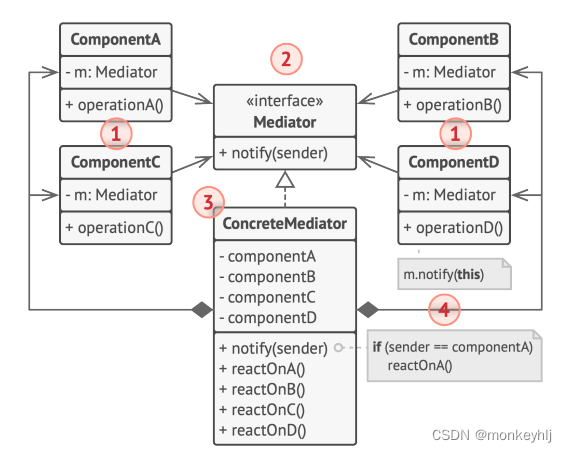
备忘录
备忘录是一种行为设计模式,允许在不暴露对象实现细节的情况下保存和恢复对象之前的状态。
![[外链图片转存失败,源站可能有防盗链机制,建议将图片保存下来直接上传(img-Ovmi05th-1663506844533)(.\pics\image-20220918203847689.png)]](https://1000bd.com/contentImg/2023/11/07/223253445.png)
访问者
访问者是一种行为设计模式,它能将算法与其所作用的对象隔离开来。
new File(log_filename); this.message = message; } @Override public void update(String filename) { log.write(filename+message); } } public class EmailAlertsListener implements EventListener{ File log; String message; public EmailAlertsListener(String log_filename,String message) { this.log = new File(log_filename); this.message = message; } @Override public void update(String filename) { log.write(filename+message); } } public class File { String path; String name; public File(String path){ this.path = path; } public void write(String name){ this.name = name; } }- 1
- 2
- 3
- 4
- 5
- 6
- 7
- 8
- 9
- 10
- 11
- 12
- 13
- 14
- 15
- 16
- 17
- 18
- 19
- 20
- 21
- 22
- 23
- 24
- 25
- 26
- 27
- 28
- 29
- 30
- 31
- 32
- 33
- 34
- 35
-
相关阅读:
AI绘画工具汇总
openpnp - 程序发布包的制作
服务器技术有哪些?
使用目标之间的先验关系提升目标检测器性能
leetcode 刷题 log day 50(继续股票专题
【声明】关于检索SogK1997而找到诸多网页爬虫结果这件事
嵌入式开源库之libmodbus学习笔记
【每日一题】寻找重复数
P36 JFileChooser文件选择器
正则表达式
- 原文地址:https://blog.csdn.net/hhhmonkey/article/details/126923273
