-
【docker】docker搭建nginx的ssl模块
一、前期准备
首先安装好docker-ce服务,以及安装docker-compose。步骤参考之前博客,
二、搭建docker-compose
1、编写dockerfile文件
mkdir -p /opt/compose_nginx/nginx vim Dockerfile FROM centos:7 RUN yum -y install pcre-devel zlib-devel gcc gcc-c++ make openssl openssl-devel RUN useradd -M -s /sbin/nologin nginx ADD nginx-1.12.2.tar.gz /opt WORKDIR /opt/nginx-1.12.2 RUN ./configure \ --prefix=/usr/local/nginx \ --user=nginx \ --group=nginx \ --with-http_stub_status_module \ --with-http_ssl_module RUN make -j 4 && make install RUN ln -s /usr/local/nginx/sbin/nginx /usr/local/sbin EXPOSE 80 EXPOSE 443 RUN mkdir -p /home/nginx/zhengshu ADD server.crt /home/nginx/zhengshu ADD server.csr /home/nginx/zhengshu ADD server.key /home/nginx/zhengshu ADD nginx.conf /usr/local/nginx/conf/ RUN echo "daemon off;" >> /usr/local/nginx/conf/nginx.conf CMD ["/usr/local/nginx/sbin/nginx"]- 1
- 2
- 3
- 4
- 5
- 6
- 7
- 8
- 9
- 10
- 11
- 12
- 13
- 14
- 15
- 16
- 17
- 18
- 19
- 20
- 21
- 22
- 23
- 24
- 25
- 26
- 27

2、准备nginx.conf文件
nginx.conf文件可以在别的服务器上安装好nginx然后使用scp传输到本机,进行修改指定内容 vim /opt/compose_nginx/nginx/nginx.conf server { listen 443 ssl; server_name localhost; #charset koi8-r; #access_log logs/host.access.log main; ssl_certificate /home/nginx/zhengshu/server.crt; ssl_certificate_key /home/nginx/zhengshu/server.key; ssl_session_timeout 5m; ssl_protocols TLSv1 TLSv1.1 TLSv1.2; ssl_ciphers ECDHE-RSA-AES128-GCM-SHA256:HIGH:!aNULL:!MD5:!RC4:DHE; ssl_prefer_server_ciphers on; error_page 497 301 https://$host$request_uri; }- 1
- 2
- 3
- 4
- 5
- 6
- 7
- 8
- 9
- 10
- 11
- 12
- 13
- 14
- 15
- 16
- 17
- 18
- 19
- 20

3、准备CA证书
在其它主机或本地主机上进行生成证书,然后将证书文件,拷贝到指定目录
openssl genrsa -des3 -out server.key 2048 #生成私钥 openssl rsa -in server.key -out server.key #删除私钥密码(需要删除,不然后面访问不了) openssl req -new -key server.key -out server.csr #生成CSR证书(拿CSR证书和key私钥可以生成CA证书) openssl x509 -req -days 365 -in server.csr -signkey server.key -out server.crt #生成CA证书- 1
- 2
- 3
- 4
- 5
- 6
- 7
- 8
- 9
- 10
- 11

将这三个文件拷贝到/opt/compose_nginx/nginx/目录下

4、准备页面文件内容
mkdir /opt/compose_nginx/wwwroot echo "this is ssl nginx module" > /opt/compose_nginx/wwwroot=- 1
- 2

5、编写docker-compose.yml文件
vim /opt/compose_nginx/docker-compose.yml version: '3' services: nginx: hostname: nginx build: context: ./nginx dockerfile: Dockerfile ports: - 80:80 - 443:443 networks: compose_ngin_ydq: ipv4_address: 172.100.0.20 volumes: - ./wwwroot:/usr/local/nginx/html networks: compose_ngin_ydq: external: true- 1
- 2
- 3
- 4
- 5
- 6
- 7
- 8
- 9
- 10
- 11
- 12
- 13
- 14
- 15
- 16
- 17
- 18
- 19
- 20
- 21

6、查看所有的文件目录

7、生成镜像容器
cd /opt/compose_nginx docker-compose -f docker-compose.yml up -d- 1
- 2

8、查看容器是否生成
docker ps -a- 1

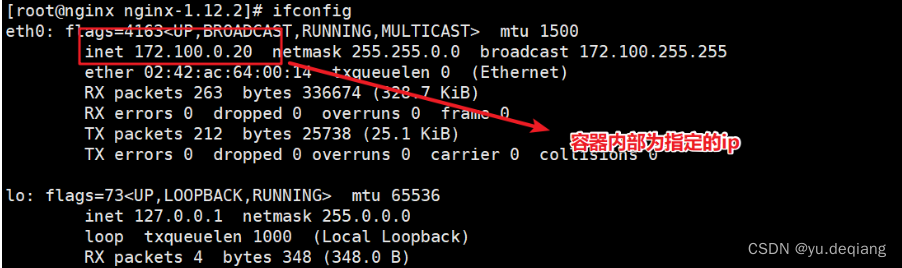
9、查看容器ip地址
docker exec -it 04eb83a8de5b bash yum -y install net-tools ifconfig- 1
- 2
- 3
三、网页访问验证
https://20.0.0.55- 1

-
相关阅读:
typescript辅助技术
Java锁常见面试题
Rook Ceph浅谈
Ajax跨域问题
二叉树的存储结构
一:图形的位置和尺寸测量
English语法_介词 - at
基于LDABPSO算法的烟叶复烤配方关联特征挖掘
Databend 在 MinIO 环境使用copy 命令 | 新手篇(3)
【Git】什么是Git以及码云代码托管服务
- 原文地址:https://blog.csdn.net/m0_57515995/article/details/126922196
