-
谷粒商城--整合Elasticsearch和商品的上架
整合Elasticsearch和商品的上架
一、整合ES
ES常用概念
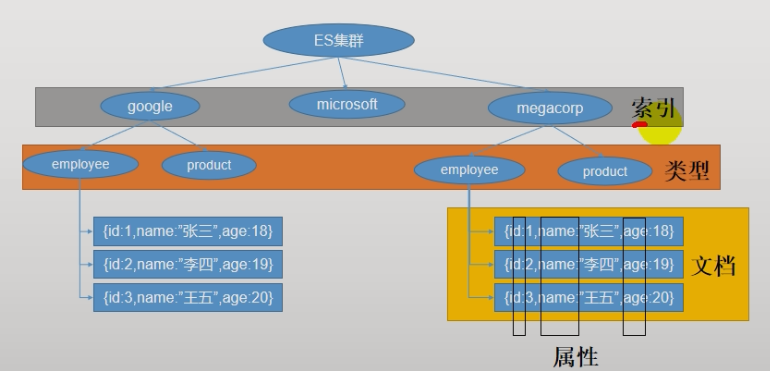
索引,类型,文档是什么?
- 索引就像是Mysql中的库
- 类型就像是Mysql中的表
- 文档就像是数据
- 属性就是列名
- 所有的数据都是Json格式
倒排索引
简约理解版本2.0
正向索引,数据库创建索引,增加搜索速度。
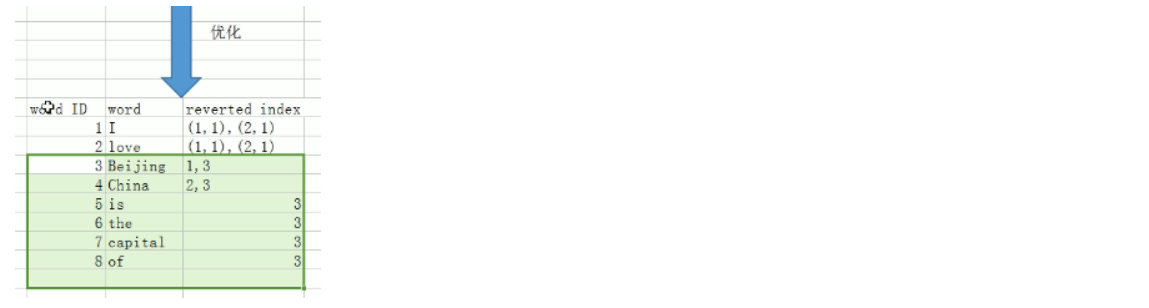
倒排索引是根据关键字去找文档,然后记录一下出现的位置和次数。根据关键字去找文档,然后记录一下出现的位置和次数

什么是倒排索引?
ElasticSearch中一个重要的概念 :
倒排索引(Inverted Index)也叫反向索引,有反向索引必有正向索引。通俗地来讲,正向索引是通过key找value,反向索引则是通过value找key。
首先弄懂几个概念,如果类比现代汉语词典的话,那么
Term就相当于词语,Term Dictionary相当于汉语词典本身,Term Index相当于词典的目录索引,Posting List相当于词语在字典的页数集合:- Term(单词):一段文本经过分析器分析以后就会输出一串单词,这一个一个的就叫做Term(直译为:单词)
- Term Dictionary(单词字典):顾名思义,它里面维护的是Term,可以理解为Term的集合
- Term Index(单词索引):为了更快的找到某个单词,我们为单词建立索引。B-Tree通过减少磁盘寻道次数来提高查询性能,
- Elasticsearch也是采用同样的思路,直接通过内存查找term,不读磁盘,但是如果term太多,term dictionary也会很大,放内存不现实,于是有了Term Index,就像字典里的索引页一样,A开头的有哪些term,分别在哪页,可以理解term index是一颗树:
- Posting List(倒排列表):倒排列表记录了出现过某个单词的所有文档的文档列表及单词在该文档中出现的位置信息,每条记录称为一个倒排项(Posting)。根据倒排列表,即可获知哪些文档包含某个单词。(PS:实际的倒排列表中并不只是存了文档ID这么简单,还有一些其它的信息,比如:词频(Term出现的次数)、偏移量(offset)等,可以想象成是Python中的元组,或者Java中的对象)
相关度分数score的计算

ES工作原理还是很复杂的,现阶段我们学会使用即可,到后期准备面试了,在继续深入学习!
安装ES和Kibana
快速安装
(1)下载ealastic search(存储和检索)和kibana(可视化检索) docker pull elasticsearch:7.4.2 docker pull kibana:7.4.2 (2)配置 # 将docker里的目录挂载到linux的/mydata目录中 # 修改/mydata就可以改掉docker里的 mkdir -p /mydata/elasticsearch/config mkdir -p /mydata/elasticsearch/data # es可以被远程任何机器访问 echo "http.host: 0.0.0.0" >/mydata/elasticsearch/config/elasticsearch.yml # 递归更改权限,es需要访问 chmod -R 777 /mydata/elasticsearch/ (3)启动Elastic search # 9200是用户交互端口 9300是集群心跳端口 # -e指定是单阶段运行 # -e指定占用的内存大小,生产时可以设置32G docker run --name elasticsearch -p 9200:9200 -p 9300:9300 \ -e "discovery.type=single-node" \ -e ES_JAVA_OPTS="-Xms64m -Xmx512m" \ -v /mydata/elasticsearch/config/elasticsearch.yml:/usr/share/elasticsearch/config/elasticsearch.yml \ -v /mydata/elasticsearch/data:/usr/share/elasticsearch/data \ -v /mydata/elasticsearch/plugins:/usr/share/elasticsearch/plugins \ -d elasticsearch:7.4.2 # 设置开机启动elasticsearch docker update elasticsearch --restart=always (4)启动kibana: # kibana指定了了ES交互端口9200 # 5600位kibana主页端口 docker run --name kibana -e ELASTICSEARCH_HOSTS=http://192.168.1.8:9200 -p 5601:5601 -d kibana:7.4.2 # 设置开机启动kibana docker update kibana --restart=always- 1
- 2
- 3
- 4
- 5
- 6
- 7
- 8
- 9
- 10
- 11
- 12
- 13
- 14
- 15
- 16
- 17
- 18
- 19
- 20
- 21
- 22
- 23
- 24
- 25
- 26
- 27
- 28
- 29
- 30
- 31
- 32
- 33
- 34
- 35
- 36
- 37
- 38
- 39
ES
查看elasticsearch版本信息: http://192.168.1.8:9200

kibana
访问Kibana: http://192.168.1.8:5601/app/kibana

初步检索_cat

GET /_cat/nodes 查看所有节点。集群中会用到 GET /_cat/health 查看es健康状况 GET /_cat/master 查看主节点 GET /_cat/indices 查看所有索引 ,等价于mysql数据库的show databases;- 1
- 2
- 3
- 4
- 5
- 6
- 7
- 8
- 9
- 10
- 11
ES的增删改查
新增文档
put新增
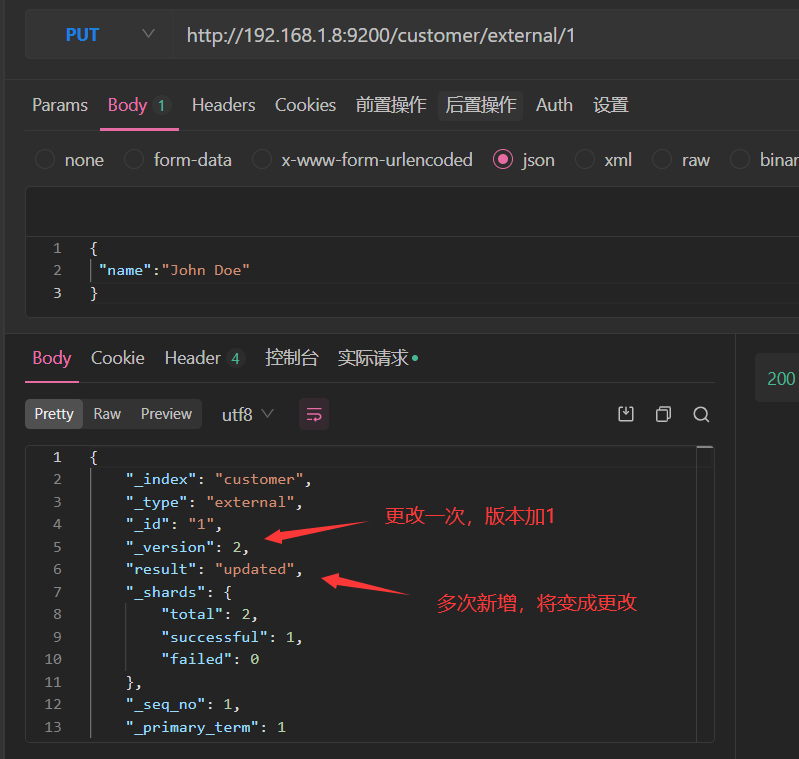
新增文档也就是新增数据库中的表,保存的时候用唯一的标识指定
http://192.168.1.8:9200/customer/external/1
post新增
不带id

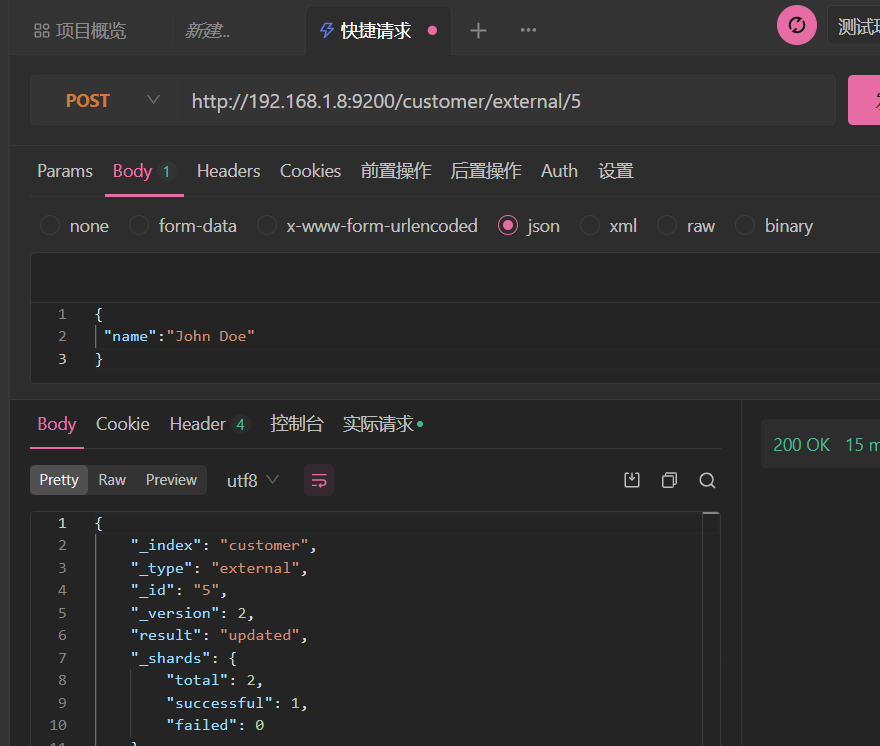
带上id,也是新增修改二合一
区别
PUT必须指定id;由于PUT需要指定id,我们一般用来做修改操作
POST新增。如果
不指定id,会自动生成id,指定存在的id为更新查询文档

GET /customer/external/1
乐观锁的使用
通过“
if_seq_no=1&if_primary_term=1”,当序列号匹配的时候,才进行修改,否则不修改。开启事务锁后,两个事务并行修改数据的时候,只要有一个事务修改完数据,记录中记录的版本号就会加1,另一个事务修改的时候会带上版本号判断,如果版本号发生了变化了那就不会进行修改
更新文档_update
POST customer/externel/1/_update { "doc":{ "name":"111" } } 或者 POST customer/externel/1 { "doc":{ "name":"222" } }- 1
- 2
- 3
- 4
- 5
- 6
- 7
- 8
- 9
- 10
- 11
- 12
- 13
不同:带有update情况下
- POST操作会对比源文档数据,如果相同不会有什么操作,文档version不增加。(带乐观锁)
- PUT操作总会重新保存并增加version版本(不带)
删除文档或索引
DELETE customer/external/1 DELETE customer- 1
- 2
注:elasticsearch并没有提供删除类型的操作,只提供了删除索引和文档的操作。
ES的批量操作_bulk
执行多条数据
这些数据之间是相互独立的,一条失败,不会影响其他数据
kibana中执行 POST /customer/external/_bulk {"index":{"_id":"1"}} {"name":"John Doe"} {"index":{"_id":"2"}} {"name":"John Doe"} #! Deprecation: [types removal] Specifying types in bulk requests is deprecated. { "took" : 20, "errors" : false, "items" : [ { "index" : { "_index" : "customer", "_type" : "external", "_id" : "1", "_version" : 5, "result" : "updated", "_shards" : { "total" : 2, "successful" : 1, "failed" : 0 }, "_seq_no" : 10, "_primary_term" : 1, "status" : 200 } }, { "index" : { "_index" : "customer", "_type" : "external", "_id" : "2", "_version" : 1, "result" : "created", "_shards" : { "total" : 2, "successful" : 1, "failed" : 0 }, "_seq_no" : 11, "_primary_term" : 1, "status" : 201 } } ] }- 1
- 2
- 3
- 4
- 5
- 6
- 7
- 8
- 9
- 10
- 11
- 12
- 13
- 14
- 15
- 16
- 17
- 18
- 19
- 20
- 21
- 22
- 23
- 24
- 25
- 26
- 27
- 28
- 29
- 30
- 31
- 32
- 33
- 34
- 35
- 36
- 37
- 38
- 39
- 40
- 41
- 42
- 43
- 44
- 45
- 46
- 47
- 48
- 49
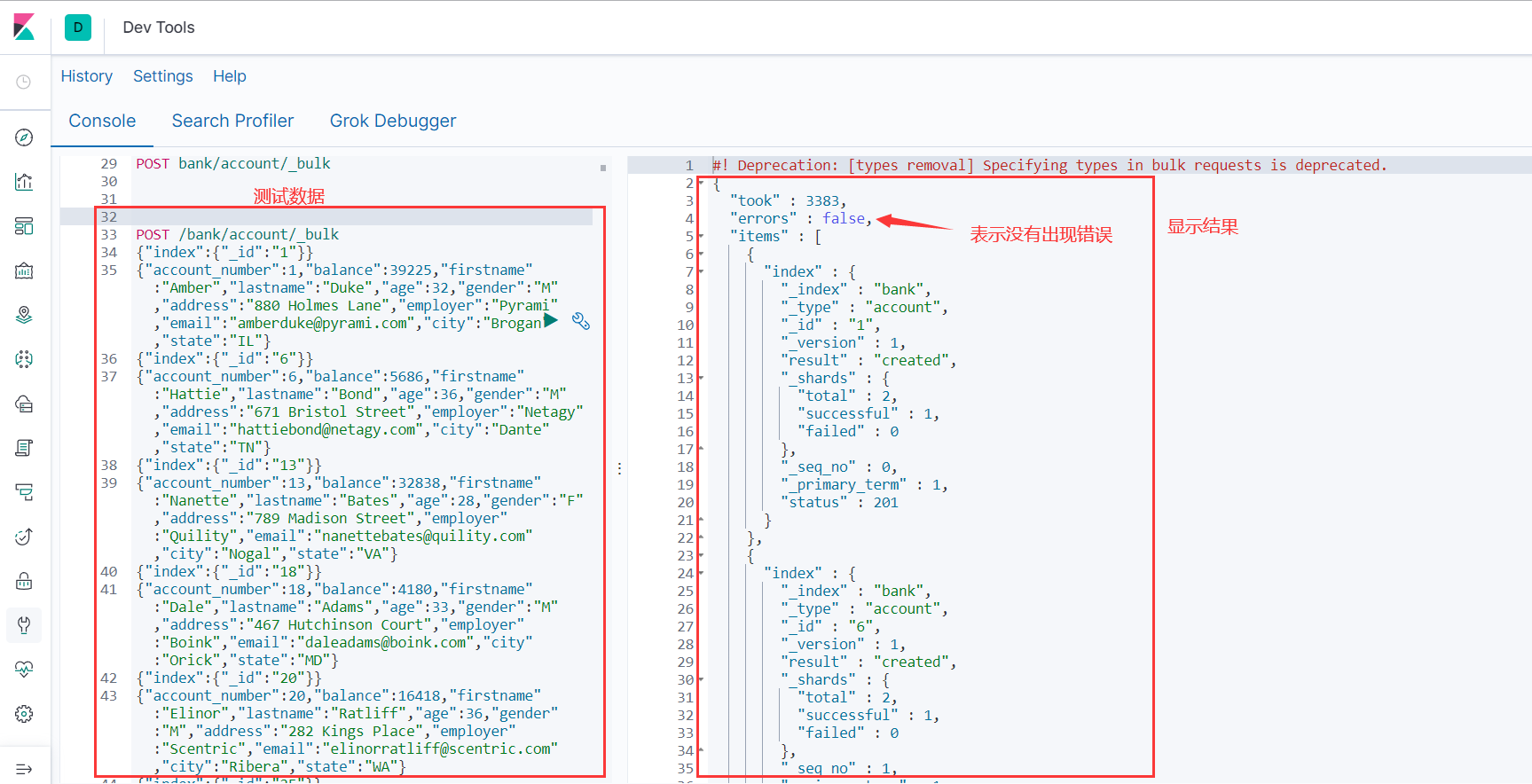
样本测试数据
https://gitee.com/xlh_blog/common_content/blob/master/es%E6%B5%8B%E8%AF%95%E6%95%B0%E6%8D%AE.json#

ES进阶
https://www.elastic.co/guide/en/elasticsearch/reference/7.6/docs-reindex.html
官方文档如下:
如下示例看着文档就可以写出来。
两种查询方式
ES支持两种基本方式检索;
- 通过REST request uri 发送搜索参数 (uri +检索参数);
- 通过REST request body 来发送它们(uri+请求体);
测试如下:
GET bank/_search/?q=*&sort=account_number:asc 说明: q=* # 查询所有 sort # 排序字段 asc #升序 GET bank/_search { "query": { "match_all": {} }, "sort": [ { "account_number": "asc" } ] } 添加新的查询条件 GET bank/_search { "query": { "match_all": {} }, "sort": [ { "account_number": "asc" }, { "balance": "desc" } ] }- 1
- 2
- 3
- 4
- 5
- 6
- 7
- 8
- 9
- 10
- 11
- 12
- 13
- 14
- 15
- 16
- 17
- 18
- 19
- 20
- 21
- 22
- 23
- 24
- 25
- 26
- 27
- 28
- 29
- 30
- 31
- 32
QueryDSL
QueryDSL就是我们第二种查询方式中请求体的内容
它的格式如下:
如果针对于某个字段,那么它的结构如下: { QUERY_NAME:{ # 使用的功能 FIELD_NAME:{ # 功能参数 ARGUMENT:VALUE, ARGUMENT:VALUE,... } } } GET bank/_search { "query": { # 查询的字段 "match_all": {} }, "from": 0, # 从第几条文档开始查 "size": 5, "_source":["balance"], #_source为要返回的字段 "sort": [ { "account_number": { # 返回结果按哪个列排序 "order": "desc" # 降序 } } ] }- 1
- 2
- 3
- 4
- 5
- 6
- 7
- 8
- 9
- 10
- 11
- 12
- 13
- 14
- 15
- 16
- 17
- 18
- 19
- 20
- 21
- 22
- 23
- 24
- 25
- 26
常用查询
match全文检索
GET bank/_search { "query": { "match": { "account_number": "20" } } } #字符串 GET bank/_search { "query": { "match": { "address": "kings" } } }- 1
- 2
- 3
- 4
- 5
- 6
- 7
- 8
- 9
- 10
- 11
- 12
- 13
- 14
- 15
- 16
- 17
- 18
match_phrase短语匹配
规则如下:
# 精准匹配, 不拆分字符串进行检索 # match_phrase:不拆分字符串进行检索 # 字段.keyword:必须全匹配上才检索成功 GET bank/_search { "query": { "match_phrase": { "address": "mill road" } } } GET bank/_search { "query": { "match": { "address.keyword": "990 Mill" } } }- 1
- 2
- 3
- 4
- 5
- 6
- 7
- 8
- 9
- 10
- 11
- 12
- 13
- 14
- 15
- 16
- 17
- 18
- 19
- 20
query/bool/must复合查询
# must:必须达到must所列举的所有条件 GET bank/_search { "query":{ "bool":{ "must":[ {"match":{"address":"mill"}}, {"match":{"gender":"M"}} ] } } } # must_not:必须不匹配must_not所列举的所有条件。 GET bank/_search { "query": { "bool": { "must": [ { "match": { "gender": "M" } }, { "match": { "address": "mill" } } ], "must_not": [ { "match": { "age": "38" } } ] } } } # should:应该达到should列举的条件,如果到达会增加相关文档的评分,并不会改变查询的结果。如果query中只有should且只有一种匹配规则,那么should的条件就会被作为默认匹配条件二区改变查询结果。 GET bank/_search { "query": { "bool": { "must": [ { "match": { "gender": "M" } }, { "match": { "address": "mill" } } ], "must_not": [ { "match": { "age": "18" } } ], "should": [ { "match": { "lastname": "Wallace" } } ] } } }- 1
- 2
- 3
- 4
- 5
- 6
- 7
- 8
- 9
- 10
- 11
- 12
- 13
- 14
- 15
- 16
- 17
- 18
- 19
- 20
- 21
- 22
- 23
- 24
- 25
- 26
- 27
- 28
- 29
- 30
- 31
- 32
- 33
- 34
- 35
- 36
- 37
- 38
- 39
- 40
- 41
- 42
- 43
- 44
- 45
- 46
- 47
- 48
- 49
- 50
- 51
- 52
- 53
- 54
- 55
- 56
- 57
- 58
- 59
- 60
- 61
- 62
- 63
- 64
- 65
- 66
- 67
- 68
- 69
- 70
- 71
- 72
- 73
- 74
- 75
- 76

能够看到相关度越高,得分也越高。
query/filter【结果过滤】
- must 贡献得分
- should 贡献得分
- must_not 不贡献得分
- filter 不贡献得分
匹配的越多,得分越高!只有must和should影响相关性得分
GET bank/_search { "query": { "bool": { "must": [ { "match": {"address": "mill" } } ], "filter": { "range": { "balance": { "gte": "10000", "lte": "20000" } } } } } } #这条是不会显示结果的,结果都是0 GET bank/_search { "query": { "bool": { "filter": { "range": { "balance": { "gte": "10000", "lte": "20000" } } } } } }- 1
- 2
- 3
- 4
- 5
- 6
- 7
- 8
- 9
- 10
- 11
- 12
- 13
- 14
- 15
- 16
- 17
- 18
- 19
- 20
- 21
- 22
- 23
- 24
- 25
- 26
- 27
- 28
- 29
- 30
- 31
- 32
- 33
- 34
- 35
- 36
- 37
query/term
# 全文检索字段用match,其他非text字段匹配用term。 GET bank/_search { "query": { "term": { "address": "mill Road" } } }- 1
- 2
- 3
- 4
- 5
- 6
- 7
- 8
- 9
aggs/agg1(聚合)
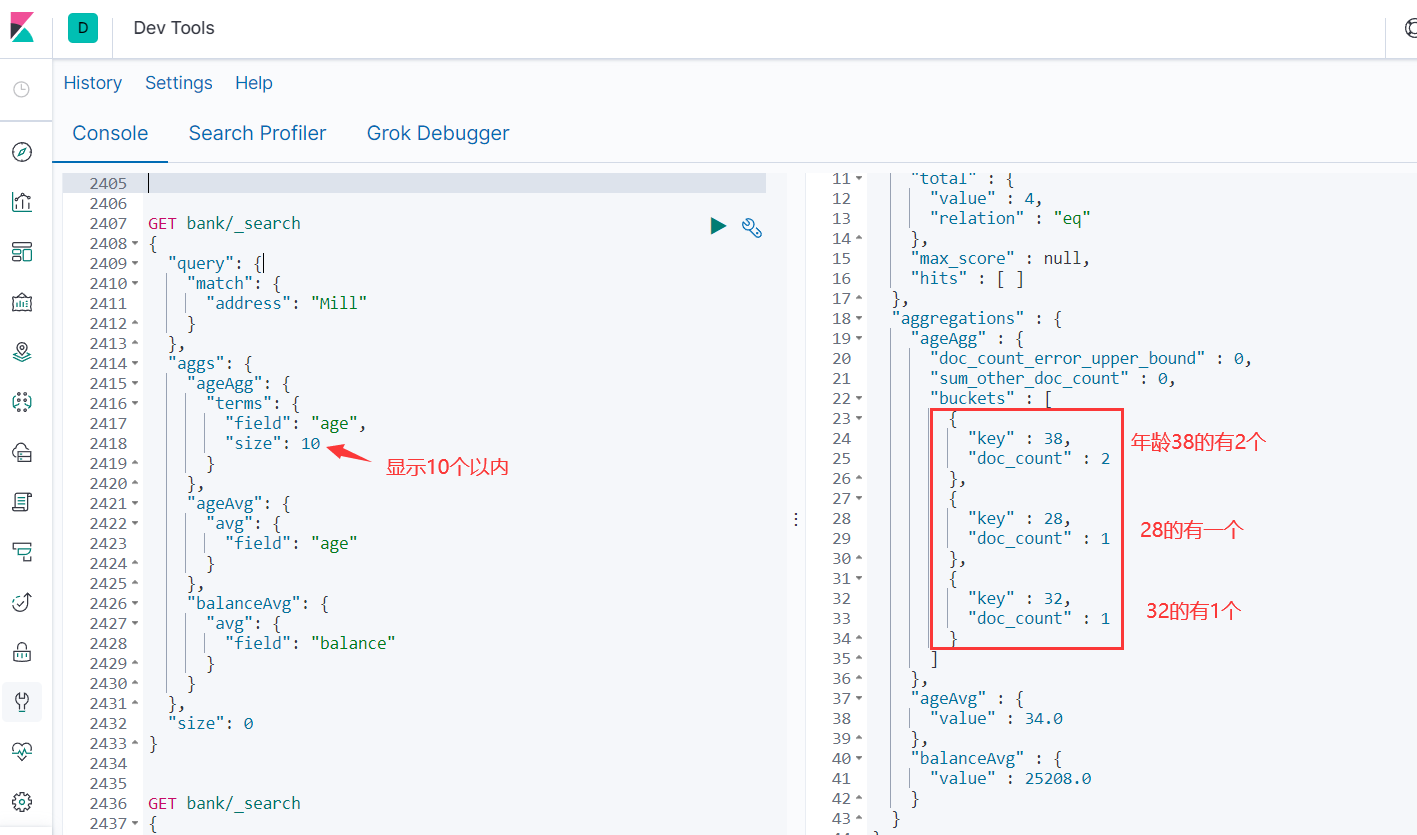
# 聚合查询就是查一点这个,查一点哪个,不是单一的查询 GET bank/_search { "query": { "match": { "address": "Mill" } }, "aggs": { "ageAgg": { "terms": { "field": "age", "size": 10 } }, "ageAvg": { "avg": { "field": "age" } }, "balanceAvg": { "avg": { "field": "balance" } } }, "size": 0 }- 1
- 2
- 3
- 4
- 5
- 6
- 7
- 8
- 9
- 10
- 11
- 12
- 13
- 14
- 15
- 16
- 17
- 18
- 19
- 20
- 21
- 22
- 23
- 24
- 25
- 26
- 27
- 28
nested对象聚合
GET articles/_search { "size": 0, "aggs": { "nested": { # "nested": { # "path": "payment" }, "aggs": { "amount_avg": { "avg": { "field": "payment.amount" } } } } } }- 1
- 2
- 3
- 4
- 5
- 6
- 7
- 8
- 9
- 10
- 11
- 12
- 13
- 14
- 15
- 16
- 17
- 18
Mapping字段映射
映射定义文档如何被存储和检索的
Mapping映射是用来定义一个文档(document),以及它所包含的属性(field)是如何存储和索引的。比如:使用mapping来定义:
当然对于已经存在的字段进行映射的时候,我们不能进行更新。更新必须创建新的索引才行
# 创建索引的时候去指定 PUT /my_index { "mappings": { "properties": { "age": { "type": "integer" }, "email": { "type": "keyword" }, "name": { "type": "text" } } } }- 1
- 2
- 3
- 4
- 5
- 6
- 7
- 8
- 9
- 10
- 11
- 12
- 13
- 14
- 15
- 16
- 17
- 18
- 19
- 20
更新索引
对于已经存在的字段映射,我们不能更新。更新必须创建新的索引,进行数据迁移。
添加新的字段映射`PUT /my_index/_mapping` PUT /my_index/_mapping { "properties": { "employee-id": { "type": "keyword", "index": false # 字段不能被检索。检索 } } }- 1
- 2
- 3
- 4
- 5
- 6
- 7
- 8
- 9
- 10
数据迁移
POST _reindex { "source": { "index": "bank", "type": "account" }, "dest": { "index": "newbank" } } GET /newbank/_search- 1
- 2
- 3
- 4
- 5
- 6
- 7
- 8
- 9
- 10
- 11
- 12
分词
ES中的分词就是能接收一个字符流,将之分割为独立的token(词元,通常是独立的单词),然后输入tokens流
简单来说,ES解析你的输入,是一个一个字的去读取
如下:

使用分词器
关于分词器: https://www.elastic.co/guide/en/elasticsearch/reference/7.6/analysis.html
对于中文,我们需要安装额外的分词器
下载地址:
https://github.com/medcl/elasticsearch-analysis-ik/releases
将上面下载的插件,放到es的plugs文件夹下
[root@localhost plugins]# pwd /mydata/elasticsearch/plugins/- 1
- 2
重启ES,测试分词器是否安装成功
GET _analyze { "text":"我是中国人" }- 1
- 2
- 3
- 4
如果可以解析中文成功,证明安装成功

调整虚拟机内存为3G
自定义词库
上面ES虽然能识别中文了,但是也是一个一个字识别的,我们想让它按我们的规矩来的话,我们需要自定义一下
默认es是不支持一些新的词语,它的词库里组合是很不规律的
那么我们可以自定义扩展一下这个词库!怎么扩展呢?
安装Nginx
将分词内容放到nginx服务器当中
随便启动一个Nginx,目的是单纯为了复制配置文件 docker run -p 80:80 --name nginx -d nginx:1.10 docker container cp nginx:/etc/nginx . mv nginx/ conf mv conf/ /mydata/nginx docker rm -f nginx 结构如下: [root@localhost mydata]# cd nginx/ [root@localhost nginx]# ls conf [root@localhost nginx]# cd conf/ [root@localhost conf]# ls conf.d fastcgi_params html koi-utf koi-win logs mime.types modules nginx.conf scgi_params uwsgi_params win-utf docker run -p 80:80 --name nginx \ -v /mydata/nginx/html:/usr/share/nginx/html \ -v /mydata/nginx/logs:/var/log/nginx \ -v /mydata/nginx/conf:/etc/nginx \ -d nginx:1.10 mkdir /mydata/nginx/html/es [root@localhost ~]# cat /mydata/nginx/html/es/fenci.txt 彭于晏 杜兰特- 1
- 2
- 3
- 4
- 5
- 6
- 7
- 8
- 9
- 10
- 11
- 12
- 13
- 14
- 15
- 16
- 17
- 18
- 19
- 20
- 21
- 22
- 23
- 24
- 25
- 26
修改ESIKAnalyzer.cfg.xml
[root@localhost config]# cat IKAnalyzer.cfg.xml CTYPE properties SYSTEM "http://java.sun.com/dtd/properties.dtd"> <properties> <comment>IK Analyzer 扩展配置</comment> <!--用户可以在这里配置自己的扩展字典 --> <entry key="ext_dict"></entry> <!--用户可以在这里配置自己的扩展停止词字典--> <entry key="ext_stopwords"></entry> <!--用户可以在这里配置远程扩展字典 --> <entry key="remote_ext_dict">http://192.168.1.8/es/fenci.txt</entry> <!--用户可以在这里配置远程扩展停止词字典--> <!-- <entry key="remote_ext_stopwords">words_location</entry> --> </properties>- 1
- 2
- 3
- 4
- 5
- 6
- 7
- 8
- 9
- 10
- 11
- 12
- 13
修改完成后,需要重启es容器,否则修改不生效。
docker restart elasticsearch POST _analyze { "analyzer": "ik_max_word", "text":"我是彭于晏" }- 1
- 2
- 3
- 4
- 5
- 6
- 7

当然后面有新词的话,那就直接在es指定目录下继续添加新词即可
整合ElasticSearch
我们先来一个简单的写写试试
官方文档如下:
https://www.elastic.co/guide/en/elasticsearch/client/java-rest/current/java-rest-high-document-index.html配置类
固定写法,其中builder = RestClient.builder(new HttpHost(“192.168.1.8”, 9200, “http”));如果有ES集群的话可以用来指定多个ES主机地址
@Configuration public class EsConfig { public static final RequestOptions COMMON_OPTIONS; static { RequestOptions.Builder builder = RequestOptions.DEFAULT.toBuilder(); COMMON_OPTIONS = builder.build(); } /** * 主要是给容器中注入一个RestHighLevelClient * @return */ @Bean public RestHighLevelClient esRestClient() { RestClientBuilder builder = null; // 可以指定多个es builder = RestClient.builder(new HttpHost("192.168.1.8", 9200, "http")); RestHighLevelClient client = new RestHighLevelClient(builder); return client; } }- 1
- 2
- 3
- 4
- 5
- 6
- 7
- 8
- 9
- 10
- 11
- 12
- 13
- 14
- 15
- 16
- 17
- 18
- 19
- 20
- 21
- 22
- 23
- 24
- 25
测试类
保存数据
测试的时候要在启动类上排除数据库
@SpringBootApplication(exclude = {DataSourceAutoConfiguration.class})


@SpringBootTest class MallSearchApplicationTests { @Resource private RestHighLevelClient client; @Test void contextLoads() { } @Test public void indexData() throws IOException { // 设置索引 IndexRequest indexRequest = new IndexRequest ("users"); indexRequest.id("1"); User user = new User(); user.setUserName("张三"); user.setAge(20); user.setGender("男"); String jsonString = JSON.toJSONString(user); //设置要保存的内容,指定数据和类型 indexRequest.source(jsonString, XContentType.JSON); //执行创建索引和保存数据 IndexResponse index = client.index(indexRequest, EsConfig.COMMON_OPTIONS); System.out.println(index); }- 1
- 2
- 3
- 4
- 5
- 6
- 7
- 8
- 9
- 10
- 11
- 12
- 13
- 14
- 15
- 16
- 17
- 18
- 19
- 20
- 21
- 22
- 23
- 24
- 25
- 26
- 27
- 28
- 29
- 30
- 31
- 32

简单的检索
@Test public void find() throws IOException { // 1 创建检索请求 SearchRequest searchRequest = new SearchRequest(); searchRequest.indices("bank"); SearchSourceBuilder sourceBuilder = new SearchSourceBuilder(); sourceBuilder.query(QueryBuilders.matchQuery("address","mill")); // 可以加多个检索条件 // sourceBuilder.query(QueryBuilders.matchQuery("address","mill")); // sourceBuilder.query(QueryBuilders.matchQuery("address","mill")); System.out.println(sourceBuilder.toString()); searchRequest.source(sourceBuilder); // 2 执行检索 SearchResponse response = client.search(searchRequest, EsConfig.COMMON_OPTIONS); // 3 分析响应结果 System.out.println(response.toString()); }- 1
- 2
- 3
- 4
- 5
- 6
- 7
- 8
- 9
- 10
- 11
- 12
- 13
- 14
- 15
- 16
- 17
- 18
{"query":{"match":{"address":{"query":"mill","operator":"OR","prefix_length":0,"max_expansions":50,"fuzzy_transpositions":true,"lenient":false,"zero_terms_query":"NONE","auto_generate_synonyms_phrase_query":true,"boost":1.0}}}} {"took":10,"timed_out":false,"_shards":{"total":1,"successful":1,"skipped":0,"failed":0},"hits":{"total":{"value":4,"relation":"eq"},"max_score":5.4032025,"hits":[{"_index":"bank","_type":"account","_id":"970","_score":5.4032025,"_source":{"account_number":970,"balance":19648,"firstname":"Forbes","lastname":"Wallace","age":28,"gender":"M","address":"990 Mill Road","employer":"Pheast","email":"forbeswallace@pheast.com","city":"Lopezo","state":"AK"}},{"_index":"bank","_type":"account","_id":"136","_score":5.4032025,"_source":{"account_number":136,"balance":45801,"firstname":"Winnie","lastname":"Holland","age":38,"gender":"M","address":"198 Mill Lane","employer":"Neteria","email":"winnieholland@neteria.com","city":"Urie","state":"IL"}},{"_index":"bank","_type":"account","_id":"345","_score":5.4032025,"_source":{"account_number":345,"balance":9812,"firstname":"Parker","lastname":"Hines","age":38,"gender":"M","address":"715 Mill Avenue","employer":"Baluba","email":"parkerhines@baluba.com","city":"Blackgum","state":"KY"}},{"_index":"bank","_type":"account","_id":"472","_score":5.4032025,"_source":{"account_number":472,"balance":25571,"firstname":"Lee","lastname":"Long","age":32,"gender":"F","address":"288 Mill Street","employer":"Comverges","email":"leelong@comverges.com","city":"Movico","state":"MT"}}]}}- 1
- 2
- 3
复杂的查询
/** * 复杂检索:在bank中搜索address中包含mill的所有人的年龄分布以及平均年龄,平均薪资 * * @throws IOException */ @Test public void searchData() throws IOException { //1. 创建检索请求 SearchRequest searchRequest = new SearchRequest(); //1.1)指定索引 searchRequest.indices("bank"); //1.2)构造检索条件 SearchSourceBuilder sourceBuilder = new SearchSourceBuilder(); sourceBuilder.query(QueryBuilders.matchQuery("address", "Mill")); //1.2.1)按照年龄分布进行聚合 TermsAggregationBuilder ageAgg = AggregationBuilders.terms("ageAgg").field("age").size(10); sourceBuilder.aggregation(ageAgg); //1.2.2)计算平均年龄 AvgAggregationBuilder ageAvg = AggregationBuilders.avg("ageAvg").field("age"); sourceBuilder.aggregation(ageAvg); //1.2.3)计算平均薪资 AvgAggregationBuilder balanceAvg = AggregationBuilders.avg("balanceAvg").field("balance"); sourceBuilder.aggregation(balanceAvg); System.out.println("检索条件:" + sourceBuilder); searchRequest.source(sourceBuilder); //2. 执行检索 SearchResponse searchResponse = client.search(searchRequest, RequestOptions.DEFAULT); System.out.println("检索结果:" + searchResponse); //3. 将检索结果封装为Bean SearchHits hits = searchResponse.getHits(); SearchHit[] searchHits = hits.getHits(); for (SearchHit searchHit : searchHits) { String sourceAsString = searchHit.getSourceAsString(); Account account = JSON.parseObject(sourceAsString, Account.class); System.out.println(account); } //4. 获取聚合信息 Aggregations aggregations = searchResponse.getAggregations(); Terms ageAgg1 = aggregations.get("ageAgg"); for (Terms.Bucket bucket : ageAgg1.getBuckets()) { String keyAsString = bucket.getKeyAsString(); System.out.println("年龄:" + keyAsString + " ==> " + bucket.getDocCount()); } Avg ageAvg1 = aggregations.get("ageAvg"); System.out.println("平均年龄:" + ageAvg1.getValue()); Avg balanceAvg1 = aggregations.get("balanceAvg"); System.out.println("平均薪资:" + balanceAvg1.getValue()); }- 1
- 2
- 3
- 4
- 5
- 6
- 7
- 8
- 9
- 10
- 11
- 12
- 13
- 14
- 15
- 16
- 17
- 18
- 19
- 20
- 21
- 22
- 23
- 24
- 25
- 26
- 27
- 28
- 29
- 30
- 31
- 32
- 33
- 34
- 35
- 36
- 37
- 38
- 39
- 40
- 41
- 42
- 43
- 44
- 45
- 46
- 47
- 48
- 49
- 50
- 51
- 52
- 53
- 54
- 55
- 56
- 57
- 58
- 59
执行结果如下:
检索条件:{"query":{"match":{"address":{"query":"Mill","operator":"OR","prefix_length":0,"max_expansions":50,"fuzzy_transpositions":true,"lenient":false,"zero_terms_query":"NONE","auto_generate_synonyms_phrase_query":true,"boost":1.0}}},"aggregations":{"ageAgg":{"terms":{"field":"age","size":10,"min_doc_count":1,"shard_min_doc_count":0,"show_term_doc_count_error":false,"order":[{"_count":"desc"},{"_key":"asc"}]}},"ageAvg":{"avg":{"field":"age"}},"balanceAvg":{"avg":{"field":"balance"}}}} 检索结果:{"took":11,"timed_out":false,"_shards":{"total":1,"successful":1,"skipped":0,"failed":0},"hits":{"total":{"value":4,"relation":"eq"},"max_score":5.4032025,"hits":[{"_index":"bank","_type":"account","_id":"970","_score":5.4032025,"_source":{"account_number":970,"balance":19648,"firstname":"Forbes","lastname":"Wallace","age":28,"gender":"M","address":"990 Mill Road","employer":"Pheast","email":"forbeswallace@pheast.com","city":"Lopezo","state":"AK"}},{"_index":"bank","_type":"account","_id":"136","_score":5.4032025,"_source":{"account_number":136,"balance":45801,"firstname":"Winnie","lastname":"Holland","age":38,"gender":"M","address":"198 Mill Lane","employer":"Neteria","email":"winnieholland@neteria.com","city":"Urie","state":"IL"}},{"_index":"bank","_type":"account","_id":"345","_score":5.4032025,"_source":{"account_number":345,"balance":9812,"firstname":"Parker","lastname":"Hines","age":38,"gender":"M","address":"715 Mill Avenue","employer":"Baluba","email":"parkerhines@baluba.com","city":"Blackgum","state":"KY"}},{"_index":"bank","_type":"account","_id":"472","_score":5.4032025,"_source":{"account_number":472,"balance":25571,"firstname":"Lee","lastname":"Long","age":32,"gender":"F","address":"288 Mill Street","employer":"Comverges","email":"leelong@comverges.com","city":"Movico","state":"MT"}}]},"aggregations":{"lterms#ageAgg":{"doc_count_error_upper_bound":0,"sum_other_doc_count":0,"buckets":[{"key":38,"doc_count":2},{"key":28,"doc_count":1},{"key":32,"doc_count":1}]},"avg#ageAvg":{"value":34.0},"avg#balanceAvg":{"value":25208.0}}} MallSearchApplicationTests.Account(account_number=970, balance=19648, firstname=Forbes, lastname=Wallace, age=28, gender=M, address=990 Mill Road, employer=Pheast, email=forbeswallace@pheast.com, city=Lopezo, state=AK) MallSearchApplicationTests.Account(account_number=136, balance=45801, firstname=Winnie, lastname=Holland, age=38, gender=M, address=198 Mill Lane, employer=Neteria, email=winnieholland@neteria.com, city=Urie, state=IL) MallSearchApplicationTests.Account(account_number=345, balance=9812, firstname=Parker, lastname=Hines, age=38, gender=M, address=715 Mill Avenue, employer=Baluba, email=parkerhines@baluba.com, city=Blackgum, state=KY) MallSearchApplicationTests.Account(account_number=472, balance=25571, firstname=Lee, lastname=Long, age=32, gender=F, address=288 Mill Street, employer=Comverges, email=leelong@comverges.com, city=Movico, state=MT) 年龄:38 ==> 2 年龄:28 ==> 1 年龄:32 ==> 1 平均年龄:34.0 平均薪资:25208.0- 1
- 2
- 3
- 4
- 5
- 6
- 7
- 8
- 9
- 10
- 11
和我们Kibana显示的结果也对应上了
二、整合商品上架
需求:
- 在后台选择上架的商品才能在网站展示
- 上架的商品也可以被ES检索
sku在es中存储
商品上架在es中应该是存储spu
- 检索的时候输入名字,这样就是需要用sku的title去全文检索
- 检索使用商品规格,规格是spu的公共属性,每个spu是一样的
方案1:
缺点:如果每个sku都存储规格参数(如尺寸),会有冗余存储,因为每个spu对应的sku的规格参数都一样
{ skuId:1 spuId:11 skyTitile:华为xx price:999 saleCount:99 attr:[ {尺寸:5}, {CPU:高通945}, {分辨率:全高清} ] }- 1
- 2
- 3
- 4
- 5
- 6
- 7
- 8
- 9
- 10
- 11
- 12
方案2:
先找到4000个符合要求的spu,再根据4000个spu查询对应的属性,封装了4000个id,long 8B*4000=32000B=32KB
1K个人检索,就是32MBsku索引 { spuId:1 skuId:11 } attr索引 { skuId:11 attr:[ {尺寸:5}, {CPU:高通945}, {分辨率:全高清} ] }- 1
- 2
- 3
- 4
- 5
- 6
- 7
- 8
- 9
- 10
- 11
- 12
- 13
- 14
结论:如果将规格参数单独建立索引,会出现检索时出现大量数据传输的问题,会引起网络网络
所以我们选方案一,用空间换时间
最终选用的数据模型
{ “type”: “keyword” }, 保持数据精度问题,可以检索,但不分词
“analyzer”: “ik_smart” 中文分词器
“index”: false, 不可被检索,不生成index
“doc_values”: false 默认为true,不可被聚合,es就不会维护一些聚合的信息这个数据模型要先在es中建立
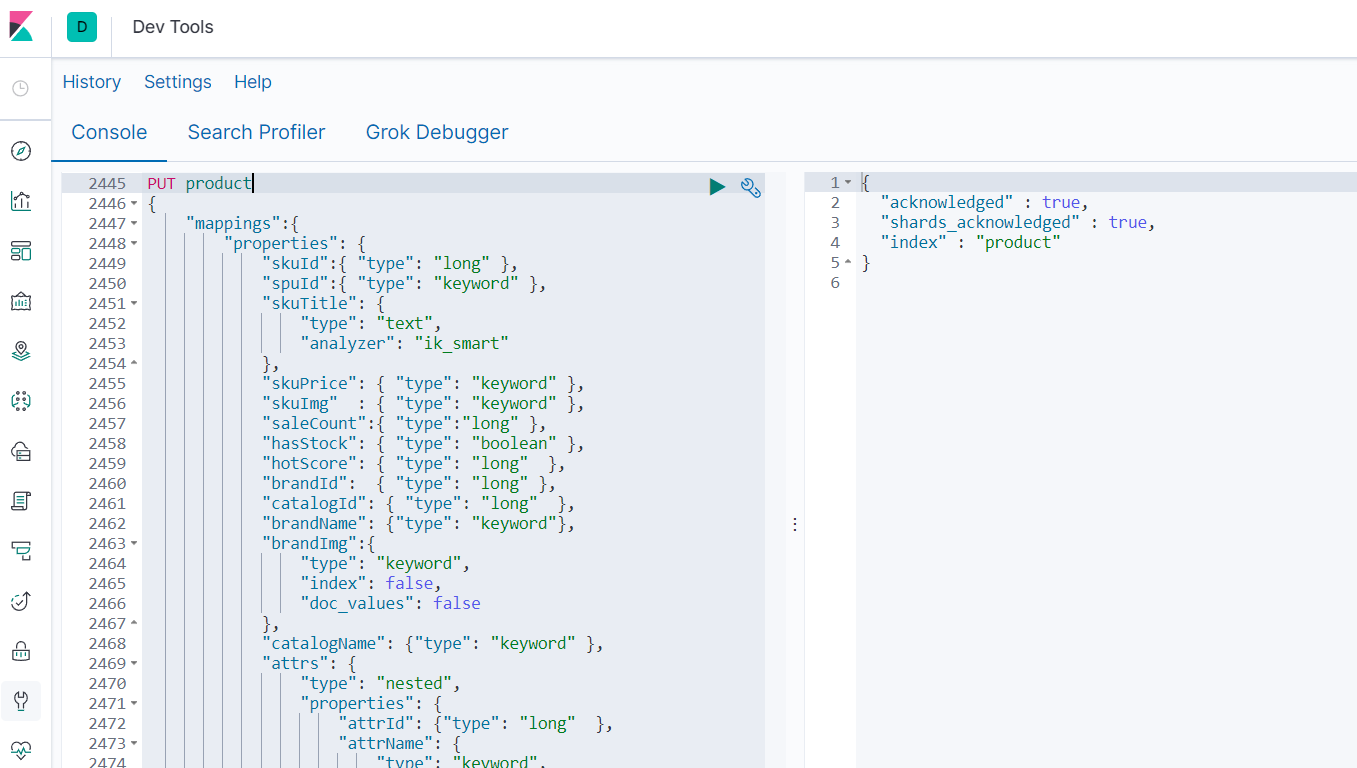
PUT product { "mappings":{ "properties": { "skuId":{ "type": "long" }, "spuId":{ "type": "keyword" }, "skuTitle": { "type": "text", "analyzer": "ik_smart" }, "skuPrice": { "type": "keyword" }, "skuImg" : { "type": "keyword" }, "saleCount":{ "type":"long" }, "hasStock": { "type": "boolean" }, "hotScore": { "type": "long" }, "brandId": { "type": "long" }, "catalogId": { "type": "long" }, "brandName": {"type": "keyword"}, "brandImg":{ "type": "keyword", "index": false, "doc_values": false }, "catalogName": {"type": "keyword" }, "attrs": { "type": "nested", "properties": { "attrId": {"type": "long" }, "attrName": { "type": "keyword", "index": false, "doc_values": false }, "attrValue": {"type": "keyword" } } } } } }- 1
- 2
- 3
- 4
- 5
- 6
- 7
- 8
- 9
- 10
- 11
- 12
- 13
- 14
- 15
- 16
- 17
- 18
- 19
- 20
- 21
- 22
- 23
- 24
- 25
- 26
- 27
- 28
- 29
- 30
- 31
- 32
- 33
- 34
- 35
- 36
- 37
- 38
- 39
- 40
构造基本数据
商品上架需要在es中保存spu信息并更新spu状态信息,所以我们就建立专门的vo来接收
SkuEsModel
写在common模块
@Data public class SkuEsModel { //common中 private Long skuId; private Long spuId; private String skuTitle; private BigDecimal skuPrice; private String skuImg; private Long saleCount; private boolean hasStock; private Long hotScore; private Long brandId; private Long catalogId; private String brandName; private String brandImg; private String catalogName; private List<Attr> attrs; @Data public static class Attr{ private Long attrId; private String attrName; private String attrValue; } }- 1
- 2
- 3
- 4
- 5
- 6
- 7
- 8
- 9
- 10
- 11
- 12
- 13
- 14
- 15
- 16
- 17
- 18
- 19
- 20
- 21
- 22
- 23
- 24
- 25
库存量查询
上架的话需要确定库存,所以调用ware微服务来检测是否有库存
@RestController @RequestMapping("ware/waresku") public class WareSkuController { @Autowired private WareSkuService wareSkuService; @PostMapping(value = "/hasStock") public R getSkuHasStock(@RequestBody List<Long> skuIds) { List<SkuHasStockVo> vos = wareSkuService.getSkuHasStock(skuIds); return R.ok().setData(vos); } }- 1
- 2
- 3
- 4
- 5
- 6
- 7
- 8
- 9
- 10
- 11
- 12
impl
实现也比较好理解,就是先用自定义的mapper查有没有库存
有的话,给库存赋值,并收集成集合
@Override public List<SkuHasStockVo> getSkuHasStock(List<Long> skuIds) { List<SkuHasStockVo> skuHasStockVos = skuIds.stream().map(item -> { Long count = this.baseMapper.getSkuStock(item); SkuHasStockVo skuHasStockVo = new SkuHasStockVo(); skuHasStockVo.setSkuId(item); skuHasStockVo.setHasStock(count == null ? false : count > 0); return skuHasStockVo; }).collect(Collectors.toList()); return skuHasStockVos; }- 1
- 2
- 3
- 4
- 5
- 6
- 7
- 8
- 9
- 10
- 11
- 12
- 13
自定义mapper
这里的库存并不是简单查一下库存表,所以不能用mp自带的api去查询,需要自定义一个简单的sql
就是用库存减去锁定的库存即可得出!
<select id="getSkuStock" resultType="java.lang.Long"> SELECT SUM(stock - stock_locked) FROM wms_ware_sku WHERE sku_id = #{skuId} </select>- 1
- 2
- 3
商品上架
完整代码
controller
/** * 商品上架 */ @PostMapping("/{spuId}/up") public R spuUp(@PathVariable("spuId") Long spuId){ spuInfoService.up(spuId); return R.ok(); }- 1
- 2
- 3
- 4
- 5
- 6
- 7
- 8
impl
@Override public void up(Long spuId) { //1.获得spu对应的sku集合 List<SkuInfoEntity> skuInfoEntities = skuInfoService.getSkusBySpuId(spuId); //2.获得spu的基础属性实体集合 List<ProductAttrValueEntity> baseAttrs = productAttrValueService.baseAttrListforSpu(spuId); //3.获得基本属性中可搜索的属性id //3.1获得spu基础属性实体集合中的属性id集合 List<Long> attrIds = baseAttrs.stream().map(attr -> { return attr.getAttrId(); }).collect(Collectors.toList()); //3.2获得可搜索属性实体类对象 List<Long> searchAttrIds = attrService.selectSearchAttrs(attrIds); //3.3将它们转化为set集合 Set<Long> idSet = searchAttrIds.stream().collect(Collectors.toSet()); //3.4对所有基础属性实体过滤,第一步是只保留可搜索属性实体类对象,第二步是给这些对象中的Attrs对象赋值,最后收集为attrsList List<SkuEsModel.Attrs> attrsList = baseAttrs.stream().filter(item -> { return idSet.contains(item.getAttrId()); }).map(item -> { SkuEsModel.Attrs attrs = new SkuEsModel.Attrs(); BeanUtils.copyProperties(item, attrs); return attrs; }).collect(Collectors.toList()); //收集所有skuId的集合 List<Long> skuIdList = skuInfoEntities.stream() .map(SkuInfoEntity::getSkuId) .collect(Collectors.toList()); //TODO 1、发送远程调用,库存系统查询是否有库存 Map<Long, Boolean> stockMap = null; try { R skuHasStock = wareFeignService.getSkuHasStock(skuIdList); TypeReference<List<SkuHasStockVo>> typeReference = new TypeReference<List<SkuHasStockVo>>() {}; stockMap = skuHasStock.getData(typeReference).stream() .collect(Collectors.toMap(SkuHasStockVo::getSkuId, item -> item.getHasStock())); } catch (Exception e) { log.error("库存服务查询异常:原因{}",e); } //2、封装每个sku的信息 Map<Long, Boolean> finalStockMap = stockMap; List<SkuEsModel> collect = skuInfoEntities.stream().map(sku -> { //组装需要的数据 SkuEsModel esModel = new SkuEsModel(); esModel.setSkuPrice(sku.getPrice()); esModel.setSkuImg(sku.getSkuDefaultImg()); //设置库存信息 if (finalStockMap == null) { esModel.setHasStock(true); } else { esModel.setHasStock(finalStockMap.get(sku.getSkuId())); } //TODO 2、热度评分。0 esModel.setHotScore(0L); //TODO 3、查询品牌和分类的名字信息 BrandEntity brandEntity = brandService.getById(sku.getBrandId()); esModel.setBrandName(brandEntity.getName()); esModel.setBrandId(brandEntity.getBrandId()); esModel.setBrandImg(brandEntity.getLogo()); CategoryEntity categoryEntity = categoryService.getById(sku.getCatalogId()); esModel.setCatalogId(categoryEntity.getCatId()); esModel.setCatalogName(categoryEntity.getName()); //设置检索属性 esModel.setAttrs(attrsList); BeanUtils.copyProperties(sku,esModel); return esModel; }).collect(Collectors.toList()); //TODO 5、将数据发给es进行保存:mall-search R r = searchFeignService.productStatusUp(collect); if (r.getCode() == 0) { //远程调用成功 //TODO 6、修改当前spu的状态 this.baseMapper.updaSpuStatus(spuId, ProductConstant.ProductStatusEnum.SPU_UP.getCode()); } else { //远程调用失败 //TODO 7、重复调用?接口幂等性:重试机制 } }- 1
- 2
- 3
- 4
- 5
- 6
- 7
- 8
- 9
- 10
- 11
- 12
- 13
- 14
- 15
- 16
- 17
- 18
- 19
- 20
- 21
- 22
- 23
- 24
- 25
- 26
- 27
- 28
- 29
- 30
- 31
- 32
- 33
- 34
- 35
- 36
- 37
- 38
- 39
- 40
- 41
- 42
- 43
- 44
- 45
- 46
- 47
- 48
- 49
- 50
- 51
- 52
- 53
- 54
- 55
- 56
- 57
- 58
- 59
- 60
- 61
- 62
- 63
- 64
- 65
- 66
- 67
- 68
- 69
- 70
- 71
- 72
- 73
- 74
- 75
- 76
- 77
- 78
- 79
- 80
- 81
- 82
- 83
- 84
- 85
- 86
- 87
- 88
- 89
- 90
- 91
- 92
详解
获得spu对应的sku集合
其中
skuInfoService.getSkusBySpuId中getSkusBySpuId就是写一个简单的query因为是单表查询
所以应该这样写
@Override public List<SkuInfoEntity> getSkusBySpuId(Long spuId) { List<SkuInfoEntity> list = this.list( new QueryWrapper<SkuInfoEntity>().eq("spu_id",spuId)); return list; }- 1
- 2
- 3
- 4
- 5
- 6
获得spu的基础属性实体集合

@Override public List<ProductAttrValueEntity> baseAttrListforSpu(Long spuId) { return this.list(new QueryWrapper<ProductAttrValueEntity>().eq("spu_id",spuId)); }- 1
- 2
- 3
- 4
给SkuEsModel.Attrs对象赋值
找出所有属性的id集合
List<Long> attrIds = baseAttrs.stream().map(attr -> { return attr.getAttrId(); }).collect(Collectors.toList());- 1
- 2
- 3
在上面的结果中进行筛选,得到可搜索ID
List<Long> searchAttrIds = attrService.selectSearchAttrs(attrIds);- 1
其中attrService.selectSearchAttrs实现如下:
@Override public List<Long> selectSearchAttrs(List<Long> attrIds) { List<Long> searchAttrIds = this.baseMapper.selectSearchAttrIds(); return searchAttrIds; }- 1
- 2
- 3
- 4
- 5
这里的
baseMapper.selectSearchAttrIds,baseMapper是MP提供的类,里面很多常见的CRUD,如果要扩展的话,可以直接写扩展的方法名,让写对应的Mapper就行,很方便,安装插件就可以一键生成!筛选每个属性,下面sql的意思就是普通的查询加上可搜索id的条件
<select id="selectSearchAttrIds" resultType="java.lang.Long"> select * from pms_attr where attr_id IN <foreach collection="attrIds" item="id" separator="," open="(" close=")"> #{id} </foreach> AND search_type = 1 </select>- 1
- 2
- 3
- 4
- 5
- 6
- 7
给SkuEsModel.Attrs对象赋值
Set<Long> idSet = searchAttrIds.stream().collect(Collectors.toSet()); //3.4对所有基础属性实体过滤,第一步是只保留可搜索属性实体类对象,第二步是给这些对象中的Attrs对象赋值,最后收集为attrsList List<SkuEsModel.Attrs> attrsList = baseAttrs.stream().filter(item -> { return idSet.contains(item.getAttrId()); }).map(item -> { SkuEsModel.Attrs attrs = new SkuEsModel.Attrs(); BeanUtils.copyProperties(item, attrs); return attrs; }).collect(Collectors.toList());- 1
- 2
- 3
- 4
- 5
- 6
- 7
- 8
- 9
- 10
查询是否有库存
这里属于跨微服务的调用,所以这里使用了openfeign去远程调用ware微服务去查询是否有库存
ware微服务里的查询库存方法为:@RestController @RequestMapping("ware/waresku") public class WareSkuController { @Autowired private WareSkuService wareSkuService; @PostMapping(value = "/hasStock") public R<List<SkuHasStockVo>> getSkuHasStock(@RequestBody List<Long> skuIds) { //skuId stock List<SkuHasStockVo> vos = wareSkuService.getSkuHasStock(skuIds); R<List<SkuHasStockVo>> ok = R.ok(); ok.setData(vos); return ok; } }- 1
- 2
- 3
- 4
- 5
- 6
- 7
- 8
- 9
- 10
- 11
- 12
- 13
- 14
- 15
- 16
实现如下:
通过skuid来查询该sku的库存数
@Override public List<SkuHasStockVo> getSkuHasStock(List<Long> skuIds) { List<SkuHasStockVo> skuHasStockVos = skuIds.stream().map(item -> { Long count = this.baseMapper.getSkuStock(item); SkuHasStockVo skuHasStockVo = new SkuHasStockVo(); skuHasStockVo.setSkuId(item); skuHasStockVo.setHasStock(count == null ? false : count > 0); return skuHasStockVo; }).collect(Collectors.toList()); return skuHasStockVos; }- 1
- 2
- 3
- 4
- 5
- 6
- 7
- 8
- 9
- 10
- 11
- 12
- 13
getSkuStock属于自定义的查询接口,内容如下:
<select id="getSkuStock" resultType="java.lang.Long"> SELECT SUM(stock - stock_locked) FROM wms_ware_sku WHERE sku_id = #{skuId} </select>- 1
- 2
- 3
那么接下来
product微服务就可以使用该方法进行查询了,内容如下:Map<Long, Boolean> stockMap = null; try { R<List<SkuHasStockVo>> skuHasStock = wareFeignService.getSkuHasStock(skuIdList); TypeReference<List<SkuHasStockVo>> typeReference = new TypeReference<List<SkuHasStockVo>>() {}; stockMap = skuHasStock.getData(typeReference).stream() .collect(Collectors.toMap(SkuHasStockVo::getSkuId, item -> item.getHasStock())); } catch (Exception e) { log.error("库存服务查询异常:原因{}",e); }- 1
- 2
- 3
- 4
- 5
- 6
- 7
- 8
- 9
对所有sku进行封装
就是对要保存的sku封装成功ES的VO模型进行接收
Map<Long, Boolean> finalStockMap = stockMap; List<SkuEsModel> collect = skuInfoEntities.stream().map(sku -> { //组装需要的数据 SkuEsModel esModel = new SkuEsModel(); esModel.setSkuPrice(sku.getPrice()); esModel.setSkuImg(sku.getSkuDefaultImg()); //设置库存信息 if (finalStockMap == null) { esModel.setHasStock(true); } else { esModel.setHasStock(finalStockMap.get(sku.getSkuId())); } //TODO 2、热度评分。0 esModel.setHotScore(0L); //TODO 3、查询品牌和分类的名字信息 BrandEntity brandEntity = brandService.getById(sku.getBrandId()); esModel.setBrandName(brandEntity.getName()); esModel.setBrandId(brandEntity.getBrandId()); esModel.setBrandImg(brandEntity.getLogo()); CategoryEntity categoryEntity = categoryService.getById(sku.getCatalogId()); esModel.setCatalogId(categoryEntity.getCatId()); esModel.setCatalogName(categoryEntity.getName()); //设置检索属性 esModel.setAttrs(attrsList); BeanUtils.copyProperties(sku,esModel); return esModel; }).collect(Collectors.toList());- 1
- 2
- 3
- 4
- 5
- 6
- 7
- 8
- 9
- 10
- 11
- 12
- 13
- 14
- 15
- 16
- 17
- 18
- 19
- 20
- 21
- 22
- 23
- 24
- 25
- 26
- 27
- 28
- 29
- 30
- 31
- 32
- 33
- 34
mall-search保存数据
controller
@PostMapping(value = "/product") public R productStatusUp(@RequestBody List<SkuEsModel> skuEsModels) { boolean status = false; try { status = productSaveService.productStatusUp(skuEsModels); } catch (IOException e) { log.error("商品上架错误{}",e); return R.error(BizCodeEnum.PRODUCT_UP_EXCEPTION.getCode(), BizCodeEnum.PRODUCT_UP_EXCEPTION.getMessage()); } if (status) { return R.error(BizCodeEnum.PRODUCT_UP_EXCEPTION.getCode(), BizCodeEnum.PRODUCT_UP_EXCEPTION.getMessage()); } else { return R.ok(); } }- 1
- 2
- 3
- 4
- 5
- 6
- 7
- 8
- 9
- 10
- 11
- 12
- 13
- 14
- 15
- 16
- 17
- 18
impl
@Override public boolean productStatusUp(List<SkuEsModel> skuEsModels) throws IOException { //1.在es中建立索引 //2. 在ES中保存这些数据 BulkRequest bulkRequest = new BulkRequest(); for (SkuEsModel skuEsModel : skuEsModels) { //构造保存请求 IndexRequest indexRequest = new IndexRequest(EsConstant.PRODUCT_INDEX); indexRequest.id(skuEsModel.getSkuId().toString()); String jsonString = JSON.toJSONString(skuEsModel); indexRequest.source(jsonString, XContentType.JSON); bulkRequest.add(indexRequest); } // BulkRequest bulkRequest, RequestOptions options BulkResponse bulk = esRestClient.bulk(bulkRequest, EsConfig.COMMON_OPTIONS); //TODO 如果批量错误 boolean hasFailures = bulk.hasFailures(); List<String> collect = Arrays.asList(bulk.getItems()).stream().map(item -> { return item.getId(); }).collect(Collectors.toList()); log.info("商品上架完成:{}",collect); return hasFailures; }- 1
- 2
- 3
- 4
- 5
- 6
- 7
- 8
- 9
- 10
- 11
- 12
- 13
- 14
- 15
- 16
- 17
- 18
- 19
- 20
- 21
- 22
- 23
- 24
- 25
- 26
- 27
- 28
- 29
- 30
将数据发送给ES保存
- FeignService
- 通过FeignService远程调用
@FeignClient("mall-search") public interface SearchFeignService { @PostMapping(value = "/search/save/product") R productStatusUp(@RequestBody List<SkuEsModel> skuEsModels); }- 1
- 2
- 3
- 4
- 5
- 6
- 7
//TODO 5、将数据发给es进行保存:mall-search R r = searchFeignService.productStatusUp(collect); if (r.getCode() == 0) { //远程调用成功 //TODO 6、修改当前spu的状态 this.baseMapper.updaSpuStatus(spuId, ProductConstant.ProductStatusEnum.SPU_UP.getCode()); } else { //远程调用失败 //TODO 7、重复调用?接口幂等性:重试机制 }- 1
- 2
- 3
- 4
- 5
- 6
- 7
- 8
- 9
- 10
- 11
DeBug调式
商品上架用到了三个微服务,分别是product、ware、search
那我们分别debug启动它们,然后在这些微服务中使用的方法中打上断点,查看调用流程
获得spu对应的sku集合

获得spu的基础属性实体集合
基础属性如下:

给SkuEsModel.Attrs对象赋值

测试

-
相关阅读:
ubuntu18.04系统android studio 搜索文本快捷键不出来的解决办法
认识Vue
EDA程序设计--计时器设计
狂神说Go语言学习笔记(三)
Linux基本命令
软件测试简历项目经验该怎么写?【两年经验】
算法基础学习|二分
基于Android的“智慧校园”的设计与实现
如何实现高效地扩展5G毫米波段?
腾讯云原生安全“3+1”一体化方案发布,重构云上安全防御体系
- 原文地址:https://blog.csdn.net/qq_45714272/article/details/126921828
