-
Three光线投射实例
基础环境搭建:

新建一个二十面体,detail参数要>1:
detail — 默认值为0。将这个值设为一个大于0的数将会为它增加一些顶点,使其不再是一个二十面体。当这个值大于1的时候,实际上它将变成一个球体。
const geometry = new THREE.IcosahedronGeometry(0.5, 2) const material = new THREE.MeshPhongMaterial({ color: 0xffffff }) meshes = new THREE.Mesh(geometry, material)- 1
- 2
- 3

使用Three提供的InstancedMesh()(实例化网格)实现大规模(同材质同几何体)物品集合的创建:一种具有实例化渲染支持的特殊版本的Mesh。你可以使用 InstancedMesh 来渲染大量具有相同几何体与材质、但具有不同变换的物体。 使用 InstancedMesh 将帮助你减少 draw call 的数量,从而提升你应用程序的整体渲染性能。
- 创建网格对象:
//三行三列10*10*10,共1000个 let amount = 10, count = Math.pow(amount, 3) let white = new THREE.Color().setHex(0xffffff) ... meshes = new THREE.InstancedMesh(geometry, material, count)- 1
- 2
- 3
- 4
- 5
- 循环创建集合内的每一个物体:
let index = 0 const offset = (amount - 1) / 2 const matrix = new THREE.Matrix4() for (let i = 0; i < amount; i++) { for (let j = 0; j < amount; j++) { for (let k = 0; k < amount; k++) { matrix.setPosition(i - offset, j - offset, k - offset) meshes.setMatrixAt(index, matrix) meshes.setColorAt(index, white) index++ } } }- 1
- 2
- 3
- 4
- 5
- 6
- 7
- 8
- 9
- 10
- 11
- 12
- 13
.setColorAt ( index : Integer, color : Color ) : undefined
Sets the given color to the defined instance. Make sure you set .instanceColor.needsUpdate to true after updating all the colors.
.setMatrixAt ( index : Integer, matrix : Matrix4 ) : undefined
设置给定的本地变换矩阵到已定义的实例。请确保在更新所有矩阵后将 .instanceMatrix.needsUpdate 设置为true。
使用Raycaster()类实现鼠标交互相应机制:鼠标滑过的球体赋予随机生成的颜色
这个类用于进行raycasting(光线投射)。 光线投射用于进行鼠标拾取(在三维空间中计算出鼠标移过了什么物体)。
- 声明变量并附鼠标初始值(在物体集合之外,否则初始状态便会有一子实例被染色):
let raycaster = new THREE.Raycaster() let mouse = new THREE.Vector2(1, 1)- 1
- 2
- 监听鼠标移动位置,设置mouse值:
mouse坐标归一化处理
document.addEventListener('mousemove', function (event) { // console.log(event) mouse.x = (event.clientX / window.innerWidth) * 2 - 1 mouse.y = - (event.clientY / window.innerHeight) * 2 + 1 })- 1
- 2
- 3
- 4
- 5
- 设置射线-从摄像机到鼠标方向延伸的射线将穿过物品集合
.setFromCamera ( coords : Vector2, camera : Camera ) : undefined
coords —— 在标准化设备坐标中鼠标的二维坐标 —— X分量与Y分量应当在-1到1之间。
camera —— 射线所来源的摄像机。
使用一个新的原点和方向来更新射线。.intersectObject ( object : Object3D, recursive : Boolean, optionalTarget : Array ) : Array
object —— 检查与射线相交的物体。
recursive —— 若为true,则同时也会检查所有的后代。否则将只会检查对象本身。默认值为true。
optionalTarget — (可选)设置结果的目标数组。如果不设置这个值,则一个新的Array会被实例化;如果设置了这个值,则在每次调用之前必须清空这个数组(例如:array.length = 0;)。
检测所有在射线与物体之间,包括或不包括后代的相交部分。返回结果时,相交部分将按距离进行排序,最近的位于第一个。
该方法返回一个包含有交叉部分的数组:
[ { distance, point, face, faceIndex, object }, … ]
distance —— 射线投射原点和相交部分之间的距离。
point —— 相交部分的点(世界坐标)
face —— 相交的面
faceIndex —— 相交的面的索引
object —— 相交的物体
uv —— 相交部分的点的UV坐标。
uv2 —— Second set of U,V coordinates at point of intersection
instanceId – The index number of the instance where the ray intersects the InstancedMesh
当计算这条射线是否和物体相交的时候,Raycaster将传入的对象委托给raycast方法。 这将可以让mesh对于光线投射的响应不同于lines和pointclouds。
请注意:对于网格来说,面必须朝向射线的原点,以便其能够被检测到。 用于交互的射线穿过面的背侧时,将不会被检测到。如果需要对物体中面的两侧进行光线投射, 你需要将material中的side属性设置为THREE.DoubleSide。raycaster.setFromCamera(mouse, camera) // console.log(mouse) const intersection = raycaster.intersectObject(meshes) // console.log(intersection.length)- 1
- 2
- 3
- 4
- 鼠标交互(滑过)的物品集合实例赋予随机颜色:
let color=new THREE.Color() ... if (intersection.length > 0) { const instanceId = intersection[0].instanceId meshes.getColorAt(instanceId, color) if (color.equals(white)) { meshes.setColorAt(instanceId, color.setHex(Math.random() * 0xffffff)) meshes.instanceColor.needsUpdate = true } }- 1
- 2
- 3
- 4
- 5
- 6
- 7
- 8
- 9
- 10
.instanceColor.needsUpdate to true after updating all the colors.
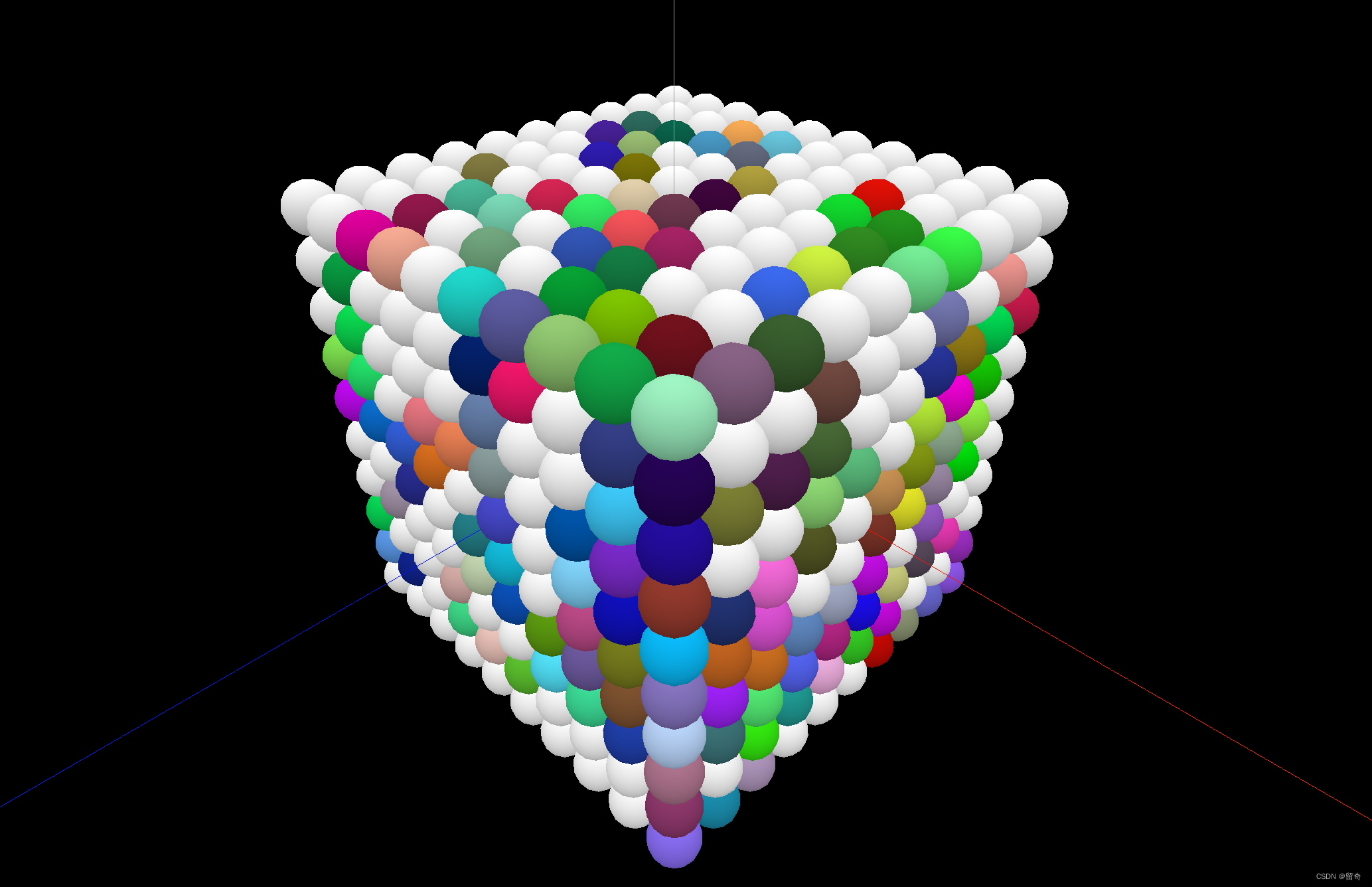
附加计数功能,统计总染色实例占实例总数的比例:

-
相关阅读:
JAVA学习——day02
JS 清理 iframe 回收内存
AI绘画:StableDiffusion实操教程-诛仙-碧瑶(附高清图下载)
企业侧功能
C++指针传递和引用传递(函数参数中&和*的区别)
Vue2学习笔记(尚硅谷天禹老师)
Linux 文件系统逻辑结构图的解释
@Transactional和普通自定义切面执行顺序的思考
C++系统相关操作3 - 获取操作系统的平台类型
Python 引用不确定的函数
- 原文地址:https://blog.csdn.net/lqiqil/article/details/126915751