-
关于安卓卡片式交互实现(recyclerview)
背景
对于安卓卡片式交互,已有很多案例,前有“探探”卡片滑动交互,后有各种各样的三方软件,都在互相复制粘贴。今项目中也有类似需求,特此记录。
!!!代码链接在文末!!!
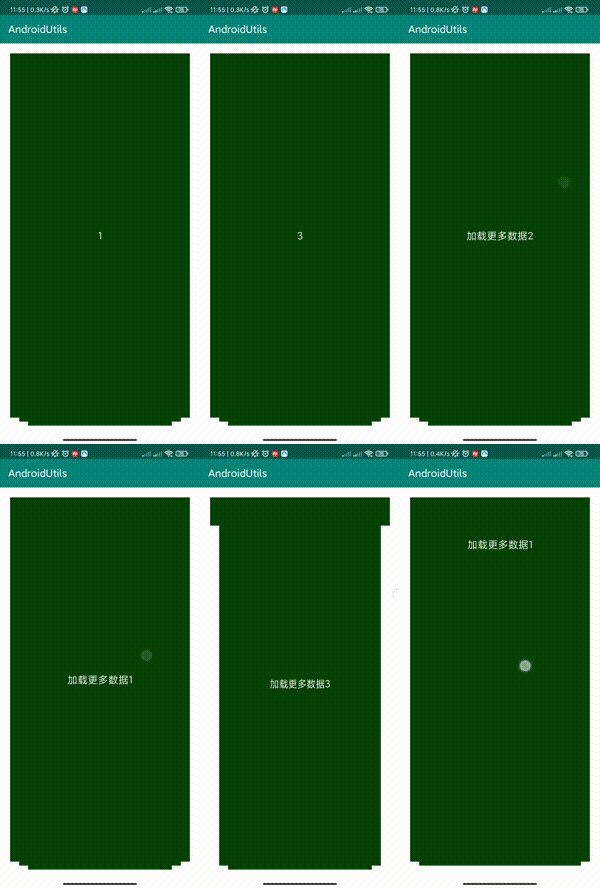
演示gif
思路
实现这样的效果,其实从宏观上,就是实现了一个layoutmanger以及ItemTouchHelper。
(一)LayoutManager主要是实现recyclerview的布局
(二)ItemTouchHelper主要是实现用户滑动的时候,卡片的交互过程实现
(一)重写LayoutManger
首先,要确定的是,绘制多少个层级的布局。目前需求是显示三个叠加的item,因此,对于LayoutManager,我们只需要每次刷新的时候,绘制三次即可。(ps:开发过程应当把“层级”变量抽象全局化,适配“层级”变化的情况)核心代码如下:
@Override public void onLayoutChildren(RecyclerView.Recycler recycler, RecyclerView.State state) { super.onLayoutChildren(recycler, state); detachAndScrapAttachedViews(recycler); int maxCount = SlideConfig.SHOW_MAX_COUNT; //获取所有item(包括不可见的)个数 int count = getItemCount(); //由于我们是倒序摆放,所以初始索引从后面开始 int initIndex = count - maxCount; if (initIndex < 0) { initIndex = 0; } //当前顺序 int currentIndex = 0; for (int i = initIndex; i < count; i++) { //从缓存中获取view View view = recycler.getViewForPosition(i); //添加到recyclerView addView(view); //测量一下view measureChild(view, 0, 0); //居中摆放,getDecoratedMeasuredWidth方法是获取带分割线的宽度,比直接使用view.getWidth()精确 int realWidth = getDecoratedMeasuredWidth(view); int realHeight = getDecoratedMeasuredHeight(view); int widthPadding = (int) ((getWidth() - realWidth) / 2f); int heightPadding = (int) ((getHeight() - realHeight) / 2f); //摆放child layoutDecorated(view, widthPadding, heightPadding, widthPadding + realWidth, heightPadding + realHeight); //根据索引,来位移和缩放child int measureHeight = view.getMeasuredHeight(); int trainY = SlideDpUtils.dp2px(SlideConfig.TRANSLATION_Y); RecyclerView.LayoutParams viewParams = (RecyclerView.LayoutParams) view.getLayoutParams(); int paramsHeight = viewParams.height; if (paramsHeight == -1) { viewParams.height = (measureHeight - trainY * (maxCount + 1)); // viewParams.height = (500); view.setLayoutParams(viewParams); } float translationY = (maxCount - currentIndex - 1) * trainY; if (currentIndex != maxCount - 1) { view.setTranslationY(translationY); } view.setScaleX(1 - (maxCount - currentIndex - 1) * SlideConfig.SCALE); currentIndex++; // view.setScaleY(1 - level * SlideConfig.SCALE); } }- 1
- 2
- 3
- 4
- 5
- 6
- 7
- 8
- 9
- 10
- 11
- 12
- 13
- 14
- 15
- 16
- 17
- 18
- 19
- 20
- 21
- 22
- 23
- 24
- 25
- 26
- 27
- 28
- 29
- 30
- 31
- 32
- 33
- 34
- 35
- 36
- 37
- 38
- 39
- 40
- 41
- 42
- 43
- 44
- 45
- 46
- 47
- 48
- 49
- 50
- 51
- 52
- 53
- 54
- 55
- 56
- 57
- 58
可见,,其实也没啥,就是一些布局中,宽高的适配,以及一些位置计算罢了。
其实这里的绘制逻辑,是和recyclerview中的LinearLayoutManager中的处理手段,有着异曲同工之妙,所以,这里就不在叙述了。值得注意的是,在绘制的过程中,LayoutManager有个居中的逻辑,如果布局高度太小,则会出现上下距离过宽的问题。如果布局高度填充满了,则会出现显示不全堆叠效果的问题。
这里的解决思路就是,当布局高度未填充满的情况下,则进行控件的高度进行重新设置,计算好误差距离,然后进行Y轴方向的偏移。
(二)重写ItemTouchHelper
对于ItemTouchHelper,需要在swipe方法进行数据的移除,界面刷新以及监听的回调,核心代码如下:@Override public void onSwiped(@NonNull RecyclerView.ViewHolder viewHolder, int i) { //通知adapter if (mAdapter != null) { int currentPosition = viewHolder.getLayoutPosition(); //由于是限定了永远只有三个,所以,该current position的值永远少于等于 mAdapter.getDataList().remove(currentPosition); // mAdapter.getDataList().add(0, s); mAdapter.notifyDataSetChanged(); mAdapter.notifyOutSideRefresh(); mAdapter.notifyPageChange(); } }- 1
- 2
- 3
- 4
- 5
- 6
- 7
- 8
- 9
- 10
- 11
- 12
- 13
- 14
- 15
而对于触摸的场景下,卡片的宽高,缩放等设置,则在onChildDraw方法实现即可,核心代码如下:
@Override public void onChildDraw(@NonNull Canvas c, @NonNull RecyclerView recyclerView, @NonNull RecyclerView.ViewHolder viewHolder, float dX, float dY, int actionState, boolean isCurrentlyActive) { try { //计算移动距离 float distance = (float) Math.hypot(dX, dY); float maxDistance = recyclerView.getWidth() / 2f; //比例 float fraction = distance / maxDistance; if (fraction > 1) { fraction = 1; } int maxCount = SlideConfig.SHOW_MAX_COUNT; int trainY = SlideDpUtils.dp2px(SlideConfig.TRANSLATION_Y); //为每个child执行动画 int count = recyclerView.getChildCount(); int adapterCount = mAdapter.getDataList().size(); for (int i = 0; i < count; i++) { if (i != count - 1 && adapterCount > maxCount) { //不是第一层--且数量大于3 View view = recyclerView.getChildAt(i); view.setScaleX(1 - (maxCount - i - 1) * SlideConfig.SCALE + fraction * SlideConfig.SCALE); view.setTranslationY((maxCount - i - 1) * trainY - fraction * trainY); } // int level = SlideConfig.SHOW_MAX_COUNT - i - 1; // if (level != SlideConfig.SHOW_MAX_COUNT) // //获取的view从下层到上层 // View view = recyclerView.getChildAt(i); // int level = SlideConfig.SHOW_MAX_COUNT - i - 1; // //level范围(SlideConfig.SHOW_MAX_COUNT-1)-0,每个child最大只移动一个SlideConfig.TRANSLATION_Y和放大SlideConfig.SCALE // // if (level == SlideConfig.SHOW_MAX_COUNT - 1) { // 最下层的不动和最后第二层重叠 // view.setTranslationY(SlideConfig.TRANSLATION_Y * (level - 1)); // view.setScaleX(1 - SlideConfig.SCALE * (level - 1)); // view.setScaleY(1 - SlideConfig.SCALE * (level - 1)); // } else if (level > 0) { // view.setTranslationY(level * SlideConfig.TRANSLATION_Y - fraction * SlideConfig.TRANSLATION_Y); // view.setScaleX(1 - level * SlideConfig.SCALE + fraction * SlideConfig.SCALE); // view.setScaleY(1 - level * SlideConfig.SCALE + fraction * SlideConfig.SCALE); // } } } catch (Exception e) { } super.onChildDraw(c, recyclerView, viewHolder, dX, dY, actionState, isCurrentlyActive); }- 1
- 2
- 3
- 4
- 5
- 6
- 7
- 8
- 9
- 10
- 11
- 12
- 13
- 14
- 15
- 16
- 17
- 18
- 19
- 20
- 21
- 22
- 23
- 24
- 25
- 26
- 27
- 28
- 29
- 30
- 31
- 32
- 33
- 34
- 35
- 36
- 37
- 38
- 39
- 40
- 41
- 42
- 43
- 44
- 45
- 46
- 47
- 48
- 49
- 50
- 51
这里,就实现了recyclerview卡片堆叠效果了。
代码地址–库libslidrecyclerviewthat’s all---------------------------------------------------------------------
-
相关阅读:
.env文件详解
使用Docker搭建Npm私服Verdaccio
浏览器添加油猴(tampermonkey)扩展
基于matlab实现的卡尔曼滤波匀加速直线运动仿真
java计算机毕业设计基于ssm的医院门诊互联电子病历管理信息系统(源代码+数据库+Lw文档)
项目构建生命周期与插件
理解前端框架、前端库,两者有什么区别
从零开始用C语言实现图片解码播放器(有源码)
pytorch tensorboard
webshell流量特征
- 原文地址:https://blog.csdn.net/motosheep/article/details/126916198