• 基于html+css+js的图书管理系统


    资源下载地址:https://download.csdn.net/download/sheziqiong/86771863
    资源下载地址:https://download.csdn.net/download/sheziqiong/86771863
    目 录
    一.项目设计方案 4
    二.实施过程分析 4
    三.项目设计成果 4
    四.项目创新性 4
    五.改进及展望 4
    六.项目成员 4
    附录一 5
    一.项目设计方案
    本项目是用html,css,js语言编写的图书管理系统,用jquery进行页面的加工,ajax异步读取信息,json数据存储相关信息。
    1.项目界面设计
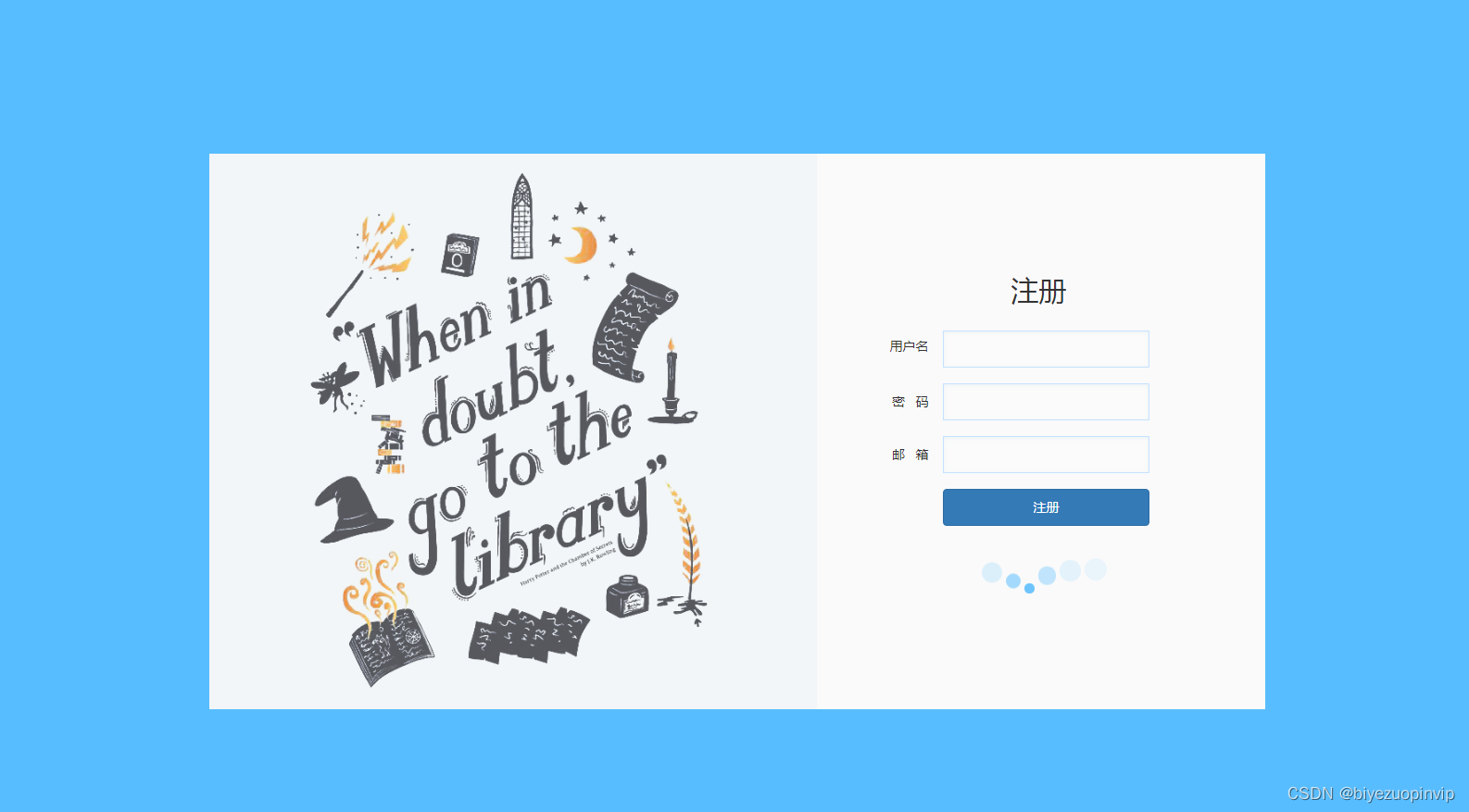
    (1)注册界面:主要包含3个输入框,分别是用户名,密码和邮箱。下方一个注册按钮和css制作的小球波浪动画。以贺卡的布局展现整个页面。
    (2)登录界面:主要包含2个输入框,分别是用户名,密码。下方一个登录按钮。以贺卡的布局展现整个页面。
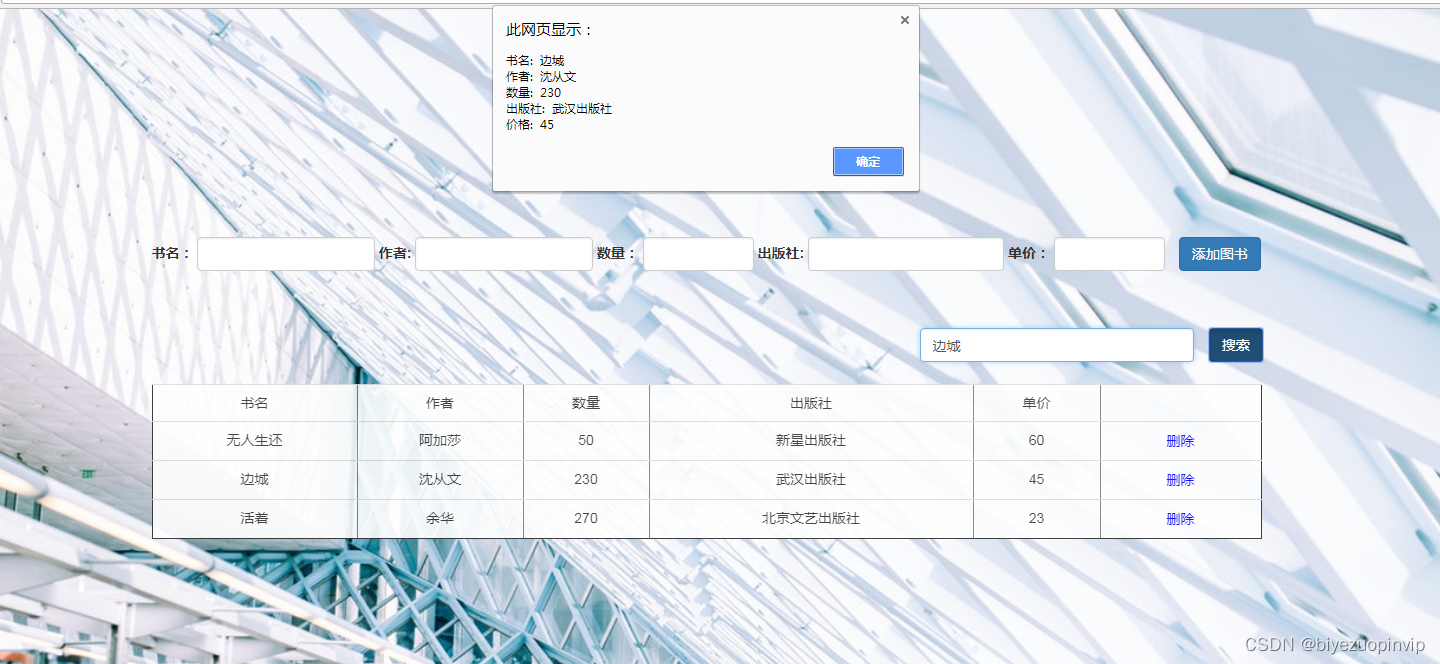
    (3)主界面:主要包含一个图书信息的表格,添加图书的输入框,搜索框,管理系统的标题,页脚。背景图是一个图书馆的实景图。
    2.项目交互设计
    本应用涉及到的交互有:
    (1)点击注册按钮,如果有输入框内容为空,弹出警告。点击确定重新注册,注册成功后,跳转出注册成功的提示,提示后自动跳转到登录页面。
    (2)点击登录按钮,如果如果有输入框内容为空,弹出警告。如果登录的用户名或密码与json数据中存储的不一致,则弹出警告。点击确定重新登录。点击登录按钮,用户名和密码与存储的一致则跳转出现登录成功,本文转载自http://www.biyezuopin.vip/onews.asp?id=15031再自动跳转到主页面。
    (3)输入需要增加的图书信息,如果有输入框中内容为空,则出现警告。如果书的数目为负,则出现警告。点击添加图书按钮,图书信息被增加到表格上。
    (4)输入需要搜索的图书/作者/出版社信息,点击搜索按钮,弹出图书详细信息。
    (5)点击图书列表中的删除按钮,删除单条信息。
    3.项目功能设计
    (1)注册
    用户输入用户名,密码和邮箱进行注册,如果输入框内容为空则报出警告。
    (2)登录
    用户输入用户名,密码,与已存储的json数据进行验证,验证成功进入主界面,不成功弹出警告。
    (3)浏览图书
    进入主界面后,可以查看表格中的图书信息,鼠标移动到图书信息上会有一定的效果变化。
    (4)增加图书
    设置五个输入框,分别是:书名,作者名,数量,出版社,单价。
    用户输入信息后点击添加按钮添加到表格上。
    如果有输入框为空则弹出警告。
    如果书籍数量为负也弹出警告。
    (5)删除图书
    点击图书表格上每条图书后的删除按钮,删除单条图书信息,新添加后的图书信息也可以删除。
    (6)搜索图书
    用户在搜索框输入书名/作者/出版社信息,点击搜索按钮,弹出该图书的详细信息,如果没有搜索到,就弹出提示。新增加的信息也可以被搜索到。

    <!DOCTYPE html>
    <html lang="en">
    
    <head>
        <meta charset="UTF-8">
        <title>图书管理系统</title>
        <link href="https://cdn.bootcss.com/bootstrap/3.3.7/css/bootstrap.css" rel="stylesheet">
        <script type="text/javascript" src="jquery.js"></script>
        <style>
            table {
                width: 500px;
                height: 100px;
                background-color: white;
                opacity:0.9;
                text-align: center;
            }
    
            .but{
                background-color: transparent;
                border: none;
                color: blue;
            }
            .but:hover{
                text-decoration: underline;
                color: red;
            }
            #tab {
                margin-top: 2%
            }
    
            #find {
                margin-top: 5%;
                padding-right: 0;
            }
    
            #name,
            #au,
            pub {
                width: 16%;
            }
    
            #num,
            #money {
                width: 10%;
               
            }
    
            .add {
                margin-left: 10px;
            }
    
            #header {
                margin-top: 20%;
            }
            .icon{
                width: 5%;
               margin-right: 10px;
            }
            .conticon{
                margin-top: -8%;
                margin-left: 1%;
            }
        </style>
    </head>
    
    <body>
       <div id="box">
        <div class="container">
          <h1 style="position: absolute;top: 10%;left: 45%;">图书管理系统</h1>
            <div id="header">
               
                <div class="col-md-12">
                    <form class="form-inline">
                        <div class="form-group">
                            <label for="exampleInputName2">书名:</label>
    
                            <input type="text" id="name" / class="form-control">
                            <label for="exampleInputName2">作者:</label>
                            <input type="text" id="au" / class="form-control">
                            <label for="exampleInputName2">数量:</label>
                            <input type="number" id="num" / class="form-control">
                            <label for="exampleInputName2">出版社:</label>
                            <input type="text" id="pub" / class="form-control">
                            <label for="exampleInputName2">单价:</label>
                            <input type="number" id="money" / class="form-control">
                            <input type="button" id="addBook" class="add btn btn-primary" value="添加图书" />
                        </div>
                    </form>
                </div>
            </div>
            <div id="find" class="col-md-4 col-md-offset-8">
                <div class="col-md-10" style="margin-left: -7px;">
                    <input type="text" class="txtx form-control" id="tex" placeholder="请输入想要查找的书名/作者名/出版社">
                </div>
                <input type="button" value="搜索" class="butt btn btn-primary" >
    
            </div>
            <div class="col-md-12">
                <div class="table-responsive">
                    <table border="1" cellspacing="0" cellpadding="0" id="tab" class="tabb table table-hover ">
    
                        <tr id="clone">
                            <td>书名</td>
                            <td>作者</td>
                            <td>数量</td>
                            <td>出版社</td>
                            <td>单价</td>
                            <td> </td>
                        </tr>
                        <tbody>
    
                        </tbody>
                    </table>
                </div>
            </div>
            
            <div class="footer">


                 <div class="container">
                            <div class="row text-center">
                                <div class="col-md-10 col-md-offset-1" style="padding-bottom: 10%;padding-top: 10%;">
                                    <h4 style="color:#6e6969;">Wechat&nbsp;:&nbsp;hictoo / QQ&nbsp;:&nbsp;2947873981 / 2947873981@qq.com / Tel : 18742527701 </h4>
                                    <h4 style="color:#6e6969;">点击下方图标与我联系</h4>
                                </div>
                            </div>
                        </div>
                        <div class="conticon col-md-12 text-center">
                            <a href="tencent://message/?uin=2947873981&Site=qq&Menu=yes"><img src="./sucai/qq.png" alt="" class="icon"></a>
                            <a href="mailto:2947873981@qq.com"><img src="./sucai/email.png" alt="" class="icon"></a>
                        </div>


            </div>
            
        </div>
    
    </div>
        <script>
            $.ajax({
                url: "books.json",
                dataType: "json",
    
                success: function(data) {
    
                    //data -- 请求成功的相应数据 responseText
    
                    console.log(data);
    
                    $.each(data.result.list, function(index, item) {
                        console.log(item.bookname);
                        var bookname = item.bookname;
                        var author = item.author;
                        var count = item.count;
                        var publish = item.publish;
                        var price = item.price;
    
                        var txt = "" + bookname + "" + author + "" + count + "" + publish + "" + price + '' + "" + '<button id="deleteB" class="but">删除</button>' + "";
                        $(".tabb").append(txt);
                    })
    
    
                    var obj = data.result.list;
                    console.log(obj);


                    $(document).ready(function() {


                        //搜索图书信息
                        $("#find").on("click", ".butt", ser);
    
                        function ser() {
                            console.log("find");
                            var text = $("#tex").val();
                            console.log(text);
                            var text2 = $("#tex2").val();
                            var text3 = $("#tex3").val();
                            var len = data.result.list.length;
                            console.log(len);
                            //  console.log(data.result.list[1].bookname);
                            var a = 0;
                            for (var i = 0; i < len; i++) {
                                if (text == data.result.list[i].bookname) {
                                    alert("书名:  " + data.result.list[i].bookname + "\n作者:  " + data.result.list[i].author + "\n数量:  " + data.result.list[i].count + "\n出版社:  " + data.result.list[i].publish + "\n价格:  " + data.result.list[i].price);
                                    $("#tex").val("");
                                    a++;
    
    
                                }
                                if (text == data.result.list[i].author) {
                                    alert("书名:  " + data.result.list[i].bookname + "\n作者:  " + data.result.list[i].author + "\n数量:  " + data.result.list[i].count + "\n出版社:  " + data.result.list[i].publish + "\n价格:  " + data.result.list[i].price);
                                    $("#tex").val("");
                                    a++;
                                }
                                if (text == data.result.list[i].publish) {
                                    alert("书名:  " + data.result.list[i].bookname + "\n作者:  " + data.result.list[i].author + "\n数量:  " + data.result.list[i].count + "\n出版社:  " + data.result.list[i].publish + "\n价格:  " + data.result.list[i].price);
                                    $("#tex").val("");
                                    a++;
                                }
                            }
                            if (a == 0) {
                                alert("没有找到相关信息");
                                $("#tex").val("");
                            }
    
                        }


                        //删除图书信息
    
                        $("#tab").on("click", ".but", de);
    
                        function de() {
                            console.log("eeeee");
                            $(this).parent().parent().remove();
                        }
    
    
                        //添加图书信息
                        $("#header").on("click", ".add", ad);
    
    
                        function ad() {
    
                            var bookname = $("#name").val();
                            var author = $("#au").val();
                            var count = $("#num").val();
                            var publish = $("#pub").val();
                            var price = $("#money").val();
                           
                            if(bookname==""||author==""||count==""||publish==""||price==""){
                                alert("请完善图书信息,任何信息不得为空");
                                console.log("afaf");
                            }
                            
                            else{
                                if(parseInt(count)<0){
                                alert("图书数量不能为负");
                                    
                            }
                                else{
                            var txt2 = "" + bookname + "" + author + "" + count + "" + publish + "" + price + '' + "" + '<button id="deleteB" class="but">删除</button>' + "";
                            $(".tabb").append(txt2);
                            data.result.list.push({
                                bookname,
                                author,
                                count,
                                publish,
                                price
                            });
                            console.log(data.result.list);
                                $("#name").val("");
                                $("#au").val("");
                                $("#num").val("");
                                $("#pub").val("");
                                $("#money").val("");
                        }
                            }
                        }
    
                    });
    
                },
    
    
                error: function(jqxhr, textStatus, err) {
                    console.log(jqxhr, textStatus, err)
                }
    
            })
            
             var hei = $(window).height();
            // console.log(wid);
            console.log(hei);
            $("#box").css({
                "background-image":"url(gi.jpg)",
                "background-size":"100%",
                //"width": wid,
                "height": hei
            });
        </script>


    </body>
    
    </html>
    
    
    • 1
    • 2
    • 3
    • 4
    • 5
    • 6
    • 7
    • 8
    • 9
    • 10
    • 11
    • 12
    • 13
    • 14
    • 15
    • 16
    • 17
    • 18
    • 19
    • 20
    • 21
    • 22
    • 23
    • 24
    • 25
    • 26
    • 27
    • 28
    • 29
    • 30
    • 31
    • 32
    • 33
    • 34
    • 35
    • 36
    • 37
    • 38
    • 39
    • 40
    • 41
    • 42
    • 43
    • 44
    • 45
    • 46
    • 47
    • 48
    • 49
    • 50
    • 51
    • 52
    • 53
    • 54
    • 55
    • 56
    • 57
    • 58
    • 59
    • 60
    • 61
    • 62
    • 63
    • 64
    • 65
    • 66
    • 67
    • 68
    • 69
    • 70
    • 71
    • 72
    • 73
    • 74
    • 75
    • 76
    • 77
    • 78
    • 79
    • 80
    • 81
    • 82
    • 83
    • 84
    • 85
    • 86
    • 87
    • 88
    • 89
    • 90
    • 91
    • 92
    • 93
    • 94
    • 95
    • 96
    • 97
    • 98
    • 99
    • 100
    • 101
    • 102
    • 103
    • 104
    • 105
    • 106
    • 107
    • 108
    • 109
    • 110
    • 111
    • 112
    • 113
    • 114
    • 115
    • 116
    • 117
    • 118
    • 119
    • 120
    • 121
    • 122
    • 123
    • 124
    • 125
    • 126
    • 127
    • 128
    • 129
    • 130
    • 131
    • 132
    • 133
    • 134
    • 135
    • 136
    • 137
    • 138
    • 139
    • 140
    • 141
    • 142
    • 143
    • 144
    • 145
    • 146
    • 147
    • 148
    • 149
    • 150
    • 151
    • 152
    • 153
    • 154
    • 155
    • 156
    • 157
    • 158
    • 159
    • 160
    • 161
    • 162
    • 163
    • 164
    • 165
    • 166
    • 167
    • 168
    • 169
    • 170
    • 171
    • 172
    • 173
    • 174
    • 175
    • 176
    • 177
    • 178
    • 179
    • 180
    • 181
    • 182
    • 183
    • 184
    • 185
    • 186
    • 187
    • 188
    • 189
    • 190
    • 191
    • 192
    • 193
    • 194
    • 195
    • 196
    • 197
    • 198
    • 199
    • 200
    • 201
    • 202
    • 203
    • 204
    • 205
    • 206
    • 207
    • 208
    • 209
    • 210
    • 211
    • 212
    • 213
    • 214
    • 215
    • 216
    • 217
    • 218
    • 219
    • 220
    • 221
    • 222
    • 223
    • 224
    • 225
    • 226
    • 227
    • 228
    • 229
    • 230
    • 231
    • 232
    • 233
    • 234
    • 235
    • 236
    • 237
    • 238
    • 239
    • 240
    • 241
    • 242
    • 243
    • 244
    • 245
    • 246
    • 247
    • 248
    • 249
    • 250
    • 251
    • 252
    • 253
    • 254
    • 255
    • 256
    • 257
    • 258
    • 259
    • 260
    • 261
    • 262
    • 263
    • 264
    • 265
    • 266
    • 267
    • 268
    • 269
    • 270
    • 271
    • 272
    • 273
    • 274
    • 275
    • 276
    • 277
    • 278
    • 279
    • 280
    • 281
    • 282
    • 283
    • 284
    • 285
    • 286
    • 287
    • 288
    • 289
    • 290
    • 291
    • 292
    • 293
    • 294
    • 295
    • 296

    在这里插入图片描述
    在这里插入图片描述
    在这里插入图片描述
    在这里插入图片描述
    在这里插入图片描述
    在这里插入图片描述
    在这里插入图片描述
    在这里插入图片描述
    在这里插入图片描述
    在这里插入图片描述
    资源下载地址:https://download.csdn.net/download/sheziqiong/86771863
    资源下载地址:https://download.csdn.net/download/sheziqiong/86771863

  • 相关阅读:
    l8-d7 实现TCP通信
    【Docker】联合探讨Docker:容器化技术的革命性应用
    2021年全国职业院校技能大赛高职组“软件测试”赛项—“阶段二竞赛任务书”
    故障管理:谈谈我对故障的理解
    react原理篇:react局部更新实现方式(虚拟DOM和Diff算法)
    100 ECMAScript6数组方法
    GreenPlum AOCO列存读IO原理
    【Pytorch深度学习开发实践学习】Pytorch实现LeNet神经网络(3)predict.py
    java基于springboot+vue基本微信小程序的乒乓球课程管理系统 uniapp小程序
    Spring框架学习技术清单
  • 原文地址:https://blog.csdn.net/newlw/article/details/126915158