-
CSS基础篇---01选择器、字体与文本样式
CSDN话题挑战赛第2期
参赛话题:学习笔记文章目录
1.初识CSS
CSS指的是Cascading Style Sheet(层叠样式表),用于控制网页的外观。
CSS引入方式
(1)外部样式表
最理想的CSS引入方式,外部样式表在单独文件中定义,然后在HTML文件的标签对中使用link标签来引用。
<link rel="stylesheet" type="text/css" href="文件路径" />rel即relative的缩写,它的取值是固定的,即stylesheet,表示引入的是一个样式表文件(即CSS文件)。
查了一下
type="text/css"并不强制加,是建议性的。使用外部样式表,必须使用link标签来引入,而link标签是放在head标签内的。
(2)内部样式表
内部样式表,指的是把HTML代码和CSS代码放到同一个HTML文件中。其中,CSS代码放在style标签内,并且style标签是放在head标签内部的。style标签也是放在head标签内的。
- <style >
- ……
- style>
(3)行内样式表
行内样式表的CSS是在“标签的style属性”中定义的。
- <body>
- <div style="color:red;">111div>
- <div style="color:red;">222div>
- <div style="color:red;">333div>
- body>
2.选择器
标签(元素)选择器
选中相同的标签,然后对相同的标签定义同一个CSS样式。
- <style>
- /* 标签(元素)选择器 */
- p{
- color: red;
- }
- style>
class选择器
可以对“相同的元素”或者“不同的元素”定义相同的class属性,然后针对拥有同一个class的元素进行CSS样式操作。
- <style>
- /* 类选择器 */
- .blue{
- color:blue;
- }
- style>
id选择器
id名前面必须要加上前缀“#”,否则该选择器无法生效。
- <style>
- /* id选择器 */
- #red{
- color: red;
- }
- style>
通配符选择器
找到页面所有标签,设置样式,实际开发用的很少。
- <style>
- /* 通配符选择器 */
- *{
- color:skyblue;
- }
- style>
案例演示
- html>
- <html lang="en">
- <head>
- <meta charset="UTF-8">
- <meta http-equiv="X-UA-Compatible" content="IE=edge">
- <meta name="viewport" content="width=device-width, initial-scale=1.0">
- <title>Documenttitle>
- <link rel="stylesheet" href="./my.css">
- <style>
- /* 标签选择器 */
- p{
- color: red;
- /* 字体大小 */
- font-size: 20px;
- /* 背景颜色 */
- background-color: blue;
- /* 宽高 */
- width: 200px;
- height: 200px;
- }
- /* 类选择器 */
- .blue{
- color:blue;
- }
- .size{
- font-size: 20px;
- }
- /* id选择器 */
- #red{
- color: red;
- }
- /* 通配符选择器 */
- *{
- color:skyblue;
- }
- style>
- head>
- <body>
- <p>p标签p>
- <div>div标签div>
- <strong class="blue size">strong标签strong>
- <br>
- <ins class="blue size">ins标签ins>
- <br>
- <em id="red">em标签em>
- <br>
- <span>span标签span>
- <h1>h1标签h1>
- <del>del标签del>
- body>
- html>
.css直接写样式
- div{
- color:green;
- }

3.字体样式
字体大小
font-size: 取值;字体粗细
font-weight: 取值;font-weight属性取值有两种:一种是“100~900的数值”;另外一种是“关键字”。关键字一般用的是normal正常,bold加粗。一般使用400和700代替。
字体样式
font-style: 取值;取值一般用normal和italic斜体
字体类型
font-family: 字体(如楷体);字体系列
font-family: 微软雅黑,黑体,…… sans-serif;sans-serif为非衬线字体系列(没有笔锋那种)如果电脑没安装微软雅黑,就按黑体显示,还没有就按非衬线字体系列显示 。
层叠性
给同一个标签设置多种相同的样式,浏览器如何渲染呢?答案是只会显示后面的,因为CSS(层叠样式表)表示具有层叠性,即后面的覆盖前面的显示。
font复合属性
font引号后面可以设置多种不同的样式,空格隔开。
font:style weight size 字体;案例演示
- html>
- <html lang="en">
- <head>
- <meta charset="UTF-8">
- <meta http-equiv="X-UA-Compatible" content="IE=edge">
- <meta name="viewport" content="width=device-width, initial-scale=1.0">
- <title>Documenttitle>
- <style>
- /* 字体大小 */
- p{
- font-size: 30px;
- }
- /* 字体粗细 */
- h1{
- font-weight: 400;
- }
- /* 字体样式 */
- div{
- font-style: italic;
- }
- em{
- font-style: normal;
- }
- /* 字体类型*/
- span{
- font-family: 楷体;
- }
- /* 字体系列 */
- del{
- /* 如果电脑没安装微软雅黑,就按黑体显示,还没有就按
- 非衬线字体系列显示 */
- font-family: 微软雅黑,黑体,sans-serif;
- }
- /* 层叠性,后面的覆盖前面的 */
- div{
- color: red ;
- color: blue;
- }
- /* font复合属性 */
- h2{
- /* style weight size 字体 */
- font-style: normal;
- /* 层叠,后面的显示 */
- font: italic 700 66px 楷体;
- }
- style>
- head>
- <body>
- <p>p标签p>
- <h1>h1标签h1>
- <div>div标签div>
- <em>em标签em>
- <span>span标签span>
- <del>del标签del>
- <h2>h2标签h2>
- body>
- html>
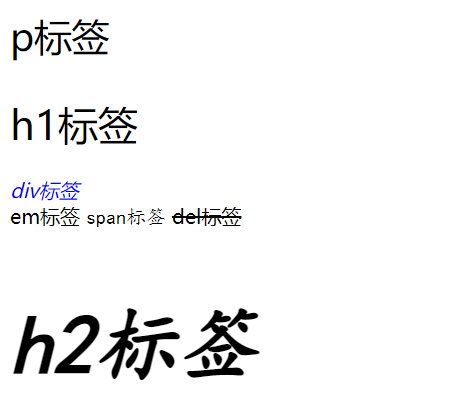
4.文本样式
文本水平对齐方式
text-align: 对齐方式;对齐方式有left,right,center。
设置居中center,能让文本、span标签、a标签、input标签、img标签居中。需要注意的是,要设置他们的父元素设置,如:h3是标题文字的文本,应该设置h3,而图片的父元素并不是img,而是body。
文本缩进
text-indent: 取值;取值:1.数字+px 2.数字加em(1em=当前标签font-size的大小)
文本修饰
text-decoration: 取值;取值:
属性值 效果 underline 下划线(常用) line-through 删除线(不常用) overline 上划线(几乎不用) none 无装饰线(常用) 开发中会使用text-decoration:none;清除a标签默认的下划线。
行高
作用:控制上下行的间距
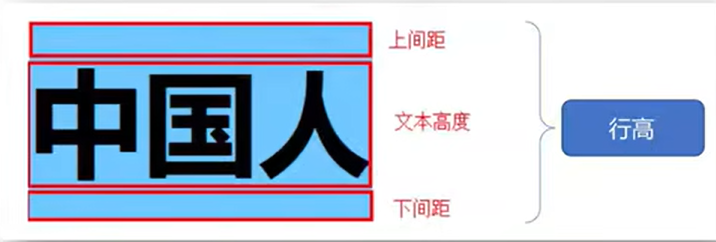
line-height:取值;取值:1.数字+px 2.数字加em(1em=当前标签font-size的大小)
应用:
1.单行文本垂直居中取值可以设置文字父元素高度。
2.网页精准布局,取值设置1取消上下间距。
行高与font连写注意覆盖问题:
其他的值都是用空格隔开,但是字号和行高用斜线隔开。
font:style weight size/line-height family;案例演示
- html>
- <html lang="en">
- <head>
- <meta charset="UTF-8">
- <meta http-equiv="X-UA-Compatible" content="IE=edge">
- <meta name="viewport" content="width=device-width, initial-scale=1.0">
- <title>Documenttitle>
- <style>
- /* 文本对齐方式 */
- h3{
- text-align: center;
- }
- /*文本缩进 */
- p{
- /* text-indent: 32px;
- font-size: 20px; */
- /* 用px设置有局限性 */
- text-indent: 2em;
- font-size: 14px;
- }
- /* 图片对齐 */
- body{
- text-align: center;
- }
- /* 文本修饰 */
- h4{
- text-decoration: underline;
- }
- div{
- text-decoration: overline;
- }
- span{
- text-decoration: line-through;
- }
- a{
- text-decoration: none;
- }
- /* 行高 */
- p{
- /*1. line-height: 16px; */
- /* 2.自己字号的多少倍 */
- /* line: height 1.5; */
- font:italic 700 15px/1.5 楷体;
- }
- style>
- head>
- <body>
- <h3>马克思主义h3>
- <p>马克思主义,英文是Marxism,是马克思主义理论体系的简称,是关于全世界无产阶级和全人类彻底解放的学说。它由马克思主义哲学、马克思主义政治经济学和科学社会主义三大部分组成,是马克思、恩格斯在批判地继承和吸收人类关于自然科学、思维科学、社会科学优秀成果的基础上于19世纪40年代创立的,并在实践中不断地丰富、发展和完善的无产阶级思想的科学体系。p>
- <img src="./img/马克思.jpg" alt="" width="200">
- <h4>h4标签h4>
- <div>div标签div>
- <span>span标签span>
- <a href="#">超链接标签a>
- body>
- html>

5.扩展:标签居中
我们改变了标签里面内容的水平对齐方式,标签的位置能不能改变呢?答案是能的。
margin: 0 auto;案例演示
- html>
- <html lang="en">
- <head>
- <meta charset="UTF-8">
- <meta http-equiv="X-UA-Compatible" content="IE=edge">
- <meta name="viewport" content="width=device-width, initial-scale=1.0">
- <title>Documenttitle>
- <style>
- div{
- /* 如果只有width,画面不显示 */
- width: 300px;
- height: 300px;
- background-color: pink;
- margin: 0 auto;
- }
- style>
- head>
- <body>
- <div>div>
- body>
- html>

-
相关阅读:
来围观 WasmEdge 7月社区会议都说了些啥
java毕业生设计中小学图书馆管理计算机源码+系统+mysql+调试部署+lw
初识git,使用git
源码安装LNMP
移动硬盘删除的文件如何恢复呢?
[MT8766][Android12] 增加应用安装白名单或者黑名单
小白学习java分布式笔记
【Linux】kill 命令使用
ImportError: urllib3 v2.0 only supports OpenSSL 1.1.1+
Python-IO编程和异常
- 原文地址:https://blog.csdn.net/btufdycxyffd/article/details/126910030
