-
Android Kotlin Paging3 Flow完整教程
准备好接口
- package com.example.android_learn_paging.net
- import com.example.android_learn_paging.model.NetDataList
- import retrofit2.http.GET
- import retrofit2.http.Query
- interface FeedBackApi {
- @GET("api/v1/open/test")
- suspend fun getFeedBack(
- @Query("page") page: Int,
- @Query("size") size: Int
- ): NetDataList
- }
用laravel8.5 写的 就是对数据库进行分页查询
- public function index($size, $search): JsonResponse
- {
- $res = AppFeedBack::query();
- if ($search) {
- if (isset($search['app_name'])) {
- $res = $res->where('app_name', 'like', "%" . $search['app_name'] . "%");
- }
- if (isset($search['content'])) {
- $res = $res->where('content', 'like', "%" . $search['content'] . "%");
- }
- }
- $data = $res
- ->orderBy('create_time', 'desc')
- ->paginate($size)
- ->toArray();
- // return AppFeedBack::simplePaginate(15);
- return $this->apiSuccess("", $data);
- }
大概给大家看下工程结构
很复杂。

返回的数据bean格式如下
- package com.example.android_learn_paging.model
- data class FeedBack(
- val id: Int, val app_name: String, val package_name: String, val content: String
- )
- data class FeedBacks(
- val current_page: Int, val data: ArrayList
, val last_page: Int - )
- data class NetDataList(
- val code: Int, val message: String, val data: FeedBacks
- )
api接口
- package com.example.android_learn_paging.net
- import com.example.android_learn_paging.model.NetDataList
- import retrofit2.http.GET
- import retrofit2.http.Query
- interface FeedBackApi {
- @GET("api/v1/open/test")
- suspend fun getFeedBack(
- @Query("page") page: Int,
- @Query("size") size: Int
- ): NetDataList
- }
初始化数据类
- package com.example.android_flow_practice.net
- import android.util.Log
- import okhttp3.OkHttpClient
- import okhttp3.logging.HttpLoggingInterceptor
- import retrofit2.Retrofit
- import retrofit2.converter.gson.GsonConverterFactory
- import retrofit2.create
- object RetrofitClient {
- val url = "https://xxx.xxxx.xxxx";
- private const val TAG = "RetrofitClient"
- private val instance: Retrofit by lazy {
- val interceptor = HttpLoggingInterceptor(HttpLoggingInterceptor.Logger {
- Log.w(TAG, "${it}")
- })
- interceptor.level = HttpLoggingInterceptor.Level.BODY;
- Retrofit.Builder().client(
- OkHttpClient.Builder().addInterceptor(interceptor).build()
- ).baseUrl(url)
- .addConverterFactory(GsonConverterFactory.create())
- .build()
- }
- fun
createApi(clazz: Class<T>): T { - return instance.create(clazz) as T
- }
- }
用到了三方依赖
- implementation "androidx.activity:activity-ktx:1.5.1"
- implementation "androidx.fragment:fragment-ktx:1.5.2"
- implementation "androidx.lifecycle:lifecycle-livedata-ktx:2.5.1"
- implementation "androidx.swiperefreshlayout:swiperefreshlayout:1.1.0"
- implementation "com.squareup.retrofit2:retrofit:2.9.0"
- implementation "com.squareup.retrofit2:converter-gson:2.9.0"
- implementation "com.squareup.okhttp3:logging-interceptor:3.4.1"
- implementation "androidx.paging:paging-runtime-ktx:3.1.1"
- implementation "com.squareup.picasso:picasso:2.71828"

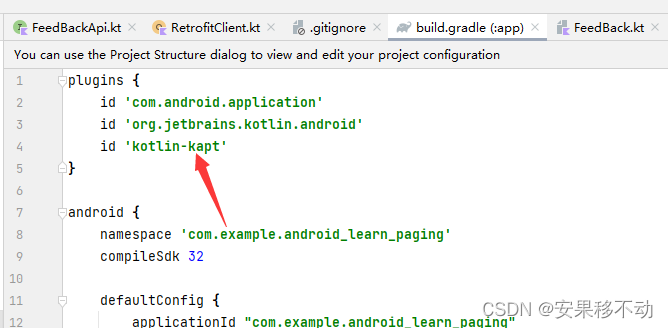
这俩勾上 kapt加上
好了
继续
AppConfigs- package com.example.android_learn_paging.config
- object AppConfigs {
- const val LOAD_PAGE = 8
- //默认就是3倍
- const val INITPAGE_SIZE = LOAD_PAGE * 3
- }
paging3 的一次加载页数 。这里写死了。为啥要这么写 因为后面就知道了
核心adapter PageSource
FeedBackPagingSource- package com.example.android_learn_paging.paging
- import android.util.Log
- import androidx.paging.PagingSource
- import androidx.paging.PagingState
- import com.example.android_flow_practice.net.RetrofitClient
- import com.example.android_learn_paging.config.AppConfigs
- import com.example.android_learn_paging.model.FeedBack
- import com.example.android_learn_paging.net.FeedBackApi
- import kotlinx.coroutines.delay
- class FeedBackPagingSource : PagingSource<Int, FeedBack>() {
- private val TAG = "FeedBackPagingSource"
- /**
- * 1 8
- * 2 8
- * 3 8
- *
- *
- * null 2
- * 1 3
- * 2 4
- *
- *
- * 1 24
- * 2 8
- * 3 8
- *
- *
- * null 4
- * 3 5
- * 4 6
- */
- override suspend fun load(params: LoadParams<Int>): LoadResult<Int, FeedBack> {
- val currentPage = params.key ?: 1
- val pageSize = params.loadSize
- val feedbacks =
- RetrofitClient.createApi(FeedBackApi::class.java).getFeedBack(currentPage, pageSize)
- Log.d(TAG, "load: currentPage $currentPage ,pageSize $pageSize")
- var prevKey: Int? = null
- var nextKey: Int? = null
- if (currentPage == 1) {
- prevKey = null
- nextKey = AppConfigs.INITPAGE_SIZE / AppConfigs.LOAD_PAGE + 1
- } else {
- prevKey = currentPage - 1
- nextKey =
- if (feedbacks.data.last_page > feedbacks.data.current_page) currentPage + 1 else null
- }
- return try {
- LoadResult.Page(data = feedbacks.data.data, prevKey = prevKey, nextKey = nextKey)
- } catch (e: Exception) {
- e.printStackTrace()
- return LoadResult.Error(e)
- }
- }
- override fun getRefreshKey(state: PagingState<Int, FeedBack>): Int? {
- return null
- }
- }

由于第一次加载了三页数 所以再次加载不可以直接从2开始
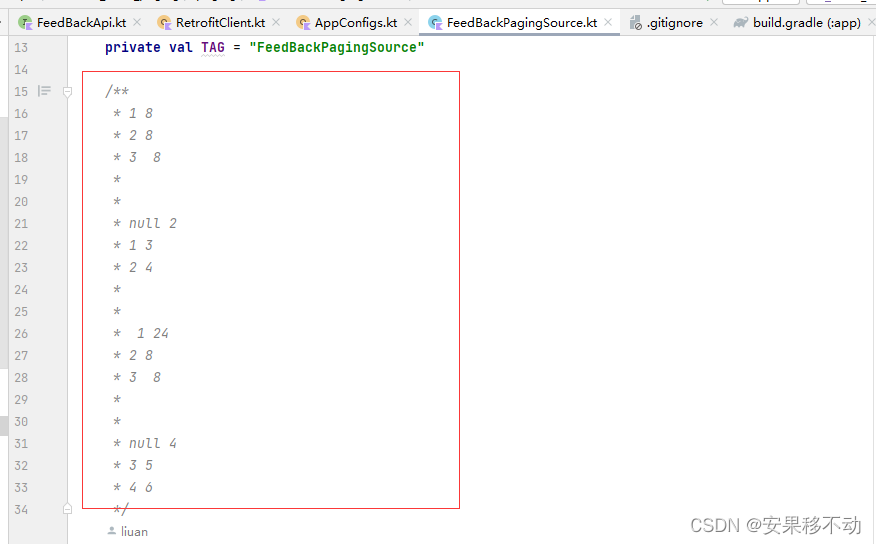
这个注释上面是指的
第一次 加载8个 对应下面 首次加载为null 然后下一页为2
第二次 8个 对应下面 第二次 加载 上一页为 1 然后下一页为3 、
这都是理想情况下 当如果是分页首次加载了 initialLoadSize 为默认3倍的时候要处理就往下面数
就懂了
viewModel记录了我们在如何处理这个数据 并且返回了FLow
- package com.example.android_learn_paging.viewmodel
- import androidx.lifecycle.ViewModel
- import androidx.lifecycle.viewModelScope
- import androidx.paging.Pager
- import androidx.paging.PagingConfig
- import androidx.paging.PagingData
- import androidx.paging.cachedIn
- import com.example.android_learn_paging.config.AppConfigs
- import com.example.android_learn_paging.model.FeedBack
- import com.example.android_learn_paging.paging.FeedBackPagingSource
- import kotlinx.coroutines.flow.Flow
- class FeedBackViewModel : ViewModel() {
- private val moives by lazy {
- Pager(config = PagingConfig(
- pageSize = AppConfigs.LOAD_PAGE,
- initialLoadSize = AppConfigs.INITPAGE_SIZE,
- prefetchDistance = 1
- ), pagingSourceFactory = { FeedBackPagingSource() }).flow.cachedIn(viewModelScope)
- }
- fun loadFeedBack(): Flow<PagingData<FeedBack>> = moives
- }
下面就是页面代码了。
先 MainActivity吧
- package com.example.android_learn_paging.activity
- import androidx.appcompat.app.AppCompatActivity
- import android.os.Bundle
- import androidx.activity.viewModels
- import androidx.lifecycle.lifecycleScope
- import androidx.paging.LoadState
- import com.example.android_learn_paging.adapter.FeedBackAdapter
- import com.example.android_learn_paging.adapter.MovieLoadMoreAdapter
- import com.example.android_learn_paging.databinding.ActivityMainBinding
- import com.example.android_learn_paging.viewmodel.FeedBackViewModel
- import kotlinx.coroutines.flow.collectLatest
- class MainActivity : AppCompatActivity() {
- private val feedBackViewModel: FeedBackViewModel by viewModels()
- private val mBinding: ActivityMainBinding by lazy {
- ActivityMainBinding.inflate(layoutInflater)
- }
- override fun onCreate(savedInstanceState: Bundle?) {
- super.onCreate(savedInstanceState)
- setContentView(mBinding.root)
- val feedBackAdapter = FeedBackAdapter(this)
- mBinding.apply {
- rv.adapter =
- feedBackAdapter.withLoadStateFooter(MovieLoadMoreAdapter(this@MainActivity))
- swipeRefreshLayout.setOnRefreshListener {
- feedBackAdapter.refresh()
- }
- }
- lifecycleScope.launchWhenCreated {
- feedBackViewModel.loadFeedBack().collectLatest {
- feedBackAdapter.submitData(it)
- }
- }
- lifecycleScope.launchWhenCreated {
- feedBackAdapter.loadStateFlow.collectLatest { status ->
- mBinding.swipeRefreshLayout.isRefreshing = status.refresh is LoadState.Loading
- }
- }
- }
- }
布局
- <?xml version="1.0" encoding="utf-8"?>
- <androidx.constraintlayout.widget.ConstraintLayout xmlns:android="http://schemas.android.com/apk/res/android"
- xmlns:app="http://schemas.android.com/apk/res-auto"
- xmlns:tools="http://schemas.android.com/tools"
- android:layout_width="match_parent"
- android:layout_height="match_parent"
- tools:context=".activity.MainActivity">
- <androidx.swiperefreshlayout.widget.SwipeRefreshLayout
- android:id="@+id/swipeRefreshLayout"
- android:layout_width="match_parent"
- android:layout_height="match_parent">
- <androidx.recyclerview.widget.RecyclerView
- android:id="@+id/rv"
- android:layout_width="match_parent"
- android:layout_height="wrap_content"
- android:orientation="vertical"
- app:layoutManager="androidx.recyclerview.widget.LinearLayoutManager" />
- </androidx.swiperefreshlayout.widget.SwipeRefreshLayout>
- </androidx.constraintlayout.widget.ConstraintLayout>
看到了很多生代码 没关系 一点一点补充
FeedBackAdapter.kt- package com.example.android_learn_paging.adapter
- import android.content.Context
- import android.view.LayoutInflater
- import android.view.ViewGroup
- import androidx.paging.PagingDataAdapter
- import androidx.recyclerview.widget.DiffUtil
- import com.example.android_learn_paging.databinding.ItemPagingBinding
- import com.example.android_learn_paging.model.FeedBack
- val diffUtil = object : DiffUtil.ItemCallback
() { - //如果id一样 就认为是同一个元素
- override fun areContentsTheSame(oldItem: FeedBack, newItem: FeedBack): Boolean {
- return oldItem.id == newItem.id
- }
- override fun areItemsTheSame(oldItem: FeedBack, newItem: FeedBack): Boolean {
- return oldItem == newItem
- }
- }
- class FeedBackAdapter(private val context: Context) :
- PagingDataAdapter
- override fun onBindViewHolder(holder: BindingViewHolder, position: Int) {
- val feedBack = getItem(position)
- feedBack?.let {
- val binding = holder.binding as ItemPagingBinding
- binding.feedback = it
- binding.packageName = "https://www.baidu.com/s?wd=%E7%99%BE%E5%BA%A6%E7%83%AD%E6%90%9C&sa=ire_dl_gh_logo_texing&rsv_dl=igh_logo_pc";
- }
- }
- override fun onCreateViewHolder(parent: ViewGroup, viewType: Int): BindingViewHolder {
- // val binding = Pagint
- val binding = ItemPagingBinding.inflate(LayoutInflater.from(context), parent, false)
- return BindingViewHolder(binding)
- }
- }
BindingViewHolder- package com.example.android_learn_paging.adapter
- import androidx.recyclerview.widget.RecyclerView
- import androidx.viewbinding.ViewBinding
- class BindingViewHolder(val binding: ViewBinding) : RecyclerView.ViewHolder(binding.root) {}
ImageViewBindingAdapter对app:image标签来进行注解
- package com.example.android_learn_paging.adapter
- import android.graphics.Color
- import com.example.android_learn_paging.R
- import android.text.TextUtils
- import android.widget.ImageView
- import androidx.databinding.BindingAdapter
- import com.squareup.picasso.Picasso
- class ImageViewBindingAdapter {
- companion object {
- @JvmStatic
- @BindingAdapter("image")
- fun setImage(imageView: ImageView, url: String) {
- if (!TextUtils.isEmpty(url)) {
- Picasso.get().load(url).placeholder(R.drawable.ic_launcher_background)
- .into(imageView)
- } else {
- imageView.setBackgroundColor(Color.GRAY)
- }
- }
- }
- }
下拉加载更多组件
MovieLoadMoreAdapter- package com.example.android_learn_paging.adapter
- import android.content.Context
- import android.view.LayoutInflater
- import android.view.ViewGroup
- import androidx.paging.LoadState
- import androidx.paging.LoadStateAdapter
- import com.example.android_learn_paging.databinding.FeedbackLoadmoreBinding
- class MovieLoadMoreAdapter(private val context: Context) : LoadStateAdapter
() { - override fun onBindViewHolder(holder: BindingViewHolder, loadState: LoadState) {
- }
- override fun onCreateViewHolder(parent: ViewGroup, loadState: LoadState): BindingViewHolder {
- val binding = FeedbackLoadmoreBinding.inflate(LayoutInflater.from(context), parent, false)
- return BindingViewHolder(binding)
- }
- }
adapter非常简单
feedback_loadmore.xml- <?xml version="1.0" encoding="utf-8"?>
- <androidx.constraintlayout.widget.ConstraintLayout xmlns:android="http://schemas.android.com/apk/res/android"
- xmlns:app="http://schemas.android.com/apk/res-auto"
- android:layout_width="match_parent"
- android:layout_height="50dp"
- android:padding="10dp">
- <ProgressBar
- android:id="@+id/progressBar"
- android:layout_width="20dp"
- android:layout_height="20dp"
- android:layout_marginStart="20dp"
- app:layout_constraintBottom_toBottomOf="parent"
- app:layout_constraintStart_toStartOf="parent" />
- <TextView
- android:id="@+id/tv_loading"
- android:layout_width="wrap_content"
- android:layout_height="wrap_content"
- android:text="加载更多数据"
- app:layout_constraintBottom_toBottomOf="parent"
- app:layout_constraintEnd_toEndOf="parent"
- app:layout_constraintStart_toStartOf="@id/progressBar" />
- </androidx.constraintlayout.widget.ConstraintLayout>
adapter item布局
item_paging.xml- <?xml version="1.0" encoding="utf-8"?>
- <layout xmlns:android="http://schemas.android.com/apk/res/android"
- xmlns:app="http://schemas.android.com/apk/res-auto"
- xmlns:tools="http://schemas.android.com/tools">
- <data>
- <variable
- name="packageName"
- type="String" />
- <variable
- name="feedback"
- type="com.example.android_learn_paging.model.FeedBack" />
- </data>
- <androidx.constraintlayout.widget.ConstraintLayout
- android:layout_width="match_parent"
- android:layout_height="wrap_content">
- <TextView
- android:id="@+id/tv_name"
- android:layout_width="wrap_content"
- android:layout_height="wrap_content"
- android:layout_marginTop="20dp"
- android:text="@{feedback.app_name}"
- app:layout_constraintEnd_toEndOf="parent"
- app:layout_constraintStart_toStartOf="parent"
- app:layout_constraintTop_toTopOf="parent" />
- <TextView
- android:id="@+id/tv_context"
- android:layout_width="wrap_content"
- android:layout_height="wrap_content"
- android:layout_marginTop="10dp"
- android:text="@{feedback.content}"
- app:layout_constraintEnd_toEndOf="parent"
- app:layout_constraintStart_toStartOf="parent"
- app:layout_constraintTop_toBottomOf="@+id/tv_name" />
- <ImageView
- android:layout_width="wrap_content"
- android:layout_height="wrap_content"
- android:layout_marginTop="10dp"
- app:image="@{packageName}"
- app:layout_constraintEnd_toEndOf="parent"
- app:layout_constraintStart_toStartOf="parent"
- app:layout_constraintTop_toBottomOf="@+id/tv_context" />
- </androidx.constraintlayout.widget.ConstraintLayout>
- </layout>

系统的adapter指向一个上滑加载更多
下拉刷新用的是

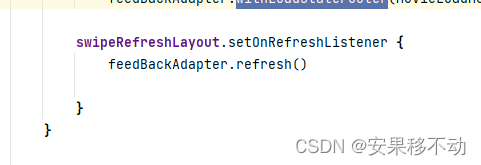
检测刷新状态 并且刷新代码
是的
PagingDataAdapter 有自己的刷新代码。。而我是刚知道。。我以前都去刷新

他 先通过一个成员变量引用出来 然后调用
.invalidate()进行刷新 也是可行的。。。但是不知道会不会有什么潜在问题。
-
相关阅读:
巧用CSS3之雨伞
使用 pair 做 unordered_map 的键值
前端分支规范
剑指offer(C++)-JZ29:顺时针打印矩阵(算法-模拟)
flex布局属性概括
LeetCode:2304. 网格中的最小路径代价(C++)
区块链技术在金融领域的应用场景
前端开发:Vue混入(mixin)的使用
腾讯笔试题总结2
制造企业如何开展客户满意度调查?民安智库为你解答
- 原文地址:https://blog.csdn.net/mp624183768/article/details/126898642
