-
SpringCloud 微服务应用篇 | (1)微服务远程调用与Eureka 注册中心
微服务远程调用
在进行完基本的模拟系统搭建之后,在地址栏中输入请求:
http://localhost:8080/order/103,得到如下结果{ "id": 101, "price": 699900, "name": "Apple 苹果 iPhone 12 ", "num": 1, "userId": 1, "user": null }- 1
- 2
- 3
- 4
- 5
- 6
- 7
- 8
打开一个新的窗口,输入请求:
http://localhost:8081/user/1,得到如下结果{ "id": 1, "username": "柳岩", "address": "湖南省衡阳市" }- 1
- 2
- 3
- 4
- 5
现在有一个需求,要求用户在请求查看订单时,也需要看到用户的信息,数据结构如下
{ "id": 101, "price": 699900, "name": "Apple 苹果 iPhone 12 ", "num": 1, "userId": 1, "user": { "id": 1, "username": "柳岩", "address": "湖南省衡阳市" } }- 1
- 2
- 3
- 4
- 5
- 6
- 7
- 8
- 9
- 10
- 11
- 12
我们的想法是,在
order-service模块中,再发一次http请求,以获取user信息具体措施是:这首先就需要有一个配置类,并且把
RestTemplate类型装入IOC容器。RestTemplate 是由 Spring 提供的一个 HTTP 请求工具。它提供了常见的REST请求方案的模版,例如 GET 请求、POST 请求、PUT 请求、DELETE 请求以及一些通用的请求执行方法 exchange 以及 execute。@Configuration public class RestTemplateConfig { @Bean public RestTemplate restTemplate() { return new RestTemplate(); } }- 1
- 2
- 3
- 4
- 5
- 6
- 7
- 8
在
OrderService中,修改代码@Autowired private RestTemplate restTemplate; public Order queryOrderById(Long orderId) { // 1.查询订单 Order order = orderMapper.findById(orderId); // 2. 利用RestTemplate发送http请求,查询用户 String url = "http://localhost:8081/user/" + order.getUserId(); User user = restTemplate.getForObject(url, User.class); // 3.封装User到Order order.setUser(user); // 4.返回 return order; }- 1
- 2
- 3
- 4
- 5
- 6
- 7
- 8
- 9
- 10
- 11
- 12
- 13
- 14
在地址栏中输入请求:
http://localhost:8080/order/103,便得到如下结果{ "id": 101, "price": 699900, "name": "Apple 苹果 iPhone 12 ", "num": 1, "userId": 1, "user": { "id": 1, "username": "柳岩", "address": "湖南省衡阳市" } }- 1
- 2
- 3
- 4
- 5
- 6
- 7
- 8
- 9
- 10
- 11
- 12
Eureka 注册中心
Eureka原理
消费者该如何获取服务提供者具体信息?
- 服务提供者启动时向
eureka注册自己的信息 eureka保存这些信息消费者根据服务名称
向
eureka拉取提供者信息如果有多个服务提供者,消费者该如何选择?- 服务消费者利用负载均衡算法,从服务列表中挑选一个
消费者如何感知服务提供者健康状态?
- 服务提供者会每隔30秒向
EurekaServer发送心跳请求,报告健康状态 eureka会更新记录服务列表信息,心跳不正常会被剔除- 消费者就可以拉取到最新的信息
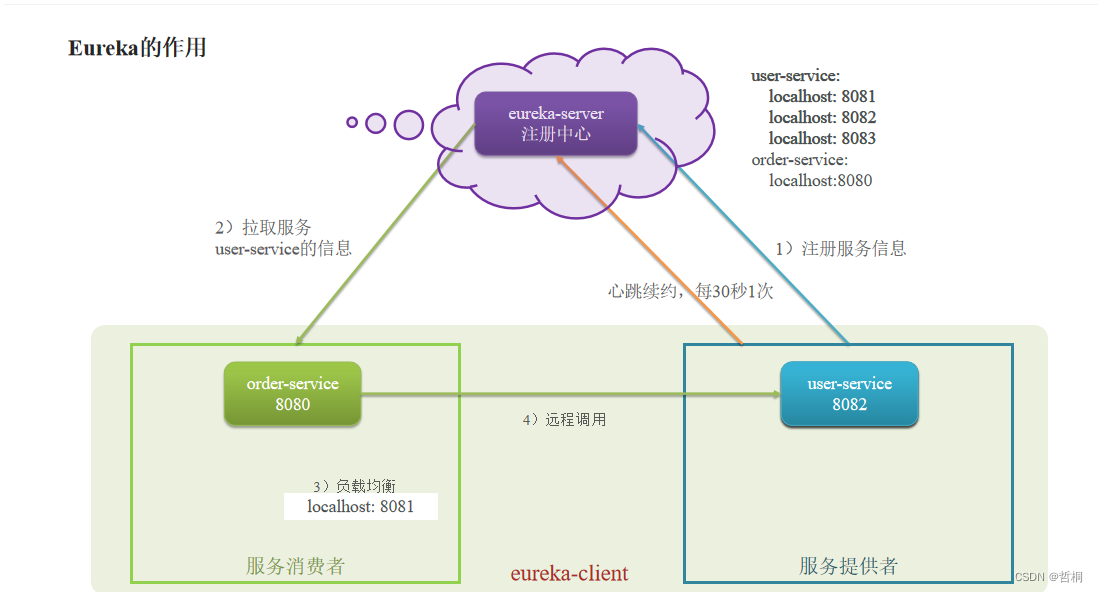
搭建EurekaServer
创建一个新的模块
eureka-server,引入eureka-server依赖<dependency> <groupId>org.springframework.cloudgroupId> <artifactId>spring-cloud-starter-netflix-eureka-serverartifactId> <version>3.1.3version> dependency>- 1
- 2
- 3
- 4
- 5
在启动类上添加
@EnableEurekaServer注解@EnableEurekaServer // 自动装配的开关 @SpringBootApplication public class EurekaServerApplication { public static void main(String[] args) { SpringApplication.run(EurekaServerApplication.class, args); } }- 1
- 2
- 3
- 4
- 5
- 6
- 7
在
application.properties中配置eureka地址server.port=10086 # 微服务名称 spring.application.name=eurekaserver # 配置Eureka地址(目的是eureka集群之间互相注册) eureka.client.service-url.defaultZone=http://127.0.0.1:10086/eureka/ eureka.client.register-with-eureka=true eureka.client.fetch-registry=false- 1
- 2
- 3
- 4
- 5
- 6
- 7
- 8
服务注册
在
user-service和order-service这两个模块中的pom.xml引入eureka-client依赖<dependency> <groupId>org.springframework.cloudgroupId> <artifactId>spring-cloud-starter-netflix-eureka-clientartifactId> dependency>- 1
- 2
- 3
- 4
- 5
在两个
Module中的application.yml中配置eureka地址spring: application: name: userservice #服务器名称 eureka: client: service-url: defaultZone: http://127.0.0.1:10086/eureka/- 1
- 2
- 3
- 4
- 5
- 6
- 7
服务发现
引入
eureka-client依赖在
application.yml中配置eureka地址给消费者(调用者)中
RestTemplate添加@LoadBalanced注解@Configuration public class RestTemplateConfig { @Bean @LoadBalanced //负责均衡 public RestTemplate restTemplate() { return new RestTemplate(); } }- 1
- 2
- 3
- 4
- 5
- 6
- 7
- 8
使用idea提供的
copy configuration,并修改新的服务的端口,即在VM options:-Dserver.port=8083。用服务提供者的服务名称远程调用。从
localhost变成userservicepublic Order queryOrderById(Long orderId) { // 1.查询订单 Order order = orderMapper.findById(orderId); // 2. 利用RestTemplate发送http请求,查询用户 String url = "http://userservice:8081/user/" + order.getUserId(); User user = restTemplate.getForObject(url, User.class); // 3.封装User到Order order.setUser(user); // 4.返回 return order; }- 1
- 2
- 3
- 4
- 5
- 6
- 7
- 8
- 9
- 10
- 11
启动各个服务器

-
相关阅读:
origin自定义颜色
python基础知识
【论文解读】斯坦福小镇Generative Agents
frp内网穿透保姆级配置流程,让客户端电脑可以通过域名或者IP访问本地程序接口
python post请求
linux系统---防火墙
WebSocket实战之二协议分析
算法笔记-第十章-图的定义和相关术语
Tensorflow pb模型转tflite,并量化
3D建模师为了让甲方爸爸过稿,还可以这么做,就是在赚血汗钱啊
- 原文地址:https://blog.csdn.net/xt199711/article/details/126878987