-
actuator--基础--6.1--端点解析--health端点
actuator–基础–6.1–端点解析–health端点
代码位置
https://gitee.com/DanShenGuiZu/learnDemo/tree/master/actuator-learn/actuator01- 1
1、/health 配置
1.1、当我们访问/health端点,返回是一个汇总的信息
http://127.0.0.1:8080/actuator/health- 1
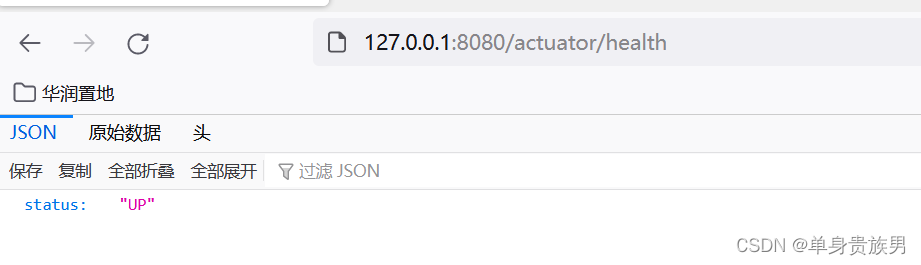
status的值有2个
1. {“status”:“UP”}
2. {“status”:“DOWN”}1.2、查看详细的应用健康信息
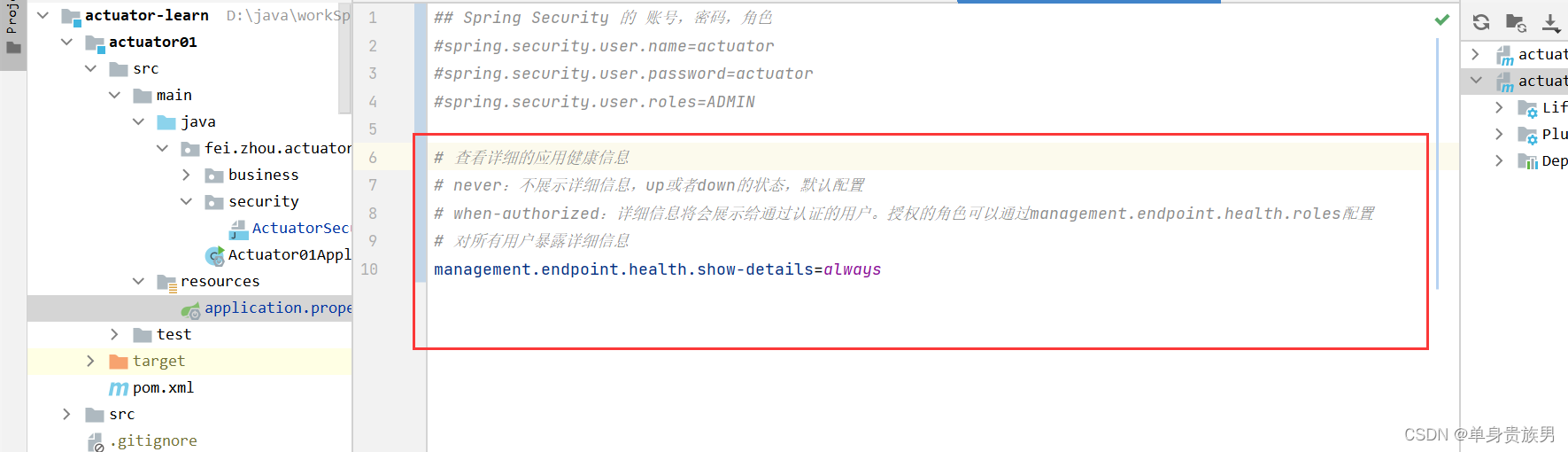
1.2.1、配置
# 查看详细的应用健康信息 # never:不展示详细信息,up或者down的状态,默认配置 # when-authorized:详细信息将会展示给通过认证的用户。授权的角色可以通过management.endpoint.health.roles配置 # 对所有用户暴露详细信息 management.endpoint.health.show-details=always- 1
- 2
- 3
- 4
- 5
1.2.2、测试
http://127.0.0.1:8080/actuator/health- 1
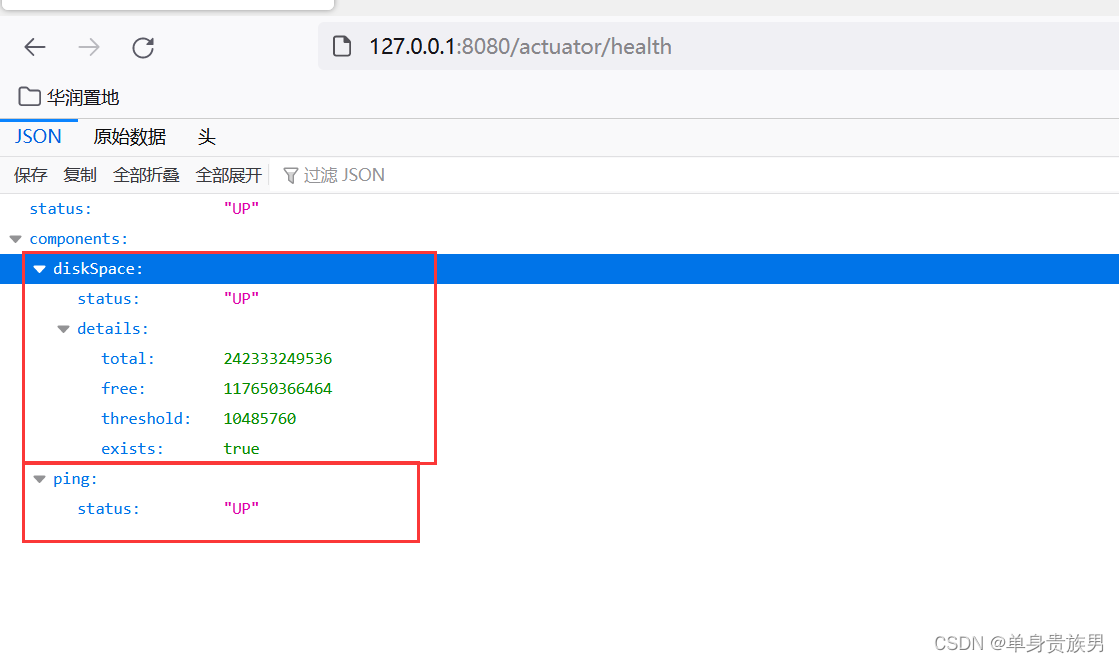
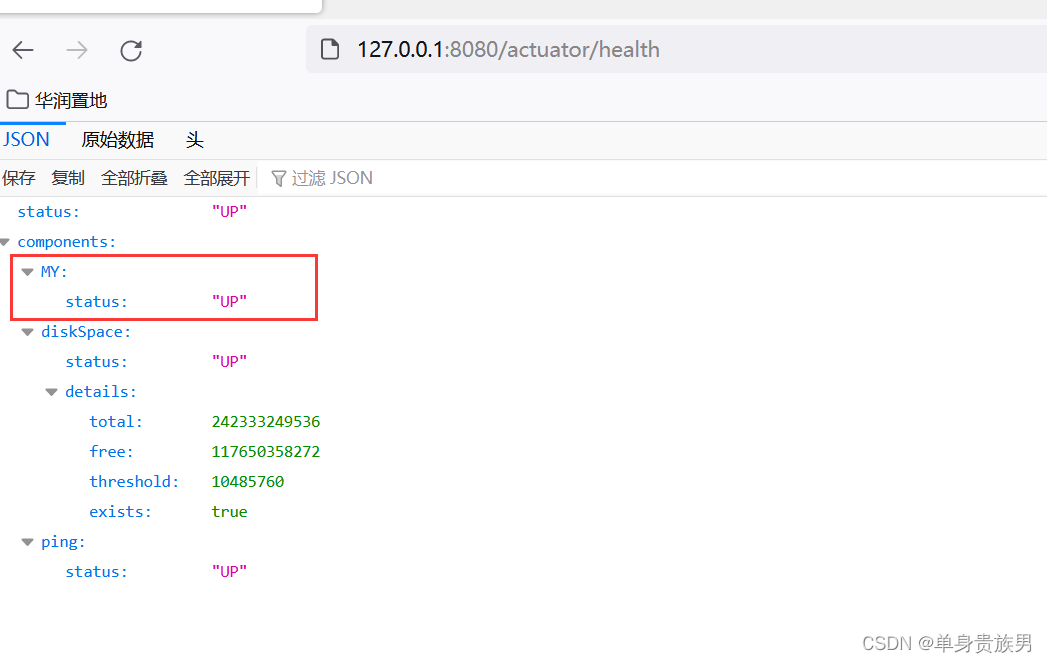
从上面的应用的详细健康信息发现,健康信息包含磁盘空间、网络。
如果我们有配置redis,mysql,那么返回的信息就会有对应redis和mysql的信息,因为actuator会自动给监控起来。
1.3、自动配置的健康指示器
- /health端点有很多自动配置的健康指示器:如redis、rabbitmq、db等组件。
- 当你的项目有依赖对应组件的时候,这些健康指示器就会被自动装配,继而采集对应的信息。
- 如上面的 diskSpace 节点信息就是DiskSpaceHealthIndicator类在起作用。
1.4、自动配置的健康指示器 对应的实现类
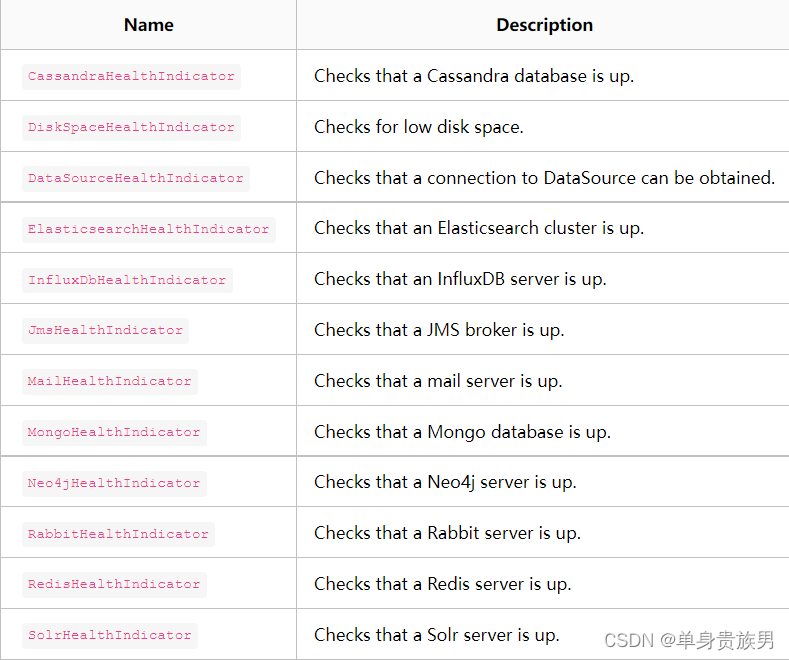
当如上的组件有一个状态异常,应用服务的整体状态即为down。我们也可以通过配置禁用健康监测。
禁用某个组件的健康监测。
# 禁用mongodb组件 management.health.mongo.enabled: false- 1
- 2
- 3
- 4
- 5
禁用所有自动配置的健康指示器
# 禁用所有自动配置的健康指示器 management.health.defaults.enabled: false- 1
- 2
- 3
2、/health原理
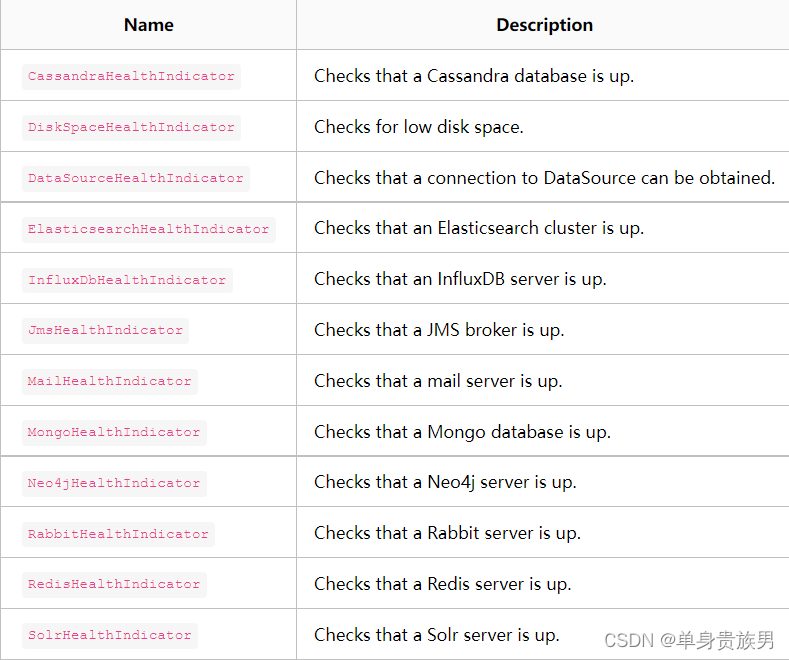
- 默认情况下,Spring boot的健康信息都是从ApplicationContext中的各种HealthIndicator Beans汇总而成的
- Spring boot框架中包含了大量的HealthIndicators的实现类
- 你可以实现自己的健康状态。
2.1、 汇总算法
- 设置状态码顺序:setStatusOrder(Status.DOWN, Status.OUT_OF_SERVICE, Status.UP, Status.UNKNOWN)。
- 过滤掉不能识别的状态码。
- 如果无任何状态码,整个spring boot应用的状态是 UNKNOWN。
- 将所有收集到的状态码按照 1 中的顺序排序。
- 返回有序状态码序列中的第一个状态码,作为整个spring boot应用的状态。
2.2、 汇总算法的源代码
org.springframework.boot.actuate.health.OrderedHealthAggregator。- 1
2.3、 Spring boot框架自带的 HealthIndicators
2.4、 禁用HealthIndicators
禁用某个组件的健康监测。
# 禁用某个(xxxx) HealthIndicators management.health.xxxx.enabled: false- 1
- 2
- 3
- 4
- 5
禁用所有的 HealthIndicators
# 禁用所有自动配置的健康指示器 management.health.defaults.enabled: false- 1
- 2
- 3
3、自定义 HealthIndicator
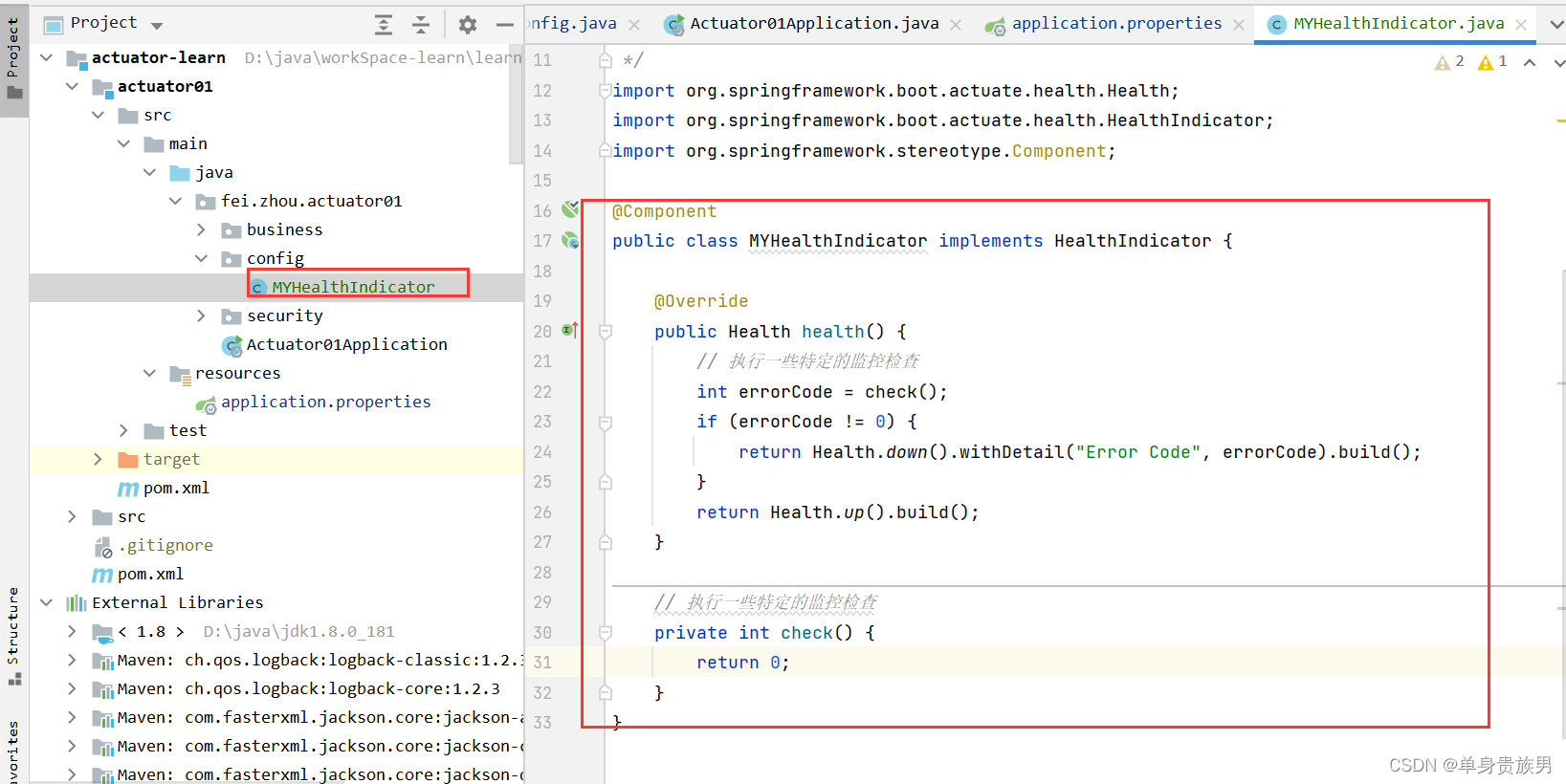
- 有时候需要提供自定义的健康状态检查信息,你可以通过实现HealthIndicator的接口来实现,并将该实现类注册为spring bean。
- 你需要实现其中的health()方法,并返回自定义的健康状态响应信息,该响应信息应该包括一个状态码和要展示详细信息。
3.1、自定义 HealthIndicator
import org.springframework.boot.actuate.health.Health; import org.springframework.boot.actuate.health.HealthIndicator; import org.springframework.stereotype.Component; @Component public class MYHealthIndicator implements HealthIndicator { @Override public Health health() { // 执行一些特定的监控检查 int errorCode = check(); if (errorCode != 0) { return Health.down().withDetail("Error Code", errorCode).build(); } return Health.up().build(); } // 执行一些特定的监控检查 private int check() { return 0; } }- 1
- 2
- 3
- 4
- 5
- 6
- 7
- 8
- 9
- 10
- 11
- 12
- 13
- 14
- 15
- 16
- 17
- 18
- 19
- 20
- 21
- 22
- 23
- 24
3.2、自定义状态类型
除了Spring boot定义的几个状态类型,我们也可以自定义状态类型,用来表示一个新的系统状态。
在这种情况下,你还需要实现接口 HealthAggregator ,或者通过配置 management.health.status.order 来继续使用HealthAggregator的默认实现。
举例
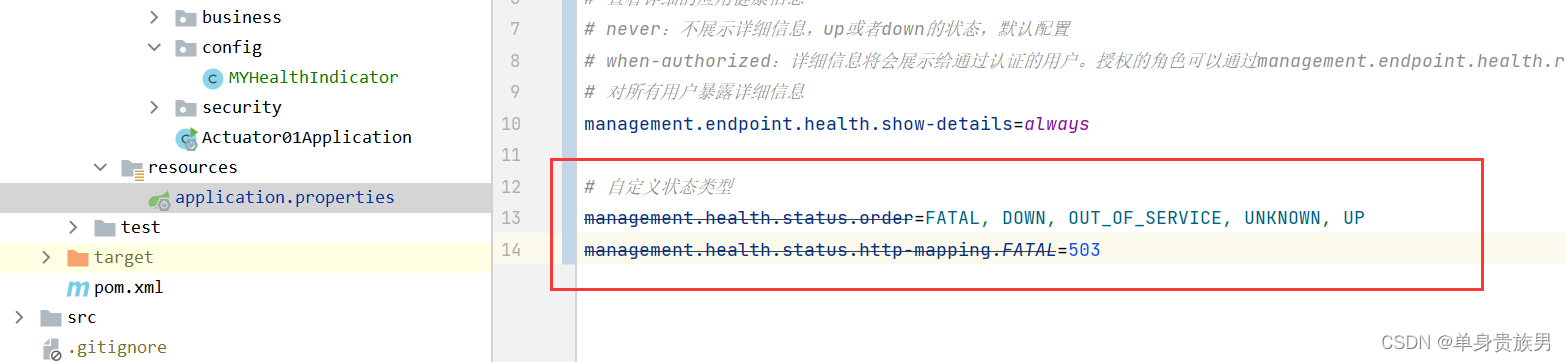
在你自定义的健康检查实现类 MYHealthIndicator中,使用了自定义的状态类型FATAL,为了配置该状态类型的严重程度,你需要在application的配置文件中添加如下配置:
management.health.status.order=FATAL, DOWN, OUT_OF_SERVICE, UNKNOWN, UP- 1
- 2
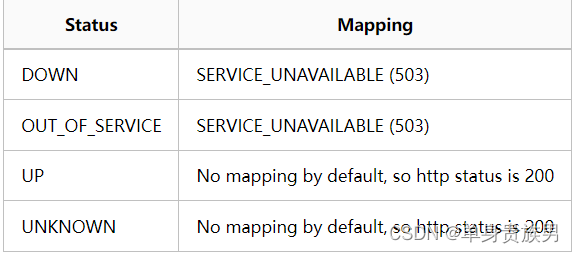
在做健康检查时,响应中的HTTP状态码反应了整体的健康状态,(例如,UP 对应200, 而 OUT_OF_SERVICE 和 DOWN 对应 503)。
同样,你也需要为自定义的状态类型设置对应的HTTP状态码,例如,下面的配置可以将 FATAL 映射为 503(服务不可用):
management.health.status.http-mapping.FATAL=503- 1
对应代码
3.3、如果需要更多的控制
自定义自己的 HealthStatusHttpMapper bean。
3.4、内置健康状态类型对应的HTTP状态码列表
-
相关阅读:
【owt-server】AudioSendAdapter分析
Folium笔记: Popup
DuckDB学习-初识tpcds
目标识别项目实战:基于Yolov7-LPRNet的动态车牌目标识别算法模型(二)
[Unity]OCR识别--OpenCV篇
PyQt5_股票最近均线状态工具
牛客网KY222打印日期 牛客网KY258累加天数
EasyPOI实现excel文件导出
浏览器:重绘(repaint)与回流/重排(reflow)
深入理解与应用Keepalive机制
- 原文地址:https://blog.csdn.net/zhou920786312/article/details/126861004
