-
你还不知道怎么使用Vuex?赶紧来看看吧!
目录
因为解决了前端组件传参的问题,针对当前项目所有的变量进行统一管理,可以理解为前端的数据库。
vuex中默认情况下是不允许使用vue实例,想要请求后台接口,必须将vue实例当成参数从组件那一方传递过来。
1、加载依赖 npm install vuex -S 下载Vuex最新版本的依赖
(注意:小编所使用的版本不同: npm i -S vuex@3.6.2)
2、导入Vuex的核心组件4个组件,然后通过index.js加载进来
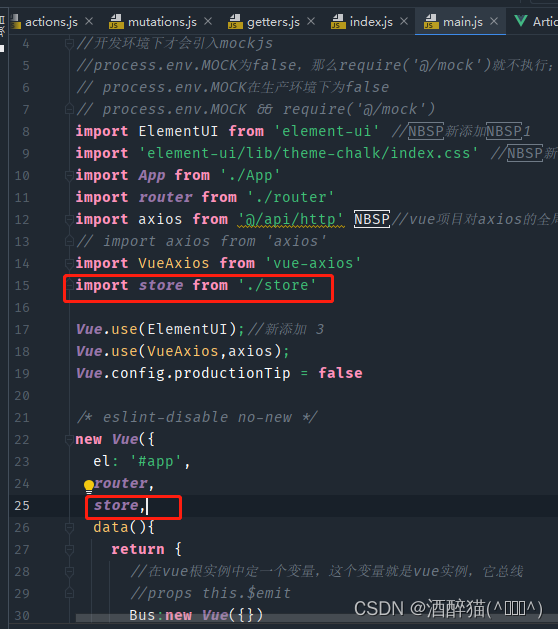
3、将Vuex对应的index.js挂载到main.js中的vue实例中
一、Vuex的核心组成
为什么要学习Vuex呢?
因为解决了前端组件传参的问题,针对当前项目所有的变量进行统一管理,可以理解为前端的数据库。
相比于总线的优点在于,能够将整个项目的变量进行统一管理

通过前期的知识分享可以了解到,
组件传参的方式我们目前学习了有两种:
1、子传父 $emit 父传子 props
2、总线
vue根实例中定义变量,这个变量也是vue实例
官方图解Vuex:
我的个人图解:

通过学习了今日的 Vuex 知识之后,我们又可以了解到一个组件传参的方式:
3、核心组件(第三种):
①state.js 存储变量
获取值 this.$store.state.变量值
②Getters.js 获取变量值
获取值 this.$store.getters.变量值的get方法
③mutations.js 改变变量值(同步)
获取值 this.$store.commit("同步的方法",{...(载荷)})
④actions.js 改变变量值(异步)
获取值 this.$store.dispatch("异步的方法",{...(载荷)})
vuex中默认情况下是不允许使用vue实例,想要请求后台接口,必须将vue实例当成参数从组件那一方传递过来。
二、Vuex版本问题及store.js的使用
Vuex使用步骤
1、加载依赖 npm install vuex -S 下载Vuex最新版本的依赖
(注意:小编所使用的版本不同: npm i -S vuex@3.6.2)

2、导入Vuex的核心组件4个组件,然后通过index.js加载进来
index.js:
- import Vue from 'vue'
- import Vuex from 'vuex'
- import state from './state'
- import getters from './getters'
- import actions from './actions'
- import mutations from './mutations'
- Vue.use(Vuex)
- const store = new Vuex.Store({
- state,
- getters,
- actions,
- mutations
- })
- export default store
3、将Vuex对应的index.js挂载到main.js中的vue实例中
4、测试Vuex的存储变量的功能
state.js:
- export default {
- resName:'阿喵餐馆'
- }
router/index.js:
- import Vue from 'vue'
- import Router from 'vue-router'
- import HelloWorld from "../components/HelloWorld";
- import AppMain from "../components/AppMain";
- import LeftNav from "../components/LeftNav";
- import TopNav from "../components/TopNav";
- import Login from "../views/Login";
- import Reg from "../views/Reg";
- import Articles from "../views/sys/Articles";
- import VuexPage1 from "../views/sys/VuexPage1";
- Vue.use(Router)
- export default new Router({
- routes: [
- {
- path: '/',
- name: 'Login',
- component: Login
- },
- {
- path: '/Login',
- name: 'Login',
- component: Login
- },
- {
- path: '/Reg',
- name: 'Reg',
- component: Reg
- },
- {
- path: '/AppMain',
- name: 'AppMain',
- component: AppMain,
- children:[
- {
- path: '/LeftNav',
- name: 'LeftNav',
- component: LeftNav
- },
- {
- path: '/TopNav',
- name: 'TopNav',
- component: TopNav
- },
- {
- path: '/sys/Articles',
- name: 'Articles',
- component: Articles
- },
- {
- path: '/sys/VuexPage1',
- name: 'VuexPage1',
- component: VuexPage1
- }
- ]
- }
- ]
- })
VuexPage1.vue:
- <div>
- <p>欢迎来到{{msg}}p>
- div>
- <script>
- export default {
- name: 'VuexPage1',
- data () {
- return {
- }
- },
- computed:{
- msg(){
- // 从vuex的state文件中获取值
- return this.$store.state.resName;
- }
- }
- }
- script>
- <style scoped>
- style>
运行:

三、Vuex中的设置及获取变量值
VuexPage2.vue:
- <div>
- <p>页面2:欢迎来到{{msg}}p>
- div>
- <script>
- export default {
- name: 'VuexPage2',
- data () {
- return {
- }
- },
- computed:{
- msg(){
- // 从vuex的state文件中获取值
- // return this.$store.state.resName;——>不推荐,不安全
- // 通过getters.js文件获取state.js中定义的变量值
- return this.$store.getters.getResName;
- }
- }
- }
- script>
- <style scoped>
- style>
router/index.js:
- import Vue from 'vue'
- import Router from 'vue-router'
- import HelloWorld from "../components/HelloWorld";
- import AppMain from "../components/AppMain";
- import LeftNav from "../components/LeftNav";
- import TopNav from "../components/TopNav";
- import Login from "../views/Login";
- import Reg from "../views/Reg";
- import Articles from "../views/sys/Articles";
- import VuexPage1 from "../views/sys/VuexPage1";
- import VuexPage2 from "../views/sys/VuexPage2";
- Vue.use(Router)
- export default new Router({
- routes: [
- {
- path: '/',
- name: 'Login',
- component: Login
- },
- {
- path: '/Login',
- name: 'Login',
- component: Login
- },
- {
- path: '/Reg',
- name: 'Reg',
- component: Reg
- },
- {
- path: '/AppMain',
- name: 'AppMain',
- component: AppMain,
- children:[
- {
- path: '/LeftNav',
- name: 'LeftNav',
- component: LeftNav
- },
- {
- path: '/TopNav',
- name: 'TopNav',
- component: TopNav
- },
- {
- path: '/sys/Articles',
- name: 'Articles',
- component: Articles
- },
- {
- path: '/sys/VuexPage1',
- name: 'VuexPage1',
- component: VuexPage1
- },
- {
- path: '/sys/VuexPage2',
- name: 'VuexPage2',
- component: VuexPage2
- }
- ]
- }
- ]
- })
mutations.vue:
- export default {
- setResName:(state,payload)=>{
- // state对象就对应了state.js中的对象
- // payload载荷 对应的 传递的 json对象参数{name:zs,age:24}
- state.resName=payload.resName;
- }
- }
getters.js:
- export default {
- getResName:(state)=>{
- return state.resName;
- }
- }
运行:


(角色管理)VuexPage2.vue:

如果点击按钮之后:

角色管理(VuexPage2)也同样共用了VuexPage1的界面:

四、Vuex中的异步同步操作
VuexPage1.vue:
- <div>
- <p>页面1:欢迎来到{{msg}}p>
- <button @click="buy">盘它button>
- <button @click="buyAsync">最终的店长button>
- div>
- <script>
- export default {
- name: 'VuexPage1',
- data () {
- return {
- }
- },
- methods:{
- buy(){
- //通过commit方法 会 调用 mutations.js文件中定义好的方法
- this.$store.commit("setResName",{
- resName:'鸡肉味的猫粮'
- })
- },
- buyAsync(){
- this.$store.dispatch("setResNameAsync",{
- resName:'杨总'
- })
- }
- },
- computed:{
- msg(){
- // 从vuex的state文件中获取值
- // return this.$store.state.resName;——>不推荐,不安全
- // 通过getters.js文件获取state.js中定义的变量值
- return this.$store.getters.getResName;
- }
- }
- }
- script>
- <style scoped>
- style>
actions.js:
- export default {
- setResNameAsync:(context,payload)=>{
- // 异步修改值 在异步方法中调用了同步方法
- // context指的是Vuex的上下文,相当于 this.$store
- // 死代码,6秒后执行
- setTimeout(function (){
- context.commit("setResName",payload);
- },6000);
- }
- }
效果演示:
先点按钮最终的店长,然后点按钮盘它:

时隔6秒之后,发生改变:

五、Vuex后台交互
actions.js:
- export default {
- setResNameAsync:(context,payload)=>{
- // 异步修改值 在异步方法中调用了同步方法
- // context指的是Vuex的上下文,相当于 this.$store
- // 死代码,6秒后执行
- setTimeout(function (){
- context.commit("setResName",payload);
- },6000);
- let _this=payload._this;
- let url=_this.axios.urls.SYSTEM_MENU_TREE;
- _this.axios.post(url,{}).then(r=>{
- console.log(r);
- }).catch(e=>{
- });
- }
- }
VuexPage1.vue:
- <div>
- <p>页面1:欢迎来到{{msg}}p>
- <button @click="buy">盘它button>
- <button @click="buyAsync">最终的店长button>
- div>
- <script>
- export default {
- name: 'VuexPage1',
- data () {
- return {
- }
- },
- methods:{
- buy(){
- //通过commit方法 会 调用 mutations.js文件中定义好的方法
- this.$store.commit("setResName",{
- resName:'鸡肉味的猫粮'
- })
- },
- buyAsync(){
- this.$store.dispatch("setResNameAsync",{
- resName:'杨总',
- _this:this
- })
- }
- },
- computed:{
- msg(){
- // 从vuex的state文件中获取值
- // return this.$store.state.resName;——>不推荐,不安全
- // 通过getters.js文件获取state.js中定义的变量值
- return this.$store.getters.getResName;
- }
- }
- }
- script>
- <style scoped>
- style>
运行:

Vuex后台交互完成!
今日分享就到这了,感谢观看!
-
相关阅读:
flask 和fastdeploy 快速部署 yolov3
查询ES之细化需求实现多字段、范围过滤、加权和高亮
FastestDet---模型训练
vim的使用快捷键之删除、复制、粘贴
微服务分布式springcloud的体育场地预约系统演kdm1z
C++学习记录(三)
起号1个月后,我分析了一些AI数字人项目的红利期和优缺点
centos7 配置Nginx 启动 停止
CPT205-Computer Graphics
使用Redis源码探究字符串的实现
- 原文地址:https://blog.csdn.net/weixin_65808248/article/details/126855136
