-
多幅图像全景拼接代码修改
前言
参考代码:github代码地址
1、创建虚拟环境
conda create -n stitching python=3.7.0- 1

2、激活虚拟环境
conda activate stitching- 1
3、安装opencv和相应的包
3.1 查看可安装opencv版本
相关opencv的最新版安装可见opencv安装
pip install opencv-python==- 1

进行安装
pip install opencv-python==3.4.2.16- 1
进行测试

3.2 安装对应的包
pip install imutils- 1
3.3 安装opencv-contrib-python
出现报错
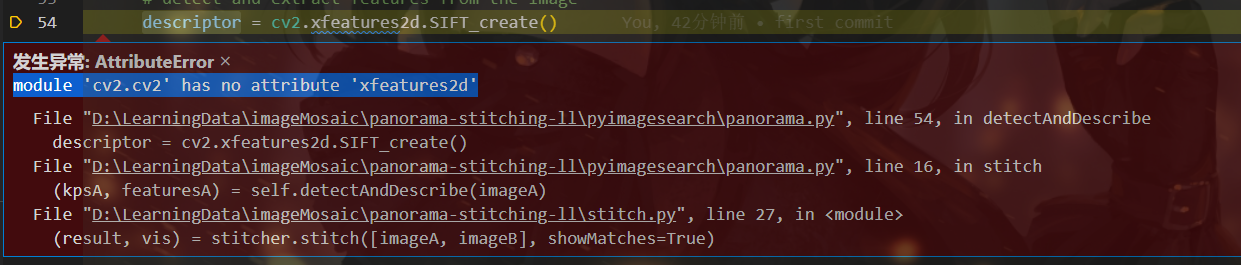
解决办法:补上一个版本配套的contrib包pip install opencv-contrib-python==3.4.2.16- 1
3.4 matplotlib安装
pip install matplotlib- 1
3.5 PCV安装
可以参考PCV安装
- 进入对应的文件夹clone PCV的代码
git clone https://github.com/Li-Shu14/PCV.git- 1
- 进行安装
这里由于我是在windows环境安装的
首先改变盘符到你对应的盘如D:
进入文件夹cd xxx/PCV

python setup.py install- 1
3.5 scipy安装
重新回到参考代码中,运行程序出现了报错
ModuleNotFoundError: No module named 'scipy'- 1
在对应环境进行安装
pip install scipy- 1
4、报错记录
4.1 print报错
SyntaxError: Missing parentheses in call to 'print'. Did you mean print('warp - right')?- 1
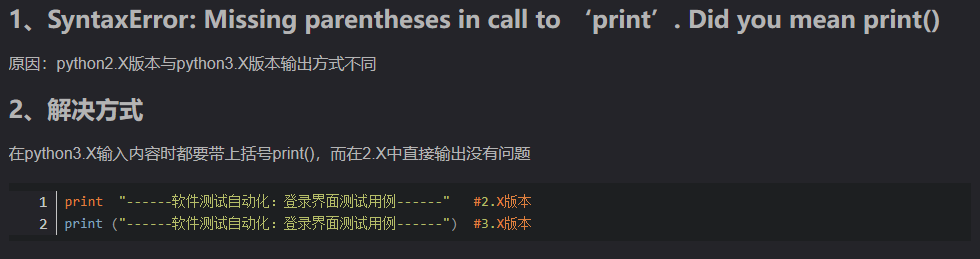
之前的PCV是应用于python2的,现在有针对python3更新的基于python3的PCVgithub参考PCV安装基于python3进行安装
4.2 matplotlib.delaunay报错
ModuleNotFoundError: No module named 'matplotlib.delaunay'- 1
更改方式可以参考matplotlib.delaunay报错
然后重新进行安装(这里不能直接进到对应的文件,所以修改完需要重新安装,我这里安装出现了报错,我直接删除了虚拟环境重新创建,然后进行安装)4.3 无法生成.sift文件

File "D:\anaconda\envs\stitching\lib\site-packages\numpy\lib\_datasource.py", line 533, in open raise IOError("%s not found." % path) OSError: ./test/1027-1.sift not found.- 1
- 2
- 3
参考链接:
OSError:sift not found 问题解决
图像拼接参考链接-
VLfeat下载
VLfeat下载

-
选择对应的文件移入当前工程文件夹

-
根据你自己的电脑是直接安装的Python还是Anaconda安装的找到对应目录中的【sift.py】文件
直接安装的路径:python\Lib\site-packages\PCV\localdescriptors
Anaconda安装的路径:Anaconda\Lib\site-packages\PCV\localdescriptors -
打开sift.py,修改路径
打开【sift.py】文件,全局cmmd,将箭头指向的那个引号里的路径改为自己项目中【sift.exe】的路径
注意:路径中如果用“\”则需要在前端加“r”,用’‘/’'或“\”则不需要


成功生成sift文件
cmmd = str(r"D:/LearningData/imageMosaic/panoramic-image/sift.exe "+imagename+" --output="+resultname+ " "+params)- 1
4.4 图片差异太大
ValueError: did not meet fit acceptance criteria- 1
多图拼接对图片的要求比较高,差异性大或太小(几乎相同)的拼接效果都很差。而且如果拍摄地点变动过大,会导致匹配值为0
5、拼接结果
5.1 两张图拼接
-
原图


-
获取特征
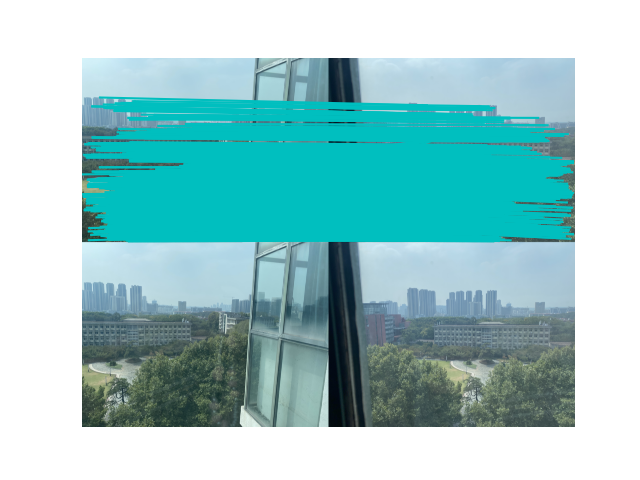
-
拼接结果

5.2 两张不同角度图拼接
-
原图


-
特征

-
结果
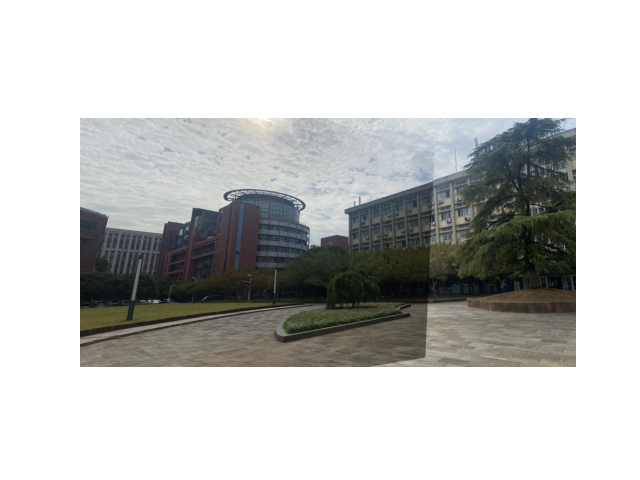
景深有一定差异,但是对于不同角度的图像拼接还是可以进行拼接的
5.3 三张图拼接
-
原图


-
特征


-
拼接结果

5.4 四图拼接
-
原图


-
特征图


-
结果

对于多张图的拼接还是有些变形
5.5 五张图片拼接
-
原图


顺序自右向左 -
特征


-
结果

6、拼接过程梳理
-
读取对应路径下的图片文件,提取特征保存在临时文件tmp.pgm中

-
特征转换为对应的特征矩阵,保存在.sift文件中

-
分别匹配临近两幅图的特征,可视化特征匹配
-
通过封装的PCV方法与匹配到的特征求对应的变化矩阵、从而进行变换、扭曲、融合
对应的变换矩阵如下

-
可视化拼接结果

附录
1、PCV更改地址
基于4、5两个问题都是python版本导致的问题,修改后的代码我上传到了github
自己改的PCV代码2、两幅图像拼接代码
from pylab import * from numpy import * from PIL import Image # If you have PCV installed, these imports should work from PCV.geometry import homography, warp from PCV.localdescriptors import sift """ This is the panorama example from section 3.3. """ # set paths to data folder # imname使我们要拼接的原图 # featname是sift文件,这个文件是需要根据原图进行生成的 # 需要根据自己的图像地址和图像数量修改地址和循环次数 # featname = ['./images5/'+str(i+1)+'.sift' for i in range(2)] # imname = ['./images5/'+str(i+1)+'.jpg' for i in range(2)] featname = ['./test/1027-'+str(i+1)+'.sift' for i in range(2)] imname = ['./test/1027-'+str(i+1)+'.jpg' for i in range(2)] # extract features and match l = {} d = {} for i in range(2): sift.process_image(imname[i],featname[i]) l[i],d[i] = sift.read_features_from_file(featname[i]) matches = {} for i in range(1): matches[i] = sift.match(d[i+1],d[i]) # visualize the matches (Figure 3-11 in the book) for i in range(1): im1 = array(Image.open(imname[i])) im2 = array(Image.open(imname[i+1])) figure() sift.plot_matches(im2,im1,l[i+1],l[i],matches[i],show_below=True) # function to convert the matches to hom. points def convert_points(j): ndx = matches[j].nonzero()[0] fp = homography.make_homog(l[j+1][ndx,:2].T) ndx2 = [int(matches[j][i]) for i in ndx] tp = homography.make_homog(l[j][ndx2,:2].T) # switch x and y - TODO this should move elsewhere fp = vstack([fp[1],fp[0],fp[2]]) tp = vstack([tp[1],tp[0],tp[2]]) return fp,tp # estimate the homographies model = homography.RansacModel() # 此代码段为2图图像拼接,若需要多幅图,只需将其中的注释部分取消即可,图像顺序为自右向左。 fp,tp = convert_points(0) H_01 = homography.H_from_ransac(fp,tp,model)[0] #im 0 to 1 #fp,tp = convert_points(1) #H_12 = homography.H_from_ransac(fp,tp,model)[0] #im 1 to 2 #tp,fp = convert_points(2) #NB: reverse order #H_32 = homography.H_from_ransac(fp,tp,model)[0] #im 3 to 2 #tp,fp = convert_points(3) #NB: reverse order #H_43 = homography.H_from_ransac(fp,tp,model)[0] #im 4 to 3 # warp the images delta = 2000 # for padding and translation im1 = array(Image.open(imname[0]), "uint8") im2 = array(Image.open(imname[1]), "uint8") im_12 = warp.panorama(H_01,im1,im2,delta,delta) #im1 = array(Image.open(imname[0]), "f") #im_02 = warp.panorama(dot(H_12,H_01),im1,im_12,delta,delta) #im1 = array(Image.open(imname[3]), "f") #im_32 = warp.panorama(H_32,im1,im_02,delta,delta) #im1 = array(Image.open(imname[4]), "f") #im_42 = warp.panorama(dot(H_32,H_43),im1,im_32,delta,2*delta) figure() imshow(array(im_12, "uint8")) axis('off') savefig("example1.png",dpi=300) show()- 1
- 2
- 3
- 4
- 5
- 6
- 7
- 8
- 9
- 10
- 11
- 12
- 13
- 14
- 15
- 16
- 17
- 18
- 19
- 20
- 21
- 22
- 23
- 24
- 25
- 26
- 27
- 28
- 29
- 30
- 31
- 32
- 33
- 34
- 35
- 36
- 37
- 38
- 39
- 40
- 41
- 42
- 43
- 44
- 45
- 46
- 47
- 48
- 49
- 50
- 51
- 52
- 53
- 54
- 55
- 56
- 57
- 58
- 59
- 60
- 61
- 62
- 63
- 64
- 65
- 66
- 67
- 68
- 69
- 70
- 71
- 72
- 73
- 74
- 75
- 76
- 77
- 78
- 79
- 80
- 81
- 82
- 83
- 84
- 85
- 86
- 87
- 88
- 89
- 90
- 91
- 92
3、三幅图像拼接代码
# 博客方法(三张图) from pylab import * from numpy import * from PIL import Image # If you have PCV installed, these imports should work from PCV.geometry import homography, warp from PCV.localdescriptors import sift np.seterr(invalid='ignore') # 忽略部分警告 """ This is the panorama example from section 3.3. """ # 设置数据文件夹的路径 featname = ['test/1027-'+str(i+1)+'.sift' for i in range(3)] imname = ['test/1027-'+str(i+1)+'.jpg' for i in range(3)] # 提取特征并匹配使用sift算法 l = {} d = {} for i in range(3): sift.process_image(imname[i], featname[i]) # 处理图像并将结果保存到文件中tmp.pgm,进而保存到.sift文件中 # feature locations, descriptors要素位置,描述符 l[i], d[i] = sift.read_features_from_file(featname[i]) # 读取特征属性并以矩阵形式返回 # 特征间两两匹配 matches = {} for i in range(2): matches[i] = sift.match(d[i + 1], d[i]) # 可视化匹配 for i in range(2): im1 = array(Image.open(imname[i])) im2 = array(Image.open(imname[i + 1])) figure() # im1、im2(图像作为数组)、locs1、locs2(特征位置),matchscores(作为“match”的输出),show_below(如果下面应该显示图像) sift.plot_matches(im2, im1, l[i + 1], l[i], matches[i], show_below=True) # 将匹配转换成齐次坐标点的函数 def convert_points(j): ndx = matches[j].nonzero()[0] fp = homography.make_homog(l[j + 1][ndx, :2].T) ndx2 = [int(matches[j][i]) for i in ndx] tp = homography.make_homog(l[j][ndx2, :2].T) # switch x and y - TODO this should move elsewhere fp = vstack([fp[1], fp[0], fp[2]]) tp = vstack([tp[1], tp[0], tp[2]]) return fp, tp # 估计单应性矩阵 model = homography.RansacModel() # 博客方法 fp, tp = convert_points(1) H_12 = homography.H_from_ransac(fp, tp, model)[0] # im 1 to 2 print(H_12, 'H_12') fp, tp = convert_points(0) H_01 = homography.H_from_ransac(fp, tp, model)[0] # im 0 to 1 print(H_01, 'H_01') # tp, fp = convert_points(2) # NB: reverse order # H_32 = homography.H_from_ransac(fp, tp, model)[0] # im 3 to 2 # tp, fp = convert_points(3) # NB: reverse order # H_43 = homography.H_from_ransac(fp, tp, model)[0] # im 4 to 3 # 扭曲图像 delta = 1500 # for padding and translation用于填充和平移 # 博客方法 im1 = array(Image.open(imname[1]), "uint8") im2 = array(Image.open(imname[2]), "uint8") im_12 = warp.panorama(H_12, im1, im2, delta, delta) im1 = array(Image.open(imname[0]), "f") im_02 = warp.panorama(dot(H_12, H_01), im1, im_12, delta, delta) # im1 = array(Image.open(imname[3]), "f") # im_32 = warp.panorama(H_32, im1, im_02, delta, delta) # im1 = array(Image.open(imname[4]), "f") # im_42 = warp.panorama(dot(H_32, H_43), im1, im_32, delta, 2 * delta) figure() imshow(array(im_02, "uint8")) axis('off') show()- 1
- 2
- 3
- 4
- 5
- 6
- 7
- 8
- 9
- 10
- 11
- 12
- 13
- 14
- 15
- 16
- 17
- 18
- 19
- 20
- 21
- 22
- 23
- 24
- 25
- 26
- 27
- 28
- 29
- 30
- 31
- 32
- 33
- 34
- 35
- 36
- 37
- 38
- 39
- 40
- 41
- 42
- 43
- 44
- 45
- 46
- 47
- 48
- 49
- 50
- 51
- 52
- 53
- 54
- 55
- 56
- 57
- 58
- 59
- 60
- 61
- 62
- 63
- 64
- 65
- 66
- 67
- 68
- 69
- 70
- 71
- 72
- 73
- 74
- 75
- 76
- 77
- 78
- 79
- 80
- 81
- 82
- 83
- 84
- 85
- 86
- 87
- 88
- 89
- 90
- 91
- 92
4、四幅图像拼接代码
from pylab import * from numpy import * from PIL import Image # If you have PCV installed, these imports should work from PCV.geometry import homography, warp from PCV.localdescriptors import sift np.seterr(invalid='ignore') # 忽略部分警告 """ This is the panorama example from section 3.3. """ # 设置数据文件夹的路径 featname = ['test/1027-'+str(i+1)+'.sift' for i in range(4)] imname = ['test/1027-'+str(i+1)+'.jpg' for i in range(4)] # 提取特征并匹配使用sift算法 l = {} d = {} for i in range(4): sift.process_image(imname[i], featname[i]) # 处理图像并将结果保存到文件中tmp.pgm,进而保存到.sift文件中 # feature locations, descriptors要素位置,描述符 l[i], d[i] = sift.read_features_from_file(featname[i]) # 读取特征属性并以矩阵形式返回 matches = {} for i in range(3): matches[i] = sift.match(d[i + 1], d[i]) # 可视化匹配 for i in range(3): im1 = array(Image.open(imname[i])) im2 = array(Image.open(imname[i + 1])) figure() # im1、im2(图像作为数组)、locs1、locs2(特征位置),matchscores(作为“match”的输出),show_below(如果下面应该显示图像) sift.plot_matches(im2, im1, l[i + 1], l[i], matches[i], show_below=True) # 将匹配转换成齐次坐标点的函数 def convert_points(j): ndx = matches[j].nonzero()[0] fp = homography.make_homog(l[j + 1][ndx, :2].T) ndx2 = [int(matches[j][i]) for i in ndx] tp = homography.make_homog(l[j][ndx2, :2].T) # switch x and y - TODO this should move elsewhere fp = vstack([fp[1], fp[0], fp[2]]) tp = vstack([tp[1], tp[0], tp[2]]) return fp, tp # 估计单应性矩阵 model = homography.RansacModel() # 博客方法 fp, tp = convert_points(1) H_12 = homography.H_from_ransac(fp, tp, model)[0] # im 1 to 2 fp, tp = convert_points(0) H_01 = homography.H_from_ransac(fp, tp, model)[0] # im 0 to 1 tp, fp = convert_points(2) # NB: reverse order H_32 = homography.H_from_ransac(fp, tp, model)[0] # im 3 to 2 # tp, fp = convert_points(3) # NB: reverse order # H_43 = homography.H_from_ransac(fp, tp, model)[0] # im 4 to 3 # 扭曲图像 delta = 2000 # for padding and translation用于填充和平移 # 博客方法 im1 = array(Image.open(imname[1]), "uint8") im2 = array(Image.open(imname[2]), "uint8") im_12 = warp.panorama(H_12, im1, im2, delta, delta) im1 = array(Image.open(imname[0]), "f") im_02 = warp.panorama(dot(H_12, H_01), im1, im_12, delta, delta) im1 = array(Image.open(imname[3]), "f") im_32 = warp.panorama(H_32, im1, im_02, delta, delta) # im1 = array(Image.open(imname[4]), "f") # im_42 = warp.panorama(dot(H_32, H_43), im1, im_32, delta, 2 * delta) figure() imshow(array(im_32, "uint8")) axis('off') show()- 1
- 2
- 3
- 4
- 5
- 6
- 7
- 8
- 9
- 10
- 11
- 12
- 13
- 14
- 15
- 16
- 17
- 18
- 19
- 20
- 21
- 22
- 23
- 24
- 25
- 26
- 27
- 28
- 29
- 30
- 31
- 32
- 33
- 34
- 35
- 36
- 37
- 38
- 39
- 40
- 41
- 42
- 43
- 44
- 45
- 46
- 47
- 48
- 49
- 50
- 51
- 52
- 53
- 54
- 55
- 56
- 57
- 58
- 59
- 60
- 61
- 62
- 63
- 64
- 65
- 66
- 67
- 68
- 69
- 70
- 71
- 72
- 73
- 74
- 75
- 76
- 77
- 78
- 79
- 80
- 81
- 82
- 83
- 84
- 85
- 86
- 87
- 88
- 89
5、五张图像拼接代码
# -*- codeing =utf-8 -*- # @Time : 2021/4/20 11:00 # @Author : ArLin # @File : demo1.py # @Software: PyCharm from pylab import * from numpy import * from PIL import Image # If you have PCV installed, these imports should work from PCV.geometry import homography, warp from PCV.localdescriptors import sift np.seterr(invalid='ignore') """ This is the panorama example from section 3.3. """ # 设置数据文件夹的路径 featname = ['./test/1027-'+str(i+1)+'.sift' for i in range(5)] imname = ['./test/1027-'+str(i+1)+'.jpg' for i in range(5)] # 提取特征并匹配使用sift算法 l = {} d = {} for i in range(5): sift.process_image(imname[i], featname[i]) l[i], d[i] = sift.read_features_from_file(featname[i]) matches = {} for i in range(4): matches[i] = sift.match(d[i + 1], d[i]) # 可视化匹配 for i in range(4): im1 = array(Image.open(imname[i])) im2 = array(Image.open(imname[i + 1])) figure() sift.plot_matches(im2, im1, l[i + 1], l[i], matches[i], show_below=True) # 将匹配转换成齐次坐标点的函数 def convert_points(j): ndx = matches[j].nonzero()[0] fp = homography.make_homog(l[j + 1][ndx, :2].T) ndx2 = [int(matches[j][i]) for i in ndx] tp = homography.make_homog(l[j][ndx2, :2].T) # switch x and y - TODO this should move elsewhere fp = vstack([fp[1], fp[0], fp[2]]) tp = vstack([tp[1], tp[0], tp[2]]) return fp, tp # 估计单应性矩阵 model = homography.RansacModel() fp, tp = convert_points(1) H_12 = homography.H_from_ransac(fp, tp, model)[0] # im 1 to 2 fp, tp = convert_points(0) H_01 = homography.H_from_ransac(fp, tp, model)[0] # im 0 to 1 tp, fp = convert_points(2) # NB: reverse order H_32 = homography.H_from_ransac(fp, tp, model)[0] # im 3 to 2 tp, fp = convert_points(3) # NB: reverse order H_43 = homography.H_from_ransac(fp, tp, model)[0] # im 4 to 3 # 扭曲图像 delta = 2000 # for padding and translation用于填充和平移 im1 = array(Image.open(imname[1]), "uint8") im2 = array(Image.open(imname[2]), "uint8") im_12 = warp.panorama(H_12, im1, im2, delta, delta) im1 = array(Image.open(imname[0]), "f") im_02 = warp.panorama(dot(H_12, H_01), im1, im_12, delta, delta) im1 = array(Image.open(imname[3]), "f") im_32 = warp.panorama(H_32, im1, im_02, delta, delta) im1 = array(Image.open(imname[4]), "f") im_42 = warp.panorama(dot(H_32, H_43), im1, im_32, delta, 2 * delta) figure() imshow(array(im_42, "uint8")) axis('off') show()- 1
- 2
- 3
- 4
- 5
- 6
- 7
- 8
- 9
- 10
- 11
- 12
- 13
- 14
- 15
- 16
- 17
- 18
- 19
- 20
- 21
- 22
- 23
- 24
- 25
- 26
- 27
- 28
- 29
- 30
- 31
- 32
- 33
- 34
- 35
- 36
- 37
- 38
- 39
- 40
- 41
- 42
- 43
- 44
- 45
- 46
- 47
- 48
- 49
- 50
- 51
- 52
- 53
- 54
- 55
- 56
- 57
- 58
- 59
- 60
- 61
- 62
- 63
- 64
- 65
- 66
- 67
- 68
- 69
- 70
- 71
- 72
- 73
- 74
- 75
- 76
- 77
- 78
- 79
- 80
- 81
- 82
- 83
- 84
- 85
- 86
- 87
- 88
- 89
- 90
-
相关阅读:
鸿蒙应用开发之HTTP数据请求
3.1虚拟化和安装Docker
Linux进程概念
【多线程】锁策略
短信验证码实现(阿里云)
VMware安装Ubuntu 16.04(完整版图文教程)
手写题目4:快速获取数组中最大的三项
【鸟哥杂谈】十分钟搭建自己的本地 Node-Red可拖拽图形化物联网
入职环境安装经验
Spring AOP 详解
- 原文地址:https://blog.csdn.net/m0_47146037/article/details/126855241
