-
SpringBoot源码 | printBanner方法解析
printBanner
printBanner方法用于打印在src/main/resources下名字是banner的自定义日志文件信息,对于整体的SpringBoot启动流程来说不算主启动业务流程,但是也提供了自定义打印日志内容的可能,有一定存在的意义,所以这里也一起来看一下printBanner方法内部吧,printBanner方法源码加入注释后
private Banner printBanner(ConfigurableEnvironment environment) { //Disable printing of the banner 是否允许打印banner信息 if (this.bannerMode == Banner.Mode.OFF) { return null; } //资源加载类 ResourceLoader resourceLoader = (this.resourceLoader != null) ? this.resourceLoader : new DefaultResourceLoader(null); //构造SpringApplicationBannerPrinter 对象 SpringApplicationBannerPrinter bannerPrinter = new SpringApplicationBannerPrinter(resourceLoader, this.banner); //Print the banner to the log file 打印banner到日志文件 if (this.bannerMode == Mode.LOG) { return bannerPrinter.print(environment, this.mainApplicationClass, logger); } //Print the banner to System.out 打印banner到System.out return bannerPrinter.print(environment, this.mainApplicationClass, System.out); }- 1
- 2
- 3
- 4
- 5
- 6
- 7
- 8
- 9
- 10
- 11
- 12
- 13
- 14
- 15
- 16
- 17
整个方法比较简单,也比较容易理解,根据我在源码中添加的注释理解即可,这里我们主要看bannerPrinter.print方法
bannerPrinter.print
首先来看一下print方法的源码

源码先获取Banner对象,然后返回PrintedBanner对象给调用方getBanner
getBanner根据environment获取Banner对象

这里在获取Banner对象的时候会涉及到getImageBanner、getTextBanner方法,返回ImageBanner或者ResourceBannergetImageBanner
getImageBanner首先会去判断是否配置了banner路径信息,后面根据resourceLoader获取banner是图片相关后缀时返回ImageBanner对象
private Banner getImageBanner(Environment environment) { //获取配置的spring.banner.image.location路径,如果存在则加载资源 String location = environment.getProperty(BANNER_IMAGE_LOCATION_PROPERTY); if (StringUtils.hasLength(location)) { Resource resource = this.resourceLoader.getResource(location); return resource.exists() ? new ImageBanner(resource) : null; } //判断是否是IMAGE_EXTENSION = { "gif", "jpg", "png" }后缀,是则返回ImageBanner for (String ext : IMAGE_EXTENSION) { Resource resource = this.resourceLoader.getResource("banner." + ext); if (resource.exists()) { return new ImageBanner(resource); } } return null; }- 1
- 2
- 3
- 4
- 5
- 6
- 7
- 8
- 9
- 10
- 11
- 12
- 13
- 14
- 15
- 16
getTextBanner
getTextBanner加载默认配置路径的banner.txt文件并判断存在性和不包含特定条件,满足则返回ResourceBanner
private Banner getTextBanner(Environment environment) { //获取资源配置spring.banner.location默认文件名banner.txt的资源路径 String location = environment.getProperty(BANNER_LOCATION_PROPERTY, DEFAULT_BANNER_LOCATION); //加载资源 Resource resource = this.resourceLoader.getResource(location); try { //如果资源存在且resource的URL不包含liquibase-core则返回ResourceBanner if (resource.exists() && !resource.getURL().toExternalForm().contains("liquibase-core")) { return new ResourceBanner(resource); } } catch (IOException ex) { // Ignore } return null; }- 1
- 2
- 3
- 4
- 5
- 6
- 7
- 8
- 9
- 10
- 11
- 12
- 13
- 14
- 15
- 16
如此便获取到Banner,回到print方法打印banner.txt文本内容
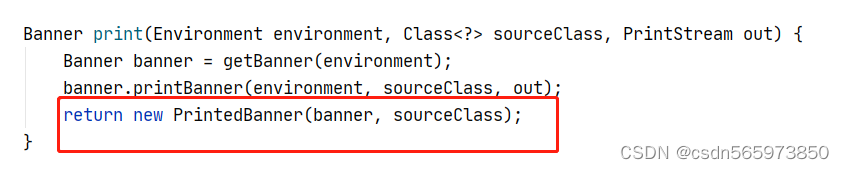
通过构造方法返回PrintedBanner用于后续打印日志信息输出

其中构造方法中参数sourceClass是主程序类

到这里整个printBanner的加载就完成了,结果如图

banner.txt文本内容为Application Version: ${ruoyi.version} Spring Boot Version: ${spring-boot.version} // _ooOoo_ // // o8888888o // // 88" . "88 // // (| ^_^ |) // // O\ = /O // // ____/`---'\____ // // .' \\| |// `. // // / \\||| : |||// \ // // / _||||| -:- |||||- \ // // | | \\\ - /// | | // // | \_| ''\---/'' | | // // \ .-\__ `-` ___/-. / // // ___`. .' /--.--\ `. . ___ // // ."" '< `.___\_<|>_/___.' >'"". // // | | : `- \`.;`\ _ /`;.`/ - ` : | | // // \ \ `-. \_ __\ /__ _/ .-` / / // // ========`-.____`-.___\_____/___.-`____.-'======== // // `=---=' // // ^^^^^^^^^^^^^^^^^^^^^^^^^^^^^^^^^^^^^^^^^^^^^^^^^^ // // 打印banner日志信息 //- 1
- 2
- 3
- 4
- 5
- 6
- 7
- 8
- 9
- 10
- 11
- 12
- 13
- 14
- 15
- 16
- 17
- 18
- 19
- 20
- 21
- 22
- 23
- 24
-
相关阅读:
如何让GPU加速20倍?AI数据平台是关键!
《机器学习》李宏毅P10卷积神经网络
Elasticsearch:ingest pipeline 使用示例 - 解析常用日志格式
链表删除-leetcode19. 删除链表的倒数第 N 个结点
基于多目标粒子群优化算法的冷热电联供型综合能源系统运行优化(Matlab代码实现)
Linux 文件内容查看
我在 Java 中错过了什么,一个 Kotlin 开发人员的观点
【容器】docker基础使用
【Linux】基础IO的理解与操作 - fd
java计算机毕业设计河池市旅游信息系统MyBatis+系统+LW文档+源码+调试部署
- 原文地址:https://blog.csdn.net/csdn565973850/article/details/126852780
