-
华为ModelArts自定义镜像(PyTorch镜像)
一、重要说明
自定义镜像是基于基础镜像制作的,其中根据基础镜像类型的不同,可提供“基础镜像为非ModelArts提供”、“基础镜像为ModelArts提供”两种方案,都可以指导用户在ModelArts上完成自定义镜像的制作。
二、准备工作
2.1 修改 docker 配置
在
/etc/docker/daemon.json文件中添加如下部分{ "insecure-registries": [ "swr.cn-central-231.xckpjs.com" ] }- 1
- 2
- 3
- 4
- 5
# 重新加载daemon.json配置 systemctl daemon-reload # 重启docker服务 systemctl restart docker- 1
- 2
- 3
- 4
- 5
2.2 修改 hosts 配置
在
/etc/hosts文件中添加如下部分:222.89.165.196 swr.cn-central-231.xckpjs.com- 1

三、关键步骤(基础镜像为非ModelArts提供)
3.1 常用指令
# 重新加载daemon.json配置 systemctl daemon-reload # 重启docker服务 systemctl restart docker # 查看docker服务状态 systemctl status docker # 查看 daemon.json cat /etc/docker/daemon.json- 1
- 2
- 3
- 4
- 5
- 6
- 7
- 8
- 9
- 10
- 11
3.2 下载AscendHub镜像
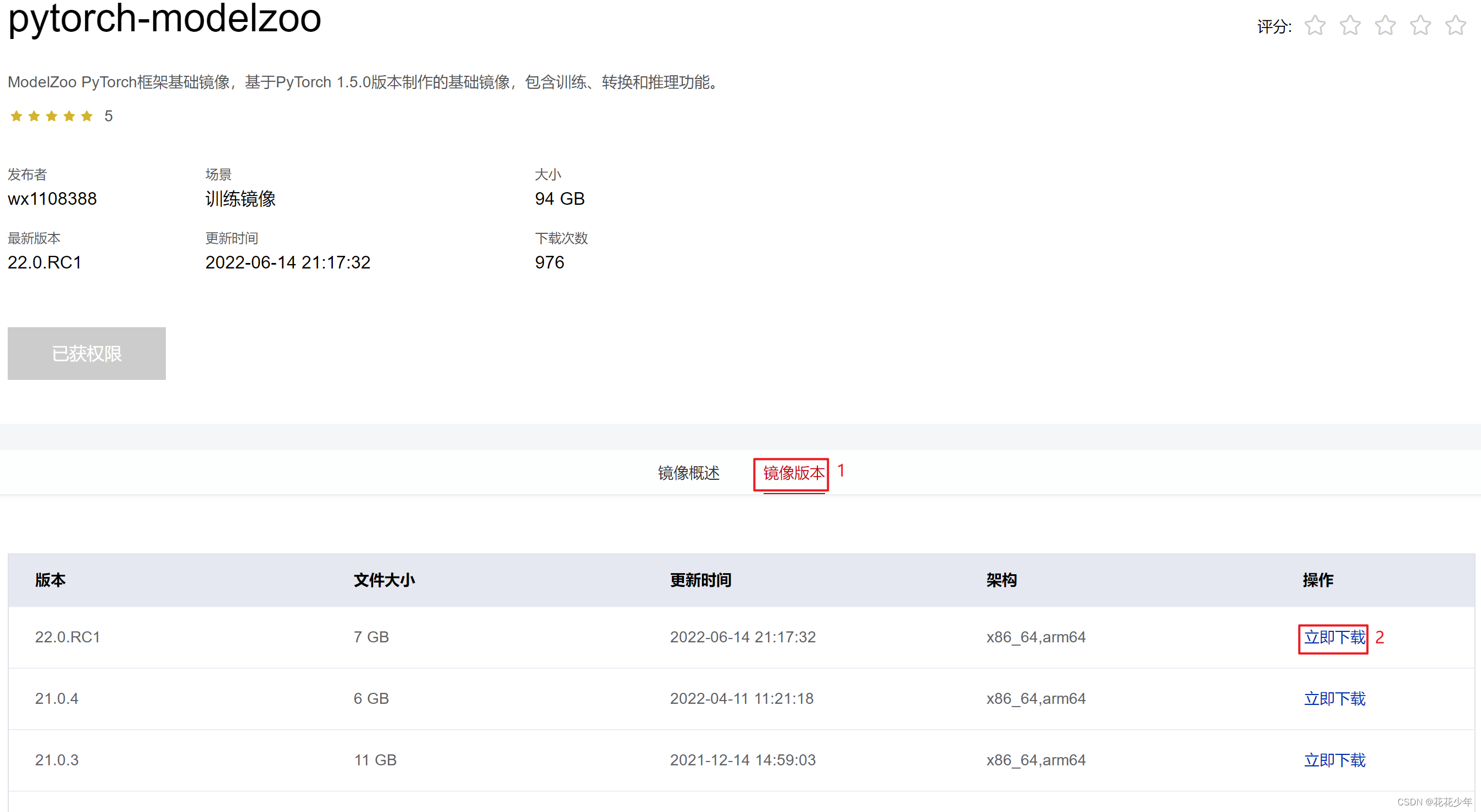
3.2.1 筛选合适的镜像
以 pytorch-modelzoo 为例。
3.2.2 下载镜像
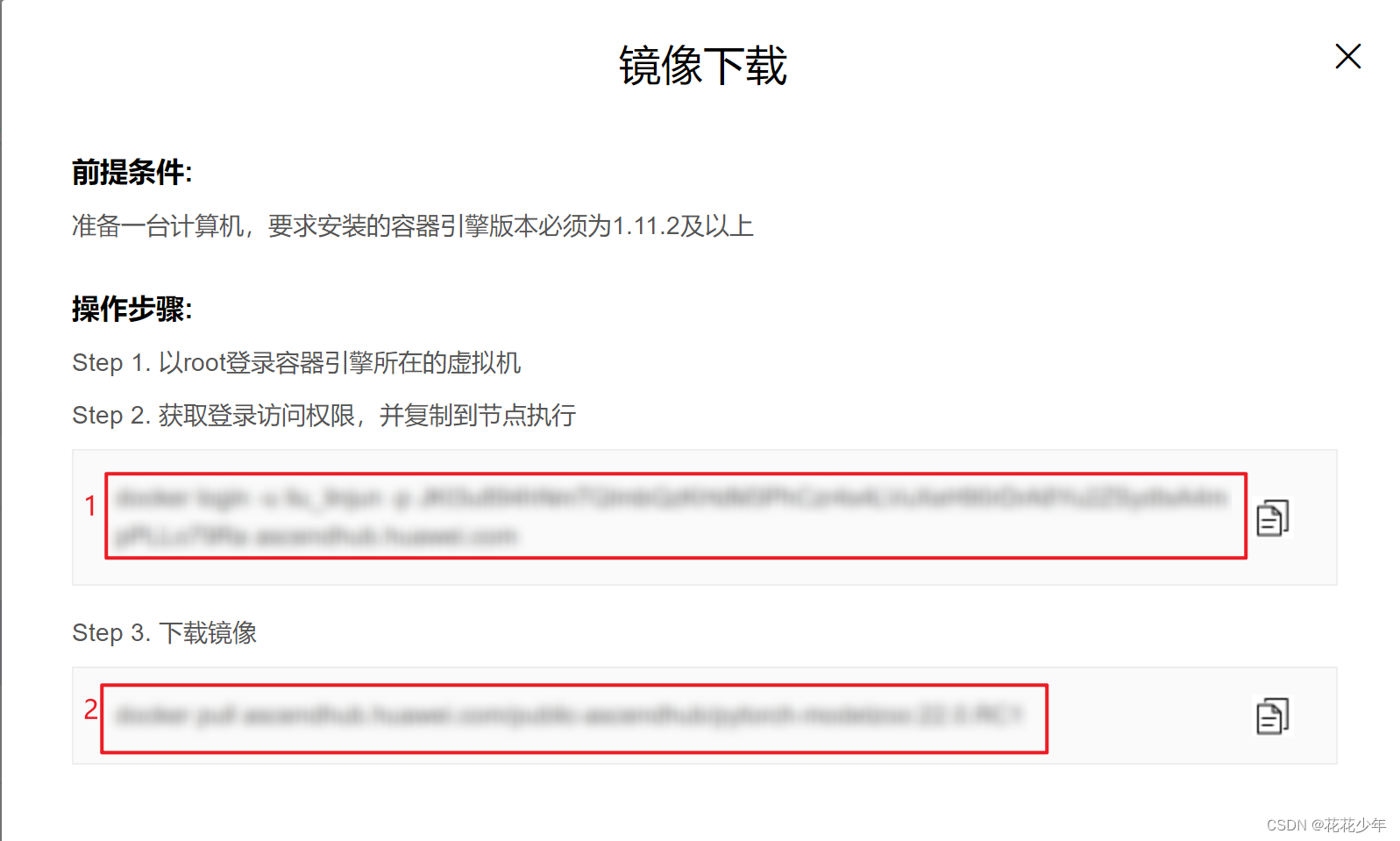
获取登录访问权限,并复制到节点执行
[root@localhost YOYOFile]# docker login -u xxx -p xxx ascendhub.huawei.com WARNING! Using --password via the CLI is insecure. Use --password-stdin. WARNING! Your password will be stored unencrypted in /root/.docker/config.json. Configure a credential helper to remove this warning. See https://docs.docker.com/engine/reference/commandline/login/#credentials-store Login Succeeded- 1
- 2
- 3
- 4
- 5
- 6
- 7
下载镜像
[root@localhost YOYOFile]# docker pull ascendhub.huawei.com/public-ascendhub/pytorch-modelzoo:22.0.RC1 22.0.RC1: Pulling from public-ascendhub/pytorch-modelzoo e196da37f904: Pull complete 55883d7d51cb: Pull complete c12f2cbfed42: Pull complete 9c8e7bc70917: Pull complete cc89c9dc31bd: Pull complete d4d05a44b5dd: Pull complete c8946786517a: Pull complete 168e9b57e364: Pull complete 0306b568f1d6: Pull complete 24f37cf22a2c: Pull complete d0c18ce516f9: Pull complete 2016b4899336: Pull complete 9168f2ae2f05: Pull complete 1bcd4049fce6: Pull complete e8241e04253f: Pull complete b0294ab5fb7a: Pull complete Digest: sha256:6b4be6a3705d7b9ba4d7bdd36e20fa9734c40b6fefbba94d588a9d7c6e764e00 Status: Downloaded newer image for ascendhub.huawei.com/public-ascendhub/pytorch-modelzoo:22.0.RC1 ascendhub.huawei.com/public-ascendhub/pytorch-modelzoo:22.0.RC1- 1
- 2
- 3
- 4
- 5
- 6
- 7
- 8
- 9
- 10
- 11
- 12
- 13
- 14
- 15
- 16
- 17
- 18
- 19
- 20
- 21
3.3 编写Dockefiile文件
参考:Dockerfile文件(基础镜像为非ModelArts提供)
- 基础镜像为非ModelArts提供时,Dockerfile文件中需要添加用户和用户组,ma-group的gid必须是100 ,ma-user用户uid必须是1000。
- 添加
FROM ascendhub.huawei.com/public-ascendhub/pytorch-modelzoo:22.0.RC1。内容参考样例如下:
FROM ascendhub.huawei.com/public-ascendhub/pytorch-modelzoo:22.0.RC1 USER root RUN default_user=$(getent passwd 1000 | awk -F ':' '{print $1}') || echo "uid: 1000 does not exist" && \ default_group=$(getent group 100 | awk -F ':' '{print $1}') || echo "gid: 100 does not exist" && \ if [ ! -z ${default_user} ] && [ ${default_user} != "ma-user" ]; then \ userdel -r ${default_user}; \ fi && \ if [ ! -z ${default_group} ] && [ ${default_group} != "ma-group" ]; then \ groupdel -f ${default_group}; \ fi && \ groupadd -g 100 ma-group && useradd -d /home/ma-user -m -u 1000 -g 100 -s /bin/bash ma-user && \ chmod -R 750 /home/ma-user- 1
- 2
- 3
- 4
- 5
- 6
- 7
- 8
- 9
- 10
- 11
- 12

3.4 build镜像
docker build -t xxxx:v1 .- 1
[root@localhost YOYOFile]# docker build -t pytorch-modelzoo:v1.1 . Sending build context to Docker daemon 2.56kB Step 1/3 : FROM ascendhub.huawei.com/public-ascendhub/pytorch-modelzoo:22.0.RC1 ---> fcc1832163ac Step 2/3 : USER root ---> Running in f03d59699644 Removing intermediate container f03d59699644 ---> 1acc2e976ce4 Step 3/3 : RUN default_user=$(getent passwd 1000 | awk -F ':' '{print $1}') || echo "uid: 1000 does not exist" && default_group=$(getent group 100 | awk -F ':' '{print $1}') || echo "gid: 100 does not exist" && if [ ! -z ${default_user} ] && [ ${default_user} != "ma-user" ]; then userdel -r ${default_user}; fi && if [ ! -z ${default_group} ] && [ ${default_group} != "ma-group" ]; then groupdel -f ${default_group}; fi && groupadd -g 100 ma-group && useradd -d /home/ma-user -m -u 1000 -g 100 -s /bin/bash ma-user && chmod -R 750 /home/ma-user ---> Running in a8620216382f userdel: group HwHiAiUser not removed because it has other members. userdel: HwHiAiUser mail spool (/var/mail/HwHiAiUser) not found Removing intermediate container a8620216382f ---> 27df0bed4cc7 Successfully built 27df0bed4cc7 Successfully tagged pytorch-modelzoo:v1.1- 1
- 2
- 3
- 4
- 5
- 6
- 7
- 8
- 9
- 10
- 11
- 12
- 13
- 14
- 15
- 16
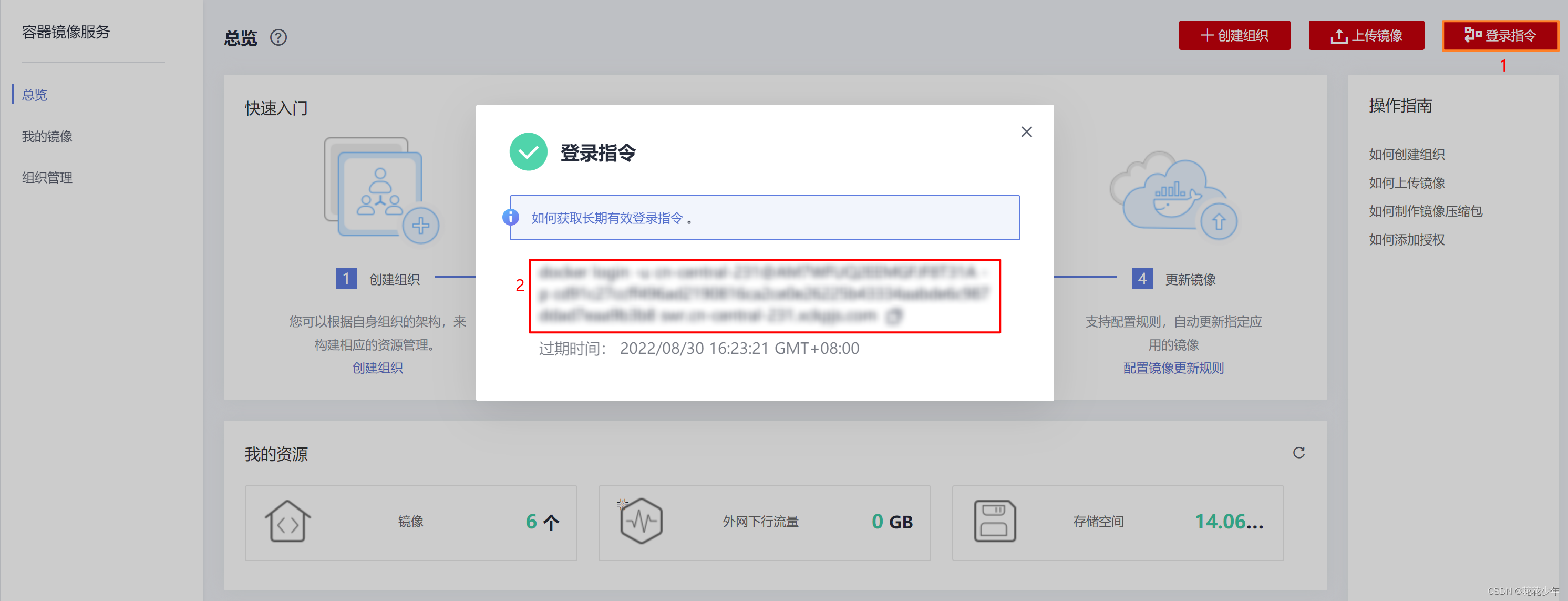
3.5 登录swr镜像产库

3.6 客户端上传
点击客户端上传按钮,根据要求修改镜像的标签tag,push镜像到swr仓库。

3.7 注册镜像
鹏城需要,河南算力中心不需要此步骤。有两种方式来注册镜像。
3.7.1 方式一
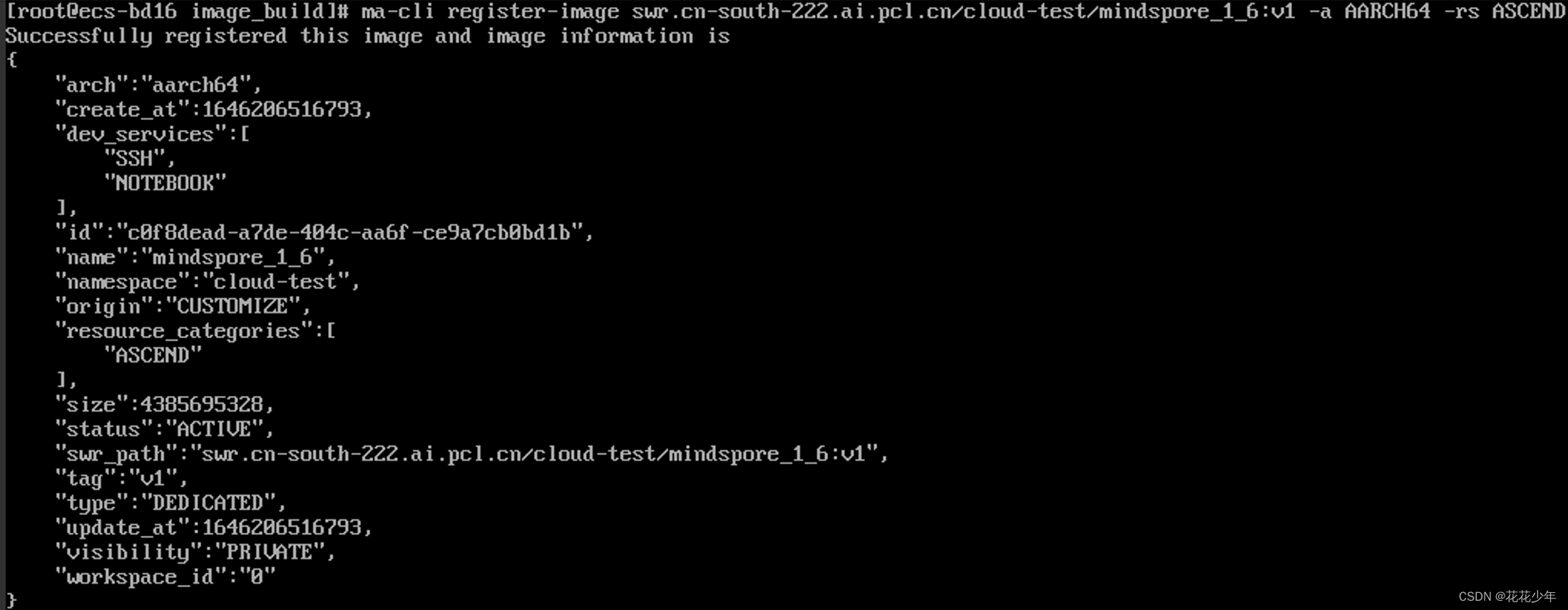
使用
ma-cli register-image [OPTIONS] SWR_PATH命令来注册镜像。ma-cli register-image swr.cn-south-222.ai.pcl.cn/cloud-test/mindspore_1_6:v1 -a AARCH64 -rs ASCEND- 1
参数解释:
-
-a 指定该镜像支持ARM架构;
-
-rs 指定镜像支持ASCEND芯片。
3.7.2 方式二
在console上注册镜像。
-
登录modelarts;
-
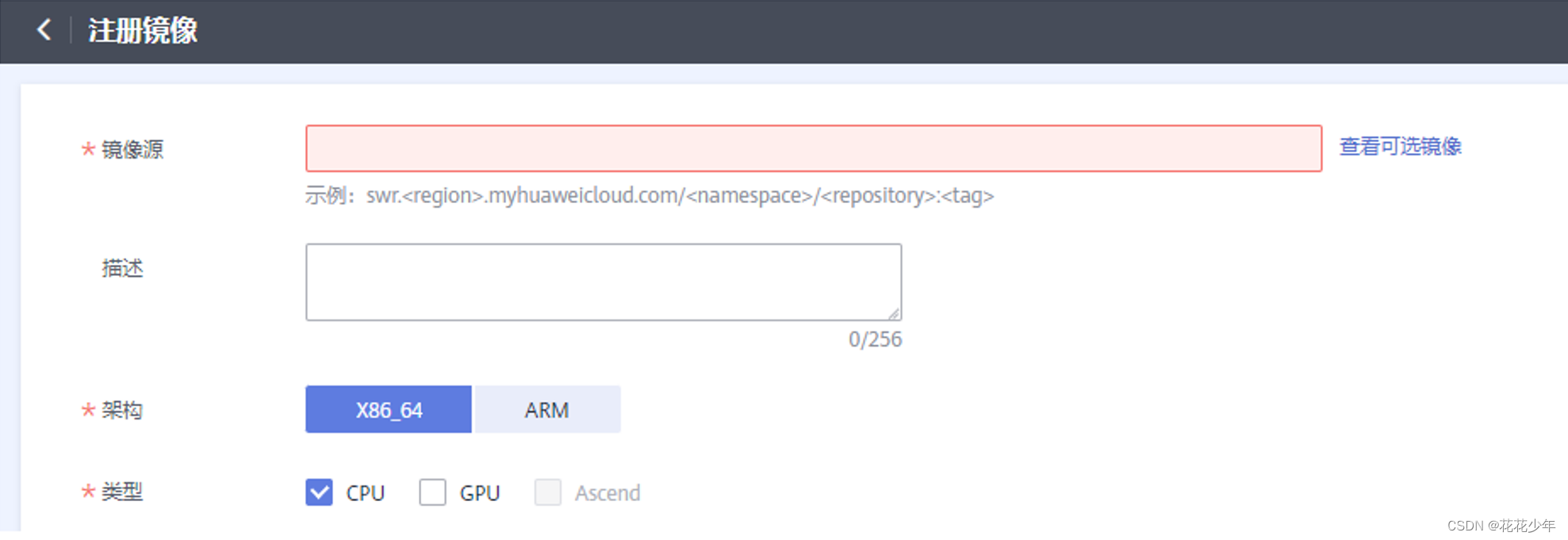
进入【镜像管理】,点击【注册镜像】;
**镜像源 **即为刚才推送到SWR中的镜像,将完整的SWR地址拷贝到这里即可。

3.8 创建算法
3.9 创建训练作业

四、关键步骤(基础镜像为ModelArts提供)
与“基础镜像为非ModelArts提供相比”,除了下载镜像、编写Dockfile文件的步骤不同之外,其他步骤保持一致。
4.1 下载镜像
镜像查询,请参考:训练基础镜像详情(Ascend-Powered-Engine)。
训练基础镜像支持的Region为:
cn-north-4docker pull swr.cn-north-4.myhuaweicloud.com/aip/pytorch_1_5_ascend:pytorch_1.5.0-cann_5.0.4-py_3.7-euler_2.8.3-aarch64-d910-roma-20220318164813-b3feb87- 1
4.2 编写Dockfile文件
五、FAQ
Q:登录指令失败
[root@localhost YOYOFile]# docker login -u cn-central-231@AM7WFUQ2EEMGFJF8T31A -p xxx swr.cn-central-231.xckpjs.com WARNING! Using --password via the CLI is insecure. Use --password-stdin. Error response from daemon: Get https://swr.cn-central-231.xckpjs.com/v2/: dial tcp: lookup swr.cn-central-231.xckpjs.com on 8.8.8.8:53: no such host- 1
- 2
- 3
WARNING! Using --password via the CLI is insecure. Use --password-stdin. Error response from daemon: Get "https://swr.cn-central-231.xckpjs.com/v2/": dial tcp: lookup swr.cn-central-231.xckpjs.com: no such host- 1
- 2

错误原因: 没有配置hosts 解决办法: 参考上文【准备工作】 1. 修改 docker 配置 2. 修改 hosts 配置- 1
- 2
- 3
- 4
- 5
- 6
- 7
-
相关阅读:
IS-IS实验总结 (下)
Spark性能调优案例-优化spark估计表大小失败 和 小表关联 走 broadcast join
为什么说企业需要MES系统? MES系统的作用和意义是什么?
正则表达式-常见字符使用方法
【VMware vSphere】使用RVTools中的PowerShell脚本创建导出vSphere环境信息的自动化任务。
php 闭包
uniapp开发断小程序-如何判断小程序是在手机端还是pc端打开
频繁调一个http请求和多个不同http请求性能一样吗
【LeetCode】145. 二叉树的后序遍历 [ 左子树 右子树 根结点]
简单的学生信息管理系统
- 原文地址:https://blog.csdn.net/m0_37605642/article/details/126803124

