-
threejs全景图片展示
关于代码
基于threejs的全景照片示例改了一下,并做简单封装。threejs的全景示例有cube和equirectangular两种,这里因为全景图片是一整张而不是多张图片拼合,故使用equirectangular。
关于全景图片
全景照片的来源是mapillary,访问需要梯子。
通过mapillary的#api爬取了照片文件和信息,相关教程有空发。
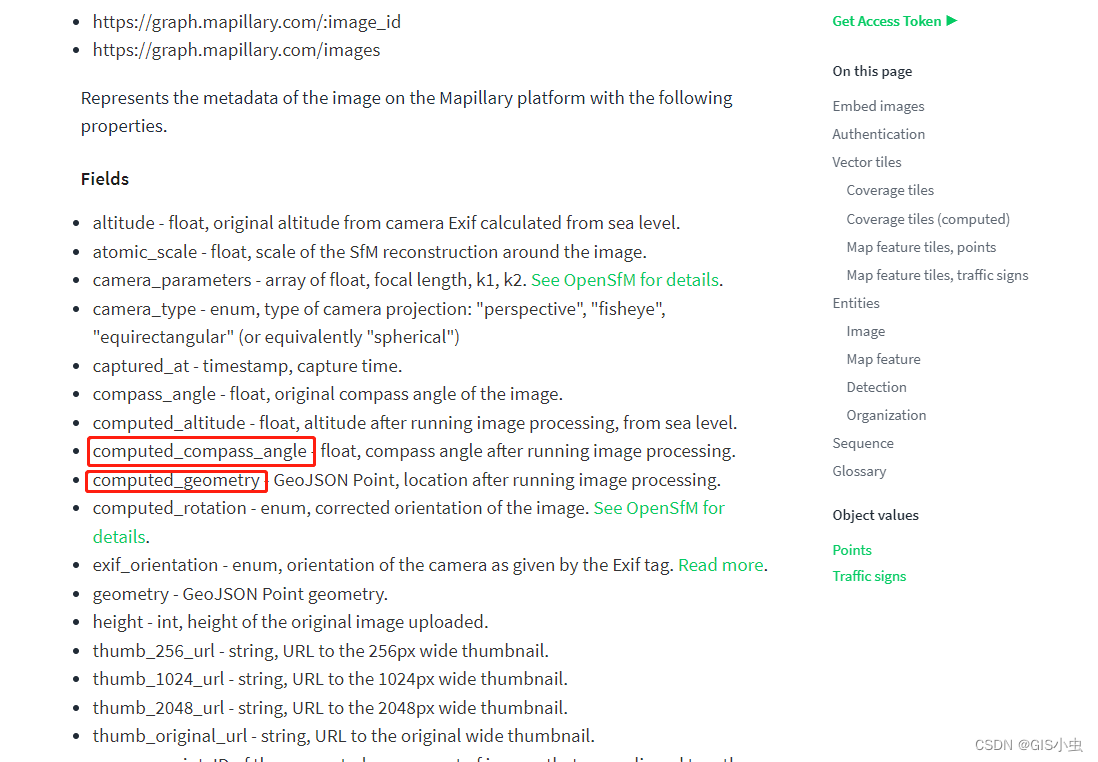
重点是这两个字段,一个是点位坐标一个是初始角度,可以用于照片的拍摄点定位和全景展示初始镜头朝向
图片本身是jpg,注意不是多张图片拼合的全景,而是一整张照片。

show me the code
使用TS编写,js自行更改
import * as THREE from "three"; const Panorama = { scene: new THREE.Scene(), /** * 刷新图片 * @param imgPath */ updateMesh: function (imgPath: string) { // 这里每次都会重置参数,不想重置就把下面注释掉 this.resetParams(); const mesh = this.scene.getObjectByName("pano") as THREE.Mesh; // 刷新 const material = mesh.material as THREE.MeshBasicMaterial; material.map = null; const texture = new THREE.TextureLoader().load(imgPath); material.map = texture; }, /** * 初始化 * @param container dom元素 * @param imgPath 图像路径 * @param compassAngle 照片朝向,0-360角度 正北方为0,顺时针为正 */ init: function ( container: HTMLElement, imgPath: string, compassAngle: number ) { const _t = this; const scene = this.scene; // 透视投影相机 // fov, aspect, near, far const camera = new THREE.PerspectiveCamera( 95, container.offsetWidth / container.offsetHeight, 1, 1100 ); const texture = new THREE.TextureLoader().load(imgPath); // 基本材质 不响应光源 const material = new THREE.MeshBasicMaterial({ map: texture }); // 球体 // radius半径, segmentsWidth经度上的切片数, segmentsHeight纬度上的切片数 const geometry = new THREE.SphereGeometry(500, 60, 40); // invert the geometry on the x-axis so that all of the faces point inward geometry.scale(-1, 1, 1); // 网格 const mesh = new THREE.Mesh(geometry, material); mesh.name = "pano"; scene.add(mesh); const renderer = new THREE.WebGLRenderer(); renderer.setPixelRatio(window.devicePixelRatio); // 设定渲染器宽高 renderer.setSize(container.offsetWidth, container.offsetHeight); container.appendChild(renderer.domElement); container.style.touchAction = "none"; container.addEventListener("pointerdown", onPointerDown); container.addEventListener("wheel", onDocumentMouseWheel); container.addEventListener("resize", onWindowResize); function onWindowResize() { camera.aspect = container.offsetWidth / container.offsetHeight; camera.updateProjectionMatrix(); renderer.setSize(container.offsetWidth, container.offsetHeight); } function onPointerDown(event: PointerEvent) { if (event.isPrimary === false) return; _t.isUserInteracting = true; _t.onPointerDownMouseX = event.clientX; _t.onPointerDownMouseY = event.clientY; _t.onPointerDownLon = _t.lon; _t.onPointerDownLat = _t.lat; container.addEventListener("pointermove", onPointerMove); container.addEventListener("pointerup", onPointerUp); } function onPointerMove(event: PointerEvent) { if (event.isPrimary === false) return; _t.lon = (_t.onPointerDownMouseX - event.clientX) * 0.1 + _t.onPointerDownLon; _t.lat = (_t.onPointerDownMouseY - event.clientY) * 0.1 + _t.onPointerDownLat; } function onPointerUp(event: PointerEvent) { if (event.isPrimary === false) return; _t.isUserInteracting = false; container.removeEventListener("pointermove", onPointerMove); container.removeEventListener("pointerup", onPointerUp); } function onDocumentMouseWheel(event: WheelEvent) { const fov = camera.fov + event.deltaY * 0.05; camera.fov = THREE.MathUtils.clamp(fov, 10, 75); camera.updateProjectionMatrix(); } function animate() { requestAnimationFrame(animate); update(); } function update() { _t.lat = Math.max(-85, Math.min(85, _t.lat)); _t.phi = THREE.MathUtils.degToRad(compassAngle - _t.lat); _t.theta = THREE.MathUtils.degToRad(_t.lon); const x = 500 * Math.sin(_t.phi) * Math.cos(_t.theta); const y = 500 * Math.cos(_t.phi); const z = 500 * Math.sin(_t.phi) * Math.sin(_t.theta); camera.lookAt(x, y, z); renderer.render(scene, camera); } animate(); }, resetParams: function () { this.isUserInteracting = false; this.onPointerDownMouseX = 0; this.onPointerDownMouseY = 0; this.lon = 0; this.onPointerDownLon = 0; this.lat = 0; this.onPointerDownLat = 0; this.phi = 0; this.theta = 0; }, isUserInteracting: false, onPointerDownMouseX: 0, onPointerDownMouseY: 0, lon: 0, onPointerDownLon: 0, lat: 0, onPointerDownLat: 0, phi: 0, theta: 0, }; export { Panorama };- 1
- 2
- 3
- 4
- 5
- 6
- 7
- 8
- 9
- 10
- 11
- 12
- 13
- 14
- 15
- 16
- 17
- 18
- 19
- 20
- 21
- 22
- 23
- 24
- 25
- 26
- 27
- 28
- 29
- 30
- 31
- 32
- 33
- 34
- 35
- 36
- 37
- 38
- 39
- 40
- 41
- 42
- 43
- 44
- 45
- 46
- 47
- 48
- 49
- 50
- 51
- 52
- 53
- 54
- 55
- 56
- 57
- 58
- 59
- 60
- 61
- 62
- 63
- 64
- 65
- 66
- 67
- 68
- 69
- 70
- 71
- 72
- 73
- 74
- 75
- 76
- 77
- 78
- 79
- 80
- 81
- 82
- 83
- 84
- 85
- 86
- 87
- 88
- 89
- 90
- 91
- 92
- 93
- 94
- 95
- 96
- 97
- 98
- 99
- 100
- 101
- 102
- 103
- 104
- 105
- 106
- 107
- 108
- 109
- 110
- 111
- 112
- 113
- 114
- 115
- 116
- 117
- 118
- 119
- 120
- 121
- 122
- 123
- 124
- 125
- 126
- 127
- 128
- 129
- 130
- 131
- 132
- 133
- 134
- 135
- 136
- 137
- 138
- 139
- 140
- 141
- 142
- 143
- 144
- 145
- 146
- 147
- 148
- 149
- 150
- 151
- 152
- 153
- 154
- 155
- 156
- 157
- 158
- 159
- 160
使用示例
找个合适的地方放一个容器
<div id="pano-container">div>- 1
引入刚才的全景工具(ThreeExt.ts)
import { Panorama as PanoFn } from "./ThreeExt.ts";- 1
为了节约资源,只有第一次加载的时候会初始化容器,后面更换照片会调用updateMesh方法。
初始化
const container = document.getElementById( "pano-container" ) as HTMLDivElement; PanoFn.init(container, 你的照片路径, 你的照片初始角度);- 1
- 2
- 3
- 4
刷新照片
PanoFn.updateMesh(新的照片路径);- 1
清除
先清空场景,再清空容器元素
PanoFn.scene.clear(); const container = document.getElementById( "pano-container" ) as HTMLDivElement; container.innerHTML = "";- 1
- 2
- 3
- 4
- 5
-
相关阅读:
回炉重造,温故知新__css常规布局方法梳理__开发实战后的经验之谈
VUE学习笔记-1
技术分享 | 接口自动化测试如何搞定 json 响应断言?
PostgreSQL 逻辑复制模块(一)
机械设计基础试题3
基于YOLOv7算法的混凝土结构表面裂缝自主识别
C语言学习之路(基础篇)—— 文件操作(上)
剑指offer专项突击版第20天
TiDB亿级数据亚秒响应查询Dashboard使用
(免费分享)基于springboot健康运动-带论文
- 原文地址:https://blog.csdn.net/Neuromancerr/article/details/126831821
