-
Flink写入kafka的自定义Key值
第一步:序列化
- package com.mz.iot.functions;
- import com.mz.iot.bean.AlarmHistoryOrigin;
- import com.mz.iot.utils.JsonUtil;
- import org.apache.flink.streaming.util.serialization.KeyedSerializationSchema;
- import org.slf4j.Logger;
- import org.slf4j.LoggerFactory;
- /**
- * liuyage
- */
- public class UserDefinedSerializationSchema implements KeyedSerializationSchema
{ - private final static Logger logger = LoggerFactory.getLogger(UserDefinedSerializationSchema.class);
- String topicName; //取模确定的Topic名称
- public UserDefinedSerializationSchema(String topicName){
- this.topicName = topicName;
- }
- @Override
- public byte[] serializeKey(String element) {
- //element就是flink流中的真实数据,这里可以根据主键下标得到主键的值key,然后下面分区器就根据这个key去决定发送到kafka哪个分区中
- AlarmHistoryOrigin aho = JsonUtil.getObjFromJson(element, AlarmHistoryOrigin.class);
- StringBuffer sb=new StringBuffer();
- sb.append(aho.getProjectId()).append(":");
- sb.append(aho.getMeterCode()).append(":");
- sb.append(aho.getAlarmType()).append(":");
- sb.append(aho.getId()).append(":");
- sb.append(aho.getAlarmRuleId());
- String key = sb.toString();
- //取出key后要转成字节数组返回
- return key.getBytes();
- }
- @Override
- public byte[] serializeValue(String element) {
- //要序列化的value,这里一般就原封不动的转成字节数组就行了
- return element.toString().getBytes();
- }
- @Override
- public String getTargetTopic(String element) {
- //本次需求没啥用,可以用于根据字段分发不同topic的需求
- return topicName;
- }
- }
第二步:自定义分区
- package com.mz.iot.functions;
- import org.apache.flink.streaming.connectors.kafka.partitioner.FlinkKafkaPartitioner;
- import org.slf4j.Logger;
- import org.slf4j.LoggerFactory;
- import java.util.Arrays;
- /**
- * liuyage
- */
- public class UserDefinedPartitioner extends FlinkKafkaPartitioner {
- private final static Logger logger = LoggerFactory.getLogger(UserDefinedPartitioner.class);
- /**
- *
- * @param record 正常记录Value {"id":"15959499868079104","alarmRuleId":"6789709006840532992","beginTime":"2022-09-01 04:42:29","endTime":"2022-09-01 04:42:40","ruleValue":0.60000,"firstValue":0.62000,"alarmType":1,"meterCode":"R19013-0003-0001-440300OII-10248","projectId":"440300OII","acquisitionTime":"2022-09-01 04:42:49","alarmValue":0.62000,"createUser":0,"createTime":"2022-09-01 04:42:49","updateUser":0,"updateTime":"2022-09-01 04:42:49","reasonTag":0,"makeUp":0}
- * @param key KeyedSerializationSchema中配置的key 440300OII:R19013-0003-0001-440300OII-10248:1:15959499868079104:6789709006840532992
- * @param value KeyedSerializationSchema中配置的value {"id":"15959499868079104","alarmRuleId":"6789709006840532992","beginTime":"2022-09-01 04:42:29","endTime":"2022-09-01 04:42:40","ruleValue":0.60000,"firstValue":0.62000,"alarmType":1,"meterCode":"R19013-0003-0001-440300OII-10248","projectId":"440300OII","acquisitionTime":"2022-09-01 04:42:49","alarmValue":0.62000,"createUser":0,"createTime":"2022-09-01 04:42:49","updateUser":0,"updateTime":"2022-09-01 04:42:49","reasonTag":0,"makeUp":0}
- * @param targetTopic iot-history-alarm-topic-test
- * @param partitions partition列表[0, 1, 2, 3, 4, 5]
- * @return
- */
- @Override
- public int partition(Object record, byte[] key, byte[] value, String targetTopic, int[] partitions) {
- //这里接收到的key是上面MySchema()中序列化后的key,需要转成string,然后取key的hash值取模kafka分区数量
- int part = Math.abs(new String(key).hashCode() % partitions.length);
- logger.info("record:"+record.toString()+"key:"+new String(key)+" value:"+new String(value) +" targetTopic:"+targetTopic +" partitions:"+ Arrays.toString(partitions) );
- /**
- *
- record:{"id":"15959499868079104","alarmRuleId":"6789709006840532992","beginTime":"2022-09-01 04:42:29","endTime":"2022-09-01 04:42:40","ruleValue":0.60000,"firstValue":0.62000,"alarmType":1,"meterCode":"R19013-0003-0001-440300OII-10248","projectId":"440300OII","acquisitionTime":"2022-09-01 04:42:49","alarmValue":0.62000,"createUser":0,"createTime":"2022-09-01 04:42:49","updateUser":0,"updateTime":"2022-09-01 04:42:49","reasonTag":0,"makeUp":0}
- key:440300OII:R19013-0003-0001-440300OII-10248:1:15959499868079104:6789709006840532992
- value:{"id":"15959499868079104","alarmRuleId":"6789709006840532992","beginTime":"2022-09-01 04:42:29","endTime":"2022-09-01 04:42:40","ruleValue":0.60000,"firstValue":0.62000,"alarmType":1,"meterCode":"R19013-0003-0001-440300OII-10248","projectId":"440300OII","acquisitionTime":"2022-09-01 04:42:49","alarmValue":0.62000,"createUser":0,"createTime":"2022-09-01 04:42:49","updateUser":0,"updateTime":"2022-09-01 04:42:49","reasonTag":0,"makeUp":0}
- targetTopic:iot-history-alarm-topic-test
- partitions:[0, 1, 2, 3, 4, 5]
- */
- return part;
- }
- }
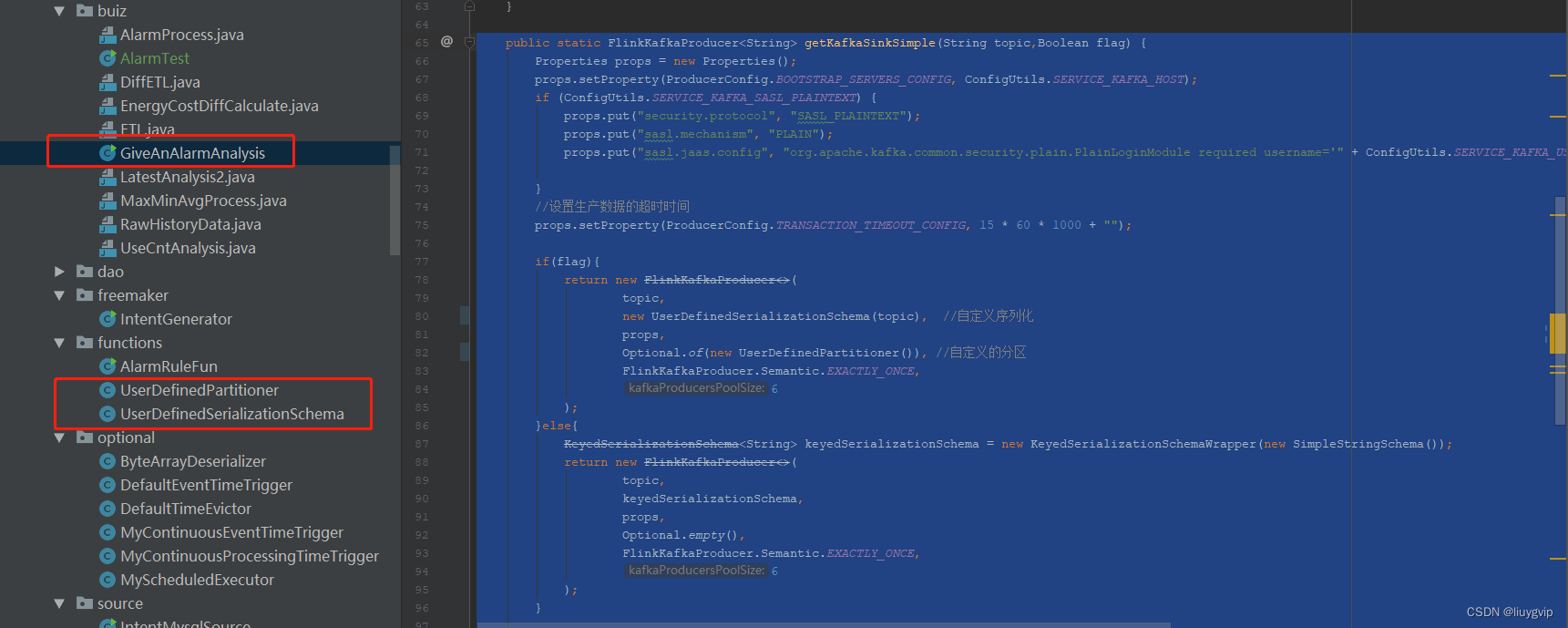
第三步:调用自定义序列化和自定义的分区
- public static FlinkKafkaProducer
getKafkaSinkSimple(String topic,Boolean flag) { - Properties props = new Properties();
- props.setProperty(ProducerConfig.BOOTSTRAP_SERVERS_CONFIG, ConfigUtils.SERVICE_KAFKA_HOST);
- if (ConfigUtils.SERVICE_KAFKA_SASL_PLAINTEXT) {
- props.put("security.protocol", "SASL_PLAINTEXT");
- props.put("sasl.mechanism", "PLAIN");
- props.put("sasl.jaas.config", "org.apache.kafka.common.security.plain.PlainLoginModule required username='" + ConfigUtils.SERVICE_KAFKA_USERNAME + "' password='" + ConfigUtils.SERVICE_KAFKA_PASSWORD + "';");
- }
- //设置生产数据的超时时间
- props.setProperty(ProducerConfig.TRANSACTION_TIMEOUT_CONFIG, 15 * 60 * 1000 + "");
- if(flag){
- return new FlinkKafkaProducer<>(
- topic,
- new UserDefinedSerializationSchema(topic), //自定义序列化
- props,
- Optional.of(new UserDefinedPartitioner()), //自定义的分区
- FlinkKafkaProducer.Semantic.EXACTLY_ONCE,
- 6
- );
- }else{
- KeyedSerializationSchema
keyedSerializationSchema = new KeyedSerializationSchemaWrapper(new SimpleStringSchema()); - return new FlinkKafkaProducer<>(
- topic,
- keyedSerializationSchema,
- props,
- Optional.empty(),
- FlinkKafkaProducer.Semantic.EXACTLY_ONCE,
- 6
- );
- }
- }
-
相关阅读:
vue单页面怎么做SEO优化
java毕业设计软件基于ssh+mysql+jsp的电影|影院购票选座系统
Faster R-CNN详解
【Linux】Alibaba Cloud Linux 3 yum 安装 PHP8.1
mybatis-3.5.0使用插件拦截sql以及通用字段赋值
Requests爬虫方法
Security思想项目总结
机器学习实战读书笔记——端到端的机器学习项目
JavaEE之CSS②(前端)
骑砍2霸主MOD开发(6)-使用C#-Harmony修改本体游戏逻辑
- 原文地址:https://blog.csdn.net/liuygvip/article/details/126829510
