• react&antd问题(2)


    react&antd问题(2)

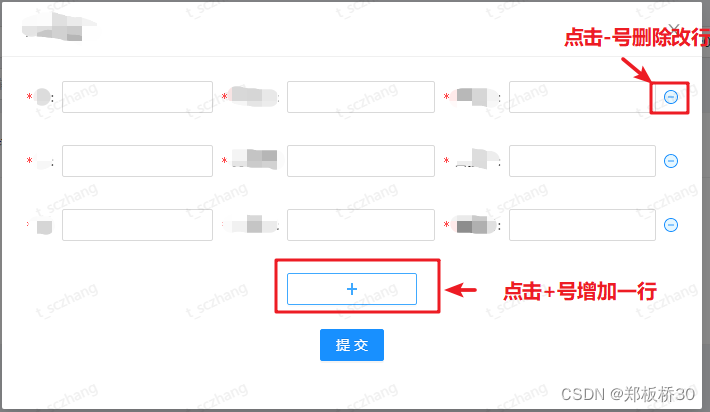
    在工作中遇到一个需求是页面新增一个领取功能,点击提交后会把数据提交到后端处理。
    在这里插入图片描述

    思路:在模态框里面套一个form表单就可以了,这个在antd有现成的可以直接拿来用

    <Modal
              title='例子例子123'
              visible={this.state.visible}
              destroyOnClose={true}
              footer={null}
              onCancel={this.handleCancel}
              width='700px'
            >
              <Form onFinish={this.handleOk}>//这里是提交表单且数据验证成功后回调事件
                <Form.List name="xxx">//name设置成后端需要你传的字段名
                  {(fields, { add, remove }) => (
                    <>
                      {fields.map(({ key, name, ...restField }) => (
                        <Space
                          key={key}
                          style={{
                            display: 'flex',
                            marginBottom: 8,
                          }}
                          align='primary'
                        >
                          <Form.Item
                            {...restField}
                            label='xxx'
                            name={[name, 'xxx']}//name后面的参数设置成后端需要你传的字段名
                            rules={[
                              {
                                required: true,//设置为true则该项为空时不能提交
                                message: 'xxx不能为空!',
                              },
                            ]}
                          >
                            <Input />
                          </Form.Item>
                          <Form.Item
                            {...restField}
                            label='xxx'
                            name={[name, 'xxx']}//name后面的参数设置成后端需要你传的字段名
                            rules={[
                              {
                                required: true,
                                message: 'xxx不能为空!',
                              },
                            ]}
                          >
                            <Input />
                          </Form.Item>
                          <Form.Item
                            {...restField}
                            label='xxx'
                            name={[name, 'xxx']}//name后面的参数设置成后端需要你传的字段名
                            rules={[
                              {
                                required: true,
                                message: 'xxx不能为空!',
                              },
                            ]}
                          >
                            <Input />
                          </Form.Item>
                          <Form.Item>
                            <MinusCircleTwoTone onClick={() => remove(name)} />//清除该行
                          </Form.Item>
                        </Space>
                      ))}
                      <Form.Item style={{ textAlign: 'center' }}>
                        <Button onClick={() => add()} style={{ width: 130 }}>//添加新一行
                          <PlusOutlined />
                        </Button>
                      </Form.Item>
                    </>
                  )}
                </Form.List>
                <Form.Item style={{ textAlign: 'center' }}>
                  <Button type="primary" htmlType='submit'>
                    提交
                  </Button>
                </Form.Item>
              </Form>
            </Modal>
    
    • 1
    • 2
    • 3
    • 4
    • 5
    • 6
    • 7
    • 8
    • 9
    • 10
    • 11
    • 12
    • 13
    • 14
    • 15
    • 16
    • 17
    • 18
    • 19
    • 20
    • 21
    • 22
    • 23
    • 24
    • 25
    • 26
    • 27
    • 28
    • 29
    • 30
    • 31
    • 32
    • 33
    • 34
    • 35
    • 36
    • 37
    • 38
    • 39
    • 40
    • 41
    • 42
    • 43
    • 44
    • 45
    • 46
    • 47
    • 48
    • 49
    • 50
    • 51
    • 52
    • 53
    • 54
    • 55
    • 56
    • 57
    • 58
    • 59
    • 60
    • 61
    • 62
    • 63
    • 64
    • 65
    • 66
    • 67
    • 68
    • 69
    • 70
    • 71
    • 72
    • 73
    • 74
    • 75
    • 76
    • 77
    • 78
    • 79
    • 80
  • 相关阅读:
    java毕业生设计校园绿化管理系统计算机源码+系统+mysql+调试部署+lw
    python中出现\x08 和 \x06等字符处理方式
    用于数据科学的顶级 C/C++ 机器学习库整理
    Hadoop、Hive、Spark 之间的关系
    git 常用命令
    Tracy vue3 小笔记 3 基础模板语法
    安装MinGW-w64
    C++文件操作解析及使用(读、写文件 使用文件指针)
    手把手教你用python做一个年会抽奖系统
    一个程序员的成长之路
  • 原文地址:https://blog.csdn.net/m0_68634366/article/details/126805891