-
17、Java 的基类(Object 类)的方法介绍
一、前言
🌻 类
Object是类层次结构的根类。每个类都使用Object作为超类。所有对象(包括数组)都实现Object类的方法。二、equals() 和【==】
(1) ==
🌻 【==】
- ① 应用于基本类型的时候,是判断值是否相等
- ② 应用于引用类型的时候,是判断对象的地址值是否相等(即判断两个对象的引用指向的是否是同一个对象)
仔细分析下面的代码, 思考打印结果:class Animal { } class Cat extends Animal { public String name = "卡菲猫"; public int age = 3; } public class TestDemo { public static void main(String[] args) { Cat cat = new Cat(); Animal animal = returnObj(cat); System.out.println(cat == animal); // true System.out.println(cat.age == 3); // true System.out.println(cat.age == 33); // false } private static Animal returnObj(Animal animal) { if (animal instanceof Cat) return animal; return null; } }- 1
- 2
- 3
- 4
- 5
- 6
- 7
- 8
- 9
- 10
- 11
- 12
- 13
- 14
- 15
- 16
- 17
- 18
- 19
- 20
- 21
- 22
- 23
- 24
(2) equals
🌻
equals()
① 是Object类中的方法,只能判断引用类型的地址是否相等
② 默认判断的是地址是否相等,子类往往重写该方法以判断内容是否相等(如:Integer、String)

class Animal { } class Cat extends Animal { } public class TestDemo { public static void main(String[] args) { Cat cat = new Cat(); Animal animal = returnObj(cat); // 判断两个对象的引用指向的是否是同一个对象 System.out.println(cat.equals(animal)); // true } private static Animal returnObj(Animal animal) { if (animal instanceof Cat) return animal; return null; } }- 1
- 2
- 3
- 4
- 5
- 6
- 7
- 8
- 9
- 10
- 11
- 12
- 13
- 14
- 15
- 16
- 17
- 18
- 19
- 20
- 21
(3) 比较两个字符数组的内容是否一样
🌻 编写代码:判断两个给定字符数组的内容是否一样【一样返回 true,否则返回 false】
public class TestDemo { public static void main(String[] args) { char[] a = "desert".toCharArray(); char[] b = "dessert".toCharArray(); System.out.println(isEqualCharArr(a, b)); // false a = "new Handsome()".toCharArray(); b = a; System.out.println(isEqualCharArr(a, b)); // true } private static boolean isEqualCharArr(char[] c1, char[] c2) { if (c1 == null || c2 == null) return false; int c1Len = c1.length; int c2Len = c2.length; // 两个字符数组的长度不一样 if (c1Len != c2Len) return false; int i = 0; // 从第 0 位开始比较 // 一共要比较 c1Len 次数 // 比较一次后, 把 c1Len 的值减1 while (c1Len-- != 0) { // 基本类型直接通过【!=】进行判断 if (c1[i] != c2[i]) { return false; } i++; } return true; } }- 1
- 2
- 3
- 4
- 5
- 6
- 7
- 8
- 9
- 10
- 11
- 12
- 13
- 14
- 15
- 16
- 17
- 18
- 19
- 20
- 21
- 22
- 23
- 24
- 25
- 26
- 27
- 28
- 29
- 30
- 31
- 32
🎈 遍历两个字符数组,然后挨个比较即可
🎈 这里通过while语句进行循环,是为了下一节能够更加容易地看明白【String 类重写 Object 类的 equals 方法的代码】(4) String 类重写 equals
🌼 String 类重写 equals 方法,用于判断值是否相等
String 类重写 equals 的代码:public boolean equals(Object anObject) { // 判断传入参数和当前对象的地址值是否一样 // 如果一样, 直接返回 true, 不执行下面的代码 if (this == anObject) { return true; } // 如果传入的参数是 String 类型或 String 类型的子类型 if (anObject instanceof String) { // 把传入的参数向下转型为 String 类型 String anotherString = (String)anObject; // 拿到当前对象的 value 的长度 // value 是 String 类中存储字符的数组(可看下面的图片) int n = value.length; // 拿到传入的参数的 value 的长度 // 并和当前对象的 value 的长度比较 // 若长度一样, 才执行 if 语句代码块的内容 if (n == anotherString.value.length) { // v1 指向当前对象的 value(存储字符的数组) char v1[] = value; // v2 指向参数对象的 value(存储字符的数组) char v2[] = anotherString.value; int i = 0; // 从第 0 个字符开始比较 // 一共循环 n 次(比较 n 次) // 每比较完一次, n 的值减少 1 while (n-- != 0) { // v1 数组和 v2 数组有一个字符不一样 if (v1[i] != v2[i]) return false; i++; // 以便于比较下一个字符 } return true; } } // 以下两种情况都会执行下面的【return false;】语句 // 1.传入的参数不是 String 类型或 String 类型的子类型 // 2.当前对象的长度和传入的参数的长度不一样 return false; }- 1
- 2
- 3
- 4
- 5
- 6
- 7
- 8
- 9
- 10
- 11
- 12
- 13
- 14
- 15
- 16
- 17
- 18
- 19
- 20
- 21
- 22
- 23
- 24
- 25
- 26
- 27
- 28
- 29
- 30
- 31
- 32
- 33
- 34
- 35
- 36
- 37
- 38

public class TestDemo { public static void main(String[] args) { String s1 = "good"; // true System.out.println(s1.equals(returnStr(1))); // false System.out.println(s1.equals(returnStr(0))); // false System.out.println(s1.equals(returnStr(2))); } private static String returnStr(int idx) { String[] strings = {"hello", "good", "morning"}; return strings[idx]; } }- 1
- 2
- 3
- 4
- 5
- 6
- 7
- 8
- 9
- 10
- 11
- 12
- 13
- 14
- 15
- 16
(5) Integer 类重写 equals
🌼 Integer 类重写 equals 方法,用于判断值是否相等。

(6) Exercise
① 编程题
🌼 【判断两个 Person 对象的内容是否相等】若两个 Person 对象的每个属性值都一样,则返回
true,否则返回false☘️ 重写
equals方法,在方法体中判断属性值是否一样public class Person { private String name; private int age; private char gender; public Person(String name, int age, char gender) { this.name = name; this.age = age; this.gender = gender; } /** * 重写 Object 的 equals 方法 * * @param obj 待比较对象 * @return obj 和当前对象的属性的值是否是一样的?一样:true; 不一样: false */ @Override public boolean equals(Object obj) { // 如果 obj 为 null, 直接返回 false if (obj == null) return false; // 如果 obj 不属于 Person 类型, 直接返回 false if (!(obj instanceof Person)) return false; // 如果 obj 指向的对象就是当前对象(this), 直接返回true if (this == obj) return true; /* 判断 obj 的属性和当前对象的属性的值是否相等 */ Person objPerson = (Person) obj; // 向下转型(强制类型转换为 Person 类型) return (objPerson.name.equals(this.name)) && (objPerson.age == this.age) && (objPerson.gender == this.gender); } } class TestDemo { public static void main(String[] args) { Person zhn = new Person("张浩男", 12, '男'); Person qy = new Person("庆医", 1, '男'); Person zgq = new Person("庆医", 1, '男'); Person hn = zhn; System.out.println(zhn.equals(qy)); // false System.out.println(qy.equals(new StringBuilder())); // false System.out.println(zgq.equals(qy)); // true System.out.println(zhn.equals(hn)); // true System.out.println(qy.equals(null)); // false } }- 1
- 2
- 3
- 4
- 5
- 6
- 7
- 8
- 9
- 10
- 11
- 12
- 13
- 14
- 15
- 16
- 17
- 18
- 19
- 20
- 21
- 22
- 23
- 24
- 25
- 26
- 27
- 28
- 29
- 30
- 31
- 32
- 33
- 34
- 35
- 36
- 37
- 38
- 39
- 40
- 41
- 42
- 43
- 44
- 45
- 46
- 47
- 48
② 输出的结果是什么?
看下面的代码,思考输出的结果是什么?public class Person { public String name; } class TestDemo { public static void main(String[] args) { Person p1 = new Person(); p1.name = "愿万事顺心"; Person p2 = new Person(); p2.name = "愿万事顺心"; // 【==】应用于对象:判断地址值是否相等 System.out.println(p1 == p2); // false // String 重写了 Object 的 equals, 用于判断值是否相等 System.out.println(p1.name.equals(p2.name)); // true // p1 和 p2 指向的肯定不是同一个对象 // 只要是【new】出来的都是在堆空间开辟了内存的 System.out.println(p1.equals(p2)); // false String s1 = new String("Hello Boy!"); // s2 的写法就类似 s1 的写法 String s2 = "Hello Boy!"; System.out.println(s1.equals(s2)); // true System.out.println(s1 == s2); // false } }- 1
- 2
- 3
- 4
- 5
- 6
- 7
- 8
- 9
- 10
- 11
- 12
- 13
- 14
- 15
- 16
- 17
- 18
- 19
- 20
- 21
- 22
- 23
- 24
- 25
- 26
- 27
- 28
- 29
- 30
- 31
③ 输出的结果是什么?
看下面的代码,思考输出的结果是什么?class TestDemo { public static void main(String[] args) { int i = 65; float f = 65.0F; System.out.println(i == f); // true char c1 = 'A'; char c2 = 12; System.out.println(i == c1); // true System.out.println(c2 == 12); // true String s1 = new String("HELLO"); String s2 = new String("HELLO"); System.out.println(s1 == s2); // false System.out.println(s1.equals(s2)); // true } }- 1
- 2
- 3
- 4
- 5
- 6
- 7
- 8
- 9
- 10
- 11
- 12
- 13
- 14
- 15
- 16
- 17
三、hashCode()
🌻
hashCode():返回当前对象的哈希值
🌻hashCode()方法作用:提高哈希表(如java.util.Hashtable包提供的哈希表)的性能。
🌻 若两个引用指向的是同一对象,则哈希值肯定是一样的(反之,如果指向的不是同一个对象,则哈希值肯定不一样)
🌻 哈希值是根据对象的地址值计算出来的,可以用哈希值唯一标识一个对象。但哈希值和对象的地址值是完全不同的东西。public class TestDemo { public static void main(String[] args) { Apple a1 = new Apple(); Apple a2 = new Apple(); Apple a = a1; /* a1 和 a2 指向的不是同一个对象(a1 和 a2 的哈希值肯定不一样) a 和 a1 指向的是同一个对象(a 和 a1 的哈希值是一样的) */ System.out.println("a.hashCode(): " + a.hashCode()); System.out.println("a1.hashCode(): " + a1.hashCode()); System.out.println("a2.hashCode(): " + a2.hashCode()); } } class Apple { }- 1
- 2
- 3
- 4
- 5
- 6
- 7
- 8
- 9
- 10
- 11
- 12
- 13
- 14
- 15
- 16
- 17

上图输出的哈希值是十进制的
四、toString()
🌻 返回该对象的字符串表示
🌻toString()会返回一个【以文本形式表示】此对象的字符串。结果应是一个简明但易于读懂的信息表达式
🌻 直接打印对象(对象的引用)默认就是调用该对象的toString()
🌻Object类的toString()会返回一个字符串☘️ 字符串的格式是:全类名 + @符号 + 该对象哈希值的无符号十六进制表示
getClass().getName() + “@” + Integer.toHexString(hashCode())public class TestDemo { public static void main(String[] args) { Apple apple = new Apple(); // com.gq.Apple@1540e19d System.out.println("\n" + apple.toString()); // 直接打印对象(对象的引用)默认就是调用该对象的 toString() // com.gq.Apple@1540e19d /* 全类名:com.gq.Apple @符号:@ 哈希值的无符号十六进制表示:1540e19d */ System.out.println("\n" + apple); /* toString() 返回的字符串的格式 */ String hashCode = apple.getClass().getName() + "@" + Integer.toHexString(apple.hashCode()); // com.gq.Apple@1540e19d System.out.println(hashCode); } } class Apple { }- 1
- 2
- 3
- 4
- 5
- 6
- 7
- 8
- 9
- 10
- 11
- 12
- 13
- 14
- 15
- 16
- 17
- 18
- 19
- 20
- 21
- 22
- 23
- 24
- 25
- 26

五、finalize()
🌻 当垃圾回收器(Garbage Collector)确定不存在对该对象的更多引用时,由对象的垃圾回收器调用
finalize()方法🌻 对象被回收的时候(对象没有被任何指针指向的时候),gc(垃圾回收器)会调用
finalize()方法☘️ 当某个对象没有被任何指针引用的时候,Java 虚拟机就认为该对象是一个垃圾对象。就会使用垃圾回收机制来销毁该对象,在修改该对象前会先调用
finalize()方法
☘️ 垃圾回收机制的调用是由 JVM 决定的,也可通过System.gc()触发垃圾回收机制【但即使主动调用垃圾回收器也不一定调用成功】🌻 子类可重写
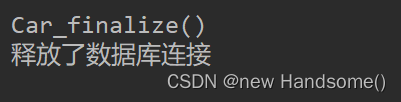
finalize()方法,做一些资源释放的操作public class TestDemo { public static void main(String[] args) { Car car = new Car(); car = null; /* 触发垃圾回收机制 */ System.gc(); } } class Car { @Override protected void finalize() throws Throwable { System.out.println("\nCar_finalize()"); System.out.println("释放了数据库连接\n"); } }- 1
- 2
- 3
- 4
- 5
- 6
- 7
- 8
- 9
- 10
- 11
- 12
- 13
- 14
- 15
- 16
- 17
结束!若有错误,请不吝赐教! -
相关阅读:
【python VS vba】(5) 在python中使用xlwt操作Excel(待完善ing)
python bytes 方法
Java OutputStreamWriter类的简介说明
四、ref与DOM-findDomNode-unmountComponentAtNode
在python中定义函数
【洛谷题解/NOIP2016提高组】P2831 愤怒的小鸟
Hadoop学习---9、Yarn
Windows平台docker安装redis
【自学开发之旅】Flask-会话保持-API授权-注册登录
grpc、https、oauth2等认证专栏实战11:授权码模式介绍
- 原文地址:https://blog.csdn.net/m0_54189068/article/details/126804198