-
gulimall基础篇回顾Day-10
前言
本文主要记录B站谷粒商城项目视频 P75-79 的内容,做到知识点的梳理和总结的作用。
一、品牌管理-分类关联与级联更新
1.1 Mybatis-Plus分页插件的使用
(1)前端界面应显示如下图效果,具有分页功能:

(2)代码实现//引入mybatis-plus的分页插件,重启项目即可实现分页功能 @Configuration @EnableTransactionManagement //开启事务 @MapperScan("com.atguigu.gulimall.product.dao") public class MyBatisConfig { //引入分页插件 @Bean public PaginationInterceptor paginationInterceptor() { PaginationInterceptor paginationInterceptor = new PaginationInterceptor(); // 设置请求的页面大于最大页后操作, true调回到首页,false 继续请求 默认false paginationInterceptor.setOverflow(true); // 设置最大单页限制数量,默认 500 条,-1 不受限制 paginationInterceptor.setLimit(1000); return paginationInterceptor; } }- 1
- 2
- 3
- 4
- 5
- 6
- 7
- 8
- 9
- 10
- 11
- 12
- 13
- 14
- 15
- 16
1.2 品牌服务模糊查询功能的实现
(1)根据品牌id或者品牌名可以在查询框中检索出匹配的品牌列表,如下图所示:

(2)在输入查询字aa后点击查询,前端发送如下请求:key即是我们要进行检索的字段。http://localhost:88/api/product/brand/list?t=1662787386145&page=1&limit=10&key=aa- 1
(3)代码实现该功能:
@Override public PageUtils queryPage(Map<String, Object> params) { //1、获取key String key = (String) params.get("key"); //2、构造查询条件 QueryWrapper<BrandEntity> queryWrapper = new QueryWrapper<>(); //3、key不为空就拼接查询条件 if(!StringUtils.isEmpty(key)){ queryWrapper.eq("brand_id",key).or().like("name",key); } //4、返回IPage对象,用于前端展示 IPage<BrandEntity> page = this.page( new Query<BrandEntity>().getPage(params), queryWrapper ); return new PageUtils(page); }- 1
- 2
- 3
- 4
- 5
- 6
- 7
- 8
- 9
- 10
- 11
- 12
- 13
- 14
- 15
- 16
- 17
1.3 品牌服务关联分类功能的实现

(1)小米品牌有造手机对应着手机分类,也有造电视对应着家用电器分类。所以一个品牌对应着多个分类,同样的一个分类对应着多种品牌。总结:品牌和分类的关系是多对多的关联关系。
(2)分类表和品牌表的中间表:pms_category_brand_relation 存储分类和品牌之间的关联关系。
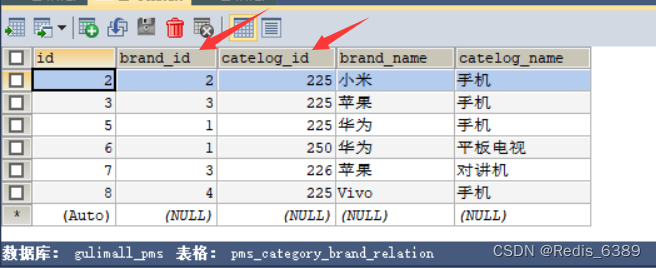
(3)根据接口文档编写接口:谷粒商城接口文档链接地址//获取当前品牌关联的所有分类列表 @GetMapping("/catelog/list") public R cateloglist(@RequestParam("brandId")Long brandId){ List<CategoryBrandRelationEntity> data = categoryBrandRelationService.list( new QueryWrapper<CategoryBrandRelationEntity>().eq("brand_id",brandId) ); return R.ok().put("data", data); }- 1
- 2
- 3
- 4
- 5
- 6
- 7
- 8
//保存分类与品牌之间的关联关系 @Override public void saveDetail(CategoryBrandRelationEntity categoryBrandRelation) { Long brandId = categoryBrandRelation.getBrandId(); Long catelogId = categoryBrandRelation.getCatelogId(); //1、查询详细名字 BrandEntity brandEntity = brandDao.selectById(brandId); CategoryEntity categoryEntity = categoryDao.selectById(catelogId); categoryBrandRelation.setBrandName(brandEntity.getName()); categoryBrandRelation.setCatelogName(categoryEntity.getName()); this.save(categoryBrandRelation); }- 1
- 2
- 3
- 4
- 5
- 6
- 7
- 8
- 9
- 10
- 11
- 12
- 13
- 14
1.4 关联分类冗余存储一致性问题
(1)关联分类的品牌名和分类名是属于冗余存储,目的是为了方便检索。要做到修改品牌名时能及时级联更新其他表冗余存储字段,就需要重写品牌update方法和三级分类的update方法。
(2)品牌级联更新方法如下:
@Transactional @Override public void updateDetail(BrandEntity brand) { //保证冗余字段的数据一致 this.updateById(brand); if(!StringUtils.isEmpty(brand.getName())){ //同步更新其他关联表中的数据 categoryBrandRelationService.updateBrand(brand.getBrandId(),brand.getName()); //TODO 更新其他关联 } }- 1
- 2
- 3
- 4
- 5
- 6
- 7
- 8
- 9
- 10
- 11
//同步更新关联表中的数据 @Override public void updateBrand(Long brandId, String name) { CategoryBrandRelationEntity relationEntity = new CategoryBrandRelationEntity(); relationEntity.setBrandId(brandId); relationEntity.setBrandName(name); //更新条件 this.update(relationEntity,new UpdateWrapper<CategoryBrandRelationEntity>().eq("brand_id",brandId)); }- 1
- 2
- 3
- 4
- 5
- 6
- 7
- 8
- 9
重启商品服务,将品牌名华为修改华为AAA点击确定,如下图:
关联分类能够级联更新,如下图:

(3)商品分类级联更新方法如下:@Transactional @Override public void updateCascade(CategoryEntity category) { this.updateById(category); //更新自己 categoryBrandRelationService.updateCategory(category.getCatId(), category.getName()); //同时修改缓存中的数据 //redis.del("catalogJson");等待下次主动查询进行更新 }- 1
- 2
- 3
- 4
- 5
- 6
- 7
- 8
- 9
@Override public void updateCategory(Long catId, String name) { this.baseMapper.updateCategory(catId,name); }- 1
- 2
- 3
- 4
@Mapper public interface CategoryBrandRelationDao extends BaseMapper<CategoryBrandRelationEntity> { void updateCategory(@Param("catId") Long catId, @Param("name")String name); }- 1
- 2
- 3
- 4
<mapper namespace="com.atguigu.gulimall.product.dao.CategoryBrandRelationDao"> <resultMap type="com.atguigu.gulimall.product.entity.CategoryBrandRelationEntity" id="categoryBrandRelationMap"> <result property="id" column="id"/> <result property="brandId" column="brand_id"/> <result property="catelogId" column="catelog_id"/> <result property="brandName" column="brand_name"/> <result property="catelogName" column="catelog_name"/> resultMap> <update id="updateCategory"> UPDATE `pms_category_brand_relation` SET catelog_name=#{name} WHERE catelog_id=#{catId} update> mapper>- 1
- 2
- 3
- 4
- 5
- 6
- 7
- 8
- 9
- 10
- 11
- 12
- 13
- 14
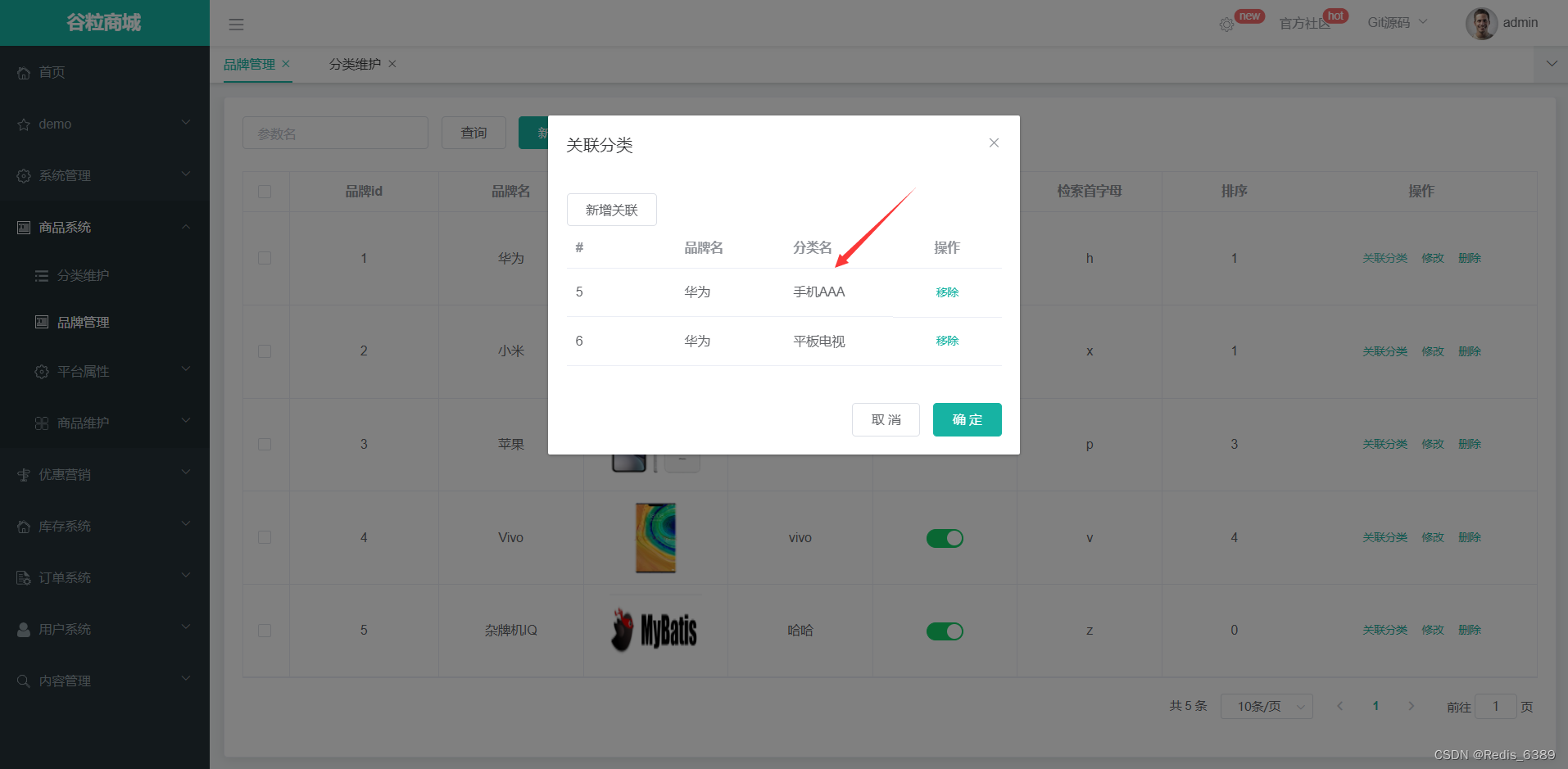
重启商品服务,修改三级分类手机为手机AAA,点击确定如下图:
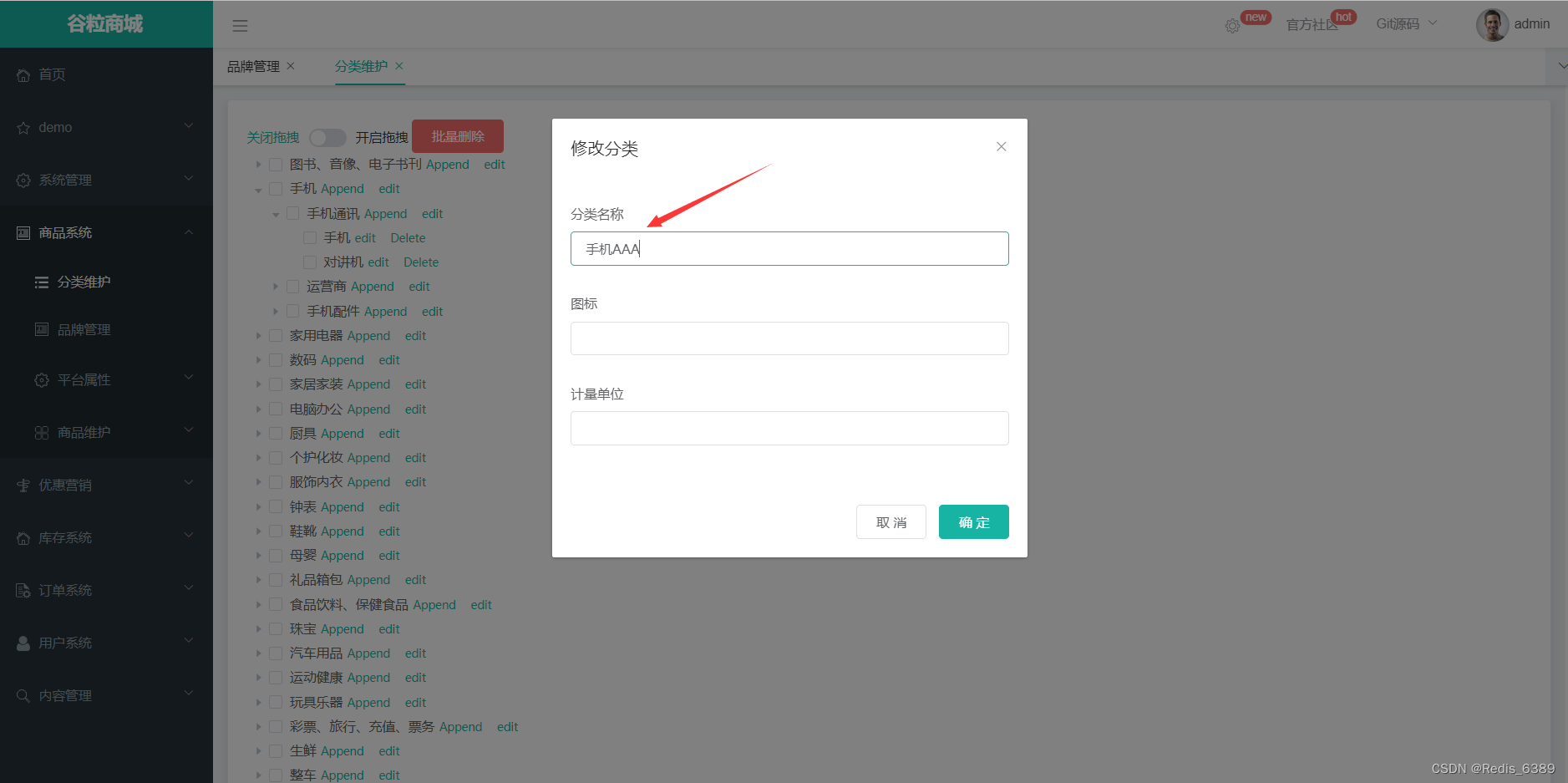
关联分类能够级联更新,如下图:
二、平台属性-规格参数与VO
2.1 属性分组查询全部无模糊匹配
(1)在查询框中输入2,点击查询全部发现没有模糊匹配功能。修改属性分组接口的查询功能,代码如下:
@Override public PageUtils queryPage(Map<String, Object> params, Long catelogId) { String key = (String) params.get("key"); //select * from pms_attr_group where catelog_id=? and (attr_group_id=key or attr_group_name like %key%) QueryWrapper<AttrGroupEntity> wrapper = new QueryWrapper<AttrGroupEntity>(); if (!StringUtils.isEmpty(key)) { wrapper.and((obj)->{ obj.eq("attr_group_id",key).or().like("attr_group_name",key); }); } if (catelogId == 0){ IPage<AttrGroupEntity> page = this.page(new Query<AttrGroupEntity>().getPage(params), wrapper); return new PageUtils(page); }else{ wrapper.eq("catelog_id",catelogId); IPage<AttrGroupEntity> page = this.page(new Query<AttrGroupEntity>().getPage(params),wrapper); return new PageUtils(page); } }- 1
- 2
- 3
- 4
- 5
- 6
- 7
- 8
- 9
- 10
- 11
- 12
- 13
- 14
- 15
- 16
- 17
- 18
- 19
- 20
- 21
- 22
- 23
2.2 规格参数新增与VO的介绍
(2)点击关联可以为这个属性分组下新建关联,如下图所示:

以京东为例:手机分类下关联主体,基本信息,主芯片等属性分组,而属性分组下又关联着多个属性例如主体关联着入网型号,上市年份等属性,如下图:

(3)点击规格参数新增功能,填写基本属性输入框的值点击保存,除了保存属性的基本信息外还保存了 attrGroupId 属性分组id字段,如下图:

(4)VO(value object)值对象
通常用于业务层之间的数据传递,和 PO 一样也是仅仅包含数据而已。但应是抽象出的业务对象 , 可以和表对应 , 也可以不对应, 这根据业务的需要。用 new 关键字创建,由GC 回收的。View object:视图对象;接受页面传递来的数据,封装对象;将业务处理完成的对象,封装成页面要用的数据。
所以 AttrVo 不仅封装了Attr 实体类的基本信息还增加了 attrGroupId 属性分组id字段。@Data public class AttrVo { /** * 属性id */ private Long attrId; /** * 属性名 */ private String attrName; /** * 是否需要检索[0-不需要,1-需要] */ private Integer searchType; /** * 值类型[0-为单个值,1-可以选择多个值] */ private Integer valueType; /** * 属性图标 */ private String icon; /** * 可选值列表[用逗号分隔] */ private String valueSelect; /** * 属性类型[0-销售属性,1-基本属性,2-既是销售属性又是基本属性] */ private Integer attrType; /** * 启用状态[0 - 禁用,1 - 启用] */ private Long enable; /** * 所属分类 */ private Long catelogId; /** * 快速展示【是否展示在介绍上;0-否 1-是】,在sku中仍然可以调整 */ private Integer showDesc; private Long attrGroupId; }- 1
- 2
- 3
- 4
- 5
- 6
- 7
- 8
- 9
- 10
- 11
- 12
- 13
- 14
- 15
- 16
- 17
- 18
- 19
- 20
- 21
- 22
- 23
- 24
- 25
- 26
- 27
- 28
- 29
- 30
- 31
- 32
- 33
- 34
- 35
- 36
- 37
- 38
- 39
- 40
- 41
- 42
- 43
- 44
- 45
- 46
@RequestMapping("/save") public R save(@RequestBody AttrVo attr){ attrService.saveAttr(attr); return R.ok(); }- 1
- 2
- 3
- 4
- 5
- 6
@Transactional @Override public void saveAttr(AttrVo attr) { AttrEntity attrEntity = new AttrEntity(); // attrEntity.setAttrName(attr.getAttrName()); BeanUtils.copyProperties(attr,attrEntity); //1、保存基本数据 this.save(attrEntity); //2、保存关联关系 if (attr.getAttrType() == ProductConstant.AttrEnum.ATTR_TYPE_BASE.getCode() && attr.getAttrGroupId() != null){ AttrAttrgroupRelationEntity relationEntity = new AttrAttrgroupRelationEntity(); relationEntity.setAttrGroupId(attr.getAttrGroupId()); relationEntity.setAttrId(attrEntity.getAttrId()); relationDao.insert(relationEntity); } }- 1
- 2
- 3
- 4
- 5
- 6
- 7
- 8
- 9
- 10
- 11
- 12
- 13
- 14
- 15
- 16
三、平台属性-规格参数列表
3.1 查询平台属性规格参数列表
(1)点击左侧商品三级分类,右侧能够展示该分类下的规格参数功能。

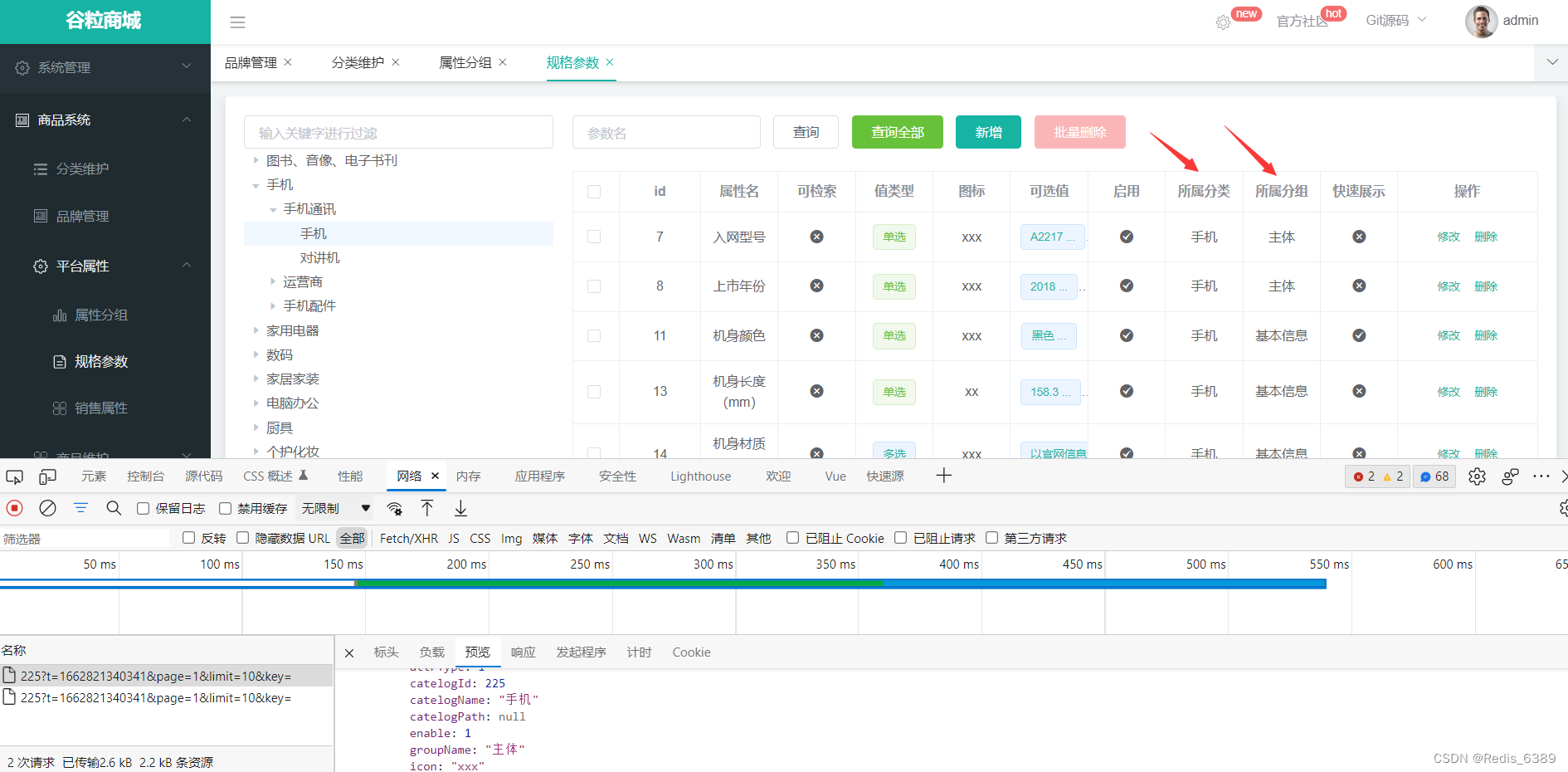
(2)接口返回的数据不仅包括了基本属性还另加了所属分类和所属分组,所以要新增一个 AttrRespVo 去继承 AttrVo 用于相应数据。(3)代码实现
@Data public class AttrRespVo extends AttrVo { /** * "catelogName": "手机/数码/手机", //所属分类名字 * "groupName": "主体", //所属分组名字 */ private String catelogName; private String groupName; private Long[] catelogPath; }- 1
- 2
- 3
- 4
- 5
- 6
- 7
- 8
- 9
- 10
- 11
- 12
public R baseAttrList(@RequestParam Map<String, Object> params, @PathVariable("catelogId") Long catelogId, @PathVariable("attrType") String type){ PageUtils page = attrService.queryBaseAttrPage(params,catelogId,type); return R.ok().put("page", page); }- 1
- 2
- 3
- 4
- 5
- 6
- 7
@Override public PageUtils queryBaseAttrPage(Map<String, Object> params, Long catelogId, String type) { QueryWrapper<AttrEntity> queryWrapper = new QueryWrapper<AttrEntity>().eq("attr_type","base".equalsIgnoreCase(type)?ProductConstant.AttrEnum.ATTR_TYPE_BASE.getCode():ProductConstant.AttrEnum.ATTR_TYPE_SALE.getCode()); if(catelogId != 0){ queryWrapper.eq("catelog_id",catelogId); } String key = (String) params.get("key"); if(!StringUtils.isEmpty(key)){ //attr_id attr_name queryWrapper.and((wrapper)->{ wrapper.eq("attr_id",key).or().like("attr_name",key); }); } IPage<AttrEntity> page = this.page( new Query<AttrEntity>().getPage(params),queryWrapper ); PageUtils pageUtils = new PageUtils(page); List<AttrEntity> records = page.getRecords(); List<AttrRespVo> respVos = records.stream().map((attrEntity) -> { AttrRespVo attrRespVo = new AttrRespVo(); BeanUtils.copyProperties(attrEntity, attrRespVo); //1、设置分类和分组的名字 if("base".equalsIgnoreCase(type)){ AttrAttrgroupRelationEntity attrId = relationDao.selectOne(new QueryWrapper<AttrAttrgroupRelationEntity>().eq("attr_id", attrEntity.getAttrId())); if (attrId != null && attrId.getAttrGroupId()!=null) { AttrGroupEntity attrGroupEntity = attrGroupDao.selectById(attrId.getAttrGroupId()); attrRespVo.setGroupName(attrGroupEntity.getAttrGroupName()); } } CategoryEntity categoryEntity = categoryDao.selectById(attrEntity.getCatelogId()); if (categoryEntity != null) { attrRespVo.setCatelogName(categoryEntity.getName()); } return attrRespVo; }).collect(Collectors.toList()); pageUtils.setList(respVos); return pageUtils; }- 1
- 2
- 3
- 4
- 5
- 6
- 7
- 8
- 9
- 10
- 11
- 12
- 13
- 14
- 15
- 16
- 17
- 18
- 19
- 20
- 21
- 22
- 23
- 24
- 25
- 26
- 27
- 28
- 29
- 30
- 31
- 32
- 33
- 34
- 35
- 36
- 37
- 38
- 39
- 40
- 41
- 42
- 43
- 44
- 45
四、平台属性-规格参数回显
4.1 所属分类和所属分组的回显
(1) 进入规格参数模块,点击修改能够除了基本属性回显外还要回显所属分类和所属分组的功能,如下图:

@Override public AttrRespVo getAttrInfo(Long attrId) { AttrRespVo respVo = new AttrRespVo(); AttrEntity attrEntity = this.getById(attrId); BeanUtils.copyProperties(attrEntity,respVo); if(attrEntity.getAttrType() == ProductConstant.AttrEnum.ATTR_TYPE_BASE.getCode()){ //1、设置分组信息 AttrAttrgroupRelationEntity attrgroupRelation = relationDao.selectOne(new QueryWrapper<AttrAttrgroupRelationEntity>().eq("attr_id", attrId)); if(attrgroupRelation!=null){ respVo.setAttrGroupId(attrgroupRelation.getAttrGroupId()); AttrGroupEntity attrGroupEntity = attrGroupDao.selectById(attrgroupRelation.getAttrGroupId()); if(attrGroupEntity!=null){ respVo.setGroupName(attrGroupEntity.getAttrGroupName()); } } } //2、设置分类信息 Long catelogId = attrEntity.getCatelogId(); Long[] catelogPath = categoryService.findCatelogPath(catelogId); respVo.setCatelogPath(catelogPath); CategoryEntity categoryEntity = categoryDao.selectById(catelogId); if(categoryEntity!=null){ respVo.setCatelogName(categoryEntity.getName()); } return respVo; }- 1
- 2
- 3
- 4
- 5
- 6
- 7
- 8
- 9
- 10
- 11
- 12
- 13
- 14
- 15
- 16
- 17
- 18
- 19
- 20
- 21
- 22
- 23
- 24
- 25
- 26
- 27
- 28
- 29
- 30
4.2 规格参数的update方法修改
(1) 规格参数点击修改功能能够回显成功后,点击修改属性分组再保存。发现还是保存原来的属性分组,原因是update仅保存基本的属性,需要对update方法进行修改。
@RequestMapping("/update") public R update(@RequestBody AttrVo attr){ attrService.updateAttr(attr); return R.ok(); }- 1
- 2
- 3
- 4
- 5
- 6
@Override public void updateAttr(AttrVo attr) { AttrEntity attrEntity = new AttrEntity(); BeanUtils.copyProperties(attr, attrEntity); this.updateById(attrEntity); if (attrEntity.getAttrType() == ProductConstant.AttrEnum.ATTR_TYPE_BASE.getCode()) { //1、修改分组关联 AttrAttrgroupRelationEntity relationEntity = new AttrAttrgroupRelationEntity(); relationEntity.setAttrGroupId(attr.getAttrGroupId()); relationEntity.setAttrId(attr.getAttrId()); Integer count = relationDao.selectCount(new QueryWrapper<AttrAttrgroupRelationEntity>().eq("attr_id", attr.getAttrId())); if (count > 0) { relationDao.update(relationEntity, new UpdateWrapper<AttrAttrgroupRelationEntity>().eq("attr_id", attr.getAttrId())); } else { relationDao.insert(relationEntity); } } }- 1
- 2
- 3
- 4
- 5
- 6
- 7
- 8
- 9
- 10
- 11
- 12
- 13
- 14
- 15
- 16
- 17
- 18
- 19
- 20
- 21
- 22
- 23
五、平台属性-销售属性维护
5.1 查询平台属性销售属性列表
(1) 查询平台属性销售属性列表和查询平台属性规格参数列表的功能是一样的,根据 pms_attr 表的 attr_type 字段来判断它是规格参数(基本属性)还是销售属性。属性类型:0 - 销售属性,1 - 基本属性。
@GetMapping("/{attrType}/list/{catelogId}") public R baseAttrList(@RequestParam Map<String, Object> params, @PathVariable("catelogId") Long catelogId, @PathVariable("attrType") String type){ PageUtils page = attrService.queryBaseAttrPage(params,catelogId,type); return R.ok().put("page", page); }- 1
- 2
- 3
- 4
- 5
- 6
- 7
- 8
@Override public PageUtils queryBaseAttrPage(Map<String, Object> params, Long catelogId, String type) { QueryWrapper<AttrEntity> queryWrapper = new QueryWrapper<AttrEntity>().eq("attr_type","base".equalsIgnoreCase(type)?ProductConstant.AttrEnum.ATTR_TYPE_BASE.getCode():ProductConstant.AttrEnum.ATTR_TYPE_SALE.getCode()); if(catelogId != 0){ queryWrapper.eq("catelog_id",catelogId); } String key = (String) params.get("key"); if(!StringUtils.isEmpty(key)){ //attr_id attr_name queryWrapper.and((wrapper)->{ wrapper.eq("attr_id",key).or().like("attr_name",key); }); } IPage<AttrEntity> page = this.page( new Query<AttrEntity>().getPage(params),queryWrapper ); PageUtils pageUtils = new PageUtils(page); List<AttrEntity> records = page.getRecords(); List<AttrRespVo> respVos = records.stream().map((attrEntity) -> { AttrRespVo attrRespVo = new AttrRespVo(); BeanUtils.copyProperties(attrEntity, attrRespVo); //1、设置分类和分组的名字 if("base".equalsIgnoreCase(type)){ AttrAttrgroupRelationEntity attrId = relationDao.selectOne(new QueryWrapper<AttrAttrgroupRelationEntity>().eq("attr_id", attrEntity.getAttrId())); if (attrId != null && attrId.getAttrGroupId()!=null) { AttrGroupEntity attrGroupEntity = attrGroupDao.selectById(attrId.getAttrGroupId()); attrRespVo.setGroupName(attrGroupEntity.getAttrGroupName()); } } CategoryEntity categoryEntity = categoryDao.selectById(attrEntity.getCatelogId()); if (categoryEntity != null) { attrRespVo.setCatelogName(categoryEntity.getName()); } return attrRespVo; }).collect(Collectors.toList()); pageUtils.setList(respVos); return pageUtils; }- 1
- 2
- 3
- 4
- 5
- 6
- 7
- 8
- 9
- 10
- 11
- 12
- 13
- 14
- 15
- 16
- 17
- 18
- 19
- 20
- 21
- 22
- 23
- 24
- 25
- 26
- 27
- 28
- 29
- 30
- 31
- 32
- 33
- 34
- 35
- 36
- 37
- 38
- 39
- 40
- 41
- 42
- 43
- 44
- 45
注意:只有规格参数(基本属性)才有所属分组,销售属性无所属分组。
-
相关阅读:
精读UNSUPERVISED SEMANTIC SEGMENTATION BY DISTILLING FEATURE CORRESPONDENCES
css总结
c#-特殊的集合
CF1514 C. Product 1 Modulo N [妙妙题]
关于专利技术交底书分类的真相
如何实现虹科物联网HMI与Corvina Cloud 1云平台连接?
C语言time()函数的用法
MyBatis递归查询学习
如何使用 TypeScript 编写“ Hello World “程序
jmeter源码二次开发
- 原文地址:https://blog.csdn.net/m0_49692893/article/details/126795101
