-
C语言-文件操作(最全)(二十一)
C语言-入门-文件操作(最全)
为什么使用文件?
我们写过的所有的程序,包括扫雷、三子棋、通讯录,它们的运行都是一次性的。当运行程序时,我们所写入和输出的内容都是存储于计算机内存中的,当程序运行结束就会消失。当重启程序,我们还得重新开始操作,这无疑是不合理的。
纵观我们计算机上的所有东西,都是以文件形式保存在计算机硬盘中。C语言中的文件操作就可以让我们把目标内容、数据存储到计算机硬盘上,这样程序结束运行时数据仍然保留在硬盘。当重启程序,可以再从指定硬盘位置读取数据内容。通过文件操作,我们实现了数据的存储与读取,实现了内容的持久化!
什么是文件?
磁盘上的文件是文件。但是在程序设计中,我们一般谈的文件有两种:程序文件、数据文件(从文件功能的角度来分类的)。
程序文件: 包括源程序文件(后缀为.c),可执行程序(windows环境后缀为.exe) 等等。数据文件: 文件的内容不一定是程序,而是程序运行时读写的数据,比如程序运行需要从中读取数据的文件,或者输出内容的文件。
文件基本概念
C 语言把文件看作是一个字符的序列,即文件是由一个一个字符组成的字符流,因此 c 语言将文件也称之为文件流。
文件分类
文本文件: 以 ASCII 码格式存放,一个字节存放一个字符。文本文件的每一个字节存放一个 ASCII 码,代表一个字符。这便于对字符的逐个处理,但占用存储空间较多,而且要花费时间转换。.c,txt,等文件就是以文本文件形式存放的
二进制文件: 以补码格式存放。二进制文件是把数据以二进制数的格式存放在文件中的,其占用存储空间较少。数据按其内存中的存储形式原样存放 .exe,word,pdf,视频,图片等文件就是以二进制文件形式存放的
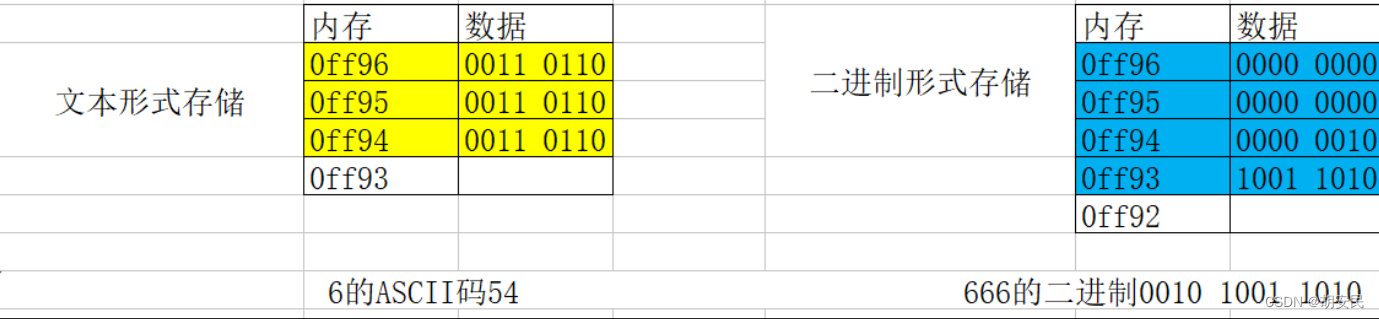

文本工具默认会按照ASCII码逐个直接解码文件, 由于文本文件存储的就是ASCII码, 所以可以正常解析显示, 由于二进制文件存储的不是ASCII码, 所以解析出来之后是乱码I/O概念
在开发中我们经常会看到“I/O”,或者“IO”等之类的写法,就是输入输出的意思。I,是英文单词“input”的首字母,中文意思是输入;O,是英文单词“output”的首字母,中文意思是输出。因此为了表述方便,大家就习惯把“I”和“O”拼写在一起,表示C语言中输入和输出的意思。
什么是行
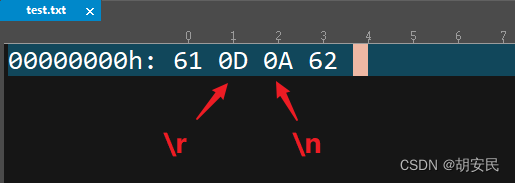
行是文本编辑器中的概念,文件流中就是一个字符。这个在不同的平台是有差异的。window 平台 ‘\r\n’,linux 平台是’\n’
平台差异:
- windows 平台在写入’\n’是会体现为’\r\n’,linux 平台在写入’\n’时会体现为’\n’。windows 平台在读入’\r\n’时,体现为一个字符’\n’,linux 平台在读入’\n’时,体现为一个字符’\n’
- linux 读 windows 中的换行,则会多读一个字符,windows 读 linux 中的换行,则没有问题
#includeint main() { FILE *fw = fopen("test.txt", "w+"); fputc('a', fw); fputc('\n', fw); fputc('b', fw); fclose(fw); return 0; } - 1
- 2
- 3
- 4
- 5
- 6
- 7
- 8
- 9
- 10
- 11
- 12

处理文件的模式

主要: Windows如果读写的是二进制文件,则还要加 b,比如 rb, r+b 等。 unix/linux 不区分文本和二进制文件常用文件函数使用
打开文件和关闭文件fopen|fclose函数
文件在读写之前应该先打开文件,在使用结束之后应该关闭文件。在编写程序的时候,在打开文件的同时,都会返回一个FILE*的指针变量指向该文件,也相当于建立了指针和文件的关系。ANSIC 规定使用fopen函数来打开文件,fclose来关闭文件。


#includeint main() { //打开一个文件 FILE *fp = fopen("test.txt", "w+"); //...处理中 fclose(fp);//处理完毕后关闭文件 return 0; } - 1
- 2
- 3
- 4
- 5
- 6
- 7
- 8
- 9
- 10
文本相关函数操作
字符读写fputc|fgetc函数
写入

#includeint main() { // 1.打开一个文件 FILE *fp = fopen("test.txt", "w+"); // 2.往文件中写入内容 for(char ch = 'a'; ch <= 'z'; ch++){ // 一次写入一个字符 char res = fputc(ch, fp); printf("res = %c\n", res); } // 3.关闭打开的文件 fclose(fp); return 0; } - 1
- 2
- 3
- 4
- 5
- 6
- 7
- 8
- 9
- 10
- 11
- 12
- 13
- 14
- 15
- 16
- 17
- 18
- 19
读取

#includeint main(int argc, char *argv[]) { // 1.打开一个文件 FILE *fp = fopen("test.txt", "r+"); // 2.从文件中读取内容,每次读取一个字节 char res = EOF; while((res = fgetc(fp)) != EOF){ printf("res = %c\n", res); } // 3.关闭打开的文件 fclose(fp); return 0; return 0; } - 1
- 2
- 3
- 4
- 5
- 6
- 7
- 8
- 9
- 10
- 11
- 12
- 13
- 14
- 15
- 16
字符串读写fputs|fgets函数

#includeint main() { FILE *fw = fopen("test.txt", "w+"); // 注意: fputs不会自动添加\n fputs("lnj\n", fw); fputs("it666\n", fw); fclose(fw); return 0; } - 1
- 2
- 3
- 4
- 5
- 6
- 7
- 8
- 9
- 10
- 11
- 12
注意: fputs函数遇到
\0自动终止写入#includeint main() { FILE *fp = fopen("test.txt", "w+"); // 注意: fputs写入时遇到\0就会自动终止写入 fputs("lnj\0it666\n", fp); fclose(fp); return 0; } - 1
- 2
- 3
- 4
- 5
- 6
- 7
- 8
- 9
- 10
- 11
- 12

读取指定长度的字符串#includeint main() { FILE *fp = fopen("test.txt", "r"); char str[1024]; // 从fp中读取4个字符, 存入到str中 最多只能读取N-1个字符(1024-1), 然后会在str最后自动添加\0 fgets(str, 4, fp); printf("str = %s", str); fclose(fp); return 0; } - 1
- 2
- 3
- 4
- 5
- 6
- 7
- 8
- 9
- 10
- 11
- 12
- 13
注意: 在读取的过程中如果遇到
\n或者EOF自动结束读取一直读取到文件末尾自动结束
int main() { FILE *fp = fopen("test.txt", "r"); //总字符串 char strSum[2048]; //每次读取的字符串保存位置 char str[102]; //每次读取一行 while(fgets(str, 102, fp)){ printf("str = %s\n", str); strcat(strSum, str); } printf("=====str = %s", strSum); // it6 fclose(fp); return 0; }- 1
- 2
- 3
- 4
- 5
- 6
- 7
- 8
- 9
- 10
- 11
- 12
- 13
- 14
- 15
- 16
- 17
注意: 如果文件中间出现了空行那么就会读取中断导致数据缺少
二进制读写fwrite|fread函数
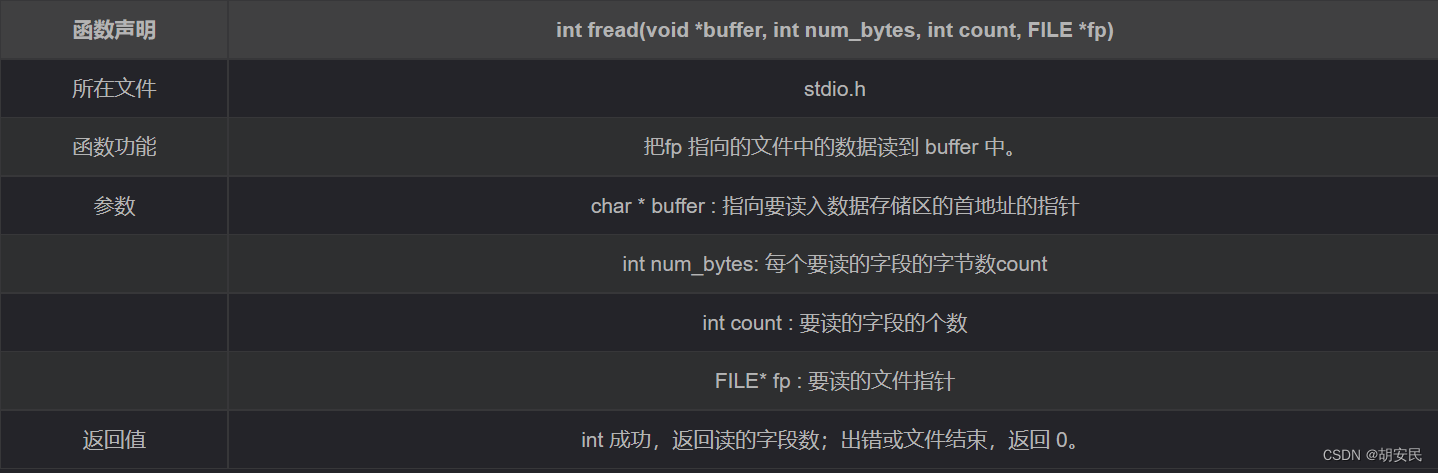
C 语言己经从接口的层面区分了,文本的读写方式和二进制的读写方式。前面我们讲的是文本的读写方式。所有的文件接口函数,要么以 ‘\0’,表示输入结束,要么以 ‘\n’, EOF(0xFF)表示读取结束。 ‘\0’ ‘\n’ 等都是文本文件的重要标识,而所有的二进制接口对于这些标识,是不敏感的。二进制的接口可以读文本,而文本的接口不可以读二进制

一个字节一个字节的写
#include#include int main() { FILE *fp = fopen("test.txt", "wb+"); // 注意: fwrite不会关心写入数据的格式 char *str = "1,张三,18\n" "2,李四,22\n" "3,王五,23"; int count=strlen(str); //需要写入的内容长度 /* * 第一个参数: 被写入数据指针 * 第二个参数: 每次写入多少个字节 * 第三个参数: 需要写入多少次 * 第四个参数: 已打开文件结构体指针 */ int w =fwrite((void *)str, 1,count , fp); printf("写入的字节数%d",w); fclose(fp); return 0; } - 1
- 2
- 3
- 4
- 5
- 6
- 7
- 8
- 9
- 10
- 11
- 12
- 13
- 14
- 15
- 16
- 17
- 18
- 19
- 20
- 21
- 22
- 23
一个字节一个字节的读
很多时候我们并不知道文件有多少字节
#includeint main() { FILE *fr = fopen("test.txt", "rb+"); char buf[1024] = {0}; int size=1; //读取时size应该填写读取数据类型的最小单位 int count=sizeof(buf)*sizeof(char ); /* * 第一个参数: 存储读取到数据的容器 * 第二个参数: 每次读取多少个字节 * 第三个参数: 需要读取多少次 * 第四个参数: 已打开文件结构体指针 * fread函数读取成功返回读取到的字节数, 读取失败返回0 */ int n = fread(buf, size, count, fr); printf("文件总字段数: %i\n", n); for(int i = 0; i < n*size; i++){ printf("%c", buf[i]); } fclose(fr); return 0; } - 1
- 2
- 3
- 4
- 5
- 6
- 7
- 8
- 9
- 10
- 11
- 12
- 13
- 14
- 15
- 16
- 17
- 18
- 19
- 20
- 21
- 22
格式化数据写入sprintf和读取fscanf
int sprintf( char *buffer, const char *format [, argument] ... );
函数功能: 把格式化的数据写入某个字符串
返回值: 写入的长度#include#include int main() { FILE * fp= fopen ("file.txt", "w+"); fprintf(fp, "%s %s %s %d", "We", "are", "in", 2014); fclose(fp); return(0); } - 1
- 2
- 3
- 4
- 5
- 6
- 7
- 8
- 9
int fscanf(FILE* stream, const char* format, [argument...]);
函数功能: 把格式化的数据从文件中读取出来 (取得时候需要和写入时候格式一直)
返回值: 读取的长度(#includeint main() { char str1[10], str2[10], str3[10]; int year; FILE * fp= fopen ("file.txt", "r+"); int i = fscanf(fp, "%s %s %s %d", str1, str2, str3, &year); printf("Read String1 |%s|\n", str1 ); printf("Read String2 |%s|\n", str2 ); printf("Read String3 |%s|\n", str3 ); printf("Read Integer |%d|\n", year ); fclose(fp); return(0); } - 1
- 2
- 3
- 4
- 5
- 6
- 7
- 8
- 9
- 10
- 11
- 12
- 13
- 14
- 15
读写结构体
结构体中的数据类型不统一,此时最适合用二进制的方式进行读写
读写单个结构体
#includetypedef struct{ char *name; int age; double height; } Person; int main() { Person p1 = {"lnj", 35, 1.88}; FILE *fp = fopen("person.stu", "wb+"); fwrite(&p1, sizeof(p1), 1, fp);//写入一个结构体 rewind(fp); //文件指针回到文件开头 ,否则读取的时候是从文件结尾开始的 Person p2; fread(&p2, sizeof(p2), 1, fp); printf("name = %s\n", p2.name); printf("age = %i\n", p2.age); printf("height = %lf\n", p2.height); return 0; } - 1
- 2
- 3
- 4
- 5
- 6
- 7
- 8
- 9
- 10
- 11
- 12
- 13
- 14
- 15
- 16
- 17
- 18
- 19
- 20
- 21
- 22
读写结构体数组
#includetypedef struct { char *name; int age; double height; } Person; int main() { Person ps[] = { {"zs", 18, 1.65}, {"ls", 21, 1.88}, {"ww", 33, 1.9} }; FILE *fp = fopen("person.stu", "wb+"); fwrite(&ps, sizeof(ps), 1, fp); int personSize = fsiez(fp) / sizeof(Person);//获取文件内结构体的个数 rewind(fp);//重置指针到文件开头 Person p[personSize]; for (int i = 0; i < personSize; ++i) { fread(&p[i], sizeof(Person), 1, fp); Person v = p[i]; printf("============Person==========\n"); printf("name = %s\n", v.name); printf("age = %i\n", v.age); printf("height = %lf\n", v.height); } fclose(fp); return 0; } - 1
- 2
- 3
- 4
- 5
- 6
- 7
- 8
- 9
- 10
- 11
- 12
- 13
- 14
- 15
- 16
- 17
- 18
- 19
- 20
- 21
- 22
- 23
- 24
- 25
- 26
- 27
- 28
- 29
读写结构体链表
/** * 链表写入文件 */ void writeListToFile(Node *head, char *fileName){ FILE *fp = fopen(fileName,"wb+"); if(fp == NULL){ printf("open file error\n"); return; } Node *cur = head; while(cur!=NULL){ fwrite(&cur, sizeof(Node), 1, fp); cur = cur->next; } fclose(fp); } /** * 读取文件链表 */ Node *readListFromFile(char *fileName) { FILE *fp = fopen(fileName, "r"); if (fp == NULL) { printf("open file error\n"); return NULL; } Node *head = NULL; Node *cur= NULL; if(!feof(fp)){ //先取头结点 cur = ( Node *)calloc(1, sizeof(Node)); fread(&cur, sizeof(Node), 1, fp); head= cur; while (!feof(fp)) { Node *node = createNode(); fread(&node, sizeof(Node), 1, fp); if(node==NULL){ break; } cur->next = node; cur = node; } } fclose(fp); return head; }- 1
- 2
- 3
- 4
- 5
- 6
- 7
- 8
- 9
- 10
- 11
- 12
- 13
- 14
- 15
- 16
- 17
- 18
- 19
- 20
- 21
- 22
- 23
- 24
- 25
- 26
- 27
- 28
- 29
- 30
- 31
- 32
- 33
- 34
- 35
- 36
- 37
- 38
- 39
- 40
- 41
- 42
- 43
- 44
- 45
- 46
辅助函数
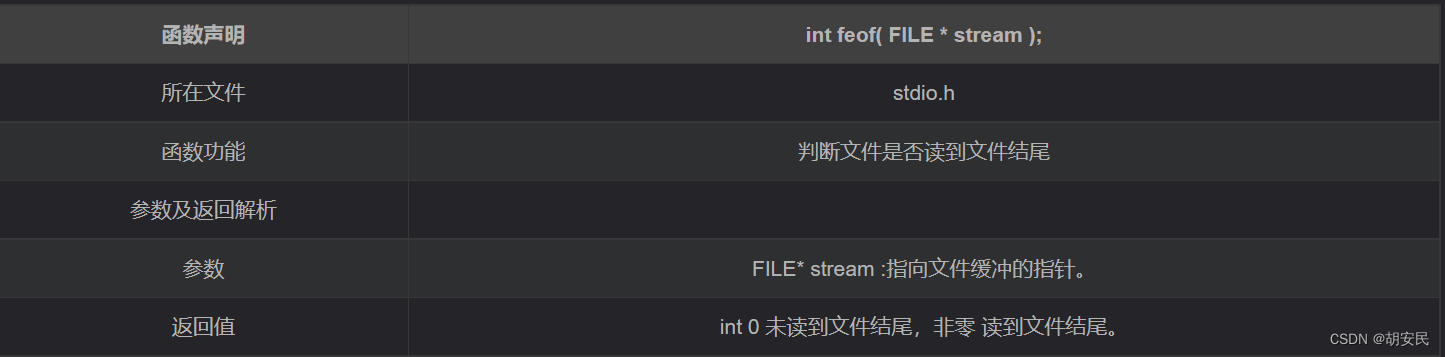
判断文件末尾feof函数
#includeint main() { // 1.打开一个文件 FILE *fp = fopen("test.txt", "r+"); // 2.从文件中读取内容 char res = EOF; // 注意: 由于只有先读了才会修改标志位, // 所以通过feof判断是否到达文件末尾, 一定要先读再判断, 不能先判断再读 while((res = fgetc(fp)) && (!feof(fp))){ printf("res = %c\n", res); } // 3.关闭打开的文件 fclose(fp); return 0; } - 1
- 2
- 3
- 4
- 5
- 6
- 7
- 8
- 9
- 10
- 11
- 12
- 13
- 14
- 15
- 16
- 17
- 18
- 19
- 20
注意: feof 这个函数,是去读标志位判断文件是否结束的。而标志位只有读完了才会被修改, 所以如果先判断再读标志位会出现多打一次的的现象所以开发中使用feof函数一定要先读后判断, 而不能先判断后读
文件指针控制fseek函数
范例一:
fseek(fp, 0L, SEEK_END);文件指针定位到文件末尾,偏移0个字节范例二:
fseek(fp,50L,0);或fseek(fp,50L,SEEK_SET);其作用是将当前指针移到离文件头50个字节处注意: 如果文件大于2G使用
_fseeki64常用的宏
#define SEEK_CUR 1 当前位置
#define SEEK_END 2 文件结尾
#define SEEK_SET 0 文件开头跳过文件前10个字节进行读取
#include#include #include "io.h" int main() { FILE *rp = fopen("test.txt", "r"); //获取文件大小 ,最大只能获取2g的文件大小因为返回值类型long使用4个字节大小来表示,最大为2的31次方也就是2G的大小 int i = (int)_filelength(_fileno(rp)); fseek(rp, 10, SEEK_SET); //跳过文件前10个字节进行读取 i-=10; char *buf = (char *) calloc(i, sizeof(char)); int r = fread(buf, 1, i, rp); printf("%d\n",r); printf("%s\n",buf); fclose(rp); return 0; } - 1
- 2
- 3
- 4
- 5
- 6
- 7
- 8
- 9
- 10
- 11
- 12
- 13
- 14
- 15
- 16
- 17
- 18
- 19
获取当前读写位置距离文件开头的字节数ftell函数

#include#include "string.h" int main() { FILE *fp = fopen("test.txt", "wb+"); char *str = "1,张三,18\n" "2,李四,22\n" "3,王五,23"; int count=strlen(str); //需要写入的内容长度 fwrite((void *)str, 1,count , fp); long cp = ftell(fp); printf("距离文件头部多少字节 = %ld\n", cp); // 35 fclose(fp); return 0; } - 1
- 2
- 3
- 4
- 5
- 6
- 7
- 8
- 9
- 10
- 11
- 12
- 13
- 14
注意: 如果文件大于2G那么使用
_ftelli64将读写指针重置到文件头部

#include#include "string.h" int main() { FILE *fp = fopen("test.txt", "wb+"); char *str = "1,张三,18\n" "2,李四,22\n" "3,王五,23"; int count=strlen(str); //需要写入的内容长度 fwrite((void *)str, 1,count , fp); long cp = ftell(fp); printf("写入文件后距离文件头部多少字节 = %ld\n", cp); // 35 // 新指向一个流的开头 rewind(fp); cp = ftell(fp); printf("重置指针后距离文件头部多少字节 = %ld\n", cp); // 0 fclose(fp); return 0; } - 1
- 2
- 3
- 4
- 5
- 6
- 7
- 8
- 9
- 10
- 11
- 12
- 13
- 14
- 15
- 16
- 17
- 18
文件操作封装
获取文件大小
可以随时获取当然文件指针到文件结尾的大小,而无需反复开关文件
//获取文件的长度(字节) long long fsiez(FILE *fp) { long long size; fpos_t fosp; //当前位置 fgetpos(fp, &fosp); //获取当前位置 _fseeki64(fp, 0, SEEK_END); //移动到文件末尾 size = _ftelli64(fp); //获取文件大小 fsetpos(fp, &fosp); //恢复原来的位置 return size; }- 1
- 2
- 3
- 4
- 5
- 6
- 7
- 8
- 9
- 10
判断是否是目录
//判断是否是一个目录 1 是,0不是 int isDir(char *path){ struct stat s; stat(path, &s); if (S_ISDIR(s.st_mode)){ return 1; } return 0; }- 1
- 2
- 3
- 4
- 5
- 6
- 7
- 8
- 9
判断是否是普通文件
//判断是否是一个文件 1 是,0不是 int isFile(char *path){ struct stat s; stat(path, &s); if (S_ISREG(s.st_mode)){ return 1; } return 0; }- 1
- 2
- 3
- 4
- 5
- 6
- 7
- 8
- 9
判断文件或者目录是否存在
//判断文件或者目录是否存在 存在返回1 不存在返回0 int fileOrDirExist(char *path) { if (access(path, F_OK) == 0){ return 1; } return 0; }- 1
- 2
- 3
- 4
- 5
- 6
- 7
获取父目录
//获取父目录(注意释放内存) char *getParentPath(char *path) { char *parentPath = (char *)malloc(sizeof(char) * (strlen(path) + 1)); strcpy(parentPath, path); char *last = strrchr(parentPath, '/'); last =last==NULL? strrchr(parentPath, '\\'):NULL; if (last != NULL) { *last = '\0'; } return parentPath; }- 1
- 2
- 3
- 4
- 5
- 6
- 7
- 8
- 9
- 10
- 11
创建空文件
//创建空文件 FILE *creatFile(char *fileName) { FILE *fp = fopen(fileName, "w+"); if (fp == NULL) { printf("open file error\n"); return NULL; } return fp; }- 1
- 2
- 3
- 4
- 5
- 6
- 7
- 8
- 9
创建目录(多级)
//创建目录(多级) int mkdirs(char *path) { char str[512]; strncpy(str, path, 512); int len = strlen(str); for (int i = 0; i < len; i++) { if (str[i] == '/'||str[i] == '\\') { str[i] = '\0'; if (access(str, 0) != 0) { mkdir(str); } str[i] = '/'; } } if (len > 0 && access(str, 0) != 0) { mkdir(str); } return isDir(path); }- 1
- 2
- 3
- 4
- 5
- 6
- 7
- 8
- 9
- 10
- 11
- 12
- 13
- 14
- 15
- 16
- 17
- 18
- 19
查询目录(自由深度)
//查询目录下的所有文件和目录() static void dirAll_(char *dirPath, CharList *dirList,CharList *fileList, CharList *allList) { if (isDir(dirPath)) { //判断目标文件目录是否存在 if(!fileOrDirExist(dirPath)){ return; } DIR *dp = opendir(dirPath); //打开一个目录路径 struct dirent *entry; while ((entry = readdir(dp)) != NULL) { //返回DIR中的目录或者文件实体指针 ,当函数返回NULL时,表明指针已经指向目录的结尾。 if (strcmp(entry->d_name, ".") == 0 || strcmp(entry->d_name, "..") == 0||strcmp(entry->d_name, "$RECYCLE.BIN") == 0) {//跳过.和..目录和$RECYCLE.BIN(系统文件,保存历史记录的) continue; } char* srcPath=malloc(sizeof(char)*(strlen(dirPath)+strlen(entry->d_name)+2)); sprintf(srcPath, "%s%c%s", dirPath,separator, entry->d_name);//原始文件路径 addCharList(allList,srcPath); if (isDir(srcPath)) { addCharList(dirList,srcPath); }else{ //是文件 addCharList(fileList,srcPath); } } closedir(dp); } } static void dirAllDeep_(char *dirPath,int deep,int *deepCount, CharList *dirList,CharList *fileList, CharList *allList){ CharList *dirList1 = createCharList(100); CharList *fileList1 = createCharList(100); CharList *allList1 = createCharList(200); dirAll_(dirPath,dirList1,fileList1,allList1); charListMerge(dirList,dirList1); charListMerge(fileList,fileList1); charListMerge(allList,allList1); (*deepCount)++; if( (*deepCount)==deep){ return; } CharListIterator *pIterator = createCharListIterator(dirList1); while (hasNextCharListIterator(pIterator)) { char *path = nextCharListIterator(pIterator); dirAllDeep_(path,deep,deepCount,dirList,fileList,allList); } } /** * * @param dirPath * @param deep 1表示只查询当前目录,2表示查询当前目录和下一级目录,以此类推 -1表示查询所有目录包括子目录 * @return */ CharHashMap *dirAllDeep(char *dirPath,int deep){ CharHashMap *pMap = createCharHashMap(10); CharList *dirList = createCharList(100); CharList *fileList = createCharList(100); CharList *allList = createCharList(200); putCharHashMap(pMap,"dir", dirList ); putCharHashMap(pMap,"file", fileList ); putCharHashMap(pMap,"all", allList ); int *deepCount= malloc(sizeof(int)); (*deepCount)=0; dirAllDeep_(dirPath,deep,deepCount,dirList,fileList,allList); return pMap; }- 1
- 2
- 3
- 4
- 5
- 6
- 7
- 8
- 9
- 10
- 11
- 12
- 13
- 14
- 15
- 16
- 17
- 18
- 19
- 20
- 21
- 22
- 23
- 24
- 25
- 26
- 27
- 28
- 29
- 30
- 31
- 32
- 33
- 34
- 35
- 36
- 37
- 38
- 39
- 40
- 41
- 42
- 43
- 44
- 45
- 46
- 47
- 48
- 49
- 50
- 51
- 52
- 53
- 54
- 55
- 56
- 57
- 58
- 59
- 60
- 61
- 62
- 63
- 64
- 65
- 66
- 67
- 68
复制(目录和文件)
// 复制目录或者文件(没有大小限制,500M以上的文件采用分段复制) void copy(char *src, char *dest) { if (isFile(src)) { FILE *rp = fopen(src, "rb+"); long long i = fsiez(rp);//获取文件大小 long limitSize=524288000;//500M,分段复制的大小 //如果文件大于500M那么就分段读取 if (i > limitSize) { long long j = i / limitSize;//分段数(复制几次) long long k = i % limitSize;//最后一次复制的大小 for (int l = 0; l < j; l++) { char *buf = malloc(sizeof(char) * limitSize); fread(buf, sizeof(char), limitSize, rp); FILE *wp = fopen(dest, "ab+"); fwrite(buf, sizeof(char), limitSize, wp); fclose(wp); free(buf); } //读取剩余的 if (k > 0) { char *buf = malloc(sizeof(char) * k); fread(buf, sizeof(char), k, rp); FILE *wp = fopen(dest, "ab+"); fwrite(buf, sizeof(char), k, wp); fclose(wp); free(buf); } } else { char *buf = malloc(sizeof(char) * i); fread(buf, sizeof(char), i, rp); FILE *wp = fopen(dest, "wb+"); fwrite(buf, sizeof(char), i, wp); fclose(wp); free(buf); } } if (isDir(src)) { //判断目标文件目录是否存在,不存在则创建 if(!fileOrDirExist(dest)){ mkdirs(dest); } DIR *dp = opendir(src); //打开一个目录路径 struct dirent *entry; while ((entry = readdir(dp)) != NULL) { //返回DIR中的目录或者文件实体指针 ,当函数返回NULL时,表明指针已经指向目录的结尾。 if (strcmp(entry->d_name, ".") == 0 || strcmp(entry->d_name, "..") == 0||strcmp(entry->d_name, "$RECYCLE.BIN") == 0) {//跳过.和..目录 continue; } char srcPath[512]; char destPath[512]; sprintf(srcPath, "%s%c%s", src,separator, entry->d_name);//原始文件路径 sprintf(destPath, "%s%c%s", dest,separator, entry->d_name);//目标文件路径 copy(srcPath, destPath); } closedir(dp); } }- 1
- 2
- 3
- 4
- 5
- 6
- 7
- 8
- 9
- 10
- 11
- 12
- 13
- 14
- 15
- 16
- 17
- 18
- 19
- 20
- 21
- 22
- 23
- 24
- 25
- 26
- 27
- 28
- 29
- 30
- 31
- 32
- 33
- 34
- 35
- 36
- 37
- 38
- 39
- 40
- 41
- 42
- 43
- 44
- 45
- 46
- 47
- 48
- 49
- 50
- 51
- 52
- 53
- 54
- 55
- 56
修改文件名称
/** * 修改文件和目录的名称 * @param srcPath 原始文件或目录路径 * @param destPath 修改后的文件或目录名称 * @return */ int renameFile(char *srcPath, char *newName) { char *string =getParentPath(srcPath); char *path = (char *)malloc(sizeof(char) * (strlen(string) + strlen(newName) + 2)); sprintf(path,"%s%c%s",string,separator,newName); if (rename(srcPath, path) == 0) { return 1; } return 0; }- 1
- 2
- 3
- 4
- 5
- 6
- 7
- 8
- 9
- 10
- 11
- 12
- 13
- 14
- 15
移动(目录和文件)
//移动文件 int moveFile(char *srcPath, char *destPath) { if (rename(srcPath, destPath) == 0) { return 1; } return 0; } //移动目录 int moveDir(char *srcPath, char *destPath) { if (isDir(srcPath)) { //判断目标文件目录是否存在 if(!fileOrDirExist(srcPath)){ return 0; } //判断目标文件目录是否存在 if(!fileOrDirExist(destPath)){ return 0; } DIR *dp = opendir(srcPath); //打开一个目录路径 struct dirent *entry; while ((entry = readdir(dp)) != NULL) { //返回DIR中的目录或者文件实体指针 ,当函数返回NULL时,表明指针已经指向目录的结尾。 if (strcmp(entry->d_name, ".") == 0 || strcmp(entry->d_name, "..") == 0||strcmp(entry->d_name, "$RECYCLE.BIN") == 0) {//跳过.和..目录 continue; } char* srcPath1=malloc(sizeof(char)*(strlen(srcPath)+strlen(entry->d_name)+2)); sprintf(srcPath1, "%s%c%s", srcPath,separator, entry->d_name);//原始文件路径 char* destPath1=malloc(sizeof(char)*(strlen(destPath)+strlen(entry->d_name)+2)); sprintf(destPath1, "%s%c%s", destPath,separator, entry->d_name);//目标文件路径 if (isDir(srcPath1)) { moveDir(srcPath1,destPath1); }else{ //是文件 moveFile(srcPath1,destPath1); } } closedir(dp); rmdir(srcPath); } return 1; }- 1
- 2
- 3
- 4
- 5
- 6
- 7
- 8
- 9
- 10
- 11
- 12
- 13
- 14
- 15
- 16
- 17
- 18
- 19
- 20
- 21
- 22
- 23
- 24
- 25
- 26
- 27
- 28
- 29
- 30
- 31
- 32
- 33
- 34
- 35
- 36
- 37
- 38
- 39
- 40
- 41
- 42
- 43
删除目录或者文件
//删除目录下的所有文件和目录 static int deleteDirAll(char *dirPath) { if (isDir(dirPath)) { DIR *dp = opendir(dirPath); //打开一个目录路径 struct dirent *entry; while ((entry = readdir(dp)) != NULL) { //返回DIR中的目录或者文件实体指针 ,当函数返回NULL时,表明指针已经指向目录的结尾。 if (strcmp(entry->d_name, ".") == 0 || strcmp(entry->d_name, "..") == 0) {//跳过.和..目录 continue; } char* srcPath=malloc(sizeof(char)*(strlen(dirPath)+strlen(entry->d_name)+2)); sprintf(srcPath, "%s%c%s", dirPath,separator, entry->d_name);//原始文件路径 if (isDir(srcPath)) { deleteDirAll(srcPath); }else{ //是文件 remove(srcPath); } } closedir(dp); rmdir(dirPath); } return 1; } //删除文件或者目录 int deleteFileOrDir(char *path) { if (remove(path) == 0) { return 1; }else{ return deleteDirAll(path); } }- 1
- 2
- 3
- 4
- 5
- 6
- 7
- 8
- 9
- 10
- 11
- 12
- 13
- 14
- 15
- 16
- 17
- 18
- 19
- 20
- 21
- 22
- 23
- 24
- 25
- 26
- 27
- 28
- 29
- 30
- 31
- 32
跳过开头几行(文本)
#includeFILE *fileSkipLing(FILE *file,int len) { printf("start======跳过的内容======\n"); // 从文件中读取内容,每次读取一个字节,遇到换行符就结束 char res = EOF; for (int i = 0; i < len; ++i){ while((res = fgetc(file)) != EOF&&res != '\n') { printf("%c", res); } printf("\n"); } printf("\nEnd======跳过的内容======\n"); return file; } int main() { FILE *fp = fopen("test.txt", "r+"); fileSkipLing(fp,2); return (0); } - 1
- 2
- 3
- 4
- 5
- 6
- 7
- 8
- 9
- 10
- 11
- 12
- 13
- 14
- 15
- 16
- 17
- 18
- 19
- 20
- 21
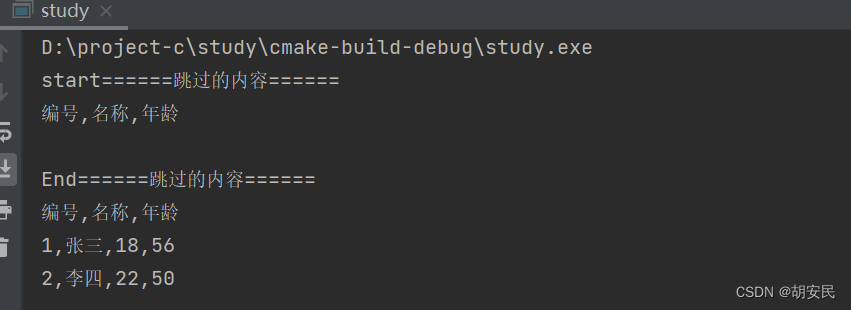
读取CSV文件
文件格式如下

typedef struct student { int id; char name[5]; int age; } Student; int main() { FILE *fp = fopen("test.txt", "r+"); fileSkipLing(fp,1);//跳过文件开头1行 printf("编号,名称,年龄\n"); Student student[2]; int len=sizeof(student)/sizeof(Student); for (int i = 0; i < len; ++i){ if(feof(fp)){ break; } fscanf(fp, "%d,%s,%d", &student[i].id, student[i].name, &student[i].age); printf("%d,%s,%d\n", student[i].id, student[i].name, student[i].age); } fclose(fp); return (0); }- 1
- 2
- 3
- 4
- 5
- 6
- 7
- 8
- 9
- 10
- 11
- 12
- 13
- 14
- 15
- 16
- 17
- 18
- 19
- 20
- 21
- 22
- 23
- 24
利用fputc 和 fgetc实现简单的加解密
#includevoid encode(char *name, char *newName, int code); void decode(char *name, char *newName, int code); int main() { encode("test.txt", "testEncode.txt", 666); decode("testEncode.txt", "testDecode.txt", 666); return 0; } /** * @brief encode 加密文件 * @param name 需要加密的文件名称 * @param newName 加密之后的文件名称 * @param code 秘钥 */ void encode(char *name, char *newName, int code){ FILE *fw = fopen(newName, "w+"); FILE *fr = fopen(name, "r+"); char ch = EOF; while((ch = fgetc(fr)) && (!feof(fr))){ fputc(ch ^ code, fw); } fclose(fw); fclose(fr); } /** * @brief encode 解密文件 * @param name 需要解密的文件名称 * @param newName 解密之后的文件名称 * @param code 秘钥 */ void decode(char *name, char *newName, int code){ FILE *fw = fopen(newName, "w+"); FILE *fr = fopen(name, "r+"); char ch = EOF; while((ch = fgetc(fr)) && (!feof(fr))){ fputc(ch ^ code, fw); } fclose(fw); fclose(fr); } - 1
- 2
- 3
- 4
- 5
- 6
- 7
- 8
- 9
- 10
- 11
- 12
- 13
- 14
- 15
- 16
- 17
- 18
- 19
- 20
- 21
- 22
- 23
- 24
- 25
- 26
- 27
- 28
- 29
- 30
- 31
- 32
- 33
- 34
- 35
- 36
- 37
- 38
- 39
- 40
- 41
- 42
- 43

点赞 -收藏-关注-便于以后复习和收到最新内容 有其他问题在评论区讨论-或者私信我-收到会在第一时间回复 在本博客学习的技术不得以任何方式直接或者间接的从事违反中华人民共和国法律,内容仅供学习、交流与参考 免责声明:本文部分素材来源于网络,版权归原创者所有,如存在文章/图片/音视频等使用不当的情况,请随时私信联系我、以迅速采取适当措施,避免给双方造成不必要的经济损失。 感谢,配合,希望我的努力对你有帮助^_^ -
相关阅读:
Git分支
知识点9--容器的数据卷
Vue(1)
【云原生|探索 Kubernetes 系列 5】简化 Kubernetes 的部署,深入解析其工作流程
【职场必备知识】毕业留蓉政策与发展前景分析
Hudi第二章:集成Spark
华为数通方向HCIP-DataCom H12-821题库(单选题:181-200)
多线程——(Callable)(Future)(CompletableFuture)
每日一练Day12
学习Git看这一篇就够了
- 原文地址:https://blog.csdn.net/weixin_45203607/article/details/126383620