-
Vue实现鼠标悬浮隐藏与显示图片效果 @mouseenter 和 @mouseleave事件
前言
前端vue 有个功能是鼠标移动到指定item上显示出来一个编辑和删除的图标
鼠标悬停在列表那么需要有悬浮显示的列表编辑和删除icon
文字不好描述,因为是web端录屏也比较麻烦 这里用截图说明图片说明

功能实现
之前没做过这种效果,问了一下我的组长-豪哥
他告诉我很简单,利用vue的@mouseenter 和 @mouseleave事件就可以完美解决
本着这个思路,我去寻求答案,找了很多有关知识,自己也慢慢摸索 完成了该效果下面说下实现 附代码
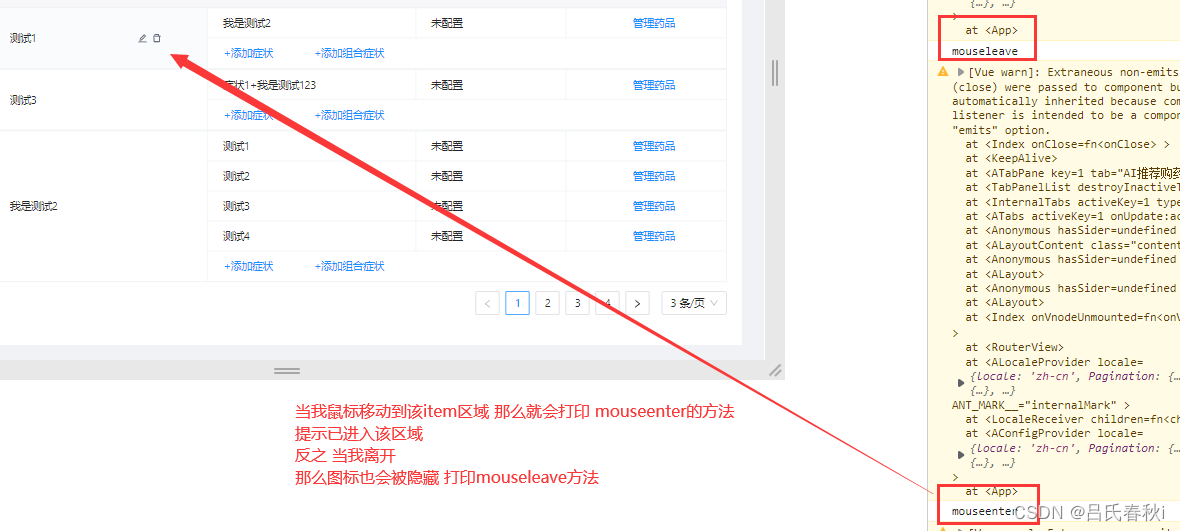
因为是在列表中完成的某个item的图标隐藏与显示
这个时候我们需要合index绑定 并且和改条目的id绑定(用来互斥)这里需要注意一点
@mouseenter和@mouseleave方法必须放到父类的div中 才能起效果我们需要
在js中把id绑定 把index设置值,默认为false 既不显示
下面js代码中做了id绑定和给数组的标记赋值的关系/** *左边图表控制隐藏与显示 */ const leftIcon = reactive({ inputAry: [] as boolean[] }) const leftIconId = ref() const mouseenter = (index: number, item: SymptomList) => { leftIcon.inputAry[index] = true leftIconId.value = item.id console.log('mouseenter') } const mouseleave = (index: number, item: SymptomList) => { leftIcon.inputAry[index] = false leftIconId.value = item.id; console.log('mouseleave') }- 1
- 2
- 3
- 4
- 5
- 6
- 7
- 8
- 9
- 10
- 11
- 12
- 13
- 14
- 15
- 16
- 17
- 18
- 19
我们在
html中把@mouseenter 和 @mouseleave事件添加
然后再指定的div标签内 做隐藏与显示的判断 还是根据id和当前点击的标记位<div v-for="(item, index) in symptomList" class="item"> <div class="left"> <div class="left-div" @mouseenter="mouseenter(index,item)" @mouseleave="mouseleave(index,item)"> <div v-if="editShow.inputAry[index] == true && item.id == diseaseId "> <a-input class="input" v-model:value="inputContent" autofocus="autofocus" :max-length="10" @change="changeInput()" /> <a-button class="commit" @click="handleInputCommit(item,index)"> <template #icon> <check-outlined style="color: #ffffff" /> template> a-button> <a-button class="cancel" @click="handleInputCancel(index)"> <template #icon> <close-outlined /> template> a-button> div> <div v-else style="display: flex;"> <div>{{ item.name }}div>v-if="leftIcon.inputAry[index] == true && item.id == leftIconId"> <a-button style="color:#676E7C; width: 13.7px ; height: 13.7px;" @click="handleClickEdit(item,index)" type="link"> <template #icon> <edit-outlined /> template> a-button> <a-button style="margin-left: 5px; color:#676E7C; width: 13.7px ; height:13.7px;" @click="handleClickDel(item,index)" type="link"> <template #icon> <delete-outlined /> template> a-button> div> div> div> div>- 1
- 2
- 3
- 4
- 5
- 6
- 7
- 8
- 9
- 10
- 11
- 12
- 13
- 14
- 15
- 16
- 17
- 18
- 19
- 20
- 21
- 22
- 23
- 24
- 25
- 26
- 27
- 28
- 29
- 30
- 31
- 32
- 33
- 34
- 35
- 36
- 37
- 38
- 39
- 40
- 41
- 42
- 43
- 44
- 45
- 46
- 47
mouseover 和 mouseenter 的区别
mouseover:当鼠标移入元素或其子元素都会触发事件,有一个重复触发,事件叠加过程。对应的移除事件是 mouseoutmouseenter:当鼠标移入元素本身(不包含元素的子元素)会触发事件,事件不会叠加。对应的移除事件是 mouseleavehover 事件调用顺序:
mouseover -> mouseenter -> mousemove(hover进去之后移动会触发) -> mouseout -> mouseleave用div来演示所有事件方法
@mouseover="mouseover" @mouseenter="mouseenter" @mousemove="mousemove" @mouseout="mouseout" @mouseleave="mouseleave" @mousedown="mousedown" @mouseup="mouseup" >- 1
- 2
- 3
- 4
- 5
- 6
- 7
- 8
- 9
- 10
- 11
- 12
- 13
- 14
- 15
- 16
- 17
总结
学习之路 永无止步
记录当下,保持一颗向上的心态~!- 相关阅读:
技术分享 | 接口自动化测试如何进行认证?
springmvc中的类型转换&数据格式化&数据验证
Linux系统之配置Nginx反向代理
AFL模糊测试
CORS处理跨域问题
【Redis】9.主从集群
SpringBoot实现上传存储图片到七牛云服务器
SparkCore
Python:合法日期
如何保护SpringBoot配置文件中的敏感信息
- 原文地址:https://blog.csdn.net/Life_s/article/details/126770960
