-
java中使用springboot2.5.6整合activiti6和flowable6.3.0工作流引擎
临时要做考勤&排班系统,并且还涉及到了工作流审批的功能模块,之前从来没有接触过oa这块的应用,没办法只能现学现卖了,接下来就是这两天踩的坑,先总结下长长记性也希望帮到有缘人,毕竟工作流引擎这快的资料太少,只能通过踩坑踩出来(说多都是眼泪…)
整合activiti6总结:
-
介绍工作流引擎
这两天了解了市面上比较热门的两个工作流引擎,分别是activiti和flowable
通俗介绍下: 1、flowable其实就是从 activiti6 发展来的,可以理解为加多宝与王老吉之间的关系 2、activiti更轻量级,适合小白和入门学习,上手会更快一点 3、flowable 支持流程节点跳转,activit不支持的 4、activiti自动权限安全验证 4、activiti6及之前的版本不兼容springboot2.x版本,需要修改activiti源码 5、flowable自带表单 6、flowable修复了很多acti6的bug,可以实现零成本迁移 .....- 1
- 2
- 3
- 4
- 5
- 6
- 7
- 8
- 9
详细介绍对比可以参考这里 https://blog.csdn.net/qq_30739519/article/details/82493456
-
springboot2.5.6整合activiti6
整合activiti的时候遇到太多的坑,最终没有实现,这里仅记录下过程中遇到的问题
1、activiti6及之前的版本不兼容springboot2.x版本(重点)
解决方法:修改activiti的源码、使用activiti7版本。
2、当activiti和springboot整合后,自动集成了Spring Security进行权限验证,在访问Activiti有关接口的时候会弹出Activiti自带的登录验证界面。
解决方法:如果不想使用Security管理想要使用shiro的话,使用在Application启动类中添加注解
@SpringBootApplication(exclude = {org.springframework.boot.autoconfigure.security.servlet.SecurityAutoConfiguration.class,
org.springframework.boot.actuate.autoconfigure.security.servlet.ManagementWebSecurityAutoConfiguration.class
})。
3、启动报错:cannot be resolved to URL because it does not exist。
解决方法:首先,activiti默认的会在项目启动的时候,自动部署processes文件下的资源文件,当你没有在resources文件下的processes文件夹下创建文件,或者你不需要部署资源文件的时候,需要在application.yml中设置配置信息,将check-process-definitions设置为false。
4、启动报错:org.springframework.beans.factory.BeanCreationException: Error creating bean with name ‘springProcessEngineConfiguration’ defined in class path resource [xxxxx/xxxx/xxx.java]: Bean instantiation via factory method failed; nested exception is org.springframework.beans.BeanInstantiationException: Failed to instantiate [org.activiti.spring.SpringProcessEngineConfiguration]: Factory method ‘springProcessEngineConfiguration’ threw exception; nested exception is java.io.FileNotFoundException: class path resource [processes/] cannot be resolved to URL because it does not exist。
解决方法:在resource目录下添加processes文件夹,并且文件夹不能为空 或是在application.yml文件中加上如下配置(注意是spring节点下)。
5、activiti是自带有mybatis。
解决方法:如果我们在项目中自己引入mybatis的话就会出现冲突。可以将自己引入的mybatis去掉,或者将activiti中的mybatis依赖去掉等.....- 1
整合flowable6总结:
使用springboot2整合flowable6引擎基本没有什么问题,只要配置好环境就能跑起来调试了,所以直接上代码
1. pom依赖
<dependency> <groupId>org.flowable</groupId> <artifactId>flowable-spring-boot-starter</artifactId> <version>6.3.0</version> </dependency>- 1
- 2
- 3
- 4
- 5
2、yml配置文件
spring: flowable: async-executor-activate: false #flase: 默认值。activiti在启动时,会对比数据库表中保存的版本,如果没有表或者版本不匹配,将抛出异常。(生产环境常用) #true: activiti会对数据库中所有表进行更新操作。如果表不存在,则自动创建。(开发时常用) #create_drop: 在activiti启动时创建表,在关闭时删除表(必须手动关闭引擎,才能删除表)。(单元测试常用) #drop-create: 在activiti启动时删除原来的旧表,然后在创建新表(不需要手动关闭引擎)。 database-schema-update: true- 1
- 2
- 3
- 4
- 5
- 6
- 7
- 8
- 9
- 10
3、配置流程文件
本地搭建flowableUI服务参考 https://blog.csdn.net/weixin_45151960/article/details/126767938
测试功能可以直接使用以下流程设计,
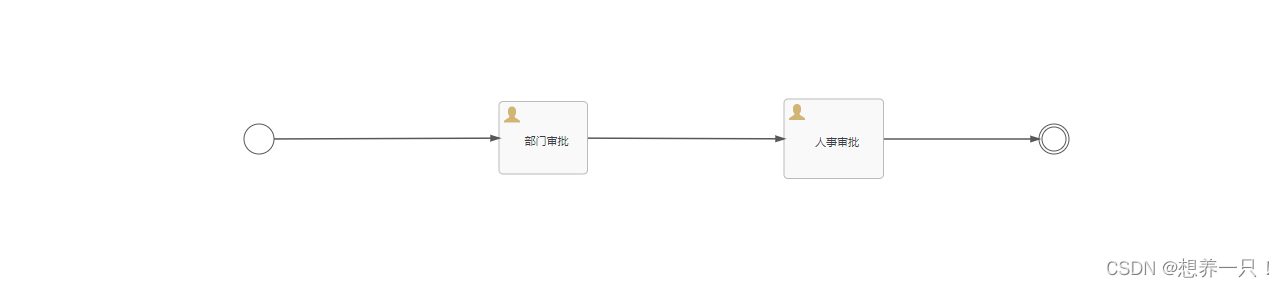
请假审批流程:leave.bpmn20.xml 文件

<?xml version="1.0" encoding="UTF-8"?> <definitions xmlns="http://www.omg.org/spec/BPMN/20100524/MODEL" xmlns:xsi="http://www.w3.org/2001/XMLSchema-instance" xmlns:xsd="http://www.w3.org/2001/XMLSchema" xmlns:flowable="http://flowable.org/bpmn" xmlns:bpmndi="http://www.omg.org/spec/BPMN/20100524/DI" xmlns:omgdc="http://www.omg.org/spec/DD/20100524/DC" xmlns:omgdi="http://www.omg.org/spec/DD/20100524/DI" typeLanguage="http://www.w3.org/2001/XMLSchema" expressionLanguage="http://www.w3.org/1999/XPath" targetNamespace="http://www.flowable.org/processdef" exporter="Flowable Open Source Modeler" exporterVersion="6.7.2"> <process id="leave" name="leave" isExecutable="true"> <documentation>请假申请流程</documentation> <startEvent id="startEvent1" flowable:formFieldValidation="true"></startEvent> <userTask id="sid-05C66809-E431-4810-8089-E4B61B1C664E" name="部门审批" flowable:assignee="zhangsan" flowable:formFieldValidation="true"> <extensionElements> <modeler:activiti-idm-assignee xmlns:modeler="http://flowable.org/modeler"><![CDATA[true]]></modeler:activiti-idm-assignee> <modeler:assignee-info-email xmlns:modeler="http://flowable.org/modeler"><![CDATA[zhangsan@qq.com]]></modeler:assignee-info-email> <modeler:assignee-info-firstname xmlns:modeler="http://flowable.org/modeler"><![CDATA[zhangsan]]></modeler:assignee-info-firstname> <modeler:assignee-info-lastname xmlns:modeler="http://flowable.org/modeler"><![CDATA[zhangsan]]></modeler:assignee-info-lastname> <modeler:initiator-can-complete xmlns:modeler="http://flowable.org/modeler"><![CDATA[false]]></modeler:initiator-can-complete> </extensionElements> </userTask> <userTask id="sid-61CACDF9-04B9-4950-9C39-B32D6DB15BC5" name="人事审批" flowable:assignee="lisi" flowable:formFieldValidation="true"> <extensionElements> <modeler:activiti-idm-assignee xmlns:modeler="http://flowable.org/modeler"><![CDATA[true]]></modeler:activiti-idm-assignee> <modeler:assignee-info-email xmlns:modeler="http://flowable.org/modeler"><![CDATA[lisi@qq.com]]></modeler:assignee-info-email> <modeler:assignee-info-firstname xmlns:modeler="http://flowable.org/modeler"><![CDATA[lisi]]></modeler:assignee-info-firstname> <modeler:assignee-info-lastname xmlns:modeler="http://flowable.org/modeler"><![CDATA[lisi]]></modeler:assignee-info-lastname> <modeler:initiator-can-complete xmlns:modeler="http://flowable.org/modeler"><![CDATA[false]]></modeler:initiator-can-complete> </extensionElements> </userTask> <intermediateThrowEvent id="sid-C0034FB3-3395-4CD7-A599-28D87E8AEF17"></intermediateThrowEvent> <sequenceFlow id="sid-A87F1823-4FA8-4588-A888-1E8D3B7D4E11" sourceRef="sid-61CACDF9-04B9-4950-9C39-B32D6DB15BC5" targetRef="sid-C0034FB3-3395-4CD7-A599-28D87E8AEF17"></sequenceFlow> <sequenceFlow id="sid-BCFAE747-4651-40CE-A612-FF3263C07FBE" sourceRef="sid-05C66809-E431-4810-8089-E4B61B1C664E" targetRef="sid-61CACDF9-04B9-4950-9C39-B32D6DB15BC5"></sequenceFlow> <sequenceFlow id="sid-F58A5782-BC08-4B85-843C-84C6642B15EB" sourceRef="startEvent1" targetRef="sid-05C66809-E431-4810-8089-E4B61B1C664E"></sequenceFlow> </process> <bpmndi:BPMNDiagram id="BPMNDiagram_leave"> <bpmndi:BPMNPlane bpmnElement="leave" id="BPMNPlane_leave"> <bpmndi:BPMNShape bpmnElement="startEvent1" id="BPMNShape_startEvent1"> <omgdc:Bounds height="30.0" width="30.0" x="60.0" y="163.0"></omgdc:Bounds> </bpmndi:BPMNShape> <bpmndi:BPMNShape bpmnElement="sid-05C66809-E431-4810-8089-E4B61B1C664E" id="BPMNShape_sid-05C66809-E431-4810-8089-E4B61B1C664E"> <omgdc:Bounds height="73.0" width="89.0" x="315.0" y="140.5"></omgdc:Bounds> </bpmndi:BPMNShape> <bpmndi:BPMNShape bpmnElement="sid-61CACDF9-04B9-4950-9C39-B32D6DB15BC5" id="BPMNShape_sid-61CACDF9-04B9-4950-9C39-B32D6DB15BC5"> <omgdc:Bounds height="80.0" width="100.0" x="600.0" y="138.0"></omgdc:Bounds> </bpmndi:BPMNShape> <bpmndi:BPMNShape bpmnElement="sid-C0034FB3-3395-4CD7-A599-28D87E8AEF17" id="BPMNShape_sid-C0034FB3-3395-4CD7-A599-28D87E8AEF17"> <omgdc:Bounds height="30.0" width="30.0" x="855.0" y="163.0"></omgdc:Bounds> </bpmndi:BPMNShape> <bpmndi:BPMNEdge bpmnElement="sid-A87F1823-4FA8-4588-A888-1E8D3B7D4E11" id="BPMNEdge_sid-A87F1823-4FA8-4588-A888-1E8D3B7D4E11" flowable:sourceDockerX="50.0" flowable:sourceDockerY="40.0" flowable:targetDockerX="15.0" flowable:targetDockerY="15.0"> <omgdi:waypoint x="699.94999999998" y="178.0"></omgdi:waypoint> <omgdi:waypoint x="855.0" y="178.0"></omgdi:waypoint> </bpmndi:BPMNEdge> <bpmndi:BPMNEdge bpmnElement="sid-BCFAE747-4651-40CE-A612-FF3263C07FBE" id="BPMNEdge_sid-BCFAE747-4651-40CE-A612-FF3263C07FBE" flowable:sourceDockerX="44.5" flowable:sourceDockerY="36.5" flowable:targetDockerX="50.0" flowable:targetDockerY="40.0"> <omgdi:waypoint x="403.95000000000005" y="177.15301204819278"></omgdi:waypoint> <omgdi:waypoint x="599.9999999999961" y="177.8278829604131"></omgdi:waypoint> </bpmndi:BPMNEdge> <bpmndi:BPMNEdge bpmnElement="sid-F58A5782-BC08-4B85-843C-84C6642B15EB" id="BPMNEdge_sid-F58A5782-BC08-4B85-843C-84C6642B15EB" flowable:sourceDockerX="15.0" flowable:sourceDockerY="15.0" flowable:targetDockerX="44.5" flowable:targetDockerY="36.5"> <omgdi:waypoint x="89.94990959686106" y="177.94727624149547"></omgdi:waypoint> <omgdi:waypoint x="314.9999999999955" y="177.1562390158172"></omgdi:waypoint> </bpmndi:BPMNEdge> </bpmndi:BPMNPlane> </bpmndi:BPMNDiagram> </definitions>- 1
- 2
- 3
- 4
- 5
- 6
- 7
- 8
- 9
- 10
- 11
- 12
- 13
- 14
- 15
- 16
- 17
- 18
- 19
- 20
- 21
- 22
- 23
- 24
- 25
- 26
- 27
- 28
- 29
- 30
- 31
- 32
- 33
- 34
- 35
- 36
- 37
- 38
- 39
- 40
- 41
- 42
- 43
- 44
- 45
- 46
- 47
- 48
- 49
- 50
- 51
- 52
- 53
- 54
- 55
- 56
- 57
4、Controller层,包含部署流程、查询流程、删除流程、创建任务、查询任务、处理任务、查询历史任务功能,可以直接测试使用
package com.boc.ljh.controller; import io.swagger.annotations.ApiOperation; import org.flowable.engine.*; import org.flowable.engine.history.HistoricActivityInstance; import org.flowable.engine.repository.Deployment; import org.flowable.engine.repository.ProcessDefinition; import org.flowable.engine.runtime.ProcessInstance; import org.flowable.task.api.Task; import org.springframework.beans.factory.annotation.Autowired; import org.springframework.web.bind.annotation.GetMapping; import org.springframework.web.bind.annotation.PathVariable; import org.springframework.web.bind.annotation.RequestMapping; import org.springframework.web.bind.annotation.RestController; import java.util.HashMap; import java.util.List; import java.util.Map; /** * @Author: ljh * @ClassName FlowableController * @Description TODO * @date 2022/9/8 9:52 * @Version 1.0 */ @RestController @RequestMapping("/flowable") public class FlowableController { @Autowired private RuntimeService runtimeService; @Autowired private TaskService taskService; @Autowired private HistoryService historyService; @Autowired private RepositoryService repositoryService; @Autowired private ProcessEngine processEngine; /** * @Author: ljh * @Description: 部署流程 * @DateTime: 10:00 2022/9/8 * @Params: flowName 设计的流程文件名称 * @Return */ @ApiOperation("部署流程") @GetMapping("/deploy") public void deploy(String flowName,String deployName){ Deployment deploy = repositoryService.createDeployment() .addClasspathResource(flowName)//要部署的流程文件 .name(deployName) .deploy(); System.out.println("部署流程ID_deploy.getId():"+deploy.getId()); System.out.println("部署流程名称_deploy.getName():"+deploy.getName()); } /** * @Author: ljh * @Description: 查询流程定义 * @DateTime: 10:12 2022/9/8 * @Params: deployId 流程ID * @Return */ @ApiOperation("查询流程定义") @GetMapping("/loadDeploy/{deployId}") public void loadDeploy(@PathVariable String deployId){ ProcessDefinition processDefinition = repositoryService.createProcessDefinitionQuery().deploymentId(deployId).singleResult(); System.out.println("流程ID_processDefinition.getDeploymentId():"+processDefinition.getDeploymentId()); System.out.println("流程名称_processDefinition.getName():"+processDefinition.getName()); System.out.println("流程描述_processDefinition.getDescription():"+processDefinition.getDescription()); System.out.println("流程定义ID_processDefinition.getId():"+processDefinition.getId()); } /** * @Author: ljh * @Description: 删除流程定义 * @DateTime: 10:18 2022/9/8 * @Params: deployId 流程ID * @Return */ @ApiOperation("删除流程定义") @GetMapping("/deleteDeploy/{deployId}") public void deleteDeploy(@PathVariable String deployId){ //删除部署的流程 参数1是部署流程的ID 如果部署的流程启动将无法删除 //repositoryService.deleteDeployment(deployId); //参数2表示进行级联删除 该流程的相关任务都会一起删除 repositoryService.deleteDeployment(deployId,true); } /** * @Author: ljh * @Description: 创建任务 * @DateTime: 10:23 2022/9/8 * @Params: * @Return */ @ApiOperation("创建任务") @GetMapping("/addTask") public void addTask(String userId, String days, String reason,String processInstanceKey) { Map<String, Object> map = new HashMap<>(); map.put("employee", userId); map.put("nrOfHolidays", days); map.put("description", reason); //参数1是流程设计*.bpmn20.xml文件中的process的id值 //参数2创建任务所需的变量数据 比如请假流程:需要请假人、请假原因、请假天数等数据 ProcessInstance processInstance = runtimeService.startProcessInstanceByKey(processInstanceKey, map); System.out.println("流程定义的ID:"+processInstance.getProcessInstanceId()); System.out.println("创建当前任务ID:"+processInstance.getId()); } /** * @Author: ljh * @Description: 查询任务 * @DateTime: 10:44 2022/9/8 * @Params: userName 任务处理人 * processDefinitionKey process标签id * @Return */ @ApiOperation("查询任务") @GetMapping("/loadTask") public void loadTask(String userName,String processDefinitionKey){ List<Task> list = taskService.createTaskQuery() .processDefinitionKey(processDefinitionKey) //指定查询的流程编号 .taskAssignee(userName) //指定查询任务的处理人 .list(); for(Task task : list){ System.out.println(task.getName()); System.out.println(task.getProcessDefinitionId()); System.out.println(task.getAssignee()); System.out.println(task.getId()); } } /** * @Author: ljh * @Description: 处理任务 * @DateTime: 10:59 2022/9/8 * @Params: userName 任务处理人 * processDefinitionKey process标签id * @Return */ @ApiOperation("处理任务") @GetMapping("/completeTask") public void completeTask(String userName,String processDefinitionKey){ Task task = taskService.createTaskQuery().processDefinitionKey(processDefinitionKey).taskAssignee(userName).singleResult(); //.singleResult()返回单个 .list()返回多个 Map<String,Object> map = new HashMap(); map.put("approved",false); taskService.complete(task.getId(),map); } /** * @Author: ljh * @Description: 查询历史记录任务 * @DateTime: 15:43 2022/9/8 * @Params: processDefinitionId 流程定义的ID如 leave:1:27508 * @Return */ @ApiOperation("查询历史记录任务") @GetMapping("/loadHistoryTask/{processDefinitionId}") public void loadHistoryTask(@PathVariable String processDefinitionId){ List<HistoricActivityInstance> list = historyService.createHistoricActivityInstanceQuery() .processDefinitionId(processDefinitionId) //流程定义的ID .finished() //查询历史记录的状态是已完成的 .orderByHistoricActivityInstanceEndTime().asc() //指定排序的字段和顺序 .list(); for (HistoricActivityInstance historicActivityInstance : list){ System.out.println(historicActivityInstance.getActivityName()+"="+historicActivityInstance.getAssignee()+"="+ historicActivityInstance.getActivityId()+"="+historicActivityInstance.getDurationInMillis()+"毫秒"); } } }- 1
- 2
- 3
- 4
- 5
- 6
- 7
- 8
- 9
- 10
- 11
- 12
- 13
- 14
- 15
- 16
- 17
- 18
- 19
- 20
- 21
- 22
- 23
- 24
- 25
- 26
- 27
- 28
- 29
- 30
- 31
- 32
- 33
- 34
- 35
- 36
- 37
- 38
- 39
- 40
- 41
- 42
- 43
- 44
- 45
- 46
- 47
- 48
- 49
- 50
- 51
- 52
- 53
- 54
- 55
- 56
- 57
- 58
- 59
- 60
- 61
- 62
- 63
- 64
- 65
- 66
- 67
- 68
- 69
- 70
- 71
- 72
- 73
- 74
- 75
- 76
- 77
- 78
- 79
- 80
- 81
- 82
- 83
- 84
- 85
- 86
- 87
- 88
- 89
- 90
- 91
- 92
- 93
- 94
- 95
- 96
- 97
- 98
- 99
- 100
- 101
- 102
- 103
- 104
- 105
- 106
- 107
- 108
- 109
- 110
- 111
- 112
- 113
- 114
- 115
- 116
- 117
- 118
- 119
- 120
- 121
- 122
- 123
- 124
- 125
- 126
- 127
- 128
- 129
- 130
- 131
- 132
- 133
- 134
- 135
- 136
- 137
- 138
- 139
- 140
- 141
- 142
- 143
- 144
- 145
- 146
- 147
- 148
- 149
- 150
- 151
- 152
- 153
- 154
- 155
- 156
- 157
- 158
- 159
- 160
- 161
- 162
- 163
- 164
- 165
- 166
- 167
- 168
- 169
- 170
- 171
- 172
- 173
- 174
- 175
- 176
- 177
- 178
- 179
- 180
- 181
- 182
- 183
- 184
- 185
- 186
- 187
- 188
-
-
相关阅读:
如何处理MindSpore Lite推理失败的问题
毕设选题推荐基于python的django框架医疗急诊预约系统
中文姓名提取(玩具代码——准头太小,权当玩闹)
hwk5:QT中TCP客户端服务器实现
安全基线核查
WPF使用Blazor的快速案例
雪花算法生成分布式主键ID
在 python 中使用 Haar-Cascade 进行人脸检测
module 工具
Java系列 - 新版MybatisPlus代码生成
- 原文地址:https://blog.csdn.net/weixin_45151960/article/details/126766306
