-
Spring整合Mybatis案例(注解格式)
目录
- 案例分析及基础准备工作请参考历史文章-XML版的
-
注解整合Mybatis分析
- 业务类使用注解形式声明bean,属性采用注解注入
- 建立独立的配置管理类,分类管理外部资源,根据功能进行分类,并提供对应的方法获取bean
- 使用注解形式启动bean扫描,加载所有注解配置的资源(bean)
- 使用AnnotationConfigApplicationContext对象加载所有的启动配置类,内部使用导入方式进行关联
-
注解整合Mybatis步骤
- 1.修改mybatis外部配置文件格式为注解格式(删掉Mybatis映射配置文件,在dao层基于注解开发)

-
- package com.superdemo.dao;
- import com.superdemo.domain.Account;
- import org.apache.ibatis.annotations.Delete;
- import org.apache.ibatis.annotations.Insert;
- import org.apache.ibatis.annotations.Select;
- import org.apache.ibatis.annotations.Update;
- import java.util.List;
- public interface AccountDao {
- @Insert("INSERT INTO account(name, money) VALUES (#{name},#{money})")
- void save(Account account);
- @Delete("DELETE FROM account WHERE id = ${id}")
- void delete(Integer id);
- @Update("UPDATE account SET name = #{name},money = #{money} WHERE id = #{id}")
- void update(Account account);
- @Select("SELECT * FROM account")
- List
findAll(); - @Select("SELECT * FROM account WHERE id = #{id}")
- Account findByid(Integer id);
- }
- 2.业务类使用@Component 声明bean,使用@Autowired 注入对象

-
- package com.superdemo.service.impl;
- import com.superdemo.dao.AccountDao;
- import com.superdemo.domain.Account;
- import com.superdemo.service.AccountService;
- import org.springframework.beans.factory.annotation.Autowired;
- import org.springframework.stereotype.Service;
- import java.util.List;
- @Service("accountService")
- public class AccountServiceImpl implements AccountService {
- @Autowired
- private AccountDao accountDao;
- /*public void setAccountDao(AccountDao accountDao) {
- this.accountDao = accountDao;
- }*/
- public void save(Account account){
- accountDao.save(account);
- }
- public void delete(Integer id){
- accountDao.delete(id);
- }
- public void update(Account account){
- accountDao.update(account);
- }
- public List
findAll(){ - return accountDao.findAll();
- }
- public Account findByid(Integer id){
- return accountDao.findByid(id);
- }
- }
- 3.建立配置文件JDBCConfig与MybatisConfig类,并将其导入到核心配置类SpringConfig

-
- jdbc.driver=com.mysql.cj.jdbc.Driver
- jdbc.url=jdbc:mysql://localhost:3306/dp1?serverTimezone=UTC&useUnicode=true&characterEncoding=UTF-8&useSSL=false
- jdbc.username=root
- jdbc.password=123456

-
- package com.superdemo.config;
- import com.alibaba.druid.pool.DruidDataSource;
- import org.springframework.beans.factory.annotation.Value;
- import org.springframework.context.annotation.Bean;
- import javax.sql.DataSource;
- public class JDBCConfig {
- @Value("${jdbc.driver}")
- private String driver;
- @Value("${jdbc.url}")
- private String url;
- @Value("${jdbc.username}")
- private String userName;
- @Value("${jdbc.password}")
- private String password;
- @Bean("dataSource")
- public DataSource getDataSource(){
- System.out.println(driver);
- DruidDataSource ds = new DruidDataSource();
- ds.setDriverClassName(driver);
- ds.setUrl(url);
- ds.setUsername(userName);
- ds.setPassword(password);
- return ds;
- }
- }

-
- package com.superdemo.config;
- import org.mybatis.spring.SqlSessionFactoryBean;
- import org.mybatis.spring.mapper.MapperScannerConfigurer;
- import org.springframework.beans.factory.annotation.Autowired;
- import org.springframework.context.annotation.Bean;
- import javax.sql.DataSource;
- public class MybatisConfig {
- /*
- 对应XML格式下:
- spring整合mybatis后控制的创建连接用的对象
- 加载mybatis映射配置的扫描,将其作为spring的bean进行管理
- */
- @Bean
- public SqlSessionFactoryBean getSqlSessionFactoryBean(@Autowired DataSource dataSource){
- SqlSessionFactoryBean ssfb = new SqlSessionFactoryBean();
- ssfb.setTypeAliasesPackage("com.superdemo.domain");
- ssfb.setDataSource(dataSource);
- return ssfb;
- }
- @Bean
- public MapperScannerConfigurer getMapperScannerConfigurer(){
- MapperScannerConfigurer msc = new MapperScannerConfigurer();
- msc.setBasePackage("com.superdemo.dao");
- return msc;
- }
- }

-
- package com.superdemo.config;
- import org.springframework.context.annotation.ComponentScan;
- import org.springframework.context.annotation.Configuration;
- import org.springframework.context.annotation.Import;
- import org.springframework.context.annotation.PropertySource;
- @Configuration
- @ComponentScan("com.superdemo")
- @PropertySource("classpath:jdbc.properties")
- @Import({JDBCConfig.class, MybatisConfig.class})
- public class SpringConfig {
- }
- 4.开启注解扫描
- 5.使用AnnotationConfigApplicationContext对象加载配置项,测试成功

-
- import com.superdemo.config.SpringConfig;
- import com.superdemo.domain.Account;
- import com.superdemo.service.AccountService;
- import org.springframework.context.ApplicationContext;
- import org.springframework.context.annotation.AnnotationConfigApplicationContext;
- import org.springframework.context.support.ClassPathXmlApplicationContext;
- public class App {
- public static void main(String[] args) {
- ApplicationContext ctx = new AnnotationConfigApplicationContext(SpringConfig.class);
- AccountService accountService = (AccountService) ctx.getBean("accountService");
- Account ac = accountService.findByid(3);
- System.out.println(ac);
- }
- }
-
再整合Junit
- 如何在Junit中使用spring中的资源?
- 1.Spring接管Junit的运行权,使用Spring专用的Junit类加载器
- 2.为Junit测试用例设定对应的spring容器
- 注意:
- 从Spring5.0以后,要求Junit的版本必须是4.12及以上
- Junit仅用于单元测试,不能将Junit的测试类配置成spring的bean,否则该配置将会被打包进入工程中
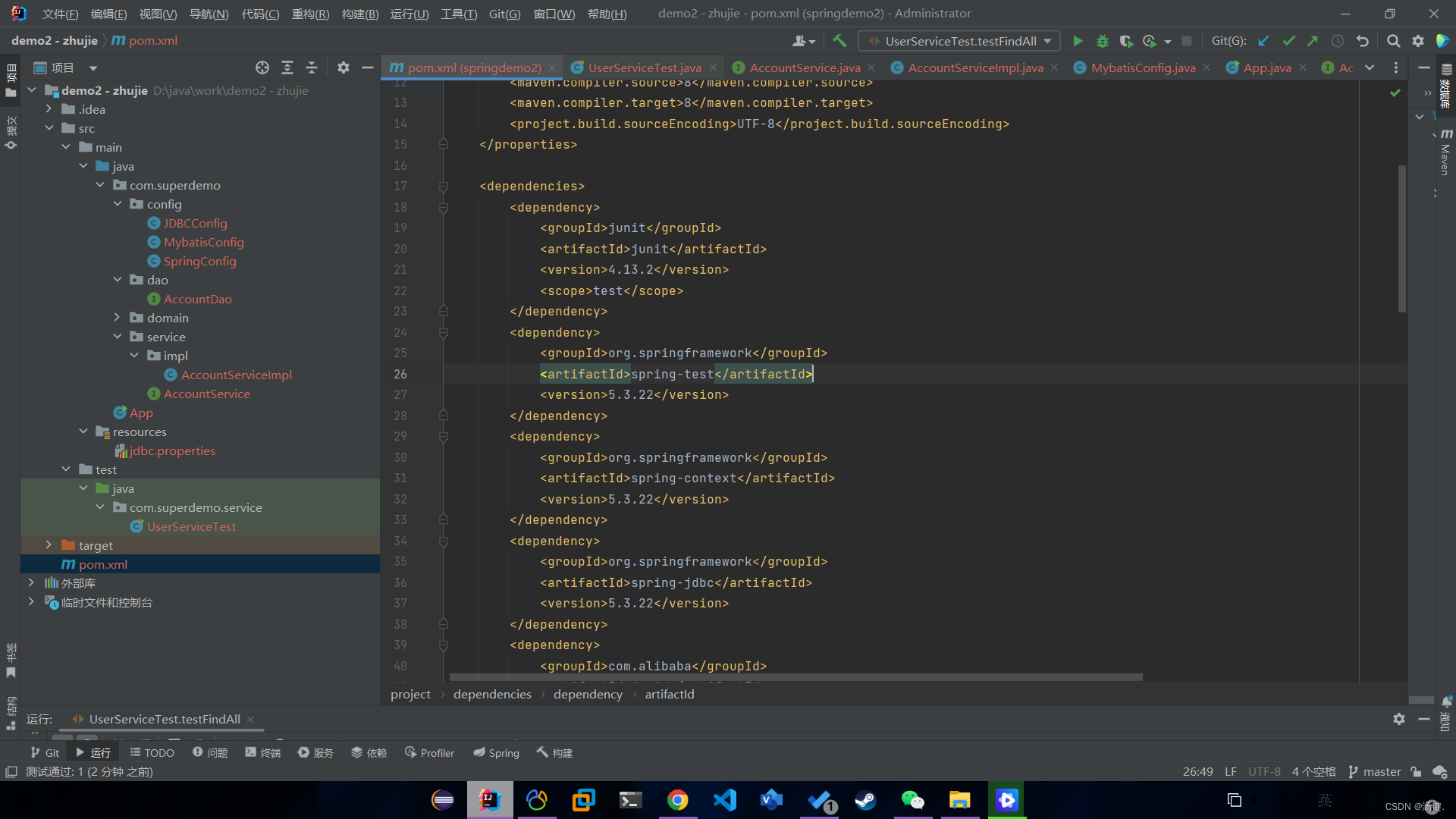
- 步骤:
- 1.导入Spring整合Junit坐标
-
- <dependency>
- <groupId>junitgroupId>
- <artifactId>junitartifactId>
- <version>4.13.2version>
- <scope>testscope>
- dependency>
- <dependency>
- <groupId>org.springframeworkgroupId>
- <artifactId>spring-testartifactId>
- <version>5.3.22version>
- dependency>
- 2.在test目录下对应创建service的测试类进行测试,测试成功

-
- package com.superdemo.service;
- import com.superdemo.config.SpringConfig;
- import com.superdemo.domain.Account;
- import org.junit.Assert;
- import org.junit.Test;
- import org.junit.runner.RunWith;
- import org.springframework.beans.factory.annotation.Autowired;
- import org.springframework.test.context.ContextConfiguration;
- import org.springframework.test.context.junit4.SpringJUnit4ClassRunner;
- import java.util.List;
- //设定spring专用的类加载器
- @RunWith(SpringJUnit4ClassRunner.class)
- //设定加载的spring上下文对应的配置
- @ContextConfiguration(classes = SpringConfig.class)
- public class UserServiceTest {
- @Autowired
- private AccountService accountService;
- @Test
- public void testFindAll(){
- List
list = accountService.findAll(); - Assert.assertEquals(3,list.size());
- }
- }
-
相关阅读:
jenkins安装配置maven
揭秘 JDQ 限流架构:实时数据链路的多维动态带宽管控|京东零售技术实践
成都扬帆牧哲教育咨询有限公司—Facebook运营技巧
解决 “ImportError: attempted relative import with no known parent package“ 问题
使用opencv结合帧差法和背景减法 检测场景异常情况
工业智能网关BL110应用之十八: 如何添加COM口采集的设备
超实用的图片压缩大小教程,手把手教会你
HDFS的读写流程——宏观与微观
2023届双非计算机硕士算法岗秋招总结
spring-boot-freemrak+rapid-实现代码生成器
- 原文地址:https://blog.csdn.net/weixin_59624686/article/details/126764836
