-
教你几个MATLAB中数组索引的方法技巧
在 MATLAB 中,数组用于表示信息和数据。您可以使用索引来访问数组的元素。在 MATLAB 中,数组索引从 1 开始。要查找数组中元素的索引,可以使用find()函数。使用find()函数,您可以从数组中找到索引和元素。find()函数返回一个包含数据的向量 。
句法:
- find(X) :返回一个包含元素索引的向量
- find(X,n) : 返回 X 中元素的前 n 个索引
- find(X,n, Direction):根据Direction在X中找到n个索引,其中Direction - ' first '或' last '
- [ row , col] = find():返回数组中元素的行列下标
- [row,col,V] = find():返回包含非零元素的向量 V
现在让我们看看如何在示例的帮助下使用find()函数查找数组中任何元素的索引。
找到(x)
find(X) 返回一个向量,其中包含 数组 X 中每个非零元素的线性索引。
示例 1:
- MATLAB
% MATLAB code for find an index of any
% element in an array using the find()
array = [1 2 3 4 5 6]
% find() will get the index of element
% store it in the index
index = find(array==3)
输出:
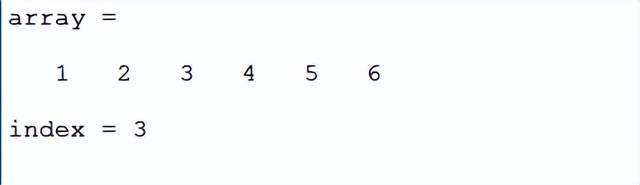
注意:如果数组包含重复项,则 find(X) 函数将返回该整数的所有索引。
示例 2:
- MATLAB
% MATLAB code for if the array contains
% duplicate elements
array = [1 2 3 4 5 6 2 4 2]
% find() will get the index of element
% store it in the index
index = find(array==2)
输出:

当数组包含重复值时,find()函数将打印相应元素的所有索引。因此,如果您不想要该元素的所有索引,则可以使用find(X,n)函数。
找到(X,n)
返回 X 中元素的前 n 个索引。
例子:
- MATLAB
% MATLAB code for return first
% n indices of the elements in X
array = [1 2 3 4 5 6 2 4 2]
% find() will get the index of element
% gets the first index of 2
% store it in the index
index = find(array==2,1)
输出:
查找(X,n,方向)
您还可以从数组中的两个方向找到元素的索引。通过使用 find(X,n,Direction),两个方向都意味着从开始和从最后开始。此函数根据方向在 X 中找到 n 个索引。Direction 参数接受“first”或“last”。如果方向是第一个,它将返回该相应元素的前 n 个索引,或者如果方向是最后一个,它将通过从数组的末尾遍历来返回索引。默认情况下,Direction 参数为“first”。
示例 1:
- MATLAB
% MATLAB code for find the index of
% the elements from both directions
% in the array
array = [1 2 3 4 5 6 2 4 2]
% find() will get the index of element
% store it in the index
index = find(array==2,2,'first')
输出:

示例 2:
- MATLAB
% array of integers
array = [1 2 3 4 5 6 2 4 2]
% find() will get the index of element
% store it in the index
index = find(array==2,2,'last')
输出:

[行,列] = 查找(x)
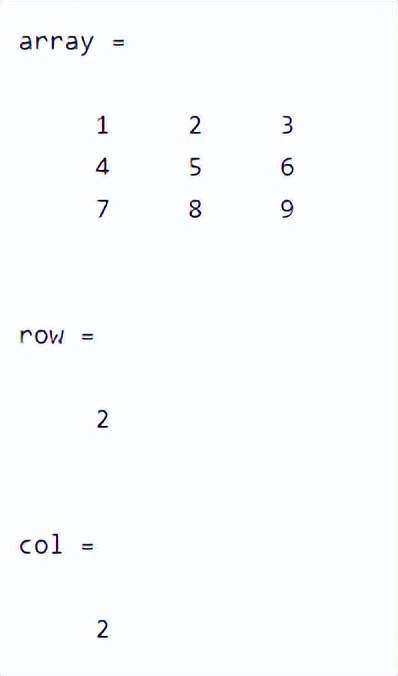
要在 3 维数组中查找元素的索引,您可以使用语法[row,col] = find(x)这将为您提供元素所在的行和列。
例子:
- MATLAB
% MATLAB code for Finding an index
% of an element in a 3-D array
array = [1 2 3; 4 5 6; 7 8 9]
% find() will get the index of element
% prints the row and column of the element
[row,col] = find(array==5)
输出:
[行,列,v] = 查找(X)
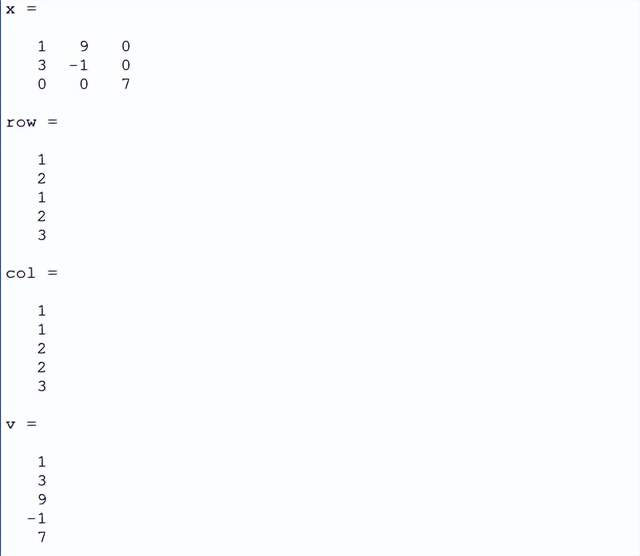
如果要查找 3 维数组中存在的所有非零元素的索引,可以使用[row,col,v] = find(X)其中 X 是我们的数组。这将找到数组中存在的所有非零元素的所有索引并将它们存储到向量v中。
例子:
- MATLAB
% MATLAB code for find the indices of
% all the non-zero elements present in the 3-D array
x = [1 9 0; 3 -1 0; 0 0 7]
% find() will get the indices of the elements
% and the vector will store all the non-zero elements
[row,col,v] = find(x)
输出:
总结
现在的专业软件都是越做越大,功能成倍成倍地增加,而处理的对象也是越来越复杂,特别是使用一些仿真软件在高精度下建模仿真的时候,因为PC上硬件的发展速度慢于软件功能复杂化的速度,就造成了我们的仿真看起来是越跑越慢了。
想要高效仿真但又不想更换电脑怎么办?现在只要在赞奇超高清云工作站上进行仿真即可,普通电脑秒变高配电脑。你只需要提供一台普通配置的旧电脑,无论你本地电脑配置多少,下载赞奇云工作站客户端手机号注册登陆即可选择你需要的高配置GPU机型,任你自己选择更换。
-
相关阅读:
java+python+nodejs+vue音乐网站管理系统ssm
Nginx HA高可用实现记录
16.WEB渗透测试--Kali Linux(四)
数字IC手撕代码-XX公司笔试真题(数据流最大值)
【C++】1079:计算分数加减表达式的值(信息学奥赛)
Python(PySpark案例实战)
数据序列化协议 Protocol Buffers(Protobuf) 认知
使用51单片机控制T0和T1分别间隔1秒2秒亮灭逻辑
Android学习笔记 75. 单元测试
如何轻松打造数字人克隆系统+直播系统?OEM教你快速部署数字人SaaS系统源码
- 原文地址:https://blog.csdn.net/XDEMO_/article/details/126762628